Page 108 of 532
107
uuGauges and Displays uMulti-Information Display*
Continued
Instrument Panel
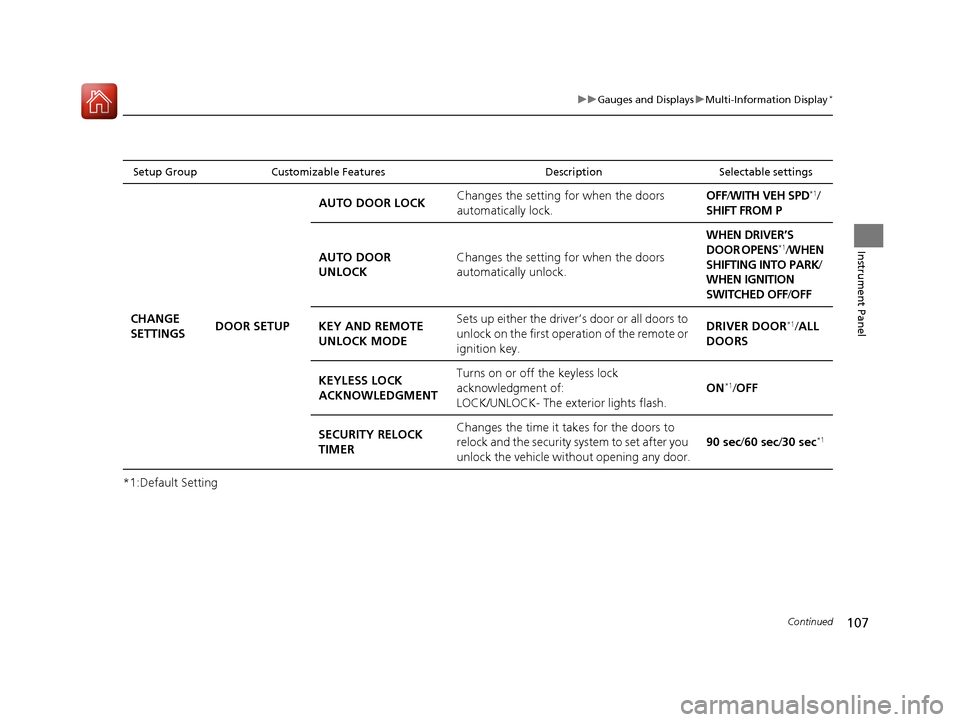
*1:Default Setting
Setup Group Customizable Features DescriptionSelectable settings
CHANGE
SETTINGSDOOR SETUP AUTO DOOR LOCK
Changes the setting
for when the doors
automatically lock. OFF
/WITH VEH SPD
*1/
SHIFT FROM P
AUTO DOOR
UNLOCK Changes the setting
for when the doors
automatically unlock. WHEN DRIVER’S
DOOR OPENS
*1/
WHEN
SHIFTING INTO PARK /
WHEN IGNITION
SWITCHED OFF /OFF
KEY AND REMOTE
UNLOCK MODE Sets up either the driver’s door or all doors to
unlock on the first operation of the remote or
ignition key. DRIVER DOOR
*1/
ALL
DOORS
KEYLESS LOCK
ACKNOWLEDGMENT Turns on or off the keyless lock
acknowledgment of:
LOCK/UNLOCK- The exterior lights flash.
ON
*1/
OFF
SECURITY RELOCK
TIMER Changes the time it takes for the doors to
relock and the security system to set after you
unlock the vehicle without opening any door.
90 sec
/60 sec /30 sec
*1
15 CR-V-31T0A6300.book 107 ページ 2015年2月2日 月曜日 午前10時35分
Page 109 of 532
108
uuGauges and Displays uMulti-Information Display*
Instrument Panel
*1:Default Setting
Setup Group Customizable Features DescriptionSelectable settings
CHANGE
SETTINGSPOWER
TAILGATE
SETUP*
KEYLESS OPEN
MODE
Changes the keyless setting for when the
power tailgate opens. ANYTIME*1/
WHEN
UNLOCKED
POWER OPEN BY
OUTER HANDLE Changes the setting to open power tailgate
by tailgate outer handle. OFF (MANUAL
ONLY)
/ON (POWER/
MANUAL)
*1
MAINTENANCE
RESET —Resets/Cancels the engine oil life display
when you have performed the maintenance
service. CANCEL
/RESET
DEFAULT
ALLCancels/Resets all the cu stomized settings as
default.SET /CANCEL
* Not available on all models
15 CR-V-31T0A6300.book 108 ページ 2015年2月2日 月曜日 午前10時35分
Page 113 of 532

uuGauges and Displays uintelligent Multi-Information Display (i-MID)
112
Instrument Panel
Shows the estimated average fuel economy of each trip meter in mpg (U.S.) or l/100
km (Canada). The display is updated at set intervals. When a trip meter is reset, the
average fuel economy is also reset.
Shows the estimated distance you can travel on the remaining fuel. This distance is
estimated from the fuel economy of your previous trips.
Shows the time elapsed since Trip A or Trip B was reset.
Shows the average speed in mph or km/h since Trip A or Trip B was reset.
■Average Fuel Economy
■Range
■Elapsed Time
■Average Speed
1Average Fuel Economy
You can choose an item to be displayed in the fuel
consumption screen. Range, elapsed time, or average
speed can be selected.
2 Customized Features P. 114
You can change when to reset the average fuel
economy. 2 Customized Features P. 114
1Elapsed Time
You can change when to reset the elapsed time.
2 Customized Features P. 114
1Average Speed
You can change when to reset the average speed.
2 Customized Features P. 114
15 CR-V-31T0A6300.book 112 ページ 2015年2月2日 月曜日 午前10時35分
Page 121 of 532

120
uuGauges and Displays uintelligent Multi-Information Display (i-MID)
Instrument Panel
*1:Default Setting
Setup Group Customizable Features DescriptionSelectable settings
Customize
Settings
Trip
Computer
Setup
Adjust
Outside
Temp.
Display
Adjusts the temperature reading by a few degrees.
−5°F ~ ±0°F*1 ~ +5°F (U.S.)
−3°C ~ ±0°C*1 ~ +3°C
(Canada)
Trip A reset
triggerChanges the setting of how to reset trip meter A,
average fuel economy A, av erage speed A, and elapsed
time A.With refuel /Manual
only*1/ IGN Off
Trip B reset
triggerChanges the setting of how to reset trip meter B,
average fuel economy B, av erage speed B, and elapsed
time B.With refuel /Manual
only*1/ IGN Off
Fuel
Efficiency
Backlight
Turns the ambient meter feature on and off.On*1/Off
Language SelectionChanges the displayed language.English*1/Francais /Espanol
Driving
Position
Setup
*
Memory
Position LinkTurns the driving position memory system on and off.On*1/Off
* Not available on all models
15 CR-V-31T0A6300.book 120 ページ 2015年2月2日 月曜日 午前10時35分
Page 122 of 532

121
uuGauges and Displays uintelligent Multi-Information Display (i-MID)
Continued
Instrument Panel
*1:Default SettingSetup Group Customizable Features
Description Selectable settings
Customize
Settings
Keyless
Access
Setup
*
Keyless
Access BeepCauses the beeper to sound when you unlock/lock the
doors.On*1/ Off
Door Unlock
Mode
Changes which doors unlock when you grab the
driver’s door handle and tailgate handle.
When you press the tailgat e release button, if you
chose Driver Door Only , only tailgate is unlatched.
If you chose All Doors, tailgate is unlatched and all
doors are unlocked.
Driver Door Only*1/ All
Doors
Lighting
Setup
Interior Light
Dimming
TimeChanges the length of time the interior lights stay on
after you close the doors.60sec /30sec*1/ 15sec
Headlight
Auto Off
TimerChanges the length of time the exterior lights stay on
after you close the driver’s door.60sec /30sec /15sec*1/0sec
Auto Light
Sensitivity*Changes the timing for th e headlights to come on.Max/High /Mid*1/Low /Min
* Not available on all models
15 CR-V-31T0A6300.book 121 ページ 2015年2月2日 月曜日 午前10時35分
Page 123 of 532

122
uuGauges and Displays uintelligent Multi-Information Display (i-MID)
Instrument Panel
*1:Default SettingSetup Group Customizabl
e Features Description Selectable settings
Customize
Settings
Door
Setup
Auto Door
LockChanges the setting for when the doors
automatically lock.Off/With Vehicle Speed*1/
Shift from P
Door Lock
ModeSets up either the driver’s door or all doors to unlock
on the first operation of th e remote or ignition key.Driver Door*1/All Doors
Auto unlock
All doorsChanges the setting for when the doors
automatically unlock.Off /When Driver’s Door
Opens*1/ When Shift To Park /
When Ignition Off
Keyless Lock
AcknowledgmentTurns on or off the keyless lock acknowledgment of:
LOCK/UNLOCK- The exte rior lights flash.
LOCK (2nd push)- The beeper sounds.
On*1/ Off
Security
Relock TimerChanges the time it takes for the doors to relock and
the security system* to set after you unlock the
vehicle without opening any door.90sec /60sec /30sec*1
Default
AllCancels/Resets all the cu stomized settings as
default.Cancel
Reset All Defaults
* Not available on all models
15 CR-V-31T0A6300.book 122 ページ 2015年2月2日 月曜日 午前10時35分
Page 129 of 532
128
Controls
Clock
Adjusting the Clock
The audio and navigation system receives signals from GPS satellites, updating the
clock automatically.
You can adjust the time in the clock di splay with the ignition switch in ON
(w*1.
■Using the MENU button
1. Press the MENU button.
2. Select Adjust Clock with the
(+ / (- button, then press the SOURCE button.
3. Press the
(+ / (- button to change the
setting between 12h and 24h.
4. Select hour or minute with the /
button.
5. Press the
(+ / (- button to adjust the
numbers up or down.
6. Select Set with the / button, then
press the SOURCE button to enter your
selection.
u The display will return to the Adjust
Clock display.
*1: Models with the smart entry system have an ENGINE START/STOP button
instead of an ignition switch.
Models with two displays
All models
Models with one display
15 CR-V-31T0A6300.book 128 ページ 2015年2月2日 月曜日 午前10時35分
Page 130 of 532

129
uuClock uAdjusting the Clock
Controls
■Using the SETUP button
1. Press the SETUP button.
2. Rotate to select Adjust Clock, then press .
3. Rotate to select the item you want to change (12/24 hour mode, hour,
minute). Then press .
4. Rotate to make the adjustment.
5. Press to enter your selection. The display returns to Adjust Clock. Repeat steps
4 to 6 to adjust other items.
6. To enter the selection, Rotate and select Set, then press .
7. Press the SETUP button to go back to the normal display.
■Using the audio wi th touch screen
1.Press the (Home) button, then select
Settings .
2. Select Clock/Info , then Clock
Adjustment .
3. Adjust the hours and minutes by selecting
/.
4. Select OK to set the time.
1Using the SETUP button
These indications are used to show how to operate
the selector knob.
Rotate to select.
Press to enter.
To set the time to the nearest hour:
Press and hold the CLOCK button until the clock
display begins to blink, then press the
( 6 (Reset)
button.
Depending on the displayed time, the clock sets
forward or backward.
Example:
1:06 will reset to 1:00
1:53 will reset to 2:00
Models with one display
Models with two displays
(Home) Button
34
1 Using the audio with touch screen
You can customize the clock display to show the 12
hour clock or 24 hour clock.
2 Customized Features P. 271
15 CR-V-31T0A6300.book 129 ページ 2015年2月2日 月曜日 午前10時35分

