Page 113 of 590
112
uuGauges and Displays uDriver Information Interface*
Instrument Panel
■Customization flow
Press the button.
ENTERVehicle Settings
“Trip A” Reset Timing
Language Selection
Adjust Outside Temp. Display
3
4
3
4
TPMS Calibration*
ENTER
“Trip B” Reset Timing
Fuel Efficiency Backlight
3
4
ACC Forward Vehicle Detect Beep
3
4Tachometer
ENTER
Forward Collision Warning Distance
3
4
3
4
Lane Keeping Assi st Suspend Beep
Road Departure Mi tigation Setting
Adjust Alarm Volume
Speed/Distance Units
Adjust Clock
3
4
Clock Display
3
4
ENTER
ENTERClock Setup
Driver Assist System Setup
Meter Setup
* Not available on all models
16 CIVIC 4D-31TBA6000.book 112 ページ 2015年8月31日 月曜日 午後5時56分
Page 116 of 590

115
uuGauges and Displays uDriver Information Interface*
Continued
Instrument Panel
*1:Default SettingSetup Group Customizable Features
Description Selectable Settings
Meter Setup Language Selection
Changes the displayed language. English
*1/French /Spanish
Adjust Outside Temp.
Display Adjusts the temperature r
eading by a few degrees. -5°F ~
±0°F
*1 ~ +5°F
(U.S.)
-3°C ~ ±0°C
*1 ~ +3°C
(Canada)
“Trip A” Reset Timing Changes the setting of how to reset trip meter A,
average fuel economy A,
average speed A, and
elapsed time A. When Refueled
/IGN Off /
Manually Reset
*1
“Trip B” Reset Timing Changes the setting of ho
w to reset trip meter B,
average fuel economy B, average speed B, and
elapsed time B. When Refueled
/IGN Off /
Manually Reset*1
Adjust Alarm Volume Changes the alarm volu
me, such as buzzers,
warnings, turn signal sound, and so on. High
/Mid*1/Low
Fuel Efficiency Backlight Turns the ambient meter feature on and off. On
*1/Off
Speed/Distance Units Selects the trip computer units. mph∙miles
*1/
km/ h∙km
(U.S.)
mph∙miles /km/ h∙km
*1
(Canada)
Tachometer Selects whether the tachom
eter come on the driver
information interface. On
*1/
Off
16 CIVIC 4D-31TBA6000.book 115 ページ 2015年8月31日 月曜日 午後5時56分
Page 119 of 590
118
uuGauges and Displays uDriver Information Interface*
Instrument Panel
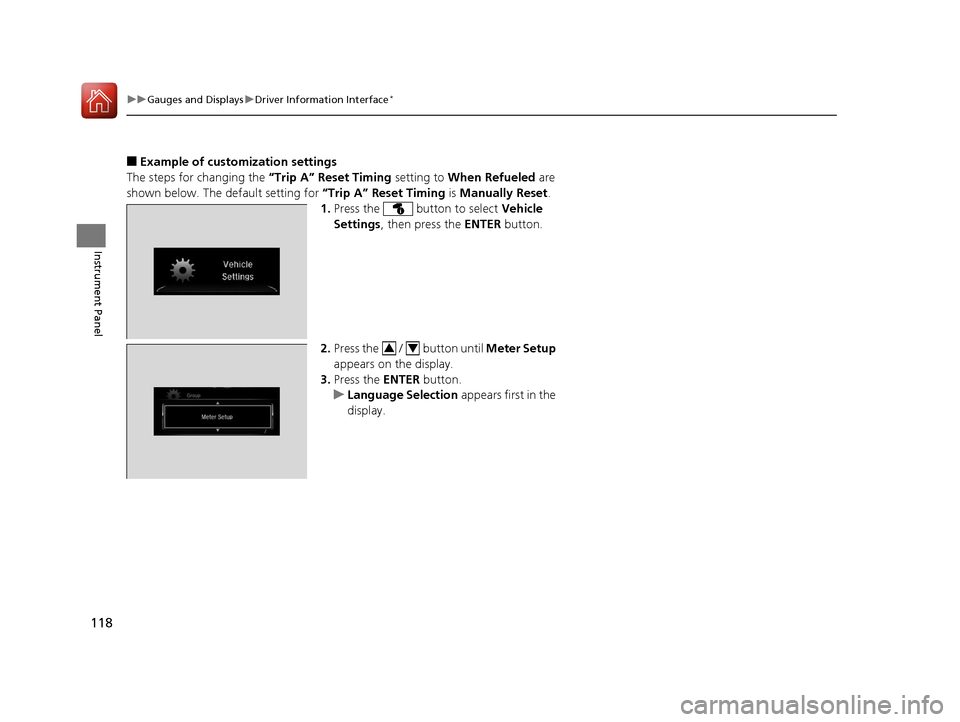
■Example of customization settings
The steps for changing the “Trip A” Reset Timing setting to When Refueled are
shown below. The default setting for “Trip A” Reset Timing is Manually Reset .
1. Press the button to select Vehicle
Settings , then press the ENTER button.
2. Press the / button until Meter Setup
appears on the display.
3. Press the ENTER button.
u Language Selection appears first in the
display.
34
16 CIVIC 4D-31TBA6000.book 118 ページ 2015年8月31日 月曜日 午後5時56分
Page 206 of 590

205
Features
Audio System Basic Operation
To use the audio system, the ignition switch must be in ACCESSORY (q or ON (w.
Use the selector knob or MENU/CLOCK
button to access some audio functions.
Press to switch between the normal and
extended display fo r some functions.
Selector knob: Rotate left or right to scroll
through the available choices. Press to set
your selection.
MENU/CLOCK button: Press to select any
mode.
The available mode in cludes the wallpaper,
display, clock, language setup, and play
modes. Play modes can be also selected from
scan, random, repeat, and so on.
(Back) button: Press to go back to the previous display.
button: Press to select the sound setting mode.
button: Press to change the audio/in formation screen brightness.
Press , then adjust the brightness using . u Each time you press , the mode switches between the daytime mode,
nighttime mode and OFF mode.
Models with color audio system1Audio System Basic Operation
These indications are used to show how to operate
the selector knob.
Rotate to select.
Press to enter.
Menu Items 2 Adjust Clock P. 122
2 Wallpaper Setup P. 208
2 Display Setup P. 211
2 Scan P. 213, 219
2 Play Mode P. 216, 219
2 RDS Settings P. 213
2 Bluetooth P. 220, 276
Press the SOURCE , , , or button on the
steering wheel to cha nge any audio setting.
2 Audio Remote Controls P. 201
(Back)
Button
Selector Knob MENU/
CLOCK
Button
Button
(Sound)
Button
Menu Display
16 CIVIC 4D-31TBA6000.book 205 ページ 2015年8月31日 月曜日 午後5時56分
Page 305 of 590
304
uuCustomized Features u
Features
Display ChangeAudio
Wallpaper
WallpaperSelect
Import
Delete
Color ThemeBlue
Red
Amber
Gray
Language
Clock Format12h
24h
OSS Licenses
16 CIVIC 4D-31TBA6000.book 304 ページ 2015年8月31日 月曜日 午後5時56分
Page 308 of 590
307
uuCustomized Features u
Continued
Features
*1:Default Setting
Setup
GroupCustomizable FeaturesDescriptionSelectable Settings
Settings Display Change
Changes the display type. Audio
*1/Wallpaper
Wallpaper Select
Changes the wallpaper type. Clock*1/
Image1/ Image2/
Image3
Import Imports an image file for a new wallpaper.
2
Wallpaper Setup P. 208—
Delete Deletes an image file for a wallpaper. Image1
*1/Image2/Image3
Color Theme Changes the background color of the audio/
information screen.
Blue
*1/
Red /Amber /Gray
Language Changes the display language. English
*1/French /Spanish
Clock Format Selects the digital clock display from 12H to
24H. 12H
*1/
24H
OSS Licenses Shows the legal information. —
16 CIVIC 4D-31TBA6000.book 307 ページ 2015年8月31日 月曜日 午後5時56分
Page 316 of 590
315
uuCustomized Features u
Continued
Features
Driver Assist System Setup*Forward Collision Warning Distance
ACC Forward Vehicle Detect Beep
Lane Keeping Assist Suspend Beep
Road Departure Mi tigation Setting
Adjust Outside Temp. Display
“Trip A” Reset Timing
“Trip B” Reset Timing
Vehicle
Meter Setup
Adjust Alarm Volume
Speed/Distance units
Fuel Efficiency Backlight
New Message Notification
Tachometer
CancelTPMS Calibration*
Calibrate
OthersLanguage
Voice Command Tips
Remember Last Screen*1
Memory Refresh
Refresh Time Adjustment
Swipe Direction
Change Skin
Factory Data Reset
Climate screen timeout
4way Switch Gesture
Volume Gestures
Detail Information
*1 : Does not appear when you
change the screen interface
design.
* Not available on all models
16 CIVIC 4D-31TBA6000.book 315 ページ 2015年8月31日 月曜日 午後5時56分
Page 327 of 590
326
uuCustomized Features u
Features
*1:Default Setting
*2:Does not appear when you change the screen interface design.
*3:Appears only when you change the screen interface design.Setup
Group Customizable Features
Description Selectable Settings
System Clock Clock/
Wallpaper
Type
*2/
Clock
Type
*3
Clock
See
Info on P. 318
Wallpaper
Clock Adjustment
Auto Time Zone
*
Manual Time Zone*
Auto Daylight Saving Time
Clock Format
Clock Display
Overlay Clock Location
Clock Reset
Others Language Change the display language. English
*1/
Français /
Español
* Not available on all models
16 CIVIC 4D-31TBA6000.book 326 ページ 2015年8月31日 月曜日 午後5時56分