2016 HONDA CIVIC remote start
[x] Cancel search: remote startPage 155 of 590
uuOperating the Switches Around the Steering Wheel uENGINE START/STOP Button*
154
Controls
If you open the driver’s doo r when the power mode is set to ACCESSORY, a warning
beep sounds.
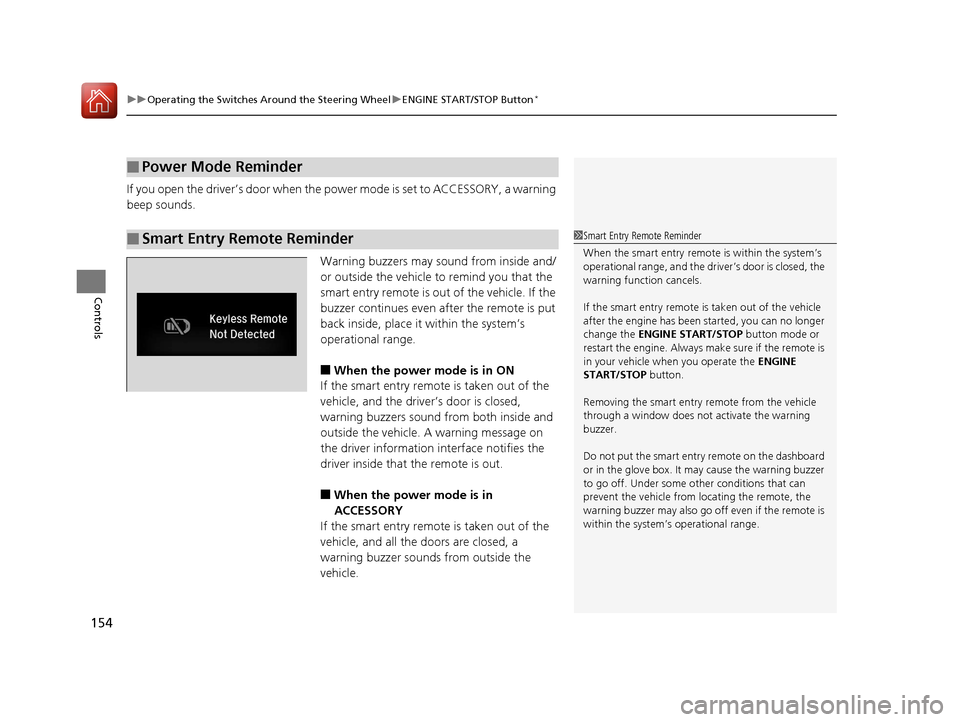
Warning buzzers may sound from inside and/
or outside the vehicle to remind you that the
smart entry remote is out of the vehicle. If the
buzzer continues even after the remote is put
back inside, place it within the system’s
operational range.
■When the power mode is in ON
If the smart entry remote is taken out of the
vehicle, and the driver’s door is closed,
warning buzzers sound from both inside and
outside the vehicle. A warning message on
the driver information interface notifies the
driver inside that the remote is out.
■When the power mode is in
ACCESSORY
If the smart entry remote is taken out of the
vehicle, and all the doors are closed, a
warning buzzer sounds from outside the
vehicle.
■Power Mode Reminder
■Smart Entry Remote Reminder1 Smart Entry Remote Reminder
When the smart entry remote is within the system’s
operational range, and the driv er’s door is closed, the
warning function cancels.
If the smart entry remote is taken out of the vehicle
after the engine has been started, you can no longer
change the ENGINE START/STOP button mode or
restart the engine. Always make sure if the remote is
in your vehicle when you operate the ENGINE
START/STOP button.
Removing the smart entry remote from the vehicle
through a window does not activate the warning
buzzer.
Do not put the smart entr y remote on the dashboard
or in the glove box. It may cause the warning buzzer
to go off. Under some other conditions that can
prevent the vehicle from locating the remote, the
warning buzzer may al so go off even if the remote is
within the system’s operational range.
16 CIVIC 4D-31TBA6000.book 154 ページ 2015年8月31日 月曜日 午後5時56分
Page 159 of 590

uuOperating the Switches Around the Steering Wheel uLight Switches
158
Controls
The headlights automatically co me on when the wipers are used several times within
a certain number of intervals wi th the headlight switch in AUTO.
The headlights automatically go off a few minutes later if the wipers are stopped.
The headlights, all other exterior lights, an d the instrument panel lights turn off 15
seconds after you remove the key or set the power mode to VEHICLE OFF (LOCK),
take the remote with you, and close the driver’s door. u You can change the headlight auto off timer setting.
2 Customized Features P. 111
If you turn the ignition switch to LOCK (0*1 with the headlight switch on, but do
not open the door, the lights turn off after 10 minutes (3 minutes, if the switch is in
the AUTO position).
The lights turn on again when you unlock or open the driver’s door. If you unlock
the door, but do not open it within 15 seconds, the lights go off. If you open the
driver’s door, you will hear a lights on reminder chime.
*1: Models with the smart entry system have an ENGINE START/STOP button instead of an
ignition switch.
■Headlight Integration with Wipers*
■Automatic Lighting Off Feature
1 Automatic Operation (aut omatic lighting control)*
Adjust the auto light sensitivity as follows:
2 Customized Features P. 111
SettingThe exterior lights come on
when the ambient light is at
MAX
HIGH
MID
LOW
MIN
Bright
Dark
1 Headlight Integration with Wipers*
This feature activates while the headlights are off in
AUTO .
The instrument panel brightness does not change
when the headlights come on.
At dark ambient light leve ls, the automatic lighting
control feature turns on the headlights, regardless of
the number of wiper sweeps.
* Not available on all models
16 CIVIC 4D-31TBA6000.book 158 ページ 2015年8月31日 月曜日 午後5時56分
Page 258 of 590
Continued257
uuAudio System Basic Operation uPlaying SiriusXM ® Radio*
Features
1. Select .
2. Select Tune Mode .
3. Select Channel Mode or Category Mode .
■To Change the Tune Mode1Playing SiriusXM ® Radio*
In the channel mode, all available channels are
selectable. In the categor y mode, you can select a
channel within a ca tegory (Jazz, Rock, Classical, etc.).
There may be instances when SiriusXM ® Radio does
not broadcast all the data fi elds (artist name, title).
This does not indicate a problem with your audio
system.
SiriusXM ® Radio stations load in ascending order,
which can take about a minute. Once they have
loaded you will be able to scroll up or down to make
your selections.
Switching the Audio Mode
Press the SOURCE button on the steering wheel or
select SOURCE on the screen.
2 Audio Remote Controls P. 201
Tune Start:
When you change to a preset channel, a song being
played on that channel restarts from the beginning
with this function. This can be turned on or off from
the Audio settings screen.
2 Customized Features P. 302
* Not available on all models
16 CIVIC 4D-31TBA6000.book 257 ページ 2015年8月31日 月曜日 午後5時56分
Page 317 of 590
316
uuCustomized Features u
Features
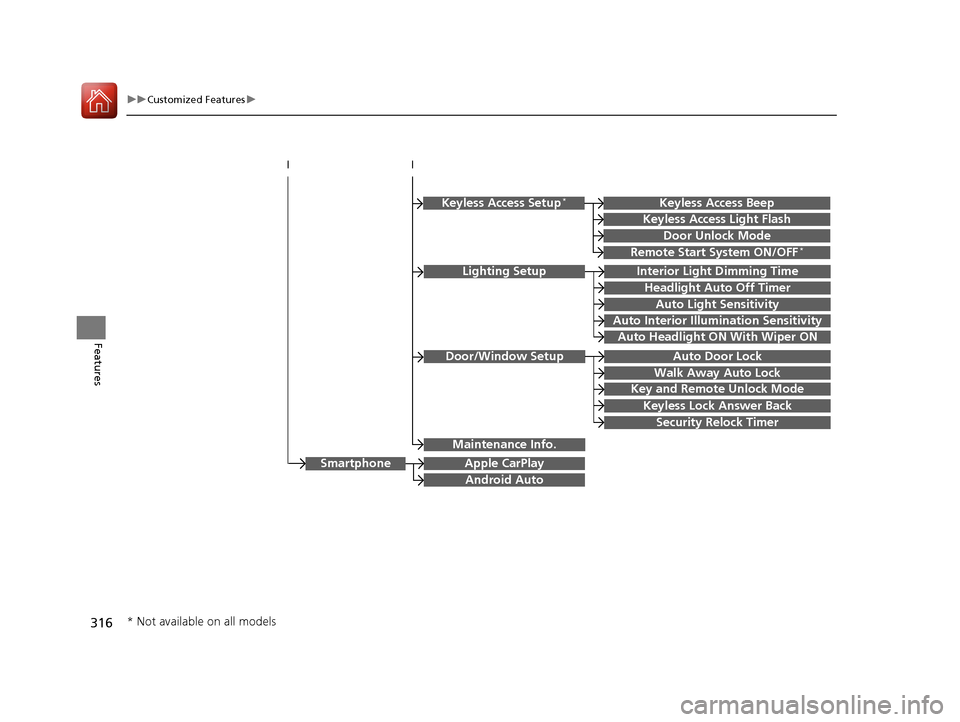
Lighting SetupInterior Light Dimming Time
Headlight Auto Off Timer
Auto Light Sensitivity
Auto Interior Illumination Sensitivity
Auto Door Lock
Key and Remote Unlock Mode
Door/Window Setup
Apple CarPlay
Maintenance Info.
Android Auto
Auto Headlight ON With Wiper ON
Keyless Lock Answer Back
Security Relock Timer
Walk Away Auto Lock
Keyless Access Setup*
Door Unlock Mode
Keyless Access Light Flash
Keyless Access Beep
Remote Start System ON/OFF*
Smartphone
* Not available on all models
16 CIVIC 4D-31TBA6000.book 316 ページ 2015年8月31日 月曜日 午後5時56分
Page 328 of 590
327
uuCustomized Features u
Continued
Features
*1:Default Setting
*2:Models with the smart entry system have an ENGINE START/STOP button instead of an ignition switch.
*3:Does not appear when you chan ge the screen interface design.
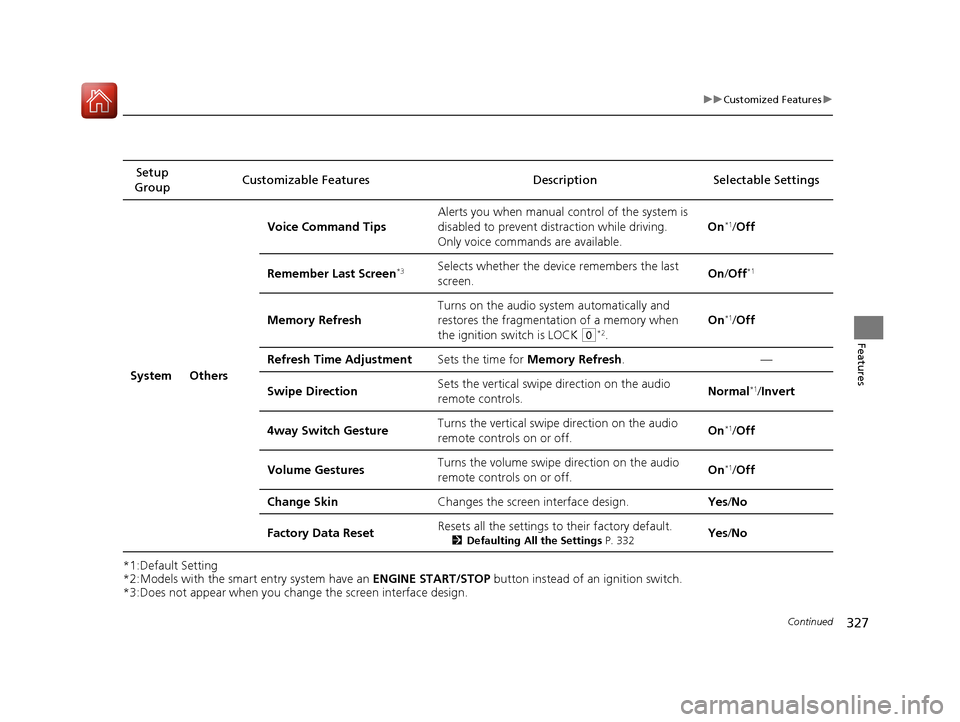
Setup
Group Customizable Features Description
Selectable Settings
System Others Voice Command Tips
Alerts you when manual co
ntrol of the system is
disabled to prevent distraction while driving.
Only voice commands are available. On
*1/
Off
Remember Last Screen
*3Selects whether the device remembers the last
screen. On
/Off*1
Memory Refresh Turns on the audio system automatically and
restores the fragmentation of a memory when
the ignition switch is LOCK
(0*2.On
*1/
Off
Refresh Time Adjustment Sets the time for Memory Refresh . —
Swipe Direction Sets the vertical swipe direction on the audio
remote controls. Normal
*1/
Invert
4way Switch Gesture Turns the vertical swipe direction on the audio
remote controls on or off. On
*1/
Off
Volume Gestures Turns the volume swipe direction on the audio
remote controls on or off.
On
*1/
Off
Change Skin Changes the screen interface design. Yes/No
Factory Data Reset Resets all the settings to their factory default.
2
Defaulting All the Settings P. 332Yes/No
16 CIVIC 4D-31TBA6000.book 327 ページ 2015年8月31日 月曜日 午後5時56分
Page 331 of 590
330
uuCustomized Features u
Features
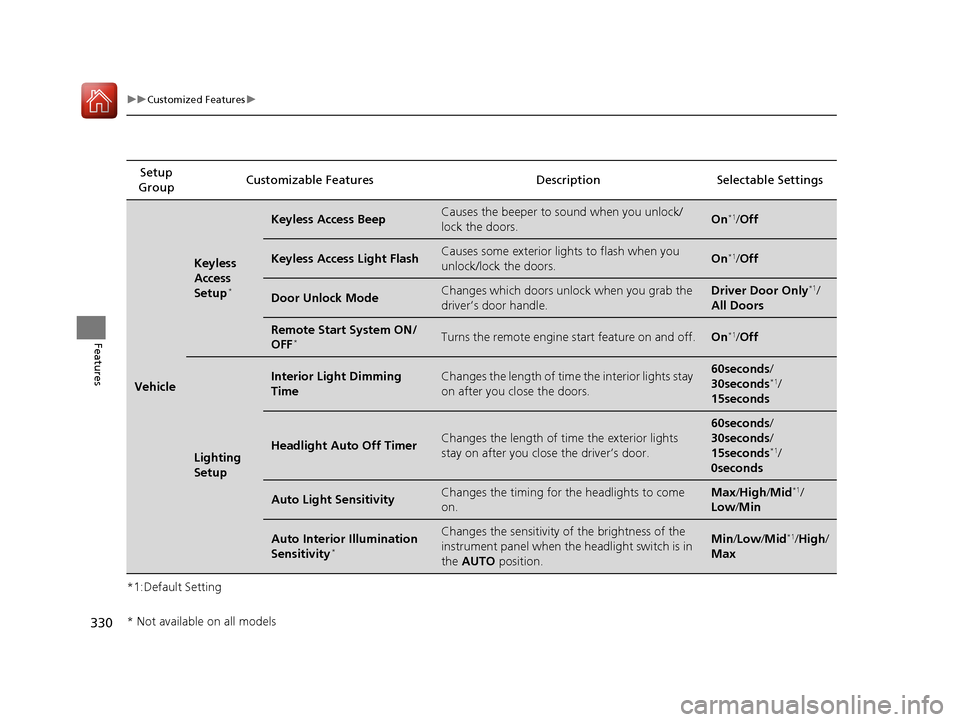
*1:Default SettingSetup
Group Customizable Features Description Selectable Settings
Vehicle
Keyless
Access
Setup
*
Keyless Access BeepCauses the beeper to sound when you unlock/
lock the doors.On*1/
Off
Keyless Access Light FlashCauses some exterior li ghts to flash when you
unlock/lock the doors.On*1/ Off
Door Unlock ModeChanges which doors unlock when you grab the
driver’s door handle.Driver Door Only*1/
All Doors
Remote Start System ON/
OFF*Turns the remote engine start feature on and off.On*1/ Off
Lighting
Setup
Interior Light Dimming
TimeChanges the length of time the interior lights stay
on after you close the doors.60seconds/
30seconds*1/
15seconds
Headlight Auto Off TimerChanges the length of time the exterior lights
stay on after you close the driver’s door.
60seconds/
30seconds/
15seconds
*1/
0seconds
Auto Light SensitivityChanges the timing for the headlights to come
on.Max /High /Mid*1/
Low /Min
Auto Interior Illumination
Sensitivity*
Changes the sensitivity of the brightness of the
instrument panel when the headlight switch is in
the AUTO position.Min/Low/ Mid*1/High /
Max
* Not available on all models
16 CIVIC 4D-31TBA6000.book 330 ページ 2015年8月31日 月曜日 午後5時56分
Page 400 of 590
Continued399
uuWhen Driving uStarting the Engine
Driving
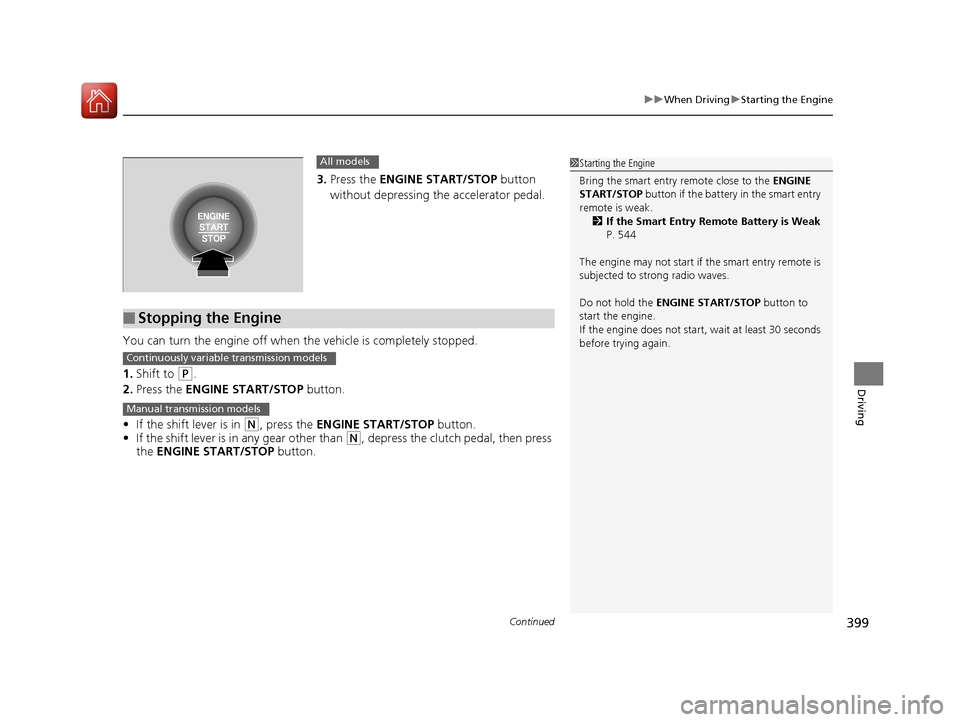
3. Press the ENGINE START/STOP button
without depressing the accelerator pedal.
You can turn the engine off when the vehicle is completely stopped.
1. Shift to
(P.
2. Press the ENGINE START/STOP button.
• If the shift lever is in
(N, press the ENGINE START/STOP button.
• If the shift lever is in any gear other than
(N, depress the clutch pedal, then press
the ENGINE START/STOP button.
All models
■Stopping the Engine
1Starting the Engine
Bring the smart entry remote close to the ENGINE
START/STOP button if the battery in the smart entry
remote is weak.
2 If the Smart Entry Remote Battery is Weak
P. 544
The engine may not start if the smart entry remote is
subjected to strong radio waves.
Do not hold the ENGINE START/STOP button to
start the engine.
If the engine does not start, wait at least 30 seconds
before trying again.
Continuously variable transmission models
Manual transmission models
16 CIVIC 4D-31TBA6000.book 399 ページ 2015年8月31日 月曜日 午後5時56分
Page 401 of 590
uuWhen Driving uStarting the Engine
400
Driving
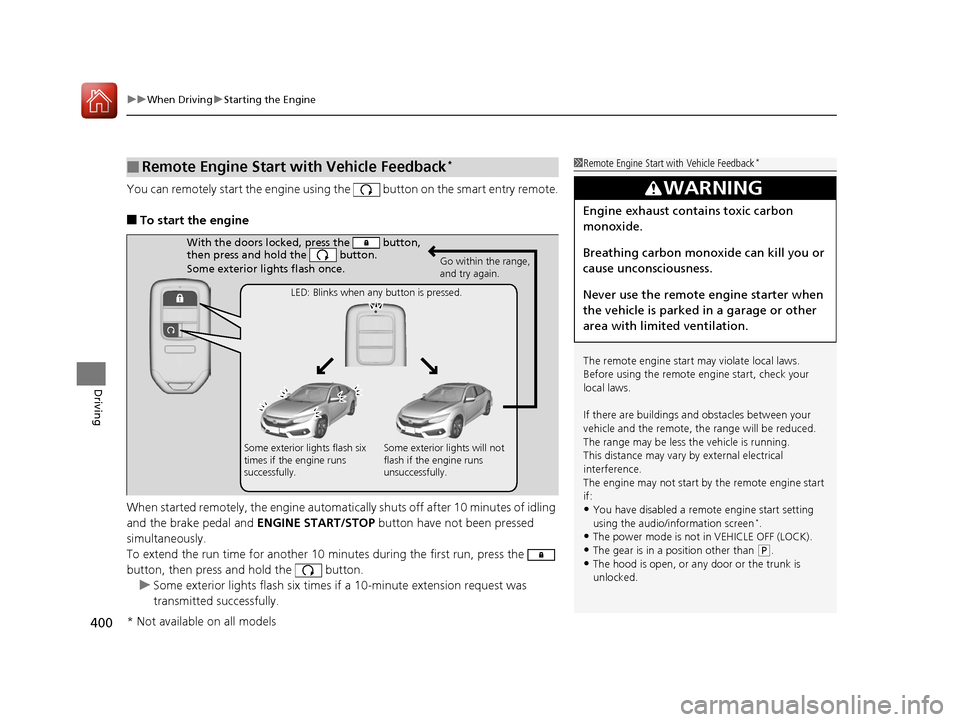
You can remotely start the engine using the button on the smart entry remote.
■To start the engine
When started remotely, the engine automati cally shuts off after 10 minutes of idling
and the brake pedal and ENGINE START/STOP button have not been pressed
simultaneously.
To extend the run time for another 10 minutes during the first run, press the
button, then press and hold the button. u Some exterior lights flash six times if a 10-minute extension request was
transmitted successfully.
■Remote Engine Start with Vehicle Feedback*1Remote Engine Start with Vehicle Feedback*
The remote engine start may violate local laws.
Before using the remote e ngine start, check your
local laws.
If there are buildings an d obstacles between your
vehicle and the remote, th e range will be reduced.
The range may be less the vehicle is running.
This distance may vary by external electrical
interference.
The engine may not start by the remote engine start
if:
•You have disabled a remo te engine start setting
using the audio/information screen*.
•The power mode is not in VEHICLE OFF (LOCK).•The gear is in a position other than ( P.
•The hood is open, or any door or the trunk is
unlocked.
3WARNING
Engine exhaust contains toxic carbon
monoxide.
Breathing carbon monoxide can kill you or
cause unconsciousness.
Never use the remote engine starter when
the vehicle is parked in a garage or other
area with limited ventilation.
With the doors locked, press the button,
then press and hold the button.
Some exterior lights flash once.
Go within the range,
and try again.
LED: Blinks when any button is pressed.
Some exterior lights flash six
times if the engine runs
successfully. Some exterior lights will not
flash if the engine runs
unsuccessfully.
* Not available on all models
16 CIVIC 4D-31TBA6000.book 400 ページ 2015年8月31日 月曜日 午後5時56分