2016 HONDA CIVIC Speed Sensor
[x] Cancel search: Speed SensorPage 428 of 590
Continued427
uuWhen Driving uAdaptive Cruise Control (ACC) with Low Speed Follow (LSF)*
Driving
■Automatic ca ncellation
The beeper sounds and a message appears on the driver information interface when
ACC with LSF is automatically canceled. Any of these conditions may cause the ACC
with LSF to automatically cancel:
• Bad weather (rain, fog, snow, etc.)
• When the radar sensor in the lower bum per next to the fog light gets dirty.
• The vehicle ahead of yo u cannot be detected.
• An abnormal tire condition is detected, or the tires are skidding.
• Driving on a mountainous road, or driving off road for extended periods.
• Abrupt steering wheel movement.
• When the ABS, VSA ® or CMBS
TM is activated.
• When the ABS or VSA ® system indicator comes on.
• When the vehicle is stopped on a very steep slope.
• When you manually apply the parking brake.
• When the detected vehicle within the AC C with LSF range is too close to your
vehicle.
• The camera behind the rearview mirror, or the area around the camera, including
the windshield, gets dirty.
The ACC with LSF automatic cancellation ca n be also triggered by the following
causes. In these cases, the parking brake will be automatically applied.
• The driver’s seat belt is unfastene d when the vehicle is stationary.
• The vehicle stops for more than 10 minutes.
• The engine is turned off.
1Automatic cancellation
Even though ACC with LSF has been automatically
canceled, you can still resu me the prior set speed.
Wait until the condition that caused ACC with LSF to
cancel improves, then press the –/SET button.
16 CIVIC 4D-31TBA6000.book 427 ページ 2015年8月31日 月曜日 午後5時56分
Page 431 of 590
430
uuWhen Driving uRoad Departure Mitigation (RDM) System*
Driving
Road Departure Mitigation (RDM) System*
Alerts and helps to assist you when the sy stem detects a possibility of your vehicle
unintentionally crossing over detected lane markings.
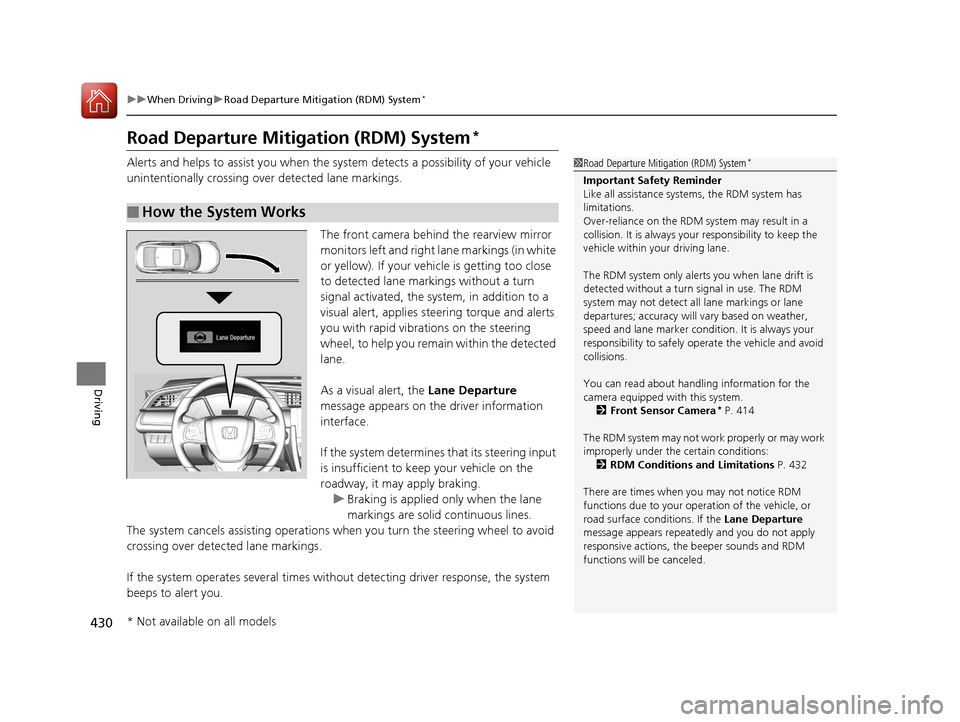
The front camera behind the rearview mirror
monitors left and right lane markings (in white
or yellow). If your vehicle is getting too close
to detected lane markings without a turn
signal activated, the system, in addition to a
visual alert, applies st eering torque and alerts
you with rapid vibrations on the steering
wheel, to help you remain within the detected
lane.
As a visual alert, the Lane Departure
message appears on the driver information
interface.
If the system determines that its steering input
is insufficient to keep your vehicle on the
roadway, it may apply braking. u Braking is applied only when the lane
markings are solid continuous lines.
The system cancels assisting operations wh en you turn the steering wheel to avoid
crossing over detected lane markings.
If the system operates several times without detecting driver response, the system
beeps to alert you.
■How the System Works
1 Road Departure Mitigation (RDM) System*
Important Safety Reminder
Like all assistance systems, the RDM system has
limitations.
Over-reliance on the RDM system may result in a
collision. It is always your responsibility to keep the
vehicle within your driving lane.
The RDM system only alerts you when lane drift is
detected without a turn signal in use. The RDM
system may not detect all lane markings or lane
departures; accuracy will vary based on weather,
speed and lane marker condi tion. It is always your
responsibility to sa fely operate the vehicle and avoid
collisions.
You can read about handling information for the
camera equipped with this system.
2 Front Sensor Camera
* P. 414
The RDM system may not wo rk properly or may work
improperly under the certain conditions:
2 RDM Conditions and Limitations P. 432
There are times when you may not notice RDM
functions due to your opera tion of the vehicle, or
road surface conditions. If the Lane Departure
message appears repeated ly and you do not apply
responsive actions, the beeper sounds and RDM
functions will be canceled.
* Not available on all models
16 CIVIC 4D-31TBA6000.book 430 ページ 2015年8月31日 月曜日 午後5時56分
Page 435 of 590
434
uuWhen Driving uLane Keeping Assist System (LKAS)*
Driving
Lane Keeping Assist System (LKAS)*
Provides steering input to help keep the vehicle in the middle of a detected lane and
provides tactile and visual alerts if the ve hicle is detected drifting out of its lane.1Lane Keeping Assist System (LKAS)*
Important Safety Reminders
The LKAS is for your convenience only. It is not a
substitute for your vehicle control. The system does
not work if you take y our hands off the steering
wheel or fail to steer the vehicle.
2 Driver Information Interface Warning and
Information Messages
* P. 91
Do not place objects on the instrument panel.
Objects may reflect on th e front windshield and
prevent correct detectio n of the traffic lanes.
LKAS only alerts you when lane drift is detected
without a turn signal in use. The LKAS may not detect
all lane markings or lane departures; accuracy will
vary based on weather, speed, and lane marker
condition.
It is always your responsibility to safely operate the
vehicle and avoid collisions.
The LKAS is convenient when it is used on freeways.
The LKAS may not work properly or may work
improperly under the certain conditions: 2 LKAS Conditions and Limitations P. 439
You can read about handling information for the
camera equipped with this system. 2 Front Sensor Camera
* P. 414
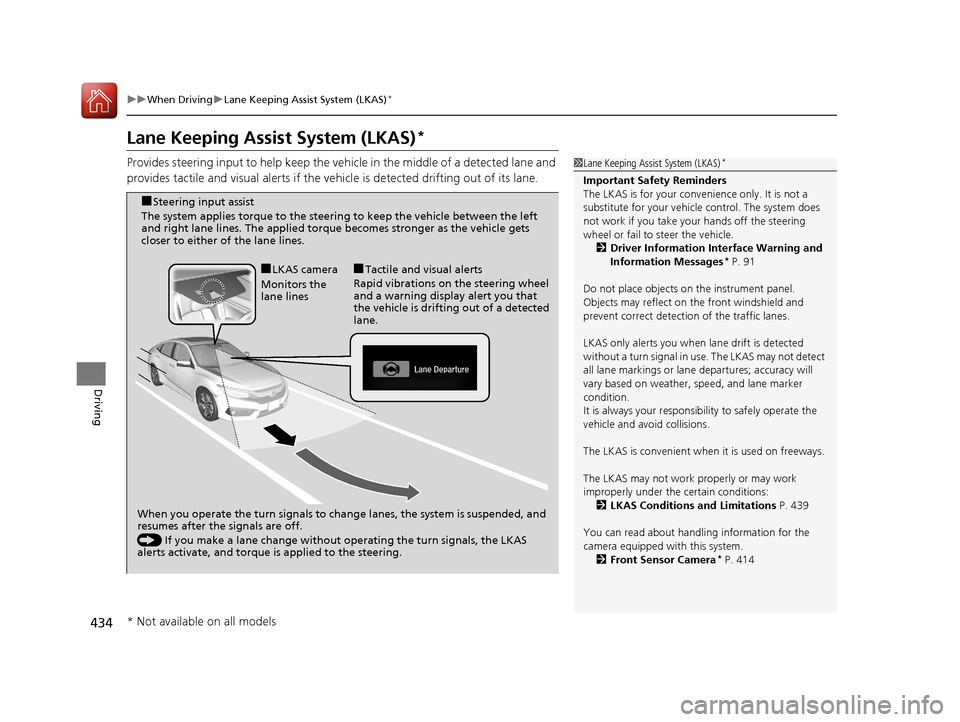
When you operate the turn signals to cha nge lanes, the system is suspended, and
resumes after the signals are off.
() If you make a lane change without operating the turn signals, the LKAS
alerts activate, and torque is applied to the steering.
■LKAS camera
Monitors the
lane lines■Tactile and visual alerts
Rapid vibrations on the steering wheel
and a warning display alert you that
the vehicle is drifting out of a detected
lane.
■Steering input assist
The system applies torque to the steerin g to keep the vehicle between the left
and right lane lines. The applied torque becomes stronger as the vehicle gets
closer to either of the lane lines.
* Not available on all models
16 CIVIC 4D-31TBA6000.book 434 ページ 2015年8月31日 月曜日 午後5時56分
Page 460 of 590
459
uuBraking uCollision Mitigation Braking SystemTM (CMBSTM)*
Continued
Driving
Collision Mitigation Braking SystemTM (CMBSTM)*
Can assist you when there is a possibility of your vehicle colliding with a vehicle or a
pedestrian detected in front of yours. The CMBSTM is designed to alert you when a
potential collision is determined, as well as to reduce your vehicle speed to help
minimize collision severity when a collision is deemed unavoidable.
■How the system works
1 Collision Mitigation Braking SystemTM (CMBSTM)*
Important Safety Reminder
The CMBSTM is designed to reduce the severity of an
unavoidable collision. It does not prevent collision nor
stop the vehicle automatically. It is still your
responsibility to operate the brake pedal and steering
wheel appropriately acco rding to the driving
conditions.
The CMBS
TM may not activate or may not detect a
vehicle in front of y our vehicle under certain
conditions:
2 CMBS
TM Conditions and Limitations P. 463
You can read about handling information for the
camera equipped with this system. 2 Front Sensor Camera
* P. 414
Be careful not to have the radar sensor cover strongly
impacted.
1 How the system works
Rapid vibrations on the steering wheel alert you
when your vehicle speed is between 19 and 62 mph
(30 and 100 km/h) with an oncoming vehicle
detected in front of you.
When the CMBS
TM activates, it may automatically
apply the brake. It will be canceled when your vehicle
stops or a potential coll ision is not determined.
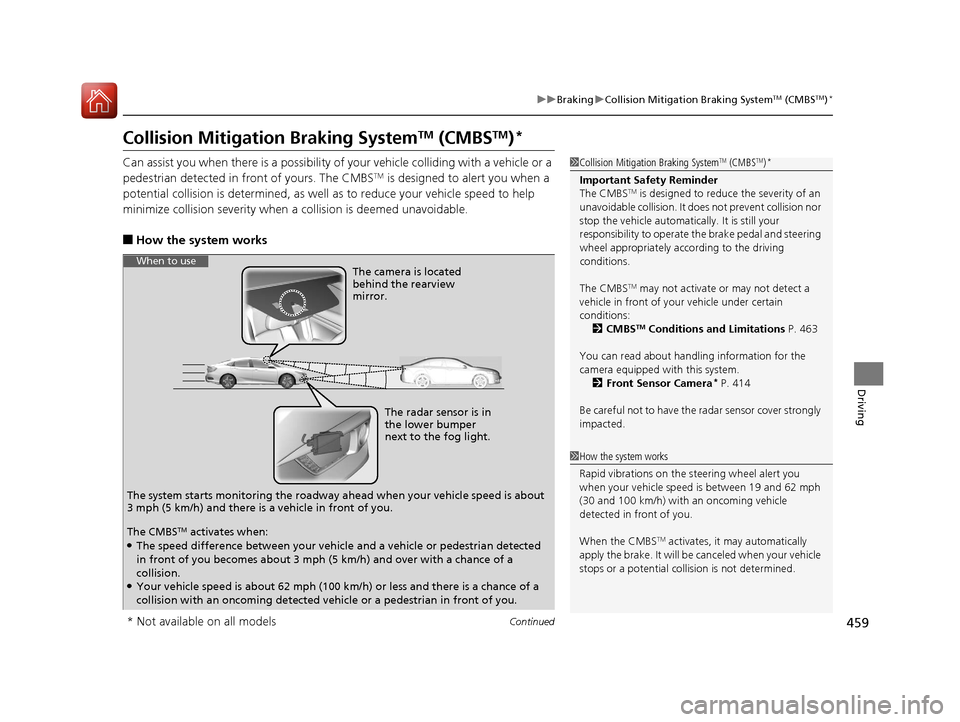
The radar sensor is in
the lower bumper
next to the fog light.
The camera is located
behind the rearview
mirror.
The system starts monitoring th e roadway ahead when your vehicle speed is about
3 mph (5 km/h) and there is a vehicle in front of you.
When to use
The CMBSTM activates when:●The speed difference between your vehicle and a vehicle or pedestrian detected
in front of you becomes about 3 mph (5 km/h) and over with a chance of a
collision.
●Your vehicle speed is about 62 mph (100 km/h) or less and there is a chance of a
collision with an oncoming detected vehicle or a pedestrian in front of you.
* Not available on all models
16 CIVIC 4D-31TBA6000.book 459 ページ 2015年8月31日 月曜日 午後5時56分
Page 465 of 590
464
uuBraking uCollision Mitigation Braking SystemTM (CMBSTM)*
Driving
■Vehicle conditions
• Headlight lenses are dirty or the headlights are not properly adjusted.
• The outside of the windshie ld is blocked by dirt, mud, leaves, wet snow, etc.
• The inside of the windshield is fogged.
• An abnormal tire or wheel condition (wrong size, varied size or construction,
improperly inflated, comp act spare tire, etc.).
• When tire chains are installed.
• The vehicle is tilted due to a heav y load or suspension modifications.
• The camera temperature gets too high.
• Driving with the parking brake applied.
• When the radar sensor in the front grille gets dirty.
■Detection limitations
• A vehicle or pedestrian suddenly crosses in front of you.
• The distance between your vehicle and the vehicle or pedestrian ahead of you is
too short.
• A vehicle cuts in front of you at a slow speed, and it brakes suddenly.
• When you accelerate rapidly and approach the vehicle or pedestrian ahead of you
at high speed.
• The vehicle ahead of you is a motorcycle, bicycle, mobility scooter or other small
vehicle.
• When there are animals in front of your vehicle.
• When you drive on a curved, wi nding or undulating road that makes it difficult for
the sensor to properly detect a vehicle in front of you.
• The speed difference between your vehicle an d a vehicle or pedestrian in front of
you is significantly large.
• An oncoming vehicle suddenly comes in front of you.
• Another vehicle suddenly comes in front of you at an intersection, etc.
• Your vehicle abruptly crosses over in front of an oncoming vehicle.
• When driving through a narrow iron bridge.
• When the lead vehicle suddenly slows down.
16 CIVIC 4D-31TBA6000.book 464 ページ 2015年8月31日 月曜日 午後5時56分
Page 467 of 590
uuBraking uCollision Mitigation Braking SystemTM (CMBSTM)*
466
Driving
The CMBSTM may activate even when you are aw are of a vehicle ahead of you, or
when there is no vehicle ahead . Some examples of this are:
■When Passing
Your vehicle approaches another vehicle ah ead of you and you change lanes to pass.
■At an intersection
Your vehicle approaches or passes another vehicle that is making a left or right turn.
■On a curve
When driving through curves, your vehicle comes to a point where an oncoming
vehicle is right in front of you.
■Through a low bridge at high speed
You drive under a low or narrow bridge at high speed.
■Speed bumps, road work sites, tr ain tracks, roadside objects, etc.
You drive over speed bumps, steel road plates, etc., or yo ur vehicle approaches train
tracks or roadside objects (such as a traffi c sign and guard rail) on a curve or, when
parking, stationary vehicles and walls.
■With Little Chance of a Collision1 Collision Mitigation Braking SystemTM (CMBSTM)*
For the CMBSTM to work properly:
Always keep the radar sensor cover clean.
Never use chemical solvents or polishing powder for
cleaning the sensor cover. Clean it with water or a
mild detergent.
Do not paint, or apply any coverings or paint to the
radar sensor area. This ca n impact CMBS operation.
Have your vehicle checked by a dealer if you find any
unusual behavior of the system (e.g., the warning
message appears too frequently).
If the front of the vehicle is impacted in any of the
following situations, the ra dar sensor may not work
properly. Have your vehi cle checked by a dealer:
•The vehicle mounted onto a bump, curb, chock,
embankment, etc.
•You drive the vehicle where the water is deep.•Your vehicle has a frontal collision.
* Not available on all models
16 CIVIC 4D-31TBA6000.book 466 ページ 2015年8月31日 月曜日 午後5時56分
Page 582 of 590
Index
581
Index
Index
A
ABS (Anti-lock Brake System).................. 457
Accessories and Modifications ................ 474
Accessory Power Socket ........................... 181
Adaptive Cruise Control (ACC) with Low
Speed Follow (LSF) ........................... 87, 416
Adding the Coolant ................................. 500
Additives
Coolant .................................................. 499
Engine Oil ............................................... 492
Washer ................................................... 503
Additives, Engine Oil ............................... 492
Adjusting Armrest .................................................. 174
Clock ...................................................... 122
Front Head Restraints .............................. 170
Front Seats.............................................. 167
Mirrors.................................................... 165
Rear Seats ............................................... 173
Steering Wheel ....................................... 164
Temperature ................................... 106, 110
Adjusting the Clock ................................. 122
Adjusting the Sound ................................ 210
Agile Handling Assist System .................. 443
Aha
TM........................................................ 272
Air Conditioning System (Climate Control System) .................................................... 190
Changing the Mode........................ 188, 192
Defrosting the Windshield and Windows ...................................... 188, 193 Dust and Pollen Filter ............................... 529
Recirculation/Fresh Air Mode ........... 188, 192
Sensor ..................................................... 196
Synchronized Mode ................................. 195
Using Automatic Climate Control ............ 190
Air Conditioning System (Heating System) .................................................... 187
Sensor ..................................................... 189
Using Automatic Heating ......................... 187
Air Pressure ............................... 517, 569, 571
Airbags ........................................................ 44
Advanced Airbags ..................................... 50
After a Collision ......................................... 47
Airbag Care ............................................... 57
Event Data Recorder .................................... 0
Front Airbags (SRS) .................................... 47
Indicator .............................................. 55, 79
Passenger Airbag Off Indicator .................. 56
Sensors ...................................................... 44
Side Airbags .............................................. 51
Side Curtain Airbags .................................. 53
AM/FM Radio ............................................ 252
Android Auto ............................................ 289
Anti-lock Brake System (ABS) .................. 457
Indicator .................................................... 79
Apple CarPlay ........................................... 286
Armrest ..................................................... 174
Audio Remote Controls ............................ 201
Audio System .................................... 198, 223
Adjusting the Sound ........................ 210, 245
Audio/Information Screen ........................ 224 Changing the Home Screen Icon
Layout ................................................... 228
Changing the Screen Interface ................ 242
Closing Apps ........................................... 244
Customizing the Meter............................ 229
Display Setup .......................................... 246
Error Messages ........................................ 293
General Information ................................ 296
Home Screen........................................... 235
iPod ........................................................ 214
Limitations for Manual Operation ............ 247
Menu Customize ..................................... 243
MP3/WMA/AAC .............................. 217, 273
Reactivating ............................................ 200
Recommended Devices............................ 297
Remote Controls ..................................... 201
Security Code .......................................... 200
Selecting an Audio Source ....................... 247
Status Area ............................................. 241
Theft Protection ...................................... 200
USB Flash Drives ...................................... 297
USB Port(s) .............................................. 199
Wallpaper Setup...................................... 233
Audio/Information Screen ............... 206, 224
Authorized Manuals ................................ 579
Auto Door Locking/Unlocking ................. 137
Customize ....................................... 117, 138
Automatic Brake Hold ............................. 454
Indicator............................................ 76, 454
Automatic Brake Hold System Indicator............................................ 76, 454
16 CIVIC 4D-31TBA6000.book 581 ページ 2015年8月31日 月曜日 午後5時56分
Page 583 of 590

582
Index
Automatic Lighting.................................. 157
Average Fuel Economy ..................... 105, 109
Average Speed .......................................... 109
B
Battery....................................................... 525
Charging System Indicator ................. 77, 552
Jump Starting .......................................... 546
Maintenance (Checking the Battery) ........ 525
Maintenance (Replacing).......................... 527
Belts (Seat) .................................................. 36
Beverage Holders ...................................... 179
Bluetooth ® Audio ..................................... 276
Bluetooth ® HandsFreeLink ®............. 333, 356
Booster Seats (For Children) ....................... 69
Brake System ............................................. 451
Anti-lock Brake System (ABS) ................... 457
Automatic Brake Hold.............................. 454
Brake Assist System ................................. 458
Fluid ........................................................ 502
Foot Brake ............................................... 453
Indicator (Red) ........................... 74, 554, 555
Parking Brake .......................................... 451
Brightness Control (Instrument Panel) .... 162
Bulb Replacement ..................................... 504
Brake Light, Tail/Rear Side Marker Light, Rear
Turn Signal Lights and Back-Up Lights .... 511
Fog Lights ................................................ 506
Front Side Marker Lights .......................... 509
Front Turn Signal Lights ........................... 508 Headlights ............................................... 504
High-Mount Brake Light .......................... 513
Parking/Daytime Running Lights .............. 510
Rear License Plate Light ........................... 512
Side Turn Signal/Emergency Indicator
Lights .................................................... 510
Taillights.................................................. 512
Bulb Specifications ........................... 568, 570
C
Carbon Monoxide Gas ............................... 70
Carrying Cargo ................................. 391, 393
Certification Label .................................... 572
Changing Bulbs ........................................ 504
Charging System Indicator ................. 77, 552
Child Safety ................................................. 58
Childproof Door Locks............................. 136
Emergency Trunk Opener ........................ 143
Child Seat .................................................... 58
Booster Seats ............................................ 69
Child Seat for Infants................................. 60
Child Seat for Small Children ..................... 61
Installing a Child Seat with a Lap/Shoulder Seat
Belt ......................................................... 65
Larger Children ......................................... 68
Rear-facing Child Seat ............................... 60
Selecting a Child Seat ................................ 62
Using a Tether ........................................... 66
Childproof Door Locks ............................. 136
Cleaning the Exterior ............................... 532 Cleaning the Interior
............................... 530
Climate Control System ........................... 190
Changing the Mode................................ 190
Defrosting the Windshield and Windows ...................................... 188, 193
Dust and Pollen Filter .............................. 529
Recirculation/Fresh Air Mode........... 188, 192
Sensors ................................................... 196
Synchronized Mode ................................ 195
Using Automatic Climate Control............ 190
CMBS
TM (Collision Mitigation Braking
SystemTM) ................................................ 459
Coat Hooks ............................................... 184
Collision Mitigation Braking System
TM
(CMBSTM) ................................................. 459
Compact Spare Tire .................. 537, 569, 571
Console Compartment ............................. 178
Continuously Variable Transmission Creeping................................................. 404
Fluid ....................................................... 501
Kickdown ............................................... 404
Operating the Shift Lever .................. 24, 406
Shift Lever Does Not Move ...................... 549
Shifting ................................................... 405
Controls .................................................... 121
Coolant (Engine) ...................................... 499
Adding the Coolant ................................ 500
Overheating ............................................ 550
Creeping (Continuously Variable Transmission) .......................................... 404
16 CIVIC 4D-31TBA6000.book 582 ページ 2015年8月31日 月曜日 午後5時56分