2016 HONDA CIVIC COUPE lights
[x] Cancel search: lightsPage 3 of 82

INTRODUCTION TABLE OF CONTENTS
This Owner’s Guide is intended to help you quickly get acquainted with your
2016 Honda Civic Coupe. It provides basic information and instructions on technology
and convenience features, as well as emergency procedures and how to get assistance.
This guide is for vehicles sold in the United States and Canada. It covers all Civic Coupe models, so you may nd descriptions of features and equipment that are not in your
vehicle. Images throughout this guide are from U.S. vehicles and represent features and equipment that are available on some, but not all, models.
This guide is not intended to be a substitute for the Owner’s Manual. The Owner
Information CD enclosed in your glove box kit includes the Owner’s Manual, Navigation
Manual, and vehicle and tire warranties in electronic format. This information can be
viewed on a computer (PC or Mac platform) and saved or printed for your reference. You can also visit owners.honda.com (U.S.) or myhonda.ca (Canada) to view the complete
and most current information.
If you are the rst registered owner of your vehicle, you may request a complimentary
printed copy of the Owner’s Manual, Navigation Manual, or Vehicle Warranty within the
rst six months of vehicle purchase. To request a copy, visit owners.honda.com (U.S.)
and create or log in to your account. In Canada, please request a copy from your Honda
dealer. American Honda Motor Co., Inc. strives to be proactive in protecting our environment
and natural resources. By using electronic delivery for a considerable portion of the
information typically found in a vehicle owner’s manual, we are further reducing our impact on the environment.
Honda Automobile Customer Service
Your authorized Honda dealer should be able to answer any questions you have
about your vehicle. However, if you are dissatised with the information you receive, you can call Honda Automobile Customer Service (see page 150).
Phone (800) 999-1009 (U.S.) or (888) 946-6329 (Canada)
Honda Roadside Assistance
24-hour emergency road service is available to you in the United States and Canada
throughout your 3-year/36,000-mile warranty term. Services include jump starting, at tire and lockout assistance, towing, and more (limitations apply).
Phone (866) 864-5211 (U.S.) or (800) 465-7587 (Canada)
*if equipped
Visual Index .................................... 1
Steering Wheel and Nearby Controls ................1
Dashboard, Ceiling, and Other Controls .............2
Safety Information .........................3
Important Safety Information ...............................3
Seat Belts ................................................................ 5
Airbags.....................................................................8 Child Safety ........................................................... 14
Safety Label Locations ........................................21
Reporting Safety Defects....................................22
Instrument Panel.......................... 23
Malfunction Indicators........................................24 Condition Indicators ............................................ 26
On/Off Indicators .................................................. 27
Information Display*............................................28Driver Information Interface* ............................29
Vehicle Controls ..........................31
Using the Key or Remote Transmitter* .............31
Smart Entry System* ........................................... 32
Door Operation ..................................................... 34
Power Window Operation ..................................35
Power Moonroof Operation* ............................36
One-Touch Turn Signal ........................................36
Interior and Exterior Lights .................................37
Wiper Operation ................................................... 38
Adjusting the Seats..............................................40 Adjusting the Steering Wheel ............................44
Adjusting the Mirrors .......................................... 45
Climate Control System .......................................46
Seat Heaters* ....................................................... 49
Customized Features ........................................... 50
Setting the Clock .................................................. 51
Audio and Connectivity ..............52
Basic Audio Operation ........................................52
Models with color audio system ......................57
FM/AM Radio ........................................................ 58
iPod ®
.........................................................................................................................
59
USB Flash Drive....................................................60 Bluetooth Audio ................................................... 61
Models with Display Audio ...............................62
HondaLink ®*
....................................................................................................
63
Wi-Fi Connection..................................................64Aha™ Radio .......................................................... 64
Apple CarPlay ®
...........................................................................................
65
Android Auto™ ..................................................... 66
FM/AM Radio ....................................................... 67
SiriusXM ®
Radio* ................................................. 68
iPod ®
.........................................................................................................................
69
USB Flash Drive....................................................70Bluetooth Audio ................................................... 71
Pandora ®
.............................................................................................................
72
Bluetooth Handsfreelink ............73
Basic HFL Operation ............................................ 73
Pairing a Phone .................................................... 74
Making a Call ........................................................ 75
Basic HFL Operation ............................................ 76
Pairing a Phone .................................................... 78
Making a Call ........................................................ 79
SMS Text Messaging and E-Mail* ....................80
HondaLink Assist..................................................81 Siri ®
Eyes Free ...................................................... 82
Navigation*................................... 83
Basic Navigation Operation ...............................83
Entering a Destination ......................................... 85
Routing ................................................................... 88
Page 4 of 82
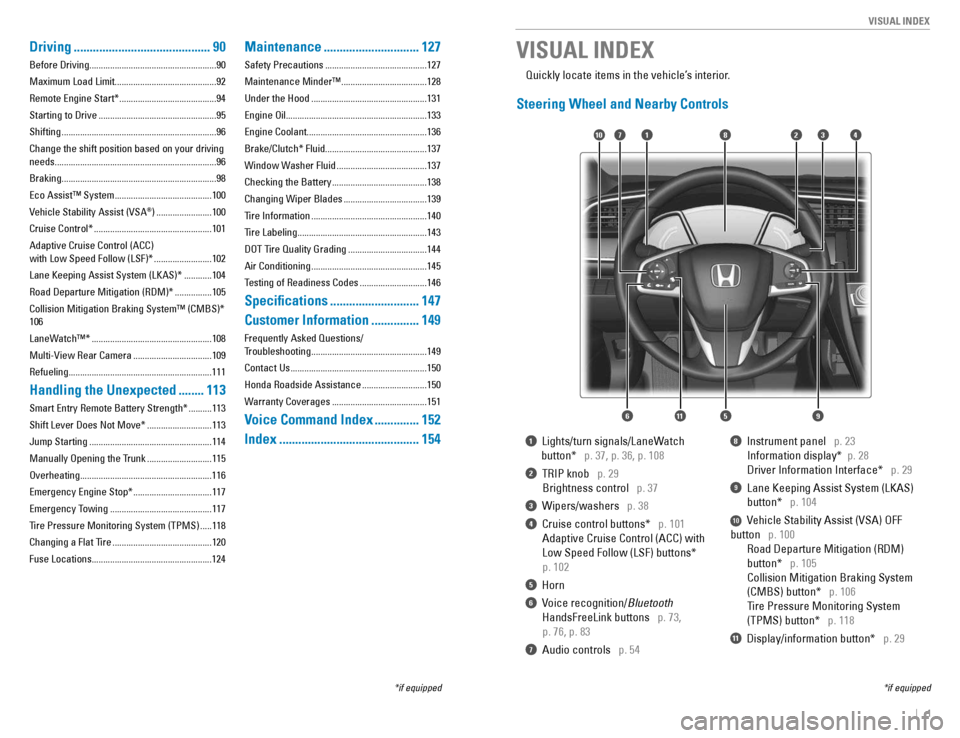
| 1
VISUAL INDEX
1 Lights/turn signals/LaneWatch
button*
p. 37, p. 36, p. 108
2 TRIP knob p. 29
Brightness control
p. 37
3 Wipers/washers p. 38
4 Cruise control buttons* p. 101
Adaptive Cruise Control (ACC) with
Low Speed Follow (LSF) buttons*
p. 102
5 Horn
6 Voice recognition/ Bluetooth
HandsFreeLink buttons
p. 73,
p. 76, p. 83
7 Audio controls p. 54
8 Instrument panel p. 23
Information display* p. 28
Driver Information Interface* p. 29
9 Lane Keeping Assist System (LKAS)
button*
p. 104
10 Vehicle Stability Assist (VSA) OFF
button
p. 100
Road Departure Mitigation (RDM)
button*
p. 105
Collision Mitigation Braking System
(CMBS) button*
p. 106
Tire Pressure Monitoring System
(TPMS) button*
p. 118
11 Display/information button* p. 29
VISUAL INDEX
*if equipped
*if equipped
Quickly locate items in the vehicle’s interior.
Steering Wheel and Nearby Controls
2
5
71310
6
48
911
Driving
........................................... 90
Before Driving.......................................................90
Maximum Load Limit............................................92Remote Engine Start* .......................................... 94
Starting to Drive ................................................... 95
Shifting ................................................................... 96
Change the shift position based on your driving
needs......................................................................96
Braking...................................................................98Eco Assist™ System .......................................... 100
Vehicle Stability Assist (VSA ®
) ........................ 100
Cruise Control* ................................................... 101
Adaptive Cruise Control (ACC) with Low Speed Follow (LSF)* .........................102
Lane Keeping Assist System (LKAS)* ............104
Road Departure Mitigation (RDM)* ................105
Collision Mitigation Braking System™ (CMBS)* 106
LaneWatch™* .................................................... 108
Multi-View Rear Camera ..................................109
Refueling..............................................................111
Handling the Unexpected ........113
Smart Entry Remote Battery Strength* ..........113
Shift Lever Does Not Move* ............................113
Jump Starting ..................................................... 114
Manually Opening the Trunk ............................115
Overheating.........................................................116 Emergency Engine Stop* ..................................117
Emergency Towing ............................................ 117
Tire Pressure Monitoring System (TPMS) .....118
Changing a Flat Tire ........................................... 120
Fuse Locations....................................................124
Maintenance .............................. 127
Safety Precautions ............................................ 127
Maintenance Minder™ .....................................128
Under the Hood .................................................. 131
Engine Oil.............................................................133
Engine Coolant....................................................136
Brake/Clutch* Fluid............................................137
Window Washer Fluid .......................................137
Checking the Battery ......................................... 138
Changing Wiper Blades ....................................139
Tire Information .................................................. 140
Tire Labeling ........................................................ 143
DOT Tire Quality Grading ..................................144
Air Conditioning .................................................. 145
Testing of Readiness Codes .............................146
Specications ............................ 147
Customer Information ...............149
Frequently Asked Questions/
Troubleshooting .................................................. 149
Contact Us ........................................................... 150
Honda Roadside Assistance ............................150
Warranty Coverages ......................................... 151
Voice Command Index ..............152
Index ............................................ 154
Page 5 of 82

2 || 3
SAFETY
VISUAL INDEX
Dashboard, Ceiling, and Other Controls
1 Color audio system* p. 57
Display Audio* p. 62
2 Hazard warning button
3 Climate control system/seat heater
buttons*
p. 45, p. 46, p. 49
4 USB port p. 52
Accessory power socket p. 52
6 Moonroof switch* p. 36
Map lights p. 37
Rearview mirror p. 45
7 Power window switches p. 35
Door lock switches p. 34
Door mirror controls p. 45
8 Trunk release button p. 34
9 Hood release handle p. 132
10 ENGINE START/STOP button*
p. 96
11 ECON button* p. 100
12 Electric parking brake switch
p. 98
Automatic brake hold button
p. 99
*if equipped
SAFETY INFORMATION
2
3
71
8
6
4
Your safety—and the safety of others—is very important, and operating this vehicle
safely is an important responsibility. While we strive to help you make informed
decisions about safety, it is not practical or possible to warn you about all the hazards associated with operating or maintaining your vehicle. Therefore, you must use your own good judgment.
Important Safety Information
This guide explains many of your vehicle’s safety features and how to use them. Please
read this information carefully. Following the instructions below will also help to keep you and your passengers safe.
Important Safety Precautions
• Always wear your seat belt.
• Secure all children in the proper restraint system.
• Be aware of airbag hazards.
• Don’t drink and drive.
• Pay appropriate attention to the task of driving safely.
• Control your speed.
• Keep your vehicle in safe condition.
Engaging in cell phone conversation or other activities that keep you from paying
close attention to the road, other vehicles, and pedestrians could lead to a crash.
Remember, situations can change quickly, and only you can decide when it is safe to divert some attention away from driving.
Safety Messages
When you see the following messages throughout this guide, pay close attention. You WILL be KILLED or SERIOUSLY HURT if you don’t follow
instructions. You CAN be KILLED or SERIOUSLY HURT if you don’t follow
instructions. You CAN be HURT if you don’t follow instructions.
This information is intended to help you avoid damage to your
vehicle, other property, or the environment.
DANGER
WARNING
CAUTION
NOTICE
5
59101112
Page 17 of 82

26 || 27
INSTRUMENT PANEL
INSTRUMENT PANEL
Condition Indicators
These indicators may require you to perform an action.
Parking brake
Release the parking brake before driving. You will hear a beep if you drive with it not fully released. Seat belt reminder Make sure seat belts are fastened for you and all passengers. The indicator
blinks and beeps sound continuously if you or your front passenger has not
fastened your seat belts when you begin driving. If the indicator remains on
after seat belts are fastened, see your dealer. Door/trunk open A door or the trunk is not closed. A beep sounds if open while driving. Low fuel
Refuel as soon as possible. If the indicator blinks, there is a problem with the
fuel gauge. Have your vehicle checked by a dealer. Low tire pressure*
Stop in a safe place, check tire pressures, and inate tire(s) if necessary. The indicator also appears if the system has not been calibrated (see page 118).
Washer uid level *
The washer uid is low. Rell the washer uid (see page 137).System message* When a condition or malfunction indicator comes on, a message also appears on the Driver Information Interface. Check the display for more information. Press the display/information button on the steering wheel to clear the message. Maintenance Minder* Scheduled maintenance for your vehicle is due. Immobilizer/security system
Your key or remote transmitter cannot be recognized by the vehicle. If the
indicator blinks, you may not be able to start the engine. Turn the vehicle off, remove the key from the ignition*, press and hold the brake pedal, and restart the vehicle. If it continues to blink, there may be a problem with the
system. Have your vehicle checked by a dealer. Canadian models: To reset the immobilizer system, follow the steps above
after the battery has been disconnected.
U.S.
Canada
*if equipped VSA off VSA engaged (blinking)CRUISE MAIN onCRUISE CONTROL onACC* onCMBS* offLKAS* on
Turn signals/hazards on Fog lights* onHigh beams onExterior lights onECON mode onAutomatic brake hold onAutomatic brake hold activated
U.S.
Canada
On/Off Indicators
These indicators remind you when an item is on or off.
Brake depress Press the brake pedal before applying or releasing the electric parking
brake or automatic brake hold. A blinking indicator means automatic brake hold operation ceased. Immediately press the brake pedal.
CV
T models
MT models
Page 20 of 82

32 || 33
VEHICLE CONTROLS
VEHICLE CONTROLS
Smart Entry System*
When you carry the remote transmitter (for example, in a pocket or purse) and it is
outside the vehicle and within range (about 32 inches or 80 cm), you can lock or unlock
the doors and trunk without handling the transmitter.
Unlocking/Locking the Doors
To unlock: Grab the driver’s door handle when the
vehicle is off to unlock the driver’s door. Grab the
front passenger’s door handle to unlock all doors.
To lock: Press the door lock button on either
door handle when the vehicle is off. If the remote transmitter is inside the vehicle, the doors will not lock.
Unlocking the Trunk
Press the trunk release button to unlock and open the trunk.
*if equipped
Door Lock Button
ButtonTrunk Release
Walk Away Auto Lock*
When you walk away from the vehicle while carrying the remote transmitter, the doors can automatically lock if the following conditions are met: • The remote transmitter is within a range of 6 feet (2 m).
• All doors and the hood are closed.
• There is not an additional remote transmitter inside the vehicle.
When you are within the range, the system is activated and a beep sounds. When you go outside the range, the lights ash and a beep sounds again. The doors automatically lock.
To turn on this feature, follow the steps below:
1. From the HOME screen, select Settings.
2. Select Vehicle. The vehicle must be in Park (P).
3. Select Door/Window Setup.
4. Select Walk Away Auto Lock.
5. Select On.
6. Select BACK to exit the menus.
*if equipped
Page 22 of 82

36 || 37
VEHICLE CONTROLS
VEHICLE CONTROLS
Power Moonroof Operation*
The moonroof can be opened and closed when the vehicle is on by using the switch on the ceiling.
Automatic Operation
To open: Push the switch back rmly to the second
detent, then release.
To close: Push the switch forward rmly to the
second detent, then release.
The moonroof opens or closes completely. To stop
the moonroof at any time, push the switch briey.
Manual Operation
To open: Push and hold the switch back to the rst detent until the desired position is
reached.
To close: Push and hold the switch forward to the rst detent until the desired
position is reached.
Moonroof Tilt
To tilt: Push the center of the switch.
To close: Push the switch forward rmly, then release.
*if equipped
Open
CloseTilt
Opening the moonroof in below freezing temperatures or when it is covered with
snow or ice can damage the moonroof panel or motor.
NOTICE
Closing the moonroof on someone’s hands or ngers can cause serious injury. Make sure your passengers are away from the moonroof before closing it.
WARNING
Interior and Exterior Lights
Operate interior and exterior lights when the vehicle is on or off.
Brightness Control
Adjust instrument panel brightness when the vehicle is on.
To brighten: Turn the knob to the right.
To dim: Turn the knob to the left.
A beep sounds when the brightness reaches its minimum or maximum.
Interior Lights
Change the interior light settings using the front and rear switches on the ceiling. ON position (rear): Interior lights remain on.
Door-activated position (front): Interior lights come
on when any of the doors are opened, the driver’s door is unlocked, or the vehicle is turned off. OFF position: Interior lights remain off.
Map lights: Press the map lights to turn on or off.
Exterior Lights
Rotate the switches on the headlight lever to operate the exterior lights. OFF: All exterior lights are off.
: Turn on exterior lights except headlights.
AUTO: Turn on the automatic lighting feature.*
Headlights turn on or off depending on ambient brightness when the vehicle is on. Headlights automatically come on after the wipers are engaged for a certain time. : Turn on all exterior lights including headlights.
: Turn fog lights* on or off.
*if equipped
TRIP knob
Door-activated position
Off
Fron t
Map lights
High beams
Flash the high beams
Low beams
Fog lights*
One-Touch Turn Signal
Use this quick and convenient method to signal a lane change.
Lightly push the turn signal lever up or down for a three-blink sequence. For a continuous signal, push the lever up or down until it locks into place.
Page 23 of 82

38 || 39
VEHICLE CONTROLS
VEHICLE CONTROLS
Wiper Operation
The windshield wipers and washers can be used when the vehicle is on. Move the wiper lever up or down to the desired position.
*if equipped
Pull to use
washer.
MIST OFF
INT: Low speed intermittent LO: Low speed wipe HI: High speed wipe
Headlight-Wiper Integration*
When the headlights are in the AUTO position, they automatically turn on when the
front wipers operate several times within a certain interval. The headlights turn off
shortly after the wipers are turned off, or if there is enough ambient light.
Do not use the wipers when the windshield is dry. The windshield may scratch, or the rubber blades may become damaged.
In cold weather, the blades may freeze to the windshield, becoming stuck.
Operating the wipers in this condition may damage the wipers. Use the defroster
to warm the windshield, or manually clear the windshield of ice and snow before turning on the wipers.
NOTICE
Intermittent (INT) Wipers*
When you move the lever to the INT position, the wipers operate based on the delay adjustment.
Rotate the adjustment ring to adjust the wiper delay.
Rotate the adjustment ring.
Lower speed, fewer sweeps Higher speed, more sweeps
INT position
Automatic (AUTO) Rain-Sensing Wipers*
When you move the lever to the AUTO position while
driving in rainy weather, the wipers operate based on the amount of detected rainfall. Put the lever in the AUTO position only when driving
in rainy weather. Rotate the adjustment ring to adjust the rainfall
sensor sensitivity. Return the lever to the OFF position when rain stops.
Rotate the adjustment ring.
Low sensitivity: Wipers operate whenmore rainfall is detected. High sensitivity: Wipers operate whenless rainfall is detected.
AUTO position
Always ensure the wiper lever is in the OFF position before entering a car wash to prevent severe damage to the windshield wiper system.
NOTICE
*if equipped
Page 26 of 82

44 || 45
VEHICLE CONTROLS
VEHICLE CONTROLS
Adjusting the Mirrors
Adjust the angle of the mirrors for the best visibility when you are sitting in the correct driving position.
Rearview Mirror with Day/Night Positions*
Manually adjust the position to reduce headlight glare from vehicles behind you. Flip the tab to switch between day and night positions.
Automatic Dimming Rearview Mirror*
When driving after dark, the automatic dimming function reduces the glare from headlights behind
you based on the mirror sensor. The function cancels when the shift lever is in Reverse (R).
Power Door Mirrors
Adjust the power door mirrors when the vehicle is on. L/R selector switch: Select the left or right mirror.
After adjusting the mirror, return the switch to the center position. Mirror position adjustment switch: Press the switch
left, right, up, or down to move the mirror.
Tab
Daytime position
Night position
*if equipped
Selector
switchAdjustment
switch
Sensor
Adjusting the Steering Wheel
The steering wheel height and distance from your body can be adjusted so that you can comfortably grip the steering wheel in an appropriate driving posture.
• Pull up the steering wheel adjustment lever.
• Move the steering wheel up or down, and in or out.
• Push down the steering wheel adjustment lever to
lock the steering wheel in position.
Adjusting the steering wheel position while driving may cause you to lose control of the vehicle and be seriously injured in a crash. Adjust the steering wheel only when the vehicle is stopped.
WARNING
To adjust To lock Lever