2016 HONDA CIVIC COUPE fuel
[x] Cancel search: fuelPage 4 of 82
| 1
VISUAL INDEX
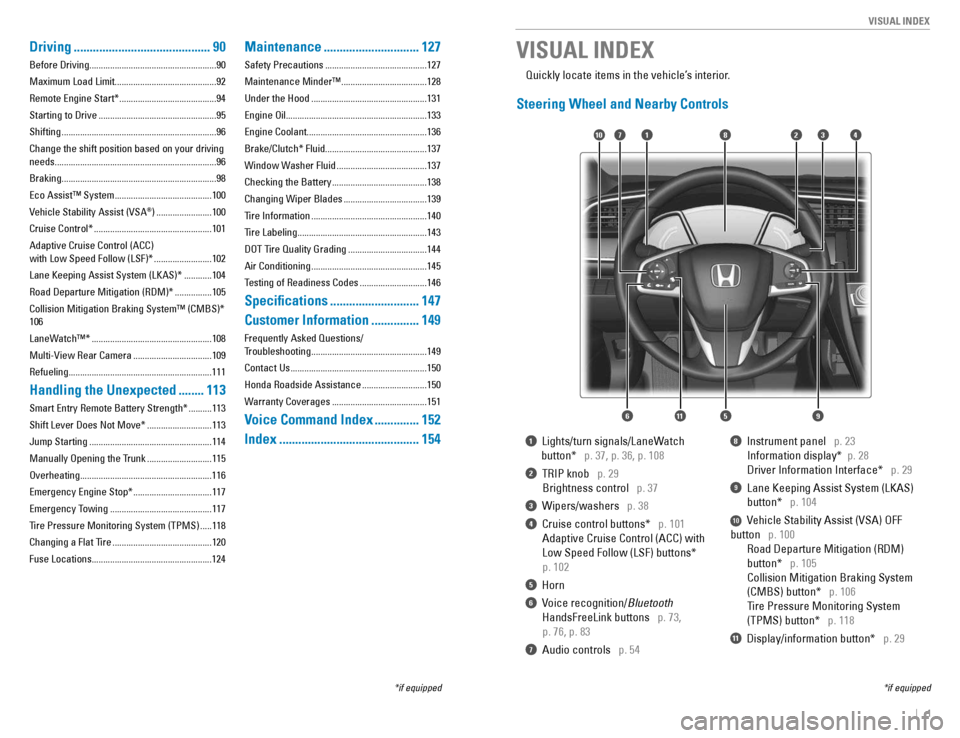
1 Lights/turn signals/LaneWatch
button*
p. 37, p. 36, p. 108
2 TRIP knob p. 29
Brightness control
p. 37
3 Wipers/washers p. 38
4 Cruise control buttons* p. 101
Adaptive Cruise Control (ACC) with
Low Speed Follow (LSF) buttons*
p. 102
5 Horn
6 Voice recognition/ Bluetooth
HandsFreeLink buttons
p. 73,
p. 76, p. 83
7 Audio controls p. 54
8 Instrument panel p. 23
Information display* p. 28
Driver Information Interface* p. 29
9 Lane Keeping Assist System (LKAS)
button*
p. 104
10 Vehicle Stability Assist (VSA) OFF
button
p. 100
Road Departure Mitigation (RDM)
button*
p. 105
Collision Mitigation Braking System
(CMBS) button*
p. 106
Tire Pressure Monitoring System
(TPMS) button*
p. 118
11 Display/information button* p. 29
VISUAL INDEX
*if equipped
*if equipped
Quickly locate items in the vehicle’s interior.
Steering Wheel and Nearby Controls
2
5
71310
6
48
911
Driving
........................................... 90
Before Driving.......................................................90
Maximum Load Limit............................................92Remote Engine Start* .......................................... 94
Starting to Drive ................................................... 95
Shifting ................................................................... 96
Change the shift position based on your driving
needs......................................................................96
Braking...................................................................98Eco Assist™ System .......................................... 100
Vehicle Stability Assist (VSA ®
) ........................ 100
Cruise Control* ................................................... 101
Adaptive Cruise Control (ACC) with Low Speed Follow (LSF)* .........................102
Lane Keeping Assist System (LKAS)* ............104
Road Departure Mitigation (RDM)* ................105
Collision Mitigation Braking System™ (CMBS)* 106
LaneWatch™* .................................................... 108
Multi-View Rear Camera ..................................109
Refueling..............................................................111
Handling the Unexpected ........113
Smart Entry Remote Battery Strength* ..........113
Shift Lever Does Not Move* ............................113
Jump Starting ..................................................... 114
Manually Opening the Trunk ............................115
Overheating.........................................................116 Emergency Engine Stop* ..................................117
Emergency Towing ............................................ 117
Tire Pressure Monitoring System (TPMS) .....118
Changing a Flat Tire ........................................... 120
Fuse Locations....................................................124
Maintenance .............................. 127
Safety Precautions ............................................ 127
Maintenance Minder™ .....................................128
Under the Hood .................................................. 131
Engine Oil.............................................................133
Engine Coolant....................................................136
Brake/Clutch* Fluid............................................137
Window Washer Fluid .......................................137
Checking the Battery ......................................... 138
Changing Wiper Blades ....................................139
Tire Information .................................................. 140
Tire Labeling ........................................................ 143
DOT Tire Quality Grading ..................................144
Air Conditioning .................................................. 145
Testing of Readiness Codes .............................146
Specications ............................ 147
Customer Information ...............149
Frequently Asked Questions/
Troubleshooting .................................................. 149
Contact Us ........................................................... 150
Honda Roadside Assistance ............................150
Warranty Coverages ......................................... 151
Voice Command Index ..............152
Index ............................................ 154
Page 17 of 82

26 || 27
INSTRUMENT PANEL
INSTRUMENT PANEL
Condition Indicators
These indicators may require you to perform an action.
Parking brake
Release the parking brake before driving. You will hear a beep if you drive with it not fully released. Seat belt reminder Make sure seat belts are fastened for you and all passengers. The indicator
blinks and beeps sound continuously if you or your front passenger has not
fastened your seat belts when you begin driving. If the indicator remains on
after seat belts are fastened, see your dealer. Door/trunk open A door or the trunk is not closed. A beep sounds if open while driving. Low fuel
Refuel as soon as possible. If the indicator blinks, there is a problem with the
fuel gauge. Have your vehicle checked by a dealer. Low tire pressure*
Stop in a safe place, check tire pressures, and inate tire(s) if necessary. The indicator also appears if the system has not been calibrated (see page 118).
Washer uid level *
The washer uid is low. Rell the washer uid (see page 137).System message* When a condition or malfunction indicator comes on, a message also appears on the Driver Information Interface. Check the display for more information. Press the display/information button on the steering wheel to clear the message. Maintenance Minder* Scheduled maintenance for your vehicle is due. Immobilizer/security system
Your key or remote transmitter cannot be recognized by the vehicle. If the
indicator blinks, you may not be able to start the engine. Turn the vehicle off, remove the key from the ignition*, press and hold the brake pedal, and restart the vehicle. If it continues to blink, there may be a problem with the
system. Have your vehicle checked by a dealer. Canadian models: To reset the immobilizer system, follow the steps above
after the battery has been disconnected.
U.S.
Canada
*if equipped VSA off VSA engaged (blinking)CRUISE MAIN onCRUISE CONTROL onACC* onCMBS* offLKAS* on
Turn signals/hazards on Fog lights* onHigh beams onExterior lights onECON mode onAutomatic brake hold onAutomatic brake hold activated
U.S.
Canada
On/Off Indicators
These indicators remind you when an item is on or off.
Brake depress Press the brake pedal before applying or releasing the electric parking
brake or automatic brake hold. A blinking indicator means automatic brake hold operation ceased. Immediately press the brake pedal.
CV
T models
MT models
Page 18 of 82
28 || 29
INSTRUMENT PANEL
INSTRUMENT PANEL
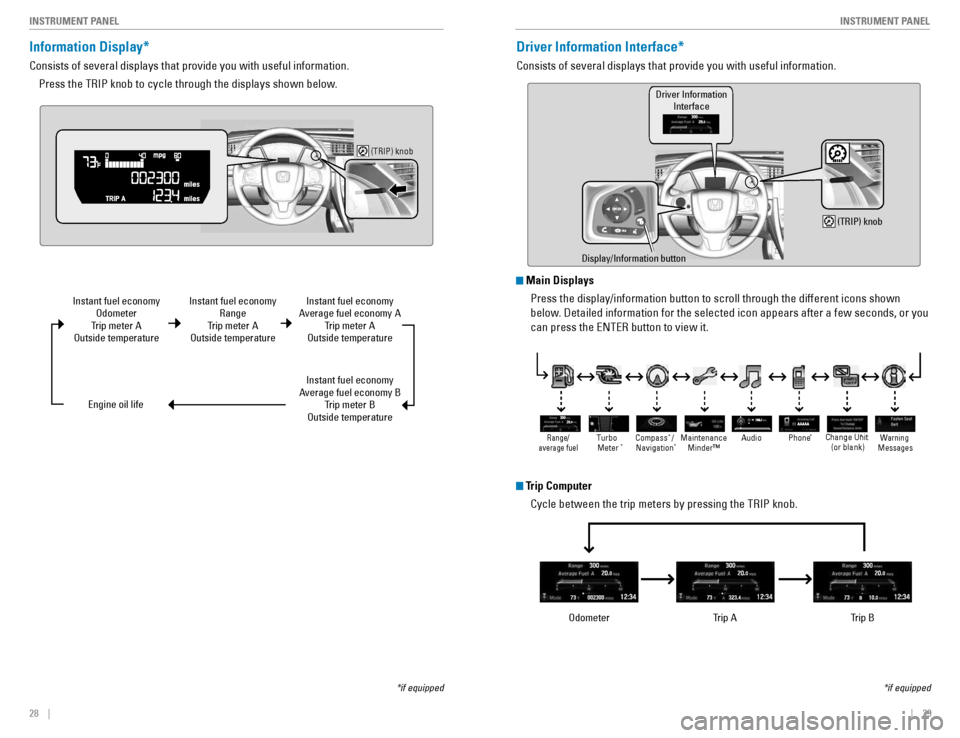
Information Display*
Consists of several displays that provide you with useful information.
Press the TRIP knob to cycle through the displays shown below.
(TRIP) knob
Instant fuel economy Odometer
Trip meter A
Outside temperature
Engine oil life
*if equipped
Instant fuel economy Range
Trip meter A
Outside temperature Instant fuel economy
Average fuel economy A Trip meter A
Outside temperature
Instant fuel economy
Average fuel economy B Trip meter B
Outside temperature
Driver Information Interface*
Consists of several displays that provide you with useful information.
*if equipped
Display/Information button
(TRIP) knob
Driver InformationInterface
Odometer Trip A Trip B
Main Displays
Press the display/information button to scroll through the different icons shown
below. Detailed information for the selected icon appears after a few seconds, or you can press the ENTER button to view it.
Trip Computer
Cycle between the trip meters by pressing the TRIP knob.
AAAAA
Warning
Message sChange Unit
(or blank)
Maintenance
Minder™ Phon
e *
Turbo
Meter * Audio
*
Compass / *
Navigation *Range/
average fuel
Page 54 of 82

100 || 101
DRIVING
DRIVING
Eco Assist™ System
Can help improve fuel efciency by adjusting the performance of the engine, transmission, climate control system, and cruise control.
ECON Button
Press the ECON button behind the shift lever to turn the system on or off. The ECON Mode indicator appears when the system is turned on.
Ambient Meter
Color-coded bars change based on your driving style and brake or accelerator pedal operation. Green: Fuel-efcient driving
Light green: Moderate acceleration/deceleration
White: Aggressive acceleration/decelerationAmbient meter
Vehicle Stability Assist (VSA ®
)
Helps to stabilize the vehicle during cornering if the vehicle turns more or less than what
was intended. It assists in maintaining traction on slippery surfaces by regulating engine output and selectively applying the brakes.
Turning VSA On or Off
Press and hold the VSA OFF button until you hear a beep to turn VSA on or off. The VSA OFF indicator appears when the system is off.
Traction control stops fully functioning, which may make it easier when trying to free your vehicle if it is
stuck in mud or snow. VSA is turned on every time you start the engine, even if you previously turned it off. If you turn VSA off, your vehicle has normal braking and cornering
ability, but traction and stability enhancement become less effective.
VSA OFF
indicator
Cruise Control*
Maintain a constant vehicle speed without having to keep your foot on the accelerator
pedal. Use cruise control on highways or open roads where you can travel at a constant speed with little acceleration or deceleration.
*if equipped
RES/+ button CANCEL button CRUISE button
-/SET button
Improper use of cruise control can lead to a crash.
Use cruise control only when traveling on open highways in good weather.
WARNING
Activating and Setting the Vehicle Speed
1. Press the CRUISE button. The CRUISE MAIN indicator appears.
2. Accelerate to the desired speed (above 25 mph/ 40 km/h). Take your foot off the pedal and press the -/ SET button to set the speed. The CRUISE CONTROL indicator appears.
Adjusting the Vehicle Speed
Press the RES/+ button to increase speed, or the -/SET button to decrease speed. Each time you press the button, the vehicle speed is increased or decreased by about 1 mph (1.6 km/h). If you keep the button pressed, the vehicle speed increases or decreases until you release it.
Canceling Cruise Control
Press the CANCEL button or the brake pedal. The CRUISE CONTROL indicator goes off. After cruise control has been canceled, you can still resume the prior set speed by pressing RES/+ while driving at a speed of at least 25 mph (40 km/h). Press the CRUISE button to turn the system off.
Page 59 of 82

110 || 111
DRIVING
DRIVING
Models with Display Audio
1. From the Home screen, select Settings.
2. Select Camera.
3. Select Rear Camera.
4. Select an option:
Fixed Guideline: Guidelines appear when you shift into Reverse.
Dynamic Guideline: Guidelines move as you turn the steering wheel.
5. Select On or Off.
6. Press BACK to exit the menu.
Changing Camera Settings
Turn the guidelines on or off.
Models with color audio system
1. Press the MENU/CLOCK button.
2. Select Settings.
3. Select Rear Camera.
4. Select Camera Guideline.
5. Select On or Off.
6. Press the Back button to exit the menu.
Refueling
Use the proper fuel and refueling procedure to ensure the best performance and safety of your vehicle.
Fuel Information
Use of unleaded gasoline of 87 octane or higher is recommended. • Honda recommends TOP TIER detergent gasoline where available.
• Do NOT use gasoline containing more than 15% ethanol.
• Do NOT use gasoline containing methanol.
• Do NOT use gasoline containing MMT.
We recommend quality gasoline containing detergent additives that help prevent
fuel system and engine deposits. In addition, in order to maintain good performance,
fuel economy, and emissions control, we strongly recommend the use of gasoline
that does NOT contain harmful manganese-based fuel additives such as MMT, if such gasoline is available.
NOTICE
Gasoline is highly ammable and explosive. You can be burned or seriously injured when handling fuel.
• Stop the engine, and keep heat, sparks, and ame away.
• Handle fuel only outdoors.
• Wipe up spills immediately.
WARNING
How to Refuel
Your fuel tank features a capless design. You can insert the ller nozzle directly into the ller pipe. The tank seals itself when you pull out the ller nozzle.
1. The fuel ll door is located at the left rear of the
vehicle. Park next to the service pump that is most accessible.
2. Turn off the engine.
3. Press the area indicated by the arrow in the image to open the fuel ll door. The vehicle must be unlocked.
4. Insert the ller nozzle fully. When the tank is full, the nozzle clicks off automatically. Wait about 5 seconds before removing the ller nozzle.
5. Close the fuel ll door.
Press
Page 60 of 82

112 || 113
HANDLING THE UNEXPECTED
DRIVING
Refueling from a Portable Fuel Container
If you need to refuel your vehicle from a portable fuel container, use the funnel provided with your vehicle.
1. Turn off the engine.
2. Press on the edge of the fuel ll door to open it.
3. Take the funnel out of the tool case in the trunk.
4. Place the end of the funnel on the lower part of
ller opening, then insert it slowly and fully. Make sure that the end of the funnel goes down along with the ller pipe.
5. Fill the tank with fuel from the portable fuel container. Pour fuel carefully so you do not spill
any.
6. Remove the funnel from the ller neck. Wipe up any fuel from the funnel before storing it.
7. Close the fuel ll door.
Funnel
Do not insert the nozzle of a portable fuel container or any funnel other than the one provided with your vehicle. Doing so can damage the fuel system. Do not try to pry open or push open the sealed fuel tank with foreign objects. This can damage the fuel system and its seal.
NOTICE
HANDLING THE UNEXPECTED
Learn about what to do in critical or emergency situations.
Smart Entry Remote Battery Strength*
If the battery life in your remote transmitter is weak, a message appears in the display with information on how to start the engine. 1. Touch the back of the remote transmitter to the ENGINE START/STOP button while the indicator is ashing.
2. With the brake pedal or clutch pedal pressed, press the ENGINE START/STOP button within 10 seconds.
Shift Lever Does Not Move*
Follow the procedure below if you cannot move the shift lever out of Park (P).
1. Set the parking brake.
2. Remove the key from the ignition, or remove the built-in key from the remote transmitter.
3. Move the removable beverage holder tray rearward. Remove the cover by pulling it with your ngers.
4. Wrap a cloth around the tip of a small at-tip screwdriver to remove the cover of the shift lock release slot. Put the tip of the at-tip screwdriver into the slot and remove it as shown in the image.
5. Insert the key into the shift lock release slot.
6. While pushing the key in, press the shift lever release button and place the shift lever into Neutral (N). The lock is now released. Have the shift lever checked by a dealer as soon as possible.
*if equipped
Slot
Cove r
Release butto n
Shift lock release slot
Page 63 of 82

118 || 119
HANDLING THE UNEXPECTED
HANDLING THE UNEXPECTED
Tire Pressure Monitoring System (TPMS)
Monitors the tire pressure while you are driving. If your vehicle’s tire pressure becomes
signicantly low, the low tire pressure indicator comes on and a message appears on
the display. Available on U.S. models only.
What to Do
Stop your vehicle in a safe place. Check the tire pressure and adjust the pressure to the specied
level on the label on the driver’s doorjamb.
TPMS Calibration
Any time you inate, change, or rotate one or more of the tires, you need to recalibrate the system.
The calibration process requires approximately 30 minutes of cumulative driving at
speeds between 30–65 mph (48–105 km/h). The vehicle must be stopped to begin
calibration, and the process nishes automatically.
Models with TPMS button
Press and hold the TPMS button until the low tire pressure indicator blinks twice, indicating the calibration process has begun.
Models with color audio system and Driver Information Interface
Use the steering wheel buttons to make and enter selections in the Driver Information Interface (see page 29).
1. Scroll to the Vehicle Settings screen, and select it.
2. Select TPMS Calibration.
3. Select Calibrate.
Models with Display Audio
Touch items on the screen to make and enter selections.
1. From the HOME screen, select Settings.
2. Select Vehicle.
3. Select TPMS Calibration.
4. Select Calibrate.
TPMS button
Low tire pressure/ TPMS indicator
Tire Pressure Monitoring System (TPMS) - Required Federal Explanation
Each tire, including the spare (if provided), should be checked monthly when cold and inated to the ination pressure recommended by the vehicle manufacturer on the vehicle placard or tire ination pressure label. (If your vehicle has tires of a different size than the size indicated on the vehicle placard or tire ination pressure label, you should determine the proper tire ination pressure for those tires.) As an added safety feature, your vehicle has been equipped with a tire pressure monitoring system (TPMS) that illuminates a low tire pressure telltale when one or more of your tires is signicantly underinated.
Accordingly, when the low tire pressure telltale illuminates, you should stop and check your tires as soon as possible, and inate them to the proper pressure. Driving on a signicantly underinated tire causes the tire to overheat and can lead to tire failure. Underination also reduces fuel efciency and tire
tread life, and may affect the vehicle’s handling and stopping ability. Please note that the TPMS is not a substitute for proper tire maintenance,
and it is the driver’s responsibility to maintain correct tire pressure, even if underination has not reached the level to trigger illumination of the TPMS low tire pressure telltale.
Your vehicle has also been equipped with a TPMS malfunction indicator to
indicate when the system is not operating properly. The TPMS malfunction indicator is combined with the low tire pressure telltale. When the system detects a malfunction, the telltale will ash for approximately one minute and then remain continuously illuminated. This sequence will continue upon subsequent vehicle start-ups as long as the malfunction exists. When the malfunction indicator is illuminated, the system may not be able to detect or signal low tire pressure as intended. TPMS malfunctions may occur for a variety of reasons, including the installation of replacement or alternate tires or wheels on the vehicle that
prevent the TPMS from functioning properly. Always check the TPMS malfunction telltale after replacing one or more tires or wheels on your vehicle to ensure that the replacement or alternate
tires and wheels allow the TPMS to continue to function properly.
Driving on an extremely underinated tire can cause it to overheat. An overheated tire can fail. Always inate your tires to the specied pressure.
NOTICE
Page 66 of 82

124 || 125
HANDLING THE UNEXPECTED
HANDLING THE UNEXPECTED
Fuse Locations
If any electrical devices are not working, turn the vehicle off and check to see if any
applicable fuse is blown. Fuse locations are shown on the fuse box cover. Locate the
fuse in question by the fuse number and box cover number.
Engine Compartment Fuse Box
Located under the hood near the battery. Push the tabs to open the box.
AmpsCircuit Protected
1(6 0A )Cooling Fa n*2(30A )Cooling Fa n*3(50A )
IG Main*4
30
AHeadlight High Beam Main 30A
Battery12 5A
2EPS
IG Main 70
A
30 A*4
50A*5
Fuse Box Option*(40A )
Fuse Box60 A30A
Front Wiper Motor
3
Starter Motor*4
Headlight Low Beam Mai
n
Rear Defroster 40A
30 A
Fuse Box 40AABS/VSA Motor40A
ABS/VSA FSR40 ABlower Motor
4 40
A
30 A
*1:M odels with the smart entry system have
* * an
ENGINE START/STO P button
instead of an ignition switch .
2: 2.0L engine models
* 3:
1.5L engine models
** 4:
Models with smart entry system
5:Models without smart entry system
models
56:
Continuously variable transmissio n
Cooling Fan5A
6Wa sher 15A
7FI Main8 15
A15 A
S
FI ub
9Stop Lights 10A
10 Injector*3(15 A)
11LA F5A
12 FI ECU10A
13Parking Lights
14 10
A
Hazard15 A
15IG Coil16 15
A
Transmission*6(15 A)17 Daytime Running Lights 10A
18 Back Up10A
19
20 15
A(30 A)
2110 A
Circuit Protected
Audio
Audio AM P*
Interior Lights Amps22(15 A)
23Front Fog Lights*
A/C Compressor
24 (10 A)
Horn10 A25 Left Headlight Low Beam 10A
27VB ACT*326 Right Headlight Low Beam
(10 A)
10A
28 Left Headlight High Beam
30 31
29Right Headlight High Beam 10A
32 (15 A)(2
0A )
33
34 (20 A)
35
36
10
A
Interior Fuse Box
Located under the dashboard on the driver’s side.
Circuit Protected Amps110A
2(5 A)
3
4(5 A)(10 A)
510 A610A
710 A
815 A
Accessory
Key Lock
*2
Front Sensor Camera*1
Transmission*2, *3
Optio n
SRS Indicator
Meter
Fuel Pump
Fuse label
* *1: Models with smart entry syste m
*2:Models without smart entry syste m
models
9AIRCON
3: Continuously variable transmission
10 A
1011Engine Control 5A12Passenger Side Door Lock 10A13(10 A)
14(20 A)
15Front Passenger’s Side Power Window20A
16Door Loc k20A
17Transmissio n*1, *3(10
A)
(5 A)
Front Sensor Camera *2
18
19Moonroo f*20 (20
A)21ACG10A10A
22 Daytime Running Light s
2324Front Sensor Camera *(5 A)
25Driver’s Door Lock10 A
2726Passen ger Side Door Unlock10A(20 A)28 Driver’s Power Window 20A
AmpsCircuit Protecte d