30 || 31
VEHICLE CONTROLS
INSTRUMENT PANEL
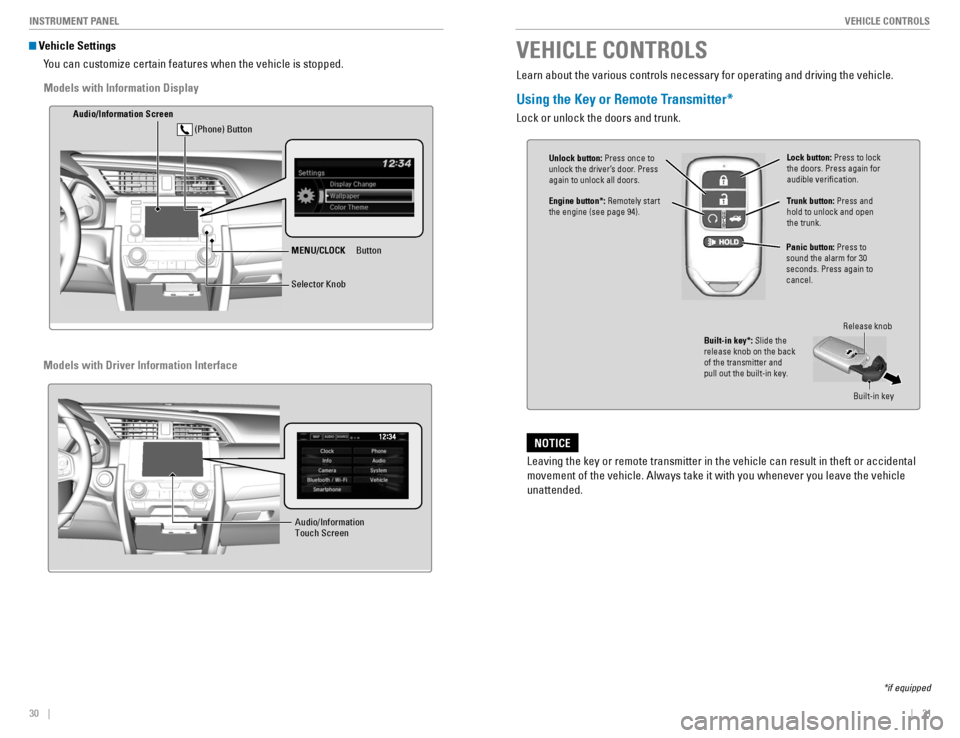
Vehicle Settings
You can customize certain features when the vehicle is stopped.
MENU/CLOCK Button
Audio/Info
rmation Screen
Selector Knob
(Phone) Button
Audio/Information Touch Screen
VEHICLE CONTROLS
*if equipped
Learn about the various controls necessary for operating and driving the vehicle.
Using the Key or Remote Transmitter*
Lock or unlock the doors and trunk.
Unlock button:
Press once to
unlock the driver’s door. Press again to unlock all doors.
Trunk button: Press and
hold to unlock and open the trunk.
Lock button: Press to lock
the doors. Press again for audible verication.
Panic button: Press to
sound the alarm for 30 seconds. Press again to cancel.
Built-in key*: Slide the
release knob on the back of the transmitter and
pull out the built-in key.
Release knob
Built-in key
Leaving the key or remote transmitter in the vehicle can result in theft or accidental
movement of the vehicle. Always take it with you whenever you leave the vehicle unattended.
NOTICE
Engine button*: Remotely start
the engine (see page 94).
Models with Information Display
Models with Driver Information Interface