2016 HONDA CIVIC COUPE warning light
[x] Cancel search: warning lightPage 449 of 585
uuBrakinguBrake System
448
Driving
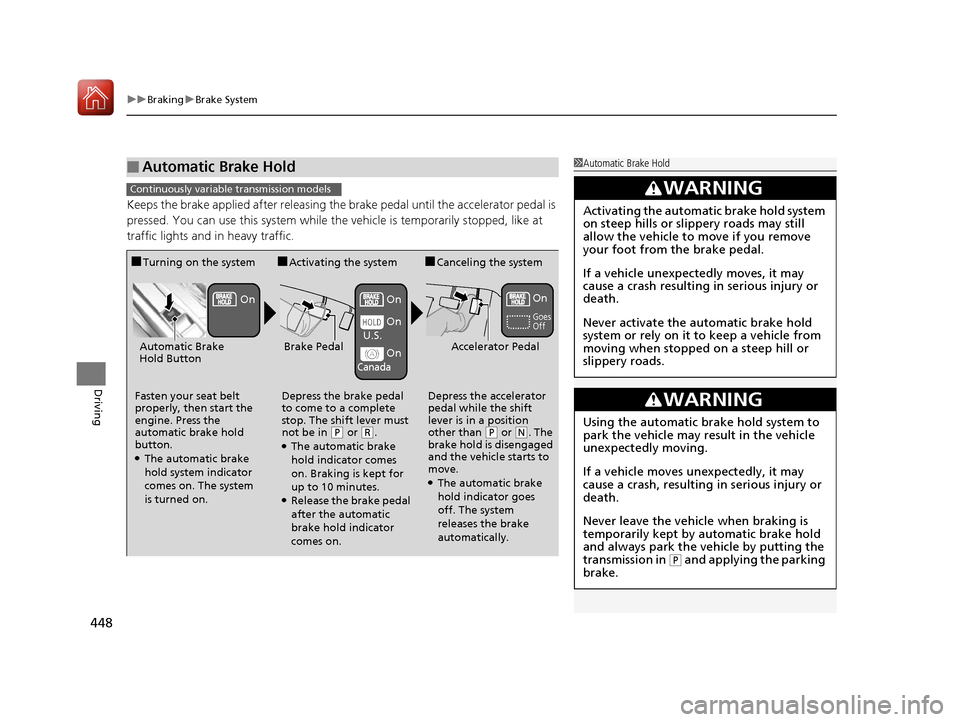
Keeps the brake applied after releasing the brake pedal until the accelerator pedal is
pressed. You can use this system while the vehicle is temporarily stopped, like at
traffic lights and in heavy traffic.
■Automatic Brake Hold1Automatic Brake Hold
3WARNING
Activating the automatic brake hold system
on steep hills or slippery roads may still
allow the vehicle to move if you remove
your foot from the brake pedal.
If a vehicle unexpectedly moves, it may
cause a crash resulting in serious injury or
death.
Never activate the automatic brake hold
system or rely on it to keep a vehicle from
moving when stopped on a steep hill or
slippery roads.
3WARNING
Using the automatic brake hold system to
park the vehicle may result in the vehicle
unexpectedly moving.
If a vehicle moves unexpectedly, it may
cause a crash, resulting in serious injury or
death.
Never leave the vehicle when braking is
temporarily kept by automatic brake hold
and always park the vehicle by putting the
transmission in
(P and applying the parking
brake.
Continuously variable transmission models
■ Turning on the system
Fasten your seat belt
properly, then start the
engine. Press the
automatic brake hold
button. ● The automatic brake
hold system indicator
comes on. The system is turned on. ■
Activating the system
Depress the brake pedal
to come to a complete
stop. The shift lever must
not be in
(P or (R.
● The automatic brake
hold indicator comes
on. Braking is kept for
up to 10 minutes.
● Release the brake pedal
after the automatic
brake hold indicator
comes on. ■
Canceling the system
Depress the accelerator
pedal while the shift
lever is in a position
other than (P or (N. The
brake hold is disengaged
and the vehicle starts to
move.
● The automatic brake
hold indicator goes
off. The system
releases the brake
automatically.
Accelerator PedalBrake PedalAutomatic Brake
Hold Button
Goes Off
On On On
On On
U.S.
Canada
16 CIVIC 2D HC2 (0A 01 0C)-31TBG6000.book 448 ページ >0>.>/6年>0月>/>0日
金曜日 午後4時>/6分
Page 456 of 585
455
uuBrakinguCollision Mitigation Braking SystemTM
(CMBS TM
)*
Continued
Driving
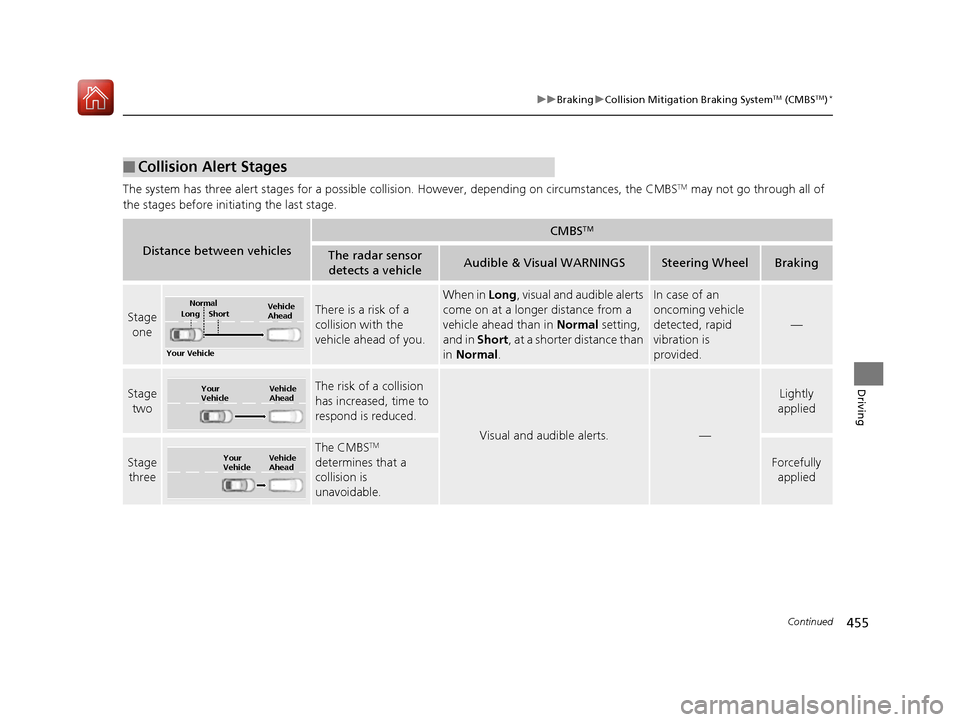
The system has three alert stages for a possible collis
ion. However, depending on circumstances, the CMBS TM
may not go through all of
the stages before initiating the last stage.
■Collision Alert Stages
Distance between vehicles
CMBS TM
The radar sensor
detects a vehicleAudible & Visual WARNINGSSteering WheelBraking
Stage oneThere is a risk of a
collision with the vehicle ahead of you.
When in Long, visual and audible alerts
come on at a longer distance from a
vehicle ahead than in Normal setting,
and in Short, at a shorter distance than
in Normal .In case of an
oncoming vehicle
detected, rapid
vibration is
provided.
—
Stage
twoThe risk of a collision
has increased, time to
respond is reduced.
Visual and audible alerts.—
Lightly
applied
Stage three
The CMBS TM
determines that a
collision is
unavoidable.
Forcefully applied
Your Vehicle Vehicle
Ahead
Normal
Short
Long
Your
Vehicle Vehicle
Ahead
Your
VehicleVehicle
Ahead
16 CIVIC 2D HC2 (0A 01 0C)-31TBG6000.book 455 ページ >0>.>/6年>0月>/>0日
金曜日 午後4時>/6分
Page 532 of 585
531
Continued
Handling the Unexpected
If a Tire Goes Flat
Changing a Flat Tire
If a tire goes flat while driving, grasp
the steering wheel firmly, and brake gradually
to reduce speed. Then, stop in a safe plac e. Replace the flat tire with a compact
spare tire. Go to a dealer as soon as possib le to have the full-size tire repaired or
replaced. 1. Park the vehicle on firm, level, and non-slippery surface, and apply the parking brake.
2. Move the shift lever to
(P .
2. Move the shift lever to
(R .
3. Turn on the hazard warning lights an d turn the ignition switch to LOCK
(0*1
.
*1: Models with the smart entry system have an ENGINE START/STOP button instead of an
ignition switch.
1Changing a Flat Tire
Follow compact spare precautions:
Periodically check the tire pressure of the compact
spare. It should be set to the specified pressure.
Specified Pressure: 60 psi (420 kPa, 4.2 kgf/cm 2
)
When driving with the compact spare tire, keep the
vehicle speed under 50 mph (80 km/h). Replace with
a full-size tire as soon as possible.
The compact spare tire and wheel in your vehicle are
specifically for this model. Do not use them with
another vehicle. Do not us e another type of compact
spare tire or wheel with your vehicle.
Do not mount tire chains on a compact spare tire.
If a chain-mounted front tire goes flat, remove one of
the full-size rear tires and replace it with the compact
spare tire. Remove the flat front tire and replace it
with the full-size tire that was removed from the rear.
Mount the tire chains on the front tire.
NOTICE
Do not use the jack if it doesn’t work properly. Call
your dealer or a prof essional towing service.
Continuously variable transmission models
Manual transmission models
All models
16 CIVIC 2D HC2 (0A 01 0C)-31TBG6000.book 531 ページ >0>.>/6年>0月>/>0日 金曜日 午後4時>/6分
Page 541 of 585
540
Handling the Unexpected
Jump Starting
Jump Starting Procedure
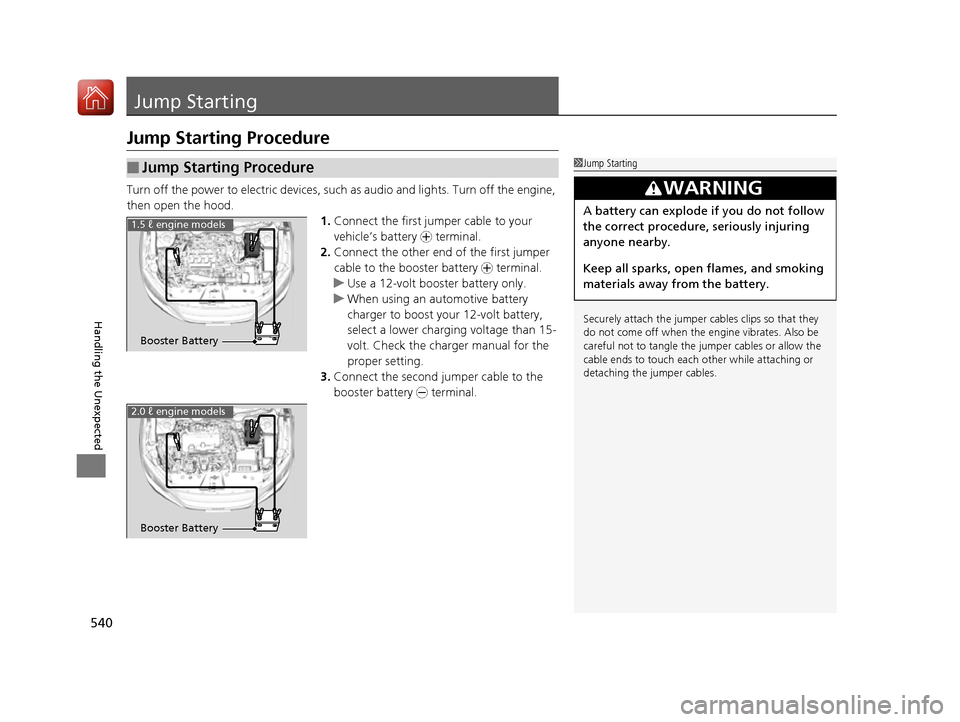
Turn off the power to electric devices, such as audio and lights. Turn off the engine,
then open the hood. 1.Connect the first jump er cable to your
vehicle’s battery + terminal.
2. Connect the other end of the first jumper
cable to the booster battery + terminal.
uUse a 12-volt booster battery only.
uWhen using an automotive battery
charger to boost your 12-volt battery,
select a lower charging voltage than 15-
volt. Check the charger manual for the
proper setting.
3. Connect the second jumper cable to the
booster battery - terminal.
■Jump Starting Procedure1Jump Starting
Securely attach the jumper cables clips so that they do not come off when the e ngine vibrates. Also be
careful not to tangle the ju mper cables or allow the
cable ends to touch each other while attaching or
detaching the jumper cables.
3WARNING
A battery can explode if you do not follow
the correct procedure, seriously injuring
anyone nearby.
Keep all sparks, open flames, and smoking
materials away from the battery.
Booster Battery
1.5 ℓ engine models
2.0 ℓ engine models
Booster Battery
16 CIVIC 2D HC2 (0A 01 0C)-31TBG6000.book 540 ページ >0>.>/6年>0月>/>0日 金曜日 午後4時>/6分
Page 545 of 585
544
Handling the Unexpected
Overheating
How to Handle Overheating
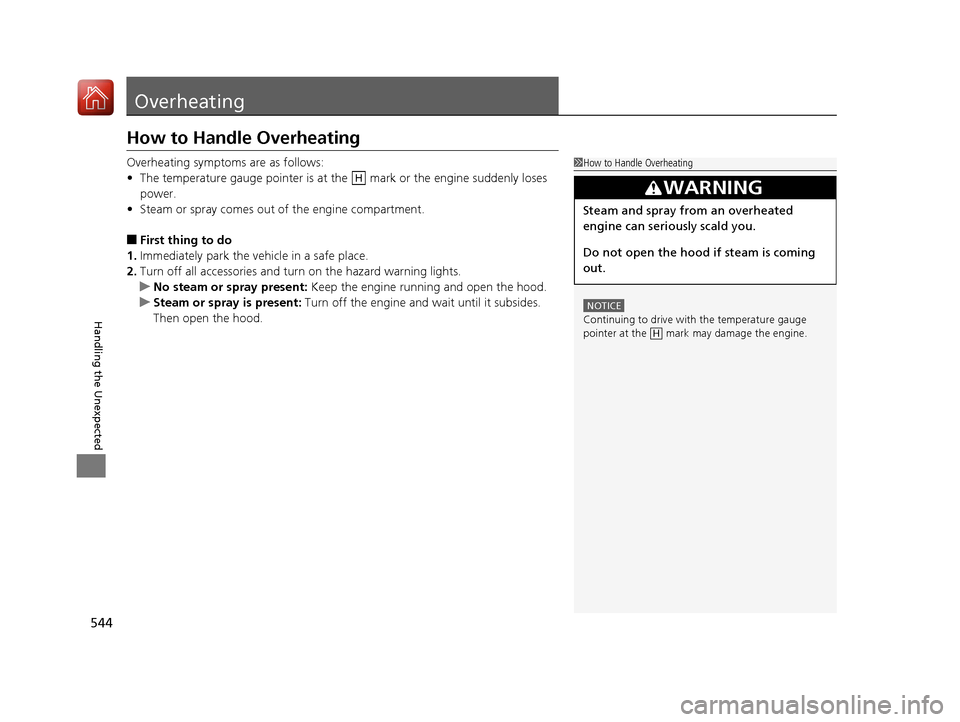
Overheating symptoms are as follows: •The temperature gauge pointer is at the mark or the engine suddenly loses
power.
• Steam or spray comes out of the engine compartment.
■ First thing to do
1. Immediately park the vehicle in a safe place.
2. Turn off all accessories and turn on the hazard warning lights.
uNo steam or spray present: Keep the engine running and open the hood.
uSteam or spray is present: Turn off the engine and wait until it subsides.
Then open the hood.
1How to Handle Overheating
NOTICE
Continuing to drive with the temperature gauge
pointer at the mark may damage the engine.
3WARNING
Steam and spray from an overheated
engine can seriously scald you.
Do not open the hood if steam is coming
out.
H
H
16 CIVIC 2D HC2 (0A 01 0C)-31TBG6000.book 544 ページ >0>.>/6年>0月>/>0日 金曜日 午後4時>/6分
Page 547 of 585
546
Handling the Unexpected
Indicator, Coming On/Blinking
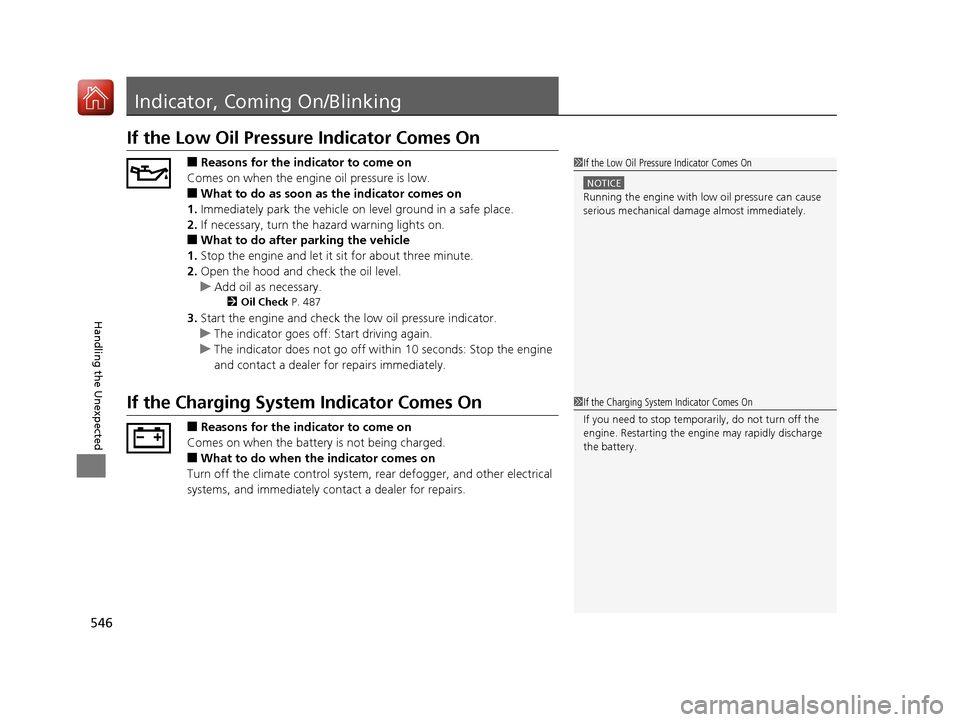
If the Low Oil Pressure Indicator Comes On■Reasons for the indicator to come on
Comes on when the engine oil pressure is low. ■ What to do as soon as the indicator comes on
1. Immediately park the vehicle on level ground in a safe place.
2. If necessary, turn the ha zard warning lights on.
■ What to do after parking the vehicle
1. Stop the engine and let it sit for about three minute.
2. Open the hood and check the oil level.
uAdd oil as necessary.
2 Oil Check P. 487
3. Start the engine and check th e low oil pressure indicator.
uThe indicator goes off: Start driving again.
uThe indicator does not go off within 10 seconds: Stop the engine
and contact a dealer for repairs immediately.
If the Charging System Indicator Comes On
■Reasons for the indicator to come on
Comes on when the battery is not being charged. ■ What to do when the indicator comes on
Turn off the climate con trol system, rear defogger, and other electrical
systems, and immediately contact a dealer for repairs.
1If the Low Oil Pressure Indicator Comes On
NOTICE
Running the engine with low oil pressure can cause
serious mechanical damage almost immediately.
1If the Charging System Indicator Comes On If you need to stop temporarily, do not turn off the
engine. Restarting the engi ne may rapidly discharge
the battery.
16 CIVIC 2D HC2 (0A 01 0C)-31TBG6000.book 546 ページ >0>.>/6年>0月>/>0日 金曜日 午後4時>/6分
Page 560 of 585
559
Handling the Unexpected
Refueling
Refueling From a Portable Fuel Container
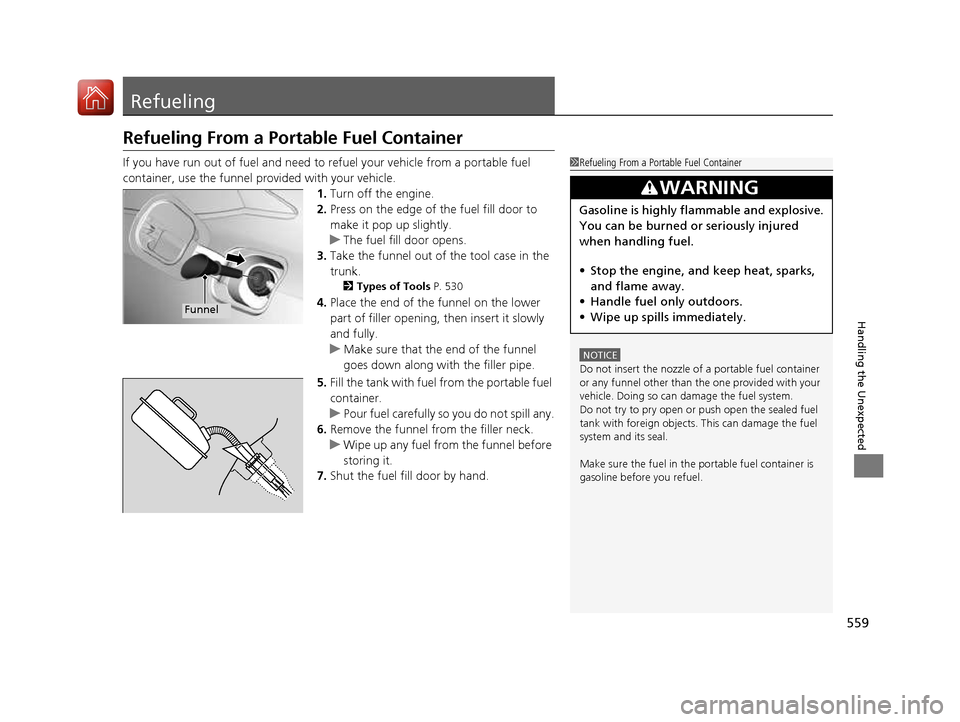
If you have run out of fuel and need to refuel your vehicle from a portable fuel
container, use the funnel provided with your vehicle.
1.Turn off the engine.
2. Press on the edge of the fuel fill door to
make it pop up slightly.
uThe fuel fill door opens.
3. Take the funnel out of the tool case in the trunk.
2 Types of Tools P. 530
4. Place the end of the funnel on the lower
part of filler opening, then insert it slowly
and fully.
uMake sure that the end of the funnel
goes down along with the filler pipe.
5. Fill the tank with fuel from the portable fuel
container.
uPour fuel carefully so you do not spill any.
6. Remove the funnel from the filler neck.
uWipe up any fuel from the funnel before
storing it.
7. Shut the fuel fill door by hand.
1Refueling From a Portable Fuel Container
NOTICE
Do not insert the nozzle of a portable fuel container
or any funnel other than the one provided with your
vehicle. Doing so can damage the fuel system.
Do not try to pry open or push open the sealed fuel tank with foreign objects. This can damage the fuel
system and its seal.
Make sure the fuel in the portable fuel container is
gasoline before you refuel.
3WARNING
Gasoline is highly flammable and explosive.
You can be burned or seriously injured
when handling fuel. • Stop the engine, and keep heat, sparks,
and flame away.
• Handle fuel only outdoors.
• Wipe up spills immediately.
Funnel
16 CIVIC 2D HC2 (0A 01 0C)-31TBG6000.book 559 ページ >0>.>/6年>0月>/>0日 金曜日 午後4時>/6分
Page 579 of 585
578
Index
FluidsBrake/Clutch ............................................ 496
Continuously Variable Transmission ......... 495
Engine Coolant ........................................ 493
Manual Transmission ............................... 495
Windshield Washer .................................. 497
FM/AM Radio .................................... 202, 242
Fog Light Indicator ..................................... 83
Folding Down the Rear Seats ................... 166
Foot Brake ................................................. 447
Front Airbags (SRS) ..................................... 47
Front Head Restraints ............................... 162
Front Seats ................................................ 159
Adjusting ................................................. 160
Front Sensor Camera ................................ 408
Fuel ...................................................... 25, 464
Economy ................................................. 467
Gauge ..................................................... 105
Instant Fuel Economy ....................... 107, 112
Low Fuel Indicator ..................................... 79
Range .............................................. 107, 111
Recommendation .................................... 464
Refueling ................................................. 464
Fuel Economy ............................................ 467
Fuel Fill Door ....................................... 25, 465
Fuses .......................................................... 552
Inspecting and Changing ......................... 555
Locations ......................................... 552, 553 G
Gasoline (Fuel)
Economy ................................................. 467
Gauge ..................................................... 105
Information ............................................. 464
Instant Fuel Economy ...................... 107, 112
Low Fuel Indicator ..................................... 79
Refueling................................................. 464
Gauges ...................................................... 105
Gear Shift Lever Positions Continuously Variable Transmission ......... 395
Continuously Variab le Transmission
(CVT) ..................................................... 397
Manual Transmission ............................... 402
Glass (care) ........................................ 524, 527
Glove Box .................................................. 170
H
Halogen Bulbs .................................. 498, 501
Handling the Unexpected ........................ 529
HandsFreeLink ® (HFL) ....................... 323, 346
Automatic Import of Ce llular Phonebook and
Call History ............................................ 359
Displaying Messages................................ 373
HFL Buttons..................................... 323, 346
HFL Menus ...................................... 325, 349
HFL Status Display ........................... 324, 348
In Case of Emergency .............................. 377
Limitations for Manual Operation .... 324, 348 Making a Call ................................. 340, 367
Options During a Call...................... 345, 370
Phone Setup ................................... 329, 354
Phonebook Phonetic M
odification........... 363
Receiving a Call............................... 344, 370
Receiving a Text/E-mail Message ............. 371
Ring Tone ............................................... 358
Selecting a Mail Account......................... 372
Speed Dial ...................................... 336, 360
To Set Up Text/E-mail Message Options ................................................. 357
Hazard Warning Button .............................. 4
HD Radio TM
............................................... 242
Headlights ................................................ 148
Aiming.................................................... 498
Automatic Operation .............................. 149
Dimming......................................... 148, 151
Operating ............................................... 148
Heaters (Seat) ........................................... 178
Heating and Cooling System Dust and Pollen Filter .............................. 523
HFL (HandsFreeLink ®) ...................... 323, 346
High Beam Indicator .................................. 83
Hill Start Assist System ..................... 387, 392
HondaLink ®.............................................. 268
I
Identification Numbers ............................ 566
Vehicle Identification............................... 566
Ignition Switch ......................................... 143
16 CIVIC 2D HC2 (0A 01 0C)-31TBG6000.book 578 ページ >0>.>/6年>0月>/>0日 金曜日 午後4時>/6分