Page 224 of 585
Continued223
uuAudio System Basic OperationuAudio/Information Screen
Features
You can change, store, and delete the wallpaper on the audio/information screen.
■ Import wallpaper
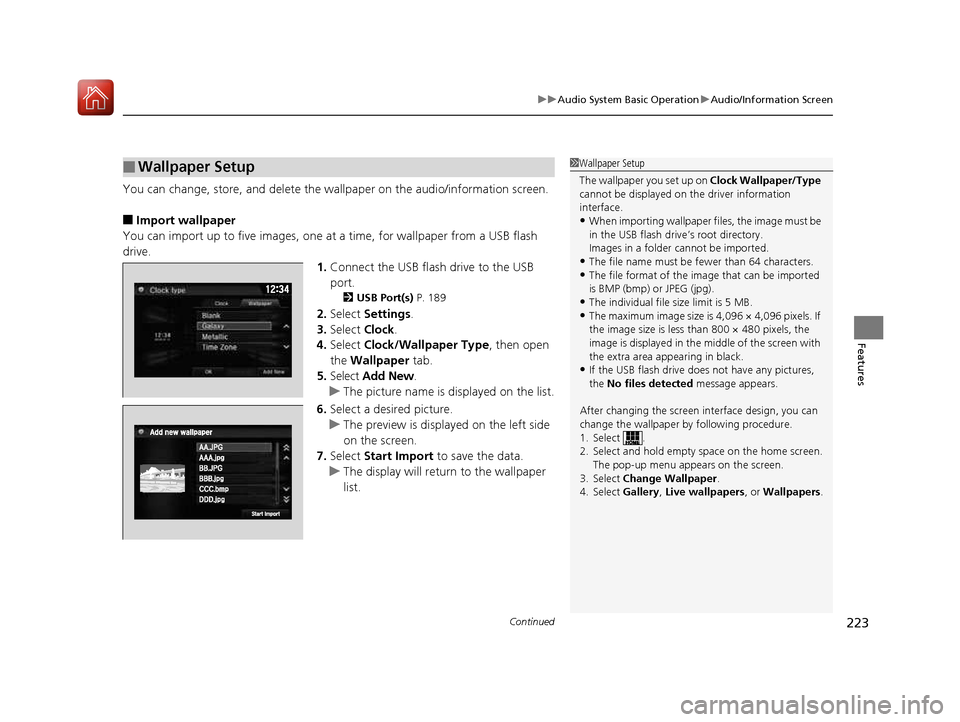
You can import up to five images, one at a time, for wallpaper from a USB flash
drive. 1.Connect the USB flash drive to the USB
port.
2 USB Port(s) P. 189
2. Select Settings .
3. Select Clock.
4. Select Clock/Wallpaper Type , then open
the Wallpaper tab.
5. Select Add New .
uThe picture name is displayed on the list.
6. Select a desired picture.
uThe preview is displayed on the left side
on the screen.
7. Select Start Import to save the data.
uThe display will return to the wallpaper
list.
■Wallpaper Setup1Wallpaper Setup
The wallpaper you set up on Clock Wallpaper/Type
cannot be displayed on th e driver information
interface. • When importing wallpaper files, the image must be
in the USB flash driv e’s root directory.
Images in a folder cannot be imported.
• The file name must be fewer than 64 characters.
• The file format of the im age that can be imported
is BMP (bmp) or JPEG (jpg).
• The individual file size limit is 5 MB.
• The maximum image size is 4,096 × 4,096 pixels. If
the image size is less than 800 × 480 pixels, the
image is displayed in the middle of the screen with
the extra area appearing in black.
• If the USB flash drive doe s not have any pictures,
the No files detected message appears.
After changing the screen interface design, you can change the wallpaper by following procedure.
1. Select .
2. Select and hold empty space on the home screen. The pop-up menu appears on the screen.
3. Select Change Wallpaper .
4. Select Gallery, Live wallpapers , or Wallpapers .
16 CIVIC 2D HC2 (0A 01 0C)-31TBG6000.book 223 ページ >0>.>/6年>0月>/>0日 金曜日 午後4時>/6分
Page 225 of 585
uuAudio System Basic OperationuAudio/Information Screen
224
Features
■ Select wallpaper
1. Select Settings .
2. Select Clock.
3. Select Clock/Wallpaper Type , then open the Wallpaper tab.
uThe screen changes to the wallpaper list.
4. Select a desired wallpaper.
uThe preview is displayed on the left side on the screen.
uThe pop-up menu appears on the screen.
5. Select Set.
uThe display will return to the wallpaper list.
■ To view wallpaper once it is set
1. Select .
2. Select Info.
3. Select .
4. Select Clock/Wallpaper .
■ Delete wallpaper
1. Select Settings .
2. Select Clock.
3. Select Clock/Wallpaper Type , then open the Wallpaper tab.
uThe screen changes to the wallpaper list.
4. Select a wallpaper that you want to delete.
uThe preview is displayed on the left side on the screen.
uThe pop-up menu appears on the screen.
5. Select Delete .
uA confirmation message appears on the screen.
6. Select Yes to delete completely.
uThe display will return to the wallpaper list.
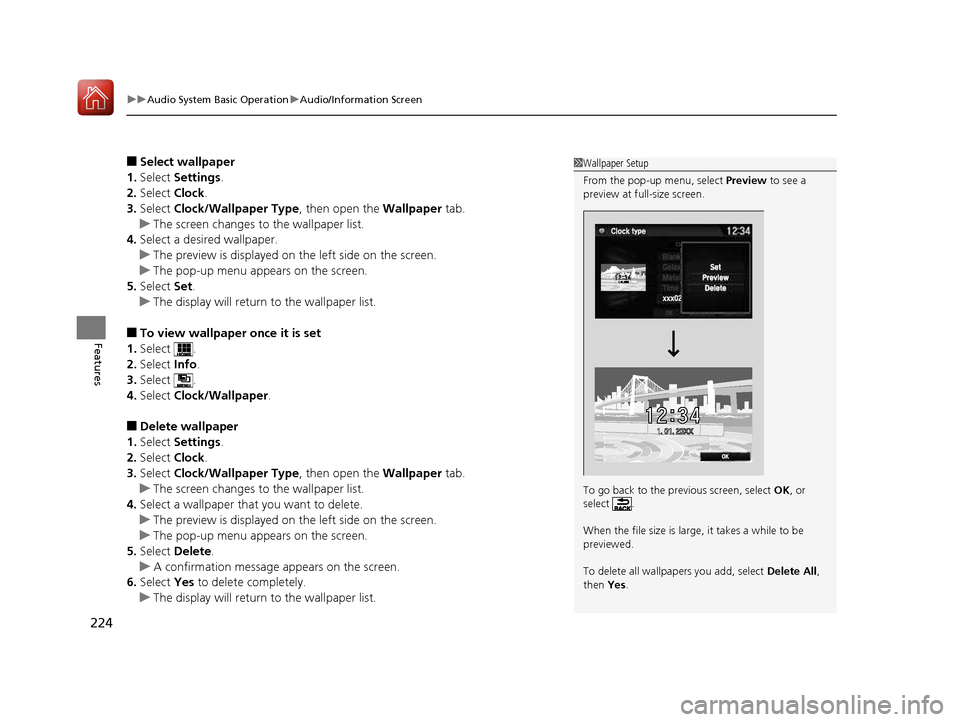
1Wallpaper Setup
From the pop-up menu, select Preview to see a
preview at full-size screen.
To go back to the previous screen, select OK, or
select .
When the file size is large, it takes a while to be previewed.
To delete all wallpapers you add, select Delete All,
then Yes.
16 CIVIC 2D HC2 (0A 01 0C)-31TBG6000.book 224 ページ >0>.>/6年>0月>/>0日 金曜日 午後4時>/6分
Page 291 of 585
290
uuGeneral Information on the Audio SystemuAbout Open Source Licenses
Features
About Open Source Licenses
To see the open source license information, follow these steps.
1. Press the MENU/CLOCK button.
2. Rotate to select Settings, then press .
3. Rotate to select OSS Licenses, then press .
1. Select .
2. Select Settings .
3. Select System .
4. Select the Others tab.
5. Select Detail Info .
6. Select About device .
7. Select Legal information .
8. Select Open source licenses .
1About Open Source Licenses LICENCE: Copyright © 2001 Bob Trower, Trantor
Standard Systems Inc.
Permission is hereby grante d, free of charge, to any
person obtaining a copy of this software and associated documentation file s (the “Software”), to
deal in the Software wit hout restriction, including
without limitation the rights to use, copy, modify,
merge, publish, distribute, sublicense, and/or sell
copies of the Software, and to permit persons to
whom the Software is furnished to do so, subject to
the following conditions:
The above copyright notice and this permission
notice shall be included in all copies or substantial
portions of the Software.
THE SOFTWARE IS PROVIDED “AS IS”, WITHOUT
WARRANTY OF ANY KIND, EXPRESS OR IMPLIED,
INCLUDING BUT NOT LIMITED TO THE WARRANTIES
OF MERCHANTABILITY, FITNESS FOR A PARTICULAR
PURPOSE AND NONINFRINGEMENT. IN NO EVENT
SHALL THE AUTHORS OR COPYRIGHT HOLDERS BE
LIABLE FOR ANY CLAIM, DAMAGES OR OTHER
LIABILITY, WHETHER IN AN ACTION OF CONTRACT,
TORT OR OTHERWISE, ARISING FROM, OUT OF OR IN
CONNECTION WITH THE SOFTWARE OR THE USE OR
OTHER DEALINGS IN THE SOFTWARE.
Models with color audio system
Models with Display Audio
16 CIVIC 2D HC2 (0A 01 0C)-31TBG6000.book 290 ページ >0>.>/6年>0月>/>0日 金曜日 午後4時>/6分
Page 293 of 585
292
Features
Customized Features
Use the audio/information screen to customize certain features.
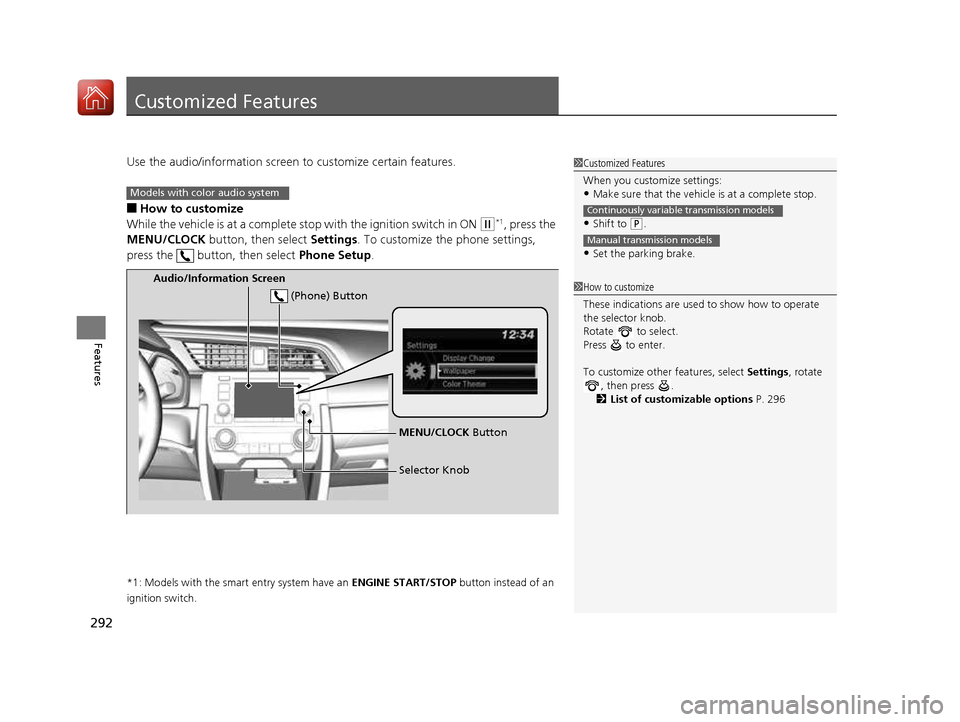
■ How to customize
While the vehicle is at a complete st op with the ignition switch in ON
(w*1
, press the
MENU/CLOCK button, then select Settings. To customize the phone settings,
press the button, then select Phone Setup.
*1: Models with the smart entry system have an ENGINE START/STOP button instead of an
ignition switch.
1Customized Features
When you customize settings: • Make sure that the vehicle is at a complete stop.
• Shift to
(P .
• Set the parking brake.
Continuously variable transmission models
Manual transmission models
1How to customize
These indications are used to show how to operate
the selector knob.
Rotate to select.
Press to enter.
To customize other features, select Settings, rotate
, then press .
2 List of customizable options P. 296
Models with color audio system
Audio/Information Screen
MENU/CLOCK Button
Selector Knob
(Phone) Button
16 CIVIC 2D HC2 (0A 01 0C)-31TBG6000.book 292 ページ >0>.>/6年>0月>/>0日
金曜日 午後4時>/6分
Page 294 of 585
293
uuCustomized Featuresu
Continued
Features
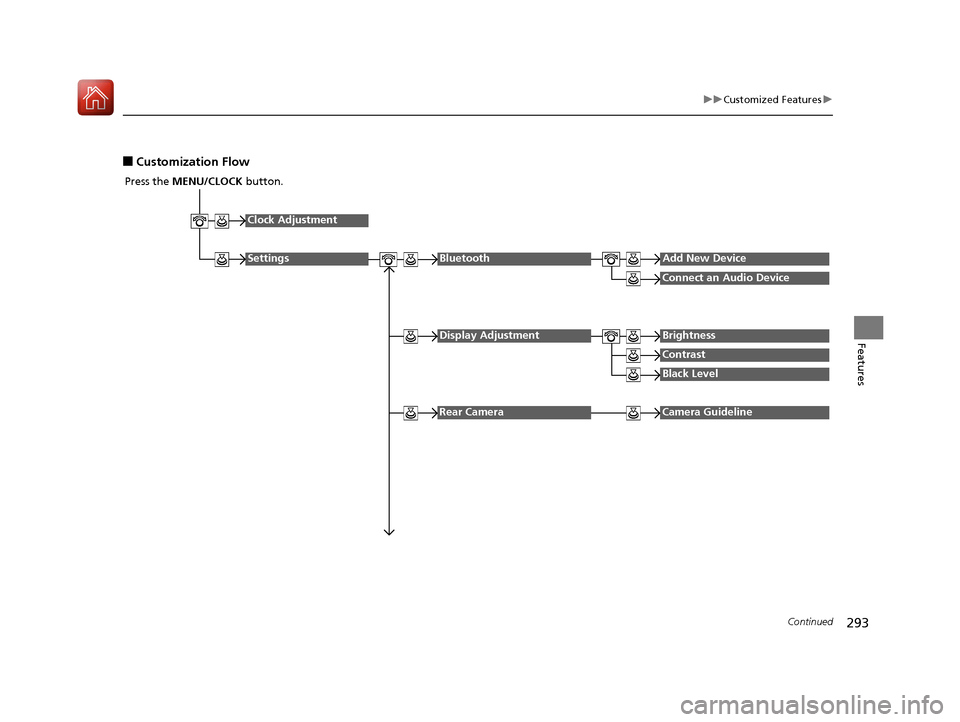
■Customization Flow
Press the MENU/CLOCK button.
Clock Adjustment
SettingsBluetoothAdd New Device
Connect an Audio Device
Display AdjustmentBrightness
Contrast
Black Level
Rear CameraCamera Guideline
16 CIVIC 2D HC2 (0A 01 0C)-31TBG6000.book 293 ページ >0>.>/6年>0月>/>0日 金曜日 午後4時>/6分
Page 297 of 585
296
uuCustomized Featuresu
Features
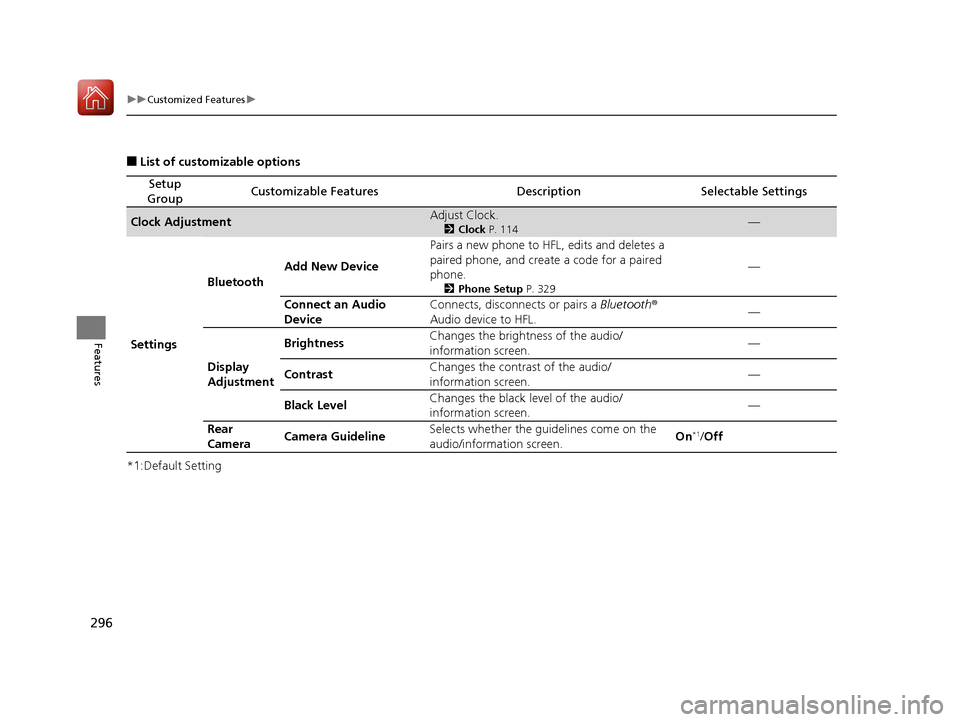
■List of customizable options
*1:Default Setting
Setup
GroupCustomizable FeaturesDescriptionSelectable Settings
Clock AdjustmentAdjust Clock. 2Clock P. 114—
Settings Bluetooth
Add New Device Pairs a new phone to HFL, edits and deletes a
paired phone, and create a code for a paired
phone.
2Phone Setup P. 329 —
Connect an Audio
Device Connects, disconnects or pairs a
Bluetooth®
Audio device to HFL. —
Display
Adjustment Brightness
Changes the brightness of the audio/
information screen.
—
Contrast Changes the contrast of the audio/
information screen. —
Black Level Changes the black level of the audio/
information screen. —
Rear
Camera Camera Guideline Selects whether the guidelines come on the
audio/information screen.
On
*1
/Off
16 CIVIC 2D HC2 (0A 01 0C)-31TBG6000.book 296 ページ >0>.>/6年>0月>/>0日 金曜日 午後4時>/6分
Page 298 of 585
297
uuCustomized Featuresu
Continued
Features
*1:Default Setting
Setup
GroupCustomizable FeaturesDescriptionSelectable Settings
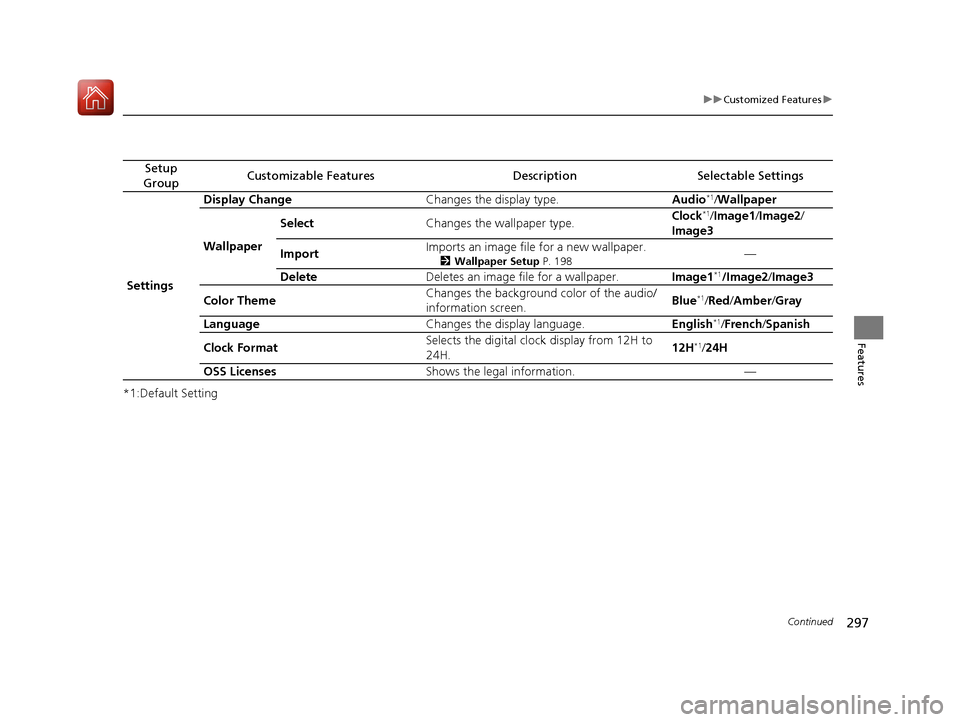
Settings Display Change
Changes the display type. Audio*1
/Wallpaper
Wallpaper Select
Changes the wallpaper type. Clock
*1
/Image1 /Image2 /
Image3
Import Imports an image file for a new wallpaper.
2Wallpaper Setup P. 198 —
Delete Deletes an image file for a wallpaper. Image1*1
/Image2 /Image3
Color Theme Changes the background color of the audio/
information screen.
Blue
*1
/Red /Amber /Gray
Language Changes the display language. English*1
/French /Spanish
Clock Format Selects the digital clock display from 12H to
24H.
12H
*1
/24H
OSS Licenses Shows the legal information. —
16 CIVIC 2D HC2 (0A 01 0C)-31TBG6000.book 297 ページ >0>.>/6年>0月>/>0日 金曜日 午後4時>/6分
Page 301 of 585
300
uuCustomized Featuresu
Features
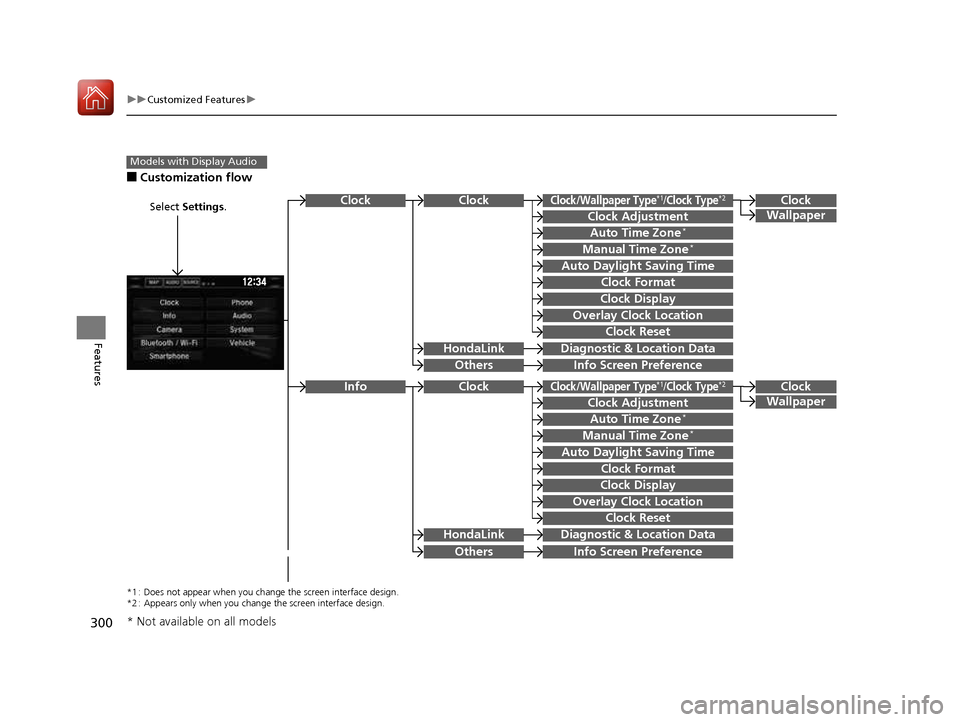
■Customization flow
Models with Display Audio
Select Settings .Clock
Wallpaper
Others
Clock/Wallpaper Type*1/Clock Type*2
Clock Adjustment
Clock Format
ClockClock
Auto Time Zone *
Manual Time Zone *
Auto Daylight Saving Time
Clock Display
Overlay Clock Location
Clock Reset
Info Screen Preference
Clock
Wallpaper
Others
Clock/Wallpaper Type*1/Clock Type*2
Clock Adjustment
Clock Format
Clock
Auto Time Zone*
Manual Time Zone *
Auto Daylight Saving Time
Clock Display
Overlay Clock Location
Clock Reset
Info Screen Preference
Info
HondaLinkDiagnostic &
Location Data
HondaLinkDiagnostic & Location Data
*1 : Does not appear when you chang e the screen interface design.
*2 : Appears only when you change the screen interface design.
* Not available on all models
16 CIVIC 2D HC2 (0A 01 0C)-31TBG6000.book 300 ページ >0>.>/6年>0月>/>0日 金曜日 午後4時>/6分