2016 HONDA CIVIC COUPE mirror
[x] Cancel search: mirrorPage 425 of 585
424
uuWhen DrivinguRoad Departure Mitigation (RDM) System*
Driving
Road Departure Mitigation (RDM) System *
Alerts and helps to assist you when the sy stem detects a possibility of your vehicle
unintentionally crossing over detected lane markings.
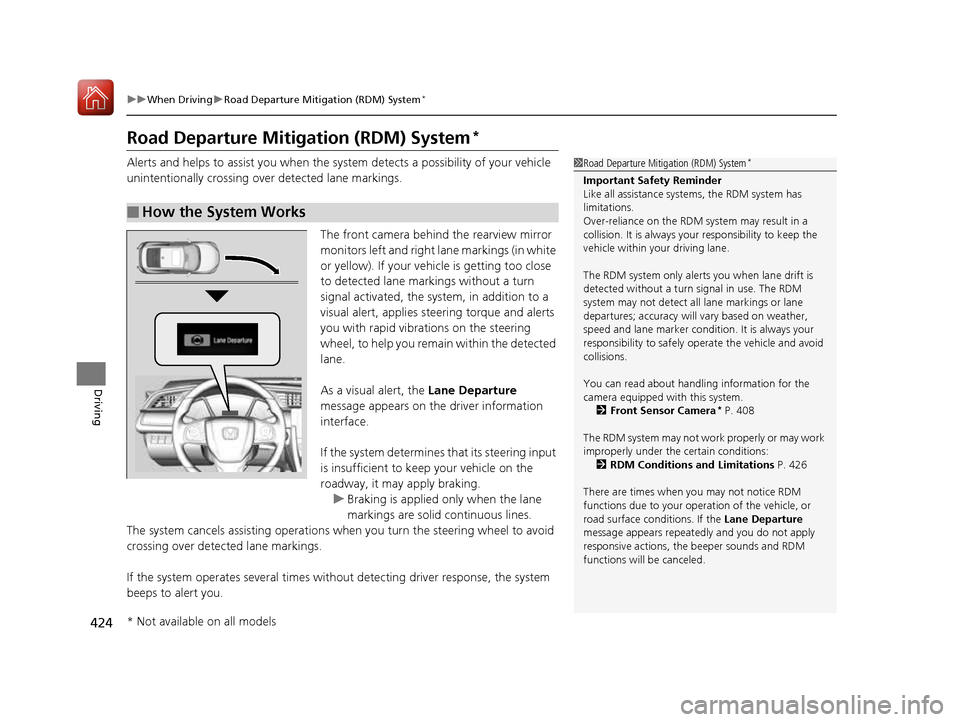
The front camera behind the rearview mirror monitors left and right lane markings (in white
or yellow). If your vehicle is getting too close
to detected lane markings without a turn
signal activated, the sy stem, in addition to a
visual alert, applies st eering torque and alerts
you with rapid vibrations on the steering
wheel, to help you remain within the detected lane.
As a visual alert, the Lane Departure
message appears on the driver information interface.
If the system determines that its steering input
is insufficient to keep your vehicle on the
roadway, it may apply braking.
uBraking is applied only when the lane
markings are solid continuous lines.
The system cancels assisting operations wh en you turn the steering wheel to avoid
crossing over detected lane markings.
If the system operates several times without detecting driver response, the system
beeps to alert you.
■How the System Works
1Road Departure Mitigation (RDM) System *
Important Safety Reminder
Like all assistance systems, the RDM system has
limitations.
Over-reliance on the RDM system may result in a
collision. It is always your responsibility to keep the
vehicle within your driving lane.
The RDM system only alerts you when lane drift is
detected without a turn signal in use. The RDM
system may not detect all lane markings or lane
departures; accuracy will vary based on weather,
speed and lane marker condi tion. It is always your
responsibility to sa fely operate the vehicle and avoid
collisions.
You can read about handling information for the
camera equipped with this system.
2 Front Sensor Camera *
P. 408
The RDM system may not wo rk properly or may work
improperly under the certain conditions: 2 RDM Conditions and Limitations P. 426
There are times when you may not notice RDM
functions due to your opera tion of the vehicle, or
road surface conditions. If the Lane Departure
message appears repeated ly and you do not apply
responsive actions, the beeper sounds and RDM
functions will be canceled.
* Not available on all models
16 CIVIC 2D HC2 (0A 01 0C)-31TBG6000.book 424 ページ >0>.>/6年>0月>/>0日 金曜日 午後4時>/6分
Page 434 of 585
433
uuWhen DrivinguLane Keeping Assist System (LKAS)*
Continued
Driving
■
The LKAS may automatically be canceled when:
• The camera temperature gets extremely high or low.
• The camera behind the rearview mirror, or the area around the camera, including
the windshield, gets dirty.
The beeper sounds if the LKAS is automatically canceled.
The system may not detect lane markings and therefore may not keep the vehicle in
the middle of a lane under certain conditions, including the following: ■ Environmental conditions
• Driving in bad weather (rain, fog, snow, etc.).
• Sudden changes between light and dark, such as an entrance or exit of a tunnel.
• There is little contrast between la ne lines and the roadway surface.
• Driving into low sunlight (e.g., at dawn or dusk).
• Strong light is reflec ted onto the roadway.
• Driving in the shadows of trees, buildings, etc.
• Shadows of adjacent objects are parallel to lane markings.
• Roadway objects or structures are misinterpreted as lane markers.
• Reflections on the interior of the front windshield.
■LKAS Conditions and Limitations
16 CIVIC 2D HC2 (0A 01 0C)-31TBG6000.book 433 ページ >0>.>/6年>0月>/>0日 金曜日 午後4時>/6分
Page 439 of 585
438
uuWhen DrivinguLaneWatchTM
*
Driving
LaneWatch TM
*
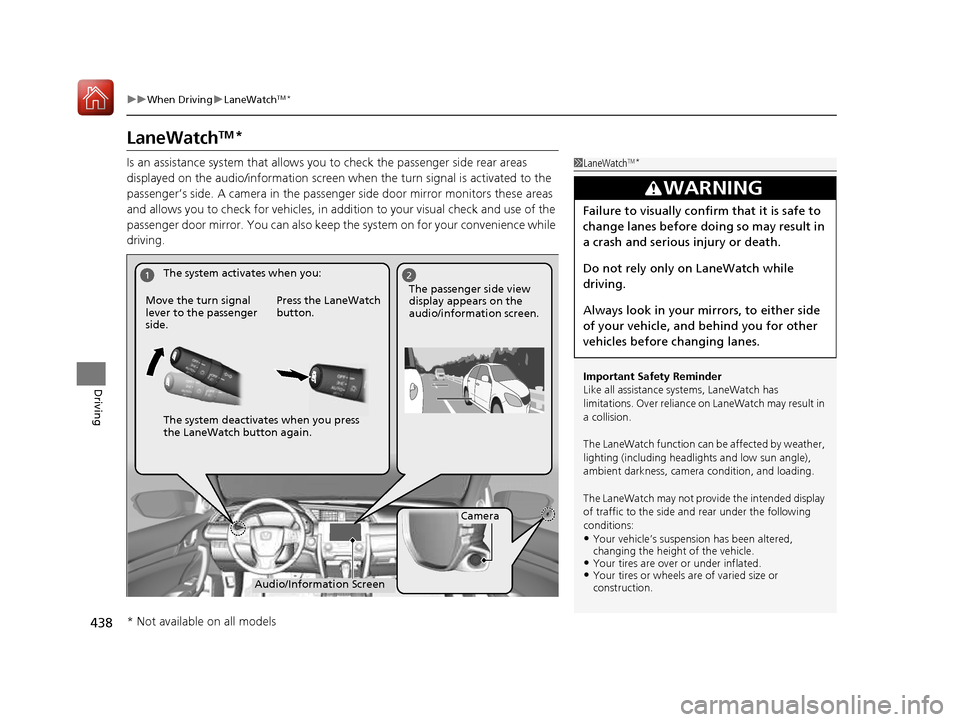
Is an assistance system that allows y ou to check the passenger side rear areas
displayed on the audio/information screen when the turn signal is activated to the
passenger’s side. A camera in the passenger side door mirror monitors these areas
and allows you to check for vehicles, in addition to your visual check and use of the
passenger door mirror. You can also keep th e system on for your convenience while
driving.
1LaneWatch TM
*
Important Safety Reminder
Like all assistance systems, LaneWatch has
limitations. Over reliance on LaneWatch may result in
a collision.
The LaneWatch function can be affected by weather,
lighting (including headli ghts and low sun angle),
ambient darkness, camera condition, and loading.
The LaneWatch may not prov ide the intended display
of traffic to the side a nd rear under the following
conditions: • Your vehicle’s suspensi on has been altered,
changing the height of the vehicle.
• Your tires are over or under inflated.
• Your tires or wheels are of varied size or construction.
3WARNING
Failure to visually confirm that it is safe to
change lanes before doing so may result in
a crash and serious injury or death.
Do not rely only on LaneWatch while
driving.
Always look in your mi rrors, to either side
of your vehicle, and behind you for other
vehicles before changing lanes.
12
Camera
Audio/Information Screen
Move the turn signal
lever to the passenger side.
Press the LaneWatch
button.
The passenger side view display appears on the
audio/information screen.
The system activates when you:
The system deactivates when you press
the LaneWatch button again.
* Not available on all models
16 CIVIC 2D HC2 (0A 01 0C)-31TBG6000.book 438 ページ >0>.>/6年>0月>/>0日
金曜日 午後4時>/6分
Page 440 of 585
439
uuWhen DrivinguLaneWatchTM
*
Driving
■ Customizing the La neWatch settings
You can customize the following items using the audio/information screen. • Show with Turn Signal : Selects whether LaneWatch monitor comes on when
you operate the turn signal light lever.
• Display Time after Turn Signal Off : Changes the length of time the LaneWatch
display stays on after you pull the turn signal lever back.
• Reference Line : Selects whether the reference lines appear on the LaneWatch
monitor.
• Display : Allows for display adjustments of items, such as brightness, contrast and
black level. This setting is part of the System setup group.
2 Customized Features P. 292
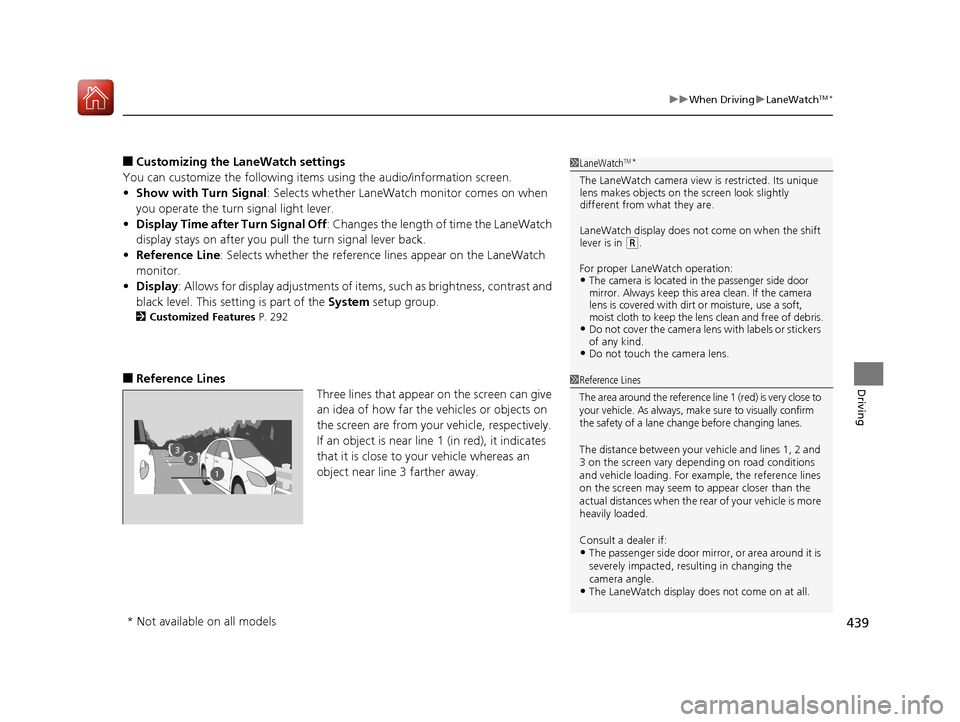
■ Reference Lines
Three lines that appear on the screen can give
an idea of how far the vehicles or objects on
the screen are from your vehicle, respectively.
If an object is near line 1 (in red), it indicates
that it is close to your vehicle whereas an
object near line 3 farther away.1LaneWatchTM
*
The LaneWatch camera view is restricted. Its unique
lens makes objects on the screen look slightly
different from what they are.
LaneWatch display does not come on when the shift
lever is in
(R .
For proper LaneWatch operation: • The camera is located in the passenger side door
mirror. Always keep this area clean. If the camera
lens is covered with dirt or moisture, use a soft,
moist cloth to keep the lens clean and free of debris.
• Do not cover the camera lens with labels or stickers
of any kind.
• Do not touch the camera lens.
23
1
1Reference Lines
The area around the reference lin e 1 (red) is very close to
your vehicle. As always, m ake sure to visually confirm
the safety of a lane chan ge before changing lanes.
The distance betwee n your vehicle and lines 1, 2 and
3 on the screen vary depending on road conditions
and vehicle loading. For ex ample, the reference lines
on the screen may seem to appear closer than the
actual distances when the rear of your vehicle is more
heavily loaded. Consult a dealer if:
• The passenger side door mirr or, or area around it is
severely impacted, resulting in changing the camera angle.
• The LaneWatch display doe s not come on at all.
* Not available on all models
16 CIVIC 2D HC2 (0A 01 0C)-31TBG6000.book 439 ページ >0>.>/6年>0月>/>0日 金曜日 午後4時>/6分
Page 454 of 585
453
uuBrakinguCollision Mitigation Braking SystemTM
(CMBS TM
)*
Continued
Driving
Collision Mitigation Braking System TM
(CMBS TM
)*
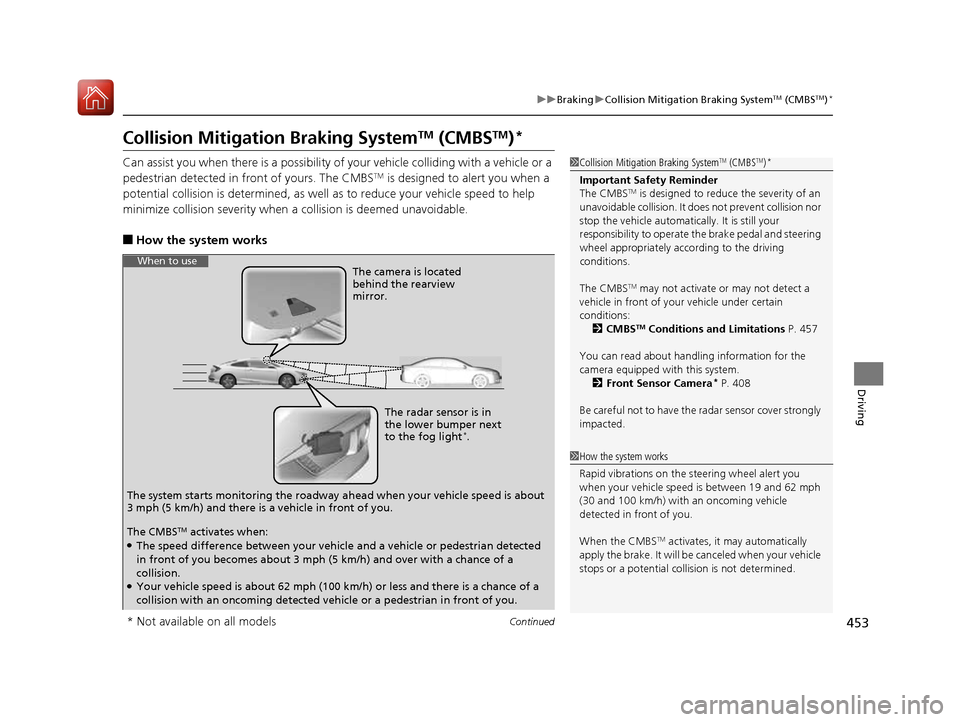
Can assist you when there is a possibility of your vehicle colliding with a vehicle or a
pedestrian detected in front of yours. The CMBS TM
is designed to alert you when a
potential collision is determined, as well as to reduce your vehicle speed to help
minimize collision severity when a collision is deemed unavoidable.
■ How the system works
1Collision Mitigation Braking System TM
(CMBS TM
)*
Important Safety Reminder
The CMBS TM
is designed to reduce the severity of an
unavoidable collision. It doe s not prevent collision nor
stop the vehicle automatically. It is still your
responsibility to operate the brake pedal and steering
wheel appropriately acco rding to the driving
conditions.
The CMBS TM
may not activate or may not detect a
vehicle in front of y our vehicle under certain
conditions:
2 CMBS TM
Conditions and Limitations P. 457
You can read about handling information for the
camera equipped with this system. 2 Front Sensor Camera *
P. 408
Be careful not to have the radar sensor cover strongly
impacted.
1How the system works
Rapid vibrations on the steering wheel alert you
when your vehicle speed is between 19 and 62 mph
(30 and 100 km/h) with an oncoming vehicle
detected in front of you.
When the CMBS TM
activates, it may automatically
apply the brake. It will be canceled when your vehicle
stops or a potential coll ision is not determined.
The radar sensor is in
the lower bumper next
to the fog light*
.
The camera is located
behind the rearview mirror.
The system starts monitoring the roadway ah ead when your vehicle speed is about
3 mph (5 km/h) and there is a vehicle in front of you.
When to use
The CMBS TM
activates when:
● The speed difference between your vehicle and a vehicle or pedestrian detected
in front of you becomes about 3 mph (5 km/h) and over with a chance of a
collision.
● Your vehicle speed is about 62 mph (100 km/h) or less and there is a chance of a
collision with an oncoming detected ve hicle or a pedestrian in front of you.
* Not available on all models
16 CIVIC 2D HC2 (0A 01 0C)-31TBG6000.book 453 ページ >0>.>/6年>0月>/>0日 金曜日 午後4時>/6分
Page 527 of 585
526
uuCleaninguExterior Care
Maintenance
Exterior Care
Dust off the vehicle body after you drive.
Regularly inspect your vehicle for scratches on painted surfaces. A scratch on a
painted surface can result in body rust. If you find a scratch, promptly repair it.
Wash the vehicle regularly. Wash more frequently when driving in the following
conditions: • If driving on roads with road salt.
• If driving in coastal areas.
• If tar, soot, bird droppings, insects, or tree sap are stuck to painted surfaces.
• Make sure to follow the instructions indicated on the automated car wash.
• Fold in the door mirrors.
• Turn off the automatic intermittent wipers *
.
• Keep sufficient distance between the cleaning nozzl e and the vehicle body.
• Take particular care around the windows. St anding too close may cause water to
enter the vehicle interior.
• Do not spray high pressure water directly into the engine compartment. Instead,
use low pressure water and a mild detergent.
■Washing the Vehicle
■Using an Automated Car Wash
■Using High Pressure Cleaners
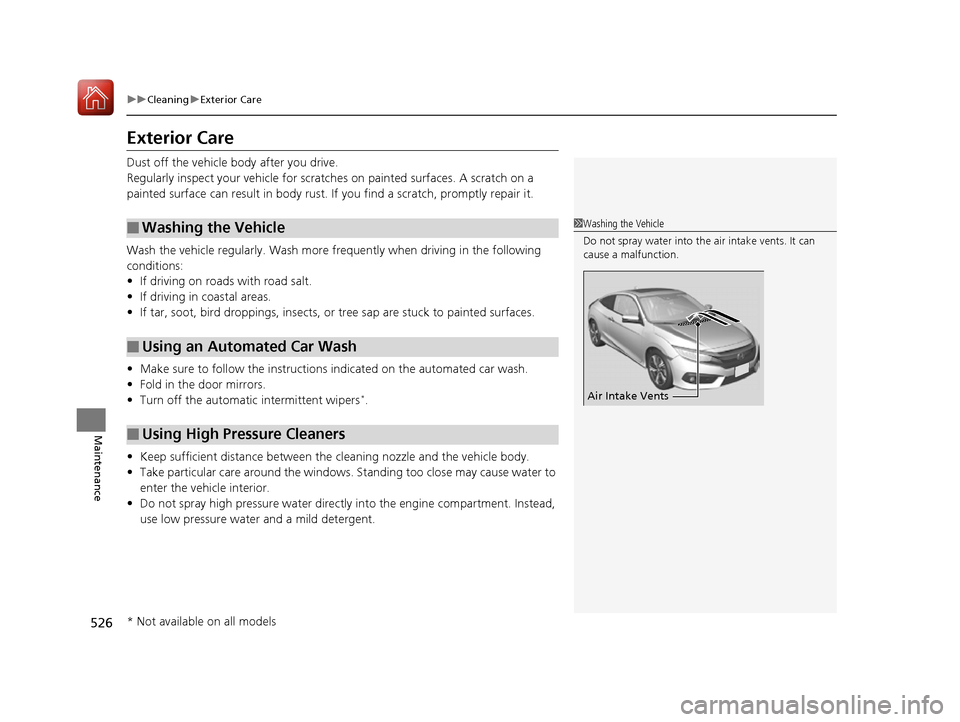
1Washing the Vehicle
Do not spray water into the air intake vents. It can cause a malfunction.
Air Intake Vents
* Not available on all models
16 CIVIC 2D HC2 (0A 01 0C)-31TBG6000.book 526 ページ >0>.>/6年>0月>/>0日 金曜日 午後4時>/6分
Page 565 of 585
564
uuSpecificationsu
Information
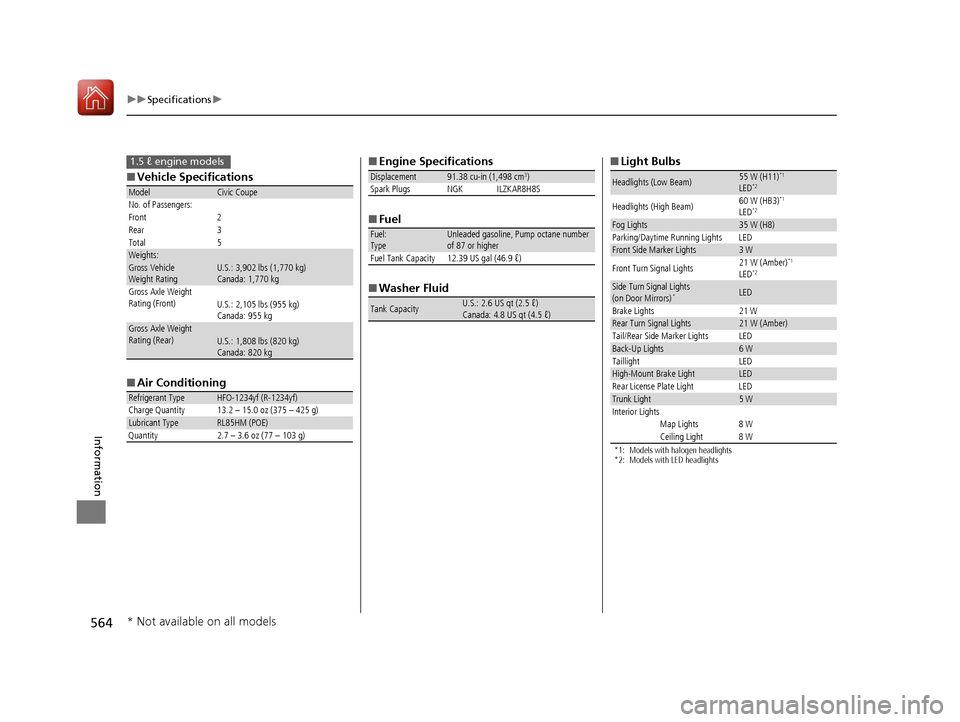
■Vehicle Specifications
■Air Conditioning
ModelCivic Coupe
No. of Passengers:
Front 2
Rear 3
Total 5
Weights:Gross Vehicle
Weight Rating U.S.: 3,902 lbs (1,770 kg)
Canada: 1,770 kg
Gross Axle Weight
Rating (Front)U.S.: 2,105 lbs (955 kg)
Canada: 955 kg
Gross Axle Weight
Rating (Rear)U.S.: 1,808 lbs (820 kg)
Canada: 820 kg
Refrigerant TypeHFO-1234yf (R-1234yf)
Charge Quantity 13.2 – 15.0 oz (375 – 425 g)
Lubricant TypeRL85HM (POE)
Quantity 2.7 – 3.6 oz (77 – 103 g)
1.5 ℓ engine models■Engine Specifications
■Fuel
■Washer Fluid
Displacement91.38 cu-in (1,498 cm 3
)
Spark Plugs NGK ILZKAR8H8S
Fuel: TypeUnleaded gasoline, Pump octane number
of 87 or higher
Fuel Tank Capacity 12.39 US gal (46.9 ℓ)
Tank CapacityU.S.: 2.6 US qt (2.5 ℓ)
Canada: 4.8 US qt (4.5 ℓ)
■Light Bulbs
*1: Models with halogen headlights
*2: Models with LED headlights
Headlights (Low Beam)55 W (H11) *1
LED *2
Headlights (High Beam) 60 W (HB3)
*1
LED *2
Fog Lights35 W (H8)
Parking/Daytime Running Lights LED
Front Side Marker Lights3 W
Front Turn Signal Lights 21 W (Amber)
*1
LED *2
Side Turn Signal Lights
(on Door Mirrors)
*LED
Brake Lights 21 W
Rear Turn Signal Lights21 W (Amber)
Tail/Rear Side Marker Lights LED
Back-Up Lights6 W
Taillight LED
High-Mount Brake LightLED
Rear License Plate Light LED
Trunk Light5 W
Interior Lights Map Lights 8 W
Ceiling Light 8 W
* Not available on all models
16 CIVIC 2D HC2 (0A 01 0C)-31TBG6000.book 564 ページ >0>.>/6年>0月>/>0日 金曜日 午後4時>/6分
Page 576 of 585
Index
575
Index
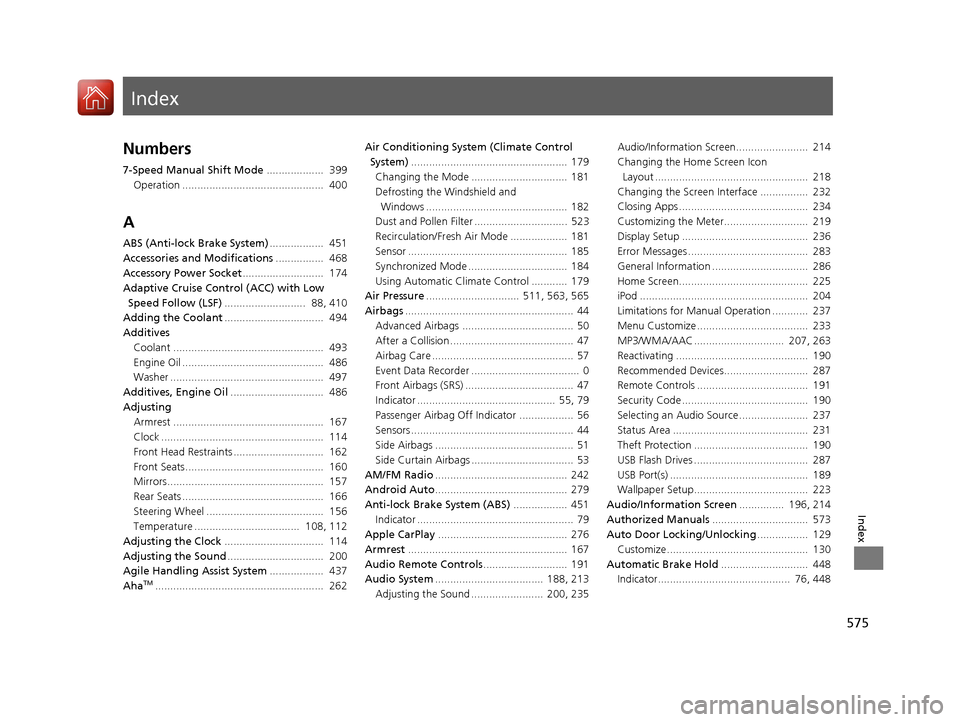
Index
Numbers
7-Speed Manual Shift Mode................... 399
Operation ............................................... 400
A
ABS (Anti-lock Brake System) .................. 451
Accessories and Modifications ................ 468
Accessory Power Socket ........................... 174
Adaptive Cruise Control (ACC) with Low
Speed Follow (LSF) ........................... 88, 410
Adding the Coolant ................................. 494
Additives
Coolant .................................................. 493
Engine Oil ............................................... 486
Washer ................................................... 497
Additives, Engine Oil ............................... 486
Adjusting
Armrest .................................................. 167
Clock ...................................................... 114
Front Head Restraints .............................. 162
Front Seats.............................................. 160
Mirrors.................................................... 157
Rear Seats ............................................... 166
Steering Wheel ....................................... 156
Temperature ................................... 108, 112
Adjusting the Clock ................................. 114
Adjusting the Sound ................................ 200
Agile Handling Assist System .................. 437
Aha TM
........................................................ 262 Air Conditioning System (Climate Control
System) .................................................... 179
Changing the Mode ................................ 181
Defrosting the Windshield and Windows ............................................... 182
Dust and Pollen Filter ............................... 523
Recirculation/Fresh Air Mode ................... 181
Sensor ..................................................... 185
Synchronized Mode ................................. 184
Using Automatic Climate Control ............ 179
Air Pressure ............................... 511, 563, 565
Airbags ........................................................ 44
Advanced Airbags ..................................... 50
After a Collision ......................................... 47
Airbag Care ............................................... 57
Event Data Recorder .................................... 0
Front Airbags (SRS) .................................... 47
Indicator .............................................. 55, 79
Passenger Airbag Off Indicator .................. 56
Sensors ...................................................... 44
Side Airbags .............................................. 51
Side Curtain Airbags .................................. 53
AM/FM Radio ............................................ 242
Android Auto ............................................ 279
Anti-lock Brake System (ABS) .................. 451
Indicator .................................................... 79
Apple CarPlay ........................................... 276
Armrest ..................................................... 167
Audio Remote Controls ............................ 191
Audio System .................................... 188, 213
Adjusting the Sound ........................ 200, 235 Audio/Information Screen........................ 214
Changing the Home Screen Icon
Layout ................................................... 218
Changing the Screen Interface ................ 232
Closing Apps ........................................... 234
Customizing the Meter............................ 219
Display Setup .......................................... 236
Error Messages ........................................ 283
General Information ................................ 286
Home Screen........................................... 225
iPod ........................................................ 204
Limitations for Manual Operation ............ 237
Menu Customize ..................................... 233
MP3/WMA/AAC .............................. 207, 263
Reactivating ............................................ 190
Recommended Devices............................ 287
Remote Controls ..................................... 191
Security Code .......................................... 190
Selecting an Audio Source ....................... 237
Status Area ............................................. 231
Theft Protection ...................................... 190
USB Flash Drives ...................................... 287
USB Port(s) .............................................. 189
Wallpaper Setup...................................... 223
Audio/Information Screen ............... 196, 214
Authorized Manuals ................................ 573
Auto Door Locking/Unlocking ................. 129
Customize ............................................... 130
Automatic Brake Hold ............................. 448
Indicator............................................ 76, 448
16 CIVIC 2D HC2 (0A 01 0C)-31TBG6000.book 575 ページ >0>.>/6年>0月>/>0日 金曜日 午後4時>/6分