2016 HONDA CIVIC COUPE transmission
[x] Cancel search: transmissionPage 97 of 585
96
uuIndicatorsuDriver Information Interface Warning and Information Messages *
Instrument Panel
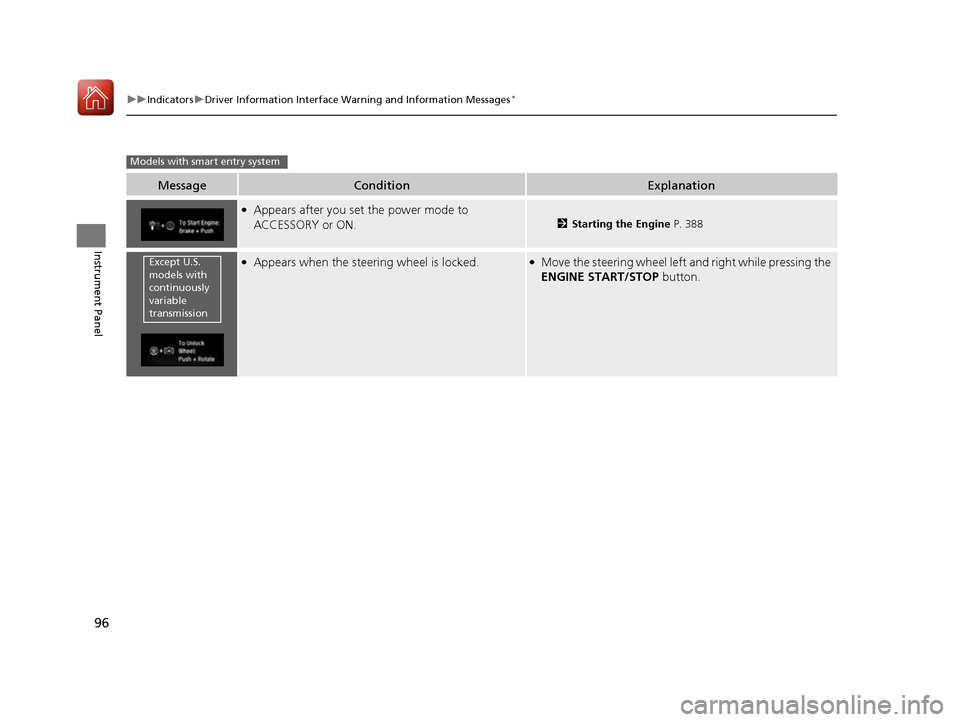
MessageConditionExplanation
●
Appears after you set the power mode to ACCESSORY or ON.
2 Starting the Engine P. 388
●
Appears when the steering wheel is locked.● Move the steering wheel left and right while pressing the
ENGINE START/STOP button.
Models with smart entry system
Except U.S.
models with
continuously
variable
transmission
16 CIVIC 2D HC2 (0A 01 0C)-31TBG6000.book 96 ページ >0>.>/6年>0月>/>0日 金 曜日 午後4時>/6分
Page 131 of 585
130
uuLocking and Unlocking the DoorsuCustomizing the Auto Door Locking/Unlocking Setting
Controls
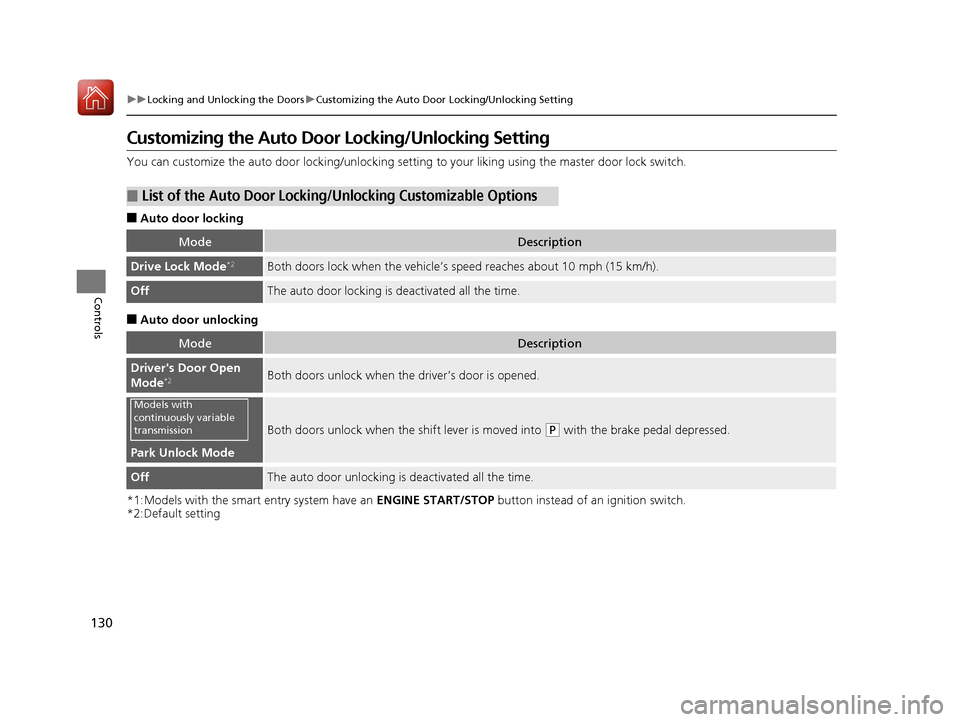
Customizing the Auto Door Locking/Unlocking Setting
You can customize the auto door locking/unlocking setting to your liking using the master door lock switch.
■ Auto door locking
■ Auto door unlocking
*1:Models with the smart entry system have an ENGINE START/STOP button instead of an ignition switch.
*2:Default setting
■List of the Auto Door Locking/ Unlocking Customizable Options
ModeDescription
Drive Lock Mode*2Both doors lock when the vehicle’s
speed reaches about 10 mph (15 km/h).
OffThe auto door locking is deactivated all the time.
ModeDescription
Driver's Door Open
Mode*2Both doors unlock when the driver’s door is opened.
Park Unlock Mode
Both doors unlock when the
shift lever is moved into (P with the brake pedal depressed.
OffThe auto door unlocking is deactivated all the time.
Models with
continuously variable
transmission
16 CIVIC 2D HC2 (0A 01 0C)-31TBG6000.book 130 ページ >0>.>/6年>0月>/>0日 金曜日 午後4時>/6分
Page 132 of 585
131
uuLocking and Unlocking the DoorsuCustomizing the Auto Door Locking/Unlocking Setting
Continued
Controls
*1:Models with the smart entry system have an ENGINE START/STOP button instead of an ignition switch.
*2:Default setting
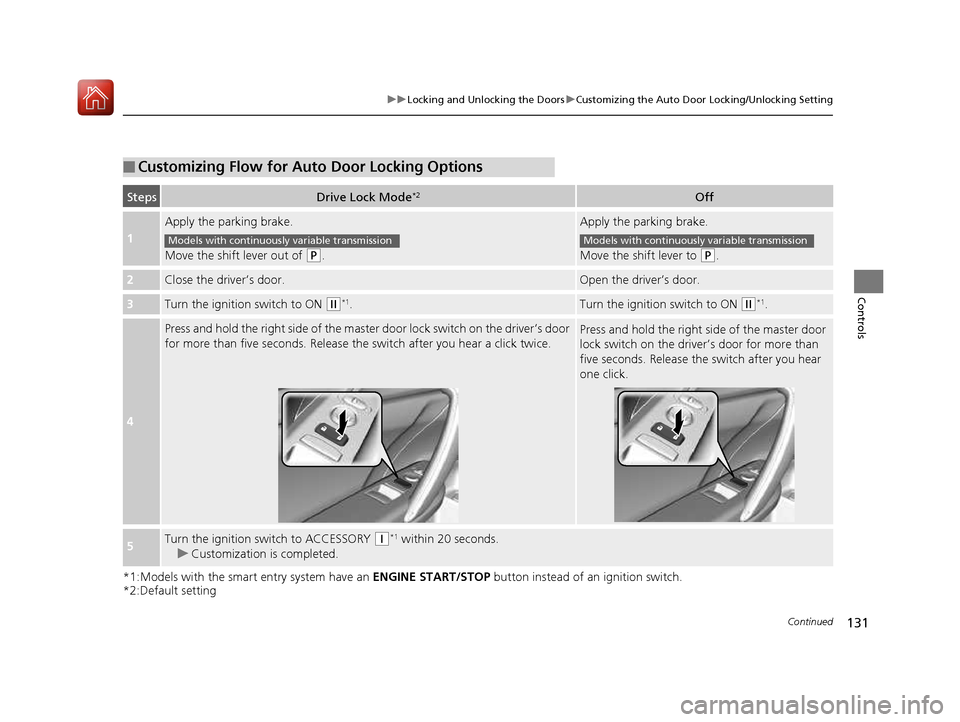
■Customizing Flow for Auto Door Locking Options
StepsDrive Lock Mode *2Off
1
Apply the parking brake.
Move the shift lever out of
(P
.
Apply the parking brake.
Move the shift lever to
(P.
2Close the driver’s door.Open the driver’s door.
3Turn the ignition switch to ON (w*1
.Turn the ignition switch to ON (w *1
.
4
Press and hold the right side of the master door lock switch on the driver’s door
for more than five seconds. Release th e switch after you hear a click twice.Press and hold the right side of the master door
lock switch on the driver’s door for more than
five seconds. Release the switch after you hear
one click.
5Turn the ignition switch to ACCESSORY (q*1
within 20 seconds.
uCustomization is completed.
Models with continuously variable transmissionModels with continuously variable transmission
16 CIVIC 2D HC2 (0A 01 0C)-31TBG6000.book 131 ページ >0>.>/6年>0月>/>0日 金曜日 午後4時>/6分
Page 133 of 585
132
uuLocking and Unlocking the DoorsuCustomizing the Auto Door Locking/Unlocking Setting
Controls
*1:Models with the smart entry system have an ENGINE START/STOP button instead of an ignition switch.
*2:Default setting
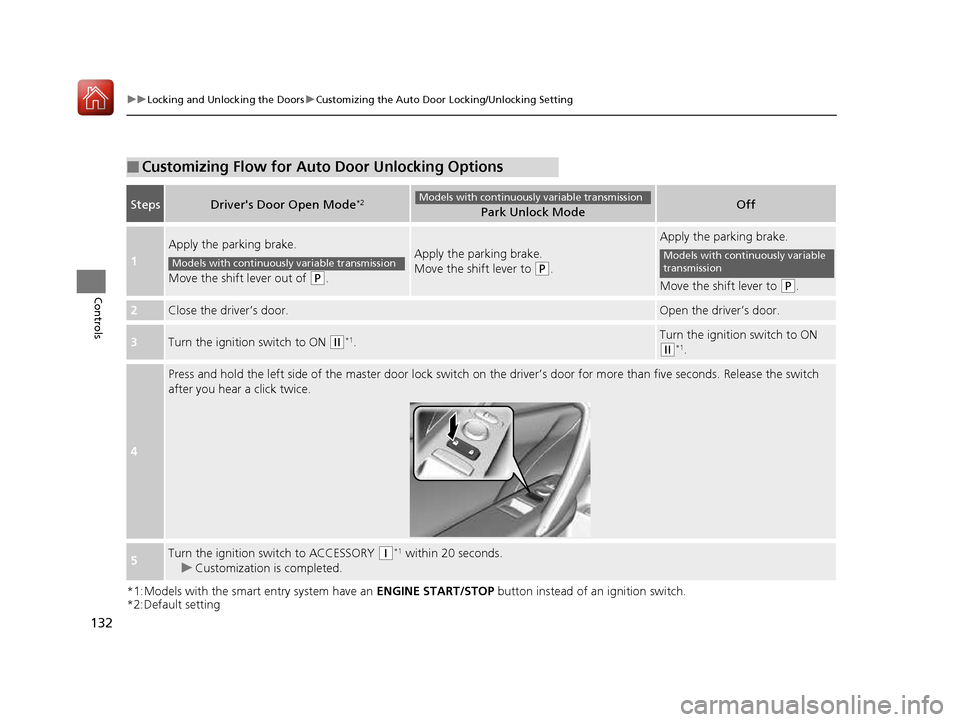
■Customizing Flow for Auto Door Unlocking Options
StepsDriver's Door Open Mode *2Park Unlock ModeOff
1
Apply the parking brake.
Move the shift lever out of
(P
.
Apply the parking brake.
Move the shift lever to
(P.
Apply the parking brake.
Move the shift lever to
(P.
2Close the driver’s door.Open the driver’s door.
3Turn the ignition switch to ON (w *1
.Turn the ignition switch to ON
(w *1
.
4
Press and hold the left side of the master door lock switch on the driver’s door for more than five seconds. Release the switch
after you hear a click twice.
5Turn the ignition switch to ACCESSORY (q *1
within 20 seconds.
uCustomization is completed.
Models with continuously variable transmission
Models with continuously variable transmissionModels with continuously variable
transmission
16 CIVIC 2D HC2 (0A 01 0C)-31TBG6000.book 132 ページ >0>.>/6年>0月>/>0日 金曜日 午後4時>/6分
Page 137 of 585
136
Controls
Security System
Immobilizer System
The immobilizer system prevents a key that has not been pre-registered from
starting the engine. Each key contains el ectronic transmitters that use electronic
signals to verify the key.
Pay attention to the following when inserti ng the key into the ignition switch or
pressing the ENGINE START/STOP button:
• Do not allow objects that emit strong radio waves near the ignition switch or the
ENGINE START/STOP button.
• Make sure the key is not covered by or touching a metal object.
• Do not bring a key from anot her vehicle’s immobilizer system near the ignition
switch or the ENGINE START/STOP button.
• Do not put the key near magnetic items. Electronic devices, such as a television
set and audio system are strongly magneti c, or a key chain can become magnetic,
too.
Security System Alarm
The security system alarm activates wh en the trunk, hood or doors are forcibly
opened. The alarm does not go off if the trunk or doors are opened with the key,
remote transmitter or smart entry system.
However, the alarm goes off when a door is opened with the key, then the shift
lever is moved out of
(P (continuously variable transmission models) or the hood is
opened before the ignition switch is turned to ON (w*1
.
■ When the security sy stem alarm activates
The horn sounds intermittently and all the exterior lights flash. ■ To deactivate the security system alarm
Unlock the vehicle using the remote transmi tter, or smart entry system. The system,
along with the horn and flashing lights, is deactivated.
*1: Models with the smart entry system have an ENGINE START/STOP button instead of an
ignition switch.
1Security System
Do not alter the system or add other devices to it.
Doing so may damage the system and make your
vehicle inoperable.
1Immobilizer System
NOTICE
Leaving the key in the vehicl e can result in theft or
accidental movement of the vehicle.
Always take the key with you whenever you leave the
vehicle unattended.
Canadian models only: Apply and hold the brake
pedal before turning the vehicle on the first time after
the battery has been disconnected.
1Security System Alarm
The security alarm continues for a maximum of two
minutes until the security system deactivates.
16 CIVIC 2D HC2 (0A 01 0C)-31TBG6000.book 136 ページ >0>.>/6年>0月>/>0日 金曜日 午後4時>/6分
Page 138 of 585
Continued137
uuSecurity SystemuSecurity System Alarm
Controls
■Setting the security system alarm
The security system alarm automatically sets when the following conditions have
been met: • The ignition switch is in LOCK
(0 *1
, and the key has been removed from the
ignition switch.
• The hood and trunk are closed.
• Both doors are locked with the key, the remote transmitter, or smart entry
system.
■ When the security system alarm sets
The security system alarm indicator in the instrument panel blinks. When the
blinking interval changes after about 15 se conds, the security system alarm is set.
■ To cancel the security system alarm
The security system is canc eled when the vehicle is unlocked using the remote
transmitter, smart entry system, or th e ignition switch is turned to ON
(w*1
. The
security system indicator go es off at the same time.
*1: Models with the smart entry system have an ENGINE START/STOP button instead of an
ignition switch.
1Security System Alarm
Do not set the security system alarm when someone
is in the vehicle or a window is open. The system can
accidentally activate when: • Unlocking the door with the lock tab.
• Opening the trunk with th e trunk release button on
the driver’s door or the emergency trunk opener.
• Opening the hood with the hood release.
• Moving the shift lever out of
(P .
If the battery goes dead after you have set the
security system alarm, the security alarm may go off once the battery is re charged or replaced.
If this occurs, deactivate the security system alarm by
unlocking a door using th e remote transmitter.
Continuously variable transmission models
16 CIVIC 2D HC2 (0A 01 0C)-31TBG6000.book 137 ページ >0>.>/6年>0月>/>0日 金曜日 午後4時>/6分
Page 144 of 585
143
Controls
Operating the Switches Around the Steering Wheel
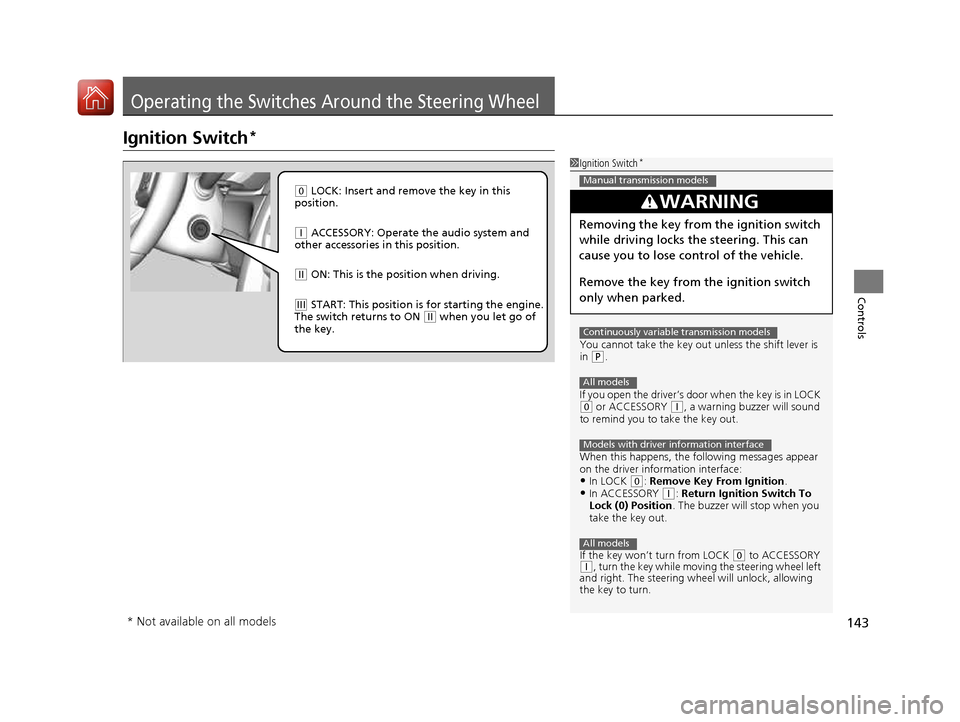
Ignition Switch*
1Ignition Switch
*
You cannot take the key out unless the shift lever is
in
(P .
If you open the driver’s door when the key is in LOCK
(0 or ACCESSORY (q, a warning buzzer will sound
to remind you to take the key out.
When this happens, the fo llowing messages appear
on the driver information interface:
• In LOCK
(0 : Remove Key From Ignition .
• In ACCESSORY (q : Return Ignition Switch To
Lock (0) Position . The buzzer will stop when you
take the key out.
If the key won’t turn from LOCK
(0 to ACCESSORY (q , turn the key while moving the steering wheel left
and right. The steering wh eel will unlock, allowing
the key to turn.
3WARNING
Removing the key from the ignition switch
while driving locks the steering. This can
cause you to lose control of the vehicle.
Remove the key from the ignition switch
only when parked.
Manual transmission models
Continuously variable transmission models
All models
Models with driver information interface
All models
(0 LOCK: Insert and remove the key in this
position.
(q ACCESSORY: Operate the audio system and
other accessories in this position.
(w ON: This is the position when driving.
(e START: This position is for starting the engine.
The switch returns to ON (w when you let go of
the key.
* Not available on all models
16 CIVIC 2D HC2 (0A 01 0C)-31TBG6000.book 143 ページ >0>.>/6年>0月>/>0日 金曜日 午後4時>/6分
Page 278 of 585
Continued277
uuAudio System Basic OperationuApple CarPlay
Features
■Maps
Display Apple CarPlay map and use the navi gation function just as you would on
your iPhone.
Only one navigation system (pre-installed navigation or Apple CarPlay) can give
directions at a time. When you are using one system, directions to any prior
destination set on the other system will be canceled, and the system you are
currently using will direct you to your destination.
After you have connected your iPhone to the system via USB, use the following
procedure to set up Apple CarPlay. Us e of Apple CarPlay will result in the
transmission of certain user and vehicle information (such as vehicle location, speed,
and status) to your iPhone to enhance the Apple CarPlay experience. You will need
to consent to the sharing of this in formation on the Display Audio Screen.
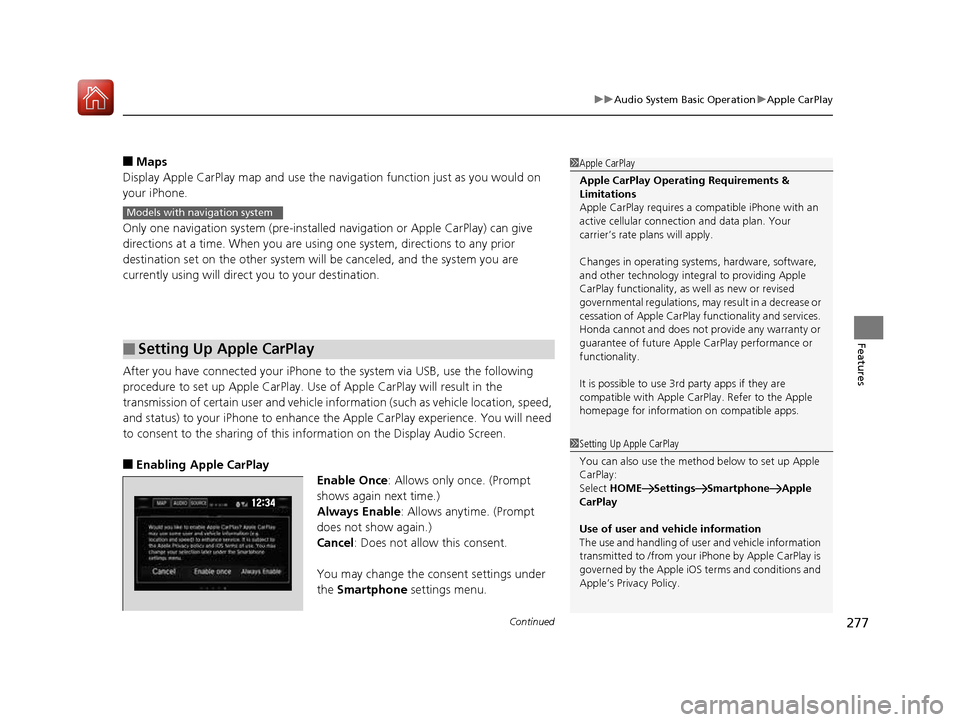
■ Enabling Apple CarPlay
Enable Once: Allows only once. (Prompt
shows again next time.)
Always Enable : Allows anytime. (Prompt
does not show again.)
Cancel : Does not allow this consent.
You may change the consent settings under the Smartphone settings menu.
■Setting Up Apple CarPlay
1Apple CarPlay
Apple CarPlay Operating Requirements &
Limitations Apple CarPlay requi res a compatible iPhone with an
active cellular connecti on and data plan. Your
carrier’s rate plans will apply.
Changes in operating system s, hardware, software,
and other technology integral to providing Apple
CarPlay functionality, as well as new or revised
governmental regulations, may result in a decrease or
cessation of Apple CarPlay functionality and services.
Honda cannot and does not pr ovide any warranty or
guarantee of future Appl e CarPlay performance or
functionality.
It is possible to use 3r d party apps if they are
compatible with Apple CarPlay. Refer to the Apple
homepage for information on compatible apps.
Models with navigation system
1Setting Up Apple CarPlay
You can also use the method below to set up Apple
CarPlay:
Select HOME Settings Smartphone Apple
CarPlay
Use of user and vehicle information
The use and handling of user and vehicle information
transmitted to /from your iPhone by Appl e CarPlay is
governed by the Apple iOS terms and conditions and
Apple’s Privacy Policy.
16 CIVIC 2D HC2 (0A 01 0C)-31TBG6000.book 277 ページ >0>.>/6年>0月>/>0日 金曜日 午後4時>/6分