2016 HONDA CIVIC COUPE oil
[x] Cancel search: oilPage 112 of 585
Continued111
uuGauges and DisplaysuDriver Information Interface*
Instrument Panel
Shows the estimated average fuel economy
of each trip meter in mpg or l/100 km.
The display is updated at set intervals. Wh en a trip meter is reset, the average fuel
economy is also reset.
Shows the estimated distance you can travel on the remaining fuel. This distance is
estimated from the fuel economy of your previous trips.
Shows the time elapsed since Trip A or Trip B was reset.
Shows the average speed in mph or km/h since Trip A or Trip B was reset.
Shows the remaining oil life and Maintenance Minder TM
.
2 Maintenance Minder TM
P. 473
■Average Fuel Economy
■Range
■Elapsed Time
■Average Speed
■Engine Oil Life
1Average Fuel Economy
You can change when to reset the average fuel
economy.
2 Customized Features P. 292
16 CIVIC 2D HC2 (0A 01 0C)-31TBG6000.book 111 ページ >0>.>/6年>0月>/>0日 金曜日 午後4時>/6分
Page 176 of 585

Continued175
uuInterior Lights/Interior Convenience ItemsuInterior Convenience Items
Controls
To use the wireless charger, the power mode must be in ACCESSORY or ON.
Charge a compatible device on the ar ea indicated by the mark as follows:
1. To turn the system on and off, press and
hold the (power) button.
uWhen the system is activated, the green
indicator light comes on.
2. Place the device you want to charge on the charging area.
uThe system will au tomatically start
charging the device, and the amber
indicator light will come on.
uMake sure that the device is compatible
with the system, and placed with the
rechargeable side in the center of the
charging area.
3. When charging is completed, the green
indicator light will come on.
uDepending on the device, the amber
indicator light will stay on.
■Wireless Charger *
Canadian models1Wireless Charger
*
This system consumes a lot of power. Do not use the system for a long time when the engine is not
running. This may weaken the battery, making it
difficult to start the engine.
When using the wireless charger, check the user’s manual
that came with the compatible device you want to charge.
3CAUTION
Metal objects between the charge pad
and the device to be charged will get
hot and can burn you. • Always remove foreign objects from
the charge pad before charging the
device.
• Be sure the surface is clear of dust and
other debris before charging.
• Do not spill liquids (i. e. water, drinks,
etc.) on the charger and the device.
• Do not use oil, grease, alcohol,
benzine or thinner for cleaning the
charge pad.
• Do not cover the system with towels,
clothing, or other objects while
charging etc.
• Avoid spraying aerosols which may
come in contact with the charge pad surface.
Green Indicator
Amber Indicator
Charging Area (Power) Button
* Not available on all models
16 CIVIC 2D HC2 (0A 01 0C)-31TBG6000.book 175 ページ >0>.>/6年>0月>/>0日
金曜日 午後4時>/6分
Page 322 of 585
321
uuCustomized Featuresu
Features
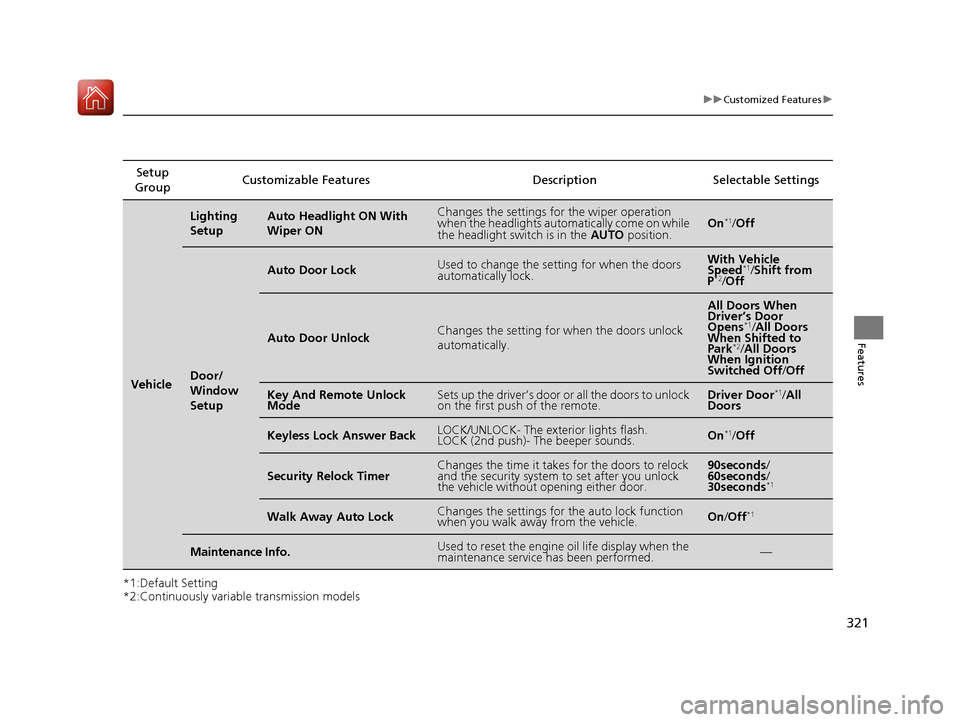
*1:Default Setting
*2:Continuously variable transmission modelsSetup
Group Customizable Features Description Selectable Settings
Vehicle
Lighting
SetupAuto Headlight ON With Wiper ONChanges the settings for the wiper operation
when the headlights automa
tically come on while
the headlight switch is in the AUTO position.On*1
/Off
Door/
Window
Setup
Auto Door LockUsed to change the sett ing for when the doors
automatically lock.With Vehicle
Speed *1
/Shift from
P *2
/Off
Auto Door UnlockChanges the setting for when the doors unlock
automatically.
All Doors When
Driver’s Door
Opens *1
/All Doors
When Shifted to Park *2
/All Doors
When Ignition
Switched Off /Off
Key And Remote Unlock
ModeSets up the driver’s door or all the doors to unlock
on the first push of the remote.Driver Door *1
/All
Doors
Keyless Lock Answer BackLOCK/UNLOCK- The exterior lights flash.
LOCK (2nd push)- The beeper sounds.On *1
/Off
Security Relock TimerChanges the time it takes for the doors to relock
and the security system to set after you unlock
the vehicle without opening either door.90seconds /
60seconds /
30seconds *1
Walk Away Auto LockChanges the settings for the auto lock function
when you walk away from the vehicle.On
/Off *1
Maintenance Info.Used to reset the engine
oil life display when the
maintenance service has been performed.—
16 CIVIC 2D HC2 (0A 01 0C)-31TBG6000.book 321 ページ >0>.>/6年>0月>/>0日 金曜日 午後4時>/6分
Page 392 of 585
Continued391
uuWhen DrivinguStarting the Engine
Driving
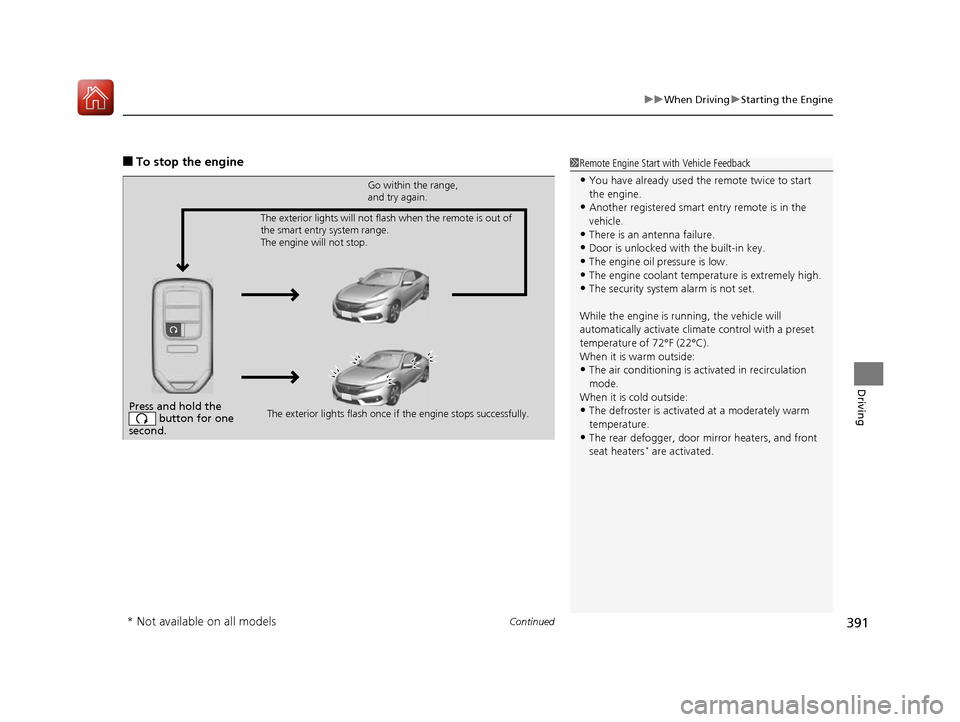
■To stop the engine1Remote Engine Start with Vehicle Feedback
• You have already used the remote twice to start the engine.
• Another registered smart entry remote is in the
vehicle.
• There is an antenna failure.
• Door is unlocked with the built-in key.
• The engine oil pressure is low.
• The engine coolant temper ature is extremely high.
• The security system alarm is not set.
While the engine is running, the vehicle will
automatically activate climate control with a preset
temperature of 72°F (22°C).
When it is warm outside:
• The air conditioning is acti vated in recirculation
mode.
When it is cold outside:
• The defroster is activated at a moderately warm
temperature.
• The rear defogger, door mi rror heaters, and front
seat heaters *
are activated.
Press and hold the
button for one
second.
Go within the range,
and try again.
The exterior lights flash once if the engine stops successfully.
The exterior lights will not flash when the remote is out of
the smart entry system range.
The engine will not stop.
* Not available on all models
16 CIVIC 2D HC2 (0A 01 0C)-31TBG6000.book 391 ページ >0>.>/6年>0月>/>0日
金曜日 午後4時>/6分
Page 462 of 585
461
Driving
Parking Your Vehicle
When Stopped 1.Depress the brake pedal firmly.
2. With the brake pedal depressed, pull up th e electric parking brake switch slowly,
but fully.
3. Move the shift lever from
(D to (P.
3. Move the shift lever to
(R or (1.
4. Turn off the engine.
uThe parking brake indicator goes off in about 15 seconds.
Always confirm the electric parking brake is set, in particular if you are parked on an
incline.
1Parking Your Vehicle
Do not park your vehicle near flammable objects,
such as dry grass, oil, or timber.
Heat from the exhaust can cause a fire.
1When Stopped
NOTICE
The following can dama ge the transmission:
• Depressing the accelera tor and brake pedals
simultaneously.
• Holding the vehicle in place when facing uphill by
depressing the accelerator pedal.
• Moving the shift lever into
(P before the vehicle
stops completely.
Continuously variable transmission models
Continuously variable transmission models
Manual transmission models
All models
16 CIVIC 2D HC2 (0A 01 0C)-31TBG6000.book 461 ページ >0>.>/6年>0月>/>0日 金曜日 午後4時>/6分
Page 468 of 585
467
Driving
Fuel Economy
Improving Fuel Economy
Fuel economy depends on several conditions, including driving conditions, your
driving habits, the condition of your vehicle, and loading. Depending on these and
other conditions, you may or may not achieve the rated fuel economy of this vehicle.
You can optimize your fuel economy with proper maintenance of your vehicle.
Always maintain your vehicle in accordance with the messages displayed on the
information display *
/driver information interface *
.
• Use the recommended viscosity engine oil, displaying the API Certification Seal.
• Maintain the specified tire pressure.
• Do not load the vehicle with excess cargo.
• Keep your vehicle clean. A buildup of snow or mud on your vehicle's underside adds weight and increases wind resistance.
■Maintenance and Fuel Economy
1Improving Fuel Economy
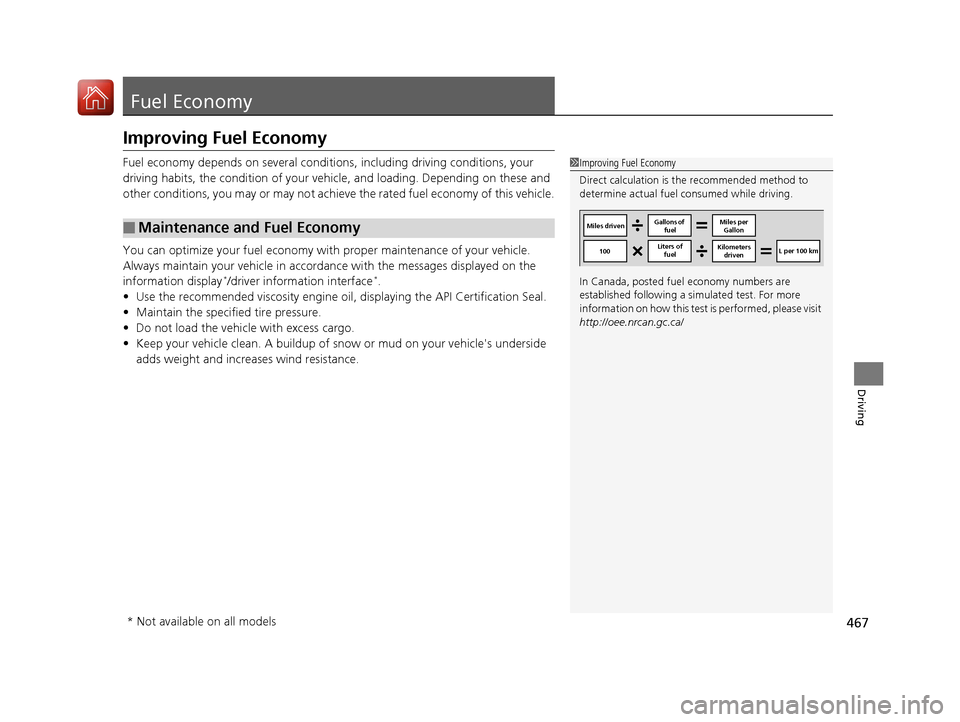
Direct calculation is the recommended method to
determine actual fuel consumed while driving.
In Canada, posted fuel economy numbers are
established following a simulated test. For more
information on how this test is performed, please visit
http://oee.nrcan.gc.ca/
Miles driven Gallons of
fuel Miles per
Gallon
100 Liters of
fuel Kilometers
driven L per 100 km
* Not available on all models
16 CIVIC 2D HC2 (0A 01 0C)-31TBG6000.book 467 ページ >0>.>/6年>0月>/>0日
金曜日 午後4時>/6分
Page 470 of 585
469
Maintenance
This chapter discusses basic maintenance.
Before Performing Maintenance Inspection and Maintenance ............ 470
Safety When Performing Maintenance .... 471Parts and Fluids Used in Maintenance Service ........................................... 472
Maintenance Minder TM
..................... 473
Maintenance Under the Hood
Maintenance Items Un der the Hood .... 483Opening the Hood ........................... 485
Recommended Engine Oil ................ 486
Oil Check ......................................... 487
Adding Engine Oil ............................ 489
Changing the Engine Oil and Oil Filter..... 490
Engine Coolant ................................ 493
Transmission Fluid ............................ 495
Brake/Clutch*
Fluid .......................... 496
Refilling Window Wa sher Fluid......... 497
Replacing Light Bulbs ....................... 498
Checking and Maintaining Wiper
Blades .......................................... 507
Checking and Maintaining Tires
Checking Tires ................................. 510
Tire and Loading Information Label ..... 511Tire Labeling .................................... 511DOT Tire Quality Grading (U.S. Vehicles) ...... 513Wear Indicators................................ 515 Tire Service Life ................................ 515
Tire and Wheel Replacement ........... 516
Tire Rotation .................................... 517
Winter Tires ..................................... 518
Battery ............................................... 519
Remote Transmitter Care
Replacing the Button Battery ........... 521
Climate Control System Maintenance.... 523Cleaning
Interior Care .................................... 524
Exterior Care.................................... 526
* Not available on all models
16 CIVIC 2D HC2 (0A 01 0C)-31TBG6000.book 469 ページ >0>.>/6年>0月>/>0日 金曜日 午後4時>/6分
Page 471 of 585
470
Maintenance
Before Performing Maintenance
Inspection and Maintenance
For your safety, perform all listed inspections and maintenance to keep your vehicle
in good condition. If you become aware of any abnormality (noise, smell, insufficient
brake fluid, oil residue on the ground, etc.), have your vehicle inspected by a dealer. (Note, however, that service at a dealer is not mandatory to keep your warranties in
effect.) ■ Daily inspections
Perform inspections before long distance tri ps, when washing the vehicle, or when
refueling. ■ Periodic inspections
• Check the continuously variable transmission fluid level monthly.
2 Continuously Variable Transmission Fluid P. 495
• Check the brake/clutch *
fluid level monthly.
2 Brake/Clutch *
Fluid P. 496
• Check the tire pressure monthly. Examin e the tread for wear and foreign objects.
2 Checking and Maintaining Tires P. 510
• Check the operation of the exterior lights monthly.
2 Replacing Light Bulbs P. 498
• Check the condition of the wiper bl ades at least every six months.
2 Checking and Maintaining Wiper Blades P. 507
■Types of Inspection and Maintenance
1Inspection and Maintenance
Maintenance, replacement, or repair of
emissions control devices and systems may be
done by any automotive repair establishment or
individuals using parts that are “certified” to
EPA standards.
According to state and federal regulations, failure to
perform maintenance on the maintenance main
items marked with # will not void your emissions
warranties. However, all ma intenance services should
be performed in accordan ce with the intervals
indicated by the information display *
/driver
information interface *
.
2 Maintenance Service Items P. 475, 480
If you want to perform complex maintenance tasks
that require more skills a nd tools, you can purchase a
subscription to the Service Express website at
www.techinfo.honda.com .
2 Authorized Manuals P. 573
If you want to perform ma intenance yourself, make
sure that you have the necessary tools and skills first.
After performing ma intenance, update the records in
the separate maintenance booklet.
U.S. models
* Not available on all models
16 CIVIC 2D HC2 (0A 01 0C)-31TBG6000.book 470 ページ >0>.>/6年>0月>/>0日 金曜日 午後4時>/6分