Page 93 of 609
92
uuIndicators uMulti-Information Display Warn ing and Information Messages*
Instrument Panel
MessageConditionExplanation
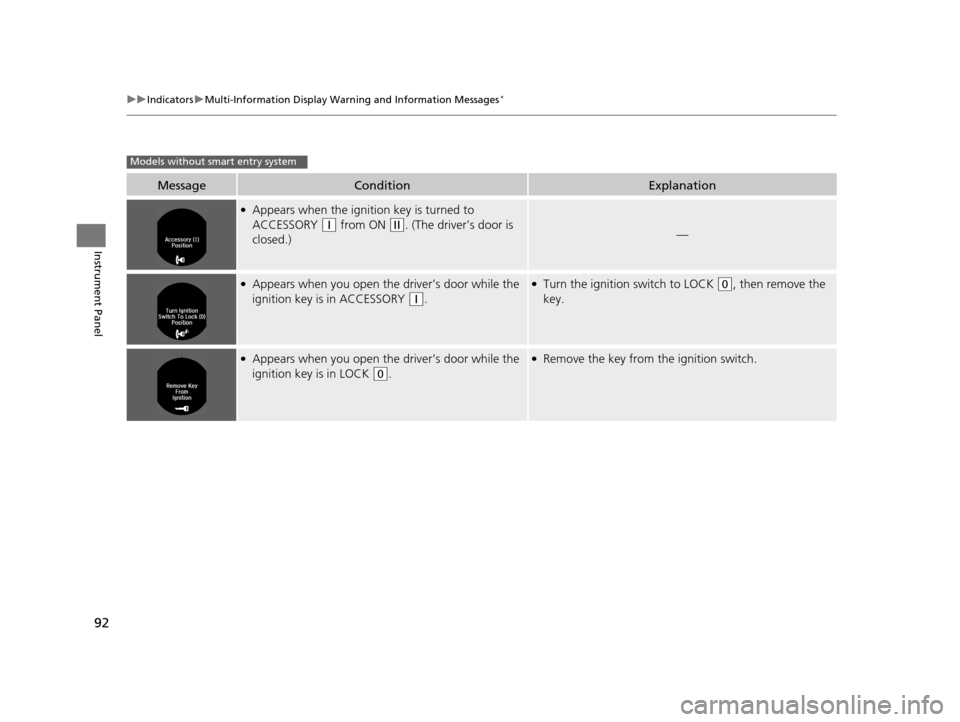
●Appears when the ignition key is turned to
ACCESSORY
(q from ON (w. (The driver’s door is
closed.)—
●Appears when you open th e driver’s door while the
ignition key is in ACCESSORY
(q.
●Turn the ignition switch to LOCK (0, then remove the
key.
●Appears when you open th e driver’s door while the
ignition key is in LOCK
(0.
●Remove the key from the ignition switch.
Models without smart entry system
16 US ACCORD 2D (KA KC KL)-31T3L6300.book 92 ページ 2015年7月23日 木曜日 午後4時11分
Page 99 of 609

98
Instrument Panel
Gauges and Displays
Gauges
Gauges include the speedometer, tachometer, fuel gauge, and related indicators.
They are displayed when the ignition switch is in ON
(w*1.
Displays your driving speed in mph (U.S.) or km/h (Canada).
Shows the number of engine revolutions per minute.
Displays the amount of fuel left in the fuel tank.
Displays the temperature of the engine coolant.
*1: Models with the smart entry system have an ENGINE START/STOP button instead of an
ignition switch.
■Speedometer
■Tachometer
■Fuel Gauge
■Temperature Gauge
1 Fuel Gauge
NOTICE
You should refuel when the reading approaches .
Running out of fuel can cause the engine to misfire,
damaging the cata lytic converter.
The actual amount of remain ing fuel may differ from
the fuel gauge reading.E
1 Temperature Gauge
NOTICE
Driving with the temperat ure gauge pointer in the
upper zone can cause serious engine damage. Pull
safely to the side of th e road and allow engine
temperature to return to normal. 2 Overheating P. 570
16 US ACCORD 2D (KA KC KL)-31T3L6300.book 98 ページ 2015年7月23日 木曜日 午後4時11分
Page 102 of 609

101
uuGauges and Displays uInformation Display*
Instrument Panel
Shows the outside temperature in Fahr enheit (U.S.) or Celsius (Canada).
■Adjusting the outside temperature indicator
Adjust the temperature reading up to ± 5°F or ± 3°C if the temperature reading
seems incorrect.
1. Turn the ignition switch to ON
(w*1.
2. Press and hold the (Select/Reset) knob for 10 seconds or more while the
outside temperature is show n on the information display.
u The information display goes into temp erature adjustment mode. The display
starts showing from -5°F to +5°F (U .S.) or -3°C to +3°C (Canada).
3. Release the knob when the righ t adjustment amount is shown.
u The adjustment is complete.
Shows the estimated distance you can travel on the remaining fuel. This distance is
estimated from the fuel economy of your previous trips.
*1: Models with the smart entry system have an ENGINE START/STOP button instead of an
ignition switch.
■Outside Temperature
■Range
1 Outside Temperature
The temperature sensor is in the front bumper.
Road heat and exhaust from another vehicle can
affect the temperature reading when your vehicle
speed is less than 19 mph (30 km/h).
It may take several minutes for the display to be
updated after the temperature reading has stabilized.
16 US ACCORD 2D (KA KC KL)-31T3L6300.book 101 ページ 2015年7月23日 木曜日 午後4時11分
Page 107 of 609

uuGauges and Displays uMulti-Information Display*
106
Instrument Panel
Use the multi-information display to customize certain features.
■How to customize
Select the Vehicle Settings screen by pressing the button while the
ignition switch is in ON
(w*1, and the vehicle is at a complete stop.
Press the SEL/RESET button.
*1:Models with the smart entry system have an ENGINE START/STOP button instead of an
ignition switch.
■Customized Features1 Customized Features
To customize other features, press the
button.
2 List of customizable options P. 109
2 Example of customization settings P. 113
Customization is possible when you see the driver’s
ID ( Driver 1 or Driver 2) on the screen.
The driver’s ID indicates which remote transmitter
you have used to unlock the driver’s door. The
customized settings are recalled every time you
unlock the driver’s door with that remote.
When you customize settings: Shift to
( P
Button:
Changes the customize
menus and items.
Multi-Information Display:
Goes to Vehicle Settings .
SEL/RESET button:
Enters the selected item.
16 US ACCORD 2D (KA KC KL)-31T3L6300.book 106 ページ 2015年7月23日 木曜日 午後4時11分
Page 113 of 609
112
uuGauges and Displays uMulti-Information Display*
Instrument Panel
*1: Default SettingSetup Group Customizable Features Description Selectable Settings
Door Setup
Auto Door LockChanges the setting for when the doors
automatically lock.With Vehicle Speed*1/
Shift
from P /Off
Auto Door UnlockChanges the setting for when the doors
automatically unlock.
All Doors When Driver’s
Door Opens*1/All Doors
When Shifted To Park /All
Doors When Ignition
Switched Off/Off
Key And Remote Unlock
ModeSets up either the driver’s door or both doors to
unlock on the first operatio n of the remote or built-
in key.
Driver Door*1/ All Doors
Keyless Lock Answer
BackLOCK/UNLOCK- The exterior lights flash.
LOCK (2nd push)- The beeper sounds.On*1/ Off
Security Relock Timer
Changes the time it takes for the doors to relock and
the security system to set after you unlock the
vehicle without opening either door.
90sec /60sec /30sec*1
Maintenance
Reset—Resets/Cancels the engine oil life display when you
have performed the maintenance service. Cancel /Reset
Default All—Cancels/Resets all the customized settings as
default.Cancel /Set
16 US ACCORD 2D (KA KC KL)-31T3L6300.book 112 ページ 2015年7月23日 木曜日 午後4時11分
Page 116 of 609

115
Controls
This chapter explains how to operate the various controls necessary for driving.
Clock.................................................. 116
Locking and Unlocking the Doors
Key Types and Functions .................. 118
Low Smart Entry Remote Signal Strength*... 120Locking/Unlocking the Doors from the Outside .......................................... 121
Locking/Unlocking the Doors from the
Inside ............................................. 126
Auto Door Locking/Unlocking .......... 128
Opening and Closing the Trunk ....... 129
Security System Immobilizer System .......................... 133
Security System Alarm ...................... 133
Opening and Closing the Windows ... 136
Opening and Closing the Moonroof*...139
Operating the Switches Around the
Steering Wheel
Ignition Switch
*............................... 140
ENGINE START/STOP Button*........... 141
Ignition Switch and Power Mode
Comparison ................................... 144
Turn Signals ..................................... 145
Light Switches.................................. 145
Fog Lights
*...................................... 147
Auto High-Beam (H igh Beam Support
System)
*........................................ 148
Daytime Running Lights ................... 151
Wipers and Washers ........................ 152
Brightness Control ........................... 154 Rear Defogger/Heated Door Mirror
*
Button ........................................... 155
Driving Position Memory System
*.... 156
Adjusting the Steering Wheel .......... 158
Adjusting the Mirrors
Interior Rearview Mirror ................... 159
Power Door Mirrors ......................... 160
Adjusting the Seats .......................... 161
Interior Lights/Interior Convenience Items ................................................ 169
Climate Control System
Using Automatic Climate Control .... 180
Synchronized Mode ......................... 182
Automatic Climate Control Sensors ... 183
* Not available on all models
16 US ACCORD 2D (KA KC KL)-31T3L6300.book 115 ページ 2015年7月23日 木曜日 午後4時11分
Page 117 of 609
116
Controls
Clock
Adjusting the Clock
You can adjust the time in the clock display with the ignition switch is in ON (w *1.
■Using the Settings menu on the audio/information screen1.Press the SETTINGS button.
2. Rotate to select System Settings, then
press .
u Repeat the procedure to select Clock,
then Clock Adjustment .
3. Rotate to change hour, then press .
4. Rotate to change minute, then press .
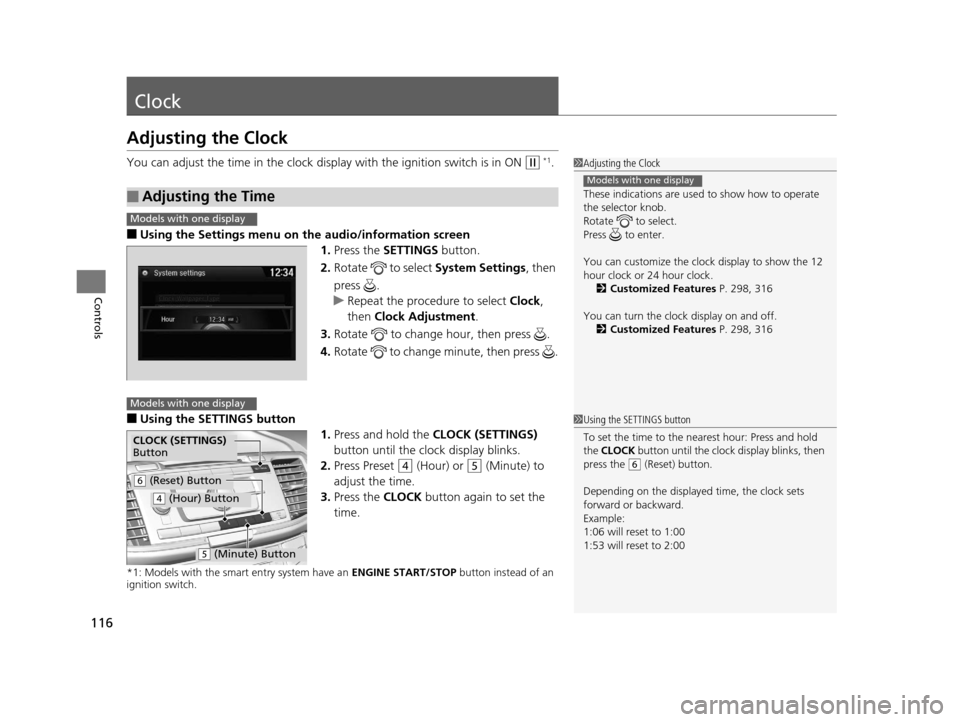
■Using the SETTINGS button
1.Press and hold the CLOCK (SETTINGS)
button until the clock display blinks.
2. Press Preset
(4 (Hour) or (5 (Minute) to
adjust the time.
3. Press the CLOCK button again to set the
time.
*1: Models with the smart entry system have an ENGINE START/STOP button instead of an
ignition switch.
■Adjusting the Time
1 Adjusting the Clock
These indications are used to show how to operate
the selector knob.
Rotate to select.
Press to enter.
You can customize the clock display to show the 12
hour clock or 24 hour clock. 2 Customized Features P. 298, 316
You can turn the clock display on and off. 2 Customized Features P. 298, 316
Models with one display
Models with one display
Models with one display
1Using the SETTINGS button
To set the time to the nearest hour: Press and hold
the CLOCK button until the clock display blinks, then
press the
( 6 (Reset) button.
Depending on the displayed time, the clock sets
forward or backward.
Example:
1:06 will reset to 1:00
1:53 will reset to 2:00
CLOCK (SETTINGS)
Button
( 6 (Reset) Button
(4 (Hour) Button
(5 (Minute) Button
16 US ACCORD 2D (KA KC KL)-31T3L6300.book 116 ページ 2015年7月23日 木曜日 午後4時11分
Page 124 of 609
Continued123
uuLocking and Unlocking the Doors uLocking/Unlocking the Doors from the Outside
Controls
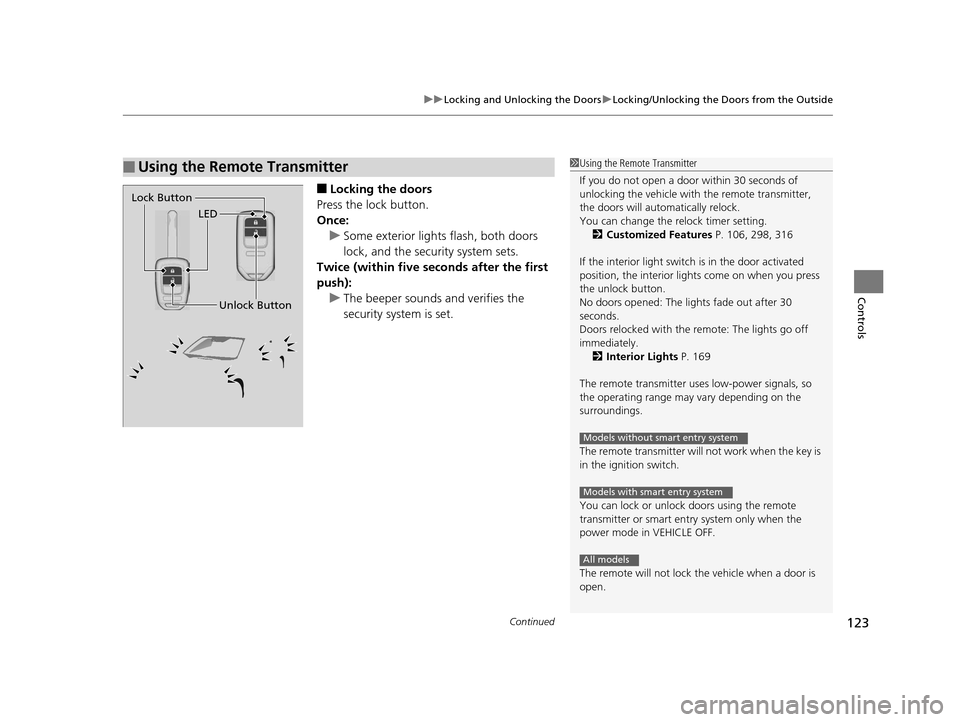
■Locking the doors
Press the lock button.
Once: u Some exterior lights flash, both doors
lock, and the security system sets.
Twice (within five se conds after the first
push): u The beeper sounds and verifies the
security system is set.
■Using the Remote Transmitter1Using the Remote Transmitter
If you do not open a door within 30 seconds of
unlocking the vehicle with the remote transmitter,
the doors will automatically relock.
You can change the relock timer setting. 2 Customized Features P. 106, 298, 316
If the interior light switch is in the door activated
position, the interior light s come on when you press
the unlock button.
No doors opened: The li ghts fade out after 30
seconds.
Doors relocked with the remote: The lights go off
immediately. 2 Interior Lights P. 169
The remote transmitter us es low-power signals, so
the operating range may vary depending on the
surroundings.
The remote transmitter will not work when the key is
in the ignition switch.
You can lock or unlock doors using the remote
transmitter or smart entry system only when the
power mode in VEHICLE OFF.
The remote will not lock the vehicle when a door is
open.
Models without smart entry system
Models with smart entry system
All models
LED
Unlock Button
Lock Button
16 US ACCORD 2D (KA KC KL)-31T3L6300.book 123 ページ 2015年7月23日 木曜日 午後4時11分