2016 GMC YUKON DENALI remote start
[x] Cancel search: remote startPage 329 of 396

GMC Yukon Denali/Yukon XL Denali Owner Manual (GMNA-Localizing-U.S./
Canada/Mexico-9159308) - 2016 - crc - 6/2/15
328 Vehicle Care
Caution
If any accessories are left on or
plugged in during the jump
starting procedure, they could be
damaged. The repairs would not
be covered by the vehicle
warranty. Whenever possible, turn
off or unplug all accessories on
either vehicle when jump starting.
4. Turn off the ignition on both vehicles. Unplug unnecessary
accessories plugged into the
accessory power outlets. Turn
off the radio and all the lamps
that are not needed. This will
avoid sparks and help save
both batteries. And it could
save the radio!
5. Open the hood on the other vehicle and locate the
positive (+) and negative (−)
terminal locations on that
vehicle.
The positive (+) terminal is
under a red plastic cover at the
positive battery post. To uncover the positive (+)
terminal, open the red plastic
cover.
For more information on the
location of the remote
positive (+) and remote
negative (−) terminals, see
Engine Compartment Overview
0
264.
{Warning
An electric fan can start up even
when the engine is not running
and can injure you. Keep hands,
clothing, and tools away from any
underhood electric fan.
{Warning
Using a match near a battery can
cause battery gas to explode.
People have been hurt doing this,
and some have been blinded.
Use a flashlight if you need more
light.
(Continued)
Warning (Continued)
Battery fluid contains acid that
can burn you. Do not get it on
you. If you accidentally get it in
your eyes or on your skin, flush
the place with water and get
medical help immediately.
{Warning
Fans or other moving engine
parts can injure you badly. Keep
your hands away from moving
parts once the engine is running.
6. Check that the jumper cables do not have loose or missing
insulation. If they do, you could
get a shock. The vehicles
could be damaged too.
Before you connect the cables,
here are some basic things you
should know. Positive (+) will
go to positive (+) or to a remote
positive (+) terminal if the
vehicle has one. Negative (−)
Page 330 of 396
GMC Yukon Denali/Yukon XL Denali Owner Manual (GMNA-Localizing-U.S./
Canada/Mexico-9159308) - 2016 - crc - 6/2/15
Vehicle Care 329
will go to a heavy, unpainted
metal engine part or to a
remote negative (−) terminal if
the vehicle has one.
Do not connect positive (+) to
negative (−) or you will get a
short that would damage the
battery and maybe other parts
too. And do not connect the
negative (−) cable to the
negative (−) terminal on the
dead battery because this can
cause sparks.
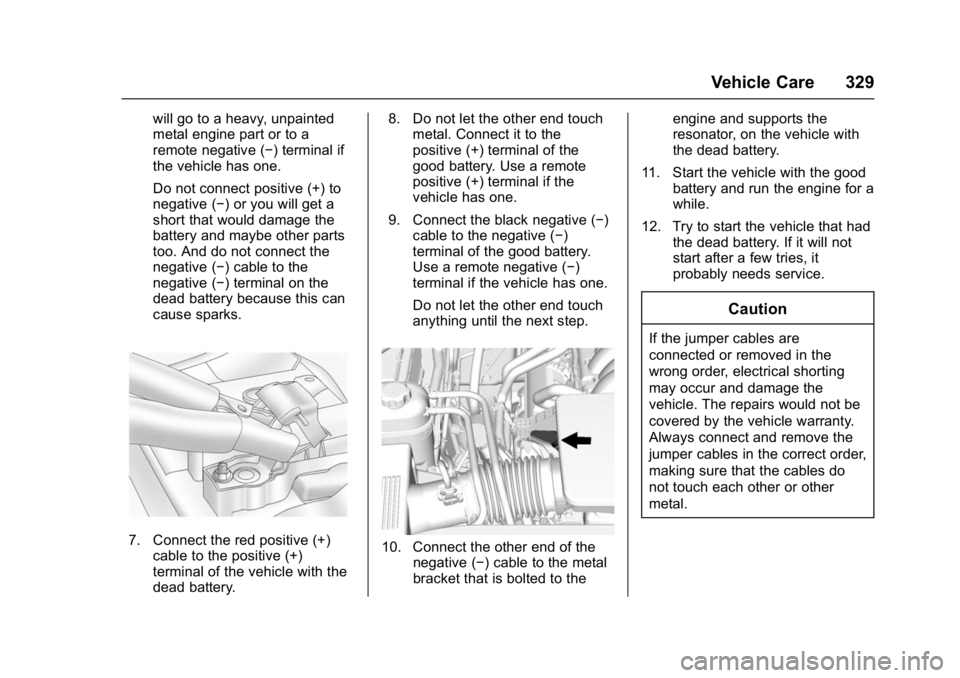
7. Connect the red positive (+)cable to the positive (+)
terminal of the vehicle with the
dead battery. 8. Do not let the other end touch
metal. Connect it to the
positive (+) terminal of the
good battery. Use a remote
positive (+) terminal if the
vehicle has one.
9. Connect the black negative (−) cable to the negative (−)
terminal of the good battery.
Use a remote negative (−)
terminal if the vehicle has one.
Do not let the other end touch
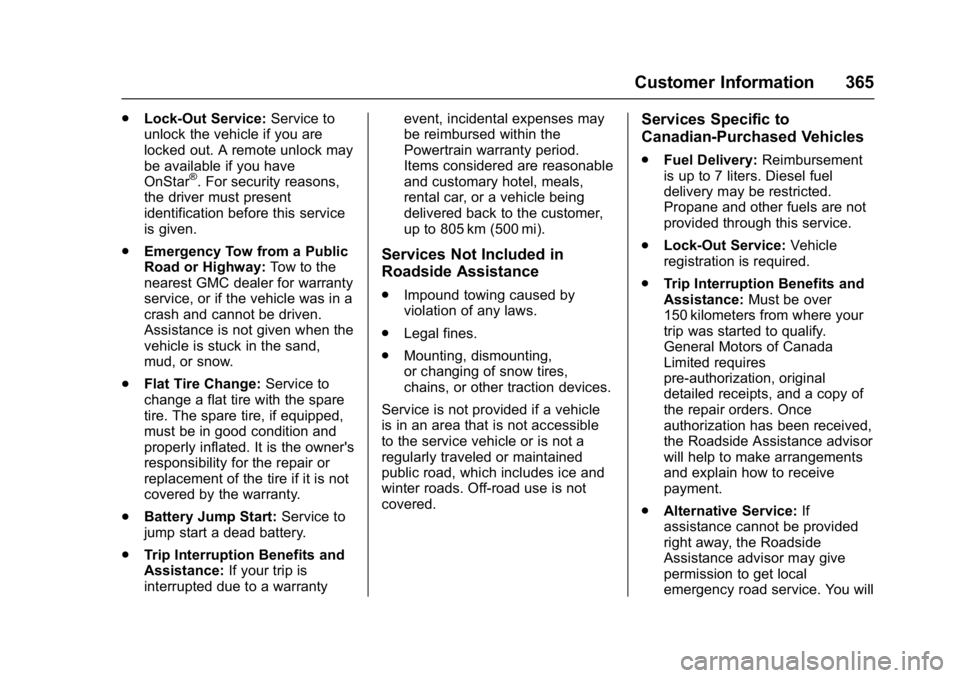
anything until the next step.10. Connect the other end of the negative (−) cable to the metal
bracket that is bolted to the engine and supports the
resonator, on the vehicle with
the dead battery.
11. Start the vehicle with the good battery and run the engine for a
while.
12. Try to start the vehicle that had the dead battery. If it will not
start after a few tries, it
probably needs service.
Caution
If the jumper cables are
connected or removed in the
wrong order, electrical shorting
may occur and damage the
vehicle. The repairs would not be
covered by the vehicle warranty.
Always connect and remove the
jumper cables in the correct order,
making sure that the cables do
not touch each other or other
metal.
Page 366 of 396
GMC Yukon Denali/Yukon XL Denali Owner Manual (GMNA-Localizing-U.S./
Canada/Mexico-9159308) - 2016 - crc - 6/2/15
Customer Information 365
.Lock-Out Service: Service to
unlock the vehicle if you are
locked out. A remote unlock may
be available if you have
OnStar
®. For security reasons,
the driver must present
identification before this service
is given.
. Emergency Tow from a Public
Road or Highway: Tow to the
nearest GMC dealer for warranty
service, or if the vehicle was in a
crash and cannot be driven.
Assistance is not given when the
vehicle is stuck in the sand,
mud, or snow.
. Flat Tire Change: Service to
change a flat tire with the spare
tire. The spare tire, if equipped,
must be in good condition and
properly inflated. It is the owner's
responsibility for the repair or
replacement of the tire if it is not
covered by the warranty.
. Battery Jump Start: Service to
jump start a dead battery.
. Trip Interruption Benefits and
Assistance: If your trip is
interrupted due to a warranty event, incidental expenses may
be reimbursed within the
Powertrain warranty period.
Items considered are reasonable
and customary hotel, meals,
rental car, or a vehicle being
delivered back to the customer,
up to 805 km (500 mi).
Services Not Included in
Roadside Assistance
.
Impound towing caused by
violation of any laws.
. Legal fines.
. Mounting, dismounting,
or changing of snow tires,
chains, or other traction devices.
Service is not provided if a vehicle
is in an area that is not accessible
to the service vehicle or is not a
regularly traveled or maintained
public road, which includes ice and
winter roads. Off-road use is not
covered.
Services Specific to
Canadian-Purchased Vehicles
. Fuel Delivery: Reimbursement
is up to 7 liters. Diesel fuel
delivery may be restricted.
Propane and other fuels are not
provided through this service.
. Lock-Out Service: Vehicle
registration is required.
. Trip Interruption Benefits and
Assistance: Must be over
150 kilometers from where your
trip was started to qualify.
General Motors of Canada
Limited requires
pre-authorization, original
detailed receipts, and a copy of
the repair orders. Once
authorization has been received,
the Roadside Assistance advisor
will help to make arrangements
and explain how to receive
payment.
. Alternative Service: If
assistance cannot be provided
right away, the Roadside
Assistance advisor may give
permission to get local
emergency road service. You will
Page 376 of 396

GMC Yukon Denali/Yukon XL Denali Owner Manual (GMNA-Localizing-U.S./
Canada/Mexico-9159308) - 2016 - crc - 6/2/15
OnStar 375
.Obtain the Wi-Fi®hotspot name
or SSID and password,
if equipped.
Press
Qto connect to an
Advisor to:
. Verify account information or
update contact information.
. Get driving directions.
. Receive a Diagnostic check of
the vehicle's key operating
systems.
. Receive Roadside Assistance.
. Manage Wi-Fi Settings,
if equipped.
Press
>to get a priority connection
to an OnStar Advisor available
24/7 to:
. Get help for an emergency.
. Be a Good Samaritan or
respond to an AMBER Alert.
. Get assistance in severe
weather or other crisis situations
and find evacuation routes.
OnStar Services
Emergency
OnStar Emergency Services require
a specific OnStar subscription plan.
With Automatic Crash Response, in
many crashes, built-in sensors can
automatically alert a specially
trained OnStar Advisor who is
immediately connected to the
vehicle to help.
Press
>for a priority connection to
an OnStar Advisor who can contact
emergency service providers, direct
them to your exact location, and
relay important information.
With OnStar Crisis Assist, specially
trained Advisors are available
24 hours a day, 7 days a week, to
provide a central point of contact,
assistance, and information during a
crisis.
With Roadside Assistance, Advisors
can locate a nearby service provider
to help with a flat tire, a battery
jump, or an empty gas tank.
Security
If equipped, OnStar provides these
services:
. With Stolen Vehicle Assistance,
OnStar Advisors can use GPS to
pinpoint the vehicle and help
authorities quickly recover it.
. With Remote Ignition Block,
if equipped, OnStar can block
the engine from being started.
. With Stolen Vehicle Slowdown,
if equipped, OnStar can work
with law enforcement to
gradually slow the vehicle down.
Navigation
OnStar navigation requires a
specific OnStar subscription plan.
Press
Qto receive Turn-by-Turn
directions or have them sent to the
vehicle’s navigation screen,
if equipped.
Turn-by-Turn Navigation
1. PressQto connect to an
Advisor.
Page 378 of 396

GMC Yukon Denali/Yukon XL Denali Owner Manual (GMNA-Localizing-U.S./
Canada/Mexico-9159308) - 2016 - crc - 6/2/15
OnStar 377
(no Internet connection, 3G,
4G, 4G LTE), and signal quality
(poor, good, excellent).
3. To change the SSID or password, press
Qor call
1-888-4ONSTAR to connect
with an Advisor.
OnStar RemoteLink
®Mobile App
(If Equipped)
Download the OnStar RemoteLink
mobile app to select Apple
®,
Android™, BlackBerry®,
or Windows®mobile devices.
OnStar Subscribers can access the
following services from a mobile
device:
. Remotely start/stop the vehicle,
if factory-equipped.
. Lock/unlock doors, if equipped
with automatic locks.
. Activate the horn and lamps.
. Check the vehicle’s fuel level, oil
life, or tire pressure,
if factory-equipped with the Tire
Pressure Monitor System.
. Send directions to the vehicle. .
Locate the vehicle on a map
(U.S. market only).
. Turn the vehicle's Wi-Fi hotspot
on/off, manage settings, and
monitor data consumption,
if equipped.
For OnStar RemoteLink information
and compatibility, see
www.onstar.com (U.S.) or
www.onstar.ca (Canada).
Remote Services
Contact an OnStar Advisor to
unlock the doors or sound the horn
and flash the lamps.
OnStar AtYourService
OnStar Advisors can provide
savings offers from restaurants and
retailers on your route, help locate
hotels, or book a room.
OnStar Hands-Free Calling
Make and receive calls with the
built-in wireless calling service.
Make a Call
1. Press
=. System responds:
“OnStar ready.” 2. Say
“Call.”System responds:
“Call. Please say the name or
number to call.”
3. Say the entire number without pausing, including a “1”and the
area code. System responds:
“OK, calling.”
Calling 911 Emergency
1. Press=. System responds:
“OnStar ready.”
2. Say “Call.”System responds:
“Call. Please say the name or
number to call.”
3. Say “911”without pausing.
System responds: “911.”
4. Say “Call.”System responds:
“OK, dialing 911.”
Retrieve My Number
1. Press=. System responds:
“OnStar ready.”
2. Say “My number.” System
responds: “Your OnStar
Hands-Free Calling number is,”
then says the number.
Page 381 of 396

GMC Yukon Denali/Yukon XL Denali Owner Manual (GMNA-Localizing-U.S./
Canada/Mexico-9159308) - 2016 - crc - 6/2/15
380 OnStar
vehicle has not been started for
five days, OnStar can contact
Roadside Assistance or a locksmith
to help gain access to the vehicle.
Global Positioning
System (GPS)
.Obstruction of the GPS can
occur in a large city with tall
buildings; in parking garages;
around airports; in tunnels and
underpasses; or in an area with
very dense trees. If GPS signals
are not available, the OnStar
system should still operate to
call OnStar. However, OnStar
could have difficulty identifying
the exact location.
. In emergency situations, OnStar
can use the last stored GPS
location to send to emergency
responders.
A temporary loss of GPS can cause
loss of the ability to send a
Turn-by-Turn Navigation route. The
Advisor may give a verbal route or
may ask for a call back after the
vehicle is driven into an open area.
Cellular and GPS Antennas
Cellular reception is required for
OnStar to send remote signals to
the vehicle. Do not place items over
or near the antenna to prevent
blocking cellular and GPS signal
reception.
Unable to Connect to OnStar
Message
If there is limited cellular coverage
or the cellular network has reached
maximum capacity, this message
may come on. Press
Qto try the
call again or try again after driving a
few miles into another cellular area.
Vehicle and Power Issues
OnStar services require a vehicle
electrical system, wireless service,
and GPS satellite technologies to be
available and operating for features
to function properly. These systems
may not operate if the battery is
discharged or disconnected.
Add-on Electrical Equipment
The OnStar system is integrated
into the electrical architecture of the
vehicle. Do not add any electrical
equipment. See Add-On Electrical
Equipment 0259. Added electrical
equipment may interfere with the
operation of the OnStar system and
cause it to not operate.
Vehicle Software Updates
OnStar or GM may remotely deliver
software updates or changes to the
vehicle without further notice or
consent. These updates or changes
may enhance or maintain safety,
security, or the operation of the
vehicle or the vehicle systems.
Software updates or changes may
affect or erase data or settings that
are stored in the vehicle, such as
OnStar Hands-Free Calling name
tags, saved navigation destinations,
or pre-set radio stations. Neither
OnStar nor GM is responsible for
any affected or erased data or
settings. These updates or changes
may also collect personal
information. Such collection is
described in the OnStar privacy
Page 390 of 396

GMC Yukon Denali/Yukon XL Denali Owner Manual (GMNA-Localizing-U.S./
Canada/Mexico-9159308) - 2016 - crc - 6/2/15
Index 389
Infotainment System . . . . . . . . . . . . 373
Instrument Cluster . . . . . . . . . . . . . . 120
Instrument PanelStorage Area . . . . . . . . . . . . . . . . . 106
Interior Rearview Mirrors . . . . . . . . . 46
Introduction . . . . . . . . . . . . . . . . . . . . . . . 2
J
Jump Starting - North America . . . . . . . . . . . . . . . . . . . . . . . 326
K
Key and Lock Messages . . . . . . . . 147
Keyless EntryRemote (RKE) System . . . . . . . . . 27
Keys . . . . . . . . . . . . . . . . . . . . . . . . . . . . . 25
L
Labeling, Tire Sidewall . . . . . . . . . . 299
Lamps Daytime Running (DRL) . . . . . . 166
Dome . . . . . . . . . . . . . . . . . . . . . . . . . 170
Exterior Controls . . . . . . . . . . . . . . 165
Exterior Lamps OffReminder . . . . . . . . . . . . . . . . . . . 166
License Plate . . . . . . . . . . . . . . . . . 286
Malfunction Indicator . . . . . . . . . 129
Messages . . . . . . . . . . . . . . . . . . . . 148
On Reminder . . . . . . . . . . . . . . . . . 136 Lamps (cont'd)
Reading . . . . . . . . . . . . . . . . . . . . . . 170
Lane Change Alert (LCA) . . . . . . . 238
Lane Departure Warning (LDW) . . . . . . . . . . . . . . . . 240
Lane Keep Assist (LKA) . . . . . . . . 240
Lane Keep Assist Light . . . . . . . . . 132
Lap-Shoulder Belt . . . . . . . . . . . . . . . 67
LATCH System Replacing Parts after aCrash . . . . . . . . . . . . . . . . . . . . . . . 100
LATCH, Lower Anchors and Tethers for Children . . . . . . . . . . . . 92
LED Lighting . . . . . . . . . . . . . . . . . . . . 285
Level Control
Automatic . . . . . . . . . . . . . . . . . . . . . 221
Liftgate . . . . . . . . . . . . . . . . . . . . . . . . . . 36
Lighting Entry . . . . . . . . . . . . . . . . . . . . . . . . . 171
Exit . . . . . . . . . . . . . . . . . . . . . . . . . . . 171
Illumination Control . . . . . . . . . . . 169
LED . . . . . . . . . . . . . . . . . . . . . . . . . . 285
Lights . . . . . . . . . . . . . . . . . . . . . . . . . . . 132
Airbag Readiness . . . . . . . . . . . . . 127
Antilock Brake System(ABS) Warning . . . . . . . . . . . . . . 131
Brake System Warning . . . . . . . 130
Charging System . . . . . . . . . . . . . 128 Lights (cont'd)
Cruise Control . . . . . . . . . . . . . . . . 136
Door Ajar . . . . . . . . . . . . . . . . . . . . . 136
Engine Coolant
Temperature Warning . . . . . . . 133
Engine Oil Pressure . . . . . . . . . . 134
Flash-to-Pass . . . . . . . . . . . . . . . . . 166
Four-Wheel-Drive . . . . . . . . . . . . . 131
Front Fog Lamp . . . . . . . . . . . . . . 136
High-Beam On . . . . . . . . . . . . . . . . 135
High/Low Beam Changer . . . . . 166
Low Fuel Warning . . . . . . . . . . . . 135
Safety Belt Reminders . . . . . . . . 126
Security . . . . . . . . . . . . . . . . . . . . . . 135
StabiliTrak
®OFF . . . . . . . . . . . . . 133
Tire Pressure . . . . . . . . . . . . . . . . . 134
Tow/Haul Mode . . . . . . . . . . . . . . . 132
Traction Control System (TCS)/StabiliTrak
®. . . . . . . . . . 133
Traction Off . . . . . . . . . . . . . . . . . . . 132
Locking Rear Axle . . . . . . . . . . . . . . 220
Locks Automatic Door . . . . . . . . . . . . . . . . . 35
Delayed Locking . . . . . . . . . . . . . . . . 35
Door . . . . . . . . . . . . . . . . . . . . . . . . . . . . 34
Lockout Protection . . . . . . . . . . . . . . 35
Power Door . . . . . . . . . . . . . . . . . . . . . 34
Safety . . . . . . . . . . . . . . . . . . . . . . . . . . 35
Page 392 of 396

GMC Yukon Denali/Yukon XL Denali Owner Manual (GMNA-Localizing-U.S./
Canada/Mexico-9159308) - 2016 - crc - 6/2/15
Index 391
OnStar . . . . . . . . . . . . . . . . . . . . . . . . . 373
OnStar®Additional
Information . . . . . . . . . . . . . . . . . . . . 378
OnStar
®Connections . . . . . . . . . . . 376
OnStar®Diagnostics . . . . . . . . . . . . 378
OnStar®Emergency . . . . . . . . . . . . 375
OnStar®Navigation . . . . . . . . . . . . . 375
OnStar®Overview . . . . . . . . . . . . . . 374
OnStar®Security . . . . . . . . . . . . . . . 375
Ordering Service Publications . . . . . . . . . . 369
Outlets Power . . . . . . . . . . . . . . . . . . . . . . . . .116
Overheating, Engine . . . . . . . . . . . . 273
P
Park Shifting Into . . . . . . . . . . . . . . . . . . . 203
Shifting Out of . . . . . . . . . . . . . . . . 204
Parking Brake . . . . . . . . . . . . . . . . . . . . . . . . . 217
Brake and P (Park)
Mechanism Check . . . . . . . . . . 282
Over Things That Burn . . . . . . . 205
Parking or Backing Assistance Systems . . . . . . . . . . 231
Passenger Airbag Status Indicator . . . . . . . . . . . . . . . . . . . . . . 127 Passenger Compartment Air
Filter . . . . . . . . . . . . . . . . . . . . . . . . . . 179
Passenger Sensing System . . . . . 80
Perchlorate Materials Requirements, California . . . . . . 261
Personalization Vehicle . . . . . . . . . . . . . . . . . . . . . . . 155
Power Door Locks . . . . . . . . . . . . . . . . . . . . . 34
Mirrors . . . . . . . . . . . . . . . . . . . . . . . . . . 44
Outlets . . . . . . . . . . . . . . . . . . . . . . . .116
Protection, Battery . . . . . . . . . . . . 172
Retained Accessory (RAP) . . . 203
Seat Adjustment . . . . . . . . . . . . . . . . 53
Windows . . . . . . . . . . . . . . . . . . . . . . . 47
Power Assist Steps . . . . . . . . . . . . . . 40
Pregnancy, Using Safety Belts . . . 71
Privacy
Vehicle Data Recording . . . . . . . 372
Program Courtesy Transportation . . . . . . 366
Proposition 65 Warning,
California . . . . . . . . . . . .261, 278, 326
R
Radio Frequency Statement . . . . 370
Reading Lamps . . . . . . . . . . . . . . . . . 170
Rear Axle . . . . . . . . . . . . . . . . . . . . . . . 280Locking . . . . . . . . . . . . . . . . . . . . . . . 220
Rear Climate Control System . . . 178
Rear Seats Heated . . . . . . . . . . . . . . . . . . . . . . . . . 58
Rear Storage . . . . . . . . . . . . . . . . . . . 107
Rear Window Washer/Wiper . . . . 114
Rearview Mirrors Automatic Dimming . . . . . . . . . . . . . 46
Reclining Seatbacks . . . . . . . . . . . . . 54
Recommended Fluids and Lubricants . . . . . . . . . . . . . . . . . . . . . 353
Records Maintenance . . . . . . . . . . . . . . . . . . 356
Recreational Vehicle Towing . . . . 330
Reimbursement Program, GM Mobility . . . . . . . . . . . . . . . . . . . 364
Remote Keyless Entry (RKE) System . . . . . . . . . . . . . . 26, 27
Remote Vehicle Start . . . . . . . . . . . . 33
Replacement Glass . . . . . . . . . . . . . . . . . . . . . . . . . 283
Replacement Bulbs . . . . . . . . . . . . . 287
Replacement Parts Airbags . . . . . . . . . . . . . . . . . . . . . . . . . 85