2016 GMC SIERRA lock
[x] Cancel search: lockPage 4 of 509
GMC Sierra Owner Manual (GMNA-Localizing-U.S./Canada/Mexico-
9234758) - 2016 - crc - 11/9/15
Introduction 3
Danger, Warning, and
Caution
Warning messages found on vehicle
labels and in this manual describe
hazards and what to do to avoid or
reduce them.
{Danger
Danger indicates a hazard with a
high level of risk which will result
in serious injury or death.
{Warning
Warning indicates a hazard that
could result in injury or death.
Caution
Caution indicates a hazard that
could result in property or vehicle
damage.
A circle with a slash through it is a
safety symbol which means“Do
Not,” “Do not do this,” or“Do not let
this happen.”
Symbols
The vehicle has components and
labels that use symbols instead of
text. Symbols are shown along with
the text describing the operation or
information relating to a specific
component, control, message,
gauge, or indicator.
M: Shown when the owner
manual has additional instructions
or information.
*: Shown when the service
manual has additional instructions
or information.
0: Shown when there is more
information on another page —
“see page.” Vehicle Symbol Chart
Here are some additional symbols
that may be found on the vehicle
and what they mean. For more
information on the symbol, refer to
the Index.
0:
Adjustable Pedals
9: Airbag Readiness Light
!:Antilock Brake System (ABS)
g: Audio Steering Wheel Controls
or OnStar®(if equipped)
$: Brake System Warning Light
":Charging System
I: Cruise Control
`:Do Not Puncture
^:Do Not Service
B:Engine Coolant Temperature
O:Exterior Lamps
_: Flame/Fire Prohibited
#:Fog Lamps
.:Fuel Gauge
+: Fuses
Page 6 of 509
GMC Sierra Owner Manual (GMNA-Localizing-U.S./Canada/Mexico-
9234758) - 2016 - crc - 11/9/15
In Brief 5
In Brief
Instrument Panel
Instrument Panel . . . . . . . . . . . . . . . . 6
Initial Drive Information
Initial Drive Information . . . . . . . . . . 8
Remote Keyless Entry (RKE)System . . . . . . . . . . . . . . . . . . . . . . . . 8
Remote Vehicle Start . . . . . . . . . . . 9
Door Locks . . . . . . . . . . . . . . . . . . . . . 9
Windows . . . . . . . . . . . . . . . . . . . . . . . 10
Seat Adjustment . . . . . . . . . . . . . . . 11
Memory Features . . . . . . . . . . . . . . 13
Heated and Ventilated Seats . . . 13
Head Restraint Adjustment . . . . 13
Safety Belts . . . . . . . . . . . . . . . . . . . . 14
Passenger Sensing System . . . 14
Mirror Adjustment . . . . . . . . . . . . . . 14
Steering Wheel Adjustment . . . . 16
Throttle and Brake Pedal Adjustment . . . . . . . . . . . . . . . . . . . 16
Interior Lighting . . . . . . . . . . . . . . . . 17
Exterior Lighting . . . . . . . . . . . . . . . 17
Windshield Wiper/Washer . . . . . . 18
Climate Controls . . . . . . . . . . . . . . . 18
Transmission . . . . . . . . . . . . . . . . . . 21
Four-Wheel Drive . . . . . . . . . . . . . . 22
Vehicle Features
Infotainment System . . . . . . . . . . . 23
Radio(s) . . . . . . . . . . . . . . . . . . . . . . . 23
Satellite Radio . . . . . . . . . . . . . . . . . 24
Portable Audio Devices . . . . . . . . 24
Bluetooth
®. . . . . . . . . . . . . . . . . . . . . 24
Steering Wheel Controls . . . . . . . 25
Driver Information Center (DIC) . . . . . . . . . . . . . . . . . 26
Forward Collision Alert (FCA) System . . . . . . . . . . . . . . . . . . . . . . . 26
Lane Departure Warning (LDW) . . . . . . . . . . . . . . . 26
Lane Keep Assist (LKA) . . . . . . . 26
Rear Vision Camera (RVC) . . . . 27
Parking Assist . . . . . . . . . . . . . . . . . 27
Power Outlets . . . . . . . . . . . . . . . . . 27
Universal Remote System . . . . . 27
Sunroof . . . . . . . . . . . . . . . . . . . . . . . . 28
eAssist Features
eAssist®Overview . . . . . . . . . . . . . 29
Performance and Maintenance
Traction Control/Electronic Stability Control . . . . . . . . . . . . . . 29
Tire Pressure Monitor . . . . . . . . . . 29
Engine Oil Life System . . . . . . . . 30
E85 or FlexFuel . . . . . . . . . . . . . . . . 30
Driving for Better Fuel Economy . . . . . . . . . . . . . . . . . . . . . 30
Roadside Assistance Program . . . . . . . . . . . . . . . . . . . . . . 31
Page 10 of 509
GMC Sierra Owner Manual (GMNA-Localizing-U.S./Canada/Mexico-
9234758) - 2016 - crc - 11/9/15
In Brief 9
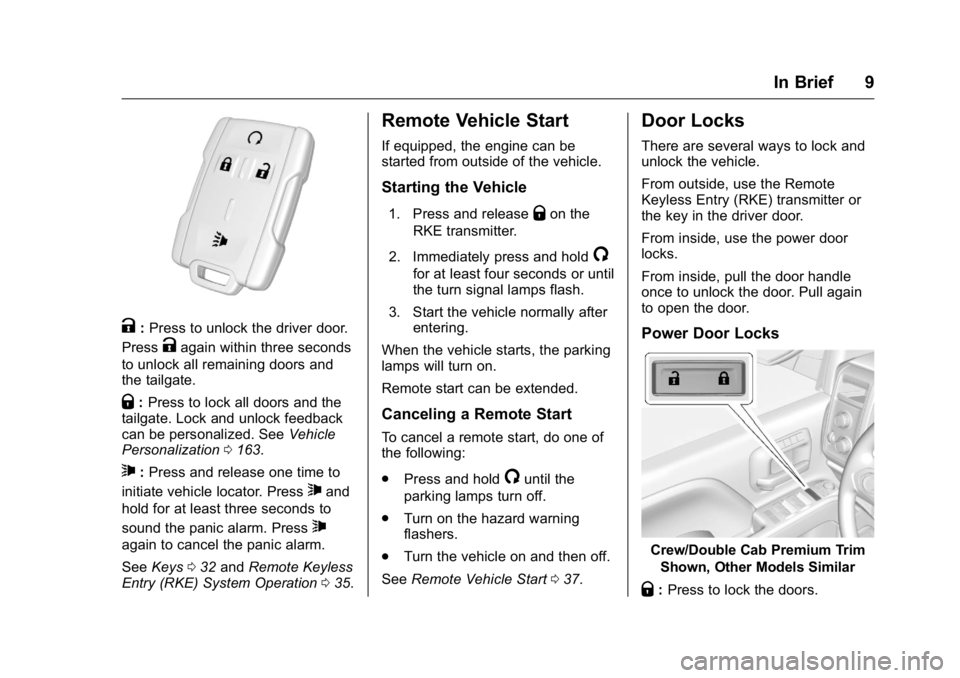
K:Press to unlock the driver door.
Press
Kagain within three seconds
to unlock all remaining doors and
the tailgate.
Q: Press to lock all doors and the
tailgate. Lock and unlock feedback
can be personalized. See Vehicle
Personalization 0163.
7:Press and release one time to
initiate vehicle locator. Press
7and
hold for at least three seconds to
sound the panic alarm. Press
7
again to cancel the panic alarm.
See Keys 032 and Remote Keyless
Entry (RKE) System Operation 035.
Remote Vehicle Start
If equipped, the engine can be
started from outside of the vehicle.
Starting the Vehicle
1. Press and releaseQon the
RKE transmitter.
2. Immediately press and hold
/
for at least four seconds or until
the turn signal lamps flash.
3. Start the vehicle normally after entering.
When the vehicle starts, the parking
lamps will turn on.
Remote start can be extended.
Canceling a Remote Start
To cancel a remote start, do one of
the following:
. Press and hold
/until the
parking lamps turn off.
. Turn on the hazard warning
flashers.
. Turn the vehicle on and then off.
See Remote Vehicle Start 037.
Door Locks
There are several ways to lock and
unlock the vehicle.
From outside, use the Remote
Keyless Entry (RKE) transmitter or
the key in the driver door.
From inside, use the power door
locks.
From inside, pull the door handle
once to unlock the door. Pull again
to open the door.
Power Door Locks
Crew/Double Cab Premium Trim
Shown, Other Models Similar
Q:Press to lock the doors.
Page 11 of 509

GMC Sierra Owner Manual (GMNA-Localizing-U.S./Canada/Mexico-
9234758) - 2016 - crc - 11/9/15
10 In Brief
K:Press to unlock the doors.
See Door Locks 038 and Power
Door Locks 039.
Windows
Power Windows
Crew/Double Cab Premium Trim
Shown, Other Models Similar
The driver door has a switch to
control all windows. Each
passenger door has a switch to
control that window. The power
windows work when the ignition is in
ON/RUN or ACC/ACCESSORY, or when Retained Accessory Power
(RAP) is active. See
Retained
Accessory Power (RAP) 0281.
Press the switch to lower the
window. Pull the switch up to raise
it. See Windows 050 and Power
Windows 050.
Express Windows
The express window feature allows
the windows to be raised and
lowered without holding the switch.
To activate express-down, press the
switch down fully and release.
The driver window has an
express-up feature. Pull the switch
up fully and release to activate.
Power Sliding Rear Window
If equipped, the power sliding rear
window works when the ignition has
been turned to ACC/ACCESSORY
or ON/RUN, or when Retained
Accessory Power (RAP) is active.
See Retained Accessory Power
(RAP) 0281.
. Press the switch to open the
window.
. Pull the switch to close the
window.
The power sliding rear window
cannot be operated manually.
Page 12 of 509

GMC Sierra Owner Manual (GMNA-Localizing-U.S./Canada/Mexico-
9234758) - 2016 - crc - 11/9/15
In Brief 11
Seat Adjustment
Manual Seats
To adjust a manual seat:1. Pull the handle at the front of the seat.
2. Slide the seat to the desired position and release the
handle.
3. Try to move the seat back and forth to be sure it is locked in
place.
See Seat Adjustment 057.
Power Seats
To adjust a power seat, if equipped:
.
Move the seat forward or
rearward by sliding the control
forward or rearward.
. If equipped, raise or lower the
front part of the seat cushion by
moving the front of the control
up or down.
. If equipped, raise or lower the
seat by moving the rear of the
control up or down.
See Power Seat Adjustment 058.
Lumbar Adjustment
Manual Lumbar
If equipped, move the lever up or
down repeatedly to increase or
decrease lumbar support.
See Lumbar Adjustment 058.
Page 13 of 509

GMC Sierra Owner Manual (GMNA-Localizing-U.S./Canada/Mexico-
9234758) - 2016 - crc - 11/9/15
12 In Brief
Power Lumbar
To adjust the power lumbar support,
if equipped:
.Press and hold the control
forward to increase or rearward
to decrease upper and lower
lumbar support at the same time.
. If equipped, press and hold the
control up to increase upper
lumbar support and decrease
lower lumbar support.
Press and hold the control down
to increase lower lumbar support
and decrease upper lumbar
support. See
Lumbar Adjustment 058.
Reclining Seatbacks
Manual Reclining Seatbacks
To adjust a manual seatback:
1. Lift the lever. The seatback will automatically
fold forward.
2. To recline, move the seatback rearward to the desired
position, then release the lever
to lock the seatback in place.
3. Push and pull on the seatback to make sure it is locked. To return the seatback to the upright
position:
1. Lift the lever fully without applying pressure to the
seatback, and the seatback will
return to the upright position.
2. Push and pull on the seatback to make sure it is locked.
See Reclining Seatbacks 059.
Power Reclining Seatbacks
To recline a power seatback,
if equipped:
. Tilt the top of the control
rearward to recline.
Page 17 of 509

GMC Sierra Owner Manual (GMNA-Localizing-U.S./Canada/Mexico-
9234758) - 2016 - crc - 11/9/15
16 In Brief
Automatic Dimming Rearview
Mirror
The automatic dimming mirror will
automatically reduce the glare from
the headlamps from behind. The
dimming feature comes on when the
vehicle is started.
SeeAutomatic Dimming Rearview
Mirror 050.
Steering Wheel
Adjustment
To adjust the steering wheel:
1. Hold the steering wheel and pull the lever. 2. Move the steering wheel up
or down.
3. Release the lever to lock the wheel in place.
Tilt and Telescoping Steering
Wheel
To adjust the tilt and telescoping
steering wheel, if equipped: 1. Push the lever (1) down to move the steering wheel
forward or rearward. Lift the
lever up to lock the wheel in
place. 2. Pull the lever (2) toward you to
move the steering wheel up or
down, then release the lever to
lock the wheel in place.
Do not adjust the steering wheel
while driving.
Throttle and Brake Pedal
Adjustment
If equipped, the position of the
throttle and brake pedals can be
changed.
The switch used to adjust the
pedals is on the center stack, below
the climate controls.
Page 25 of 509

GMC Sierra Owner Manual (GMNA-Localizing-U.S./Canada/Mexico-
9234758) - 2016 - crc - 11/9/15
24 In Brief
MENU :Press to select a menu.
g:Press to seek the previous
station or track.
l: Press to seek the next station
or track.
See “Base Radio” inOverview
(Base Radio) 0186 orOverview
(Base Radio with
Touchscreen) 0189.
Base Radio with Touchscreen
O:Press to turn the system on.
Press and hold to turn it off. When
on, press to mute; press again to
unmute. Turn to increase or
decrease the volume.
{: Press to go to the Home Page.
7:Press to seek the previous
station or track.
6: Press to seek the next station
or track.
See “Base Radio with Touchscreen”
in Overview (Base Radio) 0186 or
Overview (Base Radio with
Touchscreen) 0189.
Setting the Clock
See Clock 0125.
Satellite Radio
Vehicles with a SiriusXM®satellite
radio tuner and a valid SiriusXM
satellite radio subscription can
receive SiriusXM programming.
SiriusXM Satellite Radio
Service
SiriusXM is a satellite radio service
based in the 48 contiguous United
States and 10 Canadian provinces.
SiriusXM satellite radio has a wide
variety of programming and
commercial-free music, coast to
coast, and in digital-quality sound.
A fee is required to receive the
SiriusXM service.
For more information refer to:
. www.siriusxm.com or call
1-866-635-2349 (U.S.).
. www.xmradio.ca or call
1-877-209-0079 (Canada). See
Satellite Radio (Base Radio)
0 196 orSatellite Radio (Base
Radio with Touchscreen) 0197.
Portable Audio Devices
This vehicle may have a 3.5 mm
(1/8 in) auxiliary input jack and USB
ports in the center console or
armrest. There may be a USB port
in the upper glove box. External
devices such as iPods
®, laptop
computers, MP3 players, and USB
storage devices may be connected,
depending on the audio system.
See USB Port (Base Radio) 0205
or USB Port (Base Radio with
Touchscreen) 0208 andAuxiliary
Jack 0209.
Bluetooth®
The Bluetooth®system allows users
with a Bluetooth-enabled cell phone
to make and receive hands-free
calls using the vehicle audio system
and controls.