2016 GMC SIERRA 1500 information display
[x] Cancel search: information displayPage 27 of 509
GMC Sierra Owner Manual (GMNA-Localizing-U.S./Canada/Mexico-
9234758) - 2016 - crc - 11/9/15
26 In Brief
Driver Information
Center (DIC)
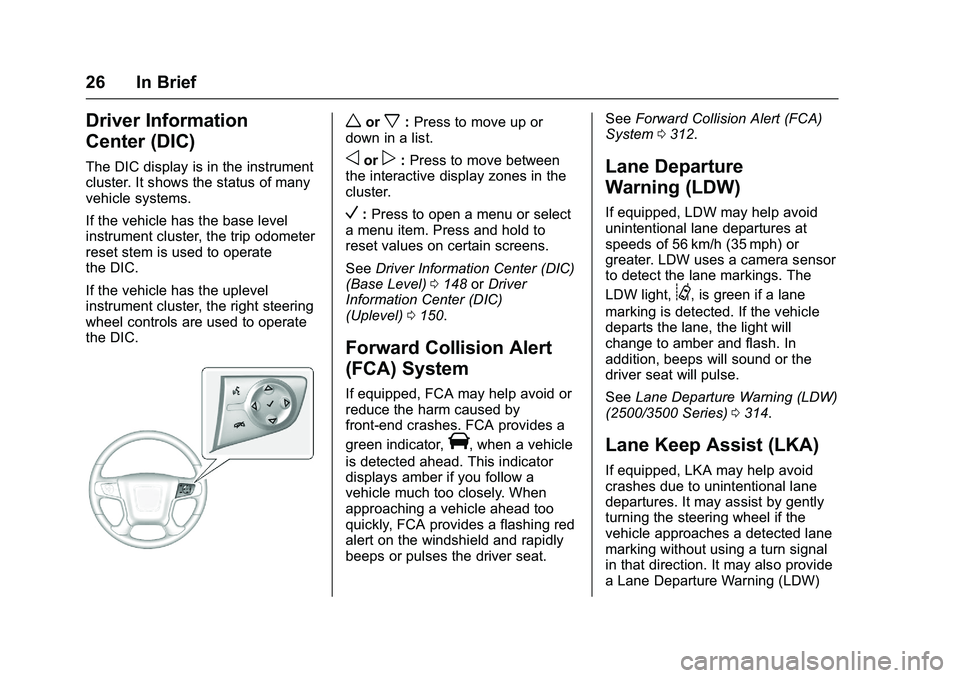
The DIC display is in the instrument
cluster. It shows the status of many
vehicle systems.
If the vehicle has the base level
instrument cluster, the trip odometer
reset stem is used to operate
the DIC.
If the vehicle has the uplevel
instrument cluster, the right steering
wheel controls are used to operate
the DIC.
worx:Press to move up or
down in a list.
oorp: Press to move between
the interactive display zones in the
cluster.
V: Press to open a menu or select
a menu item. Press and hold to
reset values on certain screens.
See Driver Information Center (DIC)
(Base Level) 0148 orDriver
Information Center (DIC)
(Uplevel) 0150.
Forward Collision Alert
(FCA) System
If equipped, FCA may help avoid or
reduce the harm caused by
front-end crashes. FCA provides a
green indicator,
V, when a vehicle
is detected ahead. This indicator
displays amber if you follow a
vehicle much too closely. When
approaching a vehicle ahead too
quickly, FCA provides a flashing red
alert on the windshield and rapidly
beeps or pulses the driver seat. See
Forward Collision Alert (FCA)
System 0312.
Lane Departure
Warning (LDW)
If equipped, LDW may help avoid
unintentional lane departures at
speeds of 56 km/h (35 mph) or
greater. LDW uses a camera sensor
to detect the lane markings. The
LDW light,
@, is green if a lane
marking is detected. If the vehicle
departs the lane, the light will
change to amber and flash. In
addition, beeps will sound or the
driver seat will pulse.
See Lane Departure Warning (LDW)
(2500/3500 Series) 0314.
Lane Keep Assist (LKA)
If equipped, LKA may help avoid
crashes due to unintentional lane
departures. It may assist by gently
turning the steering wheel if the
vehicle approaches a detected lane
marking without using a turn signal
in that direction. It may also provide
a Lane Departure Warning (LDW)
Page 30 of 509
GMC Sierra Owner Manual (GMNA-Localizing-U.S./Canada/Mexico-
9234758) - 2016 - crc - 11/9/15
In Brief 29
eAssist Features
eAssist®Overview
For an eAssist vehicle, see the
Silverado/Sierra eAssist
supplement.
Performance and
Maintenance
Traction Control/
Electronic Stability
Control
The vehicle has a traction control
system that limits wheel spin and
the StabiliTrak system that assists
with directional control of the vehicle
in difficult driving conditions. Both
systems come on automatically
when the vehicle is started and
begins to move.
.To turn off traction control, press
and release
gon the center
stack. The traction off light
i
displays in the instrument
cluster. The appropriate Driver
Information Center (DIC)
message displays. See Ride
Control System
Messages 0157.
. To turn off both traction control
and StabiliTrak, press and
hold
guntiliandgilluminate in the instrument cluster and the
appropriate DIC message
displays. See
Ride Control
System Messages 0157.
. Press and release
gagain to
turn on both systems.
StabiliTrak will automatically turn on
if the vehicle exceeds 56 km/h
(35 mph). Traction control will
remain off.
See Traction Control/Electronic
Stability Control 0303.
Tire Pressure Monitor
This vehicle may have a Tire
Pressure Monitor System (TPMS).
The low tire pressure warning light
alerts to a significant loss in
pressure of one of the vehicle's
tires. If the warning light comes on,
stop as soon as possible and inflate
Page 31 of 509
GMC Sierra Owner Manual (GMNA-Localizing-U.S./Canada/Mexico-
9234758) - 2016 - crc - 11/9/15
30 In Brief
the tires to the recommended
pressure shown on the Tire and
Loading Information label. See
Vehicle Load Limits0269. The
warning light will remain on until the
tire pressure is corrected.
The low tire pressure warning light
may come on in cool weather when
the vehicle is first started, and then
turn off as the vehicle is driven. This
may be an early indicator that the
tire pressures are getting low and
the tires need to be inflated to the
proper pressure.
The TPMS does not replace normal
monthly tire maintenance. Maintain
the correct tire pressures.
See Tire Pressure Monitor
System 0409.
Engine Oil Life System
The engine oil life system calculates
engine oil life based on vehicle use
and, on most vehicles, displays a
DIC message when it is necessary
to change the engine oil and filter.
The oil life system should be reset
to 100% only following an oil
change. Resetting the Oil Life System
To reset the engine oil life system:
1. Display OIL LIFE REMAINING on the DIC. See Driver
Information Center (DIC) (Base
Level) 0148 orDriver
Information Center (DIC)
(Uplevel) 0150. If the vehicle
does not have DIC buttons, the
vehicle must be in P (Park) to
access this display.
2. Press and hold the
Vbutton on
the DIC, or the trip odometer
reset stem if the vehicle does
not have DIC buttons, for
several seconds. The oil life
will change to 100%.
The oil life system can also be reset
as follows:
1. Turn the ignition to ON/RUN with the engine off.
2. Fully press the accelerator pedal slowly three times within
five seconds. 3. Display OIL LIFE REMAINING
on the DIC. If the display
shows 100%, the system is
reset.
See Engine Oil Life System 0366.
E85 or FlexFuel
Vehicles with a yellow fuel cap can
use either unleaded gasoline or
ethanol fuel containing up to 85%
ethanol (E85). See E85 or FlexFuel
0 319. For all other vehicles, use
only the unleaded gasoline
described under Fuel0317.
Driving for Better Fuel
Economy
Driving habits can affect fuel
mileage. Here are some driving tips
to get the best fuel economy
possible.
.
Avoid fast starts and accelerate
smoothly.
. Brake gradually and avoid
abrupt stops.
. Avoid idling the engine for long
periods of time.
Page 122 of 509
GMC Sierra Owner Manual (GMNA-Localizing-U.S./Canada/Mexico-
9234758) - 2016 - crc - 11/9/15
Instruments and Controls 121
Instruments and
Controls
Controls
Steering Wheel Adjustment . . . 122
Steering Wheel Controls . . . . . . 123
Heated Steering Wheel . . . . . . . 123
Horn . . . . . . . . . . . . . . . . . . . . . . . . . . 123
Windshield Wiper/Washer . . . . 124
Compass . . . . . . . . . . . . . . . . . . . . . 125
Clock . . . . . . . . . . . . . . . . . . . . . . . . . 125
Power Outlets . . . . . . . . . . . . . . . . 126
Wireless Charging . . . . . . . . . . . . 128
Warning Lights, Gauges, and
Indicators
Warning Lights, Gauges, andIndicators . . . . . . . . . . . . . . . . . . . 129
Instrument Cluster . . . . . . . . . . . . 130
Speedometer . . . . . . . . . . . . . . . . . 133
Odometer . . . . . . . . . . . . . . . . . . . . . 133
Trip Odometer . . . . . . . . . . . . . . . . 133
Tachometer . . . . . . . . . . . . . . . . . . . 133
Fuel Gauge . . . . . . . . . . . . . . . . . . . 133
Engine Oil Pressure Gauge . . . . . . . . . . . . . . . . . . . . . . 134
Engine Coolant Temperature Gauge . . . . . . . . . . . . . . . . . . . . . . 135
Voltmeter Gauge . . . . . . . . . . . . . 136 Safety Belt Reminders . . . . . . . . 137
Airbag Readiness Light . . . . . . . 137
Airbag On-Off Light . . . . . . . . . . . 138
Passenger Airbag Status
Indicator . . . . . . . . . . . . . . . . . . . . 139
Charging System Light . . . . . . . 140
Malfunction Indicator Lamp (Check Engine Light) . . . . . . . . 141
Brake System Warning Light . . . . . . . . . . . . . . . . . . . . . . . . 142
Antilock Brake System (ABS) Warning Light . . . . . . . . . . . . . . . 143
Four-Wheel-Drive Light . . . . . . . 143
Tow/Haul Mode Light . . . . . . . . . 144
Hill Descent Control Light . . . . 144
Lane Departure Warning (LDW) Light (2500/3500
Series) . . . . . . . . . . . . . . . . . . . . . . 144
Lane Keep Assist (LKA) Light (1500 Series) . . . . . . . . . . . . . . . 144
Vehicle Ahead Indicator . . . . . . 145
Traction Off Light . . . . . . . . . . . . . 145
StabiliTrak
®OFF Light . . . . . . . . 145
Traction Control System (TCS)/ StabiliTrak
®Light . . . . . . . . . . . 146
Tire Pressure Light . . . . . . . . . . . 146
Low Fuel Warning Light . . . . . . 146
Security Light . . . . . . . . . . . . . . . . . 147
High-Beam On Light . . . . . . . . . . 147
Front Fog Lamp Light . . . . . . . . . 147
Lamps On Reminder . . . . . . . . . 147 Cruise Control Light . . . . . . . . . . 148
Information Displays
Driver Information Center (DIC)
(Base Level) . . . . . . . . . . . . . . . . 148
Driver Information Center (DIC) (Uplevel) . . . . . . . . . . . . . . . . . . . . 150
Vehicle Messages
Vehicle Messages . . . . . . . . . . . . 153
Battery Voltage and ChargingMessages . . . . . . . . . . . . . . . . . . . 153
Brake System Messages . . . . . 154
Compass Messages . . . . . . . . . . 154
Door Ajar Messages . . . . . . . . . . 154
Engine Cooling System Messages . . . . . . . . . . . . . . . . . . . 154
Engine Oil Messages . . . . . . . . . 155
Engine Power Messages . . . . . 155
Fuel System Messages . . . . . . . 156
Key and Lock Messages . . . . . 156
Lamp Messages . . . . . . . . . . . . . . 156
Object Detection System Messages . . . . . . . . . . . . . . . . . . . 156
Ride Control System Messages . . . . . . . . . . . . . . . . . . . 157
Airbag System Messages . . . . 158
Safety Belt Messages . . . . . . . . 158
Security Messages . . . . . . . . . . . 159
Steering System Messages . . . . . . . . . . . . . . . . . . . 159
Page 126 of 509
GMC Sierra Owner Manual (GMNA-Localizing-U.S./Canada/Mexico-
9234758) - 2016 - crc - 11/9/15
Instruments and Controls 125
Compass
The vehicle may have a compass
display on the Driver Information
Center (DIC). The compass receives
its heading and other information
from the Global Positioning
System (GPS) antenna,
StabiliTrak
®, and vehicle speed
information.
The compass system is designed to
operate for a certain number of
miles or degrees of turn before
needing a signal from the GPS
satellites. When the compass
display shows CAL, drive the
vehicle for a short distance in an
open area where it can receive a
GPS signal. The compass system
will automatically determine when a
GPS signal is restored and provide
a heading again. See Compass
Messages 0154 for the messages
that may be displayed for the
compass.
Clock
Setting the Time and Date with
Faceplate Controls
To set the time or date:
1. Select SETTINGS from the Home Page, then select Time
and Date.
2. Select the desired function.
3. Turn the MENU knob to increase or decrease the value.
4. Press the MENU knob to go to the next value. After the last
value is selected, the system
will update and return to the
Settings menu. Press
oBACK
to go to the last menu and
save the changes.
Auto Set requires an OnStar
subscription.
If auto timing is set, the time
displayed on the clock may not
update immediately when driving
into a new time zone. To set the clock display:
1. Select SETTINGS from the Home Page, then select Time
and Date.
2. Select Clock Display.
3. Turn the MENU knob to Off or On.
4. Press the MENU knob to select.
Press
oBACK to go to the last
menu and save the changes.
Setting the Time and Date with
Touchscreen Controls
To set the time:
1. Touch the SETTINGS screen button from the Home Page,
then touch Time and Date.
2. Touch Set Time and touch
«
orªto increase or decrease
hours, minutes, and AM or PM.
Touch 12–24 Hr for 12 or
24 hour clock.
3. Touch the
}or0screen
button to go back to the
previous menu.
Page 133 of 509
GMC Sierra Owner Manual (GMNA-Localizing-U.S./Canada/Mexico-
9234758) - 2016 - crc - 11/9/15
132 Instruments and Controls
Cluster Menu (Uplevel Cluster)
There is an interactive display area
in the center of the instrument
cluster.
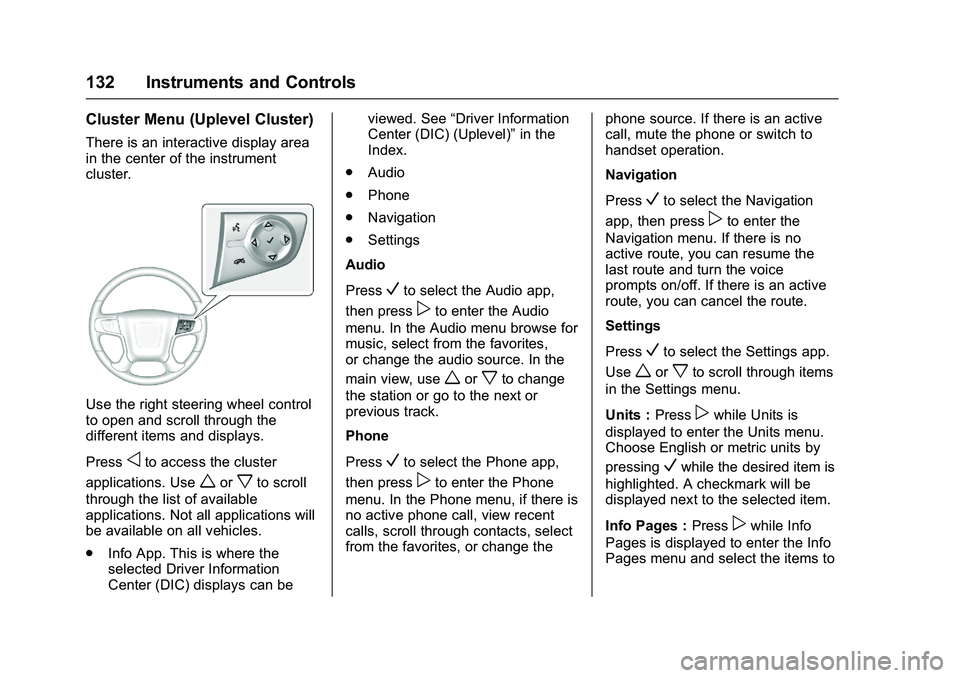
Use the right steering wheel control
to open and scroll through the
different items and displays.
Press
oto access the cluster
applications. Use
worxto scroll
through the list of available
applications. Not all applications will
be available on all vehicles.
. Info App. This is where the
selected Driver Information
Center (DIC) displays can be viewed. See
“Driver Information
Center (DIC) (Uplevel)” in the
Index.
. Audio
. Phone
. Navigation
. Settings
Audio
Press
Vto select the Audio app,
then press
pto enter the Audio
menu. In the Audio menu browse for
music, select from the favorites,
or change the audio source. In the
main view, use
worxto change
the station or go to the next or
previous track.
Phone
Press
Vto select the Phone app,
then press
pto enter the Phone
menu. In the Phone menu, if there is
no active phone call, view recent
calls, scroll through contacts, select
from the favorites, or change the phone source. If there is an active
call, mute the phone or switch to
handset operation.
Navigation
Press
Vto select the Navigation
app, then press
pto enter the
Navigation menu. If there is no
active route, you can resume the
last route and turn the voice
prompts on/off. If there is an active
route, you can cancel the route.
Settings
Press
Vto select the Settings app.
Use
worxto scroll through items
in the Settings menu.
Units : Press
pwhile Units is
displayed to enter the Units menu.
Choose English or metric units by
pressing
Vwhile the desired item is
highlighted. A checkmark will be
displayed next to the selected item.
Info Pages : Press
pwhile Info
Pages is displayed to enter the Info
Pages menu and select the items to
Page 134 of 509
GMC Sierra Owner Manual (GMNA-Localizing-U.S./Canada/Mexico-
9234758) - 2016 - crc - 11/9/15
Instruments and Controls 133
be displayed in the Info app. See
“Driver Information Center (DIC)
(Uplevel)”in the Index.
Speed Warning : The Speed
Warning display allows the driver to
set a speed that they do not want to
exceed. To set the Speed Warning,
press
pwhen Speed Warning is
displayed, or press
Von the main
view to set the speed value. Press
worxto adjust the value. PressVto set the speed. Once the speed
is set, this feature can be turned off
by pressing
Vwhile viewing this
page. If the selected speed limit is
exceeded, a pop-up warning is
displayed with a chime.
Software Information : Press
p
while Software Information is
highlighted to display open source
software information.
Speedometer
The speedometer shows the
vehicle's speed in either kilometers
per hour (km/h) or miles per
hour (mph).
Odometer
The odometer shows how far the
vehicle has been driven, in either
kilometers or miles.
Trip Odometer
The trip odometer shows how far
the vehicle has been driven since
the trip odometer was last reset.
The trip odometer is accessed and
reset through the Driver Information
Center (DIC). SeeDriver
Information Center (DIC) (Base
Level) 0148 orDriver Information
Center (DIC) (Uplevel) 0150.
Tachometer
The tachometer displays the engine
speed in revolutions per
minute (rpm).
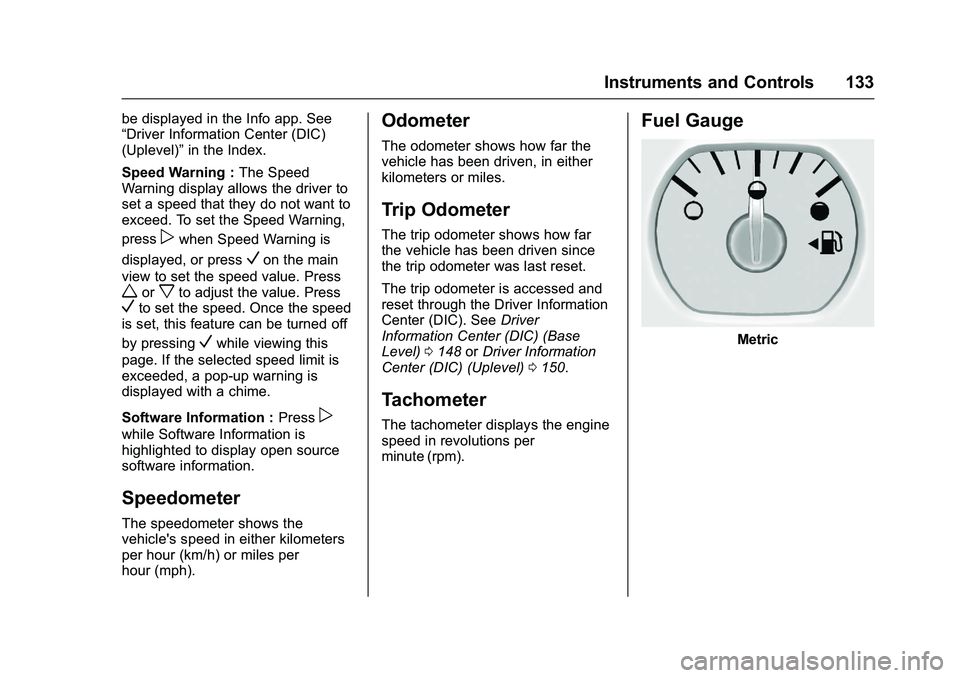
Fuel Gauge
Metric
Page 141 of 509
GMC Sierra Owner Manual (GMNA-Localizing-U.S./Canada/Mexico-
9234758) - 2016 - crc - 11/9/15
140 Instruments and Controls
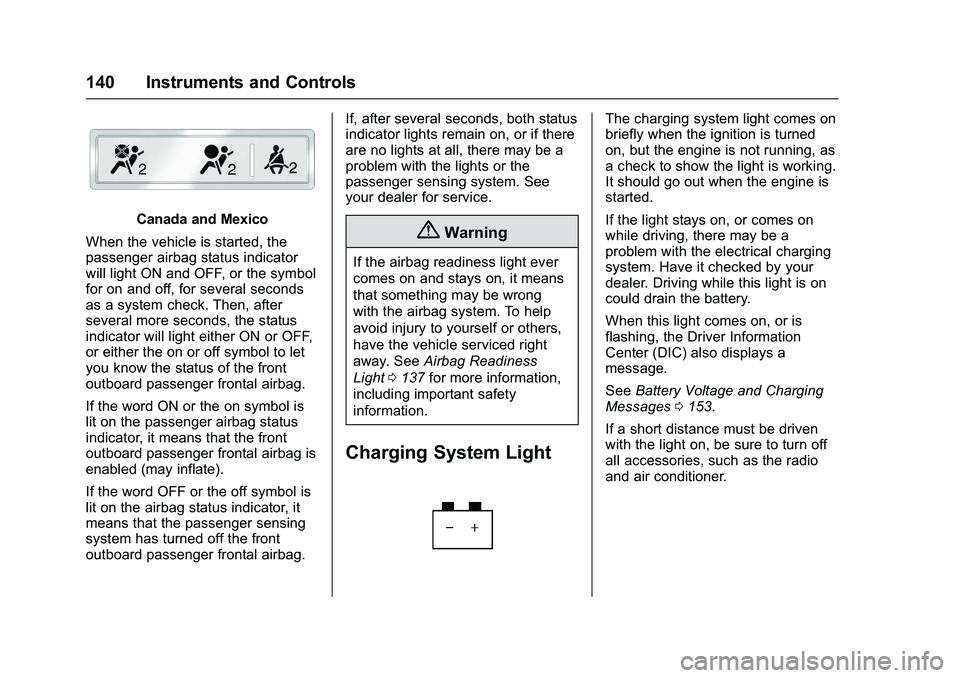
Canada and Mexico
When the vehicle is started, the
passenger airbag status indicator
will light ON and OFF, or the symbol
for on and off, for several seconds
as a system check. Then, after
several more seconds, the status
indicator will light either ON or OFF,
or either the on or off symbol to let
you know the status of the front
outboard passenger frontal airbag.
If the word ON or the on symbol is
lit on the passenger airbag status
indicator, it means that the front
outboard passenger frontal airbag is
enabled (may inflate).
If the word OFF or the off symbol is
lit on the airbag status indicator, it
means that the passenger sensing
system has turned off the front
outboard passenger frontal airbag. If, after several seconds, both status
indicator lights remain on, or if there
are no lights at all, there may be a
problem with the lights or the
passenger sensing system. See
your dealer for service.{Warning
If the airbag readiness light ever
comes on and stays on, it means
that something may be wrong
with the airbag system. To help
avoid injury to yourself or others,
have the vehicle serviced right
away. See
Airbag Readiness
Light 0137 for more information,
including important safety
information.
Charging System Light
The charging system light comes on
briefly when the ignition is turned
on, but the engine is not running, as
a check to show the light is working.
It should go out when the engine is
started.
If the light stays on, or comes on
while driving, there may be a
problem with the electrical charging
system. Have it checked by your
dealer. Driving while this light is on
could drain the battery.
When this light comes on, or is
flashing, the Driver Information
Center (DIC) also displays a
message.
See Battery Voltage and Charging
Messages 0153.
If a short distance must be driven
with the light on, be sure to turn off
all accessories, such as the radio
and air conditioner.