2016 GMC ACADIA clock
[x] Cancel search: clockPage 297 of 371
GMC Acadia/Acadia Denali Owner Manual (GMNA-Localizing-U.S./Canada/
Mexico-9159268) - 2016 - crc - 7/31/15
296 Vehicle Care
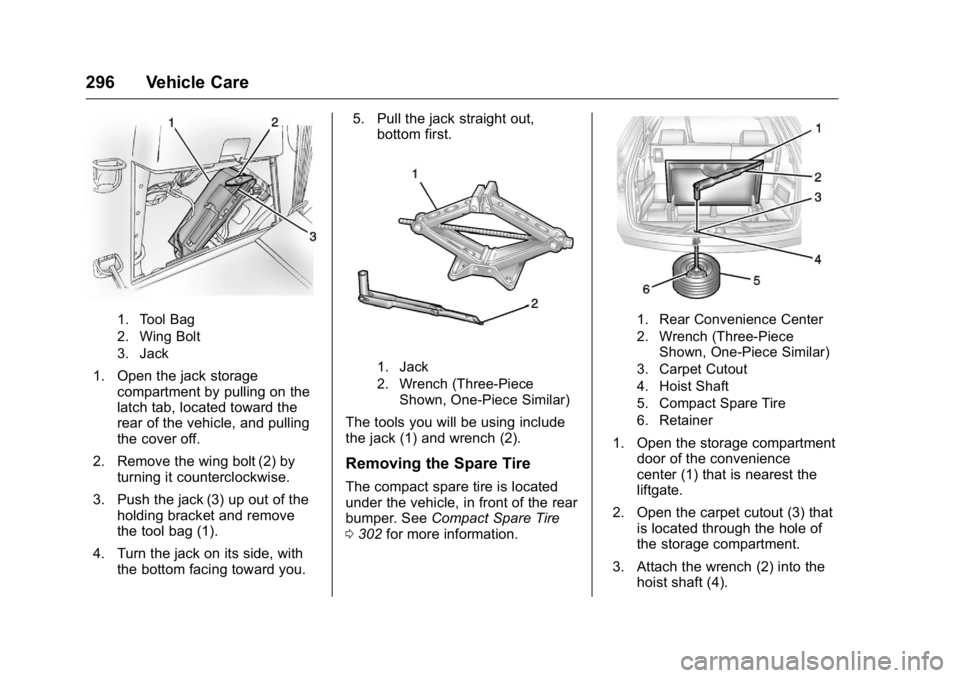
1. Tool Bag
2. Wing Bolt
3. Jack
1. Open the jack storagecompartment by pulling on the
latch tab, located toward the
rear of the vehicle, and pulling
the cover off.
2. Remove the wing bolt (2) by turning it counterclockwise.
3. Push the jack (3) up out of the holding bracket and remove
the tool bag (1).
4. Turn the jack on its side, with the bottom facing toward you. 5. Pull the jack straight out,
bottom first.1. Jack
2. Wrench (Three-Piece
Shown, One-Piece Similar)
The tools you will be using include
the jack (1) and wrench (2).
Removing the Spare Tire
The compact spare tire is located
under the vehicle, in front of the rear
bumper. See Compact Spare Tire
0 302 for more information.
1. Rear Convenience Center
2. Wrench (Three-Piece
Shown, One-Piece Similar)
3. Carpet Cutout
4. Hoist Shaft
5. Compact Spare Tire
6. Retainer
1. Open the storage compartment door of the convenience
center (1) that is nearest the
liftgate.
2. Open the carpet cutout (3) that is located through the hole of
the storage compartment.
3. Attach the wrench (2) into the hoist shaft (4).
Page 298 of 371
GMC Acadia/Acadia Denali Owner Manual (GMNA-Localizing-U.S./Canada/
Mexico-9159268) - 2016 - crc - 7/31/15
Vehicle Care 297
4. Turn the wrench (2)counterclockwise to lower the
spare tire (5) to the ground.
Continue turning the wrench
until the spare tire can be
pulled out from under the
vehicle.
5. Tilt the retainer and slip it
through the wheel opening to
remove the spare tire from the
cable.
6. Turn the wrench clockwise to raise the cable back up after
removing the spare tire.
Do not store a full-size or a flat
road tire under the vehicle. See
“Storing the Spare Tire” and
“Storing the Flat Tire” later in
this section.
Removing the Flat Tire and
Installing the Spare Tire
1. Do a safety check before
proceeding. See If a Tire Goes
Flat 0294 for more information.
2. If the vehicle has a wheel cover, loosen the plastic nut
caps with the wheel wrench.
They will not come off. Then,
using the flat end of the wheel
wrench, pry along the edge of
the cover until it comes off. Be
careful; the edges may be
sharp. Do not try to remove the
cover with your bare hands.
Store the wheel cover securely
in the rear of the vehicle until
you have the flat tire repaired
or replaced.
If the vehicle has aluminum
wheels, remove the wheel nut
caps using the wheel wrench.
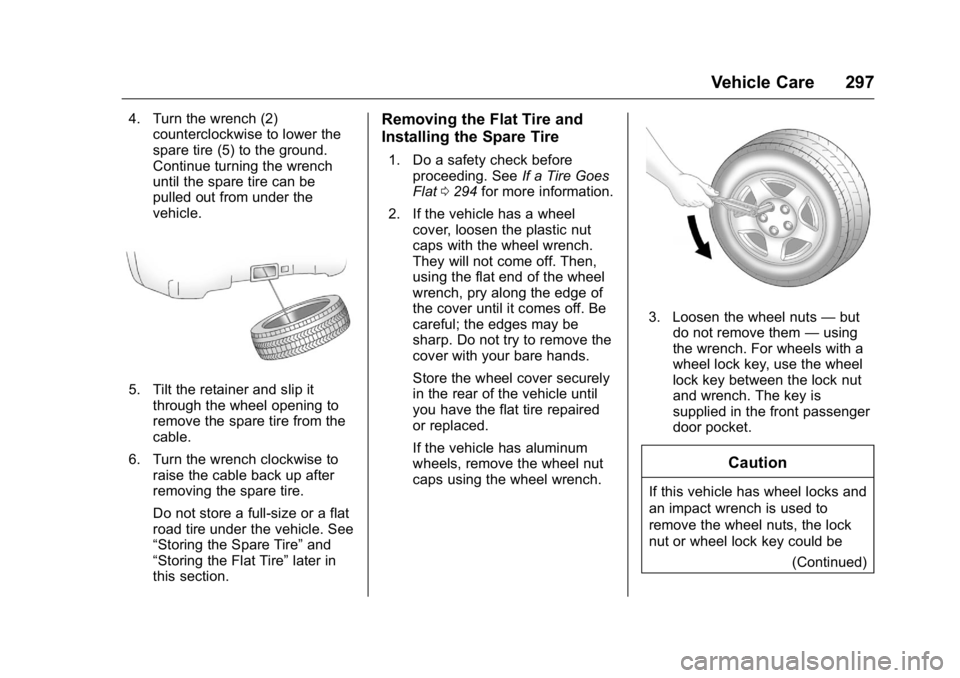
3. Loosen the wheel nuts —but
do not remove them —using
the wrench. For wheels with a
wheel lock key, use the wheel
lock key between the lock nut
and wrench. The key is
supplied in the front passenger
door pocket.
Caution
If this vehicle has wheel locks and
an impact wrench is used to
remove the wheel nuts, the lock
nut or wheel lock key could be
(Continued)
Page 299 of 371

GMC Acadia/Acadia Denali Owner Manual (GMNA-Localizing-U.S./Canada/
Mexico-9159268) - 2016 - crc - 7/31/15
298 Vehicle Care
Caution (Continued)
damaged. Do not use an impact
wrench to remove the wheel nuts
if this vehicle has wheel locks.
4. To identify the appropriatejacking location, find the
triangle or rectangular notch
about 30.5 cm (12 in) from the
front tire or about 27 cm
(10.5 in) from the rear tire.
Triangle Shown, Without Similar
The triangle may be located
near each wheel on the
vehicle's exterior.
Caution
If a jack is used to raise the
vehicle without positioning it
correctly, the vehicle could be
damaged. When raising the
vehicle on a jack, avoid contact
with the rear axle control arms. 5. Attach the wrench to the jack,
and turn the wrench clockwise
to raise the jack head
7.6 cm (3 in).
6. Do not raise the vehicle yet. Put the compact spare tire
near you.
{Warning
Getting under a vehicle when it is
lifted on a jack is dangerous.
If the vehicle slips off the jack,
you could be badly injured or
killed. Never get under a vehicle
when it is supported only by
a jack.
{Warning
Raising the vehicle with the jack
improperly positioned can
damage the vehicle and even
make the vehicle fall. To help
avoid personal injury and vehicle
damage, be sure to fit the jack lift
head into the proper location
before raising the vehicle.
Page 300 of 371

GMC Acadia/Acadia Denali Owner Manual (GMNA-Localizing-U.S./Canada/
Mexico-9159268) - 2016 - crc - 7/31/15
Vehicle Care 299
7. Raise the vehicle by turning thewrench clockwise in the jack.
Raise the vehicle far enough
off the ground so that there is
enough room for the spare tire
to fit under the wheel well.
8. Remove all the wheel nuts and the flat tire.
9. Remove the plastic spare tireheat shield by pulling the
rubber latch. Store the plastic
spare tire heat shield. See
“Storing the Spare Tire” later in
this section for more
information.
{Warning
Rust or dirt on a wheel, or on the
parts to which it is fastened, can
make wheel nuts become loose
after time. The wheel could come
off and cause an accident. When
changing a wheel, remove any
rust or dirt from places where the
wheel attaches to the vehicle. In
an emergency, a cloth or a paper
towel can be used; however, use
a scraper or wire brush later to
remove all rust or dirt.
{Warning
Never use oil or grease on bolts
or nuts because the nuts might
come loose. The vehicle's wheel
could fall off, causing a crash.
10. Remove any rust or dirt from the wheel bolts, mounting
surfaces, and spare wheel.
11. Place the spare tire on the wheel mounting surface. 12. Put the nuts on by hand by
turning them clockwise until the
wheel is held against the
mounting surface. Make sure
the rounded end is toward the
wheel.
13. Lower the vehicle by attaching the wrench to the jack and
turning the wrench
counterclockwise. Lower the
jack completely.
{Warning
Wheel nuts that are improperly or
incorrectly tightened can cause
the wheels to become loose or
come off. The wheel nuts should
be tightened with a torque wrench
to the proper torque specification
after replacing. Follow the torque
specification supplied by the
aftermarket manufacturer when
using accessory locking wheel
nuts. See Capacities and
Specifications 0334 for original
equipment wheel nut torque
specifications.
Page 303 of 371
GMC Acadia/Acadia Denali Owner Manual (GMNA-Localizing-U.S./Canada/
Mexico-9159268) - 2016 - crc - 7/31/15
302 Vehicle Care
5. Hook the cable onto theoutside portion of the liftgate
hinges (2).
6. Hook the other end of the cable onto the outside portion of the
liftgate hinge on the other side
of the vehicle.
7. Pull on the cable to make sure it is secure.
8. Make sure the metal tube is
centered at the striker. Push
the tube toward the front of the
vehicle.
9. Close the liftgate and make sure it is latched properly.
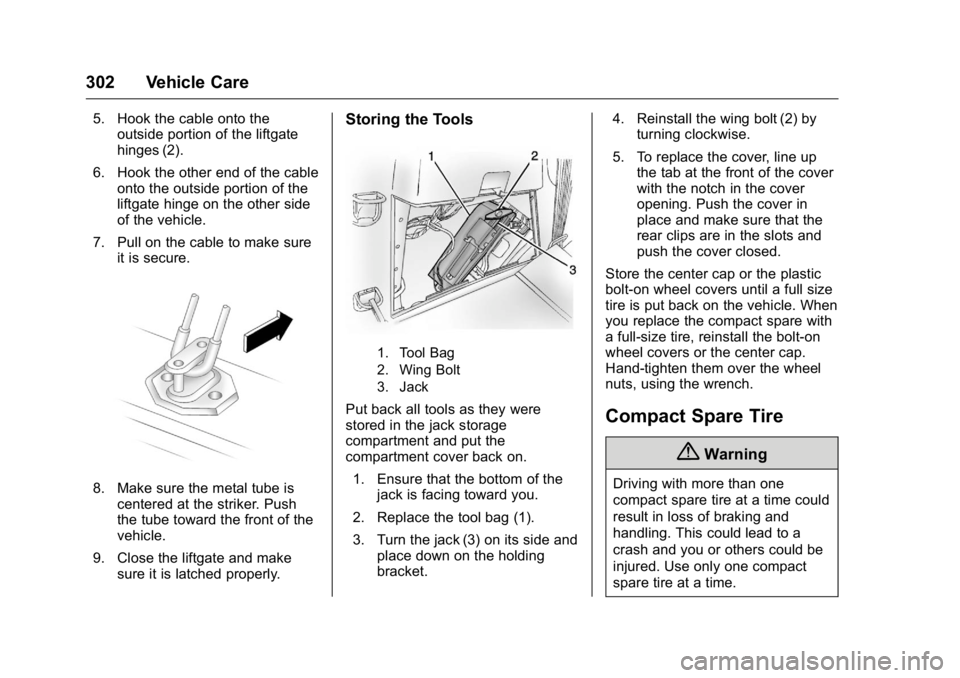
Storing the Tools
1. Tool Bag
2. Wing Bolt
3. Jack
Put back all tools as they were
stored in the jack storage
compartment and put the
compartment cover back on.
1. Ensure that the bottom of the jack is facing toward you.
2. Replace the tool bag (1).
3. Turn the jack (3) on its side and place down on the holding
bracket. 4. Reinstall the wing bolt (2) by
turning clockwise.
5. To replace the cover, line up the tab at the front of the cover
with the notch in the cover
opening. Push the cover in
place and make sure that the
rear clips are in the slots and
push the cover closed.
Store the center cap or the plastic
bolt-on wheel covers until a full size
tire is put back on the vehicle. When
you replace the compact spare with
a full-size tire, reinstall the bolt-on
wheel covers or the center cap.
Hand-tighten them over the wheel
nuts, using the wrench.Compact Spare Tire
{Warning
Driving with more than one
compact spare tire at a time could
result in loss of braking and
handling. This could lead to a
crash and you or others could be
injured. Use only one compact
spare tire at a time.
Page 363 of 371

GMC Acadia/Acadia Denali Owner Manual (GMNA-Localizing-U.S./Canada/
Mexico-9159268) - 2016 - crc - 7/31/15
362 Index
Climate Control Systems . . . . . . . 182Air Conditioning . . . . . . . . . . . . . . 182
Dual Automatic . . . . . . . . . . . . . . . 185
Heating . . . . . . . . . . . . . . . . . . . . . . . 182
Rear . . . . . . . . . . . . . . . . . . . . . 189, 190
Clock . . . . . . . . . . . . . . . . . . . . . . . . . . . 108
Cluster, Instrument . . . . . . . . . . . . . 111
Collision Damage Repair . . . . . . . 343
Compact Spare Tire . . . . . . . . . . . . 302
Compartments Storage . . . . . . . . . . . . . . . . . . . . . . . . . 98
Compass . . . . . . . . . . . . . . . . . . . . . . . 106
Connections OnStar
®. . . . . . . . . . . . . . . . . . . . . . 352
Control Traction and Electronic
Stability . . . . . . . . . . . . . . . . . . . . . 217
Control of a Vehicle . . . . . . . . . . . . . 195
Controller Rear Audio . . . . . . . . . . . . . . . . . . . 172
Convenience Net . . . . . . . . . . . . . . . 101
Convex Mirrors . . . . . . . . . . . . . . . . . . 40
Coolant
Engine . . . . . . . . . . . . . . . . . . . . . . . . 252
Engine Temperature Gauge . . .113
Engine TemperatureWarning Light . . . . . . . . . . . . . . . 121
Cooling System . . . . . . . . . . . . . . . . . 251 Cooling System (cont'd)
Engine Messages . . . . . . . . . . . . 132
Courtesy Lamps . . . . . . . . . . . . . . . . 153
Courtesy Transportation Program . . . . . . . . . . . . . . . . . . . . . . . 342
Cover Cargo . . . . . . . . . . . . . . . . . . . . . . . . . 100
Engine . . . . . . . . . . . . . . . . . . . . . . . . 246
Cruise Control . . . . . . . . . . . . . . . . . . 219
Light . . . . . . . . . . . . . . . . . . . . . . . . . . 123
Messages . . . . . . . . . . . . . . . . . . . . 132
Cupholders . . . . . . . . . . . . . . . . . . . . . . 98
Customer Assistance . . . . . . . . . . . 338 Offices . . . . . . . . . . . . . . . . . . . . . . . . 338
Text Telephone (TTY)
Users . . . . . . . . . . . . . . . . . . . . . . . 338
Customer Information Service Publications
Ordering Information . . . . . . . . 345
Customer Satisfaction Procedure . . . . . . . . . . . . . . . . . . . . . 336
D
Damage Repair, Collision . . . . . . . 343
Danger, Warning, and Caution . . . . 2
Data Recorders, Event . . . . . . . . . 348
Daytime Running Lamps/Automatic Headlamp
System . . . . . . . . . . . . . . . . . . . . . . . . 151 Defensive Driving . . . . . . . . . . . . . . . 194
Delayed Entry Lighting . . . . . . . . . 155
Delayed Exit Lighting . . . . . . . . . . . 155
Delayed Headlamps . . . . . . . . . . . . 151
Delayed Locking . . . . . . . . . . . . . . . . . 33
Devices
Auxiliary . . . . . . . . . . . . . . . . . . . . . . 169
Diagnostics OnStar
®. . . . . . . . . . . . . . . . . . . . . . 354
Distracted Driving . . . . . . . . . . . . . . . 194
Dome Lamps . . . . . . . . . . . . . . . . . . . 153
Door Ajar Messages . . . . . . . . . . . . . . . 132
Delayed Locking . . . . . . . . . . . . . . . . 33
Locks . . . . . . . . . . . . . . . . . . . . . . . . . . . 32
Power Locks . . . . . . . . . . . . . . . . . . . . 33
Drive Belt Routing, Engine . . . . . . 335
Drive Systems All-Wheel Drive . . . . . . . . . . 215, 261
Driver Information Center (DIC) . . . . . . . . . . . . . . . . . . 123
Driving Characteristics andTowing Tips . . . . . . . . . . . . . . . . . 233
Defensive . . . . . . . . . . . . . . . . . . . . . 194
Drunk . . . . . . . . . . . . . . . . . . . . . . . . . 194
For Better Fuel Economy . . . . . . . 25
Hill and Mountain Roads . . . . . . 198