2016 FORD TRANSIT CONNECT instrument cluster
[x] Cancel search: instrument clusterPage 91 of 439

Average Fuel
Indicates the average fuel consumption
since the function was last reset.
Digital Speedometer
The speed your vehicle is traveling at will
display as a digital number.
PERSONALIZED SETTINGS
Measure Units
To swap between imperial and metric
units, scroll to this display and press the
OK button.
Swapping between imperial and metric
units will affect the following displays:
• Distance to empty.
• Average fuel consumption.
• Instantaneous fuel consumption.
• Average speed.
Switching Chimes Off
The following chimes can be switched off:
• Warning messages.
• Information messages. INFORMATION MESSAGES Press the
OK button to acknowledge and
remove some messages from the
information display. Other messages will
be removed automatically after a short
time.
Certain messages need to be confirmed
before you can access the menus. The message indicator
illuminates to supplement some
messages. It will be red or amber
depending on the severity of the message
and will remain on until the cause of the
message has been rectified.
Some messages will be supplemented by
a system specific symbol with a message
indicator.
Note: Depending on the options on your
vehicle, not all of the messages will display
or be available. Certain messages may be
abbreviated or shortened depending upon
which instrument cluster type you have.
88
Tourneo Connect/Transit Connect (CHC) Canada/United States of America, enUSA, First Printing Information DisplaysE130248
Page 116 of 439

12 Volt DC Power Point
WARNINGS
Do not plug optional electrical
accessories into the cigar lighter
socket. Incorrect use of the cigar
lighter can cause damage not covered by
the vehicle warranty, and can result in fire
or serious injury. Do not use a power point for
operating a cigar lighter. Incorrect
use of the power points can cause
damage not covered by the vehicle
warranty, and can result in fire or serious
injury. Note:
When you switch the ignition on, you
can use the socket to power 12 volt
appliances with a maximum current rating
of 15 amps.
If the power supply does not work after you
switch the ignition off, switch the ignition
on.
Note: Do not hang any accessory from the
accessory plug.
Note: Do not use the power point over the
vehicle capacity of 12 volt DC 180 watts or
a fuse may blow.
Note: Always keep the power point caps
closed when not in use.
Do not insert objects other than an
accessory plug into the power point. This
will damage the power point and blow the
fuse.
Run the vehicle for full capacity use of the
power point.
To prevent the battery from running out of
charge:
• Do not use the power point longer than
necessary when the vehicle is not
running.
• Do not leave devices plugged in
overnight or when you park your vehicle
for extended periods. Locations
Power points may be in the following
locations:
•
Front of the floor console.
• Rear of the floor console.
• Right hand side of the luggage
compartment.
• Instrument panel cluster storage
compartment.
CIGAR LIGHTER Press the element in to use the cigar
lighter. It will pop out automatically.
Note:
Do not hold the cigar lighter element
pressed in.
Note: If the power supply does not work
after you switch the ignition off, switch the
ignition on.
Note: If you use the socket when the engine
is not running, the battery may lose charge.
Note: When you switch the ignition on, you
can use the socket to power 12 volt
appliances with a maximum current rating
of 15 amps.
113
Tourneo Connect/Transit Connect (CHC) Canada/United States of America, enUSA, First Printing Auxiliary Power PointsE103382
Page 125 of 439

3. Slowly insert the fuel filler nozzle fully
into the fuel system, and leave the
nozzle fully inserted to open both doors
until you are done pumping. Hold
handle higher during insertion for easier
access. 4.
After you are done pumping fuel, slowly
remove the fuel filler nozzle—allow
about five to ten seconds after
pumping fuel before removing the fuel
filler nozzle. This allows residual fuel
to drain back into the fuel tank and not
spill onto the vehicle.
Note: A fuel spillage concern may occur if
overfilling the fuel tank. Do not overfill the
tank to the point that the fuel is able to
bypass the fuel filler nozzle. The overfilled
fuel may run down the drain located below
and in front of the fuel filler door. If the fuel fill inlet was not properly closed,
a service engine warning lamp may appear
on the instrument cluster.
At the next opportunity, do the following:
1. Safely pull off the road.
2.
Put the vehicle in P (Park) and turn the
ignition off.
3. Open the fuel filler door and remove any visible debris from the fuel fill
opening.
4. Insert either the fuel fill nozzle or the fuel fill funnel provided with the vehicle
several times to allow the inlet to close
properly. This will dislodge any debris
preventing the inlet from sealing.
If this action corrects the problem, the
warning lamp may not reset immediately.
It may take several driving cycles for the
warning lamp to turn off. A driving cycle
consists of an engine start-up (after four
or more hours with the engine off) followed
by city or highway driving.
FUEL CONSUMPTION
Note: The amount of usable fuel in the
empty reserve varies and should not be
relied upon to increase driving range. When
refueling your vehicle after the fuel gauge
indicates empty, you might not be able to
refuel the full amount of the advertised
capacity of the fuel tank due to the empty
reserve still present in the tank.
Empty reserve is the amount of fuel
remaining in the tank after the fuel gauge
indicates empty. Do not rely on this fuel for
driving. The usable capacity of the fuel
tank is the amount of fuel that can be put
into the tank after the gauge indicates
empty. The advertised capacity is the total
fuel tank size – it is the combined usable
capacity plus the empty reserve.
122
Tourneo Connect/Transit Connect (CHC) Canada/United States of America, enUSA, First Printing Fuel and RefuelingE156032 E154765
Page 130 of 439

To use SelectShift, move the gearshift
lever into S (Sport). Use the +/- buttons
on the side of your gearshift lever to
manually change gears.
•
Press the (+) button to upshift.
• Press the (-) button to downshift.
Note: After you have assumed manual
control with SelectShift your vehicle will
remain in this mode until you return the
gearshift lever from S (Sport), back to D
(Drive).
Upshift to the recommended shift speeds
according to the following chart: Upshifts when accelerating (recom-
mended for best fuel economy)
Shift from:15 mph (24 km/h)
1 - 2
25 mph (40 km/h)
2 - 3
40 mph (64 km/h)
3 - 4
45 mph (72 km/h)
4 - 5
50 mph (80 km/h)
5 - 6
The instrument cluster will display the
selected gear that you are currently in and
a shift indicator arrow to assist in
optimizing shifting.
SelectShift will automatically make some
shifts for you in the event that your engine
speed is running at too high, or too low an
RPM.
Note: Engine damage may occur if
excessive engine revving is held without
shifting.
Brake-Shift Interlock WARNINGS
Do not drive your vehicle until you
verify that the brake lamps are
working. WARNINGS
When doing this procedure, you will
be taking the vehicle out of park
which means the vehicle can roll
freely. To avoid unwanted vehicle
movement, always fully set the parking
brake prior to doing this procedure. Use
wheel chocks if appropriate. If the parking brake is fully released,
but the brake warning lamp remains
illuminated, the brakes may not be
working properly. See your authorized
dealer. Use the brake shift interlock lever to move
the gearshift lever from the park position
in the event of an electrical malfunction or
if your vehicle has a dead battery.
Apply the parking brake and turn the
ignition off before performing this
procedure.
1. Insert a screwdriver (or similar tool)
between the shifter bezel and the top
finish panel.
2. Use the tool to unsnap the shifter bezel
from the finish panel. 3. Locate the white lever located on the
left side of the shifter.
4. Using the tool move the white lever towards the rear of the shifter.
127
Tourneo Connect/Transit Connect (CHC) Canada/United States of America, enUSA, First Printing TransmissionE142627
Page 143 of 439

PRINCIPLE OF OPERATION
Cruise control lets you maintain a set
speed without keeping your foot on the
accelerator pedal. You can use cruise
control when your vehicle speed is greater
than 20 mph (30 km/h).
USING CRUISE CONTROL WARNINGS
Do not use cruise control in heavy
traffic, on winding roads or when the
road surface is slippery. This could
result in loss of vehicle control, serious
injury or death. When you are going downhill, your
vehicle speed may increase above
the set speed. The system will not
apply the brakes. Change down a gear to
assist the system in maintaining the set
speed. Failure to do so could result in loss
of vehicle control, serious injury or death. Note:
Cruise control will disengage if your
vehicle speed decreases more than 10 mph
(16 km/h) below your set speed while
driving uphill. The cruise control switches are located on
the steering wheel. Switching Cruise Control On
Press and release
ON. The indicator will display in the
instrument cluster.
Setting a Speed
1. Accelerate to the desired speed.
2. Press and release
SET+.
3. Take your foot off the accelerator pedal.
Changing the Set Speed
• Press and hold SET+ or SET-. Release
the control when you reach the desired
speed.
• Press and release
SET+ or SET-. The
set speed will change in approximately
1 mph (2 km/h) increments.
• Press the accelerator or brake pedal
until you reach the desired speed. Press
and release
SET+.
Canceling the Set Speed
Pull
CAN toward you and release, or tap
the brake pedal. The system will not erase
the set speed.
Resuming the Set Speed
Pull
RES toward you and release.
Switching Cruise Control Off
Note: You will erase the set speed if you
switch the system off.
Press and release
OFF or switch the
ignition off.
140
Tourneo Connect/Transit Connect (CHC) Canada/United States of America, enUSA, First Printing Cruise ControlE142437 E71340
Page 190 of 439
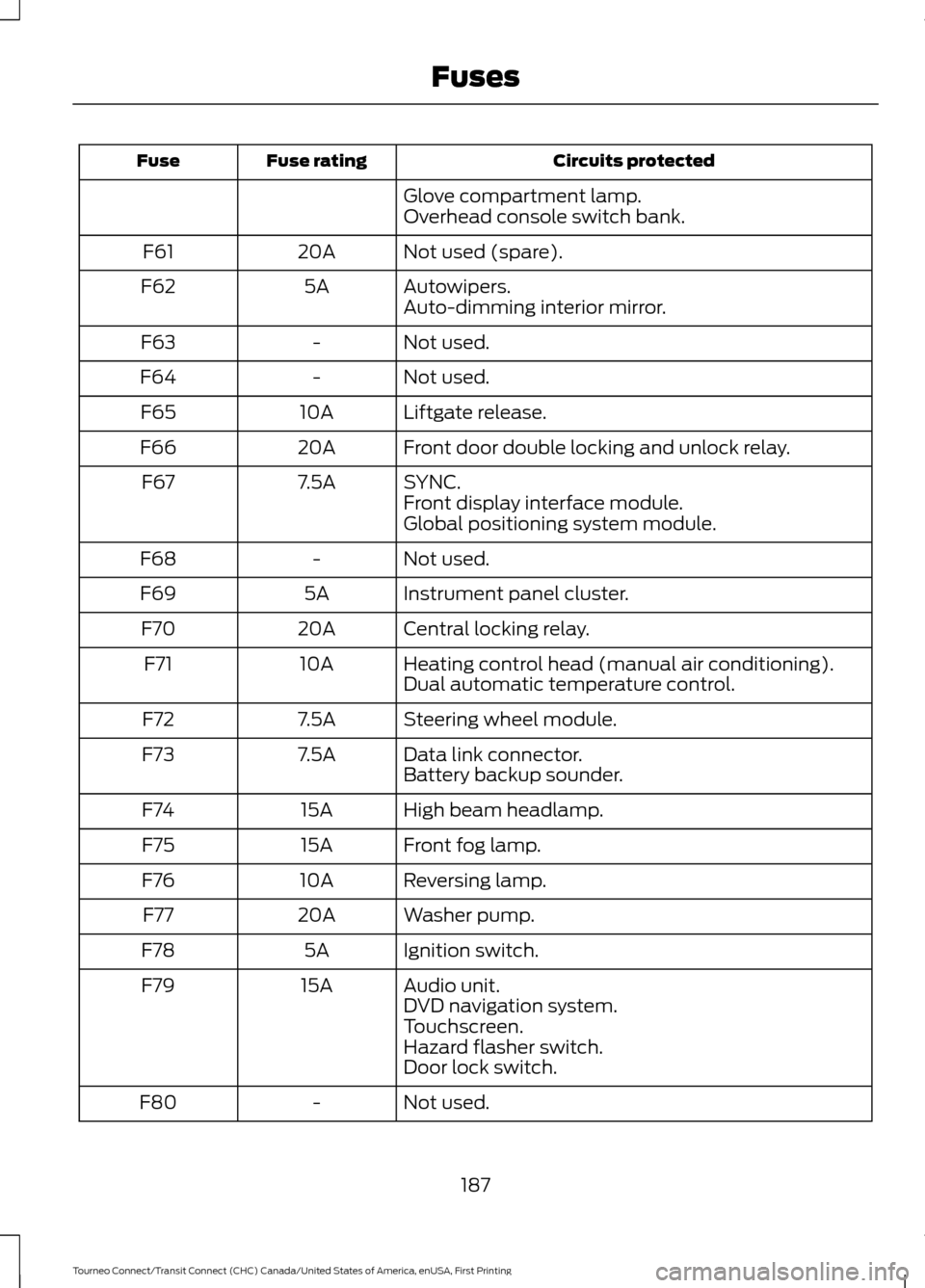
Circuits protected
Fuse rating
Fuse
Glove compartment lamp.
Overhead console switch bank.
Not used (spare).
20A
F61
Autowipers.
5A
F62
Auto-dimming interior mirror.
Not used.
-
F63
Not used.
-
F64
Liftgate release.
10A
F65
Front door double locking and unlock relay.
20A
F66
SYNC.
7.5A
F67
Front display interface module.
Global positioning system module.
Not used.
-
F68
Instrument panel cluster.
5A
F69
Central locking relay.
20A
F70
Heating control head (manual air conditioning).
10A
F71
Dual automatic temperature control.
Steering wheel module.
7.5A
F72
Data link connector.
7.5A
F73
Battery backup sounder.
High beam headlamp.
15A
F74
Front fog lamp.
15A
F75
Reversing lamp.
10A
F76
Washer pump.
20A
F77
Ignition switch.
5A
F78
Audio unit.
15A
F79
DVD navigation system.
Touchscreen.
Hazard flasher switch.
Door lock switch.
Not used.
-
F80
187
Tourneo Connect/Transit Connect (CHC) Canada/United States of America, enUSA, First Printing Fuses
Page 220 of 439

CLEANING THE INSTRUMENT
PANEL AND INSTRUMENT
CLUSTER LENS
WARNING
Do not use chemical solvents or
strong detergents when cleaning the
steering wheel or instrument panel
to avoid contamination of the airbag
system. Note:
Follow the same procedure as
cleaning leather seats for cleaning leather
instrument panels and leather interior trim
surfaces. See Cleaning Leather Seats
(page 217).
Clean the instrument panel and cluster
lens with a clean, damp and soft cloth,
then use a clean, dry and soft cloth to dry
these areas.
• Avoid cleaners or polishes that increase
the gloss of the upper portion of the
instrument panel. The dull finish in this
area helps protect you from
undesirable windshield reflection.
• Do not use any household cleaning
products or glass cleaners as these
may damage the finish of the
instrument panel, interior trim and
cluster lens.
• Wash or wipe your hands clean if you
have been in contact with certain
products such as insect repellent and
suntan lotion to avoid possible damage
to the interior painted surfaces.
• Do not allow air fresheners and hand
sanitizers to spill onto interior surfaces.
If a spill occurs, wipe off immediately.
Your warranty may not cover these
damages.
If a staining liquid like coffee or juice has
been spilled on the instrument panel or on
interior trim surfaces: 1. Wipe up spilled liquid using a clean,
soft cloth as quickly as possible.
2. Use Motorcraft Premium Leather and Vinyl Cleaner or a commercially
available leather cleaning product for
automotive interiors. Test any cleaner
or stain remover on an inconspicuous
area.
3. Alternatively, wipe the surface with a clean, soft cloth and a mild soap and
water solution. Dry the area with a
clean, soft cloth.
4. If necessary, apply more soap and water solution or cleaning product to
a clean, soft cloth and press it onto the
soiled area. Allow this to set at room
temperature for 30 minutes.
5. Remove the soaked cloth, then with a clean, damp cloth, use a rubbing
motion for 60 seconds on the soiled
area.
6. Dry the area with a clean, soft cloth.
CLEANING LEATHER SEATS
(If
Equipped)
Note: Follow the same procedure as
cleaning leather seats for cleaning leather
instrument panels and leather interior trim
surfaces.
For routine cleaning, wipe the surface with
a soft, damp cloth and a mild soap and
water solution. Dry the area with a clean,
soft cloth.
For cleaning and removing stains such as
dye transfer, use Motorcraft Premium
Leather and Vinyl Cleaner or a
commercially available leather cleaning
product for automotive interiors.
Note: Test any cleaner or stain remover on
an inconspicuous area.
217
Tourneo Connect/Transit Connect (CHC) Canada/United States of America, enUSA, First Printing Vehicle Care
Page 431 of 439

Brakes...............................................................129
General Information.......................................... 129
Breaking-In......................................................167
Bulb Specification Chart.............................211
C
Cabin Air Filter...............................................102
California Proposition 65..............................11
Capacities and Specifications - 1.6L EcoBoost™.................................................253
Capacities............................................................. 253
Specifications..................................................... 254
Capacities and Specifications - 2.5L.................................................................255
Capacities............................................................. 255
Specifications..................................................... 256
Capacities and Specifications................249
Cargo Nets......................................................149 Installing the Net................................................ 149
Removing the Net.............................................. 150
Car Wash See: Cleaning the Exterior............................... 214
Center Console...............................................114
Changing a Bulb..........................................206 Central High Mounted Brake Lamp............209
Front Fog Lamps............................................... 208
Headlamp............................................................ 206
Interior Lamps.................................................... 209
License Plate Lamp.......................................... 209
Rear Lamps......................................................... 209
Side Direction Indicator.................................. 208
Changing a Fuse............................................191 Fuses........................................................................\
191
Changing a Road Wheel...........................242 Changing a Road Wheel................................. 244
Dissimilar Spare Wheel and Tire Assembly Information...................................................... 243
Stowing the Flat or Spare Tire...................... 246
Changing the 12V Battery
..........................201
Changing the Engine Air Filter..................212 2.5L Engine............................................................ 213
EcoBoost Engines............................................... 212
Changing the Wiper Blades.....................202 Front Wiper Blades........................................... 203
Rear Window Wiper Blades........................... 203
Service Position.................................................. 202
Checking MyKey System Status................51 Checking the Wiper Blades.....................202
Child Restraint and Seatbelt
Maintenance.................................................34
Child Restraint Positioning.........................25
Child Safety
.......................................................15
General Information............................................. 15
Child Safety Locks..........................................27 Left-Hand Side...................................................... 27
Right-Hand Side................................................... 27
Cigar Lighter
.....................................................113
Cleaning Leather Seats...............................217
Cleaning Products
........................................214
Cleaning the Alloy Wheels........................218
Cleaning the Engine
.....................................215
Cleaning the Exterior...................................214
Exterior Chrome Parts....................................... 214
Exterior Plastic Parts......................................... 215
Stripes or Graphics............................................. 215
Underbody............................................................. 215
Cleaning the Instrument Panel and Instrument Cluster Lens..........................217
Cleaning the Interior....................................216
Cleaning the Windows and Wiper Blades
............................................................216
Clearing All MyKeys.......................................50
Climate Control
..............................................95
Principle of Operation........................................ 95
Clock....................................................................87 Type 1........................................................................\
. 87
Type 2........................................................................\
87
Cold Weather Precautions
........................168
Coolant Check See: Engine Coolant Check............................ 198
Cornering Lamps............................................70
Crash Sensors and Airbag Indicator........43
Creating a MyKey
...........................................49
Programming/Changing Configurable
Settings............................................................... 49
Cross Traffic Alert.........................................143 False Alerts........................................................... 146
Switching the System Off and On...............146
System Errors....................................................... 146
System Lights, Messages and Audible Alerts.................................................................. 145
System Limitations............................................ 145
Using the System................................................ 143
Cruise Control...................................................61 Principle of Operation...................................... 140
428
Tourneo Connect/Transit Connect (CHC) Canada/United States of America, enUSA, First Printing Index