2016 FORD TRANSIT CONNECT air condition
[x] Cancel search: air conditionPage 70 of 439

GENERAL INFORMATION
Condensation in Lamp Assemblies
Exterior lamps have vents to
accommodate normal changes in air
pressure.
Condensation can be a natural by-product
of this design. When moist air enters the
lamp assembly through the vents, there is
a possibility that condensation can occur
when the temperature is cold. When
normal condensation occurs, a fine mist
can form on the interior of the lens. The
fine mist eventually clears and exits
through the vents during normal operation.
Clearing time may take as long as 48 hours
under dry weather conditions.
Examples of acceptable condensation are:
•
The presence of a fine mist (no streaks,
drip marks or large droplets).
• A fine mist covers less than 50% of the
lens.
Examples of unacceptable condensation
are:
• A water puddle inside the lamp.
• Streaks, drip marks or large droplets
present on the interior of the lens.
If you see any unacceptable condensation,
have your vehicle checked by an authorized
dealer. LIGHTING CONTROL Off.A
Instrument panel lamps, license
plate lamps and tail lamps.
B
Headlamps.
C
High Beams Push the lever away from you to switch
the high beam on.
Push the lever forward again or pull the
lever toward you to switch the high beams
off.
67
Tourneo Connect/Transit Connect (CHC) Canada/United States of America, enUSA, First Printing LightingE142449 E162679
Page 84 of 439

If the needle enters the red section, the
engine is overheating. Stop the engine,
switch the ignition off and determine the
cause once the engine has cooled down.
See Engine Coolant Check (page 198).
Note: Do not restart the engine until the
cause of overheating has been resolved.
Fuel Gauge
Switch the ignition on. The fuel gauge will
indicate approximately how much remains
in the fuel tank. The fuel gauge may vary
slightly when your vehicle is moving or on
a gradient. The arrow adjacent to the fuel
pump symbol indicates on which side of
the vehicle the fuel filler door is located.
Low Fuel Level Reminder
Vehicles with Trip Computer
A low fuel level reminder displays and
sounds when the distance to empty
reaches
75 mi (120 km) to empty for
MyKey, and at 50 mi (80 km), 25 mi
(40 km), 10 mi (20 km) and 0 mi (0 km)
for all vehicle keys.
Vehicles without Trip Computer
A low fuel level reminder displays and
sounds when the fuel gauge needle is at
1/16th.
Note: The low fuel warning and
distance-to-empty warning can appear at
different fuel gauge positions depending on
fuel economy conditions. This variation is
normal. WARNING LAMPS AND
INDICATORS
The following warning lamps and
indicators will alert you to a vehicle
condition that may become serious. Some
lamps will illuminate when you start your
vehicle to make sure they work. If any
lamps remain on after starting your vehicle,
refer to the respective system warning
lamp for further information.
Note:
Some warning indicators appear in
the information display and function the
same as a warning lamp but do not display
when you start your vehicle.
Airbag - Front If it fails to illuminate when you
start your vehicle, continues to
flash or remains on, it indicates
a malfunction. Have the system checked
by your authorized dealer.
Anti-Lock Braking System If it illuminates when you are
driving, this indicates a
malfunction. You will continue
to have the normal braking system
(without ABS) unless the brake system
warning lamp is also illuminated. Have the
system checked by your authorized dealer.
Battery If it illuminates while driving, it
indicates a malfunction. Switch
off all unnecessary electrical
equipment and have the system checked
by your authorized dealer immediately.
81
Tourneo Connect/Transit Connect (CHC) Canada/United States of America, enUSA, First Printing Instrument Cluster
Page 92 of 439
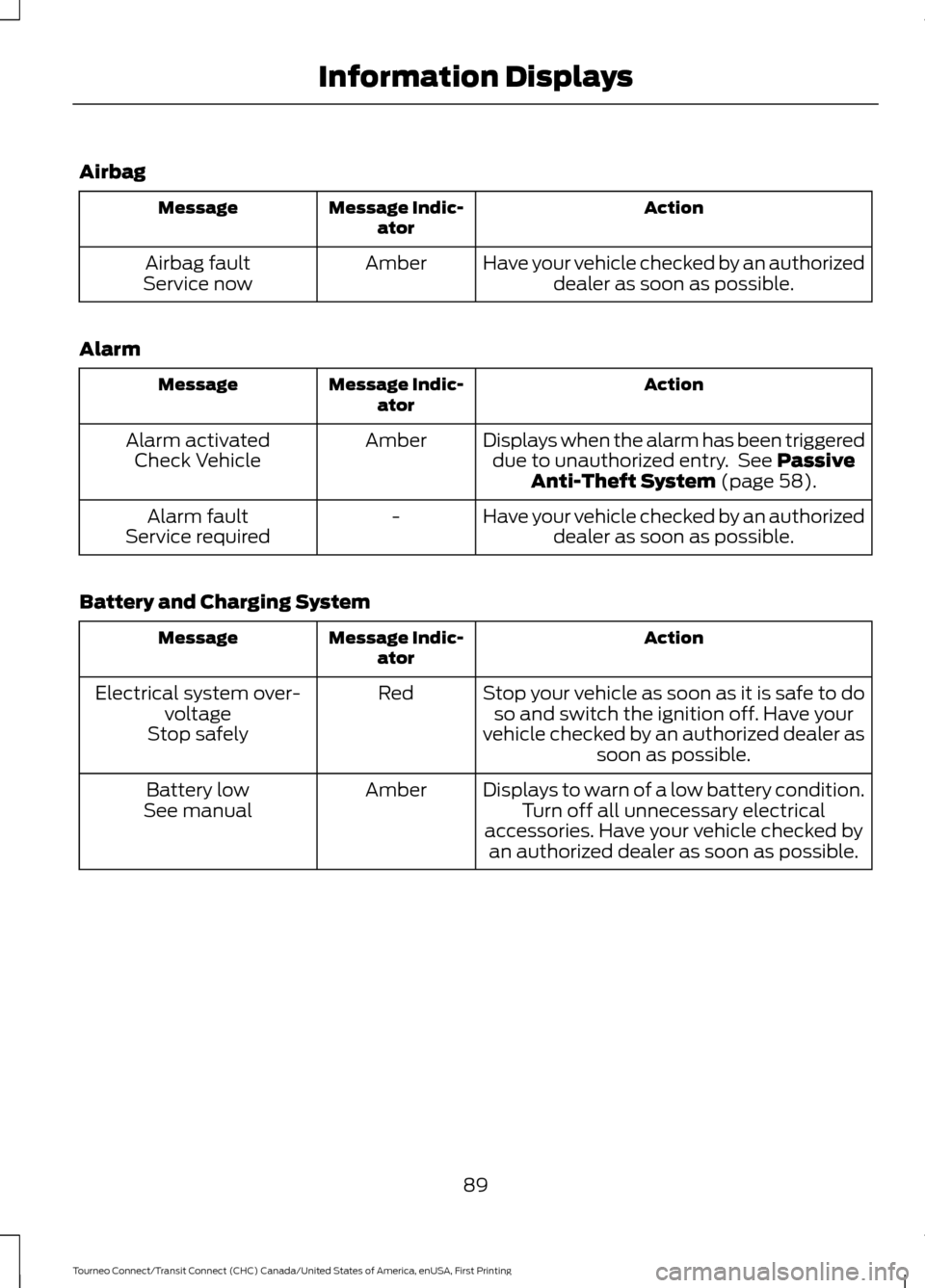
Airbag
Action
Message Indic-
ator
Message
Have your vehicle checked by an authorizeddealer as soon as possible.
Amber
Airbag fault
Service now
Alarm Action
Message Indic-
ator
Message
Displays when the alarm has been triggereddue to unauthorized entry. See Passive
Anti-Theft System (page 58).
Amber
Alarm activated
Check Vehicle
Have your vehicle checked by an authorizeddealer as soon as possible.
-
Alarm fault
Service required
Battery and Charging System Action
Message Indic-
ator
Message
Stop your vehicle as soon as it is safe to doso and switch the ignition off. Have your
vehicle checked by an authorized dealer as soon as possible.
Red
Electrical system over-
voltage
Stop safely
Displays to warn of a low battery condition.Turn off all unnecessary electrical
accessories. Have your vehicle checked by an authorized dealer as soon as possible.
Amber
Battery low
See manual
89
Tourneo Connect/Transit Connect (CHC) Canada/United States of America, enUSA, First Printing Information Displays
Page 98 of 439

PRINCIPLE OF OPERATION
Outside Air
Keep the air intakes in front of the
windshield free from obstruction (such as
snow or leaves) to allow the climate
control system to function effectively.
Recirculated Air
WARNING
Prolonged use of recirculated air may
cause the windows to mist up. If the
windows mist up, follow the settings
for demisting the windshield. The air currently in the passenger
compartment recirculates. Outside air does
not enter your vehicle.
Heating
Heating performance depends on the
temperature of the engine coolant.
General Information on Controlling
the Interior Climate
Fully close all the windows.
Warming the Interior
Direct the air toward your feet. In cold or
humid weather conditions, direct some of
the air toward the windshield and the door
windows.
Cooling the Interior
Direct the air toward your face. Air Conditioning
The system directs air through the
evaporator for cooling. The evaporator
extracts humidity from the air to help keep
the windows free of mist. The system
directs the resulting condensation to the
outside of your vehicle, which may cause
a small pool to form under your vehicle.
This is normal.
Note:
The air conditioning operates only
when the temperature is above 39°F (4°C).
Note: When you use air conditioning, your
vehicle uses more fuel.
AIR VENTS
Center Air Vents To close the air vent, turn the thumbwheel
above the vent fully downward.
95
Tourneo Connect/Transit Connect (CHC) Canada/United States of America, enUSA, First Printing Climate ControlE132995
Page 100 of 439

Fan speed control: Adjust the volume of air circulated in the vehicle.
A
Recirculated air:
Press the button to switch between outside air and
recirculated air. The air currently in the passenger compartment recirculates.
This can reduce the time needed to cool the interior and reduce unwanted odors
from entering your vehicle.
B
Temperature control:
Controls the temperature of the air circulated in your
vehicle.
C
A/C:
Press the button to switch the air conditioning on or off. Use air
conditioning with recirculated air to improve cooling performance and efficiency.
D
Air distribution control: Adjust the control to turn airflow from the windshield,
instrument panel, or footwell vents on or off.
E
AUTOMATIC CLIMATE CONTROL AUTO:
Press the button to select automatic operation. The system
automatically controls the temperature, amount and distribution of the airflow
to reach and maintain your previously selected temperature.
A
Adjust the control to increase or decrease the air temperature for the driver side
of the vehicle.
Fan speed control:
Adjust the volume of air circulated in the vehicle.
B
Power:
Press the button to switch the system on and off. When the system is
off, it prevents outside air from entering the vehicle.
C
97
Tourneo Connect/Transit Connect (CHC) Canada/United States of America, enUSA, First Printing Climate ControlE141422
Page 101 of 439

MAX Defrost: Press the button to switch on defrost. Outside air flows through
the windshield vents, air conditioning automatically turns on, and fan
automatically adjusts to the highest speed. You can also use this setting to
defrost and clear the windshield of a thin covering of ice. The heated rear window
also automatically turns on when you select maximum defrost.
D
Note: To prevent window fogging, you cannot select recirculated air when
maximum defrost is on.
MAX A/C:
Press the button to maximize cooling. Recirculated air flows through
the instrument panel vents, air conditioning automatically turns on, and the fan
automatically adjusts to the highest speed.
E
Adjust the control to increase or decrease the air temperature for the passenger
side of the vehicle. This turns on dual zone.
Recirculated air:
Press the button to switch between outside air and
recirculated air. When you select recirculated air, the air currently in the
passenger compartment recirculates. This may reduce the time needed to cool
the interior (when used with
A/C) and may reduce unwanted odors from
entering your vehicle.
F
Note:
Recirculated air may turn off automatically (or be prevented from turning
on) in all airflow modes except MAX A/C to reduce risk of fogging. Recirculated
air may also turn on and off automatically in Panel or Panel and Floor airflow
modes during hot weather in order to improve cooling efficiency.
Air distribution control: Adjust the control to turn airflow from the windshield,
instrument panel, or footwell vents on or off. You can distribute air through any
combination of these vents.
G
A/C:
Press the button to switch the air conditioning on or off. Use air
conditioning with recirculated air to improve cooling performance and efficiency.
H
Note: In certain conditions (for example, maximum defrost), the air conditioning
compressor may continue to operate even though the air conditioning is
switched off.
98
Tourneo Connect/Transit Connect (CHC) Canada/United States of America, enUSA, First Printing Climate Control
Page 104 of 439

REAR PASSENGER CLIMATE CONTROLS
Fan speed control: Adjusts the volume of air circulated in the vehicle.
A
Temperature and air distribution control:
Controls the temperature of the
air circulated in your vehicle. Adjust to select the desired temperature and
distribution. Cool air distributes through the top air vents and warm air distributes
through the rear floor vents.
B
Note: Switch the air conditioning on to cool
the air through the rear air vents.
HEATED WINDOWS AND
MIRRORS
Note: Make sure the engine is running
before operating the heated windows. Heated windshield.
A
Heated rear window or heated
exterior mirrors.
B
101
Tourneo Connect/Transit Connect (CHC) Canada/United States of America, enUSA, First Printing Climate ControlE175829
AB E170373
A
B
Page 145 of 439

The Blind Spot Information System
illuminates an amber alert indicator in the
outside mirror on the side of your vehicle
the approaching vehicle is coming from.
When the Blind Spot Information System
is alerting on a vehicle and the
corresponding turn signal is ON, the Blind
Spot Information System alert indicator
flashes as an increased warning level.
The alert indicator dims when the system
detects nighttime darkness.
Note:
The alert indicator flashes in case of
an alert and the turn signal is set to that side
at the same time.
System Sensor Blockage WARNING
To help avoid injuries, NEVER use the
Blind Spot Information System as a
replacement for using the interior
and exterior mirrors or looking over your
shoulder before changing lanes. The Blind
Spot Information System is not a
replacement for careful driving. The system uses radar sensors that are
located behind the bumper fascia on each
side of your vehicle. Any dirt, mud and
snow in front of the sensors and/or driving
in heavy rain can cause system
degradation. Also, other types of
obstructions in front of the sensor can
cause system degradation. This is referred
to as a
‘blocked ’ condition.
Note: Do not apply bumper stickers and/or
repair compound to these areas, this can
cause degraded system performance.
142
Tourneo Connect/Transit Connect (CHC) Canada/United States of America, enUSA, First Printing Driving AidsE205199