2016 FORD TAURUS USB
[x] Cancel search: USBPage 371 of 424
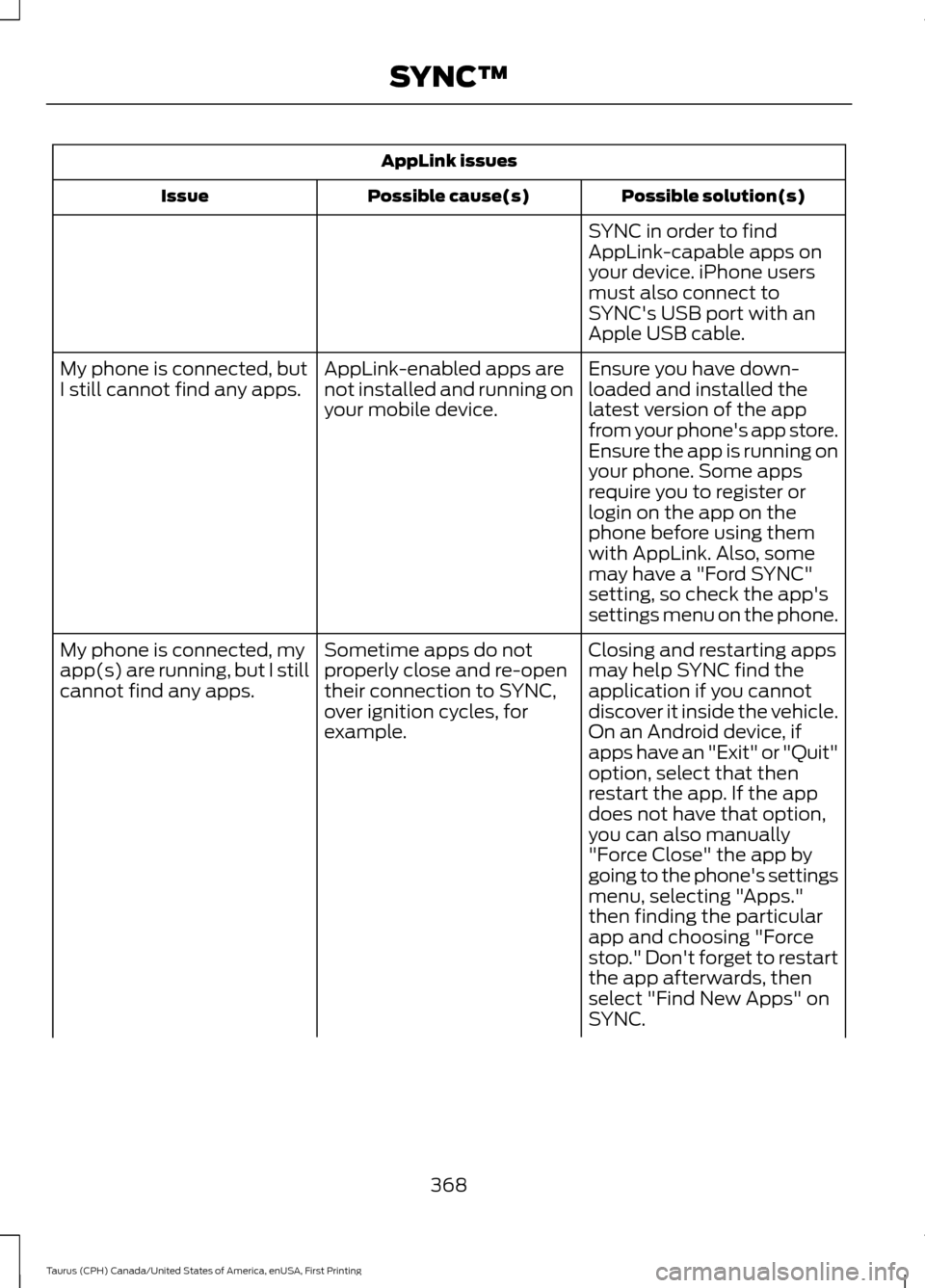
AppLink issues
Possible solution(s)
Possible cause(s)
Issue
SYNC in order to find
AppLink-capable apps on
your device. iPhone users
must also connect to
SYNC's USB port with an
Apple USB cable.
Ensure you have down-
loaded and installed the
latest version of the app
from your phone's app store.
Ensure the app is running on
your phone. Some apps
AppLink-enabled apps are
not installed and running on
your mobile device.
My phone is connected, but
I still cannot find any apps.
require you to register or
login on the app on the
phone before using them
with AppLink. Also, some
may have a "Ford SYNC"
setting, so check the app's
settings menu on the phone.
Closing and restarting apps
may help SYNC find the
application if you cannot
discover it inside the vehicle.
On an Android device, if
apps have an "Exit" or "Quit"
Sometime apps do not
properly close and re-open
their connection to SYNC,
over ignition cycles, for
example.
My phone is connected, my
app(s) are running, but I still
cannot find any apps.
option, select that then
restart the app. If the app
does not have that option,
you can also manually
"Force Close" the app by
going to the phone's settings
menu, selecting "Apps."
then finding the particular
app and choosing "Force
stop." Don't forget to restart
the app afterwards, then
select "Find New Apps" on
SYNC.
368
Taurus (CPH) Canada/United States of America, enUSA, First Printing SYNC™
Page 373 of 424
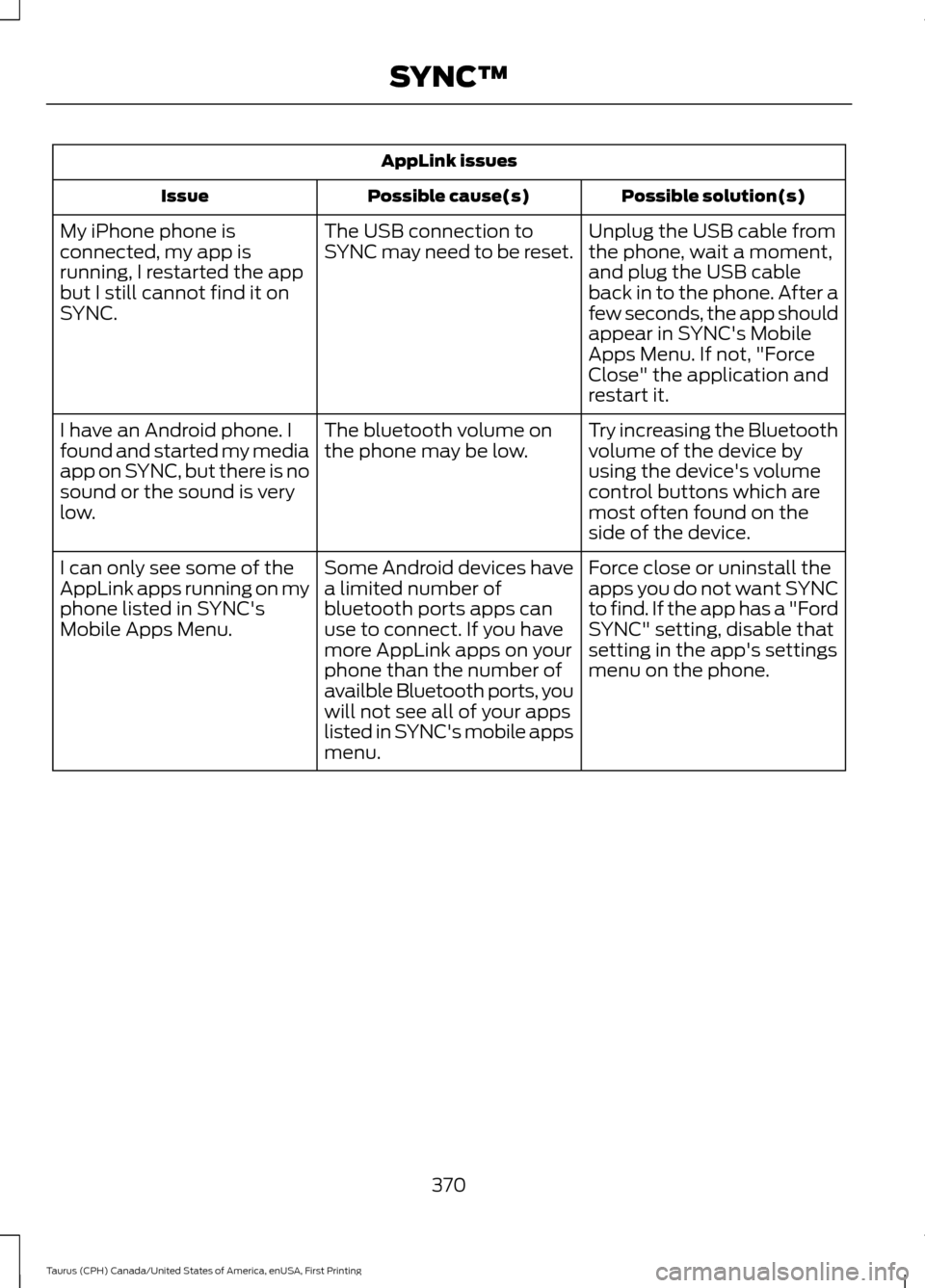
AppLink issues
Possible solution(s)
Possible cause(s)
Issue
Unplug the USB cable from
the phone, wait a moment,
and plug the USB cable
back in to the phone. After a
few seconds, the app should
appear in SYNC's Mobile
Apps Menu. If not, "Force
Close" the application and
restart it.
The USB connection to
SYNC may need to be reset.
My iPhone phone is
connected, my app is
running, I restarted the app
but I still cannot find it on
SYNC.
Try increasing the Bluetooth
volume of the device by
using the device's volume
control buttons which are
most often found on the
side of the device.
The bluetooth volume on
the phone may be low.
I have an Android phone. I
found and started my media
app on SYNC, but there is no
sound or the sound is very
low.
Force close or uninstall the
apps you do not want SYNC
to find. If the app has a "Ford
SYNC" setting, disable that
setting in the app's settings
menu on the phone.
Some Android devices have
a limited number of
bluetooth ports apps can
use to connect. If you have
more AppLink apps on your
phone than the number of
availble Bluetooth ports, you
will not see all of your apps
listed in SYNC's mobile apps
menu.
I can only see some of the
AppLink apps running on my
phone listed in SYNC's
Mobile Apps Menu.
370
Taurus (CPH) Canada/United States of America, enUSA, First Printing SYNC™
Page 422 of 424

SYNC™............................................................324
General Information......................................... 324
SYNC™ Troubleshooting.........................362
T
Technical Specifications See: Capacities and Specifications............294
The Better Business Bureau (BBB) Auto Line Program (U.S. Only)........................219
Tire Care
..........................................................270
Glossary of Tire Terminology.......................... 271
Information About Uniform Tire Quality Grading............................................................. 270
Information Contained on the Tire Sidewall............................................................ 272
Temperature A B C.............................................. 271
Traction AA A B C................................................ 271
Treadwear............................................................. 270
Tire Inflation When Punctured See: Tire Sealant and Inflator Kit................264
Tire Pressure Monitoring System..........284 Changing Tires With a Tire Pressure
Monitoring System....................................... 285
Understanding Your Tire Pressure Monitoring System ...................................... 285
Tire Repair Kit See: Tire Sealant and Inflator Kit................264
Tire Sealant and Inflator Kit....................264 First Stage: Reinflating the Tire with Sealing
Compound and Air....................................... 266
General Information......................................... 265
Second Stage: Checking Tire Pressure............................................................ 267
Tips for Use of the Kit...................................... 265
What to do after the Tire has been Sealed............................................................... 268
What to do when a Tire Is Punctured........266
Tires See: Wheels and Tires..................................... 264
Towing a Trailer
............................................203
Load Placement................................................ 203
Towing the Vehicle on Four Wheels..........................................................207
Emergency Towing............................................ 207
Recreational Towing........................................ 208
Towing.............................................................203 Traction Control
.............................................161
Principle of Operation........................................ 161
Transmission Code Designation...........300
Transmission..................................................149
Transmission See: Transmission.............................................. 149
Transporting the Vehicle...........................207
U
Under Hood Overview - 2.0L EcoBoost™.................................................236
Under Hood Overview - 3.5L Duratec
.........................................................238
Engine Shield....................................................... 239
Under Hood Overview - 3.5L Ecoboost™..................................................237
Universal Garage Door Opener................127 HomeLink Wireless Control System............127
USB Port..........................................................323
Using Adaptive Cruise Control.................174 Blocked Sensor.................................................... 179
Changing the Set Speed................................... 177
Detection Issues.................................................. 178
Disengaging Adaptive Cruise Control..........177
Following a Vehicle............................................. 175
Hilly Condition Usage........................................ 178
Low Speed Automatic Cancellation............177
Overriding Adaptive Cruise Control..............177
Resuming the Set Speed.................................. 177
Setting Adaptive Cruise Control.................... 174
Setting the Adaptive Cruise Speed..............175
Setting the Gap Distance................................. 176
Switching the System Off................................ 178
Switching to Normal Cruise Control...........180
Using All-Wheel Drive
.................................152
Driving In Special Conditions With
All-Wheel Drive (AWD)............................... 154
Operating AWD Vehicles With Mismatched Tires.................................................................... 154
Operating AWD Vehicles With Spare Tires..................................................................... 153
Using Cruise Control....................................173 Switching Cruise Control Off.......................... 174
Switching Cruise Control On........................... 173
Using MyKey With Remote Start Systems..........................................................52
Using Snow Chains
.....................................283
419
Taurus (CPH) Canada/United States of America, enUSA, First Printing Index
Page 423 of 424
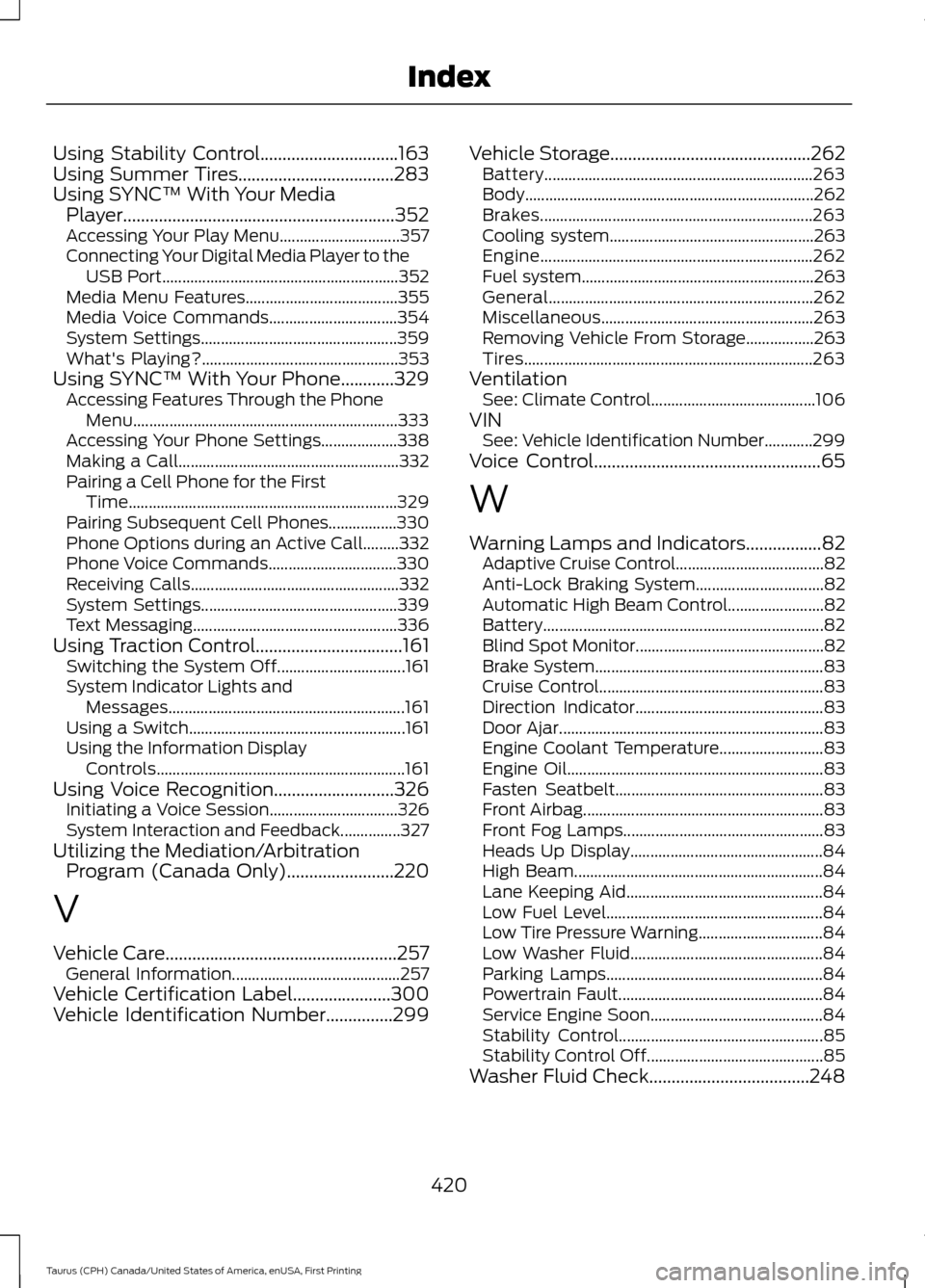
Using Stability Control...............................163
Using Summer Tires...................................283
Using SYNC™ With Your Media Player.............................................................352
Accessing Your Play Menu.............................. 357
Connecting Your Digital Media Player to the USB Port........................................................... 352
Media Menu Features...................................... 355
Media Voice Commands................................ 354
System Settings................................................. 359
What's Playing?................................................. 353
Using SYNC™ With Your Phone
............329
Accessing Features Through the Phone
Menu.................................................................. 333
Accessing Your Phone Settings................... 338
Making a Call....................................................... 332
Pairing a Cell Phone for the First Time................................................................... 329
Pairing Subsequent Cell Phones.................330
Phone Options during an Active Call.........332
Phone Voice Commands................................ 330
Receiving Calls.................................................... 332
System Settings................................................. 339
Text Messaging................................................... 336
Using Traction Control.................................161 Switching the System Off................................ 161
System Indicator Lights and Messages........................................................... 161
Using a Switch...................................................... 161
Using the Information Display Controls.............................................................. 161
Using Voice Recognition...........................326 Initiating a Voice Session................................ 326
System Interaction and Feedback...............327
Utilizing the Mediation/Arbitration Program (Canada Only)
........................220
V
Vehicle Care
....................................................257
General Information.......................................... 257
Vehicle Certification Label
......................300
Vehicle Identification Number...............299 Vehicle Storage
.............................................262
Battery................................................................... 263
Body........................................................................\
262
Brakes.................................................................... 263
Cooling system................................................... 263
Engine.................................................................... 262
Fuel system.......................................................... 263
General.................................................................. 262
Miscellaneous..................................................... 263
Removing Vehicle From Storage.................263
Tires........................................................................\
263
Ventilation See: Climate Control......................................... 106
VIN See: Vehicle Identification Number............299
Voice Control
...................................................65
W
Warning Lamps and Indicators
.................82
Adaptive Cruise Control..................................... 82
Anti-Lock Braking System................................ 82
Automatic High Beam Control........................ 82
Battery...................................................................... 82
Blind Spot Monitor............................................... 82
Brake System......................................................... 83
Cruise Control........................................................ 83
Direction Indicator............................................... 83
Door Ajar.................................................................. 83
Engine Coolant Temperature.......................... 83
Engine Oil................................................................ 83
Fasten Seatbelt.................................................... 83
Front Airbag............................................................ 83
Front Fog Lamps.................................................. 83
Heads Up Display................................................ 84
High Beam.............................................................. 84
Lane Keeping Aid................................................. 84
Low Fuel Level...................................................... 84
Low Tire Pressure Warning............................... 84
Low Washer Fluid................................................ 84
Parking Lamps...................................................... 84
Powertrain Fault................................................... 84
Service Engine Soon........................................... 84
Stability Control................................................... 85
Stability Control Off............................................ 85
Washer Fluid Check....................................248
420
Taurus (CPH) Canada/United States of America, enUSA, First Printing Index