2016 FORD TAURUS light
[x] Cancel search: lightPage 290 of 424
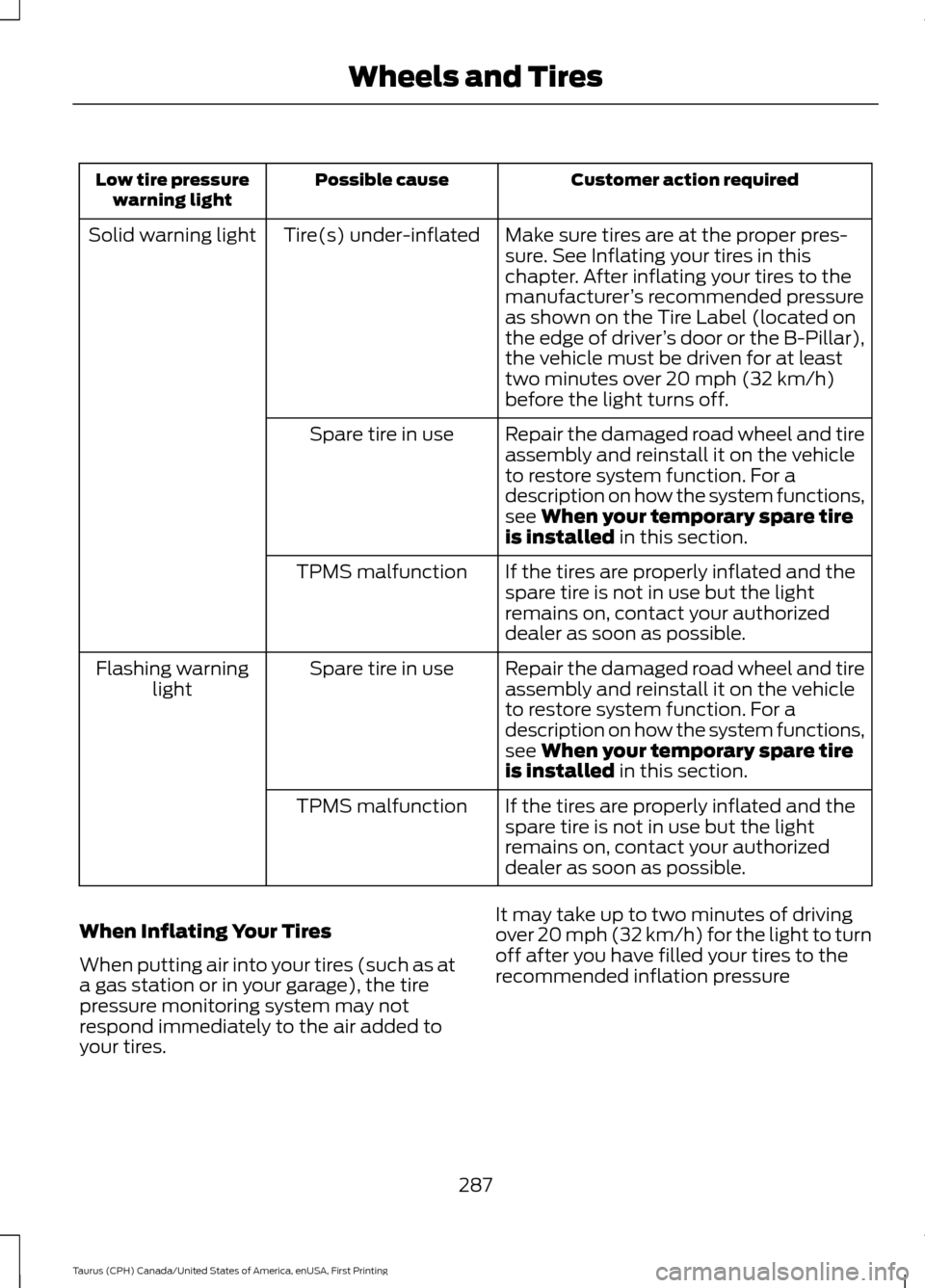
Customer action required
Possible cause
Low tire pressure
warning light
Make sure tires are at the proper pres-
sure. See Inflating your tires in this
chapter. After inflating your tires to the
manufacturer’s recommended pressure
as shown on the Tire Label (located on
the edge of driver ’s door or the B-Pillar),
the vehicle must be driven for at least
two minutes over 20 mph (32 km/h)
before the light turns off.
Tire(s) under-inflated
Solid warning light
Repair the damaged road wheel and tire
assembly and reinstall it on the vehicle
to restore system function. For a
description on how the system functions,
see When your temporary spare tire
is installed in this section.
Spare tire in use
If the tires are properly inflated and the
spare tire is not in use but the light
remains on, contact your authorized
dealer as soon as possible.
TPMS malfunction
Repair the damaged road wheel and tire
assembly and reinstall it on the vehicle
to restore system function. For a
description on how the system functions,
see
When your temporary spare tire
is installed in this section.
Spare tire in use
Flashing warning
light
If the tires are properly inflated and the
spare tire is not in use but the light
remains on, contact your authorized
dealer as soon as possible.
TPMS malfunction
When Inflating Your Tires
When putting air into your tires (such as at
a gas station or in your garage), the tire
pressure monitoring system may not
respond immediately to the air added to
your tires. It may take up to two minutes of driving
over 20 mph (32 km/h) for the light to turn
off after you have filled your tires to the
recommended inflation pressure
287
Taurus (CPH) Canada/United States of America, enUSA, First Printing Wheels and Tires
Page 291 of 424

How Temperature Affects Your Tire
Pressure
The tire pressure monitoring system
monitors tire pressure in each pneumatic
tire. While driving in a normal manner, a
typical passenger tire inflation pressure
may increase about 2 to 4 psi (14 to 28
kPa) from a cold start situation. If the
vehicle is stationary overnight with the
outside temperature significantly lower
than the daytime temperature, the tire
pressure may decrease about 3 psi (21
kPa) for a drop of 30°F (17°C) in ambient
temperature. This lower pressure value
may be detected by the tire pressure
monitoring system as being significantly
lower than the recommended inflation
pressure and activate the system warning
light for low tire pressure. If the low tire
pressure warning light is on, visually check
each tire to verify that no tire is flat. If one
or more tires are flat, repair as necessary.
Check the air pressure in the road tires. If
any tire is under-inflated, carefully drive
the vehicle to the nearest location where
air can be added to the tires. Inflate all the
tires to the recommended inflation
pressure.
CHANGING A ROAD WHEEL
WARNINGS
The use of tire sealant may damage
your tire pressure monitoring system
and should only be used in roadside
emergencies. If you must use a sealant, the
Ford Tire Mobility Kit sealant should be
used. The tire pressure monitoring system
sensor and valve stem on the wheel must
be replaced by an authorized dealer after
use of the sealant. See Tire Pressure Monitoring
System (page 284). If the tire
pressure monitor sensor becomes
damaged, it will no longer function. Note:
The tire pressure monitoring system
indicator light will illuminate when the spare
tire is in use. To restore the full function of
the monitoring system, all road wheels
equipped with tire pressure monitoring
sensors must be mounted on the vehicle.
If you get a flat tire while driving, do not
apply the brake heavily. Instead, gradually
decrease your speed. Hold the steering
wheel firmly and slowly move to a safe
place on the side of the road.
Have a flat serviced by an authorized
dealer in order to prevent damage to the
tire pressure monitoring system sensors.
See
Tire Pressure Monitoring System
(page 284). Replace the spare tire with a
road tire as soon as possible. During
repairing or replacing of the flat tire, have
the authorized dealer inspect the tire
pressure monitoring system sensor for
damage.
Dissimilar Spare Wheel and Tire
Assembly Information WARNING
Failure to follow these guidelines
could result in an increased risk of
loss of vehicle control, injury or death.
If you have a dissimilar spare wheel and
tire, then it is intended for temporary use
only. This means that if you need to use it,
you should replace it as soon as possible
with a road wheel and tire assembly that
is the same size and type as the road tires
and wheels that were originally provided
by Ford. If the dissimilar spare tire or wheel
is damaged, it should be replaced rather
than repaired.
A dissimilar spare wheel and tire assembly
is defined as a spare wheel and tire
assembly that is different in brand, size or
appearance from the road tires and wheels
and can be one of three types:
288
Taurus (CPH) Canada/United States of America, enUSA, First Printing Wheels and Tires
Page 315 of 424
GENERAL INFORMATION
Radio Frequencies and Reception
Factors
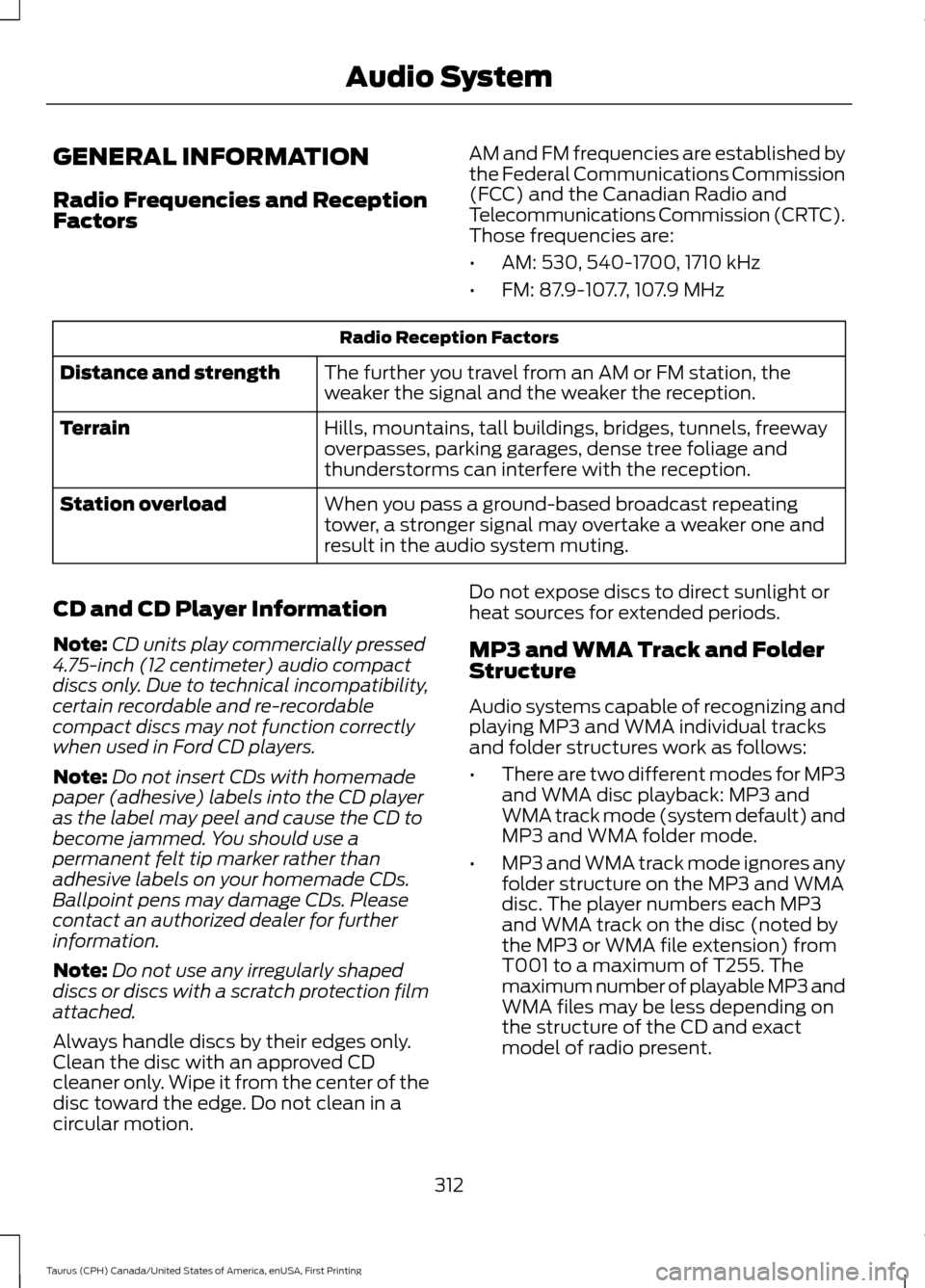
AM and FM frequencies are established by
the Federal Communications Commission
(FCC) and the Canadian Radio and
Telecommunications Commission (CRTC).
Those frequencies are:
•
AM: 530, 540-1700, 1710 kHz
• FM: 87.9-107.7, 107.9 MHz Radio Reception Factors
The further you travel from an AM or FM station, the
weaker the signal and the weaker the reception.
Distance and strength
Hills, mountains, tall buildings, bridges, tunnels, freeway
overpasses, parking garages, dense tree foliage and
thunderstorms can interfere with the reception.
Terrain
When you pass a ground-based broadcast repeating
tower, a stronger signal may overtake a weaker one and
result in the audio system muting.
Station overload
CD and CD Player Information
Note: CD units play commercially pressed
4.75-inch (12 centimeter) audio compact
discs only. Due to technical incompatibility,
certain recordable and re-recordable
compact discs may not function correctly
when used in Ford CD players.
Note: Do not insert CDs with homemade
paper (adhesive) labels into the CD player
as the label may peel and cause the CD to
become jammed. You should use a
permanent felt tip marker rather than
adhesive labels on your homemade CDs.
Ballpoint pens may damage CDs. Please
contact an authorized dealer for further
information.
Note: Do not use any irregularly shaped
discs or discs with a scratch protection film
attached.
Always handle discs by their edges only.
Clean the disc with an approved CD
cleaner only. Wipe it from the center of the
disc toward the edge. Do not clean in a
circular motion. Do not expose discs to direct sunlight or
heat sources for extended periods.
MP3 and WMA Track and Folder
Structure
Audio systems capable of recognizing and
playing MP3 and WMA individual tracks
and folder structures work as follows:
•
There are two different modes for MP3
and WMA disc playback: MP3 and
WMA track mode (system default) and
MP3 and WMA folder mode.
• MP3 and WMA track mode ignores any
folder structure on the MP3 and WMA
disc. The player numbers each MP3
and WMA track on the disc (noted by
the MP3 or WMA file extension) from
T001 to a maximum of T255. The
maximum number of playable MP3 and
WMA files may be less depending on
the structure of the CD and exact
model of radio present.
312
Taurus (CPH) Canada/United States of America, enUSA, First Printing Audio System
Page 318 of 424

Seek, Fast Forward and Reverse: In radio mode, select a frequency band
and press this button. The system stops at the first station it finds in that
direction. In SIRIUS mode, press to select the next or previous satellite radio
station. If a specific category is selected (such as jazz, rock or news), press to
find the next or previous in the selected category. In CD mode, press to select
the previous or next track. Press and hold to move quickly forward through the
current track.
F
OK and Arrow buttons:
Press OK to confirm menu selections. Press to scroll
through the menu choices.
G
Eject:
Press to eject a CD.
H
VOL and Power:
Press to switch the system on and off. Turn to adjust the
volume.
I
CLOCK:
If not in phone mode, press to display the clock.
J
SOUND:
Press to access settings for Treble, Midrange, Bass, Fade or Balance.
Use the up and down arrow buttons to select the various settings. When you
make your selection, press the left and right arrow buttons to change the
settings. Press
OK to set or press MENU to exit. Sound settings can be set for
each audio source independently.
K
MENU:
Press to access different audio system features.
L
PHONE:
Press to access the phone features of the SYNC system. See your
SYNC information.
M
AUX:
Press to access or switch between devices you plug into your vehicle.
N
SIRIUS:
Press to listen to Sirius satellite radio.
O
Menu Structure
Note: Depending on your system, some
options may appear slightly different.
Press
MENU. Press the up and down arrow buttons to
scroll through the options.
Press the right arrow to enter a menu.
Press the left arrow to exit a menu.
Press OK to confirm a selection. Radio
Select for a brief sampling of all available channels.
Scan
Select to store the six strongest local stations on the AM-
AST and FM-AST frequency bands.
AST
Select to display extra information such as artist name.
Radio Text *
* Extra information may not always be available.
315
Taurus (CPH) Canada/United States of America, enUSA, First Printing Audio System
Page 374 of 424

For a complete listing of the accessories
that are available for your vehicle, please
contact your authorized dealer or visit the
online store web site:
Web Address (United States)
www.Accessories.Ford.com Web Address (Canada)
www.Accessories.Ford.ca
Ford Motor Company will repair or replace
any properly authorized dealer-installed
Ford Original Accessory found to be
defective in factory-supplied materials or
workmanship during the warranty period,
as well as any component damaged by the
defective accessories.
Ford Motor Company will warrant your
Ford accessory through the warranty that
provides the greatest benefit:
• 24 months, unlimited mileage.
• The remainder of your new vehicle
limited warranty.
Contact an authorized dealer for details
and a copy of the warranty.
Exterior Style
• Chrome mirror caps.
• Moon roof deflector.
• Hood deflector.
• Rear spoiler.
• Side window deflector.
• Splash guards.
Interior Style
• All-weather floor mats.
• Ambient lighting.
• Carpeted floor mats.
• Sport pedals. Lifestyle
•
Ash cup (smoker's package).
• Car cover*.
• Cargo area protector.
• Cargo net.
• Cargo organization and management.
Peace of Mind
• Bumper-mounted parking sensors*.
• Locking fuel plug.
• Remote start.
• Vehicle security system.
• Wheel locks.
*Ford Licensed Accessories. The accessory
manufacturer designs, develops and
therefore warrants Ford Licensed
Accessories, and does not design or test
these accessories to Ford Motor Company
engineering requirements. Contact an
authorized Ford dealer for the
manufacturer ’s limited warranty details,
and request a copy of the Ford Licensed
Accessories product limited warranty from
the accessory manufacturer.
371
Taurus (CPH) Canada/United States of America, enUSA, First Printing Accessories
Page 380 of 424
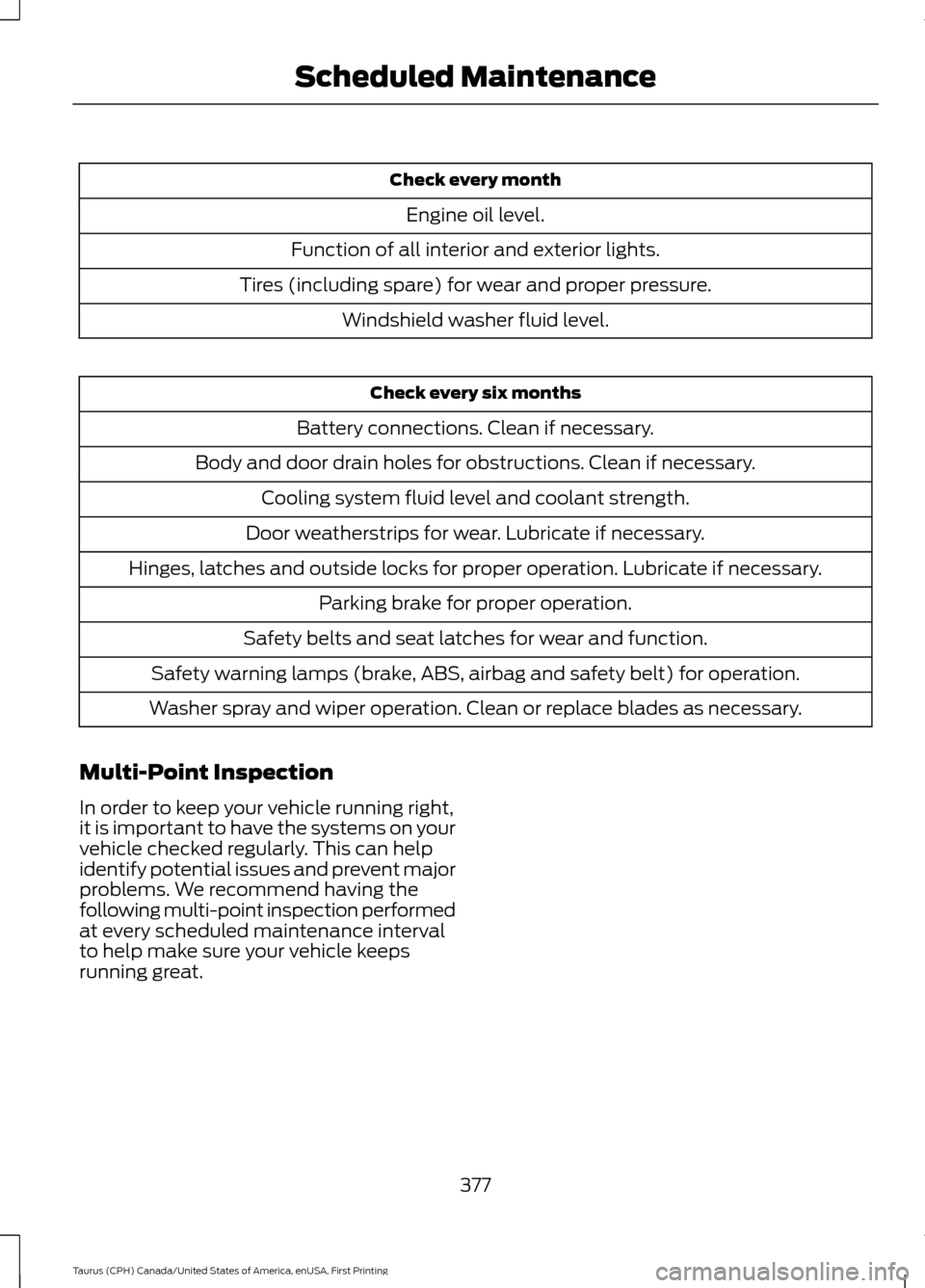
Check every month
Engine oil level.
Function of all interior and exterior lights.
Tires (including spare) for wear and proper pressure. Windshield washer fluid level. Check every six months
Battery connections. Clean if necessary.
Body and door drain holes for obstructions. Clean if necessary. Cooling system fluid level and coolant strength.
Door weatherstrips for wear. Lubricate if necessary.
Hinges, latches and outside locks for proper operation. Lubricate if necessary. Parking brake for proper operation.
Safety belts and seat latches for wear and function.
Safety warning lamps (brake, ABS, airbag and safety belt) for operation.
Washer spray and wiper operation. Clean or replace blades as necessary.
Multi-Point Inspection
In order to keep your vehicle running right,
it is important to have the systems on your
vehicle checked regularly. This can help
identify potential issues and prevent major
problems. We recommend having the
following multi-point inspection performed
at every scheduled maintenance interval
to help make sure your vehicle keeps
running great.
377
Taurus (CPH) Canada/United States of America, enUSA, First Printing Scheduled Maintenance
Page 416 of 424
Coolant Check
See: Engine Coolant Check........................... 240
Crash Sensors and Airbag Indicator.........41
Creating a MyKey...........................................49
Programming/Changing Configurable
Settings............................................................... 49
Cross Traffic Alert.........................................188 False Alerts............................................................ 191
Switching the System Off and On................191
System Errors........................................................ 191
System Lights, Messages and Audible Alerts.................................................................. 190
System Limitations........................................... 190
Using the System............................................... 188
Cruise Control..................................................65 Principle of Operation....................................... 173
Type 1........................................................................\
65
Type 2....................................................................... 65
Cruise control See: Using Cruise Control................................. 173
Customer Assistance
...................................217
D
Data Recording
..................................................9
Event Data Recording........................................... 9
Service Data Recording........................................ 9
Daytime Running Lamps..............................71
Direction Indicators
........................................73
Driver Alert.......................................................181 PRINCIPLE OF OPERATION............................ 181
USING DRIVER ALERT...................................... 181
Driver and Passenger Airbags...................36 Children and Airbags.......................................... 36
Proper Driver and Front Passenger Seating Adjustment........................................................ 36
Driving Aids......................................................181
Driving Hints
..................................................209
Driving Through Water................................210
DRL See: Daytime Running Lamps.......................... 71
E
Economical Driving
.....................................209 Emission Control System..........................146
On-Board Diagnostics (OBD-II).................... 147
Readiness for Inspection and Maintenance (I/M) Testing.................................................... 147
End User License Agreement.................394 VEHICLE SOFTWARE END USER LICENSE
AGREEMENT (EULA) ................................. 394
Engine Block Heater....................................138 Using the Engine Block Heater...................... 139
Engine Coolant Check...............................240 Adding Engine Coolant..................................... 241
Checking the Engine Coolant......................... 241
Recycled Engine Coolant................................ 242
Severe Climates................................................. 242
What You Should Know About Fail-Safe Cooling.............................................................. 242
Engine Immobilizer See: Passive Anti-Theft System...................... 61
Engine Oil Check
..........................................239
Adding Engine Oil.............................................. 239
Engine Oil Dipstick - 2.0L EcoBoost™.................................................239
Engine Oil Dipstick - 3.5L Duratec/3.5L Ecoboost™.................................................239
Engine Specifications - 2.0L EcoBoost™.................................................294
Drivebelt Routing............................................... 294
Engine Specifications - 3.5L Duratec.........................................................294
Drivebelt Routing............................................... 295
Engine Specifications - 3.5L Ecoboost™.................................................295
Drivebelt Routing............................................... 295
Environment......................................................14
Essential Towing Checks
..........................205
Before Towing a Trailer................................... 206
Hitches.................................................................. 205
Launching or Retrieving a Boat or Personal Watercraft (PWC)........................................ 206
Safety Chains...................................................... 205
Trailer Brakes....................................................... 205
Trailer Lamps...................................................... 205
When Towing a Trailer..................................... 206
Event Data Recording See: Data Recording.............................................. 9
Export Unique Options..................................13
413
Taurus (CPH) Canada/United States of America, enUSA, First Printing Index
Page 418 of 424
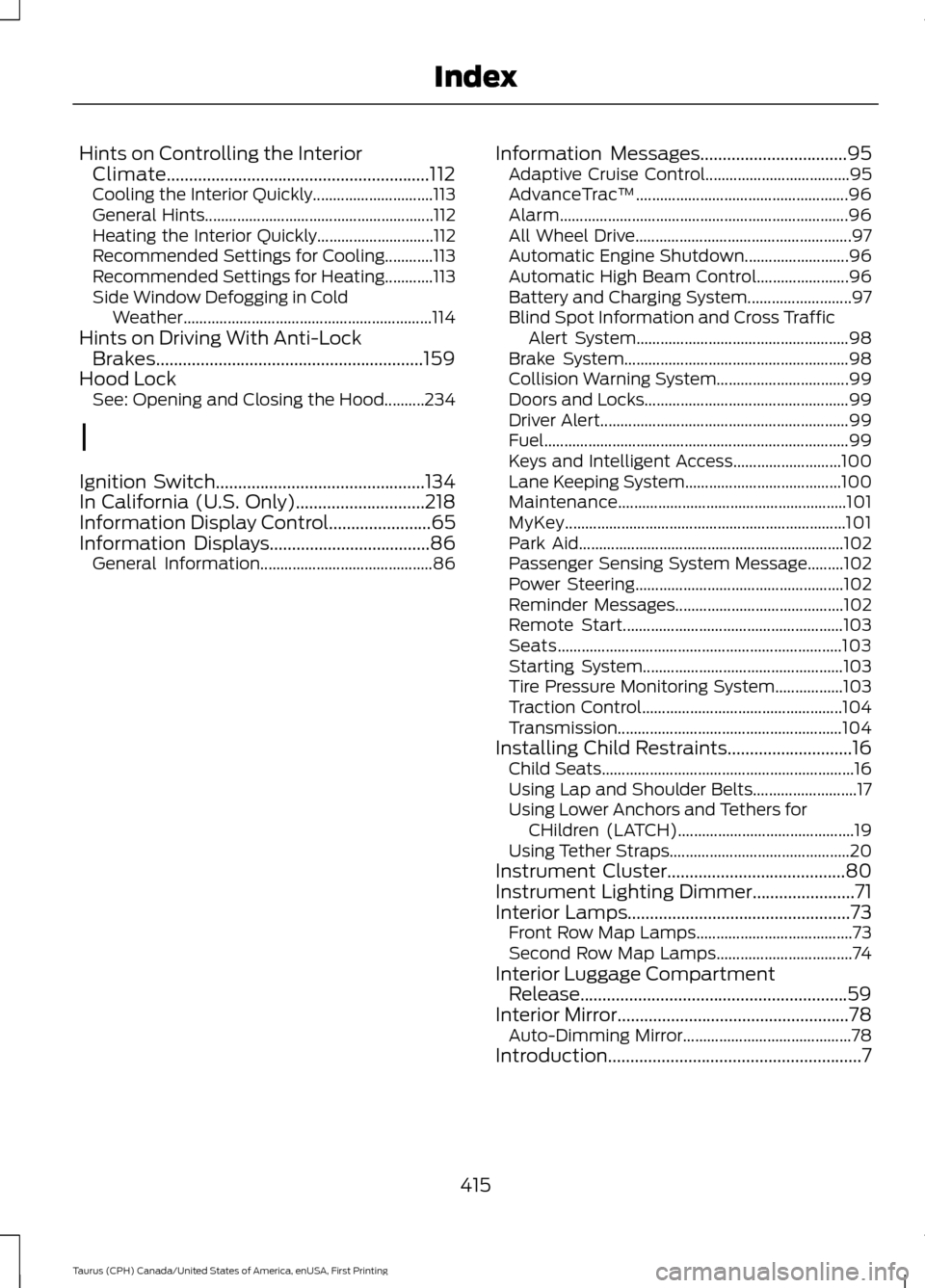
Hints on Controlling the Interior
Climate...........................................................112
Cooling the Interior Quickly.............................. 113
General Hints......................................................... 112
Heating the Interior Quickly............................. 112
Recommended Settings for Cooling............113
Recommended Settings for Heating............113
Side Window Defogging in Cold Weather.............................................................. 114
Hints on Driving With Anti-Lock Brakes............................................................159
Hood Lock See: Opening and Closing the Hood..........234
I
Ignition Switch...............................................134
In California (U.S. Only).............................218
Information Display Control.......................65
Information Displays
....................................86
General Information........................................... 86Information Messages
.................................95
Adaptive Cruise Control.................................... 95
AdvanceTrac ™..................................................... 96
Alarm........................................................................\
96
All Wheel Drive...................................................... 97
Automatic Engine Shutdown.......................... 96
Automatic High Beam Control....................... 96
Battery and Charging System.......................... 97
Blind Spot Information and Cross Traffic Alert System..................................................... 98
Brake System........................................................ 98
Collision Warning System................................. 99
Doors and Locks................................................... 99
Driver Alert.............................................................. 99
Fuel........................................................................\
.... 99
Keys and Intelligent Access........................... 100
Lane Keeping System....................................... 100
Maintenance......................................................... 101
MyKey...................................................................... 101
Park Aid.................................................................. 102
Passenger Sensing System Message.........102
Power Steering.................................................... 102
Reminder Messages.......................................... 102
Remote Start....................................................... 103
Seats....................................................................... 103
Starting System.................................................. 103
Tire Pressure Monitoring System.................103
Traction Control.................................................. 104
Transmission........................................................ 104
Installing Child Restraints
............................16
Child Seats............................................................... 16
Using Lap and Shoulder Belts.......................... 17
Using Lower Anchors and Tethers for CHildren (LATCH)............................................ 19
Using Tether Straps............................................. 20
Instrument Cluster
........................................80
Instrument Lighting Dimmer.......................71
Interior Lamps
..................................................73
Front Row Map Lamps....................................... 73
Second Row Map Lamps.................................. 74
Interior Luggage Compartment Release............................................................59
Interior Mirror
....................................................78
Auto-Dimming Mirror.......................................... 78
Introduction.........................................................7
415
Taurus (CPH) Canada/United States of America, enUSA, First Printing Index