2016 FORD SUPER DUTY reset
[x] Cancel search: resetPage 447 of 510
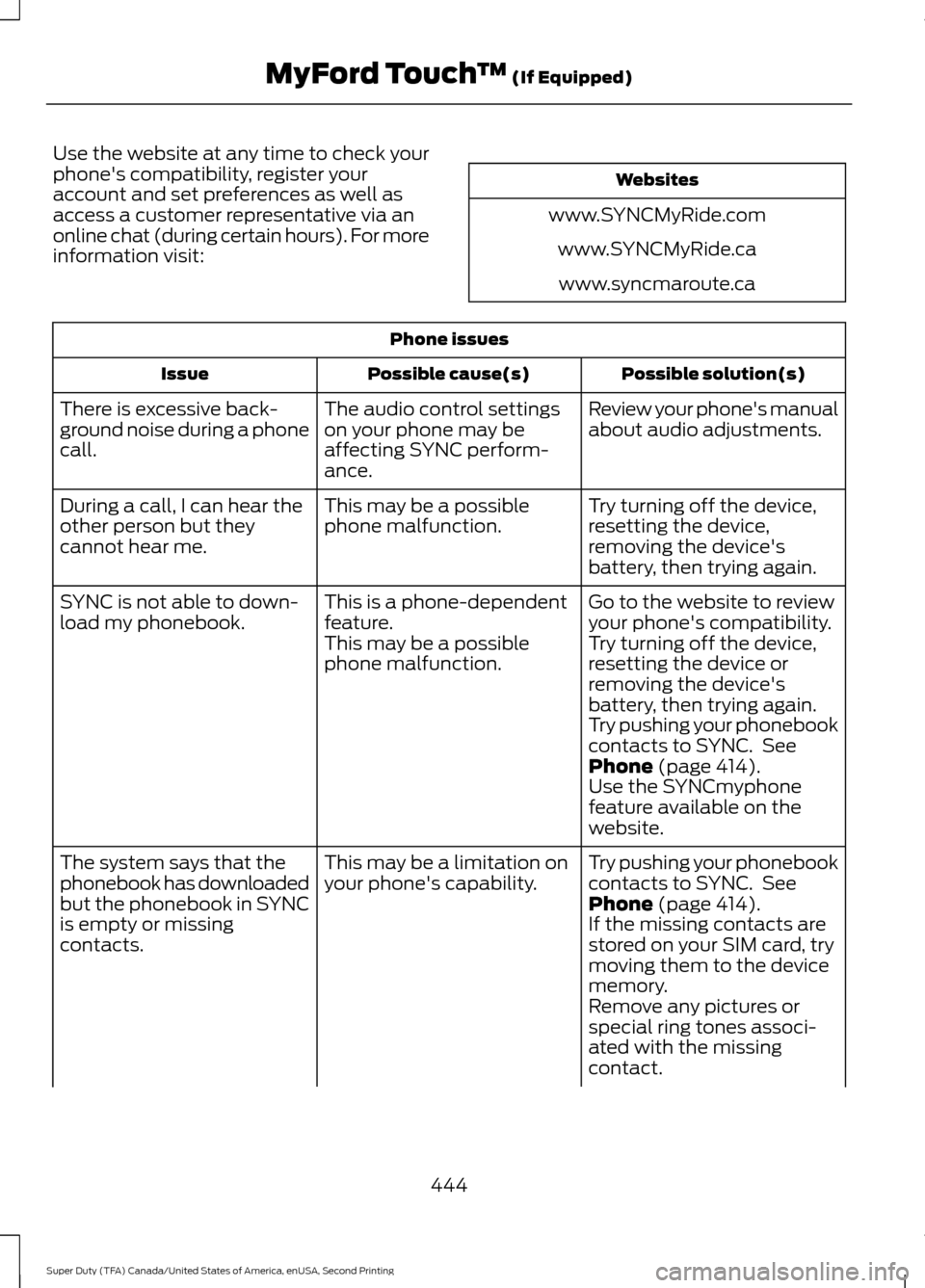
Use the website at any time to check your
phone's compatibility, register your
account and set preferences as well as
access a customer representative via an
online chat (during certain hours). For more
information visit:
Websites
www.SYNCMyRide.com www.SYNCMyRide.cawww.syncmaroute.ca Phone issues
Possible solution(s)
Possible cause(s)
Issue
Review your phone's manual
about audio adjustments.
The audio control settings
on your phone may be
affecting SYNC perform-
ance.
There is excessive back-
ground noise during a phone
call.
Try turning off the device,
resetting the device,
removing the device's
battery, then trying again.
This may be a possible
phone malfunction.
During a call, I can hear the
other person but they
cannot hear me.
Go to the website to review
your phone's compatibility.
This is a phone-dependent
feature.
SYNC is not able to down-
load my phonebook.
Try turning off the device,
resetting the device or
removing the device's
battery, then trying again.
This may be a possible
phone malfunction.
Try pushing your phonebook
contacts to SYNC. See
Phone (page 414).
Use the SYNCmyphone
feature available on the
website.
Try pushing your phonebook
contacts to SYNC. See
Phone
(page 414).
This may be a limitation on
your phone's capability.
The system says that the
phonebook has downloaded
but the phonebook in SYNC
is empty or missing
contacts. If the missing contacts are
stored on your SIM card, try
moving them to the device
memory.
Remove any pictures or
special ring tones associ-
ated with the missing
contact.
444
Super Duty (TFA) Canada/United States of America, enUSA, Second Printing MyFord Touch
™
(If Equipped)
Page 448 of 510
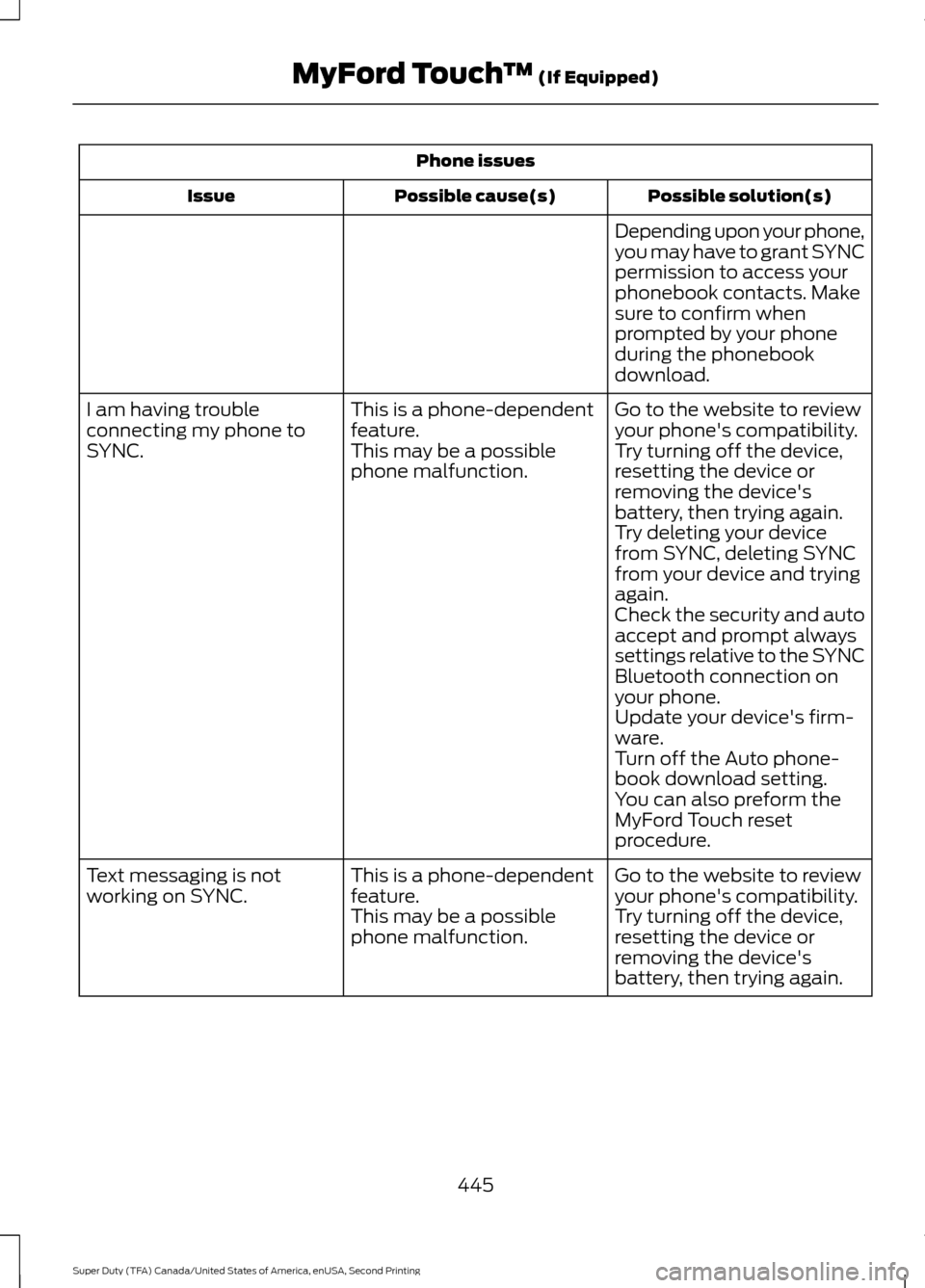
Phone issues
Possible solution(s)
Possible cause(s)
Issue
Depending upon your phone,
you may have to grant SYNC
permission to access your
phonebook contacts. Make
sure to confirm when
prompted by your phone
during the phonebook
download.
Go to the website to review
your phone's compatibility.
This is a phone-dependent
feature.
I am having trouble
connecting my phone to
SYNC.
Try turning off the device,
resetting the device or
removing the device's
battery, then trying again.
This may be a possible
phone malfunction.
Try deleting your device
from SYNC, deleting SYNC
from your device and trying
again.
Check the security and auto
accept and prompt always
settings relative to the SYNC
Bluetooth connection on
your phone.
Update your device's firm-
ware.
Turn off the Auto phone-
book download setting.
You can also preform the
MyFord Touch reset
procedure.
Go to the website to review
your phone's compatibility.
This is a phone-dependent
feature.
Text messaging is not
working on SYNC.
Try turning off the device,
resetting the device or
removing the device's
battery, then trying again.
This may be a possible
phone malfunction.
445
Super Duty (TFA) Canada/United States of America, enUSA, Second Printing MyFord Touch
™ (If Equipped)
Page 449 of 510
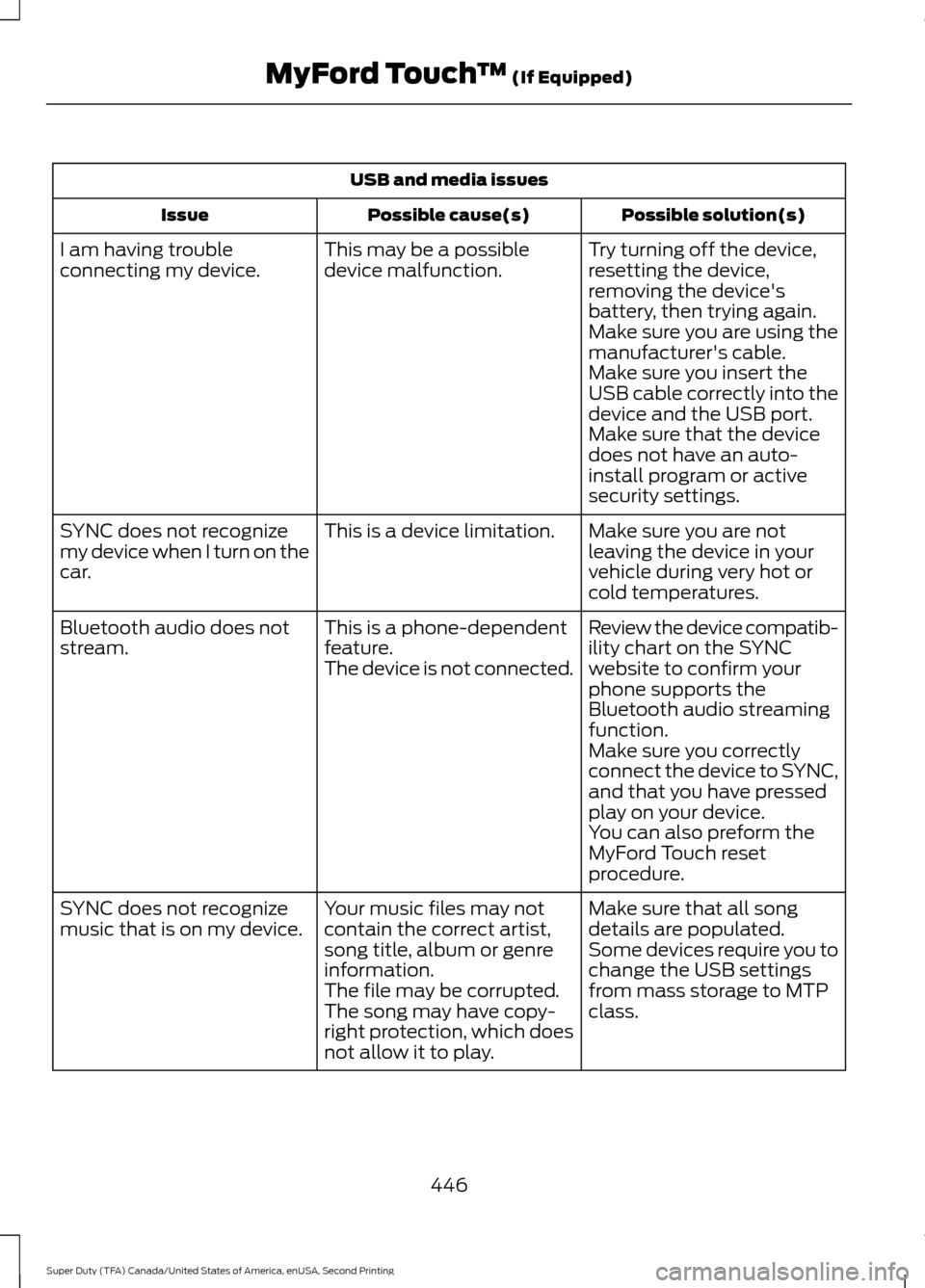
USB and media issues
Possible solution(s)
Possible cause(s)
Issue
Try turning off the device,
resetting the device,
removing the device's
battery, then trying again.
This may be a possible
device malfunction.
I am having trouble
connecting my device.
Make sure you are using the
manufacturer's cable.
Make sure you insert the
USB cable correctly into the
device and the USB port.
Make sure that the device
does not have an auto-
install program or active
security settings.
Make sure you are not
leaving the device in your
vehicle during very hot or
cold temperatures.
This is a device limitation.
SYNC does not recognize
my device when I turn on the
car.
Review the device compatib-
ility chart on the SYNC
website to confirm your
phone supports the
Bluetooth audio streaming
function.
This is a phone-dependent
feature.
The device is not connected.
Bluetooth audio does not
stream.
Make sure you correctly
connect the device to SYNC,
and that you have pressed
play on your device.
You can also preform the
MyFord Touch reset
procedure.
Make sure that all song
details are populated.
Your music files may not
contain the correct artist,
song title, album or genre
information.
SYNC does not recognize
music that is on my device.
Some devices require you to
change the USB settings
from mass storage to MTP
class.
The file may be corrupted.
The song may have copy-
right protection, which does
not allow it to play.
446
Super Duty (TFA) Canada/United States of America, enUSA, Second Printing MyFord Touch
™ (If Equipped)
Page 452 of 510
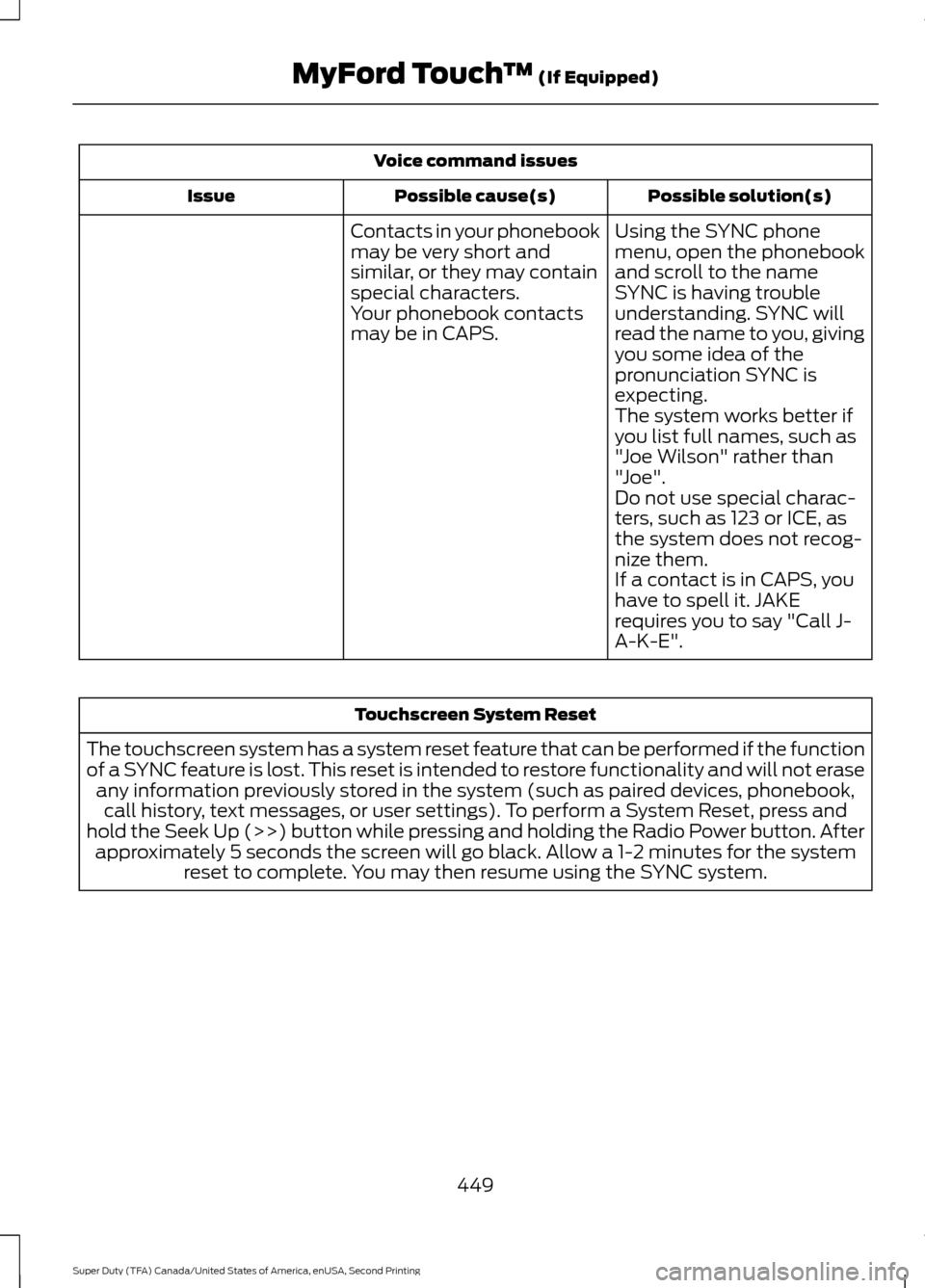
Voice command issues
Possible solution(s)
Possible cause(s)
Issue
Contacts in your phonebook
may be very short and
similar, or they may contain
special characters. Using the SYNC phone
menu, open the phonebook
and scroll to the name
SYNC is having trouble
understanding. SYNC will
read the name to you, giving
you some idea of the
pronunciation SYNC is
expecting.
Your phonebook contacts
may be in CAPS.
The system works better if
you list full names, such as
"Joe Wilson" rather than
"Joe".
Do not use special charac-
ters, such as 123 or ICE, as
the system does not recog-
nize them.
If a contact is in CAPS, you
have to spell it. JAKE
requires you to say "Call J-
A-K-E". Touchscreen System Reset
The touchscreen system has a system reset feature that can be performed if the function
of a SYNC feature is lost. This reset is intended to restore functionality and will not erase any information previously stored in the system (such as paired devices, phonebook,call history, text messages, or user settings). To perform a System Reset, press and
hold the Seek Up (>>) button while pressing and holding the Radio Power button. After approximately 5 seconds the screen will go black. Allow a 1-2 minutes for the system reset to complete. You may then resume using the SYNC system.
449
Super Duty (TFA) Canada/United States of America, enUSA, Second Printing MyFord Touch
™ (If Equipped)
Page 505 of 510
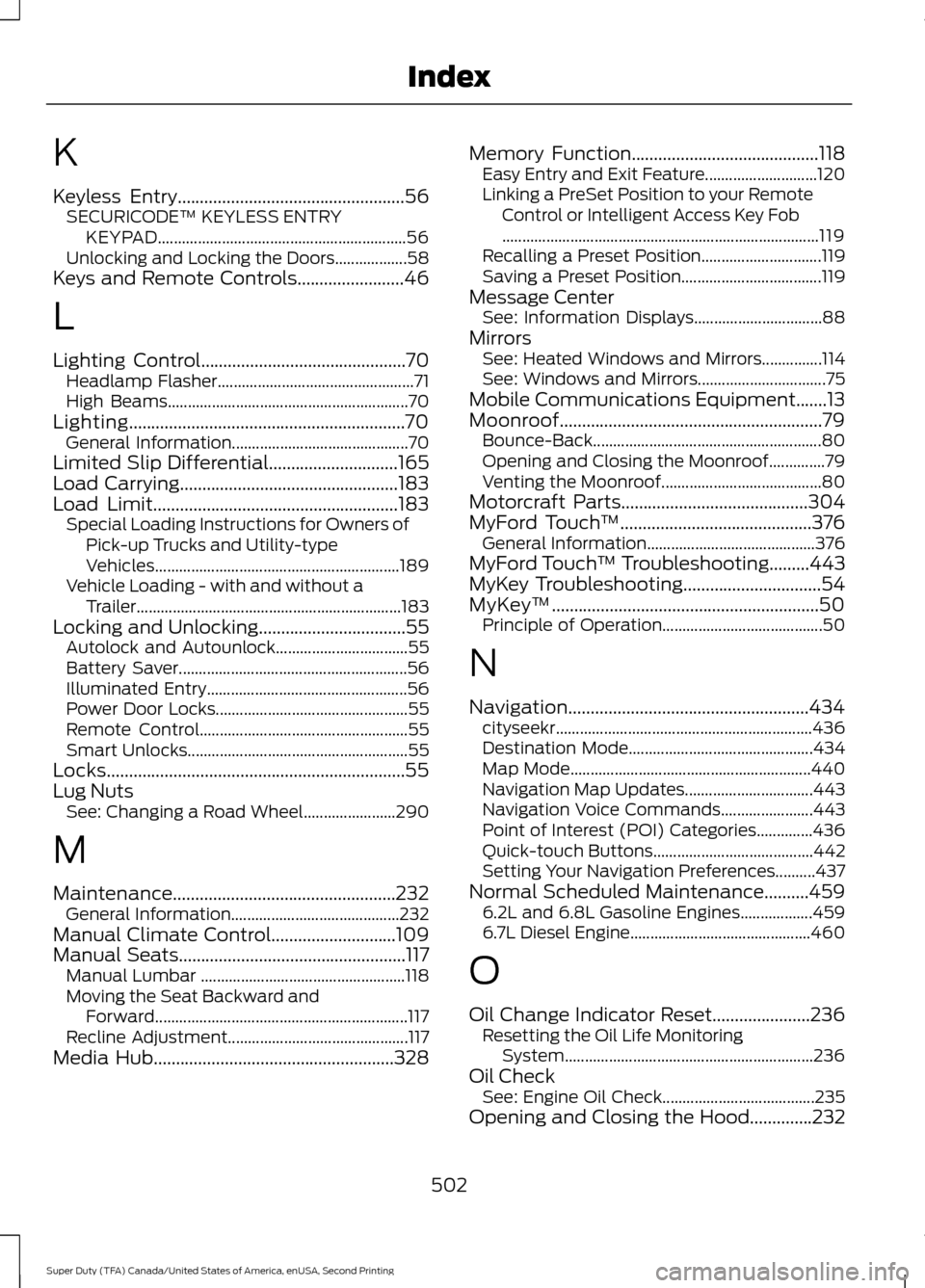
K
Keyless Entry...................................................56
SECURICODE™ KEYLESS ENTRY
KEYPAD.............................................................. 56
Unlocking and Locking the Doors.................. 58
Keys and Remote Controls........................46
L
Lighting Control..............................................70 Headlamp Flasher................................................. 71
High Beams............................................................ 70
Lighting..............................................................70 General Information............................................ 70
Limited Slip Differential.............................165
Load Carrying
.................................................183
Load Limit.......................................................183
Special Loading Instructions for Owners of
Pick-up Trucks and Utility-type
Vehicles............................................................. 189
Vehicle Loading - with and without a Trailer .................................................................. 183
Locking and Unlocking.................................55 Autolock and Autounlock................................. 55
Battery Saver......................................................... 56
Illuminated Entry.................................................. 56
Power Door Locks................................................ 55
Remote Control.................................................... 55
Smart Unlocks....................................................... 55
Locks...................................................................55
Lug Nuts See: Changing a Road Wheel....................... 290
M
Maintenance..................................................232 General Information.......................................... 232
Manual Climate Control............................109
Manual Seats
...................................................117
Manual Lumbar ................................................... 118
Moving the Seat Backward and Forward............................................................... 117
Recline Adjustment............................................. 117
Media Hub
......................................................328 Memory Function
..........................................118
Easy Entry and Exit Feature............................ 120
Linking a PreSet Position to your Remote Control or Intelligent Access Key Fob
........................................................................\
....... 119
Recalling a Preset Position.............................. 119
Saving a Preset Position................................... 119
Message Center See: Information Displays................................ 88
Mirrors See: Heated Windows and Mirrors...............114
See: Windows and Mirrors................................ 75
Mobile Communications Equipment.......13
Moonroof...........................................................79 Bounce-Back......................................................... 80
Opening and Closing the Moonroof..............79
Venting the Moonroof........................................ 80
Motorcraft Parts
..........................................304
MyFord Touch ™...........................................376
General Information.......................................... 376
MyFord Touch ™ Troubleshooting.........443
MyKey Troubleshooting
...............................54
MyKey ™............................................................50
Principle of Operation........................................ 50
N
Navigation......................................................434 cityseekr................................................................ 436
Destination Mode.............................................. 434
Map Mode............................................................ 440
Navigation Map Updates................................ 443
Navigation Voice Commands....................... 443
Point of Interest (POI) Categories..............436
Quick-touch Buttons........................................ 442
Setting Your Navigation Preferences..........437
Normal Scheduled Maintenance..........459 6.2L and 6.8L Gasoline Engines.................. 459
6.7L Diesel Engine............................................. 460
O
Oil Change Indicator Reset......................236 Resetting the Oil Life Monitoring
System.............................................................. 236
Oil Check See: Engine Oil Check...................................... 235
Opening and Closing the Hood..............232
502
Super Duty (TFA) Canada/United States of America, enUSA, Second Printing Index