2016 FORD SUPER DUTY lock
[x] Cancel search: lockPage 104 of 510

Action
Message
The powertrain control module will intentionally turn the
engine off due to your vehicle being in the final 30 seconds of
a countdown. The diesel engine shutdown for extended idling is an optional feature. Refer to your diesel supplement for more information.
ENGINE TURNS OFF IN
XX SECONDS
Appears after the 30 second countdown. Refer to your dieselsupplement for more information.
ENGINE TURNED OFF
In extremely cold weather, typically below – 15°F (–26°C)
and if the engine block heater is not utilized, your engine will
not respond to accelerator pedal movement for 30 seconds.
This restriction allows your engine to circulate the oil properly
in order to avoid engine damage. Refer to your diesel supple- ment for more information.
ENGINE WARMING
PLEASE WAIT
Your diesel particulate filter is clean. Refer to your dieselsupplement for more information.
EXHAUST FILTER DRIVE
COMPLETE
Your diesel particulate filter is clean. Refer to your dieselsupplement for more information.
EXHAUST FILTER
CLEANED
The manual operator commanded regeneration process hasstopped. Refer to your diesel supplement for more informa- tion.
EXHAUST CLEAN
STOPPED
The distance you can travel before depleting the remaining
diesel exhaust fluid. Refer to your diesel supplement for more information.
EXHAUST FLUID RANGE
XXX MI
Your diesel exhaust fluid is nearing empty. Your vehicle ’s top
speed will become limited in the displayed distance. You must
replenish the diesel exhaust fluid to resume normal operation of your vehicle. Refer to your diesel supplement for more information.
IN XX MILES, SPEED
LIMITED TO XX MPH
EXHAUST FLUID EMPTY
Your remaining diesel exhaust fluid has depleted. Your speedwill be limited upon restart. You must replenish the dieselexhaust fluid to resume normal operation of your vehicle. Refer to your diesel supplement for more information.
SPEED LIMITED TO XX
MPH UPON RESTART
EXHAUST FLUID EMPTY
The diesel exhaust fluid is empty. You must replenish thediesel exhaust fluid to resume normal operation of your
vehicle. Refer to your diesel supplement for more information.
SPEED LIMITED TO XX
MPH EXHAUST FLUID EMPTY
101
Super Duty (TFA) Canada/United States of America, enUSA, Second Printing Information Displays
Page 106 of 510
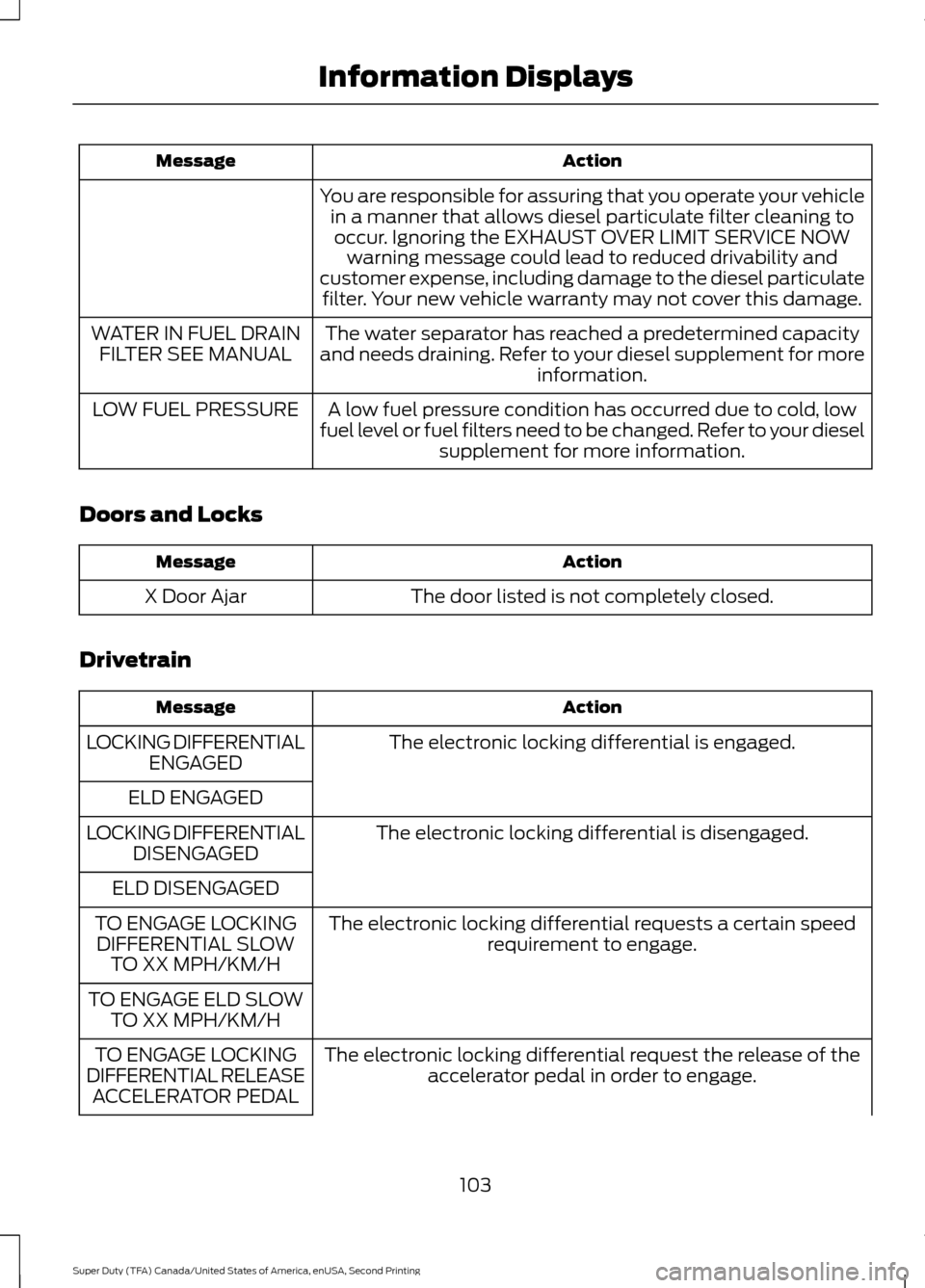
Action
Message
You are responsible for assuring that you operate your vehiclein a manner that allows diesel particulate filter cleaning tooccur. Ignoring the EXHAUST OVER LIMIT SERVICE NOW warning message could lead to reduced drivability and
customer expense, including damage to the diesel particulate filter. Your new vehicle warranty may not cover this damage.
The water separator has reached a predetermined capacity
and needs draining. Refer to your diesel supplement for more information.
WATER IN FUEL DRAIN
FILTER SEE MANUAL
A low fuel pressure condition has occurred due to cold, low
fuel level or fuel filters need to be changed. Refer to your diesel supplement for more information.
LOW FUEL PRESSURE
Doors and Locks Action
Message
The door listed is not completely closed.
X Door Ajar
Drivetrain Action
Message
The electronic locking differential is engaged.
LOCKING DIFFERENTIAL
ENGAGED
ELD ENGAGED The electronic locking differential is disengaged.
LOCKING DIFFERENTIAL
DISENGAGED
ELD DISENGAGED The electronic locking differential requests a certain speedrequirement to engage.
TO ENGAGE LOCKING
DIFFERENTIAL SLOW TO XX MPH/KM/H
TO ENGAGE ELD SLOW TO XX MPH/KM/H
The electronic locking differential request the release of theaccelerator pedal in order to engage.
TO ENGAGE LOCKING
DIFFERENTIAL RELEASE ACCELERATOR PEDAL
103
Super Duty (TFA) Canada/United States of America, enUSA, Second Printing Information Displays
Page 107 of 510
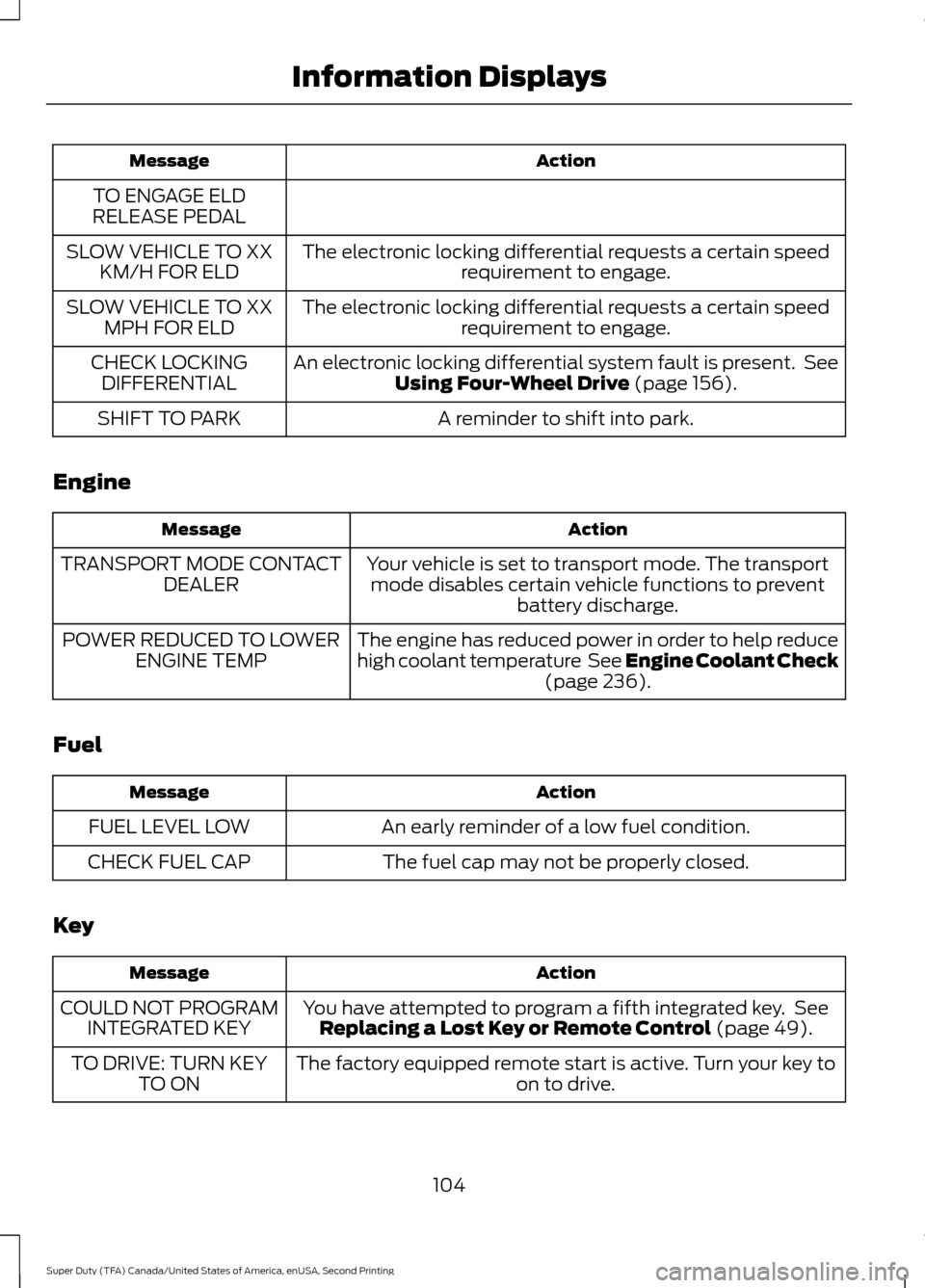
Action
Message
TO ENGAGE ELD
RELEASE PEDAL
The electronic locking differential requests a certain speedrequirement to engage.
SLOW VEHICLE TO XX
KM/H FOR ELD
The electronic locking differential requests a certain speedrequirement to engage.
SLOW VEHICLE TO XX
MPH FOR ELD
An electronic locking differential system fault is present. SeeUsing Four-Wheel Drive (page 156).
CHECK LOCKING
DIFFERENTIAL
A reminder to shift into park.
SHIFT TO PARK
Engine Action
Message
Your vehicle is set to transport mode. The transportmode disables certain vehicle functions to prevent battery discharge.
TRANSPORT MODE CONTACT
DEALER
The engine has reduced power in order to help reduce
high coolant temperature See Engine Coolant Check(page
236).
POWER REDUCED TO LOWER
ENGINE TEMP
Fuel Action
Message
An early reminder of a low fuel condition.
FUEL LEVEL LOW
The fuel cap may not be properly closed.
CHECK FUEL CAP
Key Action
Message
You have attempted to program a fifth integrated key. SeeReplacing a Lost Key or Remote Control
(page 49).
COULD NOT PROGRAM
INTEGRATED KEY
The factory equipped remote start is active. Turn your key to on to drive.
TO DRIVE: TURN KEY
TO ON
104
Super Duty (TFA) Canada/United States of America, enUSA, Second Printing Information Displays
Page 119 of 510
WARNINGS
Install the head restraint properly to
help minimize the risk of neck injury
in the event of a crash.
Note:
Adjust the seat back to an upright
driving position before adjusting the head
restraint. Adjust the head restraint so that
the top of it is level with the top of your head
and as far forward as possible. Make sure
that you remain comfortable. If you are
extremely tall, adjust the head restraint to
its highest position.
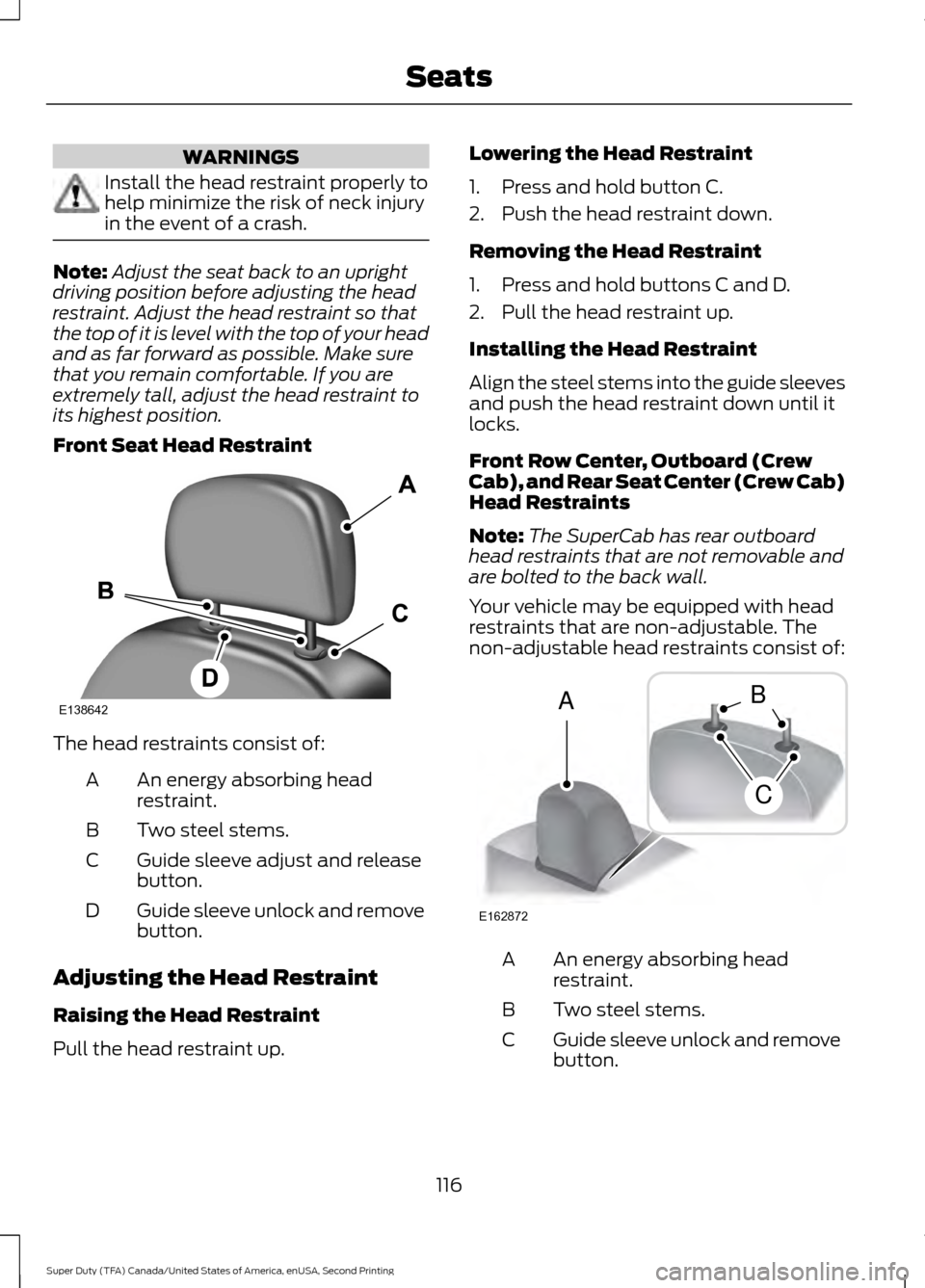
Front Seat Head Restraint The head restraints consist of:
An energy absorbing head
restraint.
A
Two steel stems.
B
Guide sleeve adjust and release
button.
C
Guide sleeve unlock and remove
button.
D
Adjusting the Head Restraint
Raising the Head Restraint
Pull the head restraint up. Lowering the Head Restraint
1. Press and hold button C.
2. Push the head restraint down.
Removing the Head Restraint
1. Press and hold buttons C and D.
2. Pull the head restraint up.
Installing the Head Restraint
Align the steel stems into the guide sleeves
and push the head restraint down until it
locks.
Front Row Center, Outboard (Crew
Cab), and Rear Seat Center (Crew Cab)
Head Restraints
Note:
The SuperCab has rear outboard
head restraints that are not removable and
are bolted to the back wall.
Your vehicle may be equipped with head
restraints that are non-adjustable. The
non-adjustable head restraints consist of: An energy absorbing head
restraint.
A
Two steel stems.
B
Guide sleeve unlock and remove
button.
C
116
Super Duty (TFA) Canada/United States of America, enUSA, Second Printing SeatsE138642 E162872
A
C
B
Page 120 of 510
Removing the Head Restraint
1. Press and hold buttons C.
2. Pull up the head restraint.
Installing the Head Restraint
Align the steel stems into the guide sleeves
and push the head restraint down until it
locks.
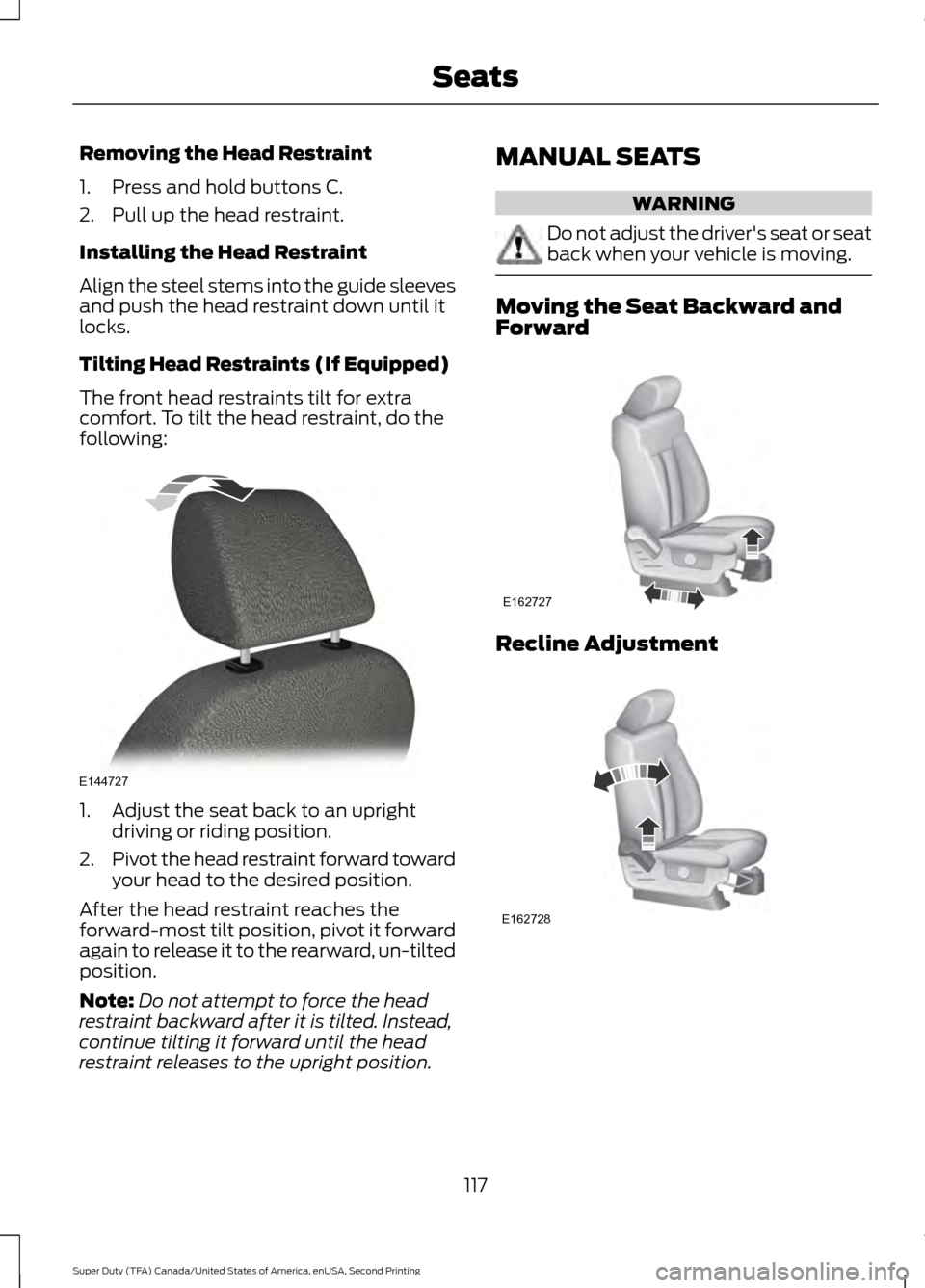
Tilting Head Restraints (If Equipped)
The front head restraints tilt for extra
comfort. To tilt the head restraint, do the
following:
1. Adjust the seat back to an upright
driving or riding position.
2. Pivot the head restraint forward toward
your head to the desired position.
After the head restraint reaches the
forward-most tilt position, pivot it forward
again to release it to the rearward, un-tilted
position.
Note: Do not attempt to force the head
restraint backward after it is tilted. Instead,
continue tilting it forward until the head
restraint releases to the upright position. MANUAL SEATS WARNING
Do not adjust the driver's seat or seat
back when your vehicle is moving.
Moving the Seat Backward and
Forward
Recline Adjustment
117
Super Duty (TFA) Canada/United States of America, enUSA, Second Printing SeatsE144727 E162727 E162728
Page 122 of 510
WARNINGS
Do not use the memory function
when your vehicle is moving.
This feature automatically recalls the
position of the following:
•
Driver seat.
• Power mirrors.
• Optional adjustable pedals.
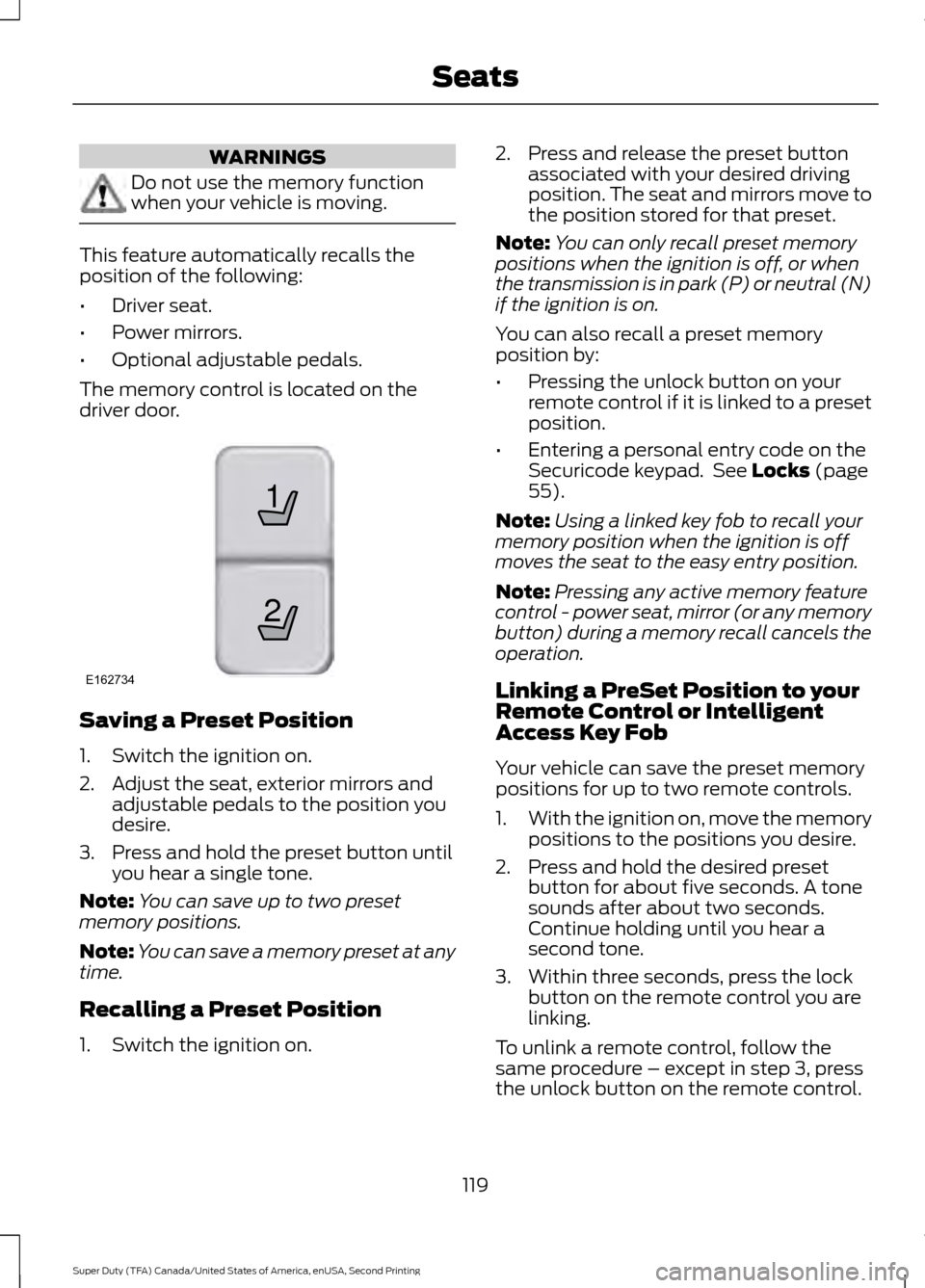
The memory control is located on the
driver door. Saving a Preset Position
1. Switch the ignition on.
2. Adjust the seat, exterior mirrors and
adjustable pedals to the position you
desire.
3. Press and hold the preset button until you hear a single tone.
Note: You can save up to two preset
memory positions.
Note: You can save a memory preset at any
time.
Recalling a Preset Position
1. Switch the ignition on. 2. Press and release the preset button
associated with your desired driving
position. The seat and mirrors move to
the position stored for that preset.
Note: You can only recall preset memory
positions when the ignition is off, or when
the transmission is in park (P) or neutral (N)
if the ignition is on.
You can also recall a preset memory
position by:
• Pressing the unlock button on your
remote control if it is linked to a preset
position.
• Entering a personal entry code on the
Securicode keypad. See Locks (page
55).
Note: Using a linked key fob to recall your
memory position when the ignition is off
moves the seat to the easy entry position.
Note: Pressing any active memory feature
control - power seat, mirror (or any memory
button) during a memory recall cancels the
operation.
Linking a PreSet Position to your
Remote Control or Intelligent
Access Key Fob
Your vehicle can save the preset memory
positions for up to two remote controls.
1. With the ignition on, move the memory
positions to the positions you desire.
2. Press and hold the desired preset button for about five seconds. A tone
sounds after about two seconds.
Continue holding until you hear a
second tone.
3. Within three seconds, press the lock button on the remote control you are
linking.
To unlink a remote control, follow the
same procedure – except in step 3, press
the unlock button on the remote control.
119
Super Duty (TFA) Canada/United States of America, enUSA, Second Printing Seats21
E162734
Page 123 of 510
Note:
If more than one linked remote
control or intelligent access key is in range,
the memory function moves to the settings
of the first key to initiate a memory recall.
Easy Entry and Exit Feature (If
Equipped)
If you enable the easy entry and exit
feature, it automatically moves the driver
seat rearward up to 2 inches (5
centimeters) when you put the
transmission in park (P) and remove the
key from the ignition.
The driver seat returns to the previous
position when you put the key in the
ignition.
You can enable or disable this feature
through the information display. See
Information Displays
(page 88).
REAR SEATS
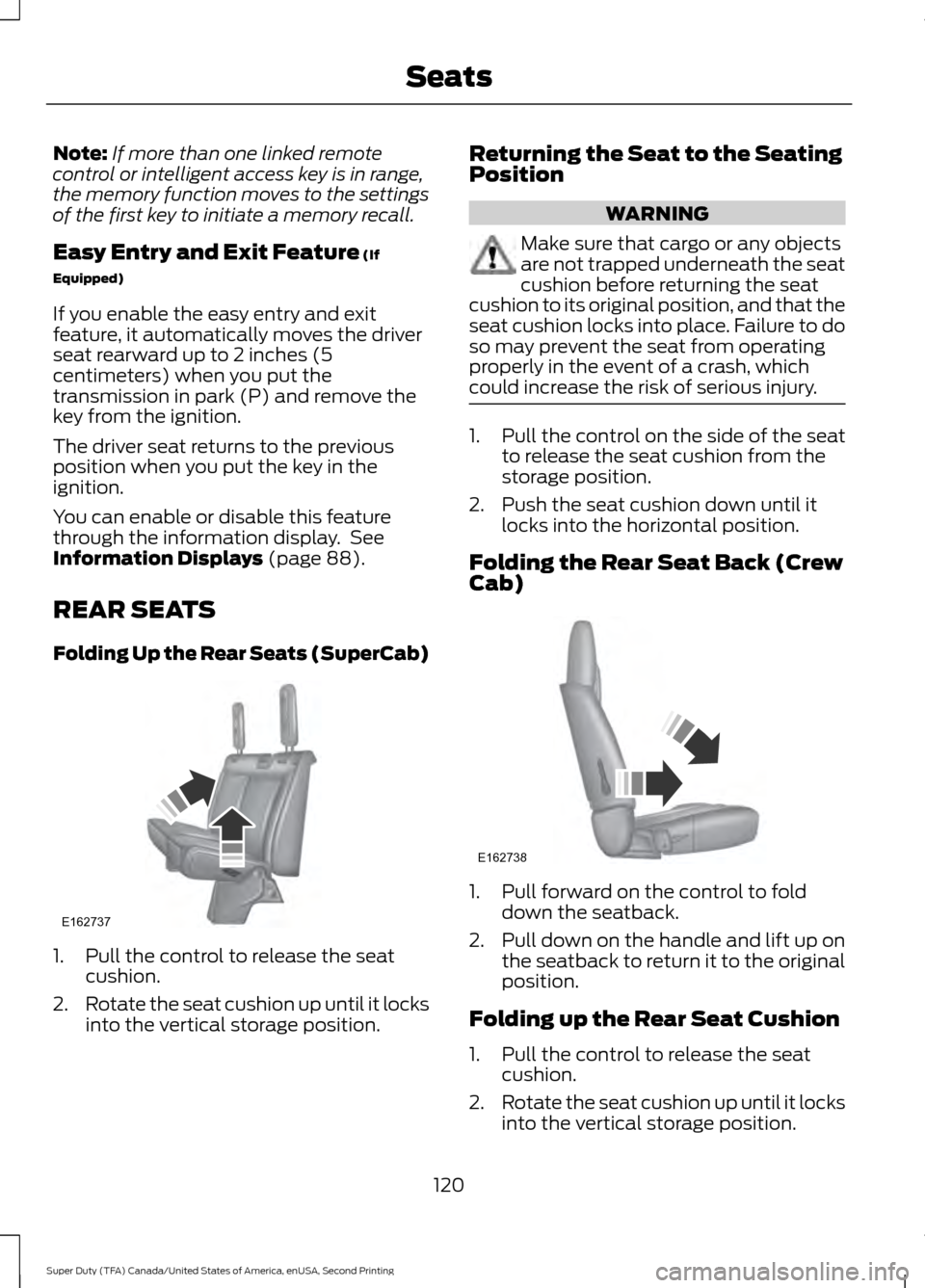
Folding Up the Rear Seats (SuperCab) 1. Pull the control to release the seat
cushion.
2. Rotate the seat cushion up until it locks
into the vertical storage position. Returning the Seat to the Seating
Position WARNING
Make sure that cargo or any objects
are not trapped underneath the seat
cushion before returning the seat
cushion to its original position, and that the
seat cushion locks into place. Failure to do
so may prevent the seat from operating
properly in the event of a crash, which
could increase the risk of serious injury. 1. Pull the control on the side of the seat
to release the seat cushion from the
storage position.
2. Push the seat cushion down until it locks into the horizontal position.
Folding the Rear Seat Back (Crew
Cab) 1. Pull forward on the control to fold
down the seatback.
2. Pull down on the handle and lift up on
the seatback to return it to the original
position.
Folding up the Rear Seat Cushion
1. Pull the control to release the seat cushion.
2. Rotate the seat cushion up until it locks
into the vertical storage position.
120
Super Duty (TFA) Canada/United States of America, enUSA, Second Printing SeatsE162737 E162738
Page 124 of 510
Returning the Seat to the Seating
Position
WARNING
Make sure that cargo or any objects
are not trapped underneath the seat
cushion before returning the seat
cushion to its original position, and that the
seat cushion locks into place. Failure to do
so may prevent the seat from operating
properly in the event of a crash, which
could increase the risk of serious injury. 1. Pull the control on the side of the seat
to release the seat cushion from the
storage position.
2. Push the seat cushion down until it locks into the horizontal position.
Rear Under Seat Storage (Crew
Cab) (If Equipped)
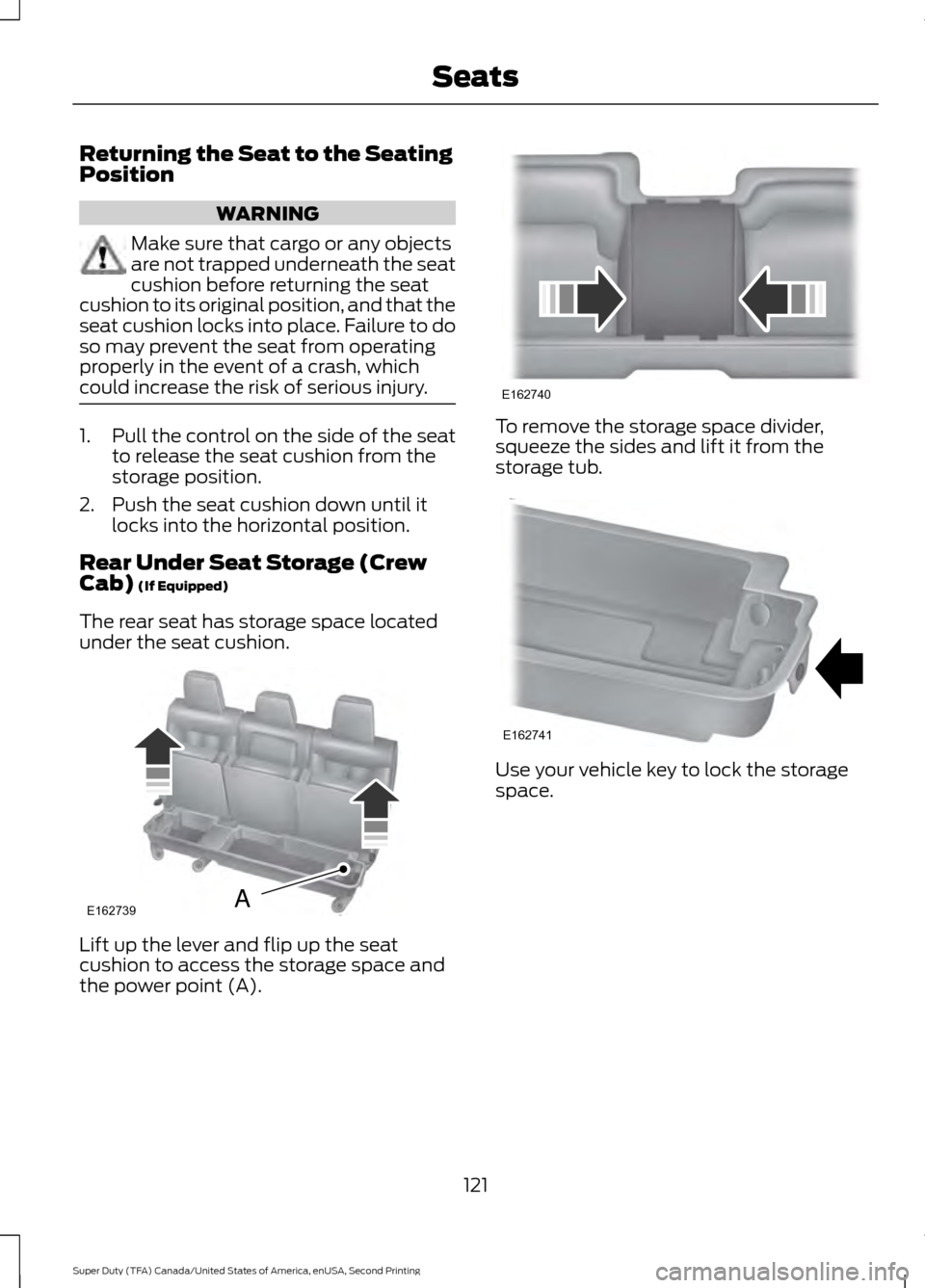
The rear seat has storage space located
under the seat cushion. Lift up the lever and flip up the seat
cushion to access the storage space and
the power point (A). To remove the storage space divider,
squeeze the sides and lift it from the
storage tub.
Use your vehicle key to lock the storage
space.
121
Super Duty (TFA) Canada/United States of America, enUSA, Second Printing SeatsE162739A E162740 E162741