2016 FORD POLICE INTERCEPTOR UTILITY steering
[x] Cancel search: steeringPage 78 of 350

•
Distance to Empty - Shows the
approximate distance your vehicle can
travel before running out of fuel.
• Inst Fuel Economy - Shows a visual
graph of your instantaneous fuel
economy along with your Avg MPG
since the function was last reset.
• Average Fuel — Shows the average fuel
economy since last reset.
• Fuel History - Shows a bar chart of your
fuel history.
• All Values — Shows all fuel economy
values (DTE, Inst Fuel Econ, Avg Fuel). Note:
You can reset your average fuel
economy by pressing and holding the OK
button on the left hand steering wheel
controls.
Driver Assist
In this mode, you can configure different
driver setting choices.
Note: Some options may appear slightly
different or not at all if the items are
optional. Driver Assist
Traction Ctrl - check enabled or uncheck disabled
Blind Spot - check enabled or uncheck disabled
Cross Traffic - check enabled or uncheck disabled Alert, Aid or Alert +Aid
Mode
Lane Keeping
System
High, Normal or Low
Intensity
Rear Park Aid - check enabled uncheck disabled 4 Wheel Tire Pressure
Tire Pressure
Settings
In this mode, you can configure different
driver setting choices. Note:
Some items are optional and may
not appear. Settings
All Sensors
Alarm
Vehicle
Perimeter Sensing
Ask on Exit
Information - check enabled or uncheck disabled
Chimes
Normal or Towing
DTE Calcula-
tion
Off or XX Seconds
Autolamp Delay
Lighting
75
Explorer (TUB), enUSA, Edition date: 03/2015, First Printing Information Displays
Page 84 of 350

Action
Message
You have programmed the maximum number of keys to the system.
Max Number of Keys
Learned
You have not programmed enough keys to the system.
Not Enough Keys
Learned
The key battery is low. Change the battery as soon as possible.See Remote Control (page 46).
Key Battery Low Replace
Soon
Informs you that you are exiting your vehicle with the intelli-gent access key and the engine is on.
Engine ON
Lane Keeping System Action
Message
The system has malfunctioned. Contact an authorized dealer as soon as possible.
Lane Keeping Sys.
Malfunction Service Required
The system has detected a condition that has caused thesystem to be temporarily unavailable.
Front Camera Tempor-
arily Not Available
The system has detected a condition that requires a cleanwindshield to operate properly.
Front Camera Low Visib-
ility Clean Screen
The system has malfunctioned. Contact an authorized dealeras soon as possible.
Front Camera Malfunc-
tion Service Required
The system requests the driver to keep their hands on thesteering wheel.
Keep Hands on Steering
Wheel
Maintenance Action
Message
Stop your vehicle as soon as safely possible. Switch off the
engine. Check the oil level. If the warning stays on or continues to come on with your engine running, contact an authorized dealer as soon as possible.
LOW Engine Oil Pressure
The engine oil life remaining is 10% or less. See
Engine Oil
Check (page 180).
Change Engine Oil Soon
The oil life left reaches 0%. See Engine Oil Check (page 180).
Oil Change Required
81
Explorer (TUB), enUSA, Edition date: 03/2015, First Printing Information Displays
Page 86 of 350
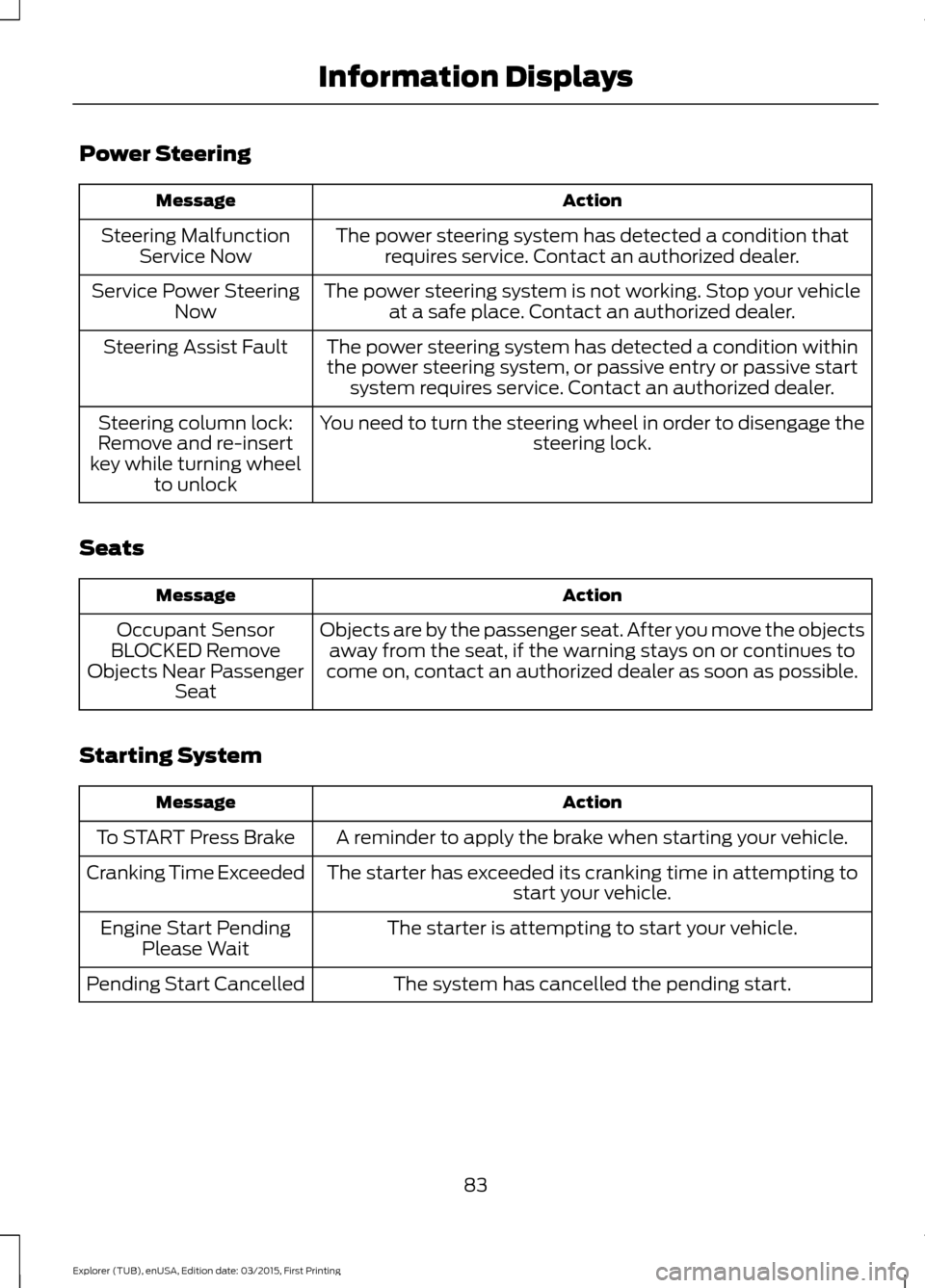
Power Steering
Action
Message
The power steering system has detected a condition thatrequires service. Contact an authorized dealer.
Steering Malfunction
Service Now
The power steering system is not working. Stop your vehicleat a safe place. Contact an authorized dealer.
Service Power Steering
Now
The power steering system has detected a condition withinthe power steering system, or passive entry or passive start system requires service. Contact an authorized dealer.
Steering Assist Fault
You need to turn the steering wheel in order to disengage thesteering lock.
Steering column lock:
Remove and re-insert
key while turning wheel to unlock
Seats Action
Message
Objects are by the passenger seat. After you move the objectsaway from the seat, if the warning stays on or continues to
come on, contact an authorized dealer as soon as possible.
Occupant Sensor
BLOCKED Remove
Objects Near Passenger Seat
Starting System Action
Message
A reminder to apply the brake when starting your vehicle.
To START Press Brake
The starter has exceeded its cranking time in attempting tostart your vehicle.
Cranking Time Exceeded
The starter is attempting to start your vehicle.
Engine Start Pending
Please Wait
The system has cancelled the pending start.
Pending Start Cancelled
83
Explorer (TUB), enUSA, Edition date: 03/2015, First Printing Information Displays
Page 93 of 350

SITTING IN THE CORRECT
POSITION
WARNINGS
Sitting improperly, out of position or
with the seatback reclined too far
can take weight off the seat cushion
and affect the decision of the passenger
sensing system, resulting in serious injury
or death in the event of a crash. Always sit
upright against your seat back, with your
feet on the floor. Do not recline the seatback as this
can cause the occupant to slide
under the safety belt, resulting in
serious injury in the event of a crash. Do not place objects higher than the
seatback to reduce the risk of serious
injury in the event of a crash or during
heavy braking. When you use them properly, the seat,
head restraint, safety belt and airbags will
provide optimum protection in the event
of a crash. We recommend that you follow these
guidelines:
•
Sit in an upright position with the base
of your spine as far back as possible.
• Do not recline the seatback more than
30 degrees.
• Adjust the head restraint so that the
top of it is level with the top of your
head and as far forward as possible.
Make sure that you remain
comfortable.
• Keep sufficient distance between
yourself and the steering wheel. We
recommend a minimum of 10 in
(25 cm) between your breastbone and
the airbag cover.
• Hold the steering wheel with your arms
slightly bent.
• Bend your legs slightly so that you can
press the pedals fully.
• Position the shoulder strap of the
safety belt over the center of your
shoulder and position the lap strap
tightly across your hips.
Make sure that your driving position is
comfortable and that you can maintain full
control of your vehicle.
HEAD RESTRAINTS WARNINGS
To minimize the risk of neck injury in
the event of a crash, the driver and
passenger occupants should not sit
in or operate the vehicle, until the head
restraint is placed in its proper position.
The driver should never adjust the head
restraint while the vehicle is in motion.
90
Explorer (TUB), enUSA, Edition date: 03/2015, First Printing SeatsE68595
Page 101 of 350

Note:
You can crank the engine for a total
of 60 seconds without the engine starting
before the starting system temporarily
disables. The 60 seconds does not have to
be all at once. For example, if you crank the
engine three times for 20 seconds each
time, without the engine starting, you
reached the 60-second time limit. A
message appears in the information display
alerting you that you exceeded the cranking
time. You cannot attempt to start the
engine for at least 15 minutes. After 15
minutes, you are limited to a 15-second
engine cranking time. You need to wait 60
minutes before you can crank the engine for
60 seconds again.
Before starting your vehicle, check the
following:
• Make sure all occupants have fastened
their safety belts.
• Make sure the headlamps and
electrical accessories are off.
• Make sure the parking brake is on.
• Make sure the transmission is in park
(P).
• Switch the ignition key to position II.
Note: Do not touch the accelerator pedal.
1. Fully depress the brake pedal.
2. Turn the key to position
III to start the
engine.
Note: The engine may continue cranking
for up to 15 seconds or until it starts.
Note: If you cannot start the engine on the
first try, wait for a short period and try again.
Failure to Start
If you cannot start the engine after three
attempts, wait 10 seconds and follow this
procedure:
1. Fully depress the brake pedal.
2. Shift into park (P). 3.
Fully depress the accelerator pedal and
hold it there.
4. Start the engine.
Stopping the Engine When Your
Vehicle is Stationary
1. Shift into park (P).
2. Turn the key to position
0.
3. Apply the parking brake.
Stopping the Engine When Your
Vehicle is Moving WARNING
Switching off the engine when the
vehicle is still moving will result in a
loss of brake and steering assistance.
The steering will not lock, but higher effort
will be required. When the ignition is
switched off, some electrical circuits,
including air bags, warning lamps and
indicators may also be off. If the ignition
was turned off accidentally, you can shift
into neutral (N) and re-start the engine. 1.
Shift into neutral and use the brakes to
bring your vehicle to a safe stop.
2. When your vehicle has stopped, shift into park (P) and turn the key to
position
0.
3. Apply the parking brake.
Guarding Against Exhaust Fumes WARNING
If you smell exhaust fumes inside
your vehicle, have your vehicle
checked by your authorized dealer
immediately. Do not drive your vehicle if
you smell exhaust fumes. Carbon
monoxide is present in exhaust fumes.
Take precautions to avoid its dangerous
effects. 98
Explorer (TUB), enUSA, Edition date: 03/2015, First Printing Starting and Stopping the Engine
Page 117 of 350

replaced road tire as soon as possible.
Major dissimilar tire sizes between the front
and rear axles could cause the AWD
system to stop functioning and default to
front-wheel drive or damage the AWD
system.
Operating AWD Vehicles With
Mismatched Tires
WARNING
Only use replacement tires and
wheels that are the same size, load
index, speed rating and type (such
as P-metric versus LT-metric or all-season
versus all-terrain) as those originally
provided by Ford. The recommended tire
and wheel size may be found on either the
Safety Compliance Certification Label
(affixed to either the door hinge pillar,
door-latch post, or the door edge that
meets the door-latch post, next to the
driver ’s seating position), or the Tire Label
which is located on the B-Pillar or edge of
the driver ’s door. If this information is not
found on these labels, then you should
contact your authorized dealer as soon as
possible. Use of any tire or wheel not
recommended by Ford can affect the
safety and performance of your vehicle,
which could result in an increased risk of
loss of vehicle control, vehicle rollover,
personal injury and death. Additionally the
use of non-recommended tires and wheels
could cause steering, suspension, axle,
transfer case or power transfer unit failure.
If you have questions regarding tire
replacement, contact your authorized
dealer as soon as possible. Major dissimilar tire sizes between the front
and rear axles (for example, 17 inch low
profile tires on the front axle and 22 inch
high profile tires on the rear axle) could
cause the AWD system to stop functioning
and default to front-wheel drive or damage
the AWD system. However, the AWD system is capable of tolerating any
combination of new and worn tires of the
same original tire size. For example, using
3 worn tread tires and 1 new tread tire all
of the same original tire size, can be
tolerated by the AWD system.
How Utility Vehicles Differ from
Other Vehicles
Truck and utility vehicles can differ from
some other vehicles. Your vehicle may be
higher to allow it to travel over rough
terrain without getting hung up or
damaging underbody components.
The differences that make your vehicle so
versatile also make it handle differently
than an ordinary passenger car.
Maintain steering wheel control at all
times, especially in rough terrain. Since
sudden changes in terrain can result in
abrupt steering wheel motion, make sure
you grip the steering wheel from the
outside. Do not grip the spokes.
Drive cautiously to avoid vehicle damage
from concealed objects such as rocks and
stumps.
You should either know the terrain or
examine maps of the area before driving.
Map out your route before driving in the
area. To maintain steering and braking
control of your vehicle, you must have all
four wheels on the ground and they must
be rolling, not sliding or spinning.
Driving In Special Conditions With
All-Wheel Drive (AWD)
AWD vehicles are equipped for driving on
sand, snow, mud and rough roads and have
operating characteristics that are
somewhat different from conventional
vehicles, both on and off the highway.
114
Explorer (TUB), enUSA, Edition date: 03/2015, First Printing All-Wheel Drive
Page 118 of 350

When driving at slow speeds in deep sand
under high outside temperatures, use a low
gear when possible. Lower gear operation
will maximize the engine and transmission
cooling capability.
Under severe operating conditions, the A/C
may cycle on and off to protect
overheating of the engine.
Basic operating principles in special
conditions
•
Drive slower in strong crosswinds which
can affect the normal steering
characteristics of your vehicle.
• Be extremely careful when driving on
pavement made slippery by loose sand,
water, gravel, snow or ice.
If Your Vehicle Goes Off the Edge of the
Pavement
• If your vehicle goes off the edge of the
pavement, slow down, but avoid severe
brake application, ease the vehicle
back onto the pavement only after
reducing your speed. Do not turn the
steering wheel too sharply while
returning to the road surface.
• It may be safer to stay on the apron or
shoulder of the road and slow down
gradually before returning to the
pavement. You may lose control if you
do not slow down or if you turn the
steering wheel too sharply or abruptly.
• It often may be less risky to strike small
objects, such as highway reflectors,
with minor damage to your vehicle
rather than attempt a sudden return to
the pavement which could cause the
vehicle to slide sideways out of control
or rollover. Remember, your safety and
the safety of others should be your
primary concern. If Your Vehicle Gets Stuck WARNINGS
Always set the parking brake fully
and make sure the transmission is in
P (Park). Turn the ignition to the lock
position or turn the vehicle off using the
start/stop button and remove the key
whenever you leave your vehicle. If the parking brake is fully released,
but the brake warning lamp remains
illuminated, the brakes may not be
working properly. See your authorized
dealer. Do not spin the wheels at over 35
mph (56 km/h). The tires may fail
and injure a passenger or bystander.
Note:
Do not rock the vehicle if the engine
is not at normal operating temperature or
damage to the transmission may occur.
Note: Do not rock the vehicle for more than
a few minutes or damage to the
transmission and tires may occur or the
engine may overheat.
If your vehicle gets stuck in mud or snow it
may be rocked out by shifting between
forward and reverse gears, stopping
between shifts, in a steady pattern. Press
lightly on the accelerator in each gear.
If your vehicle is equipped with
AdvanceTrac® with Roll Stability
Control ™, it may be beneficial to
disengage the AdvanceTrac® with Roll
Stability Control ™ system while
attempting to rock the vehicle.
Emergency Maneuvers
• In an unavoidable emergency situation
where a sudden sharp turn must be
made, remember to avoid
"over-driving" your vehicle (that is, turn
the steering wheel only as rapidly and
as far as required to avoid the
emergency). Excessive steering will
115
Explorer (TUB), enUSA, Edition date: 03/2015, First Printing All-Wheel Drive
Page 119 of 350

result in less vehicle control, not more.
Additionally, smooth variations of the
accelerator and/or brake pedal
pressure should be utilized if changes
in vehicle speed are called for. Avoid
abrupt steering, acceleration or braking
which could result in an increased risk
of loss of vehicle control, vehicle
rollover and/or personal injury. Use all
available road surface to return the
vehicle to a safe direction of travel.
• In the event of an emergency stop,
avoid skidding the tires and do not
attempt any sharp steering wheel
movements.
• If the vehicle goes from one type of
surface to another (that is, from
concrete to gravel) there will be a
change in the way the vehicle responds
to a maneuver (steering, acceleration
or braking). Again, avoid these abrupt
inputs.
Sand
Most of the time traction control improves
tire traction by managing wheel slip
through Brake, Engine, and AWD
calibrations. However, during low speed
driving, disabling traction control in deep
sand can help keep the wheels moving to
maintain vehicle momentum.
When driving over sand, try to keep all four
wheels on the most solid area of the trail.
Avoid reducing the tire pressures but shift
to a lower gear and drive steadily through
the terrain. Apply the accelerator slowly
and avoid spinning the wheels.
Do not drive your vehicle in deep sand for
an extended period of time. This could
cause the AWD system to overheat and
default to front-wheel drive. If this occurs,
a message displays in the information
display. To resume normal AWD function
as soon as possible, stop the vehicle in a
safe location and stop the engine for at
least 10 minutes. After the engine has been restarted and the AWD system has
adequately cooled, the message turns off
and normal AWD function returns. In the
event the engine is not stopped, the
message turns off when the system cools
and normal AWD function returns.
When driving at slow speeds in deep sand
under high outside temperatures, use L
(Low) gear when possible. L (Low) gear
operation will maximize the engine and
transmission cooling capability.
Under severe operating conditions, the A/C
may cycle on and off to protect
overheating of the engine.
Avoid excessive speed because vehicle
momentum can work against you and
cause the vehicle to become stuck to the
point that assistance may be required from
another vehicle. Remember, you may be
able to back out the way you came if you
proceed with caution.
Mud and Water
If you must drive through high water, drive
slowly. Traction or brake capability may
be limited.
When driving through water, determine the
depth; avoid water higher than the bottom
of the wheel rims (for cars) or the bottom
of the hubs (for trucks) (if possible) and
proceed slowly. If the ignition system gets
wet, the vehicle may stall.
Once through water, always try the brakes.
Wet brakes do not stop the vehicle as
effectively as dry brakes. Drying can be
improved by moving your vehicle slowly
while applying light pressure on the brake
pedal.
116
Explorer (TUB), enUSA, Edition date: 03/2015, First Printing All-Wheel Drive