2016 FORD POLICE INTERCEPTOR UTILITY lights
[x] Cancel search: lightsPage 138 of 350

Zone coverage decreases when parking at
shallow angles. Here, the left sensor is
mostly obstructed; zone coverage on that
side is severely limited.
System Lights, Messages and
Audible Alerts
Cross traffic alert illuminates an amber
alert indicator in the outside mirror on the
side of your vehicle the approaching
vehicle is coming from. Cross traffic alert
also sounds an audible alert and a
message appears in the information
display indicating a vehicle is coming from
the right or left. Cross traffic alert works
with the reverse sensing system that
sounds its own series of tones. See
Principle of Operation (page 124).
System Sensors
The system uses radar sensors that are
located behind the bumper fascia on each
side of your vehicle. Do not allow mud,
snow or bumper stickers to obstruct these
areas, as this can cause degraded system
performance.
System Limitations
Cross traffic alert has its own limitations;
situations such as severe weather
conditions or debris build-up on the sensor
area may limit vehicle detection. The following are other situations that may
limit the cross traffic alert system
performance:
•
Adjacently parked vehicles or objects
obstructing the sensors.
• Approaching vehicles passing at
speeds greater than
37 mph
(60 km/h).
• Backing out of an angled parking spot.
False Alerts
Note: If your vehicle has a tow bar with a
factory equipped trailer tow module and it
is towing a trailer, the sensors will
automatically turn the cross traffic alert off.
If your vehicle has a tow bar but no factory
equipped trailer tow module, it is
recommended to turn the cross traffic alert
off manually. Operating cross traffic alert
with a trailer attached will cause poor cross
traffic alert system performance.
There may be certain instances when there
is a false alert by the Cross Traffic Alert
system that illuminates the alert indicator
with no vehicle in the coverage zone. Some
amount of false alerts are normal; they are
temporary and self-correct.
System Errors
If cross traffic alert senses a problem with
the left or right sensor, a message will
appear in the information display. See
(page
73).
Switching the System Off and On
You can temporarily switch cross traffic
alert off in the information display. See
(page
73). When you switch cross traffic
alert off, you will not receive alerts and the
information display will display a system
off message.
135
Explorer (TUB), enUSA, Edition date: 03/2015, First Printing Driving AidsE142442
Page 152 of 350

Safety Chains
Note:
Never attach safety chains to the
bumper.
Always connect the safety chains to the
hook retainers of your vehicle hitch.
To connect the trailer ’s safety chains, cross
them under the trailer tongue and allow
enough slack for turning tight corners. Do
not allow the chains to drag on the ground.
Trailer Brakes WARNING
Do not connect a trailer's hydraulic
brake system directly to your
vehicle's brake system. Your vehicle
may not have enough braking power and
your chances of having a collision greatly
increase. Electric brakes and manual, automatic or
surge-type trailer brakes are safe if you
install them properly and adjust them to
the manufacturer's specifications. The
trailer brakes must meet local and federal
regulations.
The rating for the tow vehicle's braking
system operation is at the gross vehicle
weight rating, not the gross combined
weight rating.
Separate functioning brake systems
are required for safe control of towed
vehicles and trailers weighing more
than 1500 pounds (680 kilograms)
when loaded. Trailer Lamps WARNING
Never connect any trailer lamp wiring
to the vehicle's tail lamp wiring; this
may damage the electrical system
resulting in fire. Contact your authorized
dealer as soon as possible for assistance
in proper trailer tow wiring installation.
Additional electrical equipment may be
required. Trailer lamps are required on most towed
vehicles. Make sure all running lights, brake
lights, turn signals and hazard lights are
working.
Before Towing a Trailer
Practice turning, stopping and backing up
to get the feel of your vehicle-trailer
combination before starting on a trip.
When turning, make wider turns so the
trailer wheels clear curbs and other
obstacles.
When Towing a Trailer
•
Do not drive faster than 70 mph (113
km/h) during the first 500 miles (800
kilometers).
• Do not make full-throttle starts.
• Check your hitch, electrical connections
and trailer wheel lug nuts thoroughly
after you have traveled 50 miles (80
kilometers).
• When stopped in congested or heavy
traffic during hot weather, place the
gearshift in position P to aid engine and
transmission cooling and to help A/C
performance.
• Turn off the speed control with heavy
loads or in hilly terrain. The speed
control may turn off automatically
when you are towing on long, steep
grades.
149
Explorer (TUB), enUSA, Edition date: 03/2015, First Printing Towing
Page 157 of 350

•
Transmissions give their best fuel
economy when operated in the top
cruise gear and with steady pressure
on the gas pedal.
• Four-wheel-drive operation (if
equipped) is less fuel efficient than
two-wheel-drive operation.
• Close the windows for high-speed
driving.
DRIVING THROUGH WATER WARNING
Do not drive through flowing or deep
water as you may lose control of your
vehicle.
Note:
Driving through standing water can
cause vehicle damage.
Note: Engine damage can occur if water
enters the air filter.
Before driving through standing water,
check the depth. Never drive through water
that is higher than the bottom of the front
rocker area of your vehicle. When driving through standing water, drive
very slowly and do not stop your vehicle.
Your brake performance and traction may
be limited. After driving through water and
as soon as it is safe to do so: •
Lightly press the brake pedal to dry the
brakes and to check that they work.
• Check that the horn works.
• Check that the exterior lights work.
• Turn the steering wheel to check that
the steering power assist works.
FLOOR MATS (If Equipped) WARNINGS
Always use floor mats that are
designed to fit the foot well of your
vehicle. Only use floor mats that
leave the pedal area unobstructed. Only
use floor mats that are firmly secured to
retention posts so that they cannot slip out
of position and interfere with the pedals
or impair safe operation of your vehicle in
other ways. Pedals that cannot move freely can
cause loss of vehicle control and
increase the risk of serious personal
injury. Always make sure that the floor
mats are properly attached to the
retention posts in the carpet that are
supplied with your vehicle. Floor mats must
be properly secured to both retention posts
to make sure mats do not shift out of
position. Never place floor mats or any other
covering in the vehicle foot well that
cannot be properly secured to
prevent them from moving and interfering
with the pedals or the ability to control the
vehicle. Never place floor mats or any other
covering on top of already installed
floor mats. Floor mats should always
rest on top of vehicle carpeting surface and
not another floor mat or other covering.
Additional floor mats or any other covering
will reduce the pedal clearance and
potentially interfere with pedal operation.
154
Explorer (TUB), enUSA, Edition date: 03/2015, First Printing Driving HintsE176360
Page 270 of 350

Description and action
Menu
Item
Press the OK button to access, and then scroll
through a list of pre-defined messages to send.
Reply to
sender
Press the
OK button to call the sender of the
message.
Call sender
Press the
OK button to forward the message to
anyone in your phonebook or call history. You can
also choose to enter a number.
Forward
msg.
Sending, Downloading and Deleting
Your Text Messages
1. Press the
PHONE button. 2. Select the text messaging option, and
then press the
OK button.
Choose from the following options: Description and action
Menu
Item
Allows you to send a new text message based on a pre-defined set of 15
messages.
New
Allows you to read the full message and, in addition, provides the option to
have the system read the message to you. To go to the next message, select
the
More option. This allows you to reply to the sender, call the sender or
forward the message.
View
Allows you to delete current text messages from the system (not your cellular
phone). The audio display indicates when the system has deleted all your
text messages.
Delete
Allows you to delete all messages or manually trigger a download of all
unread messages from your cellular phone.
More...
Sending a Text Message
Note: You can only send a text message to
one recipient at a time.
1. Select the send option when the desired selection highlights in the audio
display.
2. Select the confirmation option when the contact appears. 3. Press the OK button again to confirm
when the system asks if you want to
send the message. A pre-defined
signature appears on each text
message.
Note: You can send text messages either
by choosing a contact from the phonebook
and selecting the text option from the audio
display or by replying to a received message
in the inbox.
267
Explorer (TUB), enUSA, Edition date: 03/2015, First Printing SYNC™
(If Equipped)
Page 301 of 350
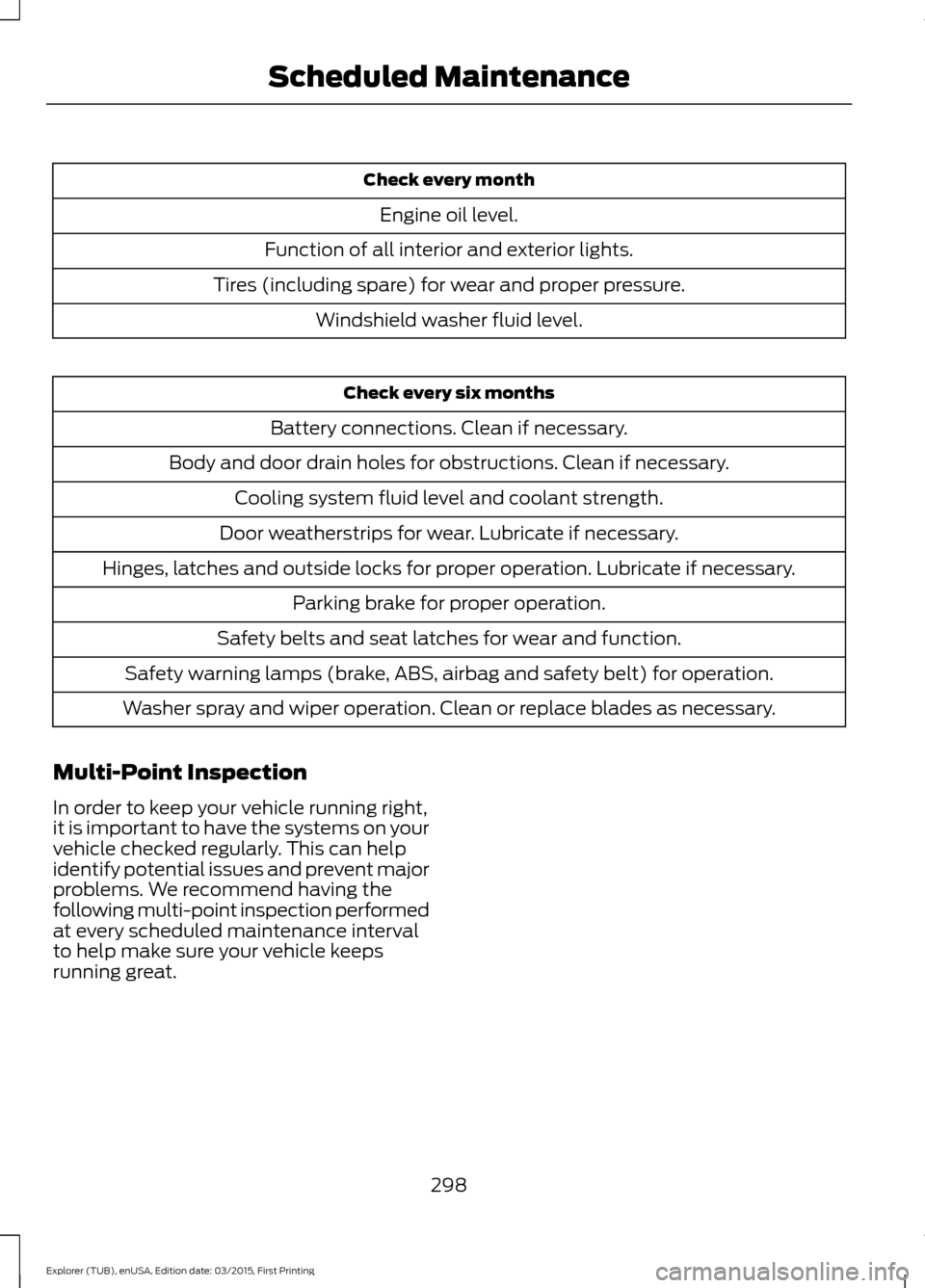
Check every month
Engine oil level.
Function of all interior and exterior lights.
Tires (including spare) for wear and proper pressure. Windshield washer fluid level. Check every six months
Battery connections. Clean if necessary.
Body and door drain holes for obstructions. Clean if necessary. Cooling system fluid level and coolant strength.
Door weatherstrips for wear. Lubricate if necessary.
Hinges, latches and outside locks for proper operation. Lubricate if necessary. Parking brake for proper operation.
Safety belts and seat latches for wear and function.
Safety warning lamps (brake, ABS, airbag and safety belt) for operation.
Washer spray and wiper operation. Clean or replace blades as necessary.
Multi-Point Inspection
In order to keep your vehicle running right,
it is important to have the systems on your
vehicle checked regularly. This can help
identify potential issues and prevent major
problems. We recommend having the
following multi-point inspection performed
at every scheduled maintenance interval
to help make sure your vehicle keeps
running great.
298
Explorer (TUB), enUSA, Edition date: 03/2015, First Printing Scheduled Maintenance
Page 343 of 350

Changing a Bulb............................................192
Front Direction Indicator.................................. 192
Front Fog Lamp................................................... 193
Headlamp.............................................................. 192
Headlamp High Beam...................................... 193
LED Lamps............................................................ 194
License Plate Lamp........................................... 195
Rear Direction Indicator and Reversing Lamp.................................................................. 194
Changing a Fuse............................................175
Fuses........................................................................\
175
Changing a Road Wheel............................227 Dissimilar Spare Wheel and Tire Assembly
Information...................................................... 227
Tire Change Procedure.................................... 228
Changing the 12V Battery..........................187
Changing the Engine Air Filter..................197
Changing the Wiper Blades
.....................189
Front Wiper Blades............................................ 189
Rear Wiper Blade............................................... 189
Checking the Wiper Blades
......................189
Child Restraint and Safety Belt Maintenance.................................................32
Child Safety
.......................................................13
General Information............................................. 13
Child Safety Locks
..........................................24
Left-Hand Side...................................................... 25
Right-Hand Side................................................... 25
Child Seat Positioning...................................22
Cleaning Leather Seats..............................201
Cleaning Products
.......................................198
Cleaning the Alloy Wheels.......................202
Cleaning the Engine
....................................199
Cleaning the Exterior...................................198 Exterior Chrome Parts...................................... 198
Exterior Plastic Parts......................................... 199
Stripes or Graphics............................................ 199
Underbody............................................................ 199
Cleaning the Instrument Panel and Instrument Cluster Lens.........................201
Cleaning the Interior
..................................200
Cleaning the Windows and Wiper Blades...........................................................200
Climate Control
..............................................86
Coolant Check See: Engine Coolant Check............................. 181
Crash Sensors and Airbag Indicator.......40 Airbags and Police Equipment........................ 41Cross Traffic Alert.........................................133
False Alerts............................................................ 135
Switching the System Off and On................135
System Errors....................................................... 135
System Lights, Messages and Audible Alerts.................................................................. 135
System Limitations............................................ 135
System Sensors................................................... 135
Using the System................................................ 133
Cruise Control
..................................................54
Principle of Operation....................................... 129
Cruise control See: Using Cruise Control................................ 129
Customer Assistance
...................................161
D
Data Recording
..................................................7
Event Data Recording............................................ 7
Service Data Recording......................................... 7
Daytime Running Lamps............................60
Digital Radio
..................................................250
HD Radio Reception and Station
Troubleshooting............................................. 251
Direction Indicators
........................................61
Driver and Passenger Airbags....................35 Children and Airbags........................................... 35
Proper Driver and Front Passenger Seating Adjustment........................................................ 35
Driving Aids
......................................................131
Driving Hints....................................................153
Driving Through Water................................154
DRL See: Daytime Running Lamps........................ 60
E
Economical Driving
......................................153
Emission Control System..........................107 On-Board Diagnostics (OBD-II)................... 108
Readiness for Inspection/Maintenance (I/M) Testing................................................... 108
End User License Agreement..................316 SYNC End User License Agreement
(EULA)............................................................... 316
Engine Block Heater.....................................99 Using the Engine Block Heater....................... 99
340
Explorer (TUB), enUSA, Edition date: 03/2015, First Printing Index
Page 349 of 350

Using All-Wheel Drive..................................112
Driving In Special Conditions With
All-Wheel Drive (AWD)................................ 114
How Utility Vehicles Differ from Other Vehicles.............................................................. 114
Operating AWD Vehicles With Mismatched Tires..................................................................... 114
Operating AWD Vehicles With Spare Tires...................................................................... 113
Using Cruise Control....................................129 Switching Cruise Control Off......................... 130
Switching Cruise Control On.......................... 129
Using Snow Chains.....................................222
Using Stability Control................................123 AdvanceTrac® with Roll Stability Control ™
(RSC®).............................................................. 123
Using Summer Tires....................................221
Using SYNC™ With Your Media Player.............................................................277
Accessing Your USB Song Library................281
Bluetooth Devices and System Settings............................................................ 283
Connecting Your Digital Media Player to the USB Port............................................................ 277
Media Menu Features....................................... 281
Media Voice Commands................................. 278
USB 2...................................................................... 283
Voice Commands for Audio Sources.........284
Using SYNC™ With Your Phone...........260 Accessing Features through the Phone
Menu.................................................................. 265
Accessing Your Phone Settings................... 268
Bluetooth Devices............................................. 269
Making Calls........................................................ 263
Pairing a Phone for the First Time..............260
Pairing Subsequent Phones........................... 261
Phone Options during an Active Call.........264
Phone Voice Commands................................ 262
Receiving Calls.................................................... 263
System Settings................................................. 270
Text Messaging.................................................. 266
Using Traction Control.................................121 Switching the System Off................................. 121
System Indicator Lights and Messages........................................................... 121
Using a Switch...................................................... 121
Using the Information Display Controls.............................................................. 121Using Voice Recognition...........................258
Initiating a Voice Session................................ 258
System Interaction and Feedback..............259
Utilizing the Mediation/Arbitration Program (Canada Only).........................163
V
Vehicle Care
...................................................198
General Information.......................................... 198
Vehicle Certification Label........................237
Vehicle Identification Number................236
Vehicle Storage............................................202 Battery................................................................... 203
Body........................................................................\
203
Brakes.................................................................... 203
Cooling system................................................... 203
Engine.................................................................... 203
Fuel system.......................................................... 203
General.................................................................. 203
Miscellaneous..................................................... 204
Removing Vehicle From Storage.................204
Tires........................................................................\
203
Ventilation See: Climate Control.......................................... 86
VIN See: Vehicle Identification Number............236
346
Explorer (TUB), enUSA, Edition date: 03/2015, First Printing Index