2016 FORD POLICE INTERCEPTOR UTILITY warning
[x] Cancel search: warningPage 275 of 350

SYNC™ APPLICATIONS AND
SERVICES (If Equipped)
In order for the following features to work,
your cellular phone must be compatible
with SYNC. To check your phone's
compatibility, visit www.SYNCMyRide.com,
www.SYNCMyRide.ca or
www.syncmaroute.ca.
• 911 Assist: Can alert 911 in the event of
an emergency.
• SYNC AppLink: Allows you to connect
to and use certain applications such as
Pandora and Stitcher (if your phone is
compatible).
These features may require activation.
Available AppLink enabled apps vary by
market.
911 Assist WARNINGS
Unless the 911 Assist setting is set on
before a crash, the system will not
dial for help which could delay
response time, potentially increasing the
risk of serious injury or death after a crash. Do not wait for 911 Assist to make an
emergency call if you can do it
yourself. Dial emergency services
immediately to avoid delayed response
time which could increase the risk of
serious injury or death after a crash. If you
do not hear 911 Assist within five seconds
of the crash, the system or phone may be
damaged or non-functional. Always place your phone in a secure
location in your vehicle so it does not
become a projectile or get damaged
in a crash. Failure to do so may cause
serious injury to someone or damage the
phone which could prevent 911 Assist from
working properly. Note:
The SYNC 911 Assist feature must be
set on before the incident.
Note: Before setting this feature on, make
sure that you read the 911 Assist Privacy
Notice later in this section for important
information.
Note: If any user switches 911 Assist to on
or off, that setting applies for all paired
phones. If 911 Assist is switched off, either
a voice message plays or a display message
or an icon comes on when your vehicle is
started and after a previously paired phone
connects.
Note: Every phone operates differently.
While SYNC 911 Assist works with most
cellular phones, some may have trouble
using this feature.
If a crash deploys an airbag (excluding
knee airbags and rear inflatable safety
belts [if equipped]) or activates the fuel
pump shut-off, your SYNC-equipped
vehicle may be able to contact emergency
services by dialing 911 through a paired and
connected Bluetooth-enabled phone. You
can learn more about the 911 Assist
feature, visit www.SYNCMyRide.com,
www.SYNCMyRide.ca or
www.syncmaroute.ca.
See
Supplementary Restraints System
(page 34). Important information about
airbag deployment is in this chapter.
See
Roadside Emergencies (page 156).
Important information about the fuel pump
shut-off is in this chapter.
272
Explorer (TUB), enUSA, Edition date: 03/2015, First Printing SYNC™
(If Equipped)
Page 301 of 350
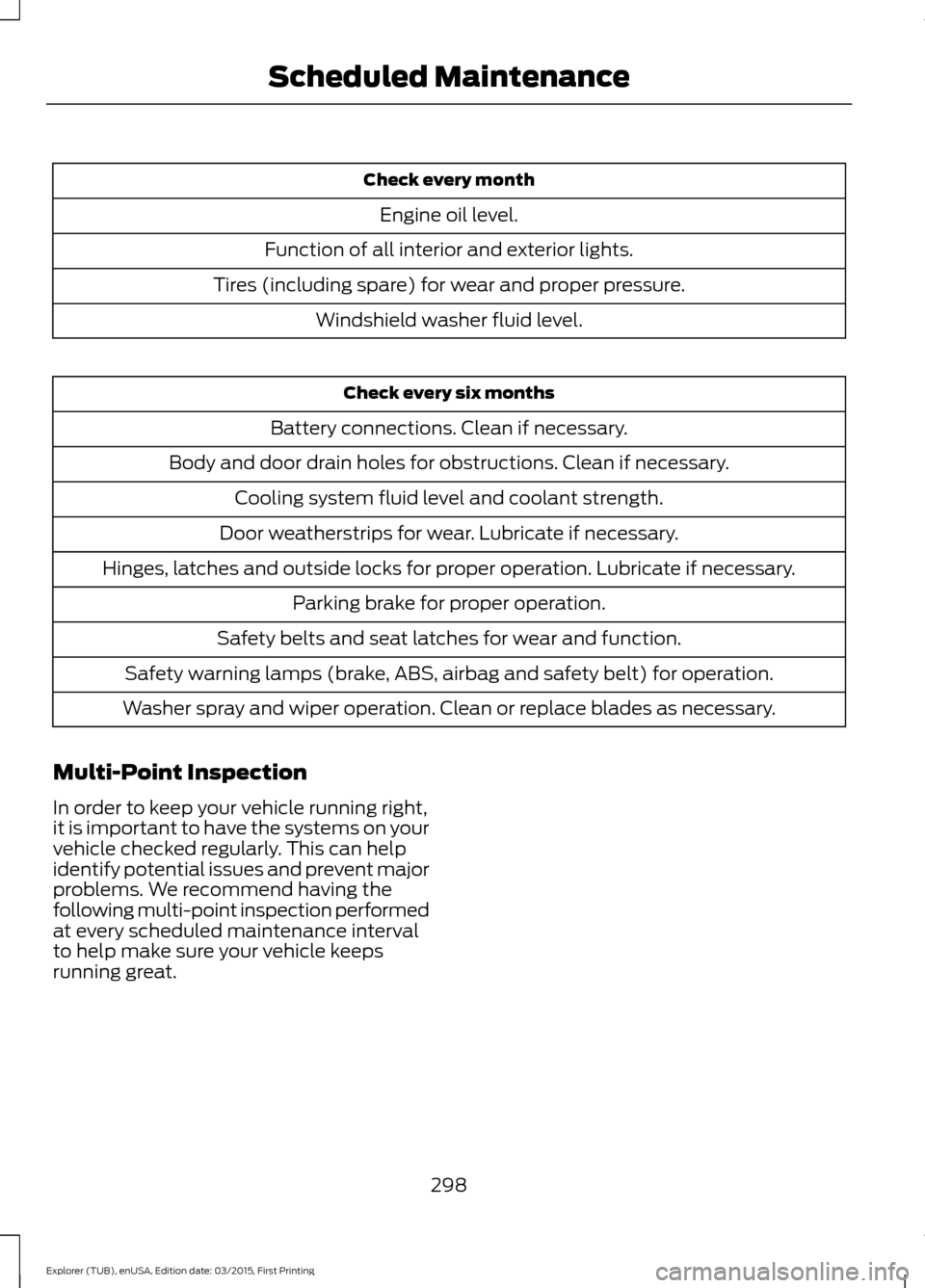
Check every month
Engine oil level.
Function of all interior and exterior lights.
Tires (including spare) for wear and proper pressure. Windshield washer fluid level. Check every six months
Battery connections. Clean if necessary.
Body and door drain holes for obstructions. Clean if necessary. Cooling system fluid level and coolant strength.
Door weatherstrips for wear. Lubricate if necessary.
Hinges, latches and outside locks for proper operation. Lubricate if necessary. Parking brake for proper operation.
Safety belts and seat latches for wear and function.
Safety warning lamps (brake, ABS, airbag and safety belt) for operation.
Washer spray and wiper operation. Clean or replace blades as necessary.
Multi-Point Inspection
In order to keep your vehicle running right,
it is important to have the systems on your
vehicle checked regularly. This can help
identify potential issues and prevent major
problems. We recommend having the
following multi-point inspection performed
at every scheduled maintenance interval
to help make sure your vehicle keeps
running great.
298
Explorer (TUB), enUSA, Edition date: 03/2015, First Printing Scheduled Maintenance
Page 302 of 350

Multi-Point inspection
Hazard warning system operation
Accessory drive belt(s)
Horn operation
Battery performance
Radiator, cooler, heater and air conditioninghoses
Engine air filter
Suspension components for leaks ordamage
Exhaust system
Steering and linkage
Exterior lamps operation
Tires (including spare) for wear and properpressure**
Fluid levels *
; fill if necessary
Windshield for cracks, chips or pits
For oil and fluid leaks
Washer spray and wiper operation
Half-shaft dust boots
* Brake, coolant recovery reservoir, automatic transmission and window washer
** If your vehicle is equipped with a temporary mobility kit, check the tire sealant expiration
Use By date on the canister. Replace as needed.
Be sure to ask your dealership service
advisor or technician about the multi-point
vehicle inspection. It is a comprehensive
way to perform a thorough inspection of
your vehicle. Your checklist gives you
immediate feedback on the overall
condition of your vehicle.
NORMAL SCHEDULED
MAINTENANCE
Intelligent Oil-Life Monitor™
Your vehicle is equipped with an Intelligent
Oil-Life Monitor that determines when you
should change the engine oil based on how
your vehicle is used. By using several
important factors in its calculations, the
monitor helps reduce the cost of owning
your vehicle and reduces environmental
waste at the same time. This means you do not have to remember
to change the oil on a mileage-based
schedule. Your vehicle lets you know when
an oil change is due by displaying a
message in the information display.
The following table provides examples of
vehicle use and its impact on oil change
intervals. It is a guideline only. Actual oil
change intervals depend on several factors
and generally decrease with severity of
use.
299
Explorer (TUB), enUSA, Edition date: 03/2015, First Printing Scheduled Maintenance
Page 324 of 350

Keep User's Guide in vehicle: When kept
in the vehicle, the User's Guide will be a
ready reference for you and other users
unfamiliar with the Windows
Automotive-based system. Please make
certain that before using the system for
the first time, all persons have access to
the User's Guide and read its instructions
and safety information carefully.
WARNING
Operating certain parts of this
system while driving can distract
your attention away from the road,
and possibly cause an accident or other
serious consequences. Do not change
system settings or enter data non-verbally
(using your hands) while driving. Stop the
vehicle in a safe and legal manner before
attempting these operations. This is
important since while setting up or
changing some functions you might be
required to distract your attention away
from the road and remove your hands from
the wheel. General Operation
Voice Command Control: Functions
within the Windows Automotive-based
system may be accomplished using only
voice commands. Using voice commands
while driving allows you to operate the
system without removing your hands from
the wheel.
Prolonged Views of Screen:
Do not
access any function requiring a prolonged
view of the screen while you are driving.
Pull over in a safe and legal manner before
attempting to access a function of the
system requiring prolonged attention. Even
occasional short scans to the screen may
be hazardous if your attention has been
diverted away from your driving task at a
critical time. Volume Setting: Do not raise the volume
excessively. Keep the volume at a level
where you can still hear outside traffic and
emergency signals while driving. Driving
while unable to hear these sounds could
cause an accident.
Use of Speech Recognition Functions:
Speech recognition software is inherently
a statistical process which is subject to
errors. It is your responsibility to monitor
any speech recognition functions included
in the system and address any errors.
Navigation Features:
Any navigation
features included in the system are
intended to provide turn by turn
instructions to get you to a desired
destination. Please make certain all
persons using this system carefully read
and follow instructions and safety
information fully.
Distraction Hazard:
Any navigation
features may require manual (non-verbal)
setup. Attempting to perform such set-up
or insert data while driving can seriously
distract your attention and could cause an
accident or other serious consequences.
Stop the vehicle in a safe and legal manner
before attempting these operations.
Let Your Judgment Prevail:
Any
navigation features are provided only as
an aid. Make your driving decisions based
on your observations of local conditions
and existing traffic regulations. Any such
feature is not a substitute for your personal
judgment. Any route suggestions made by
this system should never replace any local
traffic regulations or your personal
judgment or knowledge of safe driving
practices.
321
Explorer (TUB), enUSA, Edition date: 03/2015, First Printing Appendices
Page 330 of 350

positioning devices or any mobile or
wireless-connected electronic or computer
devices, including without limitation
cellular phones, palmtop and handheld
computers, pagers, and personal digital
assistants or PDAs.
Warning.
The Data may contain inaccurate or
incomplete information due to the passage
of time, changing circumstances, sources
used and the nature of collecting
comprehensive geographic data, any of
which may lead to incorrect results.
No Warranty.
This Data is provided to you
“as is, ” and
you agree to use it at your own risk. Telenav
and its licensors (and their licensors and
suppliers) make no guarantees,
representations or warranties of any kind,
express or implied, arising by law or
otherwise, including but not limited to,
content, quality, accuracy, completeness,
effectiveness, reliability, fitness for a
particular purpose, usefulness, use or
results to be obtained from this Data, or
that the Data or server will be
uninterrupted or error-free.
Disclaimer of Warranty:
TELENAV AND ITS LICENSORS
(INCLUDING THEIR LICENSORS AND
SUPPLIERS) DISCLAIM ANY
WARRANTIES, EXPRESS OR IMPLIED, OF
QUALITY, PERFORMANCE,
MERCHANTABILITY, FITNESS FOR A
PARTICULAR PURPOSE OR
NON-INFRINGEMENT. Some States,
Territories and Countries do not allow
certain warranty exclusions, so to that
extent the above exclusion may not apply
to you. Disclaimer of Liability:
TELENAV AND ITS LICENSORS
(INCLUDING THEIR LICENSORS AND
SUPPLIERS) SHALL NOT BE LIABLE TO
YOU: IN RESPECT OF ANY CLAIM,
DEMAND OR ACTION, IRRESPECTIVE OF
THE NATURE OF THE CAUSE OF THE
CLAIM, DEMAND OR ACTION ALLEGING
ANY LOSS, INJURY OR DAMAGES, DIRECT
OR INDIRECT, WHICH MAY RESULT FROM
THE USE OR POSSESSION OF THE
INFORMATION; OR FOR ANY LOSS OF
PROFIT, REVENUE, CONTRACTS OR
SAVINGS, OR ANY OTHER DIRECT,
INDIRECT, INCIDENTAL, SPECIAL OR
CONSEQUENTIAL DAMAGES ARISING
OUT OF YOUR USE OF OR INABILITY TO
USE THIS INFORMATION, ANY DEFECT IN
THE INFORMATION, OR THE BREACH OF
THESE TERMS OR CONDITIONS,
WHETHER IN AN ACTION IN CONTRACT
OR TORT OR BASED ON A WARRANTY,
EVEN IF TELENAV OR ITS LICENSORS
HAVE BEEN ADVISED OF THE
POSSIBILITY OF SUCH DAMAGES. Some
States, Territories and Countries do not
allow certain liability exclusions or
damages limitations, so to that extent the
above may not apply to you.
Export Control.
You shall not export from anywhere any
part of the Data or any direct product
thereof except in compliance with, and
with all licenses and approvals required
under, applicable export laws, rules and
regulations, including but not limited to the
laws, rules and regulations administered
by the Office of Foreign Assets Control of
the U.S. Department of Commerce and the
Bureau of Industry and Security of the U.S.
Department of Commerce. To the extent
327
Explorer (TUB), enUSA, Edition date: 03/2015, First Printing Appendices
Page 340 of 350

Vehicle with SYNC only
United States and Mexico
FCC ID: KMHSG1G1
IC: 1422A-SG1G1
Mexico
Model: KMHSG1P1
NOM-121-SCT1-2009
The operation of this equipment is subject
to the following two conditions: (1) This
equipment or device may not cause
harmful interference, and (2) this
equipment or device must accept any
interference, including interference that
may cause undesired operation.
Vehicle with SYNC with
Touchscreen/My Touch
FCC ID: KMHSYNCG2
IC: 1422A-SYNCG2
This device complies with Part 15 of the
FCC Rules and with RSS-210 of Industry
Canada. Operation is subject to the
following two conditions: (1) This device
may not cause harmful interference, and
(2) this device must accept any
interference received, including
interference that may cause undesired
operation.
WARNING
Changes or modifications not
expressively approved by the party
responsible for compliance could
void the user's authority to operate the
equipment. The term "IC" before the radio
certification number only signifies that
Industry Canada technical specifications
were met. The antenna used for this transmitter must
not be co-located or operating in
conjunction with any other antenna or
transmitter.
337
Explorer (TUB), enUSA, Edition date: 03/2015, First Printing Appendices
Page 342 of 350

A
A/C
See: Climate Control.......................................... 86
About This Manual...........................................5
ABS See: Brakes............................................................ 119
ABS driving hints See: Hints on Driving With Anti-Lock
Brakes................................................................. 119
Accessories See: Replacement Parts
Recommendation.............................................. 9
Adjusting the Headlamps.........................190
Vertical Aim Adjustment................................. 190
Adjusting the Pedals
.....................................55
Adjusting the Steering Wheel....................53
Airbag Disposal...............................................45
Air Conditioning See: Climate Control.......................................... 86
Alarm See: Anti-Theft Alarm........................................ 52
All-Wheel Drive...............................................112
Anti-Theft Alarm
............................................52
Alarm System........................................................ 52
Arming the Alarm................................................. 52
Disarming the Alarm........................................... 52
Triggering the Alarm............................................ 52
Appendices.....................................................316
Audible Warnings and Indicators
...............71
Automatic Transmission Warning
Chime................................................................... 72
Headlamps On Warning Chime....................... 71
Key in Ignition Warning Chime.......................... 71
Parking Brake On Warning Chime................... 71
Audio Control
...................................................53
Seek and Media.................................................... 53
Audio System................................................247 General Information.......................................... 247
Audio Unit - Vehicles With: AM/FM/CD/ SYNC.............................................................248
Autolamps........................................................59 Windshield Wiper Activated
Headlamps........................................................ 60Automatic Transmission............................110
If Your Vehicle Gets Stuck In Mud or
Snow................................................................... 110
Understanding the Positions of Your Automatic Transmission............................. 110
Automatic Transmission Fluid Check - 3.5L Ecoboost™........................................185
Adding Transmission Fluid............................. 186
Checking the Transmission Fluid Level................................................................... 185
Auxiliary Power Points
.................................95
12 Volt DC Power Point....................................... 95
Locations................................................................. 95
AWD See: All-Wheel Drive........................................... 112
B
Blind Spot Information System
................131
Using the System................................................. 131
Bonnet Lock See: Opening and Closing the Hood............177
Booster Seats
..................................................20
Types of Booster Seats....................................... 21
Brake Fluid Check........................................186
Brakes................................................................119 General Information........................................... 119
Breaking-In......................................................153
Bulb Specification Chart
...........................195
C
Cabin Air Filter.................................................89
California Proposition 65...............................9
Capacities and Specifications - 3.5L Ecoboost™.................................................238
Specifications..................................................... 239
Capacities and Specifications - 3.7L.................................................................242
Specifications..................................................... 243
Capacities and Specifications................233
Car Wash See: Cleaning the Exterior............................... 198
Center Console
...............................................96
Center Console..................................................... 96
Console Mounting Plates.................................. 96
Universal Top Tray............................................... 96
339
Explorer (TUB), enUSA, Edition date: 03/2015, First Printing Index
Page 344 of 350

Engine Coolant Check.................................181
Adding Engine Coolant..................................... 182
Checking the Engine Coolant.......................... 181
Recycled Engine Coolant................................. 182
Severe Climates.................................................. 183
What You Should Know About Fail-Safe Cooling............................................................... 183
Engine Oil Check..........................................180 Adding Engine Oil............................................... 180
Engine Oil Dipstick.......................................180
Engine Specifications - 3.5L Ecoboost™.................................................233
Drivebelt Routing............................................... 233
Engine Specifications - 3.7L.....................233
Drivebelt Routing............................................... 234
Environment......................................................12
Essential Towing Checks...........................148 Before Towing a Trailer..................................... 149
Hitches................................................................... 148
Launching or Retrieving a Boat or Personal Watercraft (PWC)......................................... 150
Safety Chains....................................................... 149
Trailer Brakes........................................................ 149
Trailer Lamps....................................................... 149
When Towing a Trailer...................................... 149
Event Data Recording See: Data Recording............................................... 7
Export Unique Options...................................11
Extended Service Plan (ESP).................294 SERVICE PLANS (CANADA ONLY)............295
SERVICE PLANS (U.S. Only)......................... 294
Exterior Mirrors................................................64 Blind Spot Information System...................... 65
Fold-Away Exterior Mirrors............................... 64
Heated Exterior Mirrors ..................................... 64
Integrated Blind Spot Mirror............................ 64
Power Exterior Mirrors........................................ 64
F
Fastening the Safety Belts..........................27 Safety Belt Extension Assembly.................... 29
Safety Belt Locking Modes............................... 28
Using Safety Belts During Pregnancy...........27
Floor Mats
.......................................................154
Foot Pedals See: Adjusting the Pedals................................. 55Ford Credit
...........................................................9
(U.S. Only)................................................................. 9
Front Passenger Sensing System............36
Fuel and Refueling
........................................101
Fuel Consumption.......................................106
Calculating Fuel Economy.............................. 106
Filling the Tank.................................................... 106
Fuel Filler Funnel Location
........................103
Fuel Filter.........................................................187
Fuel Quality - E85........................................102
Choosing the Right Fuel - Flex Fuel
Vehicles............................................................. 102
Fuel Quality
....................................................102
Choosing the Right Fuel................................... 102
Fuel Shutoff
....................................................157
Fuses..................................................................167
Fuse Specification Chart............................167 Passenger Compartment Fuse Panel.........172
Power Distribution Box..................................... 167
G
Gauges................................................................67 Engine Coolant Temperature Gauge............68
Fuel Gauge............................................................. 68
Information Display............................................. 67
Speedometer........................................................ 68
General Information on Radio Frequencies...................................................46
General Maintenance Information.......296 Multi-Point Inspection..................................... 298
Owner Checks and Services.......................... 297
Protecting Your Investment.......................... 296
Why Maintain Your Vehicle?......................... 296
Why Maintain Your Vehicle at Your Dealership?..................................................... 296
Getting Assistance Outside the U.S. and Canada..........................................................164
Getting the Services You Need.................161 Away From Home................................................ 161
H
Handbrake See: Parking Brake............................................. 120
Hazard Warning Flashers...........................157
341
Explorer (TUB), enUSA, Edition date: 03/2015, First Printing Index