2016 FORD MUSTANG lock
[x] Cancel search: lockPage 94 of 391

Blind Spot Information and Cross Traffic Alert System
Action
Message
A fault with the system has occurred. Contact an authorizeddealer as soon as possible.
Blindspot System Fault
The system sensors are blocked.
Blindspot Not Available
Sensor Blocked See Manual
The blind spot information system and cross traffic alertsystem sensors are blocked.
Cross Traffic Not Avail-
able Sensor Blocked See Manual
A fault with the system has occurred. Contact an authorizeddealer as soon as possible.
Cross Traffic System
Fault
Collision Warning System Action
Message
A fault with the system has occurred. Contact an authorizeddealer as soon as possible.
Collision Warning
Malfunction
You have a blocked sensor due to bad weather, ice, mud or
water in front of the radar sensor. You can typically clean the sensor to resolve.
Collision Warning Not
Available Sensor
Blocked See Manual
A fault with the system has occurred. Contact an authorizeddealer as soon as possible.
Collision Warning Not
Available
Doors and Locks Action
Message
The door(s) listed is not completely closed.
X Door Ajar
The trunk is not completely closed.
Trunk ajar
The hood is not completely closed.
Hood Ajar
The system has disabled the door switches.
Switches Inhibited
Security Mode
91
Mustang (CZG) Canada/United States of America, Vehicles Built From: 13-07-2015, enUSA, First Printing Information Displays
Page 99 of 391

Starting System
Action
Message
A reminder to apply the brake when starting your vehicle.
Press Brake to Start
A reminder to apply the clutch when starting your vehicle.
Press Clutch to Start
The starter has exceeded its cranking time in attempting tostart your vehicle.
Cranking Time Exceeded
The starter is attempting to start your vehicle.
Engine Start Pending
Please Wait
The system has cancelled the pending start.
Pending Start Cancelled
Steering System Action
Message
The power steering system has detected a condition thatrequires service. See an authorized dealer.
Steering Fault Service
Now
The power steering system is not working. Stop your vehiclein a safe place. Contact an authorized dealer.
Steering Loss Stop
Safely
The power steering system has detected a condition withinthe power steering system or passive entry or passive start system requires service. Contact an authorized dealer.
Steering Assist Fault
Service Required
The steering lock system has detected a condition thatrequires service. See an authorized dealer.
Steering Lock Malfunc-
tion Service Now
You need to turn your steering wheel while start your vehicleto unlock your steering column.
Steering Col. Lock Turn
Wheel while Starting vehicle
96
Mustang (CZG) Canada/United States of America, Vehicles Built From: 13-07-2015, enUSA, First Printing Information Displays
Page 101 of 391

Action
Message
Displays when the transmission has overheated and has
limited functionality. See Automatic Transmission (page
134).
Transmission Limited
Function See Manual
Transmission is too cold. Wait for it to warm up before you drive.
Transmission Warming
Up Please Wait
Displays as a reminder to shift into park.
Transmission Not in Park
Displays as a reminder to press the brake pedal in order toselect a gear.
Press Brake Pedal
Displays when the transmission has adjusted the shiftstrategy.
Transmission Adjusted
Displays when the transmission is adjusting the shift strategy.
Transmission Adapt
Mode
Displays when the transmission shift lever is locked and unable to select gears.
Transmission Indicate
Mode Lockup On
Displays when the transmission shift lever is unlocked andfree to select gears.
Transmission Indicate
Mode Lockup Off
98
Mustang (CZG) Canada/United States of America, Vehicles Built From: 13-07-2015, enUSA, First Printing Information Displays
Page 111 of 391
WARNINGS
Install the head restraint properly to
help minimize the risk of neck injury
in the event of a crash.
Note:
Adjust the seatback to an upright
driving position before adjusting the head
restraint. Adjust the head restraint so that
the top of it is level with the top of your head
and as far forward as possible. Make sure
that you remain comfortable. If you are
extremely tall, adjust the head restraint to
its highest position.
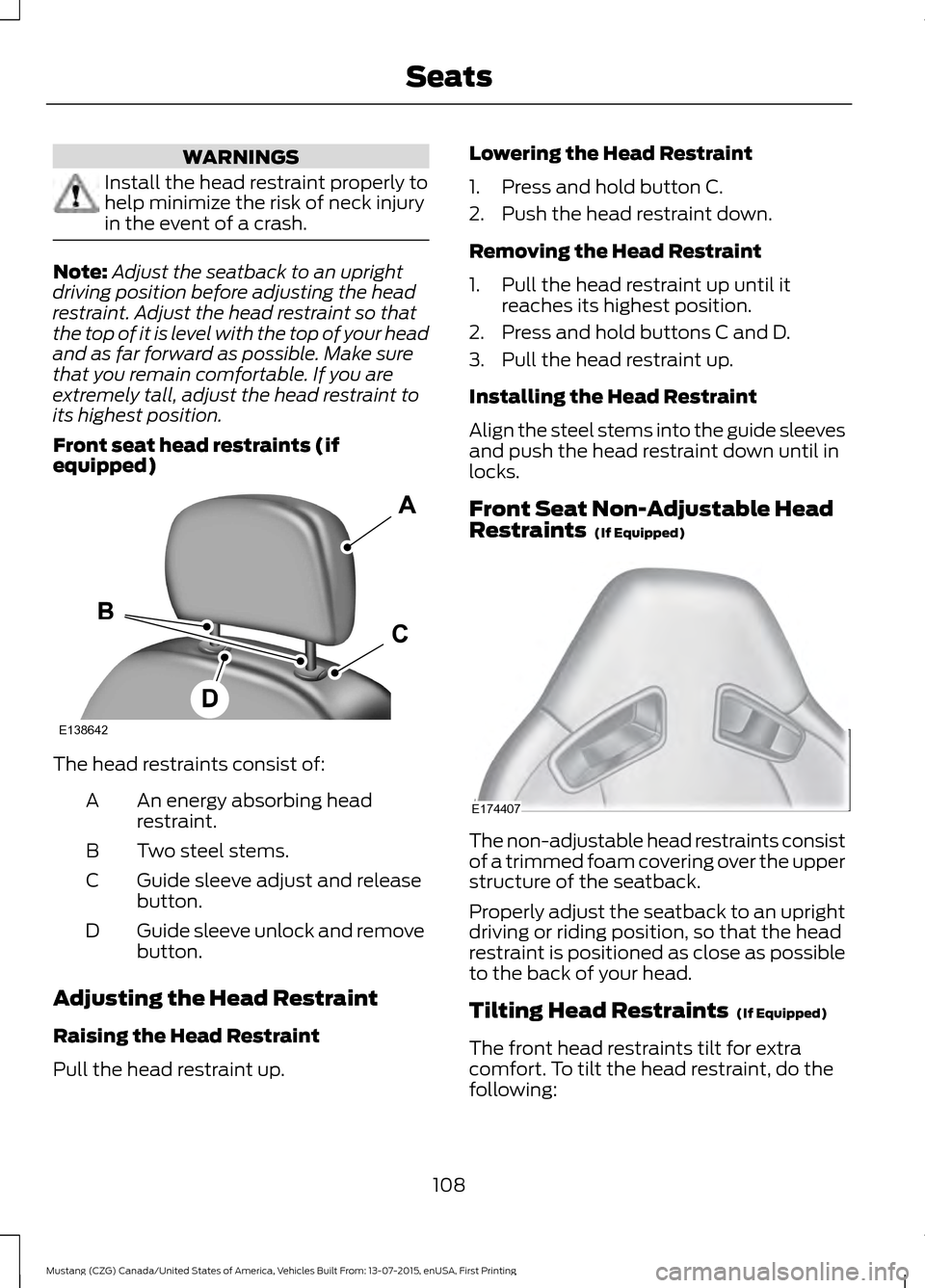
Front seat head restraints (if
equipped) The head restraints consist of:
An energy absorbing head
restraint.
A
Two steel stems.
B
Guide sleeve adjust and release
button.
C
Guide sleeve unlock and remove
button.
D
Adjusting the Head Restraint
Raising the Head Restraint
Pull the head restraint up. Lowering the Head Restraint
1. Press and hold button C.
2. Push the head restraint down.
Removing the Head Restraint
1. Pull the head restraint up until it
reaches its highest position.
2. Press and hold buttons C and D.
3. Pull the head restraint up.
Installing the Head Restraint
Align the steel stems into the guide sleeves
and push the head restraint down until in
locks.
Front Seat Non-Adjustable Head
Restraints (If Equipped) The non-adjustable head restraints consist
of a trimmed foam covering over the upper
structure of the seatback.
Properly adjust the seatback to an upright
driving or riding position, so that the head
restraint is positioned as close as possible
to the back of your head.
Tilting Head Restraints
(If Equipped)
The front head restraints tilt for extra
comfort. To tilt the head restraint, do the
following:
108
Mustang (CZG) Canada/United States of America, Vehicles Built From: 13-07-2015, enUSA, First Printing SeatsE138642 E174407
Page 114 of 391

Note:
A preset memory position can only
be recalled when the ignition is off, or when
the transmission is in park (P) or neutral (N)
if the ignition is on.
You can also recall a preset memory
position by:
• Pressing the unlock button on your
intelligent access key fob if it is linked
to a preset position.
• Unlocking the intelligent driver door
handle if a linked key fob is present.
• Entering a personal entry code on the
Securicode keypad. See Locks (page
53).
Note: Using a linked key fob to recall your
memory position when the ignition is off will
move the seat to the Easy Entry position.
Note: Pressing any seat or mirror
adjustment control (or any memory button)
during a memory recall cancels the
operation.
Seat recall movement will also stop if you
drive your vehicle.
Linking a PreSet Position to your
Remote Control or Intelligent
Access Key Fob
Your vehicle can save the preset memory
positions for up to three remote controls
or intelligent access (IA) keys.
1. With the ignition on, move the memory
positions to the desired positions.
2. Press and hold the desired preset button for about five seconds. A tone
will sound after about two seconds.
Continue holding until a second tone
is heard.
3. Within three seconds, press the lock button on the remote control you are
linking.
To unlink a remote control, follow the
same procedure – except in step 3, press
the unlock button on the remote control. Note:
If more than one linked remote
control or intelligent access key is in range,
the memory function will move to the
settings of the first key stored.
Easy Entry and Exit Feature
If you enable the easy entry and exit
feature, it automatically moves the driver
seat position rearward up to two inches
(five centimeters) when you switch the
ignition off.
The driver seat will return to the previous
position when you switch the ignition on.
You can enable or disable this feature in
the information display. See Information
Displays
(page 80).
REAR SEATS
Note: Your vehicle may have split
seatbacks that you must fold individually. Use the seatback release to fold the back
of the front seat forward for rear seat
access. This release handle is located on
the upper back of the front seat. The
seatback has memory and locks
automatically in the original position.
111
Mustang (CZG) Canada/United States of America, Vehicles Built From: 13-07-2015, enUSA, First Printing SeatsE175692
Page 116 of 391

HomeLink Wireless Control
System
WARNINGS
Make sure that the garage door and
security device are free from
obstruction when you are
programming. Do not program the system
with the vehicle in the garage. Do not use the system with any
garage door opener that does not
have the safety stop and reverse
feature as required by U.S. Federal Safety
Standards (this includes any garage door
opener manufactured before April 1, 1982).
A garage door opener which cannot detect
an object, signaling the door to stop and
reverse, does not meet current federal
safety standards. Using a garage door
opener without these features increases
the risk of serious injury or death. Note:
Make sure you keep the original
remote control transmitter for use in other
vehicles as well as for future system
programming.
Note: We recommend that upon the sale
or lease termination of your vehicle, you
erase the programmed function buttons for
security reasons. See Erasing the Function
Button Codes later in this section.
Note: You can program a maximum of
three devices. To change or replace any of
the three devices after it has been initially
programmed, you must first erase the
current settings. See Erasing the Function
Button Codes
. The universal garage door opener replaces
the common hand-held garage door
opener with a three-button transmitter
integrated into the driver
’s sun visor.
The system includes two primary features,
a garage door opener and a platform for
remote activation of devices within the
home. You can program garage doors as
well as entry gate operators, security
systems, entry door locks and home or
office lighting.
Additional system information can be
found online at www.homelink.com,
www.youtube.com/user/HomeLinkGentex
or by calling the toll-free help line at
1-800-355-3515.
In-Vehicle Programming
This process is to program your in-vehicle
HomeLink function button with your
hand-held transmitter.
Note: The programming steps below
assume you will be programming HomeLink
that was not previously programmed. If your
HomeLink was previously programmed, you
may need to erase your HomeLink buttons.
See
Erasing the Function Button Codes.
Note: Put a new battery in the hand-held
transmitter. This helps ensure quicker
training and accurate transmission of the
radio-frequency signal.
113
Mustang (CZG) Canada/United States of America, Vehicles Built From: 13-07-2015, enUSA, First Printing Universal Garage Door Opener
(If Equipped)E188211
Page 121 of 391

CENTER CONSOLE
Stow items in the cupholder carefully as
items may become loose during hard
braking, acceleration or collisions, including
hot drinks which may spill.
The console includes:
•
Cupholder.
• Storage compartment. Lift the latch to open the storage
compartment and use the following
features:
•
Auxiliary power point.
• Auxiliary audio input jack.
• USB port.
• Media hub. Locking Storage Bin (If Equipped)
The storage bin locks when the doors are
electronically locked. The bin will unlock
when the driver door is electronically
unlocked with the remote control.
Note: You cannot lock the storage bin when
the vehicle is on.
GLASSES HOLDER Press near the center of the door to open
it. Pull out the tray.
118
Mustang (CZG) Canada/United States of America, Vehicles Built From: 13-07-2015, enUSA, First Printing Storage CompartmentsE209039 E175706 E188216
Page 123 of 391

STEERING WHEEL LOCK (If
Equipped)
The steering wheel locks automatically
when you leave your vehicle and take the
intelligent access key with you. The
steering wheel unlocks automatically when
you enter your vehicle with the intelligent
access key.
Note: You may need to turn the steering
wheel left or right if the wheel does not
unlock completely. This may happen in
certain situations, such as parking your
vehicle on a steep grade.
STARTING A GASOLINE
ENGINE
When you start the engine, the idle speed
increases, this helps to warm up the
engine. If the engine idle speed does not
slow down automatically, have your
vehicle checked by an authorized dealer.
Note: You can crank the engine for a total
of 60 seconds (without the engine starting)
before the starting system temporarily
disables. The 60 seconds does not have to
be all at once. For example, if you crank the
engine three times for 20 seconds each
time, without the engine starting, you
reached the 60-second time limit. A
message appears in the information display
alerting you that you exceeded the cranking
time. You cannot attempt to start the engine
for at least 15 minutes. After 15 minutes, you
are limited to a 15-second engine cranking
time. You need to wait 60 minutes before
you can crank the engine for 60 seconds
again. Before starting the engine, check the
following:
•
Make sure all occupants have fastened
their seatbelts.
• Make sure the headlamps and
electrical accessories are off.
• Make sure the parking brake is on.
• Move the transmission selector lever
to park (P) (automatic transmission)
or neutral (manual transmission)
Note: Do not touch the accelerator pedal.
Note: You must have your intelligent access
key in the vehicle in order to shift the
transmission out of position
P.
1. Fully press the brake pedal.
2. Press the button.
The system does not function if:
• The key frequencies are jammed.
• The key battery has no charge.
If you are unable to start the engine, do the
following: 1. Remove the rubber covering (A) in the
cupholder.
2. Place the remote in the backup slot (B)
with the buttons facing up and the
keyring toward the front of the vehicle.
120
Mustang (CZG) Canada/United States of America, Vehicles Built From: 13-07-2015, enUSA, First Printing Starting and Stopping the EngineE174956