2016 FORD FOCUS fuel consumption
[x] Cancel search: fuel consumptionPage 6 of 385

Unique Driving Character-
istics
Auto-Start-Stop...........................................126
Fuel and Refueling
Safety Precautions.......................................128
Fuel Quality - Gasoline...............................129
Fuel Quality - E85
........................................129
Fuel Filler Funnel Location
........................130
Running Out of Fuel....................................130
Refueling...........................................................131
Fuel Consumption........................................133
Emission Control System..........................134
Transmission
Manual Transmission - 5-Speed Manual Transmission (MTX-75)
.........................137
Manual Transmission - 6-Speed Manual Transmission (MMT6)
...........................138
Automatic Transmission............................139
Brakes
General Information....................................144
Hints on Driving With Anti-Lock Brakes...........................................................144
Parking Brake
.................................................145
Hill Start Assist..............................................145
Traction Control
Principle of Operation.................................147
Using Traction Control................................147
Stability Control
Principle of Operation
................................148
Using Stability Control...............................149
Parking Aids
Principle of Operation................................150
Rear Parking Aid...........................................150
Front Parking Aid...........................................151 Active Park Assist
.........................................152
Rear View Camera
.......................................156
Cruise Control
Principle of Operation.................................159
Using Cruise Control....................................159
Driving Aids
Driver Alert
.......................................................161
Lane Keeping System.................................162
Blind Spot Information System..............166
Cross Traffic Alert
.........................................168
Eco Mode
..........................................................171
Steering.............................................................172
Load Carrying
Rear Under Floor Storage..........................174
Luggage Covers.............................................174
Load Limit
........................................................174
Towing
Towing a Trailer.............................................182
Transporting the Vehicle............................182
Towing the Vehicle on Four Wheels - Manual Transmission
..............................182
Towing the Vehicle on Four Wheels - 1.0L EcoBoost™, Automatic
Transmission..............................................183
Towing the Vehicle on Four Wheels - 2.0L, Automatic Transmission............183
Driving Hints
Breaking-In.....................................................186
Economical Driving
......................................186
Cold Weather Precautions
........................186
Driving Through Water...............................186
Floor Mats........................................................187
Roadside Emergencies
Roadside Assistance..................................189
3
Focus (CDH) Canada/United States of America, enUSA, First Printing Table of Contents
Page 97 of 385
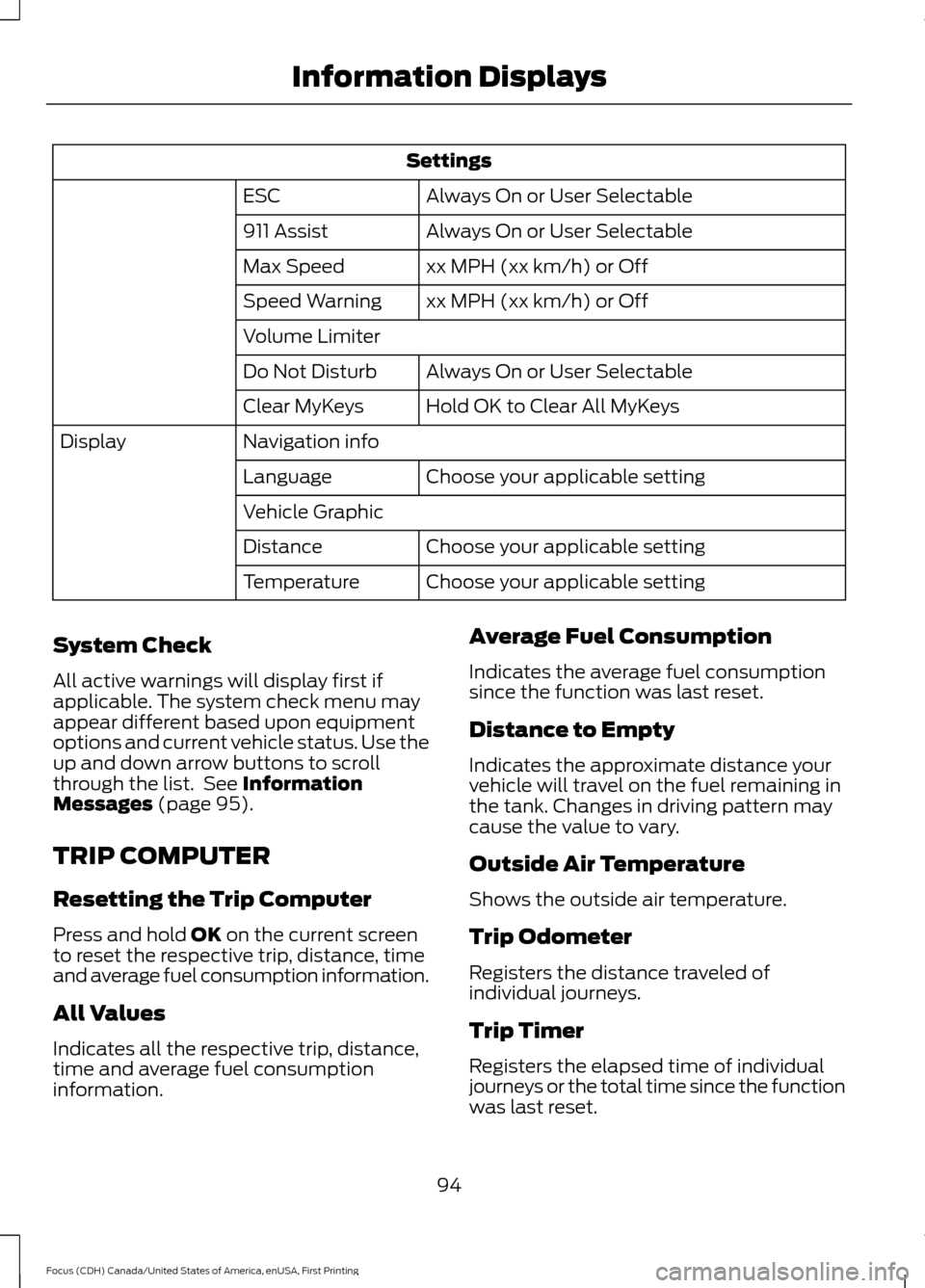
Settings
Always On or User Selectable
ESC
Always On or User Selectable
911 Assist
xx MPH (xx km/h) or Off
Max Speed
xx MPH (xx km/h) or Off
Speed Warning
Volume Limiter
Always On or User Selectable
Do Not Disturb
Hold OK to Clear All MyKeys
Clear MyKeys
Navigation info
Display
Choose your applicable setting
Language
Vehicle Graphic
Choose your applicable setting
Distance
Choose your applicable setting
Temperature
System Check
All active warnings will display first if
applicable. The system check menu may
appear different based upon equipment
options and current vehicle status. Use the
up and down arrow buttons to scroll
through the list. See Information
Messages (page 95).
TRIP COMPUTER
Resetting the Trip Computer
Press and hold
OK on the current screen
to reset the respective trip, distance, time
and average fuel consumption information.
All Values
Indicates all the respective trip, distance,
time and average fuel consumption
information. Average Fuel Consumption
Indicates the average fuel consumption
since the function was last reset.
Distance to Empty
Indicates the approximate distance your
vehicle will travel on the fuel remaining in
the tank. Changes in driving pattern may
cause the value to vary.
Outside Air Temperature
Shows the outside air temperature.
Trip Odometer
Registers the distance traveled of
individual journeys.
Trip Timer
Registers the elapsed time of individual
journeys or the total time since the function
was last reset.
94
Focus (CDH) Canada/United States of America, enUSA, First Printing Information Displays
Page 129 of 385
AUTO-START-STOP (If Equipped)
The system reduces fuel consumption and
CO2 emissions by shutting down the
engine when your vehicle is idling, for
example at traffic lights. WARNINGS
The engine may restart
automatically if required by the
system.
Switch the ignition off before
opening the hood or performing any
maintenance. Failure to do so may
result in serious injuries due to automatic
engine restart. Always switch the ignition off before
leaving your vehicle, as the system
may have turned the engine off, but
the ignition will still be on and automatic
restart may occur. Note:
The Auto-Start-Stop indicator
illuminates green when the engine shuts
down. See Warning Lamps and Indicators
(page 87). It flashes amber with a message
when the driver needs to shift to neutral or
press a pedal. See Information Messages
(page 95). If it illuminates grey, the system
is not available. Using Auto-Start-Stop with a
Manual Transmission
To Stop the Engine
1. Stop your vehicle.
2. Shift into neutral.
3. Release the clutch and accelerator
pedal.
To Re-Start the Engine
Press the clutch pedal. Note:
To obtain maximum benefit from the
system, move the transmission selector
lever to neutral and release the clutch pedal
during any stop of longer than three
seconds.
Note: Auto-Start-Stop also comes with
stall recovery. If you fully press the clutch
pedal after stalling the engine, the engine
automatically restarts.
Using Auto-Start-Stop with an
Automatic Transmission
To Stop the Engine
1. Stop your vehicle in drive (D).
2. Release the accelerator pedal.
3. Maintain pressure on the brake pedal.
Note: If your vehicle is in an engine off
Auto-Start-Stop state and you move the
transmission to reverse (R) while the brake
pedal is not pressed, a message will appear
on your instrument cluster. Press the brake
pedal within 10 seconds or you will need to
shift to park (P). A manual restart will be
required.
Note: If the Shift to P, Restart Engine
message appears and the amber
Auto-Start-Stop indicator flashes,
automatic restart is not available. You must
restart your vehicle manually.
To Re-Start the Engine
Release the brake pedal or press the
accelerator pedal.
Limitations of Use
The system may not shut down the engine
under certain conditions, for example:
• Low engine operating temperature.
• To maintain the interior climate.
• The battery charge level is low.
• The outside temperature is too low or
too high.
126
Focus (CDH) Canada/United States of America, enUSA, First Printing Unique Driving Characteristics
Page 136 of 385
1. Stop your vehicle as soon as safely
possible and shift the transmission into
park (P).
2. Switch the ignition off.
3. Open the fuel filler door and remove any visible debris from the fuel fill
opening.
4. Insert either the fuel fill nozzle or the fuel fill funnel provided with the vehicle
several times to allow the inlet to close
properly. This will dislodge any debris
preventing the inlet from sealing.
If this action corrects the problem, the
message may not reset immediately. It
may take several driving cycles for the
message to turn off. A driving cycle
consists of an engine start-up (after 4 or
more hours with the engine off) followed
by city or highway driving. Continuing to
drive with the message on may cause the
service engine soon lamp to turn on as
well.
FUEL CONSUMPTION
Note: The amount of usable fuel in the
empty reserve varies and should not be
relied upon to increase driving range. When
refueling your vehicle after the fuel gauge
indicates empty, you might not be able to
refuel the full amount of the advertised
capacity of the fuel tank due to the empty
reserve still present in the tank.
Empty reserve is the amount of fuel
remaining in the tank after the fuel gauge
indicates empty. Do not rely on this fuel for
driving. The usable capacity of the fuel
tank is the amount of fuel that can be put
into the tank after the gauge indicates
empty. The advertised capacity is the total
fuel tank size – it is the combined usable
capacity plus the empty reserve. Filling the Tank
For consistent results when filling the fuel
tank:
•
Turn the ignition off before fueling; an
inaccurate reading results if the engine
is left running.
• Use the same fill rate
(low-medium-high) each time the tank
is filled.
• Allow no more than two automatic
click-offs when filling.
Results are most accurate when the filling
method is consistent.
Calculating Fuel Economy
Do not measure fuel economy during the
first 1000 miles (1600 kilometers) of
driving (this is your engine ’s break-in
period); a more accurate measurement is
obtained after 2000 miles - 3000 miles
(3200 kilometers - 4800 kilometers). Also,
fuel expense, frequency of fill ups or fuel
gauge readings are not accurate ways to
measure fuel economy.
1. Fill the fuel tank completely and record
the initial odometer reading.
2. Each time you fill the tank, record the amount of fuel added.
3. After at least three to five tank fill ups, fill the fuel tank and record the current
odometer reading.
4. Subtract your initial odometer reading from the current odometer reading.
5. Calculate fuel economy by dividing miles traveled by gallons used (For
Metric: Multiply liters used by 100, then
divide by kilometers traveled).
133
Focus (CDH) Canada/United States of America, enUSA, First Printing Fuel and Refueling
Page 174 of 385

The following are other situations that may
limit the Cross Traffic Alert performance:
•
Adjacently parked vehicles or objects
obstructing the sensors.
• Approaching vehicles passing at
speeds greater than 37 mph
(60 km/h).
• Driving in reverse faster than
7 mph
(12 km/h).
• Backing out of an angled parking spot.
False Alerts
Note: If your vehicle has a tow bar with a
factory equipped trailer tow module and it
is towing a trailer, the sensors will
automatically turn the Cross Traffic Alert
off. If your vehicle has a tow bar but no
factory equipped trailer tow module, it is
recommended to turn the Cross Traffic Alert
off manually. Operating Cross Traffic Alert
with a trailer attached will cause poor Cross
Traffic Alert performance.
There may be certain instances when there
is a false alert by the Cross Traffic Alert
system that illuminates the alert indicator
with no vehicle in the coverage zone. Some
amount of false alerts are normal; they are
temporary and self-correct.
System Errors
If Cross Traffic Alert senses a problem with
the left or right sensor a message will
appear in the information display. See
Information Messages
(page 95).
Switching the System Off and On
You can temporarily switch Cross Traffic
Alert off in the information display. See
Information Messages (page 95). When
you switch Cross Traffic Alert off, you will
not receive alerts and the information
display will display a system off message. Note:
The Cross Traffic Alert switches on
whenever the ignition is switched on and
ready to provide appropriate alerts when
the transmission is in reverse (R). Cross
Traffic Alert will not remember the last
selected on or off setting.
You can also have Cross Traffic Alert
switched off permanently at an authorized
dealer. Once switched off permanently,
the system can only be switched back on
at an authorized dealer.
ECO MODE
This system assists you in driving more
efficiently by constantly monitoring
characteristics of gear changing,
anticipation of traffic conditions and
speeds while driving.
The value of these characteristics is
represented by petals shown in the display,
with five petals being the most efficient.
The more efficiently you drive, the better
the rating, and the better your vehicle's
overall fuel economy.
Note: These efficiency values do not result
in a defined fuel consumption figure. It might
vary as it is not only related to these driving
habits, but also influenced by many other
factors such as short trips and cold starts.
Note: Frequent short trips, where the engine
does not fully warm up, will also increase
fuel consumption
The system is accessed using the
information display control. See General
Information (page 91).
171
Focus (CDH) Canada/United States of America, enUSA, First Printing Driving Aids
Page 175 of 385
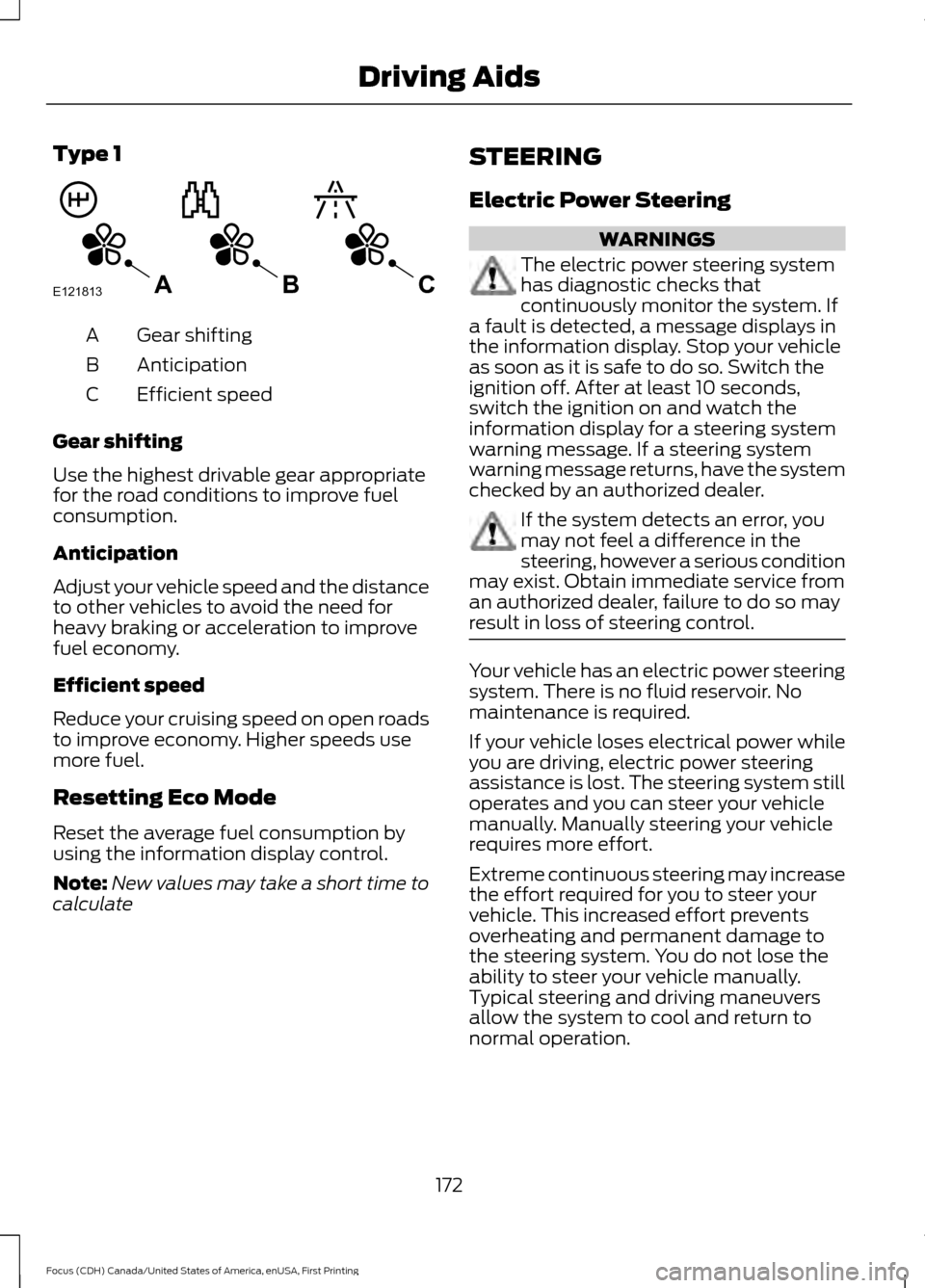
Type 1
Gear shifting
A
Anticipation
B
Efficient speed
C
Gear shifting
Use the highest drivable gear appropriate
for the road conditions to improve fuel
consumption.
Anticipation
Adjust your vehicle speed and the distance
to other vehicles to avoid the need for
heavy braking or acceleration to improve
fuel economy.
Efficient speed
Reduce your cruising speed on open roads
to improve economy. Higher speeds use
more fuel.
Resetting Eco Mode
Reset the average fuel consumption by
using the information display control.
Note: New values may take a short time to
calculate STEERING
Electric Power Steering WARNINGS
The electric power steering system
has diagnostic checks that
continuously monitor the system. If
a fault is detected, a message displays in
the information display. Stop your vehicle
as soon as it is safe to do so. Switch the
ignition off. After at least 10 seconds,
switch the ignition on and watch the
information display for a steering system
warning message. If a steering system
warning message returns, have the system
checked by an authorized dealer. If the system detects an error, you
may not feel a difference in the
steering, however a serious condition
may exist. Obtain immediate service from
an authorized dealer, failure to do so may
result in loss of steering control. Your vehicle has an electric power steering
system. There is no fluid reservoir. No
maintenance is required.
If your vehicle loses electrical power while
you are driving, electric power steering
assistance is lost. The steering system still
operates and you can steer your vehicle
manually. Manually steering your vehicle
requires more effort.
Extreme continuous steering may increase
the effort required for you to steer your
vehicle. This increased effort prevents
overheating and permanent damage to
the steering system. You do not lose the
ability to steer your vehicle manually.
Typical steering and driving maneuvers
allow the system to cool and return to
normal operation.
172
Focus (CDH) Canada/United States of America, enUSA, First Printing Driving AidsE121813CBA
Page 219 of 385
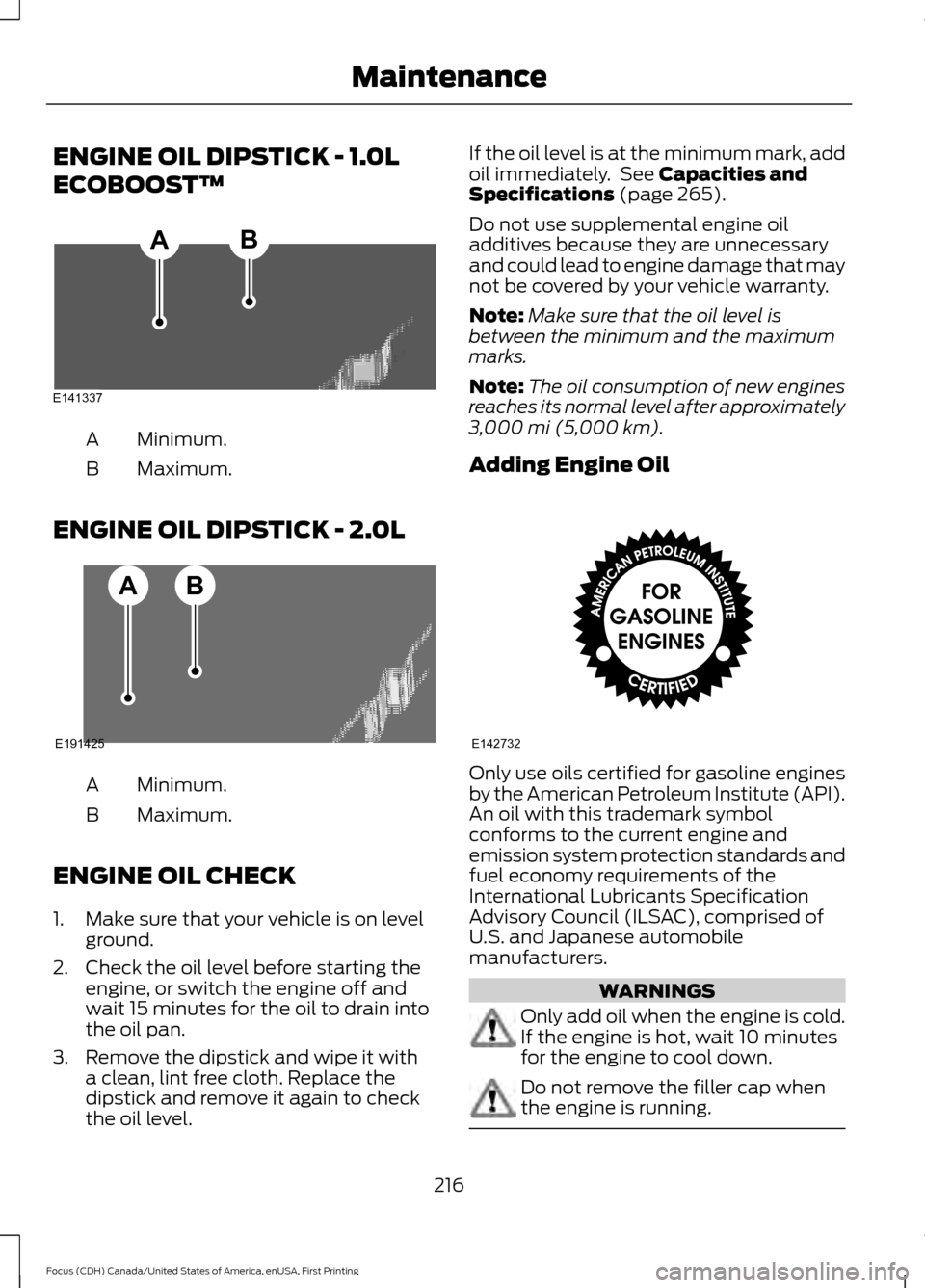
ENGINE OIL DIPSTICK - 1.0L
ECOBOOST™
Minimum.
A
Maximum.
B
ENGINE OIL DIPSTICK - 2.0L Minimum.
A
Maximum.
B
ENGINE OIL CHECK
1. Make sure that your vehicle is on level ground.
2. Check the oil level before starting the engine, or switch the engine off and
wait 15 minutes for the oil to drain into
the oil pan.
3. Remove the dipstick and wipe it with a clean, lint free cloth. Replace the
dipstick and remove it again to check
the oil level. If the oil level is at the minimum mark, add
oil immediately. See Capacities and
Specifications (page 265).
Do not use supplemental engine oil
additives because they are unnecessary
and could lead to engine damage that may
not be covered by your vehicle warranty.
Note: Make sure that the oil level is
between the minimum and the maximum
marks.
Note: The oil consumption of new engines
reaches its normal level after approximately
3,000 mi (5,000 km)
.
Adding Engine Oil Only use oils certified for gasoline engines
by the American Petroleum Institute (API).
An oil with this trademark symbol
conforms to the current engine and
emission system protection standards and
fuel economy requirements of the
International Lubricants Specification
Advisory Council (ILSAC), comprised of
U.S. and Japanese automobile
manufacturers.
WARNINGS
Only add oil when the engine is cold.
If the engine is hot, wait 10 minutes
for the engine to cool down.
Do not remove the filler cap when
the engine is running.
216
Focus (CDH) Canada/United States of America, enUSA, First Printing MaintenanceE141337
AB E191425
AB E142732
Page 316 of 385
To Access Using Voice Commands
Press the voice button then when prompted say:
Action and Description
Menu Item
Say the name of the application after the tone.
The app should start. When an app is running through SYNC, you can press the voice button and speak commands specific to the app, for example "Play Playlist Road Trip".
mobile (apps |
applications)
Use this command to discover the available voice commands.
help
SYNC Mobile App Voice Commands
The following voice commands are always available: Action and Description
Menu Item
SYNC prompts you to say the name of an
app to start it on SYNC.
mobile (apps | applications)
SYNC lists all of the currently available
mobile apps.
list [mobile] (apps | applications)
Searches your connected mobile device for
SYNC-compatible mobile apps.
find [new] [mobile] (apps | applications)
help
You can say the name of a mobile app at any time to start the mobile app on SYNC.
App Permissions
App permissions are organized by groups.
You can grant these group permissions
individually. You can change a permission
group status any time when not driving, by
using the settings menu. When you launch an app using SYNC, the
system may ask you to grant certain
permissions, for example:
•
To allow your vehicle to provide vehicle
information to the app such as, but not
limited to: Fuel level, fuel economy, fuel
consumption, engine speed, rain
sensor, odometer, VIN, external
temperature, gear position, tire
pressure, and head lamp status.
• To allow your vehicle to provide driving
characteristic information such as, but
not limited to: MyKey, seat belt status,
engine revolutions per minute, gear
position, braking events, steering wheel
angle, and accelerator pedal position.
313
Focus (CDH) Canada/United States of America, enUSA, First Printing SYNC™