Page 207 of 385
Circuits switched
Relay Type
Relay
Intercooler fan.
Micro relay
R1
Horn.
Micro relay
R2
Front window defroster (partially heated windscreen).
Micro relay
R3
Not used.
-
R4
Rear wiper.
Micro relay
R5
Not used.
-
R6
Not used.
-
R7
Delayed accessory power.
Power relay
R8
Not used.
-
R9
Starter relay.
Mini relay
R10
Air conditioning clutch.
Micro relay
R11
Cooling fan relay.
Power relay
R12
Blower motor.
Mini relay
R13
Powertrain control module.
Mini relay
R14
Rear window defroster.
Power relay
R15
Ignition.
Power relay
R16
204
Focus (CDH) Canada/United States of America, enUSA, First Printing Fuses
Page 209 of 385
Circuits protected
Ampere
rating
Fuse
Interior lamps, driver's door switch pack, glove box,
ambient lighting, electric moonroof.
10A
F60
Front cigar lighter.
20A
F61
2nd row power point.
Not used.
-
F62
Not used.
-
F63
Not used.
-
F64
Luggage compartment lid release.
10A
F65
Driver's door lock.
20A
F66
Information and entertainment display.
7.5A
F67 Global Positioning System.
SYNC module.
Not used.
-
F68
Instrument cluster.
5A
F69
Central locking.
20A
F70
Air conditioning.
7.5A
F71
Steering wheel control module.
7.5A
F72
Battery back-up sounder (alarm system).
7.5A
F73
Onboard diagnostics system.
Headlamp unit (main beam).
15A
F74
Front fog lamps.
15A
F75
Reversing lamp.
10A
F76
Washer pump.
20A
F77
Ignition switch or start button.
5A
F78
Audio unit, hazard and door lock buttons.
15A
F79
Electric moonroof.
20A
F80
Radio frequency receiver.
5A
F81
Washer pump ground.
20A
F82
206
Focus (CDH) Canada/United States of America, enUSA, First Printing Fuses
Page 210 of 385
Circuits protected
Ampere
rating
Fuse
Central locking ground.
20A
F83
Driver's door unlock ground.
20A
F84
Voltage quality monitoring (KL15).
7.5A
F85 Manual air conditioning heater module.
Forward looking camera.
Radio.
Moonroof module.
Restraint system.
10A
F86
Occupant weight sensor.
Heated steering wheel.
15A
F87
Not used.
-
F88
Not used.
-
F89
Luggage Compartment Fuse Box Circuits protected
Ampere
rating
Fuse
Ignition relay.
5A *
F1
Not used.
-
F2
Keyless vehicle door handles.
5A *
F3
207
Focus (CDH) Canada/United States of America, enUSA, First Printing FusesE129927
Page 213 of 385
Circuits switched
Relay Type
Relay
Ignition switch.
Power relay
R1
Not used.
-
R2
Not used.
-
R3
Not used.
-
R4
Not used.
-
R5
Not used.
-
R6
CHANGING A FUSE
Fuses WARNING
Always replace a fuse with one that
has the specified amperage rating.
Using a fuse with a higher amperage
rating can cause severe wire damage and
could start a fire. If electrical components in the vehicle are
not working, a fuse may have blown. Blown
fuses are identified by a broken wire within
the fuse. Check the appropriate fuses
before replacing any electrical
components.
Standard Fuse Amperage Rating and Color Color
J-type fuses
M-type fuses
Dual micro fuses
Micro fuses
Fuse rating
-
-
Tan
Tan
5A
-
-
Brown
Brown
7.5A
-
-
Red
Red
10A
-
Grey
Blue
Blue
15A
Blue
Light Blue
-
Yellow
20A
White
White
-
White
25A
Pink
Pink
-
Green
30A
210
Focus (CDH) Canada/United States of America, enUSA, First Printing FusesE142430
Page 225 of 385
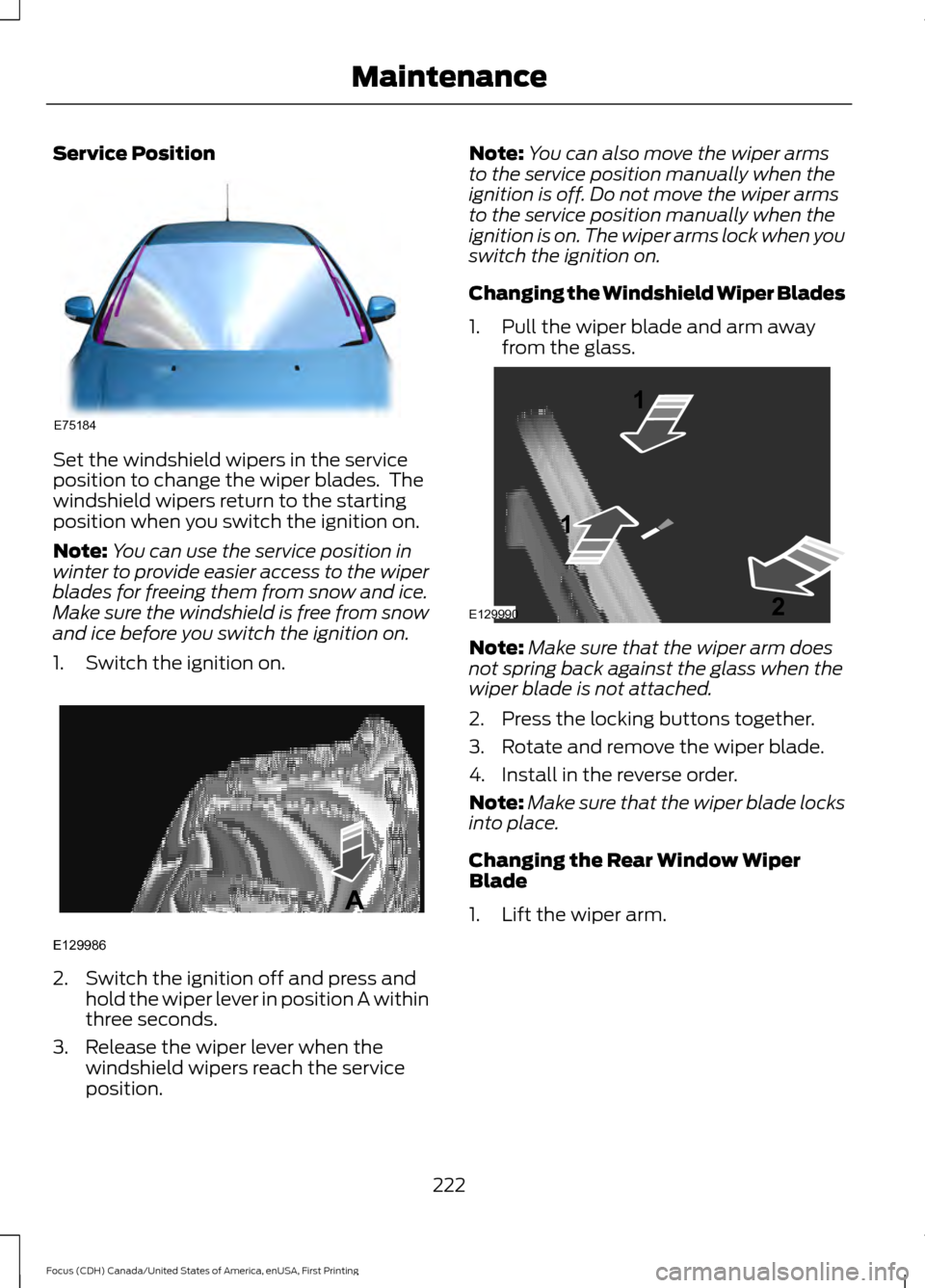
Service Position
Set the windshield wipers in the service
position to change the wiper blades. The
windshield wipers return to the starting
position when you switch the ignition on.
Note:
You can use the service position in
winter to provide easier access to the wiper
blades for freeing them from snow and ice.
Make sure the windshield is free from snow
and ice before you switch the ignition on.
1. Switch the ignition on. 2. Switch the ignition off and press and
hold the wiper lever in position A within
three seconds.
3. Release the wiper lever when the windshield wipers reach the service
position. Note:
You can also move the wiper arms
to the service position manually when the
ignition is off. Do not move the wiper arms
to the service position manually when the
ignition is on. The wiper arms lock when you
switch the ignition on.
Changing the Windshield Wiper Blades
1. Pull the wiper blade and arm away from the glass. Note:
Make sure that the wiper arm does
not spring back against the glass when the
wiper blade is not attached.
2. Press the locking buttons together.
3. Rotate and remove the wiper blade.
4. Install in the reverse order.
Note: Make sure that the wiper blade locks
into place.
Changing the Rear Window Wiper
Blade
1. Lift the wiper arm.
222
Focus (CDH) Canada/United States of America, enUSA, First Printing MaintenanceE75184 E129986
A E129990
1
1 2
Page 239 of 385
•
Do not allow wax to come in contact
with any non-body (low-gloss black)
colored trim. The wax will discolor or
stain the parts over time.
•Roof racks.
• Bumpers.
• Grained door handles.
• Side moldings.
• Mirror housings.
• Windshield cowl area.
• Do not apply wax to glass areas.
• After waxing, your car's paint should
feel smooth, and be free of streaks and
smudges.
CLEANING THE ENGINE
Engines are more efficient when they are
clean because grease and dirt buildup keep
the engine warmer than normal.
When washing:
• Take care when using a power washer
to clean the engine. The high-pressure
fluid could penetrate the sealed parts
and cause damage.
• Do not spray a hot engine with cold
water to avoid cracking the engine
block or other engine components.
• Spray Motorcraft Engine Shampoo and
Degreaser on all parts that require
cleaning and pressure rinse clean. In
Canada, use Motorcraft Engine
Shampoo.
• Never wash or rinse the engine while it
is hot or running; water in the running
engine may cause internal damage. •
Never wash or rinse any ignition coil,
spark plug wire or spark plug well, or
the area in and around these locations.
• Cover the battery, power distribution
box, and air filter assembly to prevent
water damage when cleaning the
engine.
CLEANING THE WINDOWS AND
WIPER BLADES
Car wash chemicals and environmental
fallout can result in windshield and wiper
blade contamination. Dirty windshield and
wipers will result in poor windshield wiper
operation. Keep the windshield and wiper
blades clean to maintain windshield wiper
performance.
To clean the windshield and wiper blades:
• Clean the windshield with a
non-abrasive glass cleaner. When
cleaning the interior of the windshield,
avoid getting any glass cleaner on the
instrument panel or door panels. Wipe
any glass cleaner off these surfaces
immediately.
• For windshields contaminated with
tree sap, chemicals, wax or bugs, clean
the entire windshield using steel wool
(no greater than 0000 grade) in a
circular motion and rinse with water.
• Clean the wiper blades with isopropyl
rubbing alcohol or windshield washer
concentrate.
Note: Do not use razor blades or other
sharp objects to clean or remove decals
from the inside of the heated rear window.
The vehicle warranty does not cover
damage caused to the heated rear window
grid lines.
236
Focus (CDH) Canada/United States of America, enUSA, First Printing Vehicle Care
Page 268 of 385
ENGINE SPECIFICATIONS - 1.0L ECOBOOST™
1.0L EcoBoost
Engine
61
Cubic inches
Minimum 87 octane
Required fuel
1-2-3
Firing order
Coil on plug
Ignition system
0.026 – 0.030 in. (0.65 – 0.75 mm)
Spark plug gap
10.0:1
Compression ratio
Drivebelt Routing
1.0L EcoBoost Engine ENGINE SPECIFICATIONS - 2.0L
2.0L GDI
Engine
121
Cubic inches
Minimum 87 octane or E85
Required fuel
1-3-4-2
Firing order
Coil on plug
Ignition system
.034 - .036 in. (.85 - .95 mm)
Spark plug gap
12.0:1
Compression ratio
265
Focus (CDH) Canada/United States of America, enUSA, First Printing Capacities and SpecificationsE163197
Page 301 of 385
To adjust this setting press the voice button, when prompted say:
Action and Description
Voice Command
voice settings
Then any of the following: When enabled, this feature will prompt you
to confirm any voice initiated call command
prior to the call being placed.
phone confirmation on
The system will make a best guess; you
may still occasionally be asked to confirm
settings.
phone confirmation off
Changing the Voice Settings
In addition to using voice commands to
change the voice settings, you can also use
the menu in the audio display.
To change the voice settings press the
Menu button then select: Menu Item
SYNC-Settings
Voice settings
USING SYNC™ WITH YOUR
PHONE
Hands-free calling is one of the main
features of SYNC. While the system
supports a variety of features, many are
dependent on your cellular phone's
functionality. At a minimum, most cellular
phones with Bluetooth wireless technology
support the following functions:
• Answering an incoming call.
• Ending a call.
• Using privacy mode.
• Dialing a number.
• Redialing. •
Call waiting notification.
• Caller ID.
Other features, such as text messaging
using Bluetooth and automatic phonebook
download, are phone-dependent features.
To check your phone's compatibility, see
your phone's manual and visit
www.SYNCMyRide.com,
www.SYNCMyRide.ca or
www.syncmaroute.ca.
Pairing a Phone for the First Time
Wirelessly pairing your phone with SYNC
allows you to make and receive hands-free
calls.
Note: SYNC can support downloading up
to approximately 4000 entries per
Bluetooth-enabled cellular phone.
Note: Make sure to switch on the ignition
and the radio. Shift the transmission into
park (P) for automatic transmission or first
gear for manual transmission.
Using the Audio System
Note: To scroll through the menus, press
the up and down arrows on your audio
system.
298
Focus (CDH) Canada/United States of America, enUSA, First Printing SYNC™


