2016 FORD FOCUS brake
[x] Cancel search: brakePage 222 of 385
Have an authorized dealer check and
change the transmission fluid at the
correct service interval. See Scheduled
Maintenance (page 336). Your
transmission does not consume fluid.
However, if the transmission slips, shifts
slowly or if you notice a sign of leaking
fluid, contact an authorized dealer.
Do not use supplemental transmission
fluid additives, treatments or cleaning
agents. The use of these materials may
affect transmission operation and result
in damage to internal transmission
components.
BRAKE FLUID CHECK WARNINGS
Do not use any fluid other than the
recommended brake fluid as this will
reduce brake efficiency. Use of
incorrect fluid could result in the loss of
vehicle control, serious personal injury or
death. Only use brake fluid from a sealed
container. Contamination with dirt,
water, petroleum products or other
materials may result in brake system
damage or failure. Failure to adhere to this
warning could result in the loss of vehicle
control, serious personal injury or death. Do not allow the fluid to touch your
skin or eyes. If this happens, rinse the
affected areas immediately with
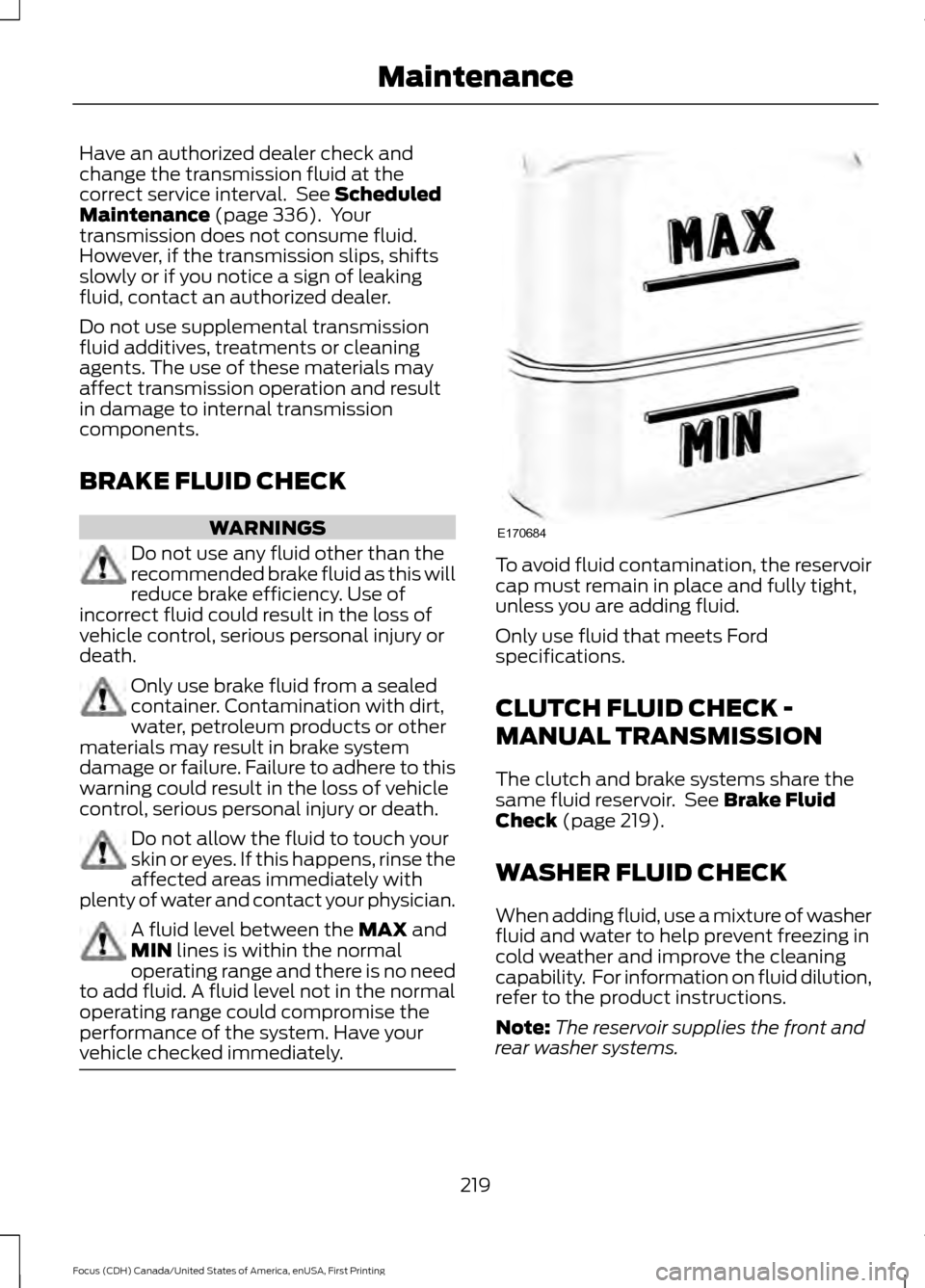
plenty of water and contact your physician. A fluid level between the
MAX and
MIN lines is within the normal
operating range and there is no need
to add fluid. A fluid level not in the normal
operating range could compromise the
performance of the system. Have your
vehicle checked immediately. To avoid fluid contamination, the reservoir
cap must remain in place and fully tight,
unless you are adding fluid.
Only use fluid that meets Ford
specifications.
CLUTCH FLUID CHECK -
MANUAL TRANSMISSION
The clutch and brake systems share the
same fluid reservoir. See
Brake Fluid
Check (page 219).
WASHER FLUID CHECK
When adding fluid, use a mixture of washer
fluid and water to help prevent freezing in
cold weather and improve the cleaning
capability. For information on fluid dilution,
refer to the product instructions.
Note: The reservoir supplies the front and
rear washer systems.
219
Focus (CDH) Canada/United States of America, enUSA, First Printing MaintenanceE170684
Page 224 of 385
Because your vehicle
’s engine is
electronically-controlled by a computer,
some engine control settings are
maintained by power from the low voltage
battery. Some engine computer settings,
like the idle trim and fuel trim strategy,
optimize the driveability and performance
of the engine. Some other computer
settings, like the clock and radio station
presets, are also maintained in memory by
power from the low voltage battery. When
a technician disconnects and connects the
low voltage battery, these settings are
erased. Complete the following procedure
in order to restore the settings:
1. With the vehicle at a complete stop, set the parking brake.
2. Shift into park (P).
3. Switch off all accessories.
4. Fully press the brake pedal and start the vehicle.
5. Run the engine until it reaches normal operating temperature. While the
engine is warming up, complete the
following: Reset the clock. See Audio
System (page 278). Reset the power
windows bounce-back feature. See
Windows and Mirrors
(page 81).
Reset the radio station presets. See
Audio System
(page 278).
6. Allow the engine to idle for at least one
minute. If the engine turns off, press
the accelerator pedal to start the
engine.
7. While the engine is running, press the brake pedal and shift into neutral (N).
8. Allow the engine to run for at least one
minute by pressing on the accelerator
pedal.
9. Drive the vehicle at least 12 mi (20 km)
to completely relearn the idle and fuel
trim strategy. Note:
If you do not allow the engine to
relearn the idle and fuel trim strategy, the
idle quality of your vehicle may be adversely
affected until the engine computer
eventually relearns the idle trim and fuel
trim strategy.
Make sure that you dispose of old batteries
in an environmentally friendly way. Seek
advice from your local authority about
recycling old batteries.
CHECKING THE WIPER
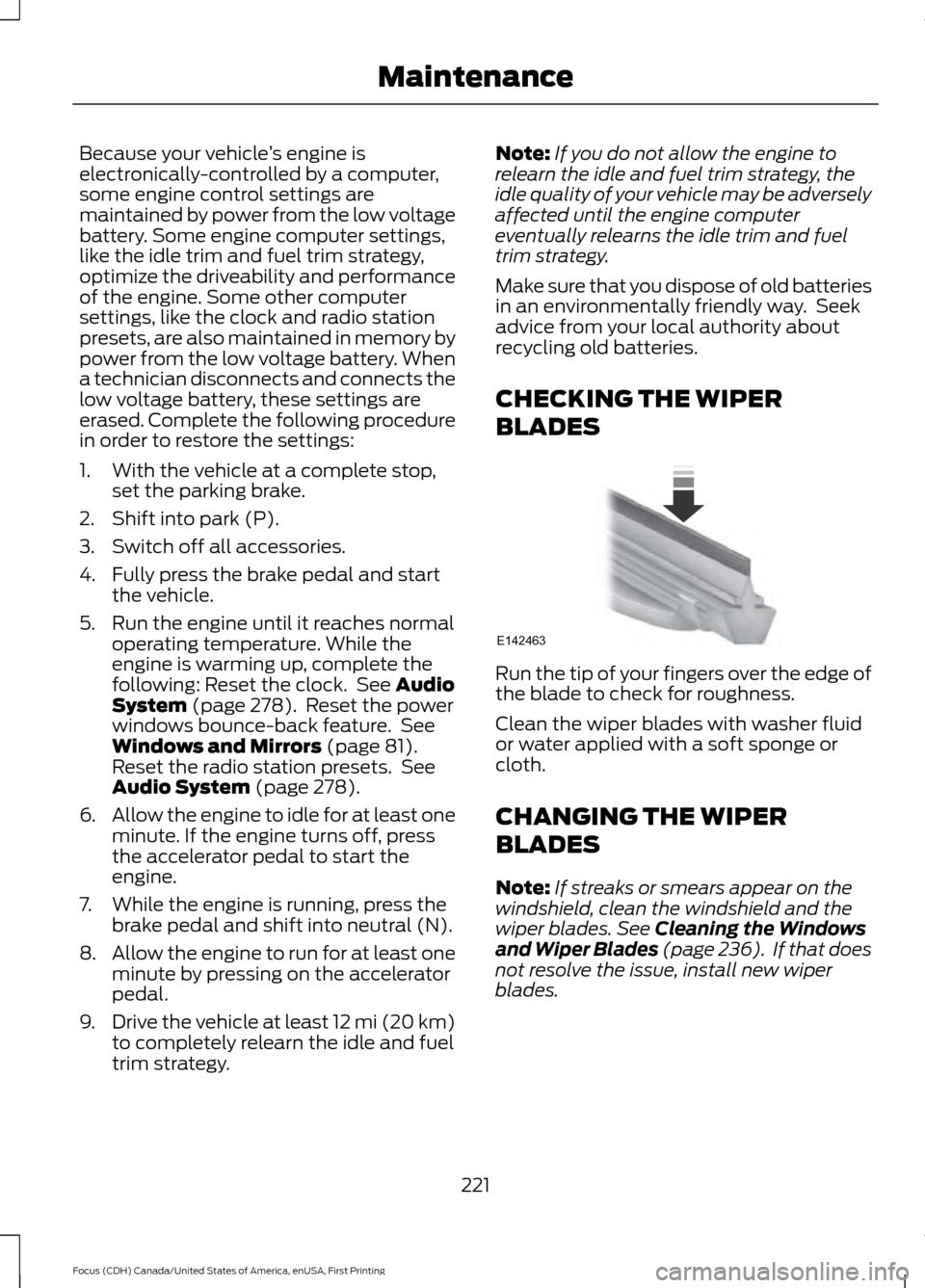
BLADES Run the tip of your fingers over the edge of
the blade to check for roughness.
Clean the wiper blades with washer fluid
or water applied with a soft sponge or
cloth.
CHANGING THE WIPER
BLADES
Note:
If streaks or smears appear on the
windshield, clean the windshield and the
wiper blades.
See Cleaning the Windows
and Wiper Blades (page 236). If that does
not resolve the issue, install new wiper
blades.
221
Focus (CDH) Canada/United States of America, enUSA, First Printing MaintenanceE142463
Page 231 of 385
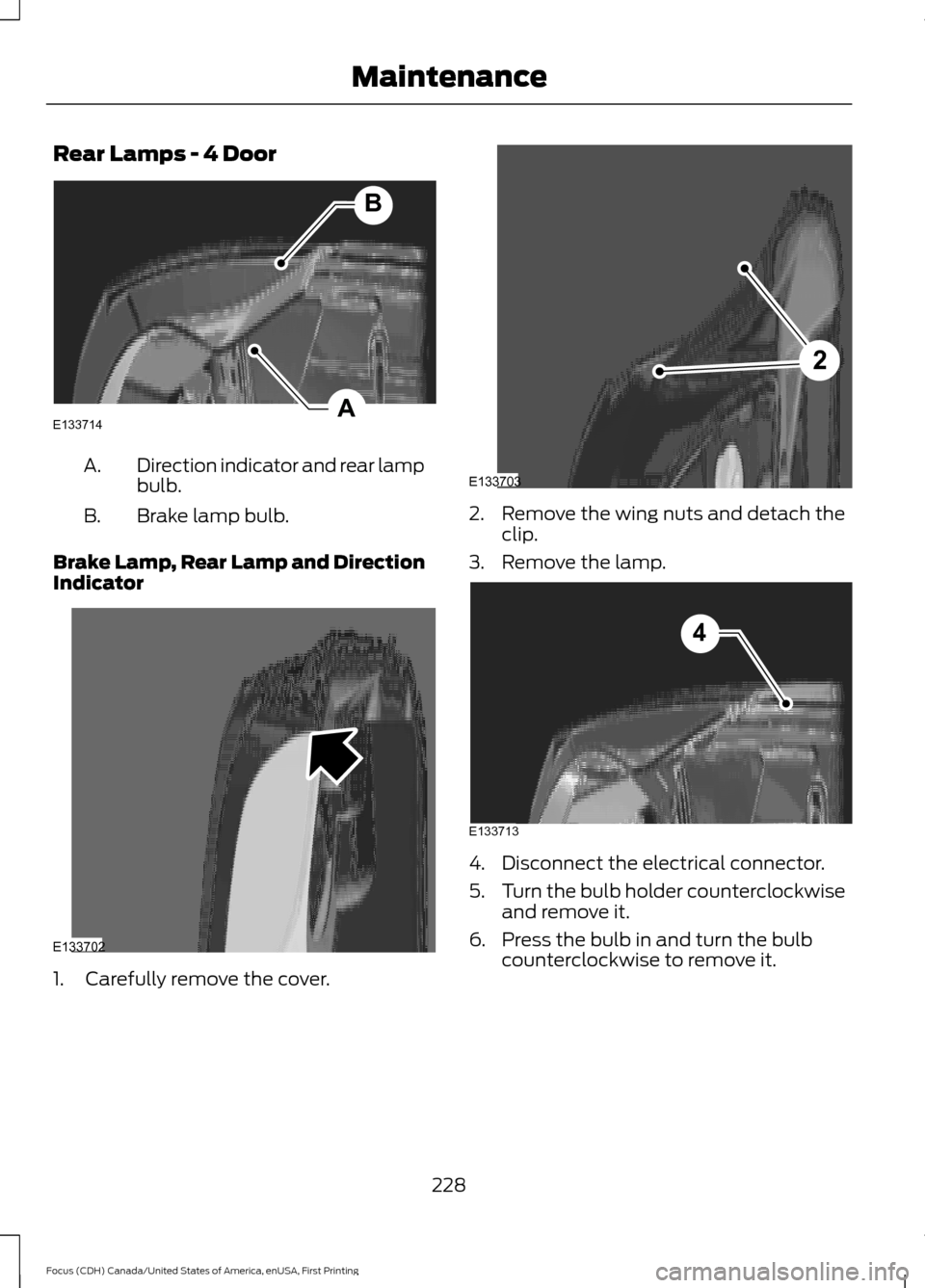
Rear Lamps - 4 Door
Direction indicator and rear lamp
bulb.
A.
Brake lamp bulb.
B.
Brake Lamp, Rear Lamp and Direction
Indicator 1. Carefully remove the cover. 2. Remove the wing nuts and detach the
clip.
3. Remove the lamp. 4. Disconnect the electrical connector.
5.
Turn the bulb holder counterclockwise
and remove it.
6. Press the bulb in and turn the bulb counterclockwise to remove it.
228
Focus (CDH) Canada/United States of America, enUSA, First Printing MaintenanceA
B
E133714 E133702 2
E133703 E133713
4
Page 232 of 385
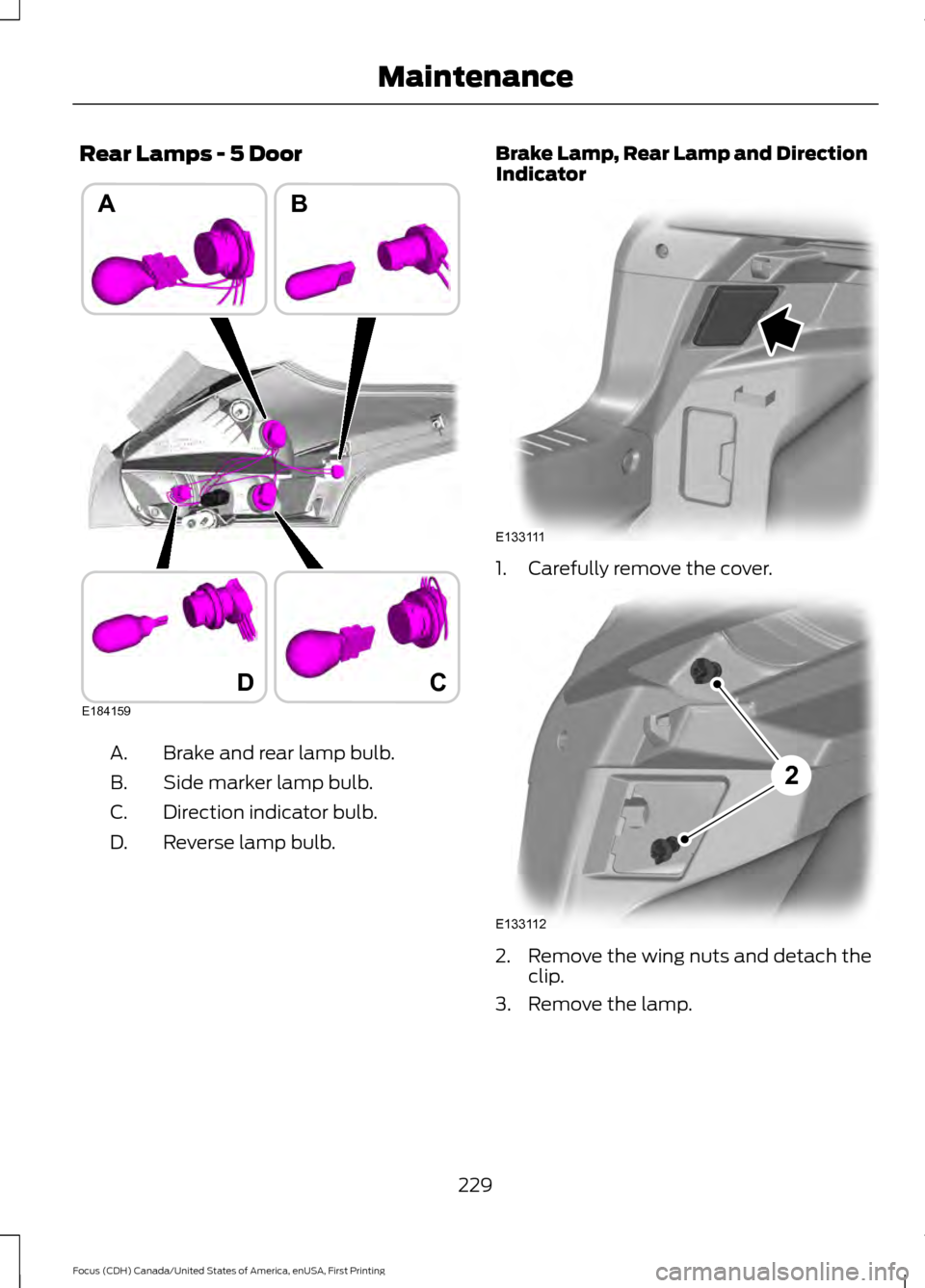
Rear Lamps - 5 Door
Brake and rear lamp bulb.
A.
Side marker lamp bulb.
B.
Direction indicator bulb.
C.
Reverse lamp bulb.
D. Brake Lamp, Rear Lamp and Direction
Indicator
1. Carefully remove the cover.
2. Remove the wing nuts and detach the
clip.
3. Remove the lamp.
229
Focus (CDH) Canada/United States of America, enUSA, First Printing MaintenanceD
AB
E184159
C E133111 E133112
2
Page 233 of 385
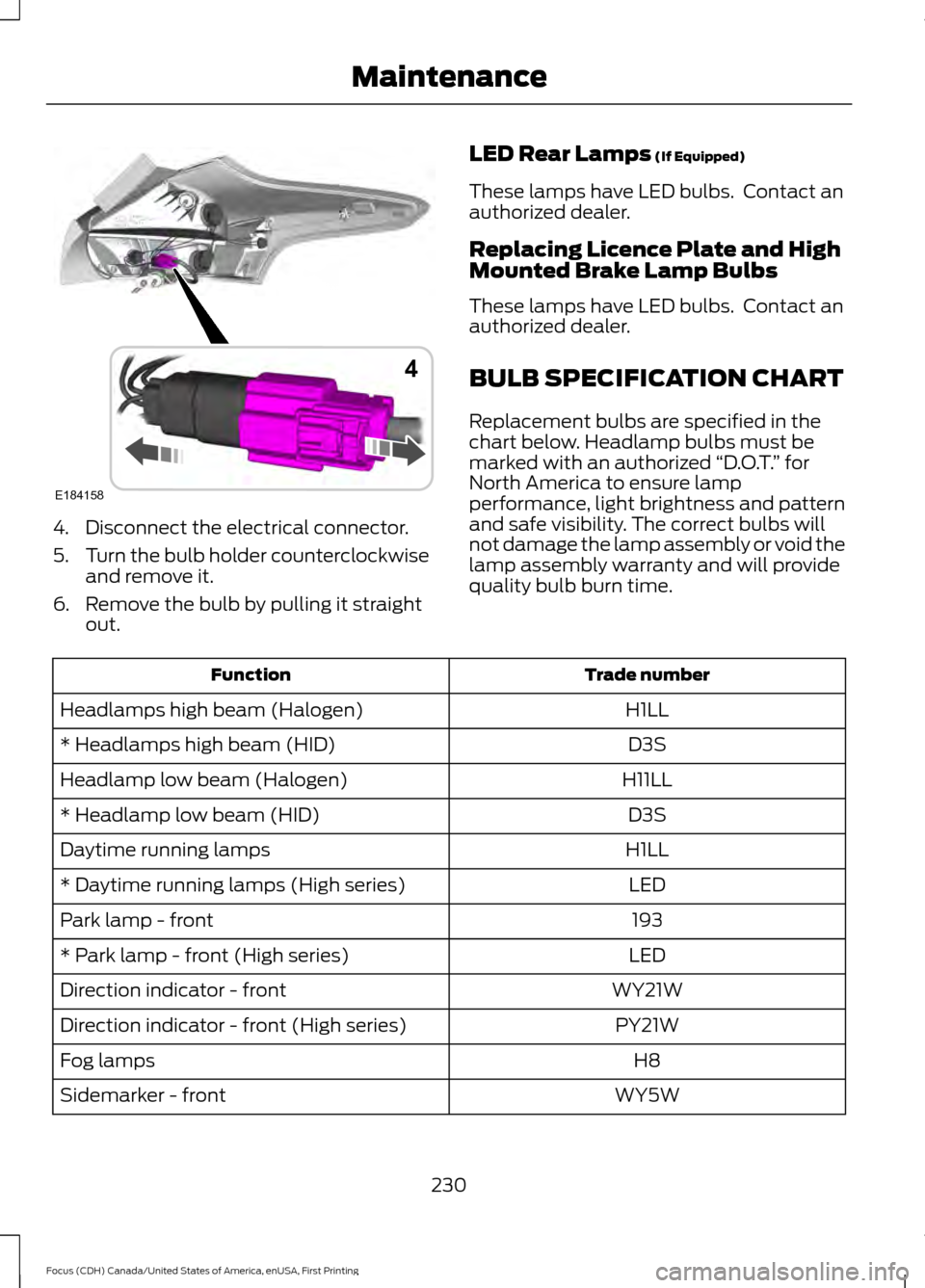
4. Disconnect the electrical connector.
5.
Turn the bulb holder counterclockwise
and remove it.
6. Remove the bulb by pulling it straight out. LED Rear Lamps (If Equipped)
These lamps have LED bulbs. Contact an
authorized dealer.
Replacing Licence Plate and High
Mounted Brake Lamp Bulbs
These lamps have LED bulbs. Contact an
authorized dealer.
BULB SPECIFICATION CHART
Replacement bulbs are specified in the
chart below. Headlamp bulbs must be
marked with an authorized “D.O.T.” for
North America to ensure lamp
performance, light brightness and pattern
and safe visibility. The correct bulbs will
not damage the lamp assembly or void the
lamp assembly warranty and will provide
quality bulb burn time. Trade number
Function
H1LL
Headlamps high beam (Halogen)
D3S
* Headlamps high beam (HID)
H11LL
Headlamp low beam (Halogen)
D3S
* Headlamp low beam (HID)
H1LL
Daytime running lamps
LED
* Daytime running lamps (High series)
193
Park lamp - front
LED
* Park lamp - front (High series)
WY21W
Direction indicator - front
PY21W
Direction indicator - front (High series)
H8
Fog lamps
WY5W
Sidemarker - front
230
Focus (CDH) Canada/United States of America, enUSA, First Printing MaintenanceE184158
4
Page 234 of 385
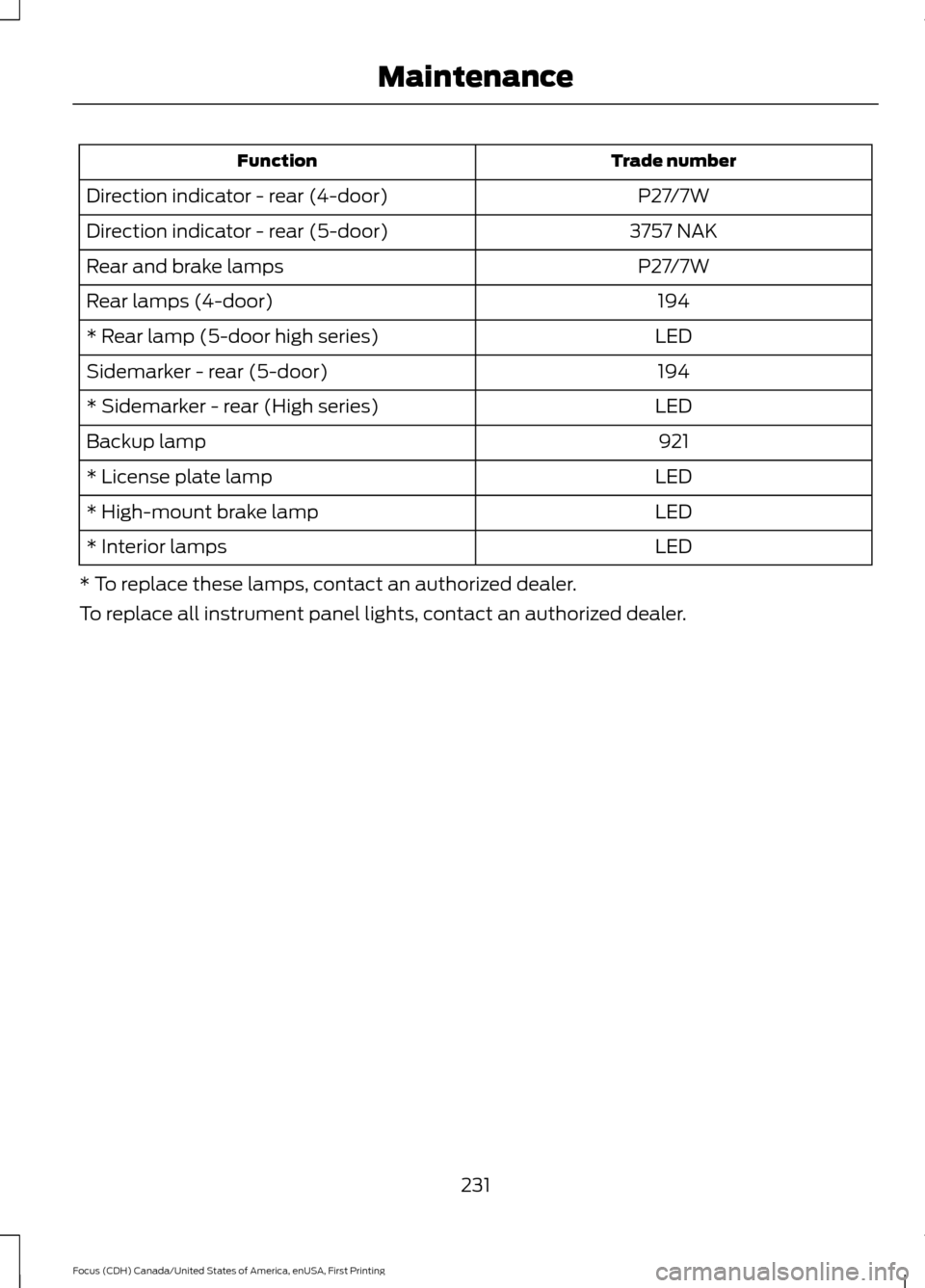
Trade number
Function
P27/7W
Direction indicator - rear (4-door)
3757 NAK
Direction indicator - rear (5-door)
P27/7W
Rear and brake lamps
194
Rear lamps (4-door)
LED
* Rear lamp (5-door high series)
194
Sidemarker - rear (5-door)
LED
* Sidemarker - rear (High series)
921
Backup lamp
LED
* License plate lamp
LED
* High-mount brake lamp
LED
* Interior lamps
* To replace these lamps, contact an authorized dealer.
To replace all instrument panel lights, contact an authorized dealer.
231
Focus (CDH) Canada/United States of America, enUSA, First Printing Maintenance
Page 242 of 385
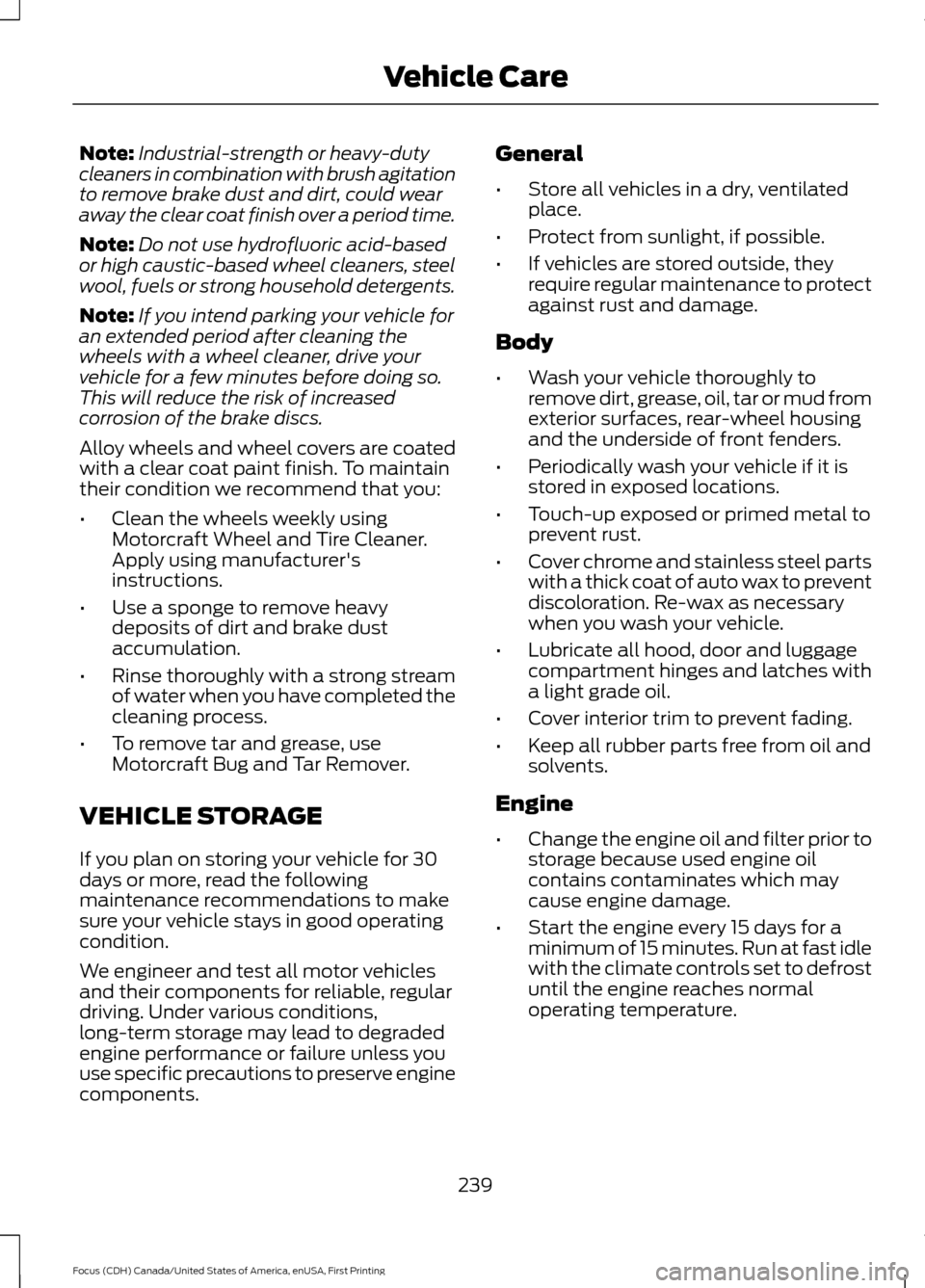
Note:
Industrial-strength or heavy-duty
cleaners in combination with brush agitation
to remove brake dust and dirt, could wear
away the clear coat finish over a period time.
Note: Do not use hydrofluoric acid-based
or high caustic-based wheel cleaners, steel
wool, fuels or strong household detergents.
Note: If you intend parking your vehicle for
an extended period after cleaning the
wheels with a wheel cleaner, drive your
vehicle for a few minutes before doing so.
This will reduce the risk of increased
corrosion of the brake discs.
Alloy wheels and wheel covers are coated
with a clear coat paint finish. To maintain
their condition we recommend that you:
• Clean the wheels weekly using
Motorcraft Wheel and Tire Cleaner.
Apply using manufacturer's
instructions.
• Use a sponge to remove heavy
deposits of dirt and brake dust
accumulation.
• Rinse thoroughly with a strong stream
of water when you have completed the
cleaning process.
• To remove tar and grease, use
Motorcraft Bug and Tar Remover.
VEHICLE STORAGE
If you plan on storing your vehicle for 30
days or more, read the following
maintenance recommendations to make
sure your vehicle stays in good operating
condition.
We engineer and test all motor vehicles
and their components for reliable, regular
driving. Under various conditions,
long-term storage may lead to degraded
engine performance or failure unless you
use specific precautions to preserve engine
components. General
•
Store all vehicles in a dry, ventilated
place.
• Protect from sunlight, if possible.
• If vehicles are stored outside, they
require regular maintenance to protect
against rust and damage.
Body
• Wash your vehicle thoroughly to
remove dirt, grease, oil, tar or mud from
exterior surfaces, rear-wheel housing
and the underside of front fenders.
• Periodically wash your vehicle if it is
stored in exposed locations.
• Touch-up exposed or primed metal to
prevent rust.
• Cover chrome and stainless steel parts
with a thick coat of auto wax to prevent
discoloration. Re-wax as necessary
when you wash your vehicle.
• Lubricate all hood, door and luggage
compartment hinges and latches with
a light grade oil.
• Cover interior trim to prevent fading.
• Keep all rubber parts free from oil and
solvents.
Engine
• Change the engine oil and filter prior to
storage because used engine oil
contains contaminates which may
cause engine damage.
• Start the engine every 15 days for a
minimum of 15 minutes. Run at fast idle
with the climate controls set to defrost
until the engine reaches normal
operating temperature.
239
Focus (CDH) Canada/United States of America, enUSA, First Printing Vehicle Care
Page 243 of 385
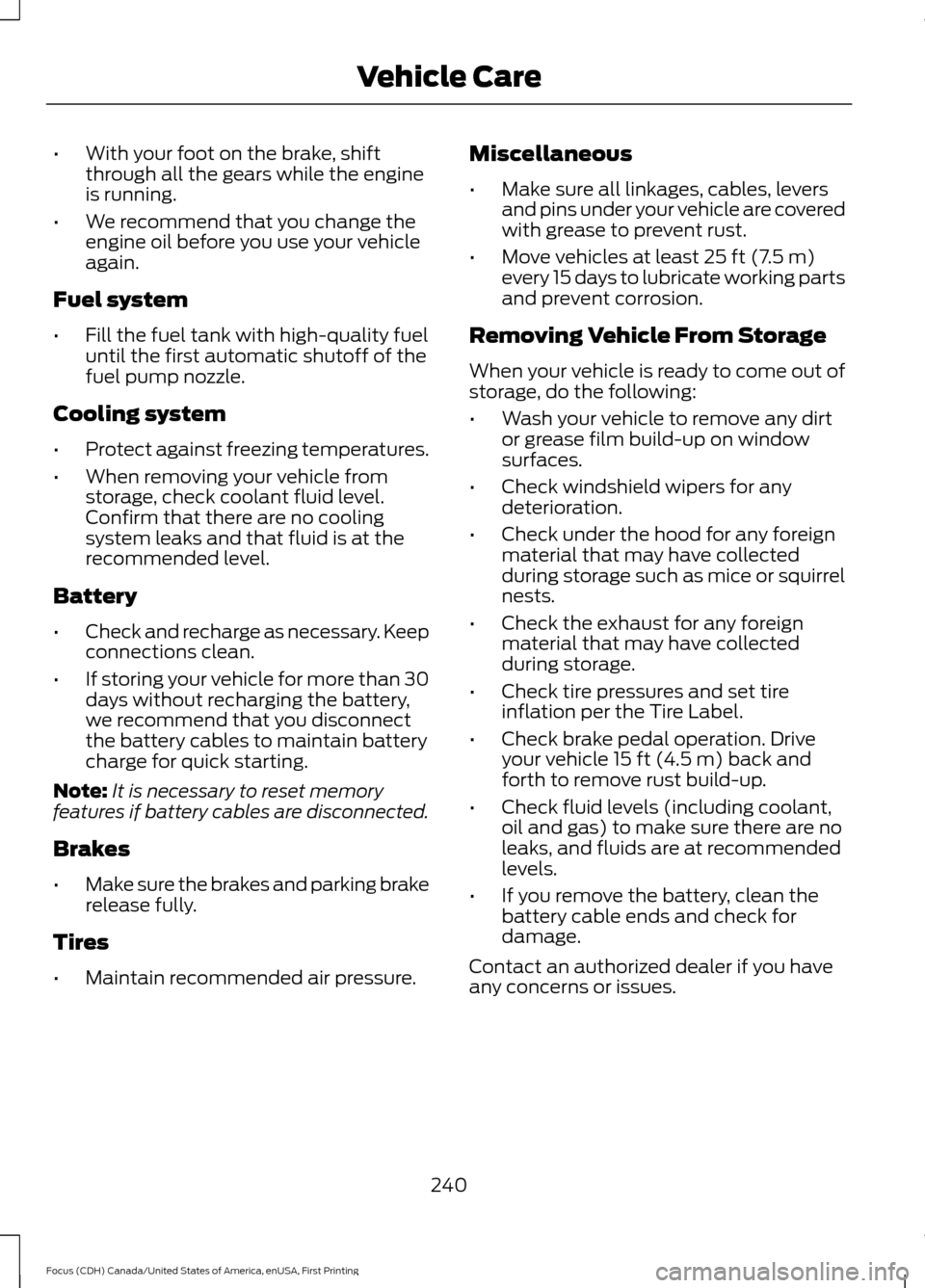
•
With your foot on the brake, shift
through all the gears while the engine
is running.
• We recommend that you change the
engine oil before you use your vehicle
again.
Fuel system
• Fill the fuel tank with high-quality fuel
until the first automatic shutoff of the
fuel pump nozzle.
Cooling system
• Protect against freezing temperatures.
• When removing your vehicle from
storage, check coolant fluid level.
Confirm that there are no cooling
system leaks and that fluid is at the
recommended level.
Battery
• Check and recharge as necessary. Keep
connections clean.
• If storing your vehicle for more than 30
days without recharging the battery,
we recommend that you disconnect
the battery cables to maintain battery
charge for quick starting.
Note: It is necessary to reset memory
features if battery cables are disconnected.
Brakes
• Make sure the brakes and parking brake
release fully.
Tires
• Maintain recommended air pressure. Miscellaneous
•
Make sure all linkages, cables, levers
and pins under your vehicle are covered
with grease to prevent rust.
• Move vehicles at least 25 ft (7.5 m)
every 15 days to lubricate working parts
and prevent corrosion.
Removing Vehicle From Storage
When your vehicle is ready to come out of
storage, do the following:
• Wash your vehicle to remove any dirt
or grease film build-up on window
surfaces.
• Check windshield wipers for any
deterioration.
• Check under the hood for any foreign
material that may have collected
during storage such as mice or squirrel
nests.
• Check the exhaust for any foreign
material that may have collected
during storage.
• Check tire pressures and set tire
inflation per the Tire Label.
• Check brake pedal operation. Drive
your vehicle
15 ft (4.5 m) back and
forth to remove rust build-up.
• Check fluid levels (including coolant,
oil and gas) to make sure there are no
leaks, and fluids are at recommended
levels.
• If you remove the battery, clean the
battery cable ends and check for
damage.
Contact an authorized dealer if you have
any concerns or issues.
240
Focus (CDH) Canada/United States of America, enUSA, First Printing Vehicle Care