2016 FORD FOCUS Ac belt
[x] Cancel search: Ac beltPage 93 of 385

The service engine soon indicator light
illuminates when you first switch the
ignition on before engine start to check the
bulb and to indicate whether the vehicle
is ready for Inspection/Maintenance (I/M)
testing.
Normally, the service engine soon light
stays on until you crank the engine, then
turns itself off if no malfunctions are
present. However, if after 15 seconds the
service engine soon light blinks eight times,
it means that the vehicle is not ready for
I/M testing. See Emission Control
System (page 134).
Stability Control Lights when the system is active.
If it remains on or does not light
when you power your vehicle on,
this indicates a malfunction. During a
malfunction, the system turns off. Have
the system checked by an authorized
dealer immediately.
See (page 148).
Stability Control Off Lights when you switch the
system off. It goes out when you
switch the system back on or
when you power off your vehicle.
See
(page 148).
AUDIBLE WARNINGS AND
INDICATORS
Key in Ignition Warning Chime
Sounds when you open the driver's door
and you have left the key in the ignition. Keyless Warning Alert
(If Equipped)
Sounds the horn twice when you exit your
vehicle with the intelligent access key, after
the last door is closed and your keyless
vehicle is in RUN, indicating your vehicle is
still on.
Headlamps On Warning Chime
Sounds when you remove the key from the
ignition and open the driver's door and you
have left the headlamps or parking lamps
on.
Parking Brake On Warning Chime
Sounds when you have left the parking
brake on and drive your vehicle. If the
warning chime remains on after you have
released the parking brake, have the
system checked by an authorized dealer
immediately.
Low Fuel Minder
A low fuel reminder triggers at about 50
miles (80 km). The low fuel warning light
will light, a warning chime will sound and
a pop up will be shown in the display
indicating the remaining distance to empty.
You will also get a subsequent reminder
at 20, 10 and 0 miles.
Fasten Safety Belt
Sounds as a reminder to fasten your safety
belt.
90
Focus (CDH) Canada/United States of America, enUSA, First Printing Instrument ClusterE138639
Page 102 of 385

Lighting
Action
Message
Displays when the brake lamp bulb has burned out.Contact an authorized dealer.
Brake lamp Bulb fault
Displays when the low beam headlamp bulb hasburned out. Contact an authorized dealer.
Low beam Bulb fault
Displays when an electrical system problem occurswith the headlamp system. Contact an authorized dealer.
Headlamp fault Service required
Maintenance Action
Message
Displays when the engine oil life is depleted and
requires a change. See Engine Oil Check (page 216).
Oil change required
Indicates the brake fluid level is low and the brake
system should be inspected immediately. See Brake
Fluid Check (page 219).
Brake fluid level low Service
now
MyKey Action
Message
Displays when MyKey is active.
MyKey active Drive Safely
Displays when starting the vehicle and MyKey is in useand the MyKey speed limit is on.
MyKey Speed Limited to XX
MPH/km/h
Displays when a MyKey is in use and the MyKey speedlimit is on and the vehicle speed is approaching 80 mph (130 km/h).
MyKey Vehicle Near Top Speed
Displays when a MyKey is in use and the MyKey speedlimit is reached.
MyKey Vehicle at Top Speed
Displays when MyKey is active.
MyKey Check Speed Drive
Safely
Displays when a MyKey is in use and Belt-Minder isactivated.
MyKey Buckle Up to Unmute
Audio
99
Focus (CDH) Canada/United States of America, enUSA, First Printing Information Displays
Page 103 of 385
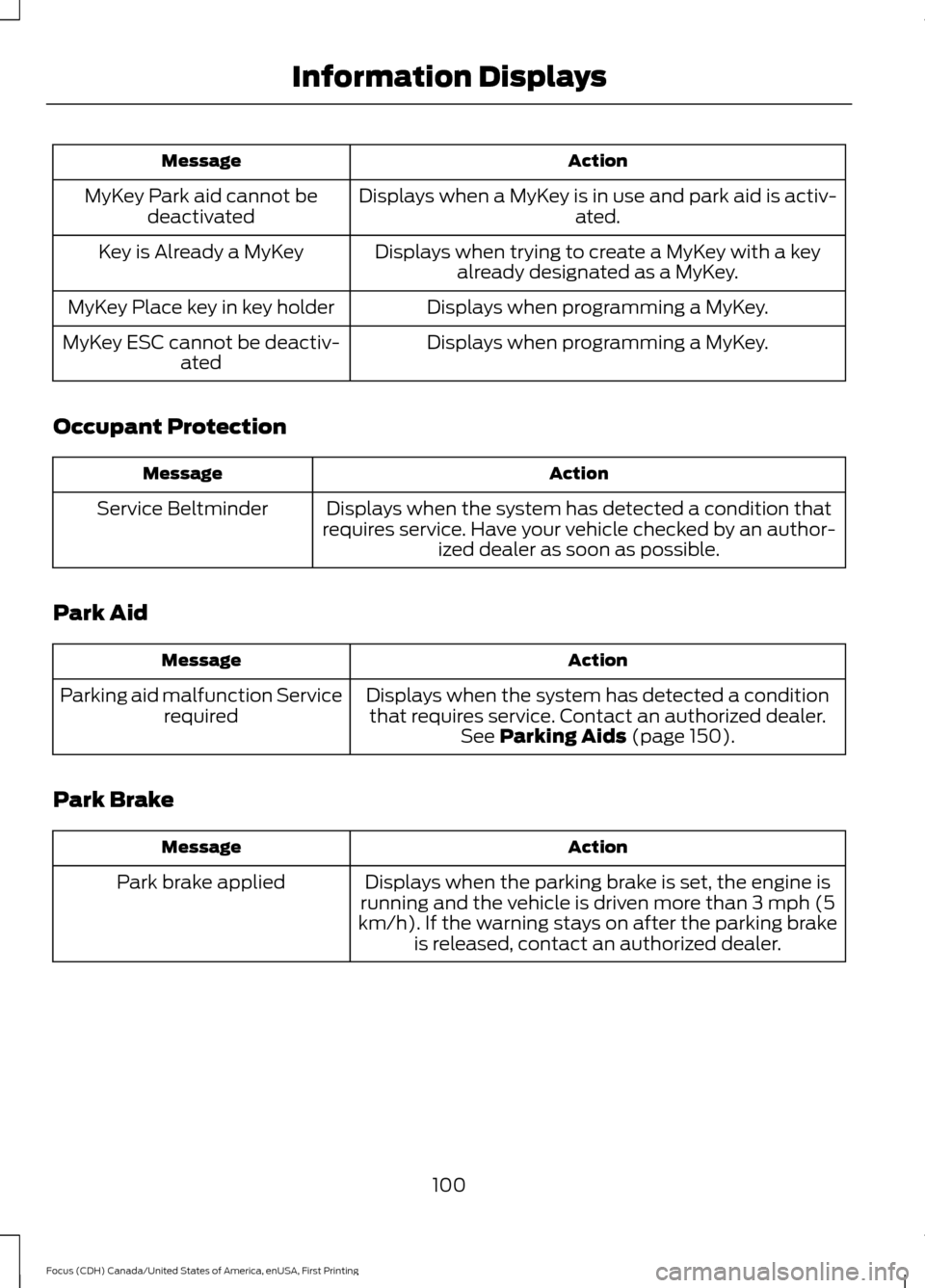
Action
Message
Displays when a MyKey is in use and park aid is activ- ated.
MyKey Park aid cannot be
deactivated
Displays when trying to create a MyKey with a keyalready designated as a MyKey.
Key is Already a MyKey
Displays when programming a MyKey.
MyKey Place key in key holder
Displays when programming a MyKey.
MyKey ESC cannot be deactiv-
ated
Occupant Protection Action
Message
Displays when the system has detected a condition that
requires service. Have your vehicle checked by an author- ized dealer as soon as possible.
Service Beltminder
Park Aid Action
Message
Displays when the system has detected a conditionthat requires service. Contact an authorized dealer. See Parking Aids (page 150).
Parking aid malfunction Service
required
Park Brake Action
Message
Displays when the parking brake is set, the engine is
running and the vehicle is driven more than 3 mph (5
km/h). If the warning stays on after the parking brake is released, contact an authorized dealer.
Park brake applied
100
Focus (CDH) Canada/United States of America, enUSA, First Printing Information Displays
Page 113 of 385
SITTING IN THE CORRECT
POSITION
WARNINGS
Do not recline the seat backrest too
far as this can cause the occupant
to slide under the safety belt,
resulting in serious injury in the event of a
crash. Sitting improperly, out of position or
with the seat backrest reclined too
far, can result in serious injury or
death in the event of a crash. Always sit
upright against your seat backrest, with
your feet on the floor. Do not place objects higher than the
seat backrest to reduce the risk of
serious injury in the event of a crash
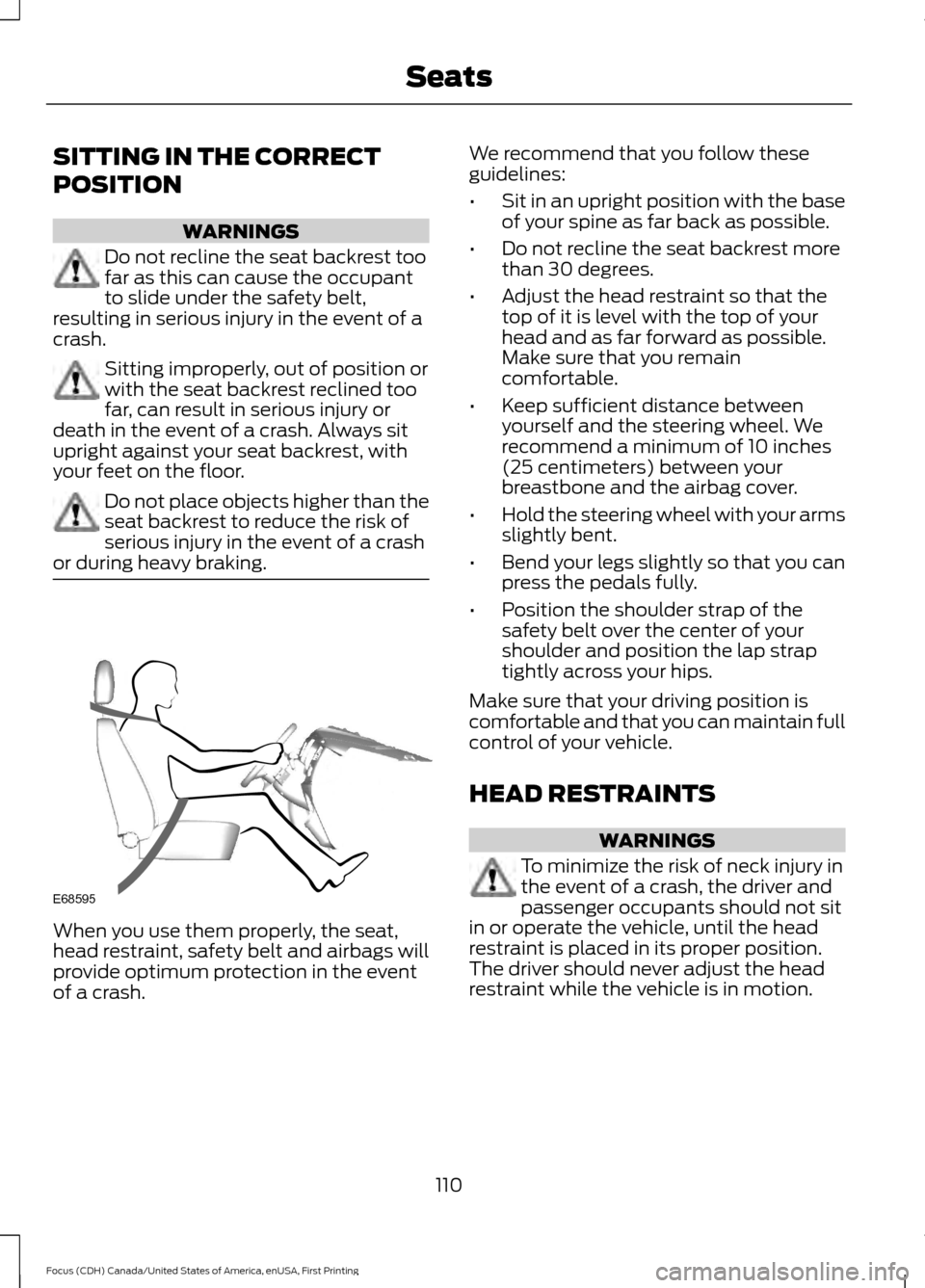
or during heavy braking. When you use them properly, the seat,
head restraint, safety belt and airbags will
provide optimum protection in the event
of a crash. We recommend that you follow these
guidelines:
•
Sit in an upright position with the base
of your spine as far back as possible.
• Do not recline the seat backrest more
than 30 degrees.
• Adjust the head restraint so that the
top of it is level with the top of your
head and as far forward as possible.
Make sure that you remain
comfortable.
• Keep sufficient distance between
yourself and the steering wheel. We
recommend a minimum of 10 inches
(25 centimeters) between your
breastbone and the airbag cover.
• Hold the steering wheel with your arms
slightly bent.
• Bend your legs slightly so that you can
press the pedals fully.
• Position the shoulder strap of the
safety belt over the center of your
shoulder and position the lap strap
tightly across your hips.
Make sure that your driving position is
comfortable and that you can maintain full
control of your vehicle.
HEAD RESTRAINTS WARNINGS
To minimize the risk of neck injury in
the event of a crash, the driver and
passenger occupants should not sit
in or operate the vehicle, until the head
restraint is placed in its proper position.
The driver should never adjust the head
restraint while the vehicle is in motion.
110
Focus (CDH) Canada/United States of America, enUSA, First Printing SeatsE68595
Page 115 of 385
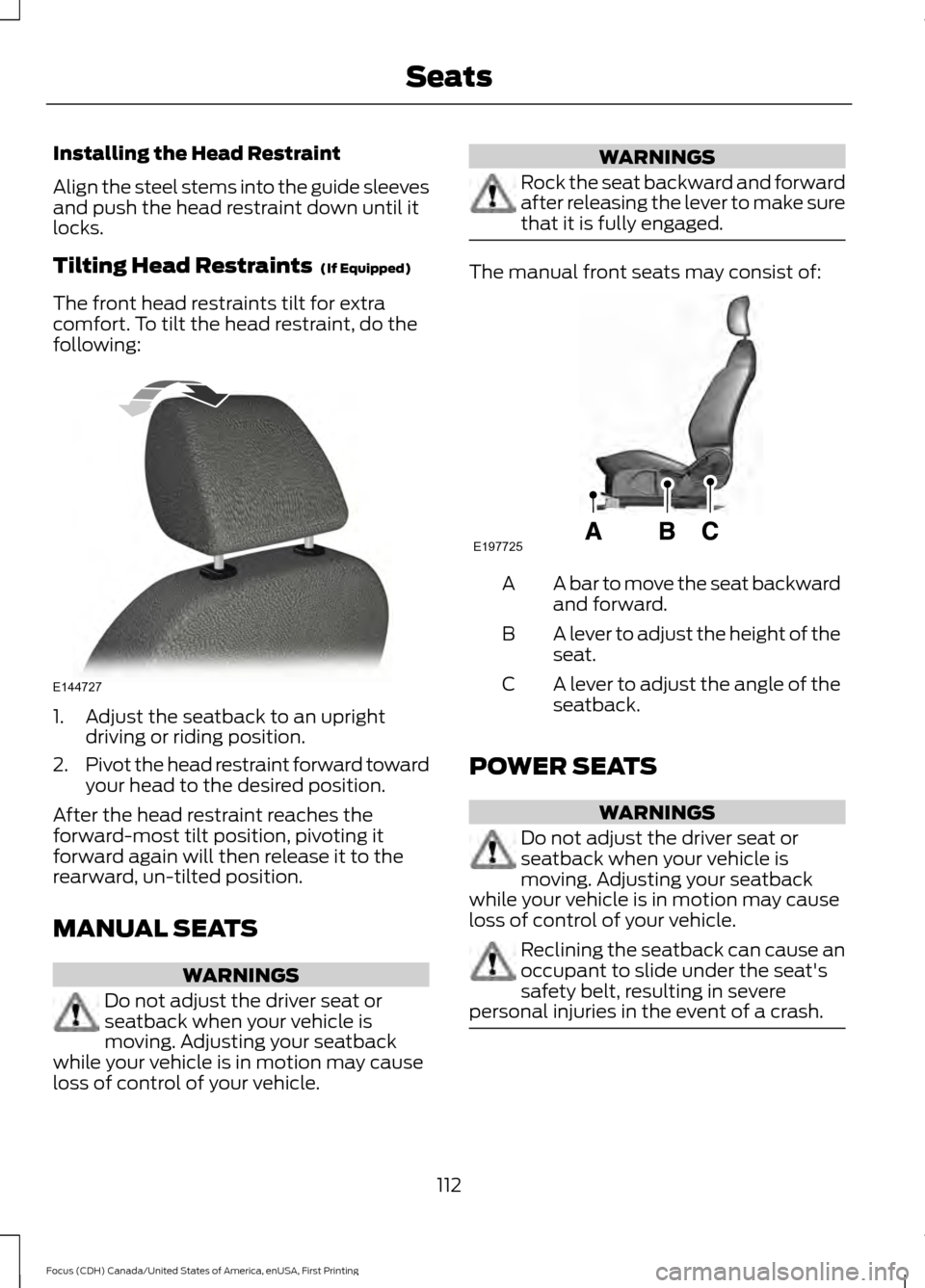
Installing the Head Restraint
Align the steel stems into the guide sleeves
and push the head restraint down until it
locks.
Tilting Head Restraints (If Equipped)
The front head restraints tilt for extra
comfort. To tilt the head restraint, do the
following: 1. Adjust the seatback to an upright
driving or riding position.
2. Pivot the head restraint forward toward
your head to the desired position.
After the head restraint reaches the
forward-most tilt position, pivoting it
forward again will then release it to the
rearward, un-tilted position.
MANUAL SEATS WARNINGS
Do not adjust the driver seat or
seatback when your vehicle is
moving. Adjusting your seatback
while your vehicle is in motion may cause
loss of control of your vehicle. WARNINGS
Rock the seat backward and forward
after releasing the lever to make sure
that it is fully engaged.
The manual front seats may consist of:
A bar to move the seat backward
and forward.
A
A lever to adjust the height of the
seat.
B
A lever to adjust the angle of the
seatback.
C
POWER SEATS WARNINGS
Do not adjust the driver seat or
seatback when your vehicle is
moving. Adjusting your seatback
while your vehicle is in motion may cause
loss of control of your vehicle. Reclining the seatback can cause an
occupant to slide under the seat's
safety belt, resulting in severe
personal injuries in the event of a crash. 112
Focus (CDH) Canada/United States of America, enUSA, First Printing SeatsE144727 E197725
Page 117 of 385
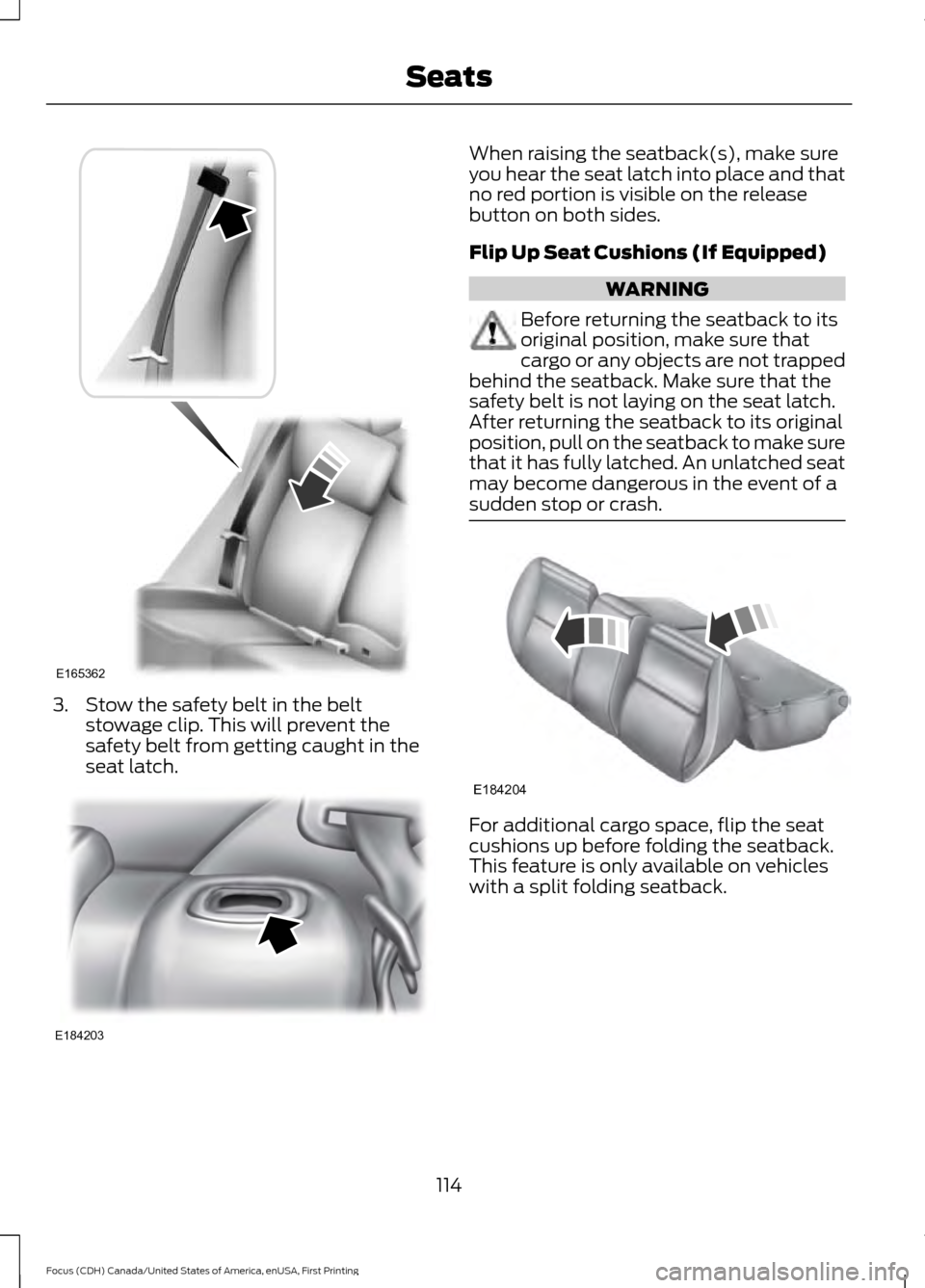
3. Stow the safety belt in the belt
stowage clip. This will prevent the
safety belt from getting caught in the
seat latch. When raising the seatback(s), make sure
you hear the seat latch into place and that
no red portion is visible on the release
button on both sides.
Flip Up Seat Cushions (If Equipped)
WARNING
Before returning the seatback to its
original position, make sure that
cargo or any objects are not trapped
behind the seatback. Make sure that the
safety belt is not laying on the seat latch.
After returning the seatback to its original
position, pull on the seatback to make sure
that it has fully latched. An unlatched seat
may become dangerous in the event of a
sudden stop or crash. For additional cargo space, flip the seat
cushions up before folding the seatback.
This feature is only available on vehicles
with a split folding seatback.
114
Focus (CDH) Canada/United States of America, enUSA, First Printing SeatsE165362 E184203 E184204
Page 124 of 385

Once your vehicle starts, it remains running
until you press the push button ignition
switch, even if your vehicle does not detect
a valid passive key. If you open and close
a door while your vehicle is running, the
system searches for a valid passive key.
You cannot start your vehicle if you open
the driver door and the system does not
detect a valid passive key.
STARTING A GASOLINE
ENGINE
When you start the engine, the idle speed
increases. This helps to warm up the
engine. If the engine idle speed does not
slow down automatically, have your
vehicle checked by an authorized dealer.
Note:
You can crank the engine for a total
of 60 seconds without the engine starting
before the starting system temporarily
disables. The 60 seconds does not have to
be all at once. For example, if you crank the
engine three times for 20 seconds each
time, without the engine starting, you
reached the 60-second time limit. A
message appears in the information display
alerting you that you exceeded the cranking
time. You cannot attempt to start the engine
for at least 15 minutes. After 15 minutes, you
are limited to a 15-second engine cranking
time. You need to wait 60 minutes before
you can crank the engine for 60 seconds
again.
Before starting your vehicle, check the
following:
• Make sure all occupants have fastened
their safety belts.
• Make sure the headlamps and
electrical accessories are off.
• Make sure the parking brake is on. •
Make sure the transmission is in park
(P).
• Switch the ignition key to position II. If
your vehicle is equipped with a keyless
ignition, see the following instructions.
Vehicles with an Ignition Key
Note: Do not touch the accelerator pedal.
1. Fully press the brake pedal. If your vehicle is equipped with a manual
transmission, fully press the clutch
pedal.
2. Turn the key to position
III to start the
engine.
Note: The engine may continue cranking
for up to 15 seconds or until it starts.
Note: If you cannot start the engine on the
first try, wait for a short period and try again.
Vehicles with Keyless Start
Note: Do not touch the accelerator pedal.
Note: You must have your intelligent access
key in your vehicle in order to shift the
transmission out of park (P).
1. Fully depress the brake pedal.
2. Press the push button ignition switch.
The system does not function if:
• The passive key frequencies are
jammed.
• The key battery has no charge.
If you are unable to start your vehicle, do
the following:
121
Focus (CDH) Canada/United States of America, enUSA, First Printing Starting and Stopping the Engine
Page 130 of 385
•
The driver door is opened.
• The driver safety belt is not fastened.
• The transmission is in Sport or Manual
modes (automatic transmission only).
The system may automatically restart the
engine under certain conditions, for
example:
• To maintain the interior climate, for
example air conditioning.
• The battery charge level is low.
• Your vehicle starts to roll downhill in
neutral.
• The driver safety belt is not fastened
(automatic transmission only).
• The driver door is opened (automatic
transmission only).
• The transmission is shifted out of drive
(automatic transmission only).
Switching the System On and Off When you switch the ignition on,
the system automatically turns
on.
To switch the system off, press the switch
and the word OFF illuminates. Press again
to switch the system back on. The system
only switches off for the current ignition
cycle.
Note: The system may not function if you
leave electrical equipment connected with
the ignition off.
Note: For vehicles with Auto-Start-Stop,
the battery requirement is different. Replace
it with one of exactly the same specification
as the original.
127
Focus (CDH) Canada/United States of America, enUSA, First Printing Unique Driving Characteristics