2016 FORD FOCUS lights
[x] Cancel search: lightsPage 173 of 385

Zone coverage also decreases when
parking at shallow angles. Here, the left
sensor is mostly obstructed; zone coverage
on that side is severely limited.
System Lights, Messages and
Audible Alerts
The Cross Traffic Alert illuminates an
amber alert indicator in the outside mirror
on the side of your vehicle the approaching
vehicle is coming from. Cross Traffic Alert
also sounds an audible alert and a
message appears in the information
display indicating a vehicle is coming from
the right or left. Cross Traffic Alert works
with the reverse sensing system that
sounds its own series of tones. See Rear
Parking Aid (page 150). The system uses radar sensors that are
located behind the bumper fascia on each
side of your vehicle. Do not allow mud,
snow or bumper stickers to obstruct these
areas, this can cause degraded system
performance. See Blind Spot
Information System (page 166). If the
Blind Spot Information System is blocked,
Cross Traffic Alert is also blocked. A
corresponding message appears in the
information display as soon as you shift
the transmission into reverse (R).
System Limitations
Cross Traffic Alert has its limitations;
situations such as severe weather
conditions or debris build-up on the sensor
area may limit vehicle detection.
170
Focus (CDH) Canada/United States of America, enUSA, First Printing Driving AidsE142442 E205199
Page 190 of 385
Before driving through standing water,
check the depth. Never drive through water
that is higher than the bottom of the front
rocker area of your vehicle.
When driving through standing water, drive
very slowly and do not stop your vehicle.
Your brake performance and traction may
be limited. After driving through water and
as soon as it is safe to do so:
•
Lightly press the brake pedal to dry the
brakes and to check that they work.
• Check that the horn works.
• Check that the exterior lights work.
• Turn the steering wheel to check that
the steering power assist works.
FLOOR MATS WARNINGS
Always use floor mats that are
designed to fit the foot well of your
vehicle. Only use floor mats that
leave the pedal area unobstructed. Only
use floor mats that are firmly secured to
retention posts so that they cannot slip out
of position and interfere with the pedals
or impair safe operation of your vehicle in
other ways. WARNINGS
Pedals that cannot move freely can
cause loss of vehicle control and
increase the risk of serious personal
injury. Always make sure that the floor
mats are properly attached to the
retention posts in the carpet that are
supplied with your vehicle. Floor mats must
be properly secured to both retention posts
to make sure mats do not shift out of
position. Never place floor mats or any other
covering in the vehicle foot well that
cannot be properly secured to
prevent them from moving and interfering
with the pedals or the ability to control the
vehicle. Never place floor mats or any other
covering on top of already installed
floor mats. Floor mats should always
rest on top of vehicle carpeting surface and
not another floor mat or other covering.
Additional floor mats or any other covering
will reduce the pedal clearance and
potentially interfere with pedal operation. Check attachment of floor mats on
a regular basis. Always properly
reinstall and secure floor mats that
have been removed for cleaning or
replacement. Always make sure that objects
cannot fall into the driver foot well
while the vehicle is moving. Objects
that are loose can become trapped under
the pedals causing a loss of vehicle control. Failure to properly follow floor mat
installation or attachment
instructions can potentially cause
interference with pedal operation causing
a loss of vehicle control. 187
Focus (CDH) Canada/United States of America, enUSA, First Printing Driving HintsE176360
Page 234 of 385
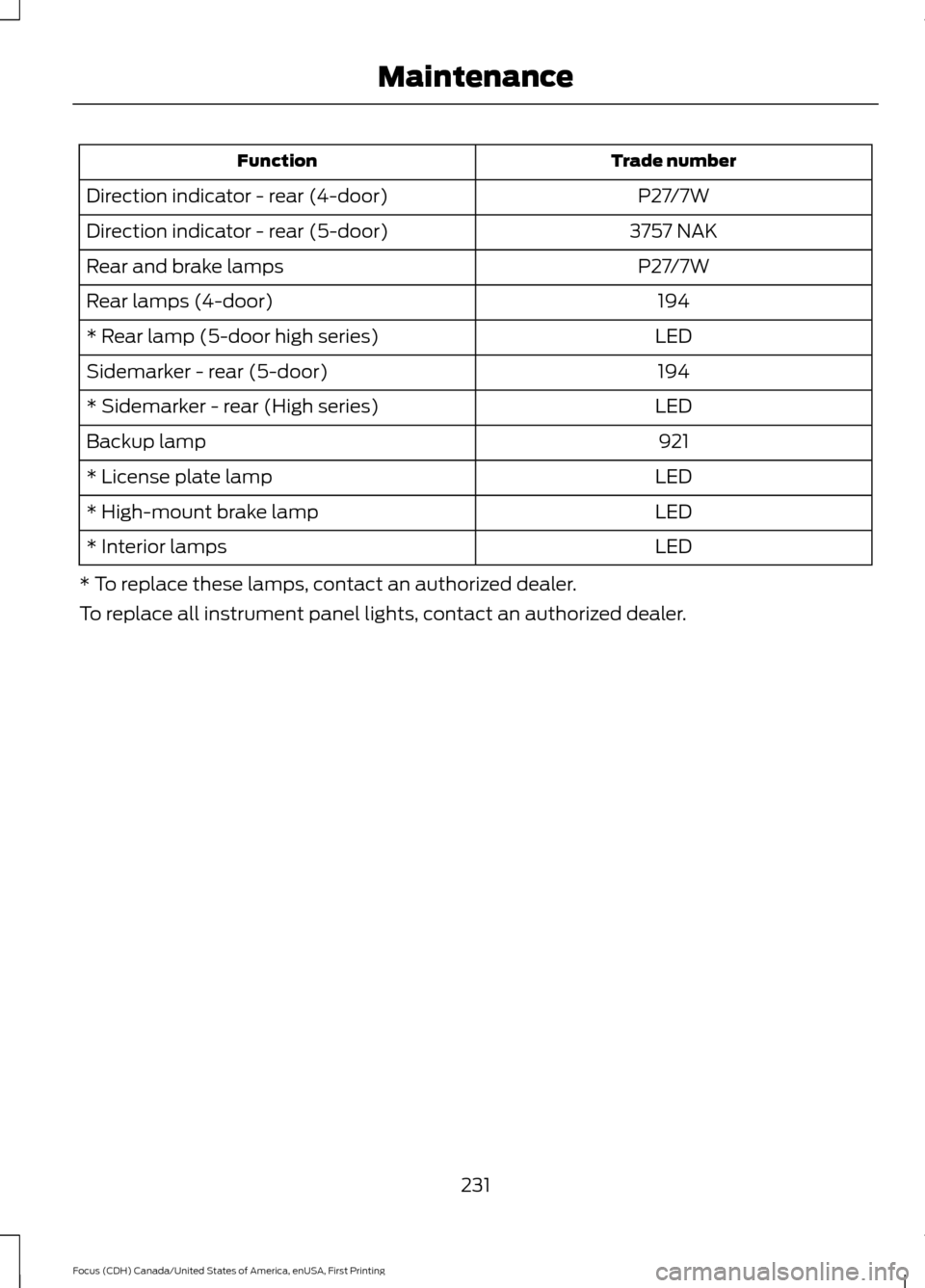
Trade number
Function
P27/7W
Direction indicator - rear (4-door)
3757 NAK
Direction indicator - rear (5-door)
P27/7W
Rear and brake lamps
194
Rear lamps (4-door)
LED
* Rear lamp (5-door high series)
194
Sidemarker - rear (5-door)
LED
* Sidemarker - rear (High series)
921
Backup lamp
LED
* License plate lamp
LED
* High-mount brake lamp
LED
* Interior lamps
* To replace these lamps, contact an authorized dealer.
To replace all instrument panel lights, contact an authorized dealer.
231
Focus (CDH) Canada/United States of America, enUSA, First Printing Maintenance
Page 308 of 385
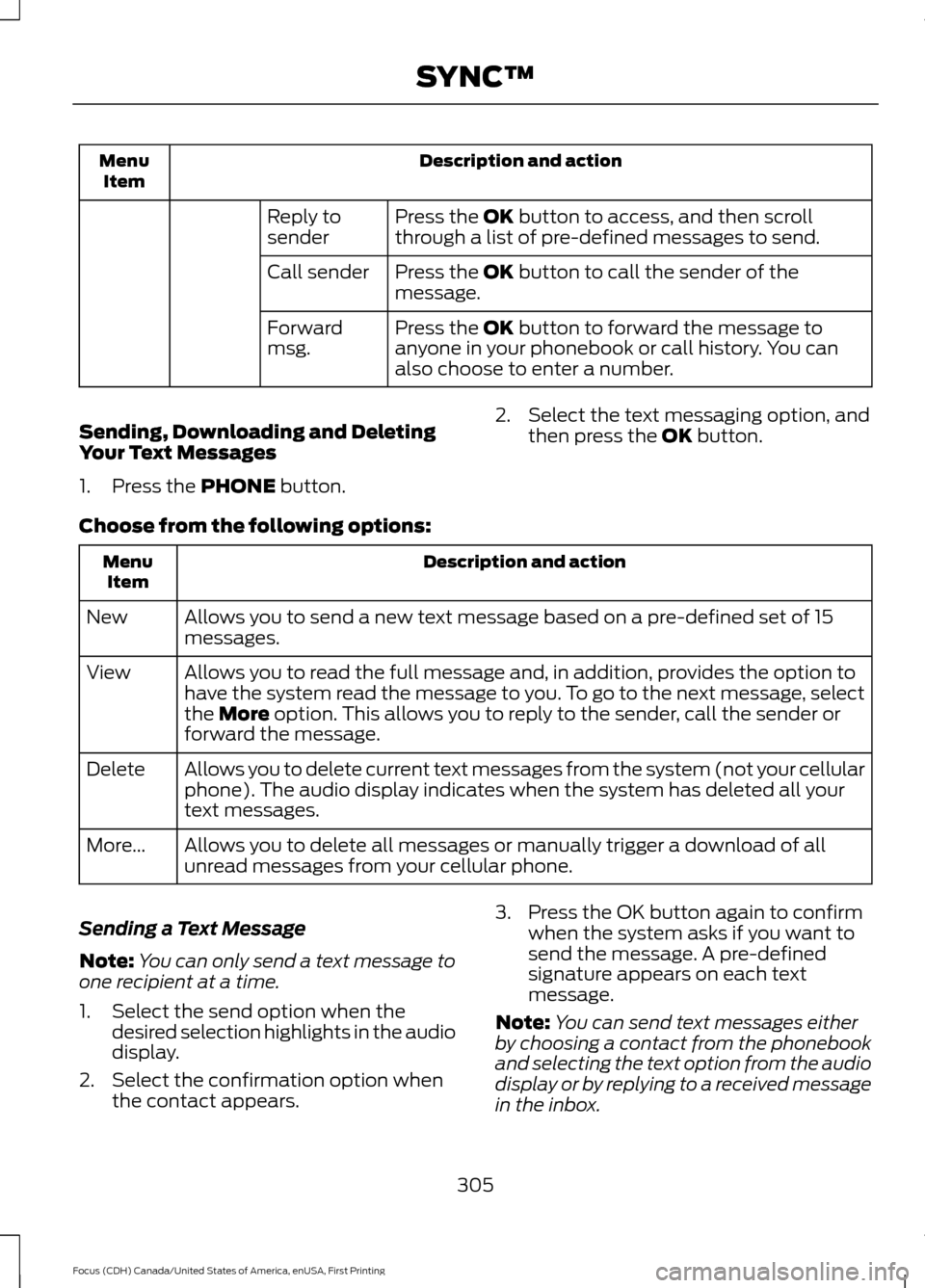
Description and action
Menu
Item
Press the OK button to access, and then scroll
through a list of pre-defined messages to send.
Reply to
sender
Press the
OK button to call the sender of the
message.
Call sender
Press the
OK button to forward the message to
anyone in your phonebook or call history. You can
also choose to enter a number.
Forward
msg.
Sending, Downloading and Deleting
Your Text Messages
1. Press the
PHONE button. 2. Select the text messaging option, and
then press the
OK button.
Choose from the following options: Description and action
Menu
Item
Allows you to send a new text message based on a pre-defined set of 15
messages.
New
Allows you to read the full message and, in addition, provides the option to
have the system read the message to you. To go to the next message, select
the
More option. This allows you to reply to the sender, call the sender or
forward the message.
View
Allows you to delete current text messages from the system (not your cellular
phone). The audio display indicates when the system has deleted all your
text messages.
Delete
Allows you to delete all messages or manually trigger a download of all
unread messages from your cellular phone.
More...
Sending a Text Message
Note: You can only send a text message to
one recipient at a time.
1. Select the send option when the desired selection highlights in the audio
display.
2. Select the confirmation option when the contact appears. 3. Press the OK button again to confirm
when the system asks if you want to
send the message. A pre-defined
signature appears on each text
message.
Note: You can send text messages either
by choosing a contact from the phonebook
and selecting the text option from the audio
display or by replying to a received message
in the inbox.
305
Focus (CDH) Canada/United States of America, enUSA, First Printing SYNC™
Page 335 of 385
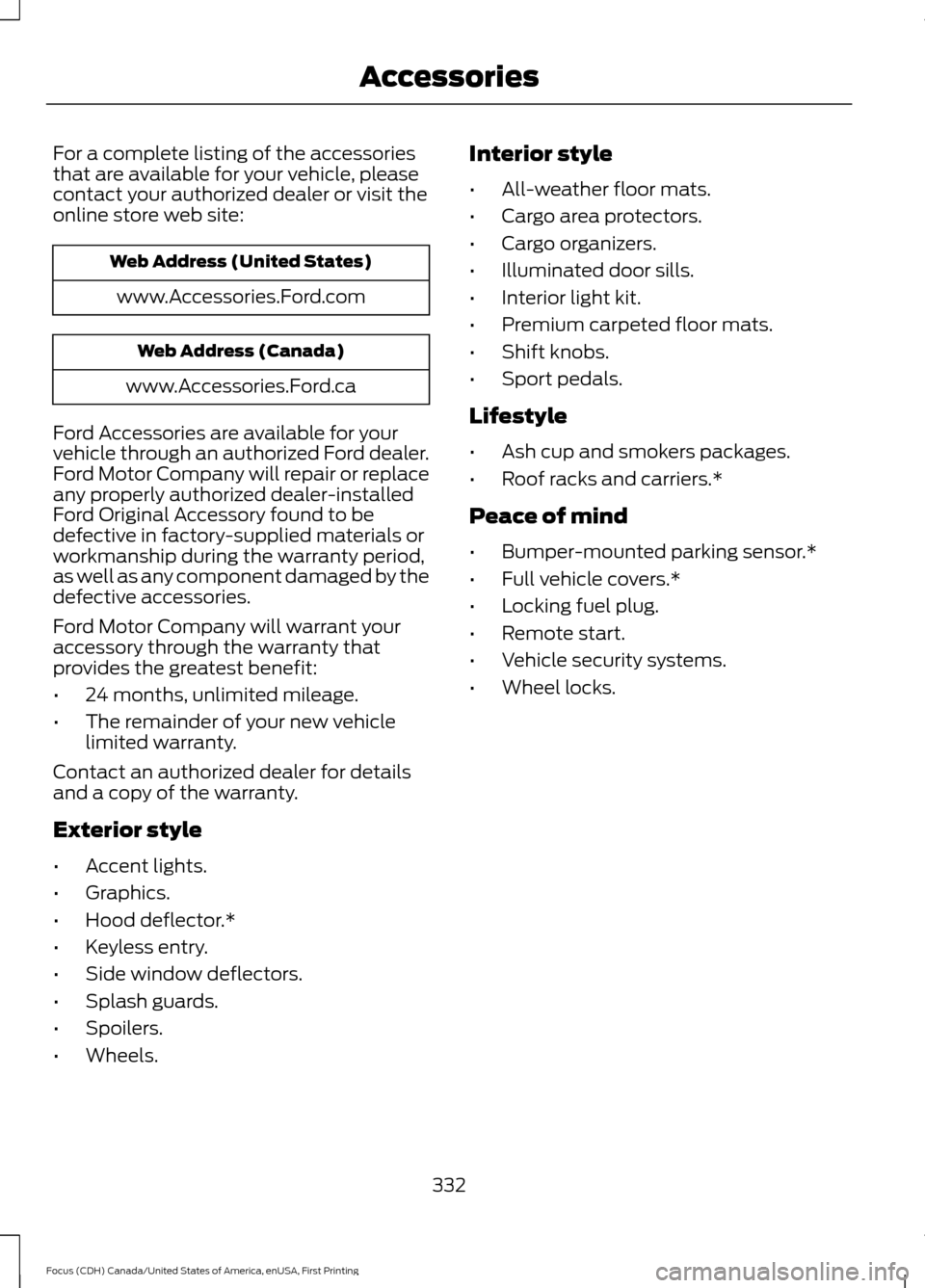
For a complete listing of the accessories
that are available for your vehicle, please
contact your authorized dealer or visit the
online store web site:
Web Address (United States)
www.Accessories.Ford.com Web Address (Canada)
www.Accessories.Ford.ca
Ford Accessories are available for your
vehicle through an authorized Ford dealer.
Ford Motor Company will repair or replace
any properly authorized dealer-installed
Ford Original Accessory found to be
defective in factory-supplied materials or
workmanship during the warranty period,
as well as any component damaged by the
defective accessories.
Ford Motor Company will warrant your
accessory through the warranty that
provides the greatest benefit:
• 24 months, unlimited mileage.
• The remainder of your new vehicle
limited warranty.
Contact an authorized dealer for details
and a copy of the warranty.
Exterior style
• Accent lights.
• Graphics.
• Hood deflector.*
• Keyless entry.
• Side window deflectors.
• Splash guards.
• Spoilers.
• Wheels. Interior style
•
All-weather floor mats.
• Cargo area protectors.
• Cargo organizers.
• Illuminated door sills.
• Interior light kit.
• Premium carpeted floor mats.
• Shift knobs.
• Sport pedals.
Lifestyle
• Ash cup and smokers packages.
• Roof racks and carriers.*
Peace of mind
• Bumper-mounted parking sensor.*
• Full vehicle covers.*
• Locking fuel plug.
• Remote start.
• Vehicle security systems.
• Wheel locks.
332
Focus (CDH) Canada/United States of America, enUSA, First Printing Accessories
Page 341 of 385

Check every month
Engine oil level.
Function of all interior and exterior lights.
Tires (including spare) for wear and proper pressure. Windshield washer fluid level. Check every six months
Battery connections. Clean if necessary.
Body and door drain holes for obstructions. Clean if necessary. Cooling system fluid level and coolant strength.
Door weatherstrips for wear. Lubricate if necessary.
Hinges, latches and outside locks for proper operation. Lubricate if necessary. Parking brake for proper operation.
Safety belts and seat latches for wear and function.
Safety warning lamps (brake, ABS, airbag and safety belt) for operation.
Washer spray and wiper operation. Clean or replace blades as necessary.
Multi-Point Inspection
In order to keep your vehicle running right,
it is important to have the systems on your
vehicle checked regularly. This can help
identify potential issues and prevent major
problems. We recommend having the
following multi-point inspection performed
at every scheduled maintenance interval
to help make sure your vehicle keeps
running great.
338
Focus (CDH) Canada/United States of America, enUSA, First Printing Scheduled Maintenance
Page 377 of 385

Blind Spot Information System..............166
Switching the System Off and On...............168
System Errors....................................................... 168
Using the System............................................... 166
Bonnet Lock See: Opening and Closing the Hood............212
Booster Seats..................................................23
Types of Booster Seats...................................... 23
Brake Fluid Check
.........................................219
Brakes...............................................................144 General Information.......................................... 144
Breaking-In.....................................................186
Bulb Specification Chart
..........................230
C
Cabin Air Filter
...............................................108
California Proposition 65..............................11
Capacities and Specifications - 1.0L EcoBoost™.................................................270
Specifications....................................................... 271
Capacities and Specifications - 2.0L
.................................................................273
Specifications...................................................... 274
Capacities and Specifications
................265
Car Wash See: Cleaning the Exterior.............................. 234
Center Console
................................................117
Changing a Bulb...........................................225 Front Fog Lamp................................................... 227
Headlamp............................................................. 225
LED Rear Lamps................................................ 230
Rear Lamps - 4 Door........................................ 228
Rear Lamps - 5 Door........................................ 229
Replacing Licence Plate and High Mounted Brake Lamp Bulbs........................................ 230
Changing a Fuse...........................................210 Fuses....................................................................... 210
Changing a Road Wheel
...........................260
Dissimilar Spare Wheel and Tire Assembly
Information..................................................... 260
Tire Change Procedure..................................... 261
Changing the 12V Battery.........................220
Changing the Engine Air Filter.................232
Changing the Wiper Blades
......................221 Checking MyKey System Status...............56
MyKey Distance.................................................... 56
Number of Admin Keys...................................... 56
Number of MyKeys.............................................. 56
Checking the Wiper Blades
.......................221
Child Restraint and Seatbelt Maintenance.................................................34
Child Restraint Positioning.........................25
Child Safety
.......................................................15
General Information............................................. 15
Child Safety Locks.........................................26 Left-Hand Side...................................................... 27
Right-Hand Side................................................... 27
Cleaning Leather Seats.............................238
Cleaning Products
.......................................234
Cleaning the Alloy Wheels.......................238
Cleaning the Engine....................................236
Cleaning the Exterior..................................234 Exterior Chrome Parts...................................... 235
Exterior Plastic Parts........................................ 235
Stripes or Graphics............................................ 235
Underbody............................................................ 235
Cleaning the Instrument Panel and Instrument Cluster Lens.........................237
Cleaning the Interior....................................237
Cleaning the Windows and Wiper Blades...........................................................236
Clearing All MyKeys.......................................55
Climate Control
.............................................103
Clutch Fluid Check - Manual Transmission...............................................219
Cold Weather Precautions
........................186
Coolant Check See: Engine Coolant Check............................. 217
Crash Sensors and Airbag Indicator........43
Creating a MyKey
...........................................54
Programming/Changing Configurable
Settings............................................................... 54
Cross Traffic Alert
.........................................168
False Alerts............................................................. 171
Switching the System Off and On.................171
System Errors......................................................... 171
System Lights, Messages and Audible Alerts.................................................................. 170
System Limitations............................................ 170
Using the System............................................... 168
Cruise Control
..................................................70
Principle of Operation....................................... 159
374
Focus (CDH) Canada/United States of America, enUSA, First Printing Index
Page 384 of 385
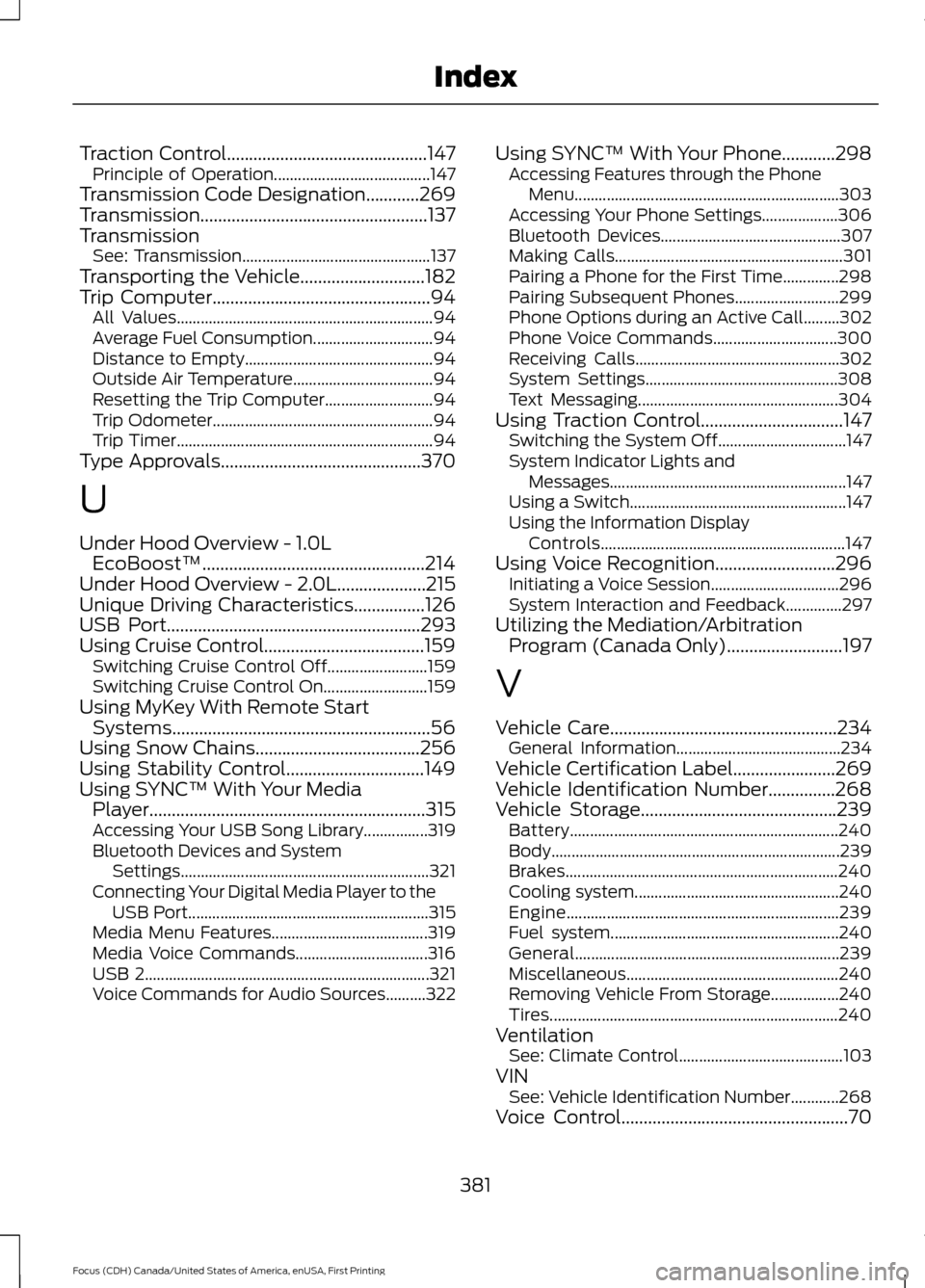
Traction Control.............................................147
Principle of Operation....................................... 147
Transmission Code Designation............269
Transmission...................................................137
Transmission See: Transmission............................................... 137
Transporting the Vehicle............................182
Trip Computer
.................................................94
All Values................................................................ 94
Average Fuel Consumption.............................. 94
Distance to Empty............................................... 94
Outside Air Temperature................................... 94
Resetting the Trip Computer........................... 94
Trip Odometer....................................................... 94
Trip Timer................................................................ 94
Type Approvals
.............................................370
U
Under Hood Overview - 1.0L EcoBoost™..................................................214
Under Hood Overview - 2.0L....................215
Unique Driving Characteristics................126
USB Port
.........................................................293
Using Cruise Control....................................159 Switching Cruise Control Off......................... 159
Switching Cruise Control On.......................... 159
Using MyKey With Remote Start Systems
..........................................................56
Using Snow Chains.....................................256
Using Stability Control...............................149
Using SYNC™ With Your Media Player
..............................................................315
Accessing Your USB Song Library................319
Bluetooth Devices and System
Settings.............................................................. 321
Connecting Your Digital Media Player to the USB Port............................................................ 315
Media Menu Features....................................... 319
Media Voice Commands................................. 316
USB 2....................................................................... 321
Voice Commands for Audio Sources..........322 Using SYNC™ With Your Phone
............298
Accessing Features through the Phone
Menu.................................................................. 303
Accessing Your Phone Settings................... 306
Bluetooth Devices............................................. 307
Making Calls......................................................... 301
Pairing a Phone for the First Time..............298
Pairing Subsequent Phones.......................... 299
Phone Options during an Active Call.........302
Phone Voice Commands............................... 300
Receiving Calls................................................... 302
System Settings................................................ 308
Text Messaging.................................................. 304
Using Traction Control
................................147
Switching the System Off................................ 147
System Indicator Lights and Messages........................................................... 147
Using a Switch...................................................... 147
Using the Information Display Controls............................................................. 147
Using Voice Recognition
...........................296
Initiating a Voice Session................................ 296
System Interaction and Feedback..............297
Utilizing the Mediation/Arbitration Program (Canada Only)
..........................197
V
Vehicle Care
...................................................234
General Information......................................... 234
Vehicle Certification Label.......................269
Vehicle Identification Number
...............268
Vehicle Storage............................................239 Battery................................................................... 240
Body........................................................................\
239
Brakes.................................................................... 240
Cooling system................................................... 240
Engine.................................................................... 239
Fuel system......................................................... 240
General.................................................................. 239
Miscellaneous..................................................... 240
Removing Vehicle From Storage.................240
Tires........................................................................\
240
Ventilation See: Climate Control......................................... 103
VIN See: Vehicle Identification Number............268
Voice Control...................................................70
381
Focus (CDH) Canada/United States of America, enUSA, First Printing Index