2016 FORD FLEX AUX
[x] Cancel search: AUXPage 348 of 417

To Access Using the Phone Menu
Press the phone button to access the
SYNC phone menu on-screen. You can
then scroll to:
Menu item
Press OK to access a list
of available applications.
Mobile Apps
Scroll through the list of
available applications and
press OK to select a
particular app. Once an
app is running through
SYNC, you can access an
app’s menu by pressing the
MENU
button to first
access the SYNC menu.
Scroll until the app name followed by
"Menu", is displayed (such as, sticher
Menu), then press
OK. From here, you can
access an application's features, such as
Thumbs up and Thumbs down. For more information, please visit: Website
www.SYNCMyRide.com
To Access Using the Media Menu
Press the
AUX button on the center
console.
Press the Menu button to the SYNC menu and scroll to: Action and description
Menu item
Press the
OK button.
SYNC-Media
Press the
OK button and scroll through the list of available
applications and select your desired app.
Mobile Apps
Scroll until the app name followed by
"Menu", is displayed (such as, Stitcher
Menu), then press
OK. From here, you can
access an application's features, such as
Thumbs up and Thumbs down. For more information, please visit: Website
www.SYNCMyRide.com
345
Flex (), enUSA, First Printing SYNC™
(If Equipped)
Page 350 of 417

To Connect Using the System Menu
Plug the device into the USB port. See
USB Port (page 317).
Press the
AUX button, then the Menu
button to enter the Media Menu.
You can then scroll to: Action and Description
Message
Press the
OK button.
SELECT SRC
Press the
OK button.
SYNC USB
Depending on how many digital media files are on your
connected device, the following message may appear in the
radio display.
Indexing\b
When indexing is complete, the screen returns to the Play menu. You can then
select one of the following:
PLAY ALL
ARTISTS
ALBUMS
GENRES
PLAYLISTS
TRACKS
EXPLORE USB
SIMILARMUSIC Exit the current menu.
RETURN
What's Playing?
When a track is playing, you can ask the
system to tell you what is currently playing.
347
Flex (), enUSA, First Printing SYNC™
(If Equipped)
Page 352 of 417

Voice command
1,2
The system searches for a
specific artist/track/album
from the music indexed
through the USB port.
Search
Track ___
| Search
Song ___
1,2
This allows you to make
your previous command
more specific. By using this
command you can filter
though a previous selec-
tion, such as an artist to
play only specific album.
Refine
album ___
The system compiles a
playlist and then plays similar
music to what is currently
playing from the USB port
using indexed metadata
information.
Similar
Music
Autoplay Off
Turn autoplay on to listen to
music processed during
indexing. Turn autoplay off to
allow the indexing process to
finish before the system plays
any of your music.
Autoplay
[on]
1 ___ is a dynamic listing, meaning that it
could be the name of anything, such as a
group, artist or song. For example you
could say "Play artist The Beatles".
2 This voice command is not available until
indexing is complete.
3 This voice command is only available in
folder mode. Bluetooth Audio Command Guide
Press the voice button and say: Voice command
Bluetooth Audio
You can then say any of the following:
[Phone] Connections | [Media] Connec-
tions | [Bluetooth] Connections
Pause
Play
[Play] Next Track | [Play] Next Song
[Play] Previous Track | [Play] Previous
Song
Media Menu Features
The media menu allows you to select your
media source, how to play your music, for
example by artist, genre, shuffle or repeat,
and to add, connect or delete devices.
Press the AUX button, then the Menu
button to enter the Media Menu.
349
Flex (), enUSA, First Printing SYNC™
(If Equipped)
Page 354 of 417

Action and Description
Message
Interact with SYNC-capable mobile applications on your
smartphone.
APPLICATIONS
Access available Bluetooth Device menu listings as well as
Advanced menu listings.
SYS SETTINGS
Press OK to exit the media menu.
EXIT MENU
1 The time required to complete this depends on the size of the media the system needs
to index. If autoplay is on, you can listen to media processed during indexing. If autoplay
is off, you cannot listen to music until the system finishes indexing media. SYNC is capable
of indexing thousands of average size media and notifies you if it reaches the maximum
indexing file size.
2 If you have already connected a device to the USB port, you cannot access the line in
feature. Some digital media players require both USB and line in ports to stream data
and music separately.
3 Some digital media players require both USB and line in ports to stream data and music
separately.
4 Indexing times can vary from device to device and with regard to the number of songs
the system needs to process.
Accessing Your Play Menu
This menu allows you to select and play
your media by artist, album, genre, playlist,
track, similar music or even to explore what
is on your USB device. Make sure that your device is plugged into
the USB port and is turned on.
Press the
AUX button, then the Menu
button to enter the Media Menu.
You can then scroll to select: Action and Description
Message
Press the
OK button.
PLAY MENU
If there are no media files to access, the display indicates there is no media. If there are
media files, you have the following options:
Press the
OK button. The first track title appears in the
display.
PLAY ALL
Play all indexed media (tracks) from your playing device in
flat file mode, one at a time in numerical order.
351
Flex (), enUSA, First Printing SYNC™
(If Equipped)
Page 356 of 417
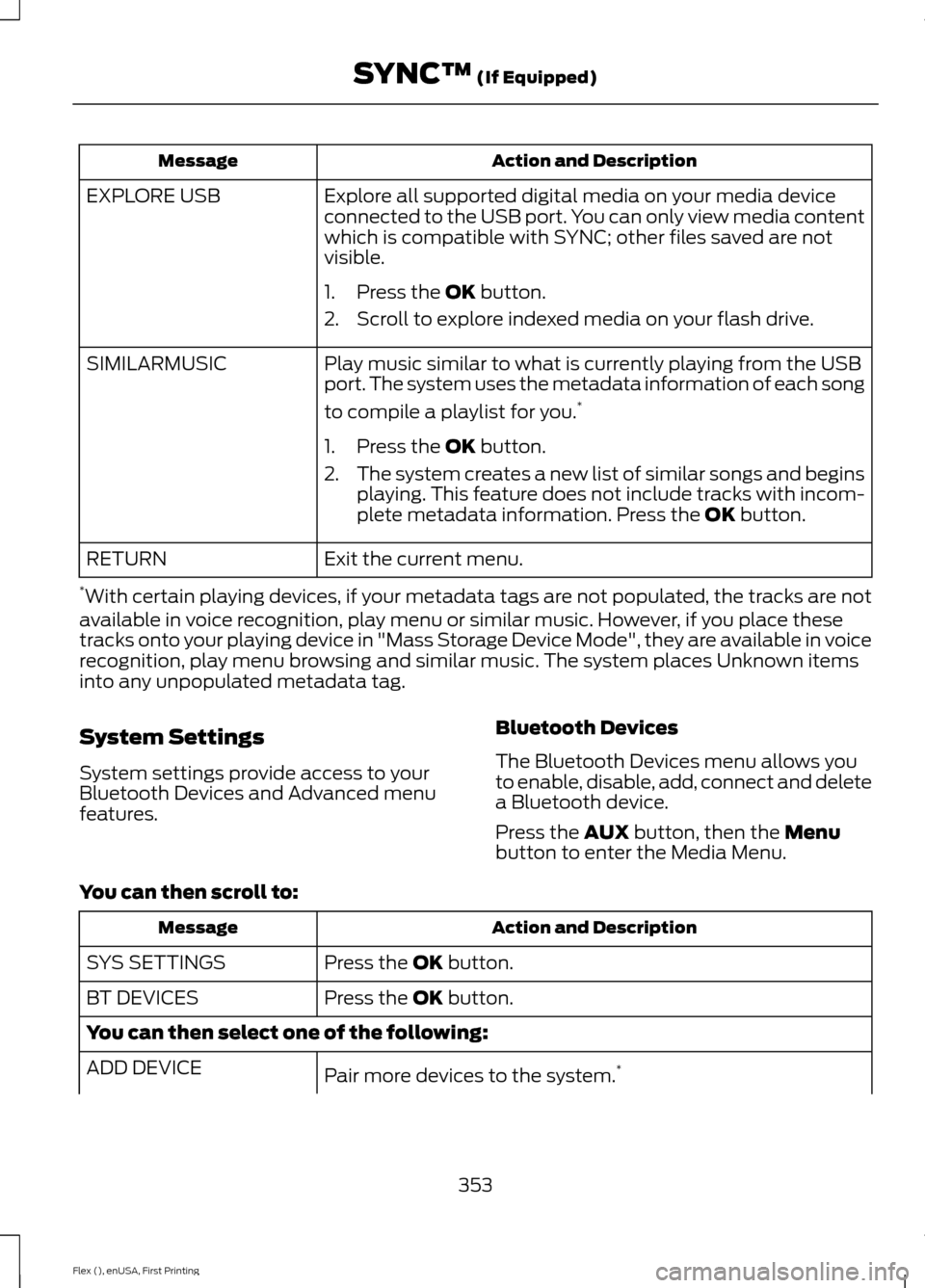
Action and Description
Message
Explore all supported digital media on your media device
connected to the USB port. You can only view media content
which is compatible with SYNC; other files saved are not
visible.
EXPLORE USB
1. Press the OK button.
2. Scroll to explore indexed media on your flash drive.
Play music similar to what is currently playing from the USB
port. The system uses the metadata information of each song
to compile a playlist for you. *
SIMILARMUSIC
1. Press the
OK button.
2. The system creates a new list of similar songs and begins
playing. This feature does not include tracks with incom-
plete metadata information. Press the
OK button.
Exit the current menu.
RETURN
* With certain playing devices, if your metadata tags are not populated, the tracks are not
available in voice recognition, play menu or similar music. However, if you place these
tracks onto your playing device in "Mass Storage Device Mode", they are available in voice
recognition, play menu browsing and similar music. The system places Unknown items
into any unpopulated metadata tag.
System Settings
System settings provide access to your
Bluetooth Devices and Advanced menu
features. Bluetooth Devices
The Bluetooth Devices menu allows you
to enable, disable, add, connect and delete
a Bluetooth device.
Press the
AUX button, then the Menu
button to enter the Media Menu.
You can then scroll to: Action and Description
Message
Press the
OK button.
SYS SETTINGS
Press the
OK button.
BT DEVICES
You can then select one of the following:
Pair more devices to the system. *
ADD DEVICE
353
Flex (), enUSA, First Printing SYNC™
(If Equipped)
Page 357 of 417

Action and Description
Message
1. Press the OK button. When find SYNC appears in the
display, press the OK button again.
2. Follow the directions in your phone's manual to put your phone into discovery mode. A six-digit PIN appears in the
display.
3. When prompted on your phone's six-digit display, enter the PIN.
Connect a previously paired Bluetooth-enabled phone.
Connect BT
1. Press
OK to select and view a list of devices.
2. Scroll until the desired device is chosen and press
OK to
connect the device.
Turn the Bluetooth feature on and off. **
BT ON/OFF
1.Press the OK button and scroll to toggle between on and
off.
2. Make a selection and press the
OK button.
Delete a paired media device.
DEL DEVICE
1. Press the
OK button and scroll to select the device.
2. Press the
OK button to confirm.
Delete all previously paired devices.
DELETE ALL
1. Press the
OK button.
2. Press the
OK button to confirm.
Exit the current menu.
RETURN
* This is a speed-dependent feature. It is only available when your vehicle is traveling at 3
mph (5 km/h) or less.
** Setting Bluetooth to off disconnects all Bluetooth devices and turns off all Bluetooth
features.
Advanced
The Advanced menu allows you to access
and set prompts, languages, defaults and
perform a master reset. Press the
AUX button, then the Menu
button to enter the Media Menu.
354
Flex (), enUSA, First Printing SYNC™
(If Equipped)
Page 409 of 417

Automatic Transmission Fluid
Check.............................................................252
Adding Transmission Fluid ............................ 253
Checking the Transmission Fluid Level................................................................... 252
Autowipers........................................................76
Auxiliary Power Points................................143 110 Volt AC Power Point................................... 143
12 Volt DC Power Point..................................... 143
Locations............................................................... 143
AWD See: All-Wheel Drive......................................... 165
B
Battery See: Changing the 12V Battery..................... 254
Blind Spot Information System...............192
Switching the System Off and On...............194
System Errors....................................................... 193
Using the System................................................ 192
Bonnet Lock See: Opening and Closing the Hood..........243
Booster Seats..................................................25 Types of Booster Seats...................................... 26
Brake Fluid Check........................................253
Brakes................................................................172 General Information........................................... 172
Breaking-In......................................................218
Bulb Specification Chart............................261
C
Cabin Air Filter
................................................122
California Proposition 65..............................11
Capacities and Specifications - 3.5L Duratec
.........................................................302
Specifications..................................................... 302
Capacities and Specifications - 3.5L Ecoboost™.................................................305
Specifications..................................................... 306
Capacities and Specifications
................297
Cargo Nets......................................................201
Car Wash See: Cleaning the Exterior.............................. 264
Center Console..............................................145 Console Refrigerator and Freezer.................145
Second Row Center Console......................... 145Changing a Bulb...........................................258
Brake and Rear Lamps, Rear Direction
Indicator and Reversing Lamp................260
Front Direction Indicator and Front Parking Lamp................................................................. 259
Front Fog Lamp................................................. 260
Headlamp............................................................. 259
Headlamp Low Beam and Headlamp High Beam................................................................. 259
LED Lamps............................................................ 261
License Plate Lamp........................................... 261
Changing a Fuse...........................................242 Fuses....................................................................... 242
Changing a Road Wheel............................291 Dissimilar Spare Wheel and Tire Assembly
Information...................................................... 291
Tire Change Procedure.................................... 292
Changing the 12V Battery.........................254
Changing the Engine Air Filter................263
Changing the Wiper Blades.....................256 Front Wiper Blades........................................... 256
Rear Wiper Blade............................................... 256
Checking MyKey System Status
...............57
Checking the Wiper Blades.....................256
Child Restraint and Seatbelt Maintenance.................................................39
Child Restraint Positioning
..........................27
Child Safety.......................................................15
General Information............................................. 15
Child Safety Locks
.........................................29
Left-Hand Side..................................................... 30
Right-Hand Side................................................... 30
Cleaning Leather Seats.............................268
Cleaning Products
.......................................264
Cleaning the Alloy Wheels.......................268
Cleaning the Engine...................................266
Cleaning the Exterior..................................264 Exterior Chrome Parts...................................... 265
Exterior Plastic Parts........................................ 265
Stripes or Graphics............................................ 265
Underbody........................................................... 265
Cleaning the Instrument Panel and Instrument Cluster Lens
.........................267
Cleaning the Interior....................................267
Cleaning the Windows and Wiper Blades...........................................................266
Clearing All MyKeys
.......................................56
Climate Control..............................................114
406
Flex (), enUSA, First Printing Index