2016 FORD FIESTA engine
[x] Cancel search: enginePage 85 of 363

High Beam Indicator
It will illuminate when you switch
the high beam headlamps on. It
will flash when you use the
headlamp flasher.
Ignition Warning Lamp If it illuminates when you are
driving, this indicates a
malfunction.
Switch off all unnecessary electrical
equipment.
Have your vehicle checked by an
authorized dealer immediately.
Information Indicator It will illuminate when a new
message is stored in the
information and entertainment
display. See Information Messages
(page 88).
Low Fuel Level Warning Lamp If it illuminates, refuel as soon as
possible.
Low Tire Pressure Warning It will illuminate when your tire
pressure is low. If the lamp
remains on with the engine
running or when driving, check your tire
pressure as soon as possible.
It will also illuminate momentarily when
you switch the ignition on to confirm the
lamp is functional. If it does not illuminate
when you switch the ignition on, or begins
to flash at any time, have your vehicle
checked by an authorized dealer. Safety Belt Minder Warning Lamp It will illuminate and a chime will
sound to remind you to fasten
your safety belt. See
Safety
Belt Minder (page 32).
Service Engine Soon If the service engine soon
indicator light stays illuminated
after the engine is started, it
indicates that the On-Board Diagnostics
(OBD-II) system has detected a
malfunction of the vehicle emissions
control system. Refer to On-Board
Diagnostics (OBD-II) in the Fuel and
Refueling chapter for more information
about having your vehicle serviced. See
Emission Control System
(page 120).
If the light is blinking, engine misfire is
occurring which could damage your
catalytic converter. Drive in a moderate
fashion (avoid heavy acceleration and
deceleration) and have your vehicle
serviced immediately. WARNING
Under engine misfire conditions,
excessive exhaust temperatures
could damage the catalytic
converter, the fuel system, interior floor
coverings or other vehicle components,
possibly causing a fire. Have an authorized
dealer service your vehicle immediately. The service engine soon indicator light
illuminates when the ignition is first turned
on prior to engine start to check the bulb
and to indicate whether the vehicle is ready
for Inspection/Maintenance (I/M) testing.
82
Fiesta (CCT) Canada/United States of America, enUSA, First Printing Instrument Cluster
Page 86 of 363

Normally, the service engine soon light will
stay on until the engine is cranked, then
turn itself off if no malfunctions are
present. However, if after 15 seconds the
service engine soon light blinks eight times,
it means that the vehicle is not ready for
I/M testing. See Emission Control
System (page 120).
Shift Indicator
(If Equipped) It will illuminate to inform you
that shifting to a higher gear may
give better fuel economy and
lower CO2 emissions. It will not illuminate
during periods of high acceleration, braking
or when the clutch pedal is pressed.
Stability Control Indicator While driving, it flashes when the
system is operating. After you
switch the ignition on, if it does
not illuminate or illuminates continuously
while driving, this indicates a malfunction.
During a malfunction, the system switches
off. Have your vehicle checked by an
authorized dealer as soon as possible.
Stability Control System Off
Indicator It will illuminate when you switch
the system off. It will go out
when you switch the system
back on or when you switch the ignition
off.
AUDIBLE WARNINGS AND
INDICATORS
Exterior Lamps On
Sounds when you remove the key from the
ignition and open the driver door, and you
have left the headlamps or parking lamps
on. Gearshift Lever Not in Park (P)
Sounds when the driver door is open, the
key is in the ignition and the gearshift lever
is not in park (P).
Key in Ignition
Sounds when the driver door is open and
the key is in the ignition.
Key Outside Vehicle - Vehicles
With Keyless System
Sounds when you close the driver door, the
key is outside your vehicle and the engine
is running. The system does not detect a
passive key inside your vehicle.
Parking Brake On
Sounds when the parking brake is on and
your vehicle is moving. If the warning chime
continues to sound when you release the
parking brake, have the system checked
by an authorized dealer.
Safety Belt Minder
WARNINGS
The safety belt minder remains in
stand-by mode when the front safety
belts have been fastened. It will
sound if either safety belt is unfastened. Do not sit on top of a fastened safety
belt to prevent the safety belt minder
from coming on. The occupant
protection system will only provide
optimum protection when you use the
safety belt correctly. Sounds when your vehicle speed exceeds
the pre-determined limit and the front
safety belts are unfastened. The chime will
stop after a period of time.
83
Fiesta (CCT) Canada/United States of America, enUSA, First Printing Instrument Cluster
Page 93 of 363

Action
Message
indicator
Message
Vehicle not moving. Close.
Amber
Passenger side rear door open
Vehicle not moving. Close.
Amber
Trunk open
Vehicle not moving. Close. See
Opening and Closing the Hood
(page 177).
Amber
Hood open
Engine Immobilizer Action
Message
indicator
Message
Have the system checked by an
authorized dealer as soon as
possible.
Red
Immobilizer malfunction Service
now
Hill Start Assist Action
Message
indicator
Message
See
Hill Start Assist (page 129).
Amber
Hill start assist not available
Keyless System Action
Message
indicator
Message
See
Keyless Entry (page 59).
Amber
Key not detected
See
Keyless Entry (page 59).
Amber
Key outside car
See
Remote Control (page 45).
Amber
Key Battery low Replace battery
See
Keyless Starting (page 111).
Amber
Switch ign. off Press ENGINE Start/
Stop button
See
Keyless Starting (page 111).
-
Press brake to start
See
Keyless Starting (page 111).
-
Press clutch to start
See
Keyless Entry (page 59).
-
Close trunk or use spare key
90
Fiesta (CCT) Canada/United States of America, enUSA, First Printing Information Displays
Page 94 of 363

Lighting
Action
Message
indicator
Message
See Changing a Bulb (page 195).
-
Left indicator malfunction Change
bulb
See
Changing a Bulb (page 195).
-
Right indicator malfunction Change
bulb
Maintenance Action
Message
indicator
Message
See Brake Fluid Check (page 186).
Red
Brake fluid level low Service now
Have the system checked by an
authorized dealer immediately.
Red
Brake system malfunction Stop
safely
Have the system checked by an
authorized dealer as soon as
possible.
Amber
Engine malfunction Service now
Have the system checked by an
authorized dealer.
-
Engine oil change due Service
required
Your vehicle is still in transport
mode or factory mode. Some
features may not be available. See
an authorized dealer.
-
Paused
MyKey Action
Message
indicator
Message
Displays when a MyKey is in use and
the MyKey speed limit is on and your
vehicle speed is approaching 80
mph (130 km/h).
Amber
MyKey Vehicle at top speed
Displays when MyKey is active.
-
MyKey active Drive safely
Displays when starting your vehicle
and MyKey is in use and the MyKey
speed limit is on.
-
MyKey Speed limited to
91
Fiesta (CCT) Canada/United States of America, enUSA, First Printing Information Displays
Page 96 of 363

Stability Control
Action
Message
indicator
Message
See Using Stability Control (page
135).
Amber
Electronic stability control off
Have the system checked by an
authorized dealer as soon as
possible.
Amber
ABS malfunction Service Now
See Using Stability Control (page
135
).
-
Traction control off
See Using Stability Control (page
135
).
-
Sport mode
See Using Stability Control (page
135
).
-
Electronic stability control off
Starting and Stopping the Engine Action
Message
indicator
Message
See
Starting and Stopping the
Engine (page 111).
-
Press brake to start
See
Starting and Stopping the
Engine (page 111).
-
Press clutch to start
See
Starting and Stopping the
Engine (page 111).
-
Press brake and clutch to start
See
Starting and Stopping the
Engine (page 111).
-
Cranking time exceeded
Steering Action
Message
indicator
Message
Full steering will be maintained but
you will need to exert greater force
on the steering wheel. Have the
system checked by an authorized
dealer as soon as possible.
Amber
Steering assist fault Service
required
93
Fiesta (CCT) Canada/United States of America, enUSA, First Printing Information Displays
Page 97 of 363

Tire pressure monitoring system
Action
Message
indicator
Message
The pressure in one or more tires
has dropped. Check as soon as
possible.
Amber
Check tire pressures
Permanent malfunction. Have your
vehicle checked by an authorized
dealer.
Amber
Tire Pressure Monitor Fault
Transmission Action
Message
indicator
Message
Have the system checked by an
authorized dealer immediately.
Red
Transmission malfunction Service
now
Under certain driving conditions it is
possible that the clutches in the
transmission can overheat. In these
circumstances it is necessary to
press the brake pedal and stop your
vehicle to prevent damage to the
Red
Transmission overtemperature Stop
safely
transmission. Move the transmis-
sion selector lever to position N or
P and apply the parking brake until
the transmission has cooled and the
message disappears from the
display.
Have the system checked by an
authorized dealer immediately.
Red
Use brake Stop safely
See
Automatic Transmission
(page 126). See Starting and
Stopping the Engine (page 111).
-
Vehicle not in Park Select P
See
Automatic Transmission
(page 126). See Starting and
Stopping the Engine (page 111).
-
Select N or P to start
See
Starting and Stopping the
Engine (page 111).
-
Press brake to start
94
Fiesta (CCT) Canada/United States of America, enUSA, First Printing Information Displays
Page 98 of 363

Action
Message
indicator
Message
See Automatic Transmission
(page 126). See Starting and
Stopping the Engine (page 111).
-
Select N to start
See
Automatic Transmission
(page 126). See Starting and
Stopping the Engine (page 111).
-
Door open Apply brake
Transmission is getting hot. Stop to
let it cool or speed up.
-
Transmission hot Stop or speed up
Transmission is hot. Wait as needed
to let it cool.
-
Transmission hot Wait...
Your vehicle is ready to drive.
-
Transmission ready
See
Automatic Transmission
(page 126). See Starting and
Stopping the Engine (page 111).
-
Press brake to unlock gearshift lever
See
Automatic Transmission
(page 126). See Starting and
Stopping the Engine (page 111).
-
Gearshift lever unlocked
See
Automatic Transmission
(page 126). See Starting and
Stopping the Engine (page 111).
-
Transmission not in Park
95
Fiesta (CCT) Canada/United States of America, enUSA, First Printing Information Displays
Page 102 of 363
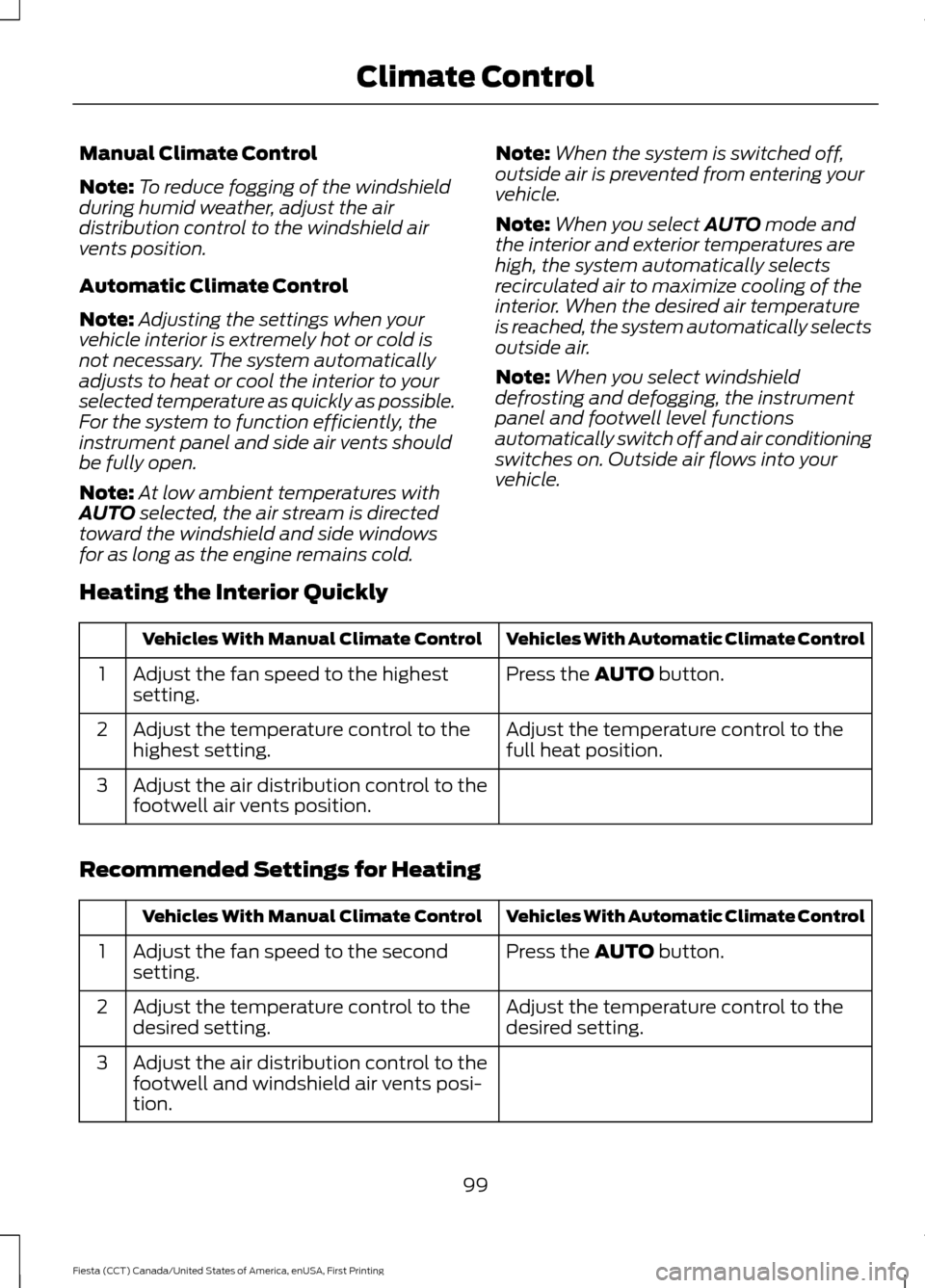
Manual Climate Control
Note:
To reduce fogging of the windshield
during humid weather, adjust the air
distribution control to the windshield air
vents position.
Automatic Climate Control
Note: Adjusting the settings when your
vehicle interior is extremely hot or cold is
not necessary. The system automatically
adjusts to heat or cool the interior to your
selected temperature as quickly as possible.
For the system to function efficiently, the
instrument panel and side air vents should
be fully open.
Note: At low ambient temperatures with
AUTO selected, the air stream is directed
toward the windshield and side windows
for as long as the engine remains cold. Note:
When the system is switched off,
outside air is prevented from entering your
vehicle.
Note: When you select
AUTO mode and
the interior and exterior temperatures are
high, the system automatically selects
recirculated air to maximize cooling of the
interior. When the desired air temperature
is reached, the system automatically selects
outside air.
Note: When you select windshield
defrosting and defogging, the instrument
panel and footwell level functions
automatically switch off and air conditioning
switches on. Outside air flows into your
vehicle.
Heating the Interior Quickly Vehicles With Automatic Climate Control
Vehicles With Manual Climate Control
Press the
AUTO button.
Adjust the fan speed to the highest
setting.
1
Adjust the temperature control to the
full heat position.
Adjust the temperature control to the
highest setting.
2
Adjust the air distribution control to the
footwell air vents position.
3
Recommended Settings for Heating Vehicles With Automatic Climate Control
Vehicles With Manual Climate Control
Press the
AUTO button.
Adjust the fan speed to the second
setting.
1
Adjust the temperature control to the
desired setting.
Adjust the temperature control to the
desired setting.
2
Adjust the air distribution control to the
footwell and windshield air vents posi-
tion.
3
99
Fiesta (CCT) Canada/United States of America, enUSA, First Printing Climate Control