2016 FORD F450 SUPER DUTY reset
[x] Cancel search: resetPage 407 of 507
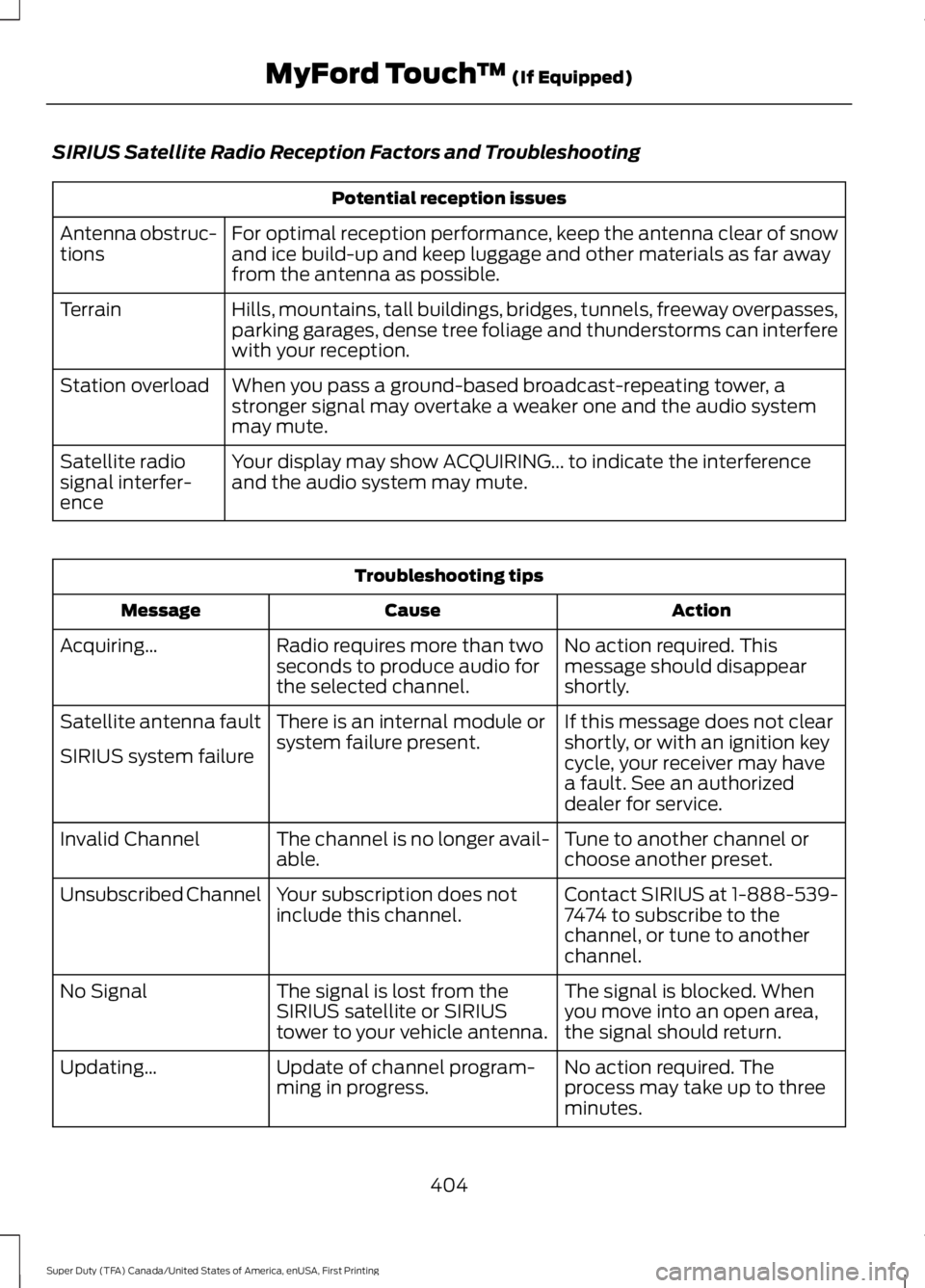
SIRIUS Satellite Radio Reception Factors and Troubleshooting
Potential reception issues
For optimal reception performance, keep the antenna clear of snowand ice build-up and keep luggage and other materials as far awayfrom the antenna as possible.
Antenna obstruc-tions
Hills, mountains, tall buildings, bridges, tunnels, freeway overpasses,parking garages, dense tree foliage and thunderstorms can interferewith your reception.
Terrain
When you pass a ground-based broadcast-repeating tower, astronger signal may overtake a weaker one and the audio systemmay mute.
Station overload
Your display may show ACQUIRING... to indicate the interferenceand the audio system may mute.Satellite radiosignal interfer-ence
Troubleshooting tips
ActionCauseMessage
No action required. Thismessage should disappearshortly.
Radio requires more than twoseconds to produce audio forthe selected channel.
Acquiring…
If this message does not clearshortly, or with an ignition keycycle, your receiver may havea fault. See an authorizeddealer for service.
There is an internal module orsystem failure present.Satellite antenna fault
SIRIUS system failure
Tune to another channel orchoose another preset.The channel is no longer avail-able.Invalid Channel
Contact SIRIUS at 1-888-539-7474 to subscribe to thechannel, or tune to anotherchannel.
Your subscription does notinclude this channel.Unsubscribed Channel
The signal is blocked. Whenyou move into an open area,the signal should return.
The signal is lost from theSIRIUS satellite or SIRIUStower to your vehicle antenna.
No Signal
No action required. Theprocess may take up to threeminutes.
Update of channel program-ming in progress.Updating…
404
Super Duty (TFA) Canada/United States of America, enUSA, First Printing
MyFord Touch™ (If Equipped)
Page 444 of 507
Websites
www.SYNCMyRide.com
Websites
www.SYNCMyRide.ca
www.syncmaroute.ca
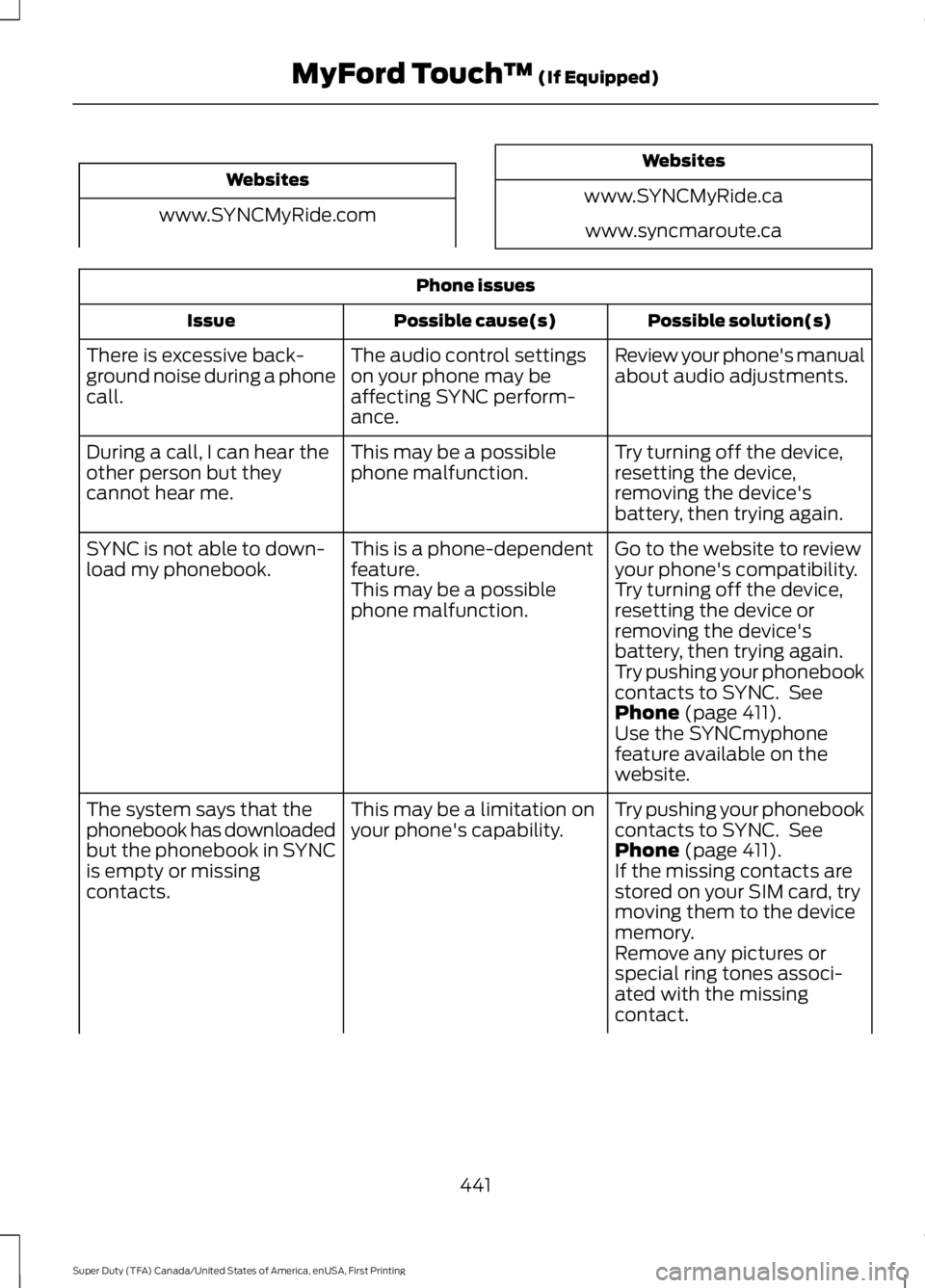
Phone issues
Possible solution(s)Possible cause(s)Issue
Review your phone's manualabout audio adjustments.The audio control settingson your phone may beaffecting SYNC perform-ance.
There is excessive back-ground noise during a phonecall.
Try turning off the device,resetting the device,removing the device'sbattery, then trying again.
This may be a possiblephone malfunction.During a call, I can hear theother person but theycannot hear me.
Go to the website to reviewyour phone's compatibility.This is a phone-dependentfeature.SYNC is not able to down-load my phonebook.Try turning off the device,resetting the device orremoving the device'sbattery, then trying again.
This may be a possiblephone malfunction.
Try pushing your phonebookcontacts to SYNC. SeePhone (page 411).Use the SYNCmyphonefeature available on thewebsite.
Try pushing your phonebookcontacts to SYNC. SeePhone (page 411).
This may be a limitation onyour phone's capability.The system says that thephonebook has downloadedbut the phonebook in SYNCis empty or missingcontacts.If the missing contacts arestored on your SIM card, trymoving them to the devicememory.Remove any pictures orspecial ring tones associ-ated with the missingcontact.
441
Super Duty (TFA) Canada/United States of America, enUSA, First Printing
MyFord Touch™ (If Equipped)
Page 445 of 507
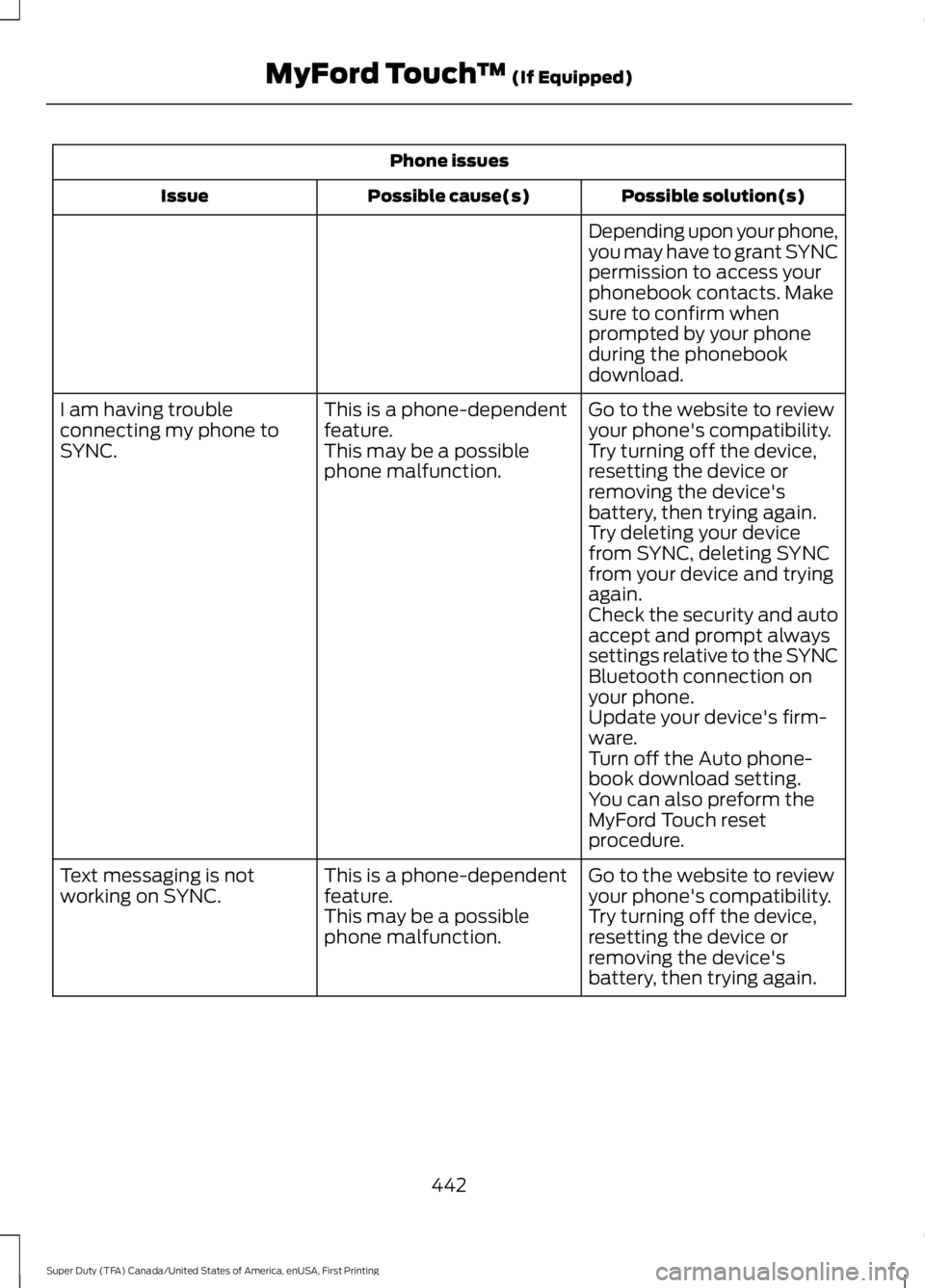
Phone issues
Possible solution(s)Possible cause(s)Issue
Depending upon your phone,you may have to grant SYNCpermission to access yourphonebook contacts. Makesure to confirm whenprompted by your phoneduring the phonebookdownload.
Go to the website to reviewyour phone's compatibility.This is a phone-dependentfeature.I am having troubleconnecting my phone toSYNC.Try turning off the device,resetting the device orremoving the device'sbattery, then trying again.
This may be a possiblephone malfunction.
Try deleting your devicefrom SYNC, deleting SYNCfrom your device and tryingagain.Check the security and autoaccept and prompt alwayssettings relative to the SYNCBluetooth connection onyour phone.Update your device's firm-ware.Turn off the Auto phone-book download setting.You can also preform theMyFord Touch resetprocedure.
Go to the website to reviewyour phone's compatibility.This is a phone-dependentfeature.Text messaging is notworking on SYNC.Try turning off the device,resetting the device orremoving the device'sbattery, then trying again.
This may be a possiblephone malfunction.
442
Super Duty (TFA) Canada/United States of America, enUSA, First Printing
MyFord Touch™ (If Equipped)
Page 446 of 507
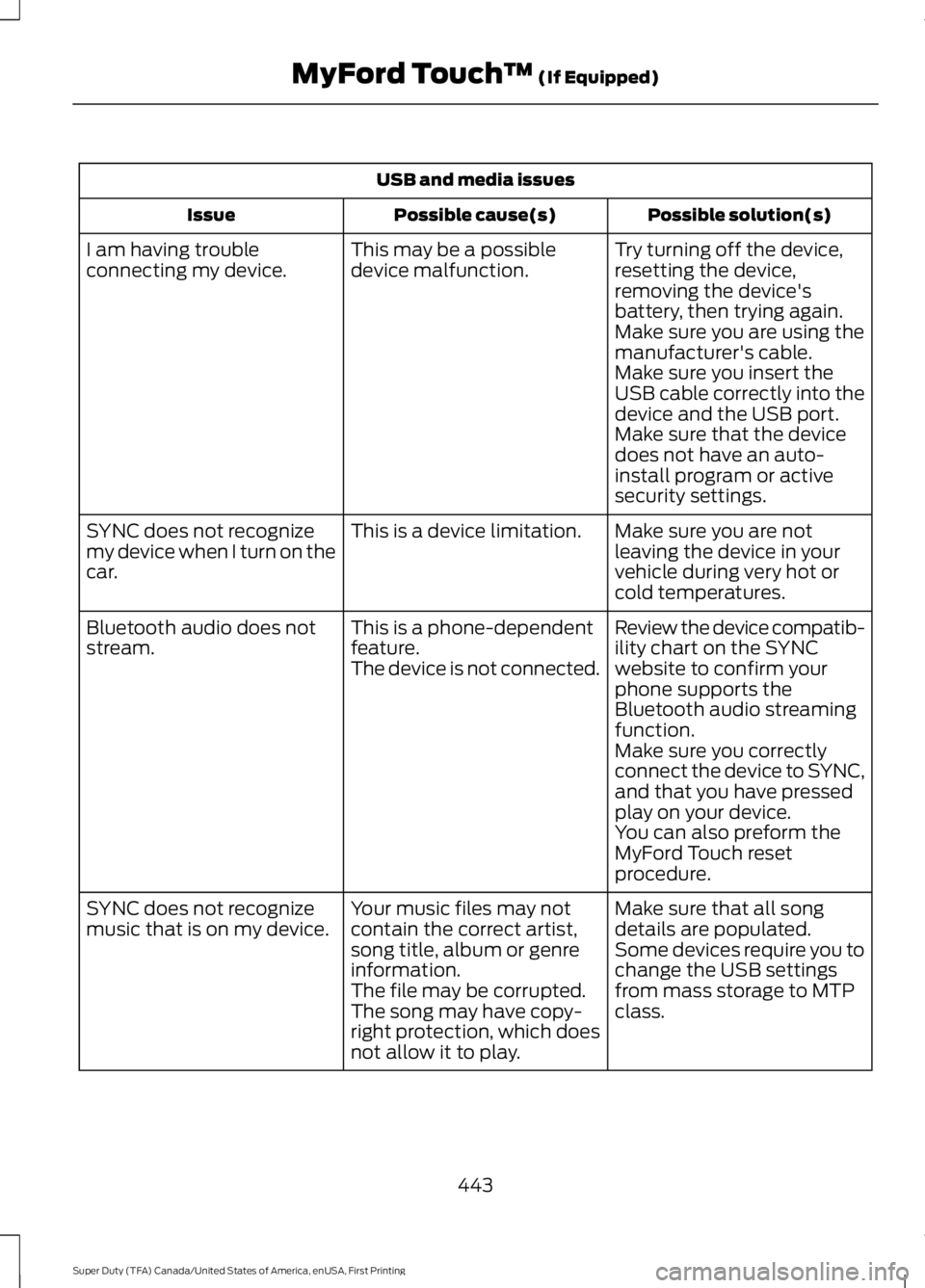
USB and media issues
Possible solution(s)Possible cause(s)Issue
Try turning off the device,resetting the device,removing the device'sbattery, then trying again.
This may be a possibledevice malfunction.I am having troubleconnecting my device.
Make sure you are using themanufacturer's cable.Make sure you insert theUSB cable correctly into thedevice and the USB port.Make sure that the devicedoes not have an auto-install program or activesecurity settings.
Make sure you are notleaving the device in yourvehicle during very hot orcold temperatures.
This is a device limitation.SYNC does not recognizemy device when I turn on thecar.
Review the device compatib-ility chart on the SYNCwebsite to confirm yourphone supports theBluetooth audio streamingfunction.
This is a phone-dependentfeature.The device is not connected.
Bluetooth audio does notstream.
Make sure you correctlyconnect the device to SYNC,and that you have pressedplay on your device.You can also preform theMyFord Touch resetprocedure.
Make sure that all songdetails are populated.Your music files may notcontain the correct artist,song title, album or genreinformation.
SYNC does not recognizemusic that is on my device.Some devices require you tochange the USB settingsfrom mass storage to MTPclass.The file may be corrupted.The song may have copy-right protection, which doesnot allow it to play.
443
Super Duty (TFA) Canada/United States of America, enUSA, First Printing
MyFord Touch™ (If Equipped)
Page 449 of 507
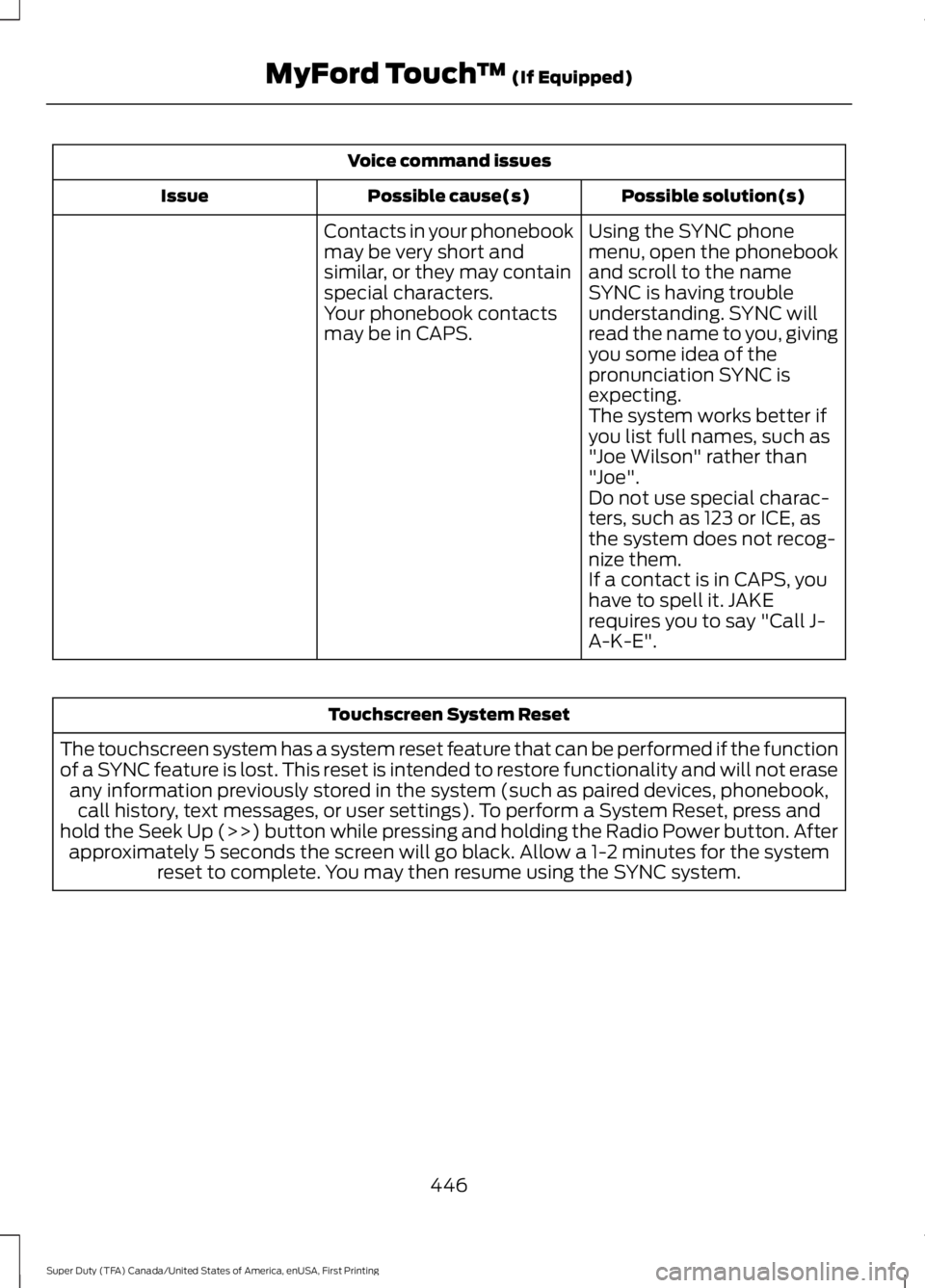
Voice command issues
Possible solution(s)Possible cause(s)Issue
Contacts in your phonebookmay be very short andsimilar, or they may containspecial characters.
Using the SYNC phonemenu, open the phonebookand scroll to the nameSYNC is having troubleunderstanding. SYNC willread the name to you, givingyou some idea of thepronunciation SYNC isexpecting.
Your phonebook contactsmay be in CAPS.
The system works better ifyou list full names, such as"Joe Wilson" rather than"Joe".Do not use special charac-ters, such as 123 or ICE, asthe system does not recog-nize them.If a contact is in CAPS, youhave to spell it. JAKErequires you to say "Call J-A-K-E".
Touchscreen System Reset
The touchscreen system has a system reset feature that can be performed if the functionof a SYNC feature is lost. This reset is intended to restore functionality and will not eraseany information previously stored in the system (such as paired devices, phonebook,call history, text messages, or user settings). To perform a System Reset, press andhold the Seek Up (>>) button while pressing and holding the Radio Power button. Afterapproximately 5 seconds the screen will go black. Allow a 1-2 minutes for the systemreset to complete. You may then resume using the SYNC system.
446
Super Duty (TFA) Canada/United States of America, enUSA, First Printing
MyFord Touch™ (If Equipped)
Page 503 of 507
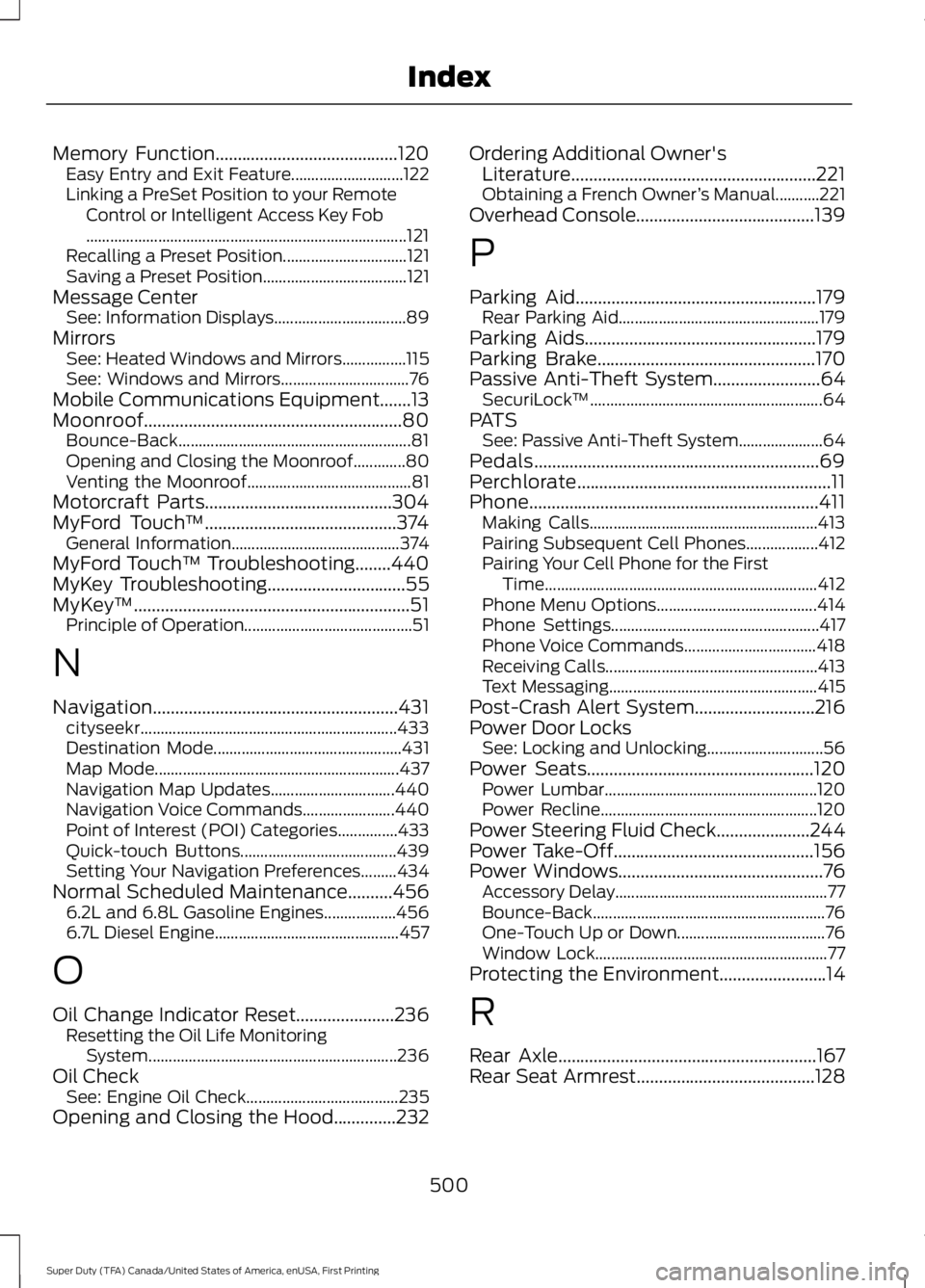
Memory Function.........................................120Easy Entry and Exit Feature............................122Linking a PreSet Position to your RemoteControl or Intelligent Access Key Fob................................................................................121Recalling a Preset Position...............................121Saving a Preset Position....................................121Message CenterSee: Information Displays.................................89MirrorsSee: Heated Windows and Mirrors................115See: Windows and Mirrors................................76Mobile Communications Equipment.......13Moonroof..........................................................80Bounce-Back..........................................................81Opening and Closing the Moonroof.............80Venting the Moonroof.........................................81Motorcraft Parts..........................................304MyFord Touch™...........................................374General Information..........................................374MyFord Touch™ Troubleshooting........440MyKey Troubleshooting...............................55MyKey™..............................................................51Principle of Operation..........................................51
N
Navigation.......................................................431cityseekr................................................................433Destination Mode...............................................431Map Mode.............................................................437Navigation Map Updates...............................440Navigation Voice Commands.......................440Point of Interest (POI) Categories...............433Quick-touch Buttons.......................................439Setting Your Navigation Preferences.........434Normal Scheduled Maintenance..........4566.2L and 6.8L Gasoline Engines..................4566.7L Diesel Engine..............................................457
O
Oil Change Indicator Reset......................236Resetting the Oil Life MonitoringSystem..............................................................236Oil CheckSee: Engine Oil Check......................................235Opening and Closing the Hood..............232
Ordering Additional Owner'sLiterature.......................................................221Obtaining a French Owner’s Manual...........221Overhead Console........................................139
P
Parking Aid......................................................179Rear Parking Aid..................................................179Parking Aids....................................................179Parking Brake.................................................170Passive Anti-Theft System........................64SecuriLock™..........................................................64PATSSee: Passive Anti-Theft System.....................64Pedals................................................................69Perchlorate.........................................................11Phone.................................................................411Making Calls.........................................................413Pairing Subsequent Cell Phones..................412Pairing Your Cell Phone for the FirstTime....................................................................412Phone Menu Options........................................414Phone Settings....................................................417Phone Voice Commands.................................418Receiving Calls.....................................................413Text Messaging....................................................415Post-Crash Alert System...........................216Power Door LocksSee: Locking and Unlocking.............................56Power Seats...................................................120Power Lumbar.....................................................120Power Recline......................................................120Power Steering Fluid Check.....................244Power Take-Off.............................................156Power Windows..............................................76Accessory Delay.....................................................77Bounce-Back..........................................................76One-Touch Up or Down.....................................76Window Lock..........................................................77Protecting the Environment........................14
R
Rear Axle..........................................................167Rear Seat Armrest........................................128
500
Super Duty (TFA) Canada/United States of America, enUSA, First Printing
Index