2016 FORD F250 SUPER DUTY reset
[x] Cancel search: resetPage 390 of 507
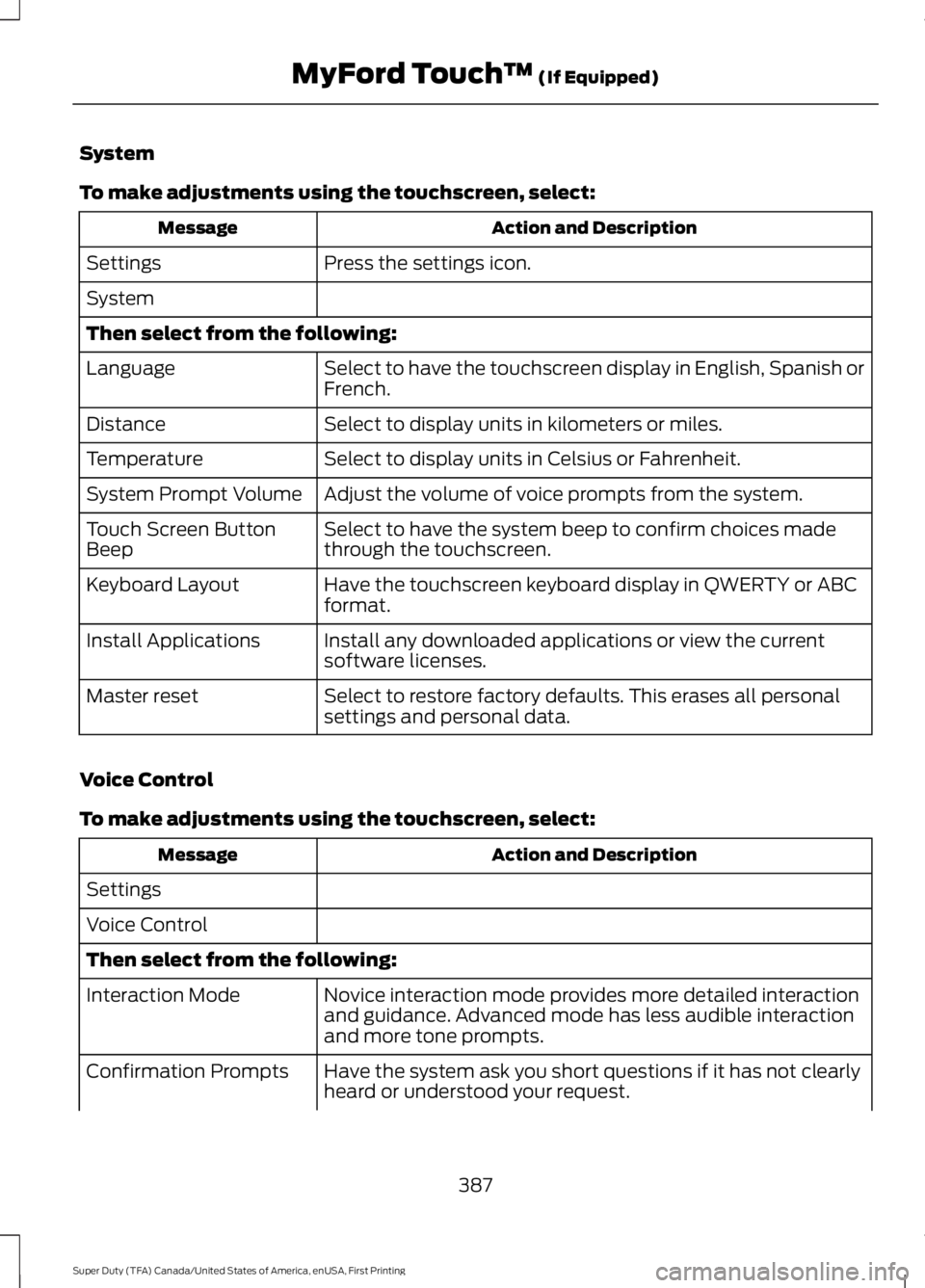
System
To make adjustments using the touchscreen, select:
Action and DescriptionMessage
Press the settings icon.Settings
System
Then select from the following:
Select to have the touchscreen display in English, Spanish orFrench.Language
Select to display units in kilometers or miles.Distance
Select to display units in Celsius or Fahrenheit.Temperature
Adjust the volume of voice prompts from the system.System Prompt Volume
Select to have the system beep to confirm choices madethrough the touchscreen.Touch Screen ButtonBeep
Have the touchscreen keyboard display in QWERTY or ABCformat.Keyboard Layout
Install any downloaded applications or view the currentsoftware licenses.Install Applications
Select to restore factory defaults. This erases all personalsettings and personal data.Master reset
Voice Control
To make adjustments using the touchscreen, select:
Action and DescriptionMessage
Settings
Voice Control
Then select from the following:
Novice interaction mode provides more detailed interactionand guidance. Advanced mode has less audible interactionand more tone prompts.
Interaction Mode
Have the system ask you short questions if it has not clearlyheard or understood your request.Confirmation Prompts
387
Super Duty (TFA) Canada/United States of America, enUSA, First Printing
MyFord Touch™ (If Equipped)
Page 398 of 507

ENTERTAINMENT
Message and DescriptionMessage
AMA
FMB
SIRIUSC
CDD
USBE
Touch this button to scroll down for more options, for exampleSD Card and USBF
These buttons change with the media mode you are in.G
Radio memory presets.H
Note:Some features may not be available in your area. Contact an authorized dealer formore information.
You can access these options using thetouchscreen or voice commands.AM/FM Radio
The following controls areavailable for AM/FM radio
395
Super Duty (TFA) Canada/United States of America, enUSA, First Printing
MyFord Touch™ (If Equipped)A
B
C
D
E
F
G
H
E161892 E142611
Page 399 of 507

Action and DescriptionItem
Touch either tab to listen to the radio. To change between AM and FMpresets, just touch the AM or FM tab.AM
FM
Save a station by pressing and holding one of the memory preset areas.There is a brief mute while the radio saves the station. Sound returnswhen finished.
Presets
Touch this button to turn HD Radio on. The light on the button illumin-ates when the feature is on. HD Radio allows you to receive radiobroadcasts digitally, where available, providing free, crystal-clear sound.See HD Radio information later in this chapter.
HD Radio
Touch this button to make adjustments to your audio settings.Options
Touch this button to go to the next strong AM or FM radio station. Thelight on the button illuminates when the feature is on.Scan
Touch this button to manually enter the desired station number. TouchEnter when you are done.Direct Tune
Options
You can make adjustments to the following options:
Action and DescriptionMenu Item
Touch this button to adjust settings for:Sound Settings
Bass
Midrange
Treble
Set Balance and Fade
DSP
Occupancy Mode
Speed Compensated Volume
This allows you to select a category of music you would like to searchfor. You can then choose to either seek or scan for the stations playingthat category.
Set PTY forSeek / Scan
396
Super Duty (TFA) Canada/United States of America, enUSA, First Printing
MyFord Touch™ (If Equipped)
Page 401 of 507
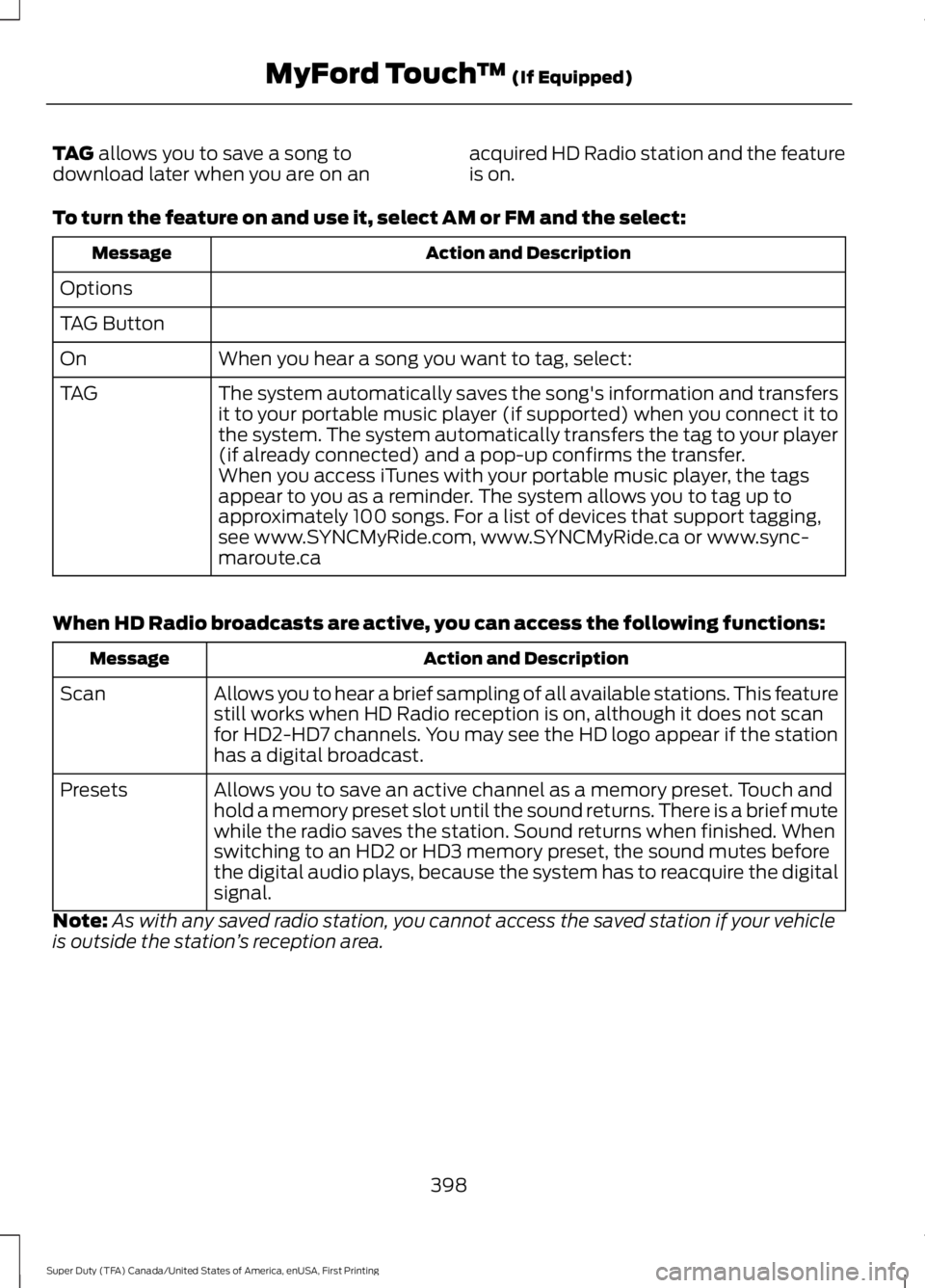
TAG allows you to save a song todownload later when you are on anacquired HD Radio station and the featureis on.
To turn the feature on and use it, select AM or FM and the select:
Action and DescriptionMessage
Options
TAG Button
When you hear a song you want to tag, select:On
The system automatically saves the song's information and transfersit to your portable music player (if supported) when you connect it tothe system. The system automatically transfers the tag to your player(if already connected) and a pop-up confirms the transfer.
TAG
When you access iTunes with your portable music player, the tagsappear to you as a reminder. The system allows you to tag up toapproximately 100 songs. For a list of devices that support tagging,see www.SYNCMyRide.com, www.SYNCMyRide.ca or www.sync-maroute.ca
When HD Radio broadcasts are active, you can access the following functions:
Action and DescriptionMessage
Allows you to hear a brief sampling of all available stations. This featurestill works when HD Radio reception is on, although it does not scanfor HD2-HD7 channels. You may see the HD logo appear if the stationhas a digital broadcast.
Scan
Allows you to save an active channel as a memory preset. Touch andhold a memory preset slot until the sound returns. There is a brief mutewhile the radio saves the station. Sound returns when finished. Whenswitching to an HD2 or HD3 memory preset, the sound mutes beforethe digital audio plays, because the system has to reacquire the digitalsignal.
Presets
Note:As with any saved radio station, you cannot access the saved station if your vehicleis outside the station’s reception area.
398
Super Duty (TFA) Canada/United States of America, enUSA, First Printing
MyFord Touch™ (If Equipped)
Page 402 of 507
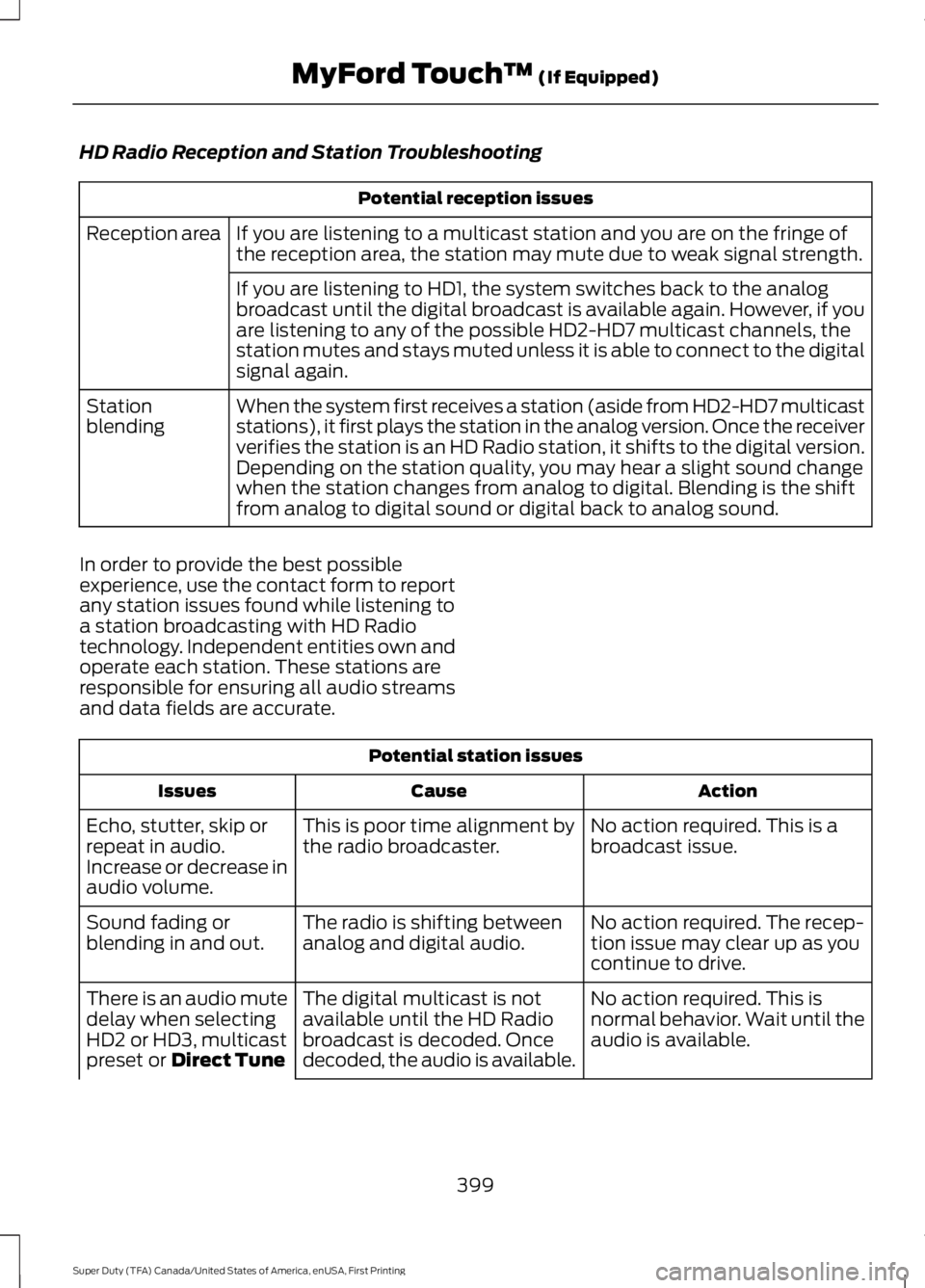
HD Radio Reception and Station Troubleshooting
Potential reception issues
If you are listening to a multicast station and you are on the fringe ofthe reception area, the station may mute due to weak signal strength.Reception area
If you are listening to HD1, the system switches back to the analogbroadcast until the digital broadcast is available again. However, if youare listening to any of the possible HD2-HD7 multicast channels, thestation mutes and stays muted unless it is able to connect to the digitalsignal again.
When the system first receives a station (aside from HD2-HD7 multicaststations), it first plays the station in the analog version. Once the receiververifies the station is an HD Radio station, it shifts to the digital version.Depending on the station quality, you may hear a slight sound changewhen the station changes from analog to digital. Blending is the shiftfrom analog to digital sound or digital back to analog sound.
Stationblending
In order to provide the best possibleexperience, use the contact form to reportany station issues found while listening toa station broadcasting with HD Radiotechnology. Independent entities own andoperate each station. These stations areresponsible for ensuring all audio streamsand data fields are accurate.
Potential station issues
ActionCauseIssues
No action required. This is abroadcast issue.This is poor time alignment bythe radio broadcaster.Echo, stutter, skip orrepeat in audio.Increase or decrease inaudio volume.
No action required. The recep-tion issue may clear up as youcontinue to drive.
The radio is shifting betweenanalog and digital audio.Sound fading orblending in and out.
No action required. This isnormal behavior. Wait until theaudio is available.
The digital multicast is notavailable until the HD Radiobroadcast is decoded. Oncedecoded, the audio is available.
There is an audio mutedelay when selectingHD2 or HD3, multicastpreset or Direct Tune
399
Super Duty (TFA) Canada/United States of America, enUSA, First Printing
MyFord Touch™ (If Equipped)
Page 403 of 507

Potential station issues
ActionCauseIssues
No action required. The stationis not available in your currentlocation.
The previously stored multicastpreset or direct tune is notavailable in your current recep-tion area.
Cannot access HD2 orHD3 multicast channelwhen recalling a presetor from a direct tune.
Fill out the station issue format http://www.ibiquity.com/automotive/report_radio_station_experi-ences
Data service issue by the radiobroadcaster.Text information doesnot match currentlyplaying audio.
Fill out the station issue format http://www.ibiquity.com/automotive/report_radio_station_experi-ences
Data service issue by the radiobroadcaster.There is no textinformation shown forcurrently selectedfrequency.
No action required. This isnormal behavior.This selection disables HD2-HD7 channel search.HD2-HD7 stations notfound when you pressScan
HD Radio Technology manufactured underlicense from iBiquity Digital Corp. U.S. andforeign patents. HD Radio and the HD andHD Radio logos are proprietary trademarksof iBiquity Digital Corp. Ford MotorCompany and iBiquity Digital Corp. are notresponsible for the content sent using HDRadio technology. Content may bechanged, added or deleted at any time atthe station owner's discretion.
Radio Voice Commands
Press the voice button and when prompted say:
Action and DescriptionVoice command
Radio
Then you can say a command similar to the following:
Say a frequency or preset.FM
Off
Help
400
Super Duty (TFA) Canada/United States of America, enUSA, First Printing
MyFord Touch™ (If Equipped)E142599
Page 404 of 507
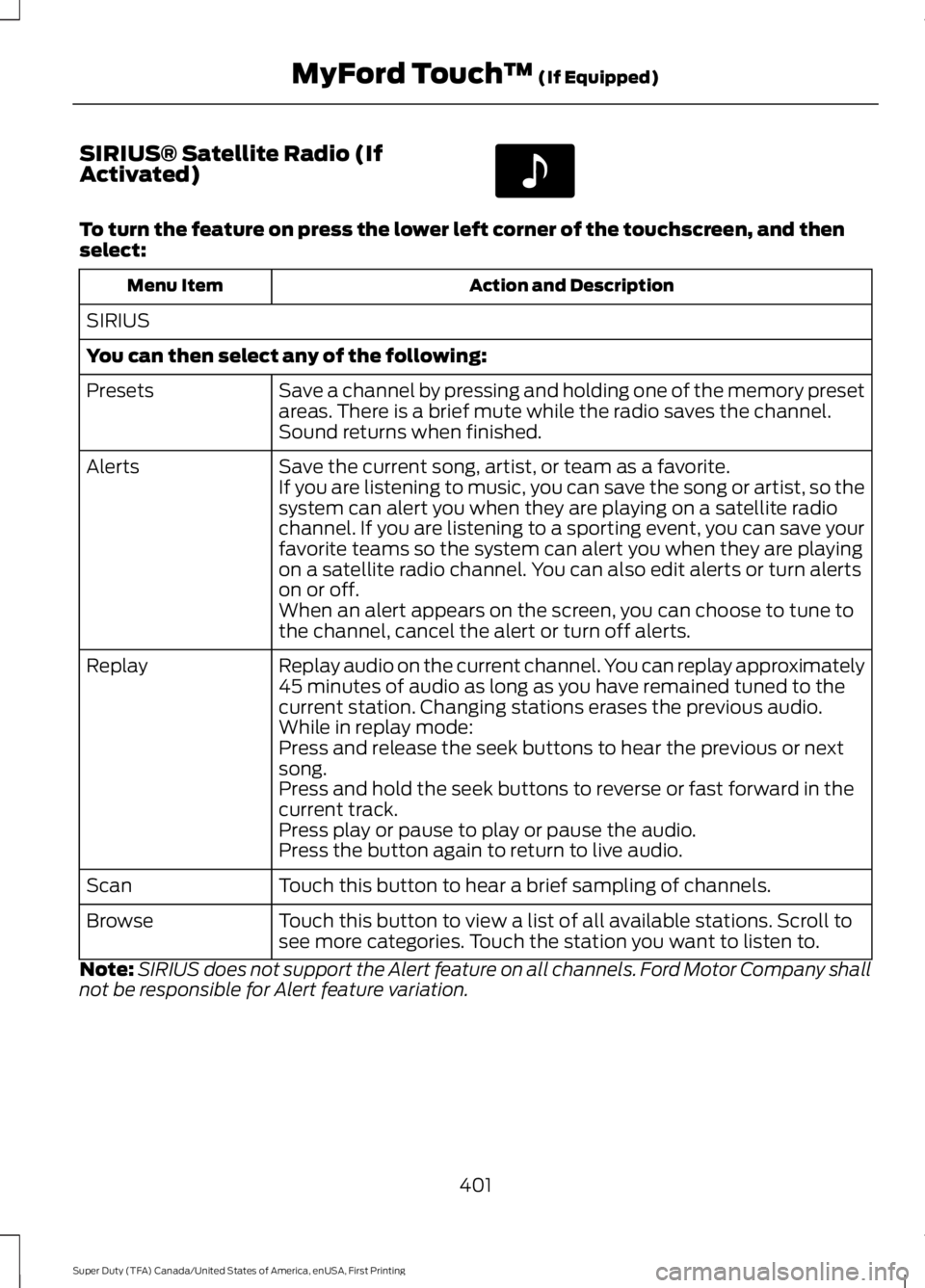
SIRIUS® Satellite Radio (IfActivated)
To turn the feature on press the lower left corner of the touchscreen, and thenselect:
Action and DescriptionMenu Item
SIRIUS
You can then select any of the following:
Save a channel by pressing and holding one of the memory presetareas. There is a brief mute while the radio saves the channel.Sound returns when finished.
Presets
Save the current song, artist, or team as a favorite.AlertsIf you are listening to music, you can save the song or artist, so thesystem can alert you when they are playing on a satellite radiochannel. If you are listening to a sporting event, you can save yourfavorite teams so the system can alert you when they are playingon a satellite radio channel. You can also edit alerts or turn alertson or off.When an alert appears on the screen, you can choose to tune tothe channel, cancel the alert or turn off alerts.
Replay audio on the current channel. You can replay approximately45 minutes of audio as long as you have remained tuned to thecurrent station. Changing stations erases the previous audio.
Replay
While in replay mode:Press and release the seek buttons to hear the previous or nextsong.Press and hold the seek buttons to reverse or fast forward in thecurrent track.Press play or pause to play or pause the audio.Press the button again to return to live audio.
Touch this button to hear a brief sampling of channels.Scan
Touch this button to view a list of all available stations. Scroll tosee more categories. Touch the station you want to listen to.Browse
Note:SIRIUS does not support the Alert feature on all channels. Ford Motor Company shallnot be responsible for Alert feature variation.
401
Super Duty (TFA) Canada/United States of America, enUSA, First Printing
MyFord Touch™ (If Equipped)E142611
Page 405 of 507
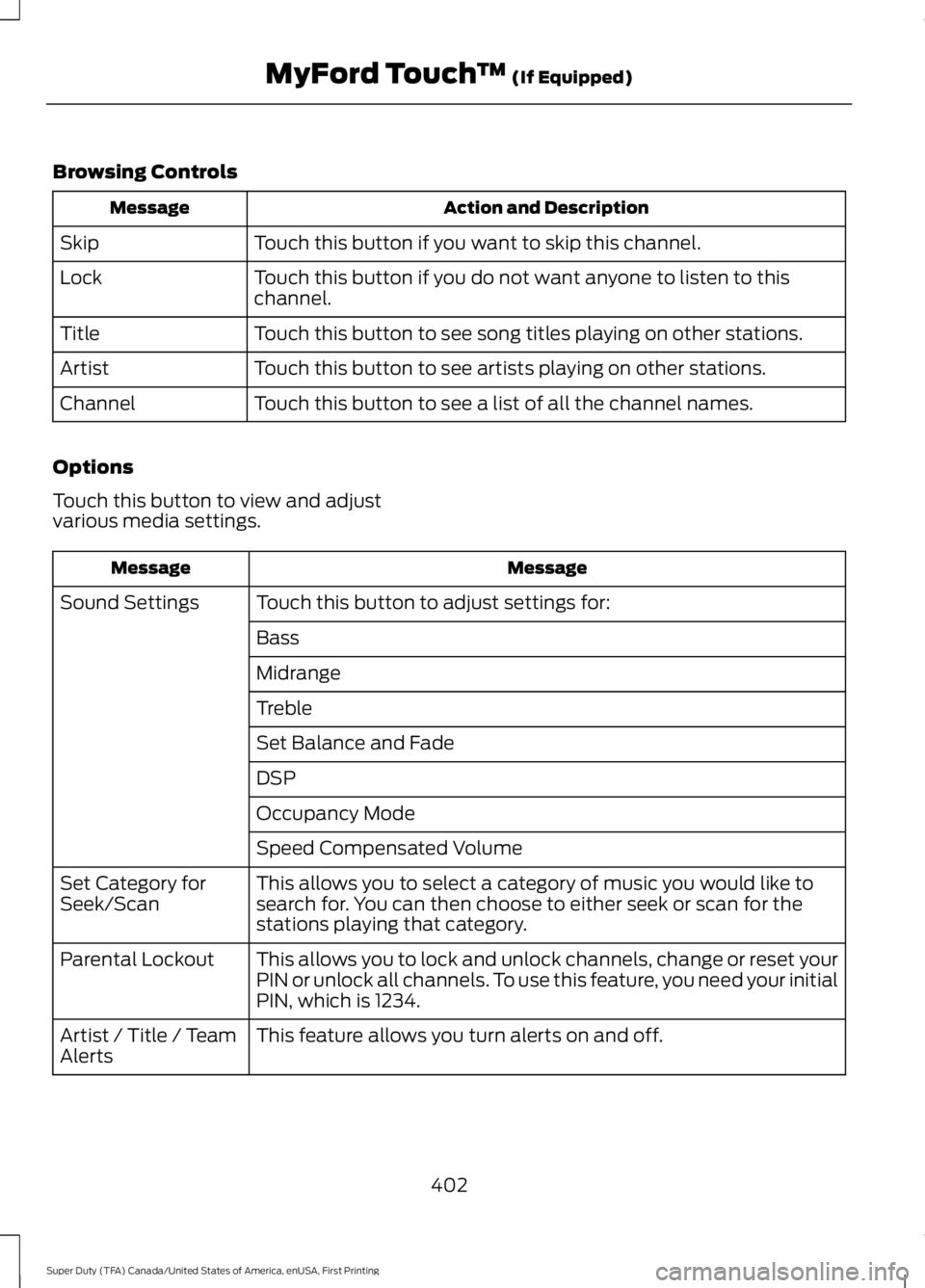
Browsing Controls
Action and DescriptionMessage
Touch this button if you want to skip this channel.Skip
Touch this button if you do not want anyone to listen to thischannel.Lock
Touch this button to see song titles playing on other stations.Title
Touch this button to see artists playing on other stations.Artist
Touch this button to see a list of all the channel names.Channel
Options
Touch this button to view and adjustvarious media settings.
MessageMessage
Touch this button to adjust settings for:Sound Settings
Bass
Midrange
Treble
Set Balance and Fade
DSP
Occupancy Mode
Speed Compensated Volume
This allows you to select a category of music you would like tosearch for. You can then choose to either seek or scan for thestations playing that category.
Set Category forSeek/Scan
This allows you to lock and unlock channels, change or reset yourPIN or unlock all channels. To use this feature, you need your initialPIN, which is 1234.
Parental Lockout
This feature allows you turn alerts on and off.Artist / Title / TeamAlerts
402
Super Duty (TFA) Canada/United States of America, enUSA, First Printing
MyFord Touch™ (If Equipped)