2016 FORD F250 radio
[x] Cancel search: radioPage 407 of 507
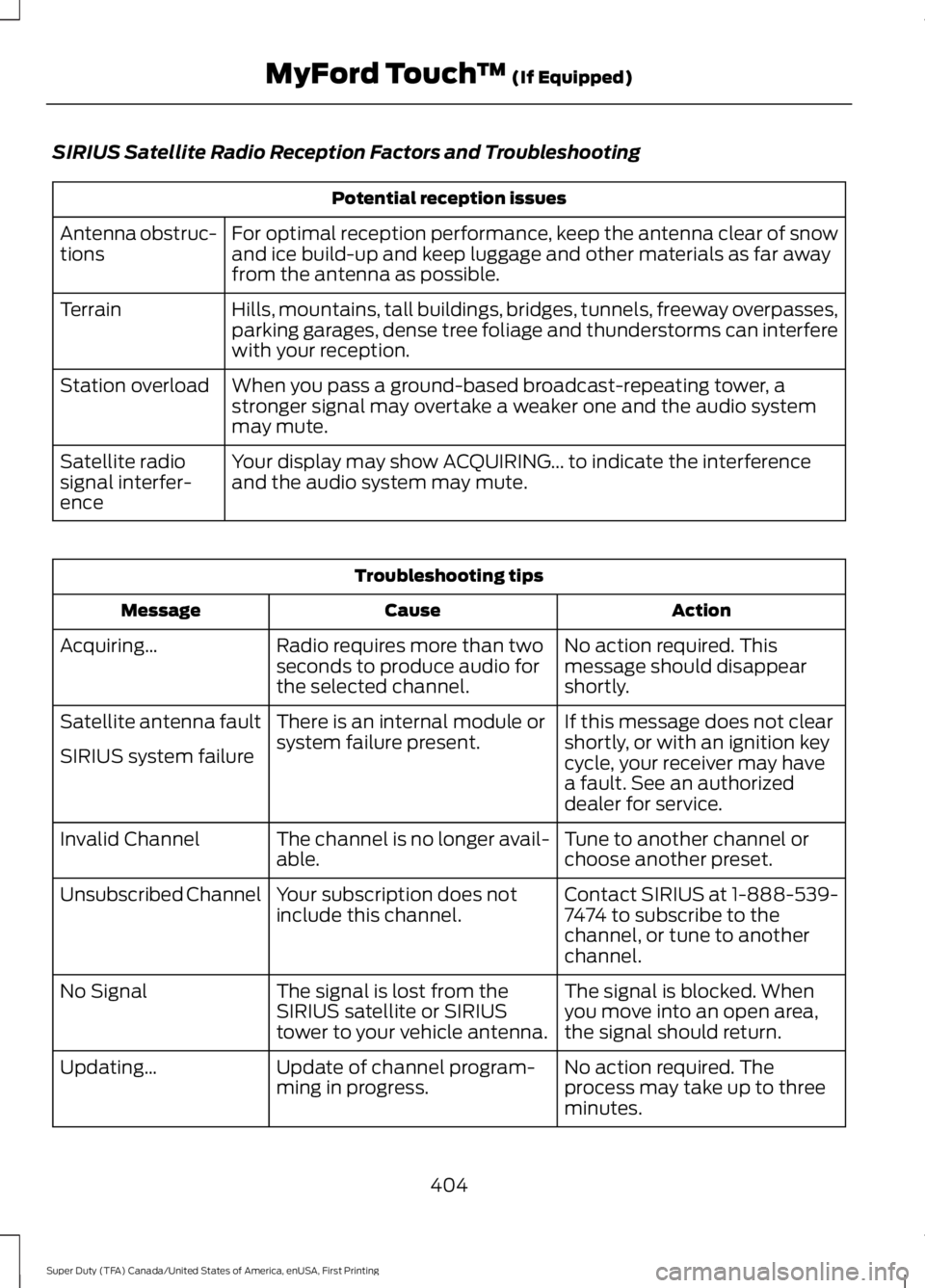
SIRIUS Satellite Radio Reception Factors and Troubleshooting
Potential reception issues
For optimal reception performance, keep the antenna clear of snow
and ice build-up and keep luggage and other materials as far away
from the antenna as possible.
Antenna obstruc-
tions
Hills, mountains, tall buildings, bridges, tunnels, freeway overpasses,
parking garages, dense tree foliage and thunderstorms can interfere
with your reception.
Terrain
When you pass a ground-based broadcast-repeating tower, a
stronger signal may overtake a weaker one and the audio system
may mute.
Station overload
Your display may show ACQUIRING... to indicate the interference
and the audio system may mute.
Satellite radio
signal interfer-
ence Troubleshooting tips
Action
Cause
Message
No action required. This
message should disappear
shortly.
Radio requires more than two
seconds to produce audio for
the selected channel.
Acquiring…
If this message does not clear
shortly, or with an ignition key
cycle, your receiver may have
a fault. See an authorized
dealer for service.
There is an internal module or
system failure present.
Satellite antenna fault
SIRIUS system failure
Tune to another channel or
choose another preset.
The channel is no longer avail-
able.
Invalid Channel
Contact SIRIUS at 1-888-539-
7474 to subscribe to the
channel, or tune to another
channel.
Your subscription does not
include this channel.
Unsubscribed Channel
The signal is blocked. When
you move into an open area,
the signal should return.
The signal is lost from the
SIRIUS satellite or SIRIUS
tower to your vehicle antenna.
No Signal
No action required. The
process may take up to three
minutes.
Update of channel program-
ming in progress.
Updating…
404
Super Duty (TFA) Canada/United States of America, enUSA, First Printing MyFord Touch
™ (If Equipped)
Page 408 of 507

Troubleshooting tips
Action
Cause
Message
Contact SIRIUS at 1-888-539-
7474 to resolve subscription
issues.
Your satellite service is no
longer available.
Questions? Call
1-888-539-7474
Use the channel guide to turn
off the Lock or Skip function on
that station.
All the channels in the selected
category are either skipped or
locked.
None found
Check Channel Guide
No action required.
SIRIUS has updated the chan-
nels available for your vehicle.
Subscription Updated
SIRIUS Satellite Radio Voice
Commands If you are listening to SIRIUS
satellite radio, press the voice
button on the steering wheel
controls. You will hear a prompt, you can
then say any of the commands in the
following table.
If you are not listening to SIRIUS
satellite radio, press the voice button
and, after the tones press the voice
button and when prompted say: Voice command
Sirius
You can then say any of the following
or a similar command:
SAT 1 Voice command
Sports Games
Tune
Help
You can also say the name of any Sirius
station, such as “The Highway” or “Deep
Tracks” , to listen to that station.
CD To access, press the lower left corner
on the touchscreen, then select:
Menu Item
CD
405
Super Duty (TFA) Canada/United States of America, enUSA, First Printing MyFord Touch
™ (If Equipped)E142599 E142611
Page 449 of 507
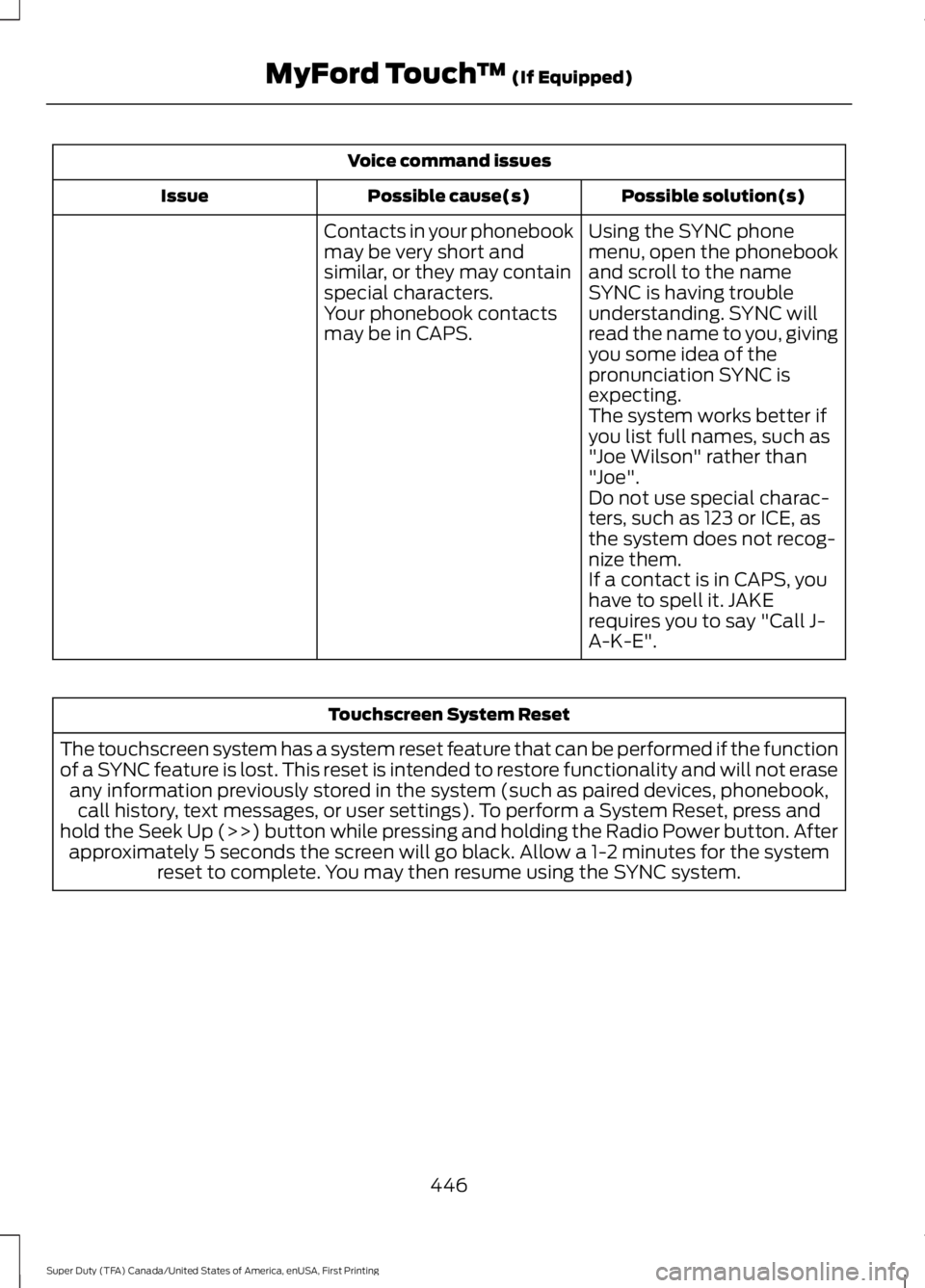
Voice command issues
Possible solution(s)
Possible cause(s)
Issue
Contacts in your phonebook
may be very short and
similar, or they may contain
special characters. Using the SYNC phone
menu, open the phonebook
and scroll to the name
SYNC is having trouble
understanding. SYNC will
read the name to you, giving
you some idea of the
pronunciation SYNC is
expecting.
Your phonebook contacts
may be in CAPS.
The system works better if
you list full names, such as
"Joe Wilson" rather than
"Joe".
Do not use special charac-
ters, such as 123 or ICE, as
the system does not recog-
nize them.
If a contact is in CAPS, you
have to spell it. JAKE
requires you to say "Call J-
A-K-E". Touchscreen System Reset
The touchscreen system has a system reset feature that can be performed if the function
of a SYNC feature is lost. This reset is intended to restore functionality and will not erase any information previously stored in the system (such as paired devices, phonebook,call history, text messages, or user settings). To perform a System Reset, press and
hold the Seek Up (>>) button while pressing and holding the Radio Power button. After approximately 5 seconds the screen will go black. Allow a 1-2 minutes for the system reset to complete. You may then resume using the SYNC system.
446
Super Duty (TFA) Canada/United States of America, enUSA, First Printing MyFord Touch
™ (If Equipped)
Page 451 of 507

*The accessory manufacturer designs,
develops and therefore warrants Ford
Licensed Accessories, and does not design
or test these accessories to Ford Motor
Company engineering requirements.
Contact an authorized Ford dealer for the
manufacturer
’s limited warranty details,
and request a copy of the Ford Licensed
Accessories product limited warranty from
the accessory manufacturer.
For maximum vehicle performance, keep
the following information in mind when
adding accessories or equipment to your
vehicle:
• When adding accessories, equipment,
passengers and luggage to your
vehicle, do not exceed the total weight
capacity of the vehicle or of the front
or rear axle (GVWR or GAWR as
indicated on the Safety Compliance
Certification label). Ask an authorized
dealer for specific weight information.
• The Federal Communications
Commission (FCC) and Canadian
Radio Telecommunications
Commission (CRTC) regulate the use
of mobile communications systems
that are equipped with radio
transmitters, for example, two-way
radios, telephones and theft alarms.
Any such equipment installed in your
vehicle should comply with Federal
Communications Commission (FCC)
and Canadian Radio
Telecommunications Commission
(CRTC) regulations and should be
installed only by an authorized dealer. •
An authorized dealer needs to install
mobile communications systems.
Improper installation may harm the
operation of your vehicle, particularly
if the manufacturer did not design the
mobile communication system
specifically for automotive use.
• If you or an authorized Ford dealer add
any non-Ford electrical or electronic
accessories or components to your
vehicle, you may adversely affect
battery performance and durability. In
addition, you may also adversely affect
the performance of other electrical
systems in the vehicle.
AUXILIARY SWITCHES
For maximum vehicle performance, keep
the following information in mind when
adding accessories or equipment to your
vehicle:
• When adding accessories, equipment,
passengers and luggage to your
vehicle, do not exceed the total weight
capacity of the vehicle or of the front
or rear axle (GVWR or GAWR as
indicated on the Safety Compliance
Certification label). Ask an authorized
dealer for specific weight information.
• The Federal Communications
Commission (FCC) and Canadian
Radio Telecommunications
Commission (CRTC) regulate the use
of mobile communications systems
equipped with radio transmitters, for
example, two-way radios, telephones
and theft alarms. Any such equipment
installed in your vehicle should comply
with Federal Communications
Commission (FCC) and Canadian
Radio Telecommunications
Commission (CRTC) regulations, and
should be installed by an authorized
dealer.
448
Super Duty (TFA) Canada/United States of America, enUSA, First Printing Accessories
Page 496 of 507

Vehicle with SYNC only
United States and Mexico
FCC ID: KMHSG1G1
IC: 1422A-SG1G1
Mexico
Model: KMHSG1P1
NOM-121-SCT1-2009
The operation of this equipment is subject
to the following two conditions: (1) This
equipment or device may not cause
harmful interference, and (2) this
equipment or device must accept any
interference, including interference that
may cause undesired operation.
Vehicle with SYNC with
Touchscreen/My Touch
FCC ID: KMHSYNCG2
IC: 1422A-SYNCG2
This device complies with Part 15 of the
FCC Rules and with RSS-210 of Industry
Canada. Operation is subject to the
following two conditions: (1) This device
may not cause harmful interference, and
(2) this device must accept any
interference received, including
interference that may cause undesired
operation.
WARNING
Changes or modifications not
expressively approved by the party
responsible for compliance could
void the user's authority to operate the
equipment. The term "IC" before the radio
certification number only signifies that
Industry Canada technical specifications
were met. The antenna used for this transmitter must
not be co-located or operating in
conjunction with any other antenna or
transmitter.
493
Super Duty (TFA) Canada/United States of America, enUSA, First Printing Appendices
Page 499 of 507

Capacities and Specifications - 6.8L
Triton-30V - V10..........................................311
Specifications....................................................... 312
Capacities and Specifications................303
Car Wash See: Cleaning the Exterior.............................. 256
Center Console..............................................139 Removable Front Cupholders........................ 139
Changing a Bulb...........................................249 Replacing Brake/Tail/Turn/Reverse Lamp
Bulbs................................................................... 251
Replacing Cargo Lamp and Central High Mounted Brake Lamp Bulbs...................... 251
Replacing Fog Lamp Bulbs............................ 250
Replacing Front Clearance and Identification Lamp Bulbs......................... 250
Replacing Front Park and Direction Indicator Lamp Bulbs.................................. 250
Replacing Headlamp Bulbs........................... 250
Replacing the License Plate Lamp Bulb.................................................................... 252
Changing a Fuse
............................................231
Fuses........................................................................\
231
Changing a Road Wheel
...........................290
Dissimilar Spare Wheel and Tire Assembly
Information..................................................... 290
Location of the Spare Tire and Tools..........291
Removing the Spare Tire (With Spare Tire Carrier Only).................................................... 292
Tire Change Procedure.................................... 293
Changing the 12V Battery.........................245 Battery Management System (If
Equipped) ........................................................ 246
Changing the Engine Air Filter................254
Changing the Wiper Blades
.....................247
Checking MyKey System Status...............53
Checking the Wiper Blades
......................247
Child Restraint and Safety Belt Maintenance
.................................................36
Child Safety.......................................................15
General Information............................................. 15
Child Safety Locks..........................................27
Child Seat Positioning..................................26
Cleaning Leather Seats.............................259 With King Ranch Edition................................. 260
Without King Ranch Edition.......................... 259
Cleaning Products.......................................256
Cleaning the Alloy Wheels........................261 Cleaning the Engine....................................257
Cleaning the Exterior
..................................256
Exterior Chrome Parts..................................... 256
Exterior Plastic Parts......................................... 257
Stripes or Graphics............................................ 257
Underbody............................................................ 257
Cleaning the Instrument Panel and Instrument Cluster Lens........................259
Cleaning the Interior
...................................258
Cleaning the Windows and Wiper Blades...........................................................258
Clearing All MyKeys.......................................53
Climate............................................................428 Climate Control Voice Commands..............431
Climate Control..............................................110
Climate Controlled Seats
..........................125
Cooled Seats........................................................ 126
Heated Seats........................................................ 125
Coolant Check See: Engine Coolant Check............................ 236
Crash Sensors and Airbag Indicator
........45
Creating a MyKey............................................52 Programming/Changing Configurable
Settings............................................................... 52
Cruise Control..................................................67 Principle of Operation....................................... 183
Cruise control See: Using Cruise Control................................ 183
Customer Assistance
...................................217
D
Data Recording
..................................................9
Event Data Recording........................................... 9
Service Data Recording........................................ 9
Daytime Running Lamps
.............................73
Digital Radio..................................................323 HD Radio Reception and Station
Troubleshooting............................................ 324
Direction Indicators........................................74 Lane Change.......................................................... 74
Driver and Passenger Airbags...................38 Children and Airbags........................................... 43
Passenger Airbag On and Off Switch ..........38
Proper Driver and Front Passenger Seating Adjustment........................................................ 42
Driving Aids
.....................................................184
Driving Hints...................................................207
496
Super Duty (TFA) Canada/United States of America, enUSA, First Printing Index
Page 500 of 507

Driving Through Water..............................208
DRL
See: Daytime Running Lamps......................... 73
E
Economical Driving.....................................207
Electronic Locking Differential.................167 Activating the Electronic Locking
Differential........................................................ 167
Emission Control System
..........................148
On-Board Diagnostics (OBD-II)................... 149
Readiness for Inspection/Maintenance (I/M) Testing................................................... 150
End User License Agreement..................472 SYNC End User License Agreement
(EULA).............................................................. 472
Engine Block Heater....................................142 Using the Engine Block Heater...................... 143
Engine Coolant Check
...............................236
Adding Engine Coolant.................................... 237
Recycled Engine Coolant................................ 238
Severe Climates................................................. 238
What You Should Know About Fail-Safe Cooling.............................................................. 239
Engine Immobilizer See: Passive Anti-Theft System..................... 64
Engine Oil Check
..........................................235
Adding Engine Oil.............................................. 235
Engine Oil Dipstick......................................235
Engine Specifications
................................303
Drivebelt Routing............................................... 303
Entertainment..............................................395 AM/FM Radio...................................................... 395
Bluetooth Audio.................................................. 410
CD........................................................................\
... 405
SD Card Slot and USB Port........................... 407
SIRIUS® Satellite Radio (If Activated)........................................................ 401
Supported Media Players, Formats and Metadata Information................................. 410
Environment......................................................14 Essential Towing Checks...........................196
Before Towing a Trailer.................................... 202
Dynamic Hitching Using the Rear View Camera System.............................................. 197
Hitches................................................................... 198
Integrated Trailer Brake Controller.............200
Launching or Retrieving a Boat or Personal Watercraft (PWC)........................................ 203
Safety Chains....................................................... 199
Trailer Brakes....................................................... 199
Trailer Lamps....................................................... 202
Trailer Towing Connector................................. 197
When Towing a Trailer..................................... 202
Event Data Recording See: Data Recording.............................................. 9
Export Unique Options..................................13
Extended Service Plan (ESP)
..................451
SERVICE PLANS (CANADA ONLY)............452
SERVICE PLANS (U.S. Only).......................... 451
Exterior Mirrors
.................................................77
Clearance Lamps................................................. 78
Fold-Away Exterior Mirrors................................ 77
Heated Exterior Mirrors...................................... 78
Memory Mirrors..................................................... 78
Power Exterior Mirrors......................................... 77
Telescoping Mirrors.............................................. 78
F
Fastening the Safety Belts
.........................30
Fastening the Cinch Tongue.............................. 31
Safety Belt Extension Assembly..................... 33
Safety Belt Locking Modes............................... 32
Using Safety Belts During Pregnancy............31
Using the Safety Belt with Cinch Tongue (Front Center and Rear Center Seats
Only).................................................................... 30
Floor Mats
......................................................208
Fog Lamps - Front See: Front Fog Lamps......................................... 73
Foot Pedals See: Adjusting the Pedals................................. 69
Ford Credit
..........................................................11
(U.S. Only)................................................................. 11
Four-Wheel Drive
.........................................158
Front Fog Lamps.............................................73
Front Seat Armrest.......................................127
Fuel and Refueling.......................................144
497
Super Duty (TFA) Canada/United States of America, enUSA, First Printing Index
Page 501 of 507

Fuel Consumption........................................147
Calculating Fuel Economy.............................. 148
Filling the Tank..................................................... 147
Fuel Filter........................................................244
Fuel Quality.....................................................145 Choosing the Right Fuel................................... 145
Choosing the Right Fuel With a Flex Fuel Vehicle (If Equipped)................................... 145
Diesel Engine........................................................ 145
Octane Recommendations............................ 145
Fuel Shutoff
....................................................213
Fuses.................................................................223
Fuse Specification Chart...........................223 Passenger Compartment Fuse
Panel
.................................................................. 228
Power Distribution Box.................................... 223
G
Garage Door Opener See: Universal Garage Door Opener............129
Gauges...............................................................82 Engine Coolant Temperature Gauge............83
Engine Oil Pressure Gauge............................... 83
Fuel Gauge.............................................................. 83
Information Display............................................. 84
Transmission Fluid Temperature Gauge.................................................................. 83
General Information on Radio Frequencies...................................................47
General Maintenance Information
.......453
Multi-point Inspection..................................... 455
Owner Checks and Services.......................... 454
Protecting Your Investment........................... 453
Why Maintain Your Vehicle?......................... 453
Why Maintain Your Vehicle at Your Dealership?..................................................... 453
Getting Assistance Outside the U.S. and Canada.........................................................220
Getting the Services You Need................217 Away From Home............................................... 217
Global Opening
................................................77
Opening the Windows........................................ 77
H
Handbrake See: Parking Brake.............................................. 170Hazard Warning Flashers
...........................213
HDC See: Using Hill Descent Control..................... 177
Head Restraints..............................................117 Adjusting the Head Restraint.......................... 118
Heated Seats
..................................................124
Rear Heated Seats ............................................ 124
Heated Steering Wheel
...............................68
Heated Windows and Mirrors...................115 Heated Exterior Mirror........................................ 115
Heated Rear Window......................................... 115
Heating See: Climate Control.......................................... 110
Hill Start Assist..............................................170 Switching the System On and Off.................171
Using Hill Start Assist........................................ 170
Hints on Controlling the Interior Climate...........................................................112
Cooling the Interior Quickly.............................. 114
General Hints......................................................... 112
Heating the Interior Quickly............................. 113
Recommended Settings for Cooling ...........114
Recommended Settings for Heating...........114
Side Window Defogging in Cold Weather.............................................................. 115
Hints on Driving With Anti-Lock Brakes
............................................................169
Hood Lock See: Opening and Closing the Hood...........232
I
Ignition Switch...............................................140
In California (U.S. Only)
.............................218
Information Display Control.......................67 Type 1........................................................................\
. 67
Type 2....................................................................... 68
Information Displays
....................................89
General Information........................................... 89
Information.....................................................418 911 Assist............................................................... 425
Alerts...................................................................... 424
Calendar................................................................ 424
Sirius Travel Link................................................. 423
SYNC Services (If Equipped, United States Only)................................................................... 419
Vehicle Health Report (If Equipped, US Only).................................................................. 427
498
Super Duty (TFA) Canada/United States of America, enUSA, First Printing Index