2016 FORD F250 ignition
[x] Cancel search: ignitionPage 347 of 507
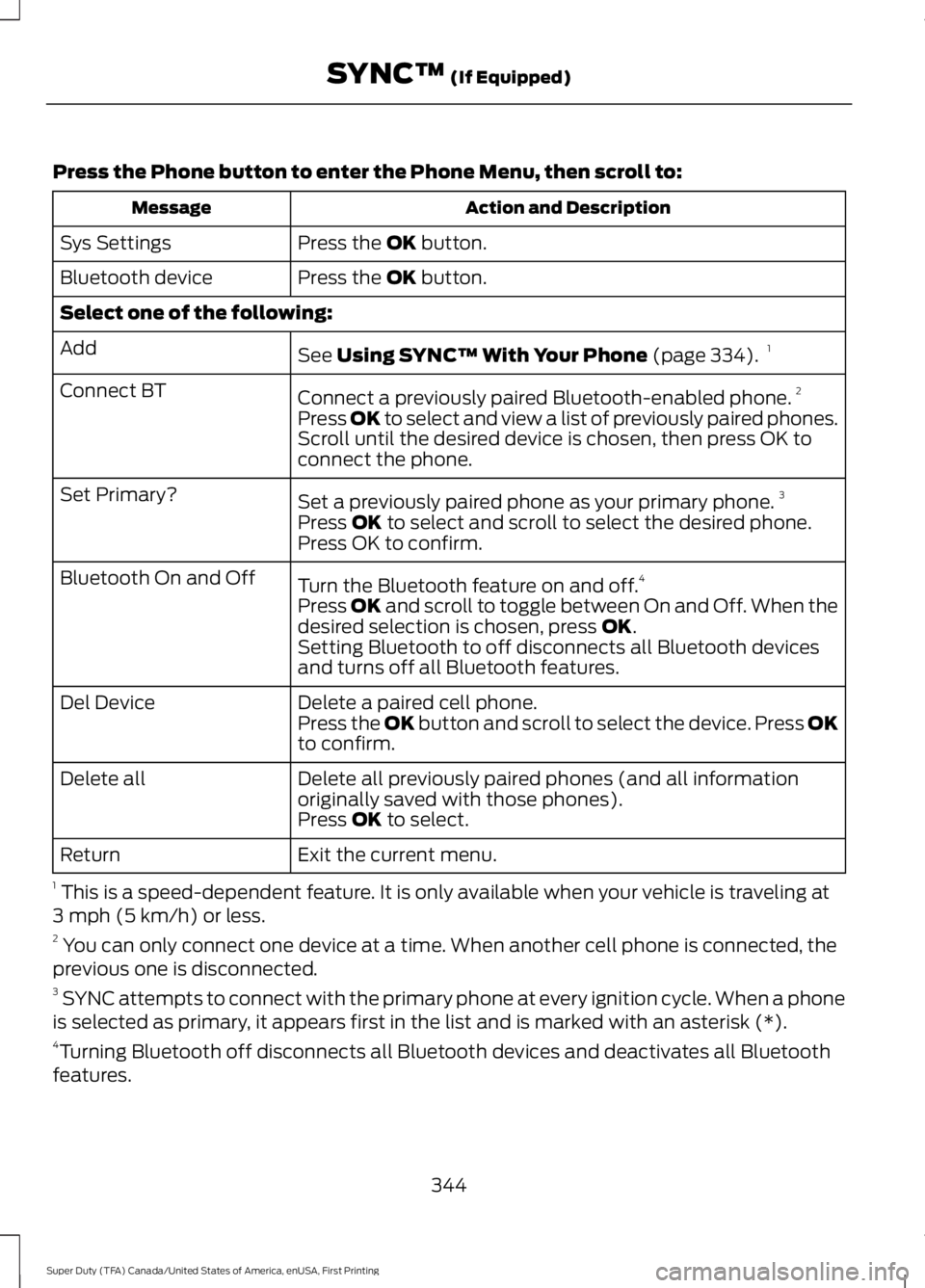
Press the Phone button to enter the Phone Menu, then scroll to:
Action and Description
Message
Press the OK button.
Sys Settings
Press the
OK button.
Bluetooth device
Select one of the following:
See
Using SYNC™ With Your Phone (page 334).1
Add
Connect a previously paired Bluetooth-enabled phone. 2
Connect BT
Press OK to select and view a list of previously paired phones.
Scroll until the desired device is chosen, then press OK to
connect the phone.
Set a previously paired phone as your primary phone. 3
Set Primary?
Press
OK to select and scroll to select the desired phone.
Press OK to confirm.
Turn the Bluetooth feature on and off. 4
Bluetooth On and Off
Press
OK and scroll to toggle between On and Off. When the
desired selection is chosen, press OK.
Setting Bluetooth to off disconnects all Bluetooth devices
and turns off all Bluetooth features.
Delete a paired cell phone.
Del Device
Press the OK button and scroll to select the device. Press OK
to confirm.
Delete all previously paired phones (and all information
originally saved with those phones).
Delete all
Press
OK to select.
Exit the current menu.
Return
1 This is a speed-dependent feature. It is only available when your vehicle is traveling at
3 mph (5 km/h) or less.
2 You can only connect one device at a time. When another cell phone is connected, the
previous one is disconnected.
3 SYNC attempts to connect with the primary phone at every ignition cycle. When a phone
is selected as primary, it appears first in the list and is marked with an asterisk (*).
4 Turning Bluetooth off disconnects all Bluetooth devices and deactivates all Bluetooth
features.
344
Super Duty (TFA) Canada/United States of America, enUSA, First Printing SYNC™
(If Equipped)
Page 374 of 507

AppLink issues
Possible solution(s)
Possible cause(s)
Issue
SYNC in order to find
AppLink-capable apps on
your device. iPhone users
must also connect to
SYNC's USB port with an
Apple USB cable.
Ensure you have down-
loaded and installed the
latest version of the app
from your phone's app store.
Ensure the app is running on
your phone. Some apps
AppLink-enabled apps are
not installed and running on
your mobile device.
My phone is connected, but
I still cannot find any apps.
require you to register or
login on the app on the
phone before using them
with AppLink. Also, some
may have a "Ford SYNC"
setting, so check the app's
settings menu on the phone.
Closing and restarting apps
may help SYNC find the
application if you cannot
discover it inside the vehicle.
On an Android device, if
apps have an "Exit' or 'Quit'
Sometime apps do not
properly close and re-open
their connection to SYNC,
over ignition cycles, for
example.
My phone is connected, my
app(s) are running, but I still
cannot find any apps.
option, select that then
restart the app. If the app
does not have that option,
you can also manually
"Force Close" the app by
going to the phone's settings
menu, selecting 'Apps.' then
finding the particular app
and choosing 'Force stop.'
Don't forget to restart the
app afterwards, then select
"Find New Apps" on SYNC.
371
Super Duty (TFA) Canada/United States of America, enUSA, First Printing SYNC™ (If Equipped)
Page 378 of 507

This system uses a four-corner strategy to
provide quick access to several vehicle
features and settings. The touchscreen
provides easy interaction with your cell
phone, entertainment, information and
system settings. The corners display active
modes within the menus, for example; your
cell phone's status.
Note:
Some features are not available while
your vehicle is moving.
Note: You can access the entertainment
features for 30 minutes after you switch the
ignition off, and no doors are opened.
PHONE
Press to select any of the following: Message
Phone
Quick Dial
Phonebook
History
Messaging
Settings
NAVIGATION
Press to select any of the following: Message
My Home
Favorites
Previous Destinations
Point of Interest
Emergency
Street Address
Intersection Message
City Center
Map
Edit Route
Cancel Route
CLIMATE
Press the corresponding icons to control
the following options:
• Driver Settings
• Recirculated Air
• Auto
• Dual
• Passenger Settings
• A/C
• Defrost
SETTINGS Press to select any of the following:
Message
Clock
Display
Sound
Vehicle
Settings
Help
HOME Press to access the home
screen.
375
Super Duty (TFA) Canada/United States of America, enUSA, First Printing MyFord Touch
™ (If Equipped)E142607 E142613
Page 391 of 507
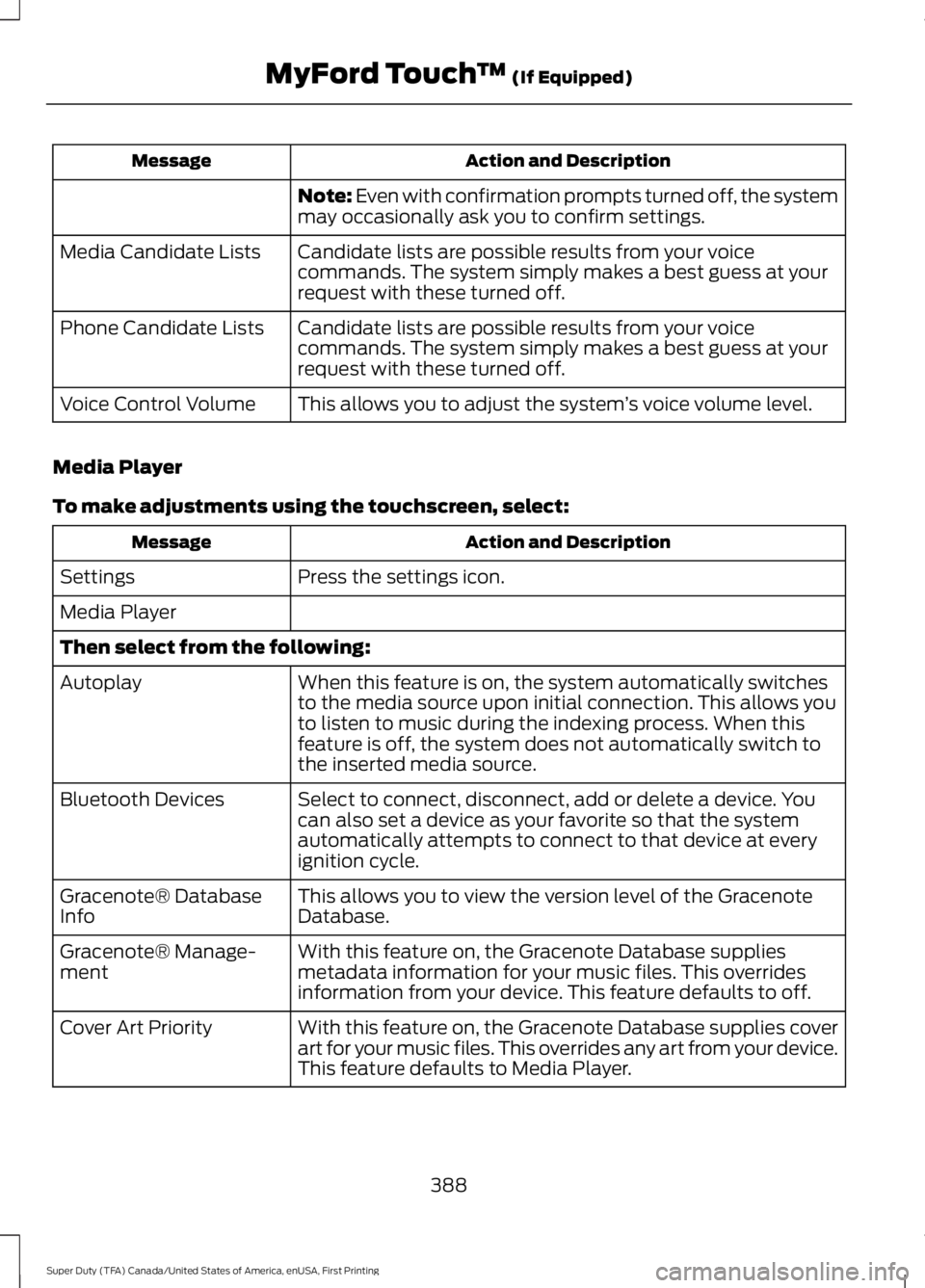
Action and Description
Message
Note: Even with confirmation prompts turned off, the system
may occasionally ask you to confirm settings.
Candidate lists are possible results from your voice
commands. The system simply makes a best guess at your
request with these turned off.
Media Candidate Lists
Candidate lists are possible results from your voice
commands. The system simply makes a best guess at your
request with these turned off.
Phone Candidate Lists
This allows you to adjust the system ’s voice volume level.
Voice Control Volume
Media Player
To make adjustments using the touchscreen, select: Action and Description
Message
Press the settings icon.
Settings
Media Player
Then select from the following:
When this feature is on, the system automatically switches
to the media source upon initial connection. This allows you
to listen to music during the indexing process. When this
feature is off, the system does not automatically switch to
the inserted media source.
Autoplay
Select to connect, disconnect, add or delete a device. You
can also set a device as your favorite so that the system
automatically attempts to connect to that device at every
ignition cycle.
Bluetooth Devices
This allows you to view the version level of the Gracenote
Database.
Gracenote® Database
Info
With this feature on, the Gracenote Database supplies
metadata information for your music files. This overrides
information from your device. This feature defaults to off.
Gracenote® Manage-
ment
With this feature on, the Gracenote Database supplies cover
art for your music files. This overrides any art from your device.
This feature defaults to Media Player.
Cover Art Priority
388
Super Duty (TFA) Canada/United States of America, enUSA, First Printing MyFord Touch
™ (If Equipped)
Page 407 of 507
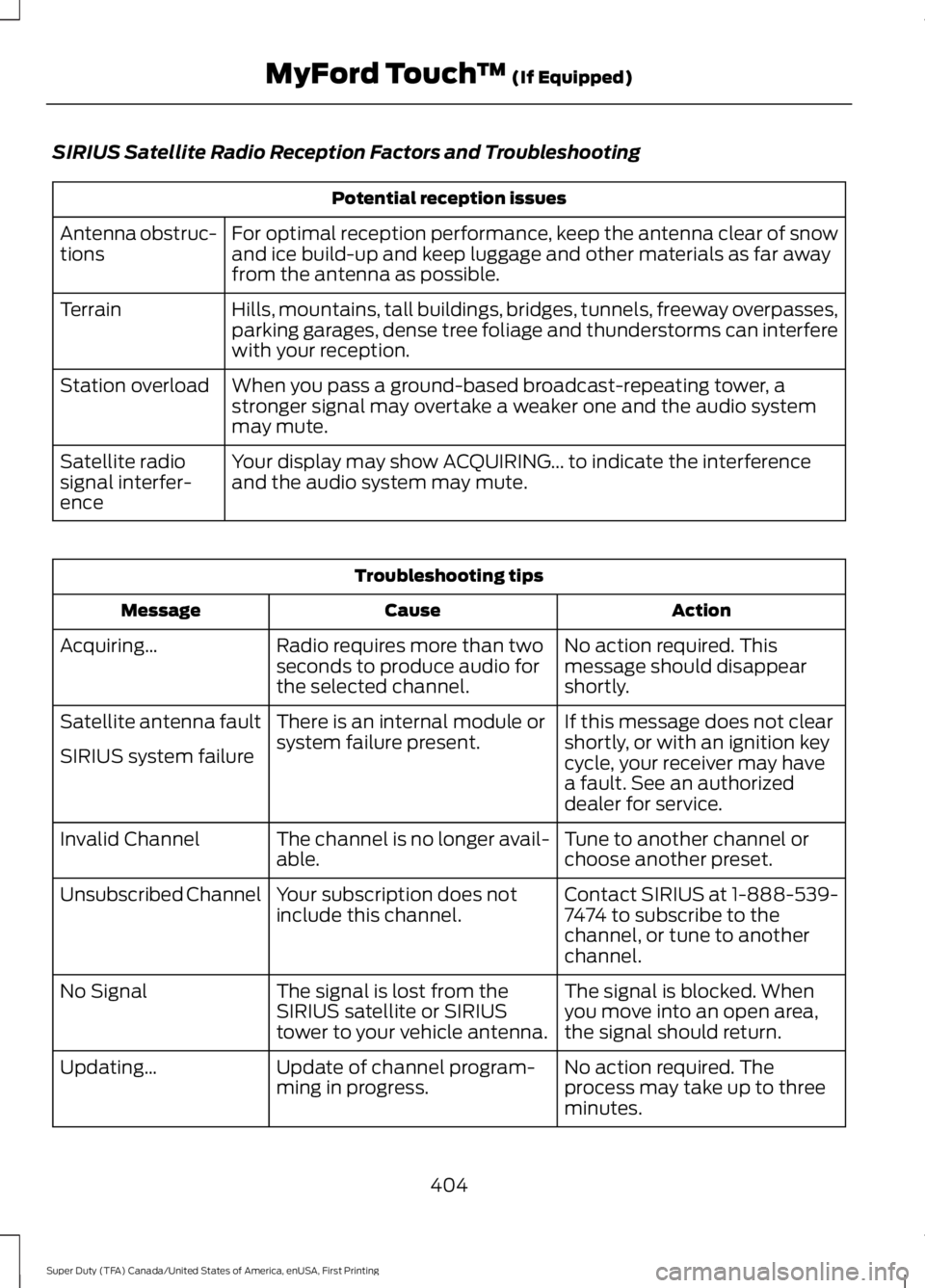
SIRIUS Satellite Radio Reception Factors and Troubleshooting
Potential reception issues
For optimal reception performance, keep the antenna clear of snow
and ice build-up and keep luggage and other materials as far away
from the antenna as possible.
Antenna obstruc-
tions
Hills, mountains, tall buildings, bridges, tunnels, freeway overpasses,
parking garages, dense tree foliage and thunderstorms can interfere
with your reception.
Terrain
When you pass a ground-based broadcast-repeating tower, a
stronger signal may overtake a weaker one and the audio system
may mute.
Station overload
Your display may show ACQUIRING... to indicate the interference
and the audio system may mute.
Satellite radio
signal interfer-
ence Troubleshooting tips
Action
Cause
Message
No action required. This
message should disappear
shortly.
Radio requires more than two
seconds to produce audio for
the selected channel.
Acquiring…
If this message does not clear
shortly, or with an ignition key
cycle, your receiver may have
a fault. See an authorized
dealer for service.
There is an internal module or
system failure present.
Satellite antenna fault
SIRIUS system failure
Tune to another channel or
choose another preset.
The channel is no longer avail-
able.
Invalid Channel
Contact SIRIUS at 1-888-539-
7474 to subscribe to the
channel, or tune to another
channel.
Your subscription does not
include this channel.
Unsubscribed Channel
The signal is blocked. When
you move into an open area,
the signal should return.
The signal is lost from the
SIRIUS satellite or SIRIUS
tower to your vehicle antenna.
No Signal
No action required. The
process may take up to three
minutes.
Update of channel program-
ming in progress.
Updating…
404
Super Duty (TFA) Canada/United States of America, enUSA, First Printing MyFord Touch
™ (If Equipped)
Page 452 of 507
•
An authorized dealer needs to install
mobile communications systems.
Improper installation may harm the
operation of your vehicle, particularly
if the manufacturer did not design the
mobile communication system
specifically for automotive use.
• If you or an authorized Ford dealer add
any non-Ford electrical or electronic
accessories or components to your
vehicle, you may adversely affect
battery performance and durability. In
addition, you may also adversely affect
the performance of other electrical
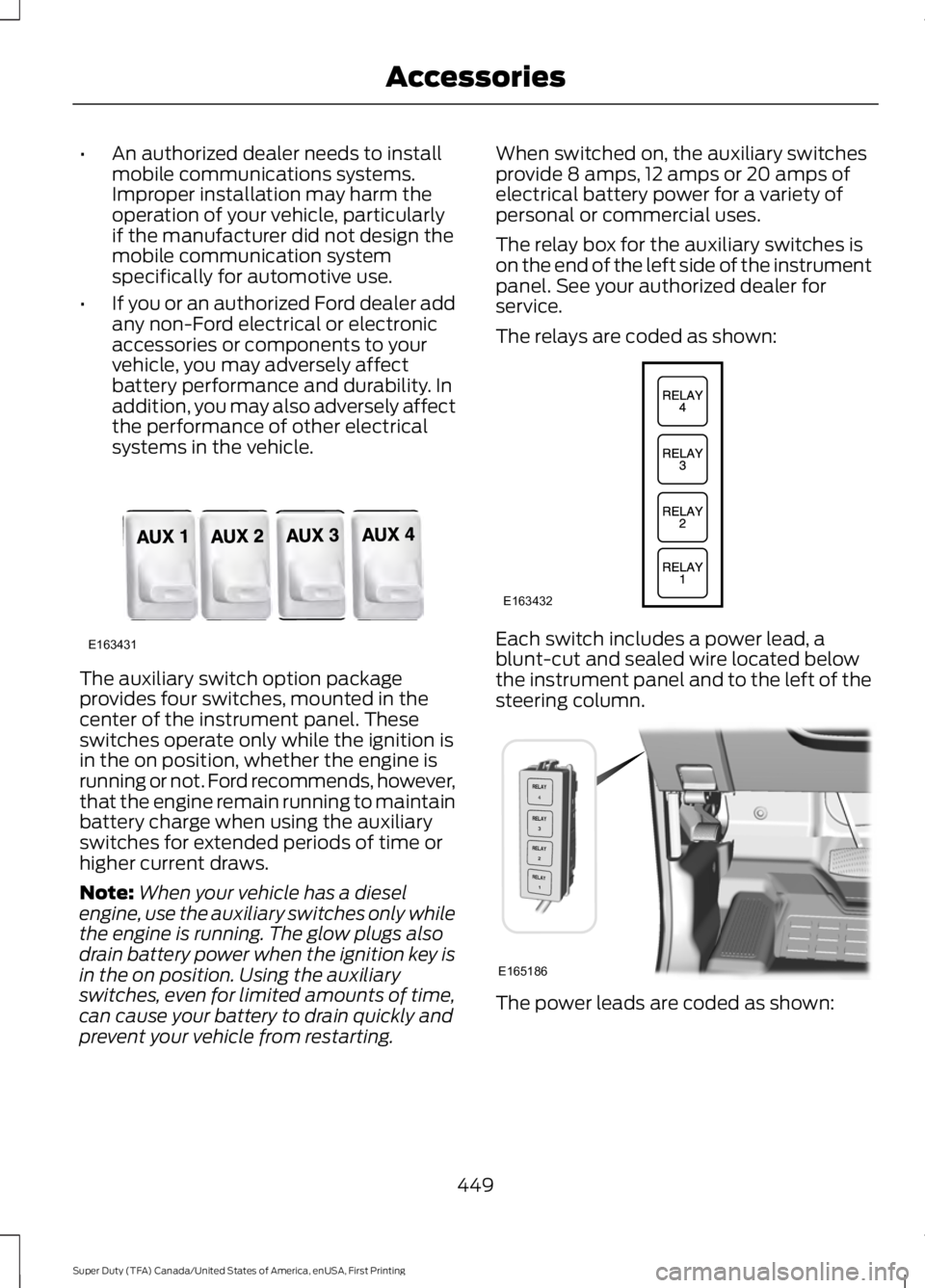
systems in the vehicle. The auxiliary switch option package
provides four switches, mounted in the
center of the instrument panel. These
switches operate only while the ignition is
in the on position, whether the engine is
running or not. Ford recommends, however,
that the engine remain running to maintain
battery charge when using the auxiliary
switches for extended periods of time or
higher current draws.
Note:
When your vehicle has a diesel
engine, use the auxiliary switches only while
the engine is running. The glow plugs also
drain battery power when the ignition key is
in the on position. Using the auxiliary
switches, even for limited amounts of time,
can cause your battery to drain quickly and
prevent your vehicle from restarting. When switched on, the auxiliary switches
provide 8 amps, 12 amps or 20 amps of
electrical battery power for a variety of
personal or commercial uses.
The relay box for the auxiliary switches is
on the end of the left side of the instrument
panel. See your authorized dealer for
service.
The relays are coded as shown:
Each switch includes a power lead, a
blunt-cut and sealed wire located below
the instrument panel and to the left of the
steering column.
The power leads are coded as shown:
449
Super Duty (TFA) Canada/United States of America, enUSA, First Printing AccessoriesE163431 E163432 E165186
Page 498 of 507

4
4WD
See: Four-Wheel Drive..................................... 158
A
A/C See: Climate Control.......................................... 110
About This Manual...........................................7
ABS See: Brakes........................................................... 169
ABS driving hints See: Hints on Driving With Anti-Lock
Brakes................................................................ 169
Accessories....................................................447 Exterior style........................................................ 447
Interior style......................................................... 447
Lifestyle................................................................. 447
Peace of mind..................................................... 447
Accessories See: Replacement Parts
Recommendation............................................. 11
Adjusting the Headlamps.........................247 Horizontal Aim Adjustment........................... 248
Vertical Aim Adjustment................................. 247
Adjusting the Pedals
....................................69
Adjusting the Steering Wheel...................66
Airbag Disposal
..............................................46
Air Conditioning See: Climate Control.......................................... 110
Alarm See: Anti-Theft Alarm........................................ 65
Anti-Theft Alarm
............................................65
Arming the Alarm................................................. 65
Disarming the Alarm........................................... 65
Appendices.....................................................472
Audible Warnings and Indicators.............87 Headlamps On Warning Chime...................... 87
Key in Ignition Warning Chime......................... 87
Parking Brake On Warning Chime.................88
Audio Control
..................................................66
Media........................................................................\
. 67
Seek, Next or Previous........................................ 67
Audio System.................................................317 General Information........................................... 317
Audio Unit - Vehicles With: AM/FM/CD/ SYNC..............................................................319 Audio Unit - Vehicles With: AM/FM/CD/
Touchscreen Display
................................322
Audio Unit - Vehicles With: AM/FM.......318
Autolamps.........................................................72 Autolamps - Programmable Exit
Delay..................................................................... 72
Automatic Climate Control.........................111
Automatic Transmission.............................151 Brake-Shift Interlock......................................... 155
If Your Vehicle Gets Stuck In Mud or Snow.................................................................. 156
Understanding the Shift Positions of a 6– Speed Automatic Transmission.........152
Understanding the Shift Positions of the 5– Speed Automatic Transmission..........151
Understanding your SelectShift Automatic ™ transmission......................... 154
Automatic Transmission Fluid Check............................................................240
Checking Automatic Transmission Fluid.................................................................... 241
Auxiliary Power Points.................................137 110 Volt AC Power Point.................................... 137
12 Volt DC Power Point...................................... 137
Locations................................................................ 137
Auxiliary Switches.......................................448
B
Bed Extender...................................................62 Grocery mode........................................................ 63
Tailgate mode........................................................ 62
Bonnet Lock See: Opening and Closing the Hood...........232
Booster Seats..................................................24 Types of Booster Seats...................................... 25
Brake Fluid Check........................................244
Brakes...............................................................169 General Information.......................................... 169
Breaking-In.....................................................207
Bulb Specification Chart
...........................252
C
California Proposition 65..............................11
Capacities and Specifications - 6.2L V8...................................................................307
Specifications..................................................... 308
495
Super Duty (TFA) Canada/United States of America, enUSA, First Printing Index
Page 501 of 507

Fuel Consumption........................................147
Calculating Fuel Economy.............................. 148
Filling the Tank..................................................... 147
Fuel Filter........................................................244
Fuel Quality.....................................................145 Choosing the Right Fuel................................... 145
Choosing the Right Fuel With a Flex Fuel Vehicle (If Equipped)................................... 145
Diesel Engine........................................................ 145
Octane Recommendations............................ 145
Fuel Shutoff
....................................................213
Fuses.................................................................223
Fuse Specification Chart...........................223 Passenger Compartment Fuse
Panel
.................................................................. 228
Power Distribution Box.................................... 223
G
Garage Door Opener See: Universal Garage Door Opener............129
Gauges...............................................................82 Engine Coolant Temperature Gauge............83
Engine Oil Pressure Gauge............................... 83
Fuel Gauge.............................................................. 83
Information Display............................................. 84
Transmission Fluid Temperature Gauge.................................................................. 83
General Information on Radio Frequencies...................................................47
General Maintenance Information
.......453
Multi-point Inspection..................................... 455
Owner Checks and Services.......................... 454
Protecting Your Investment........................... 453
Why Maintain Your Vehicle?......................... 453
Why Maintain Your Vehicle at Your Dealership?..................................................... 453
Getting Assistance Outside the U.S. and Canada.........................................................220
Getting the Services You Need................217 Away From Home............................................... 217
Global Opening
................................................77
Opening the Windows........................................ 77
H
Handbrake See: Parking Brake.............................................. 170Hazard Warning Flashers
...........................213
HDC See: Using Hill Descent Control..................... 177
Head Restraints..............................................117 Adjusting the Head Restraint.......................... 118
Heated Seats
..................................................124
Rear Heated Seats ............................................ 124
Heated Steering Wheel
...............................68
Heated Windows and Mirrors...................115 Heated Exterior Mirror........................................ 115
Heated Rear Window......................................... 115
Heating See: Climate Control.......................................... 110
Hill Start Assist..............................................170 Switching the System On and Off.................171
Using Hill Start Assist........................................ 170
Hints on Controlling the Interior Climate...........................................................112
Cooling the Interior Quickly.............................. 114
General Hints......................................................... 112
Heating the Interior Quickly............................. 113
Recommended Settings for Cooling ...........114
Recommended Settings for Heating...........114
Side Window Defogging in Cold Weather.............................................................. 115
Hints on Driving With Anti-Lock Brakes
............................................................169
Hood Lock See: Opening and Closing the Hood...........232
I
Ignition Switch...............................................140
In California (U.S. Only)
.............................218
Information Display Control.......................67 Type 1........................................................................\
. 67
Type 2....................................................................... 68
Information Displays
....................................89
General Information........................................... 89
Information.....................................................418 911 Assist............................................................... 425
Alerts...................................................................... 424
Calendar................................................................ 424
Sirius Travel Link................................................. 423
SYNC Services (If Equipped, United States Only)................................................................... 419
Vehicle Health Report (If Equipped, US Only).................................................................. 427
498
Super Duty (TFA) Canada/United States of America, enUSA, First Printing Index