2016 FORD F150 instrument cluster
[x] Cancel search: instrument clusterPage 257 of 505
Setting Up Pro Trailer Backup
Assist
Note:
Once you have entered a trailer's
information into the system, it is stored for
easy recall. A maximum of 10 trailers can be
added to the system.
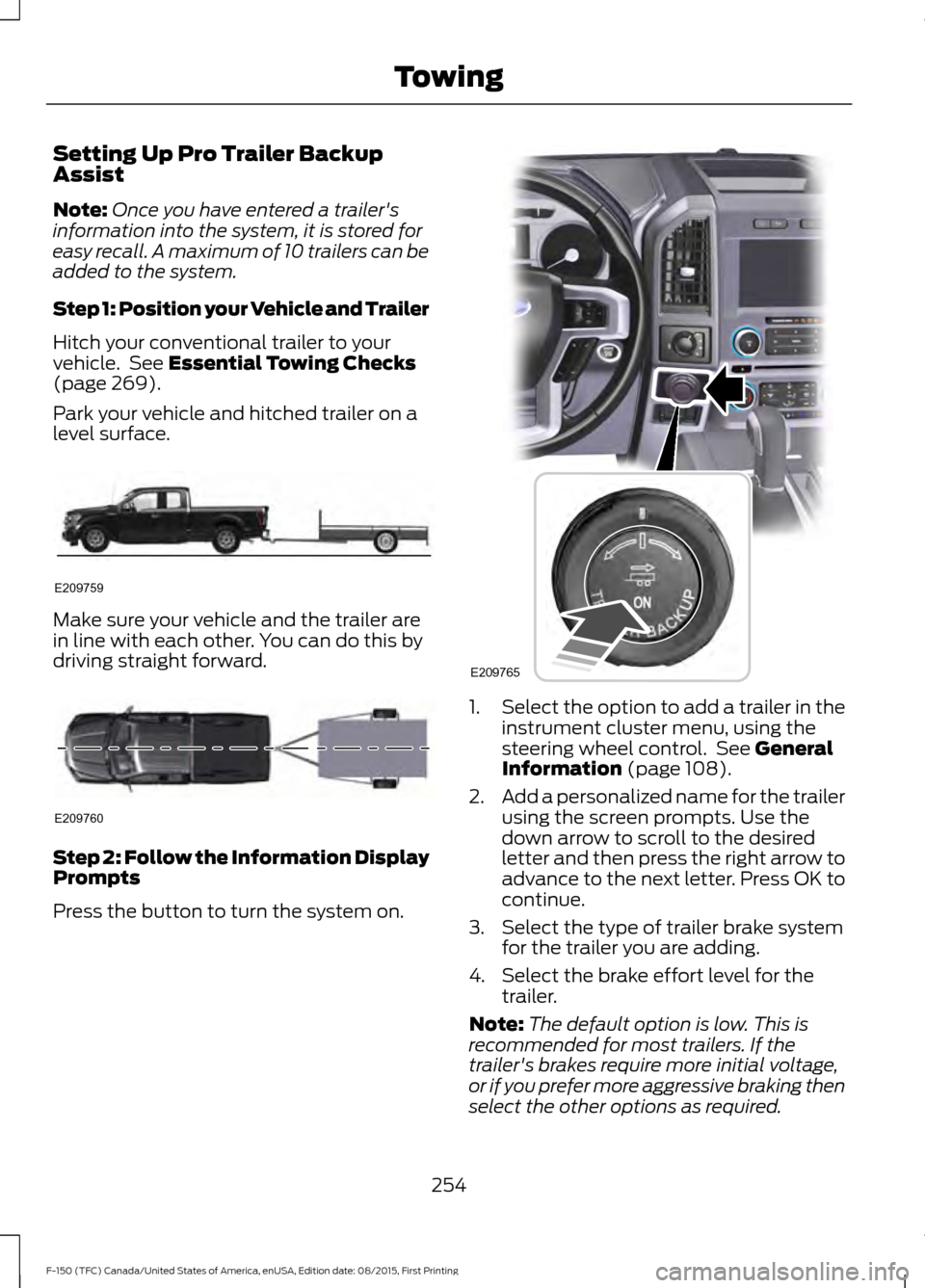
Step 1: Position your Vehicle and Trailer
Hitch your conventional trailer to your
vehicle. See Essential Towing Checks
(page 269).
Park your vehicle and hitched trailer on a
level surface. Make sure your vehicle and the trailer are
in line with each other. You can do this by
driving straight forward.
Step 2: Follow the Information Display
Prompts
Press the button to turn the system on. 1.
Select the option to add a trailer in the
instrument cluster menu, using the
steering wheel control. See
General
Information (page 108).
2. Add a personalized name for the trailer
using the screen prompts. Use the
down arrow to scroll to the desired
letter and then press the right arrow to
advance to the next letter. Press OK to
continue.
3. Select the type of trailer brake system for the trailer you are adding.
4. Select the brake effort level for the trailer.
Note: The default option is low. This is
recommended for most trailers. If the
trailer's brakes require more initial voltage,
or if you prefer more aggressive braking then
select the other options as required.
254
F-150 (TFC) Canada/United States of America, enUSA, Edition date: 08/2015, First Printing TowingE209759 E209760 E209765
Page 261 of 505

Release the knob when the trailer is
moving in the direction you want. Control
the accelerator and brakes while the
system steers your vehicle automatically
to keep the trailer moving straight back.
Note:
Your vehicle speed is automatically
limited.
Note: When you release the knob or turn it
to the center position, your vehicle follows
the trailer's path.
Troubleshooting
Setup
The system is designed to be used with a
wide variety of trailers. However there are
some trailers that do not have a proper
surface and location to mount the sticker.
These trailers are not supported. Attempts
to place the sticker on a surface that does
not meet the sticker placement
requirement listed in Step 3 of the setup
instruction or entering inaccurate
measurements to proceed through setup
can result in improper system function.
Accurate measurements are critical to
correct system function. If you need to
check measurements entered or change
them you can access them through the
trailer menus in the instrument cluster.
Choose the option to change the sticker
from the change trailer settings menu. It is
not necessary to remove the sticker if you
are just reviewing or changing
measurements.
The following menu warnings or difficulties
may occur during setup. Tips to resolve
them are listed below. Measurement A has reached maximum or
minimum value:
•
The system is designed to work with
drawbars that have a license plate to
hitch ball center measurement of 9 in
(229 mm) to 16 in (406 mm) when
installed. Do not attempt to use
drawbars that have a length outside
this range as the system performance
will be degraded and could cause
improper system function.
• Make sure that the measurement being
made is the horizontal distance only
from license plate and the hitch ball
center. A straight line distance that
includes any vertical rise or drop will
increase the measurement and make
it inaccurate. Inaccurate
measurements will degrade system
performance and could cause improper
system function. See step 4 of the
setup instruction to review
measurement instructions.
Measurement B has reached maximum or
minimum value:
• Make sure that the sticker placement
instruction in step 3 of the setup has
been followed. Stickers placed outside
the allowed zone will adversely affect
the system performance and could
cause improper feature function.
• Make sure that the measurement being
made is the horizontal distance only
from center of sticker to the hitch ball
center. A straight line distance that
includes any veritical rise or drop will
increase the measurement and cause
an inaccurate value to be entered into
the system. See step 4 of the setup for
additional measurement instructions.
258
F-150 (TFC) Canada/United States of America, enUSA, Edition date: 08/2015, First Printing Towing
Page 282 of 505

Note:
If completed successfully, the
information display shows NEUTRAL TOW
LEAVE IN N or NEUTRAL TOW ENABLED
LEAVE TRANSMISSION IN NEUTRAL.
This indicates that your vehicle is safe to
tow with all wheels on the ground.
Note: If you do not see the message in the
display, you must perform the procedure
again from the beginning.
Note: You may hear an audible noise as the
transfer case shifts into its neutral position.
This is normal.
6. Leave the transmission in position
N
and turn the ignition as far as it will go
toward the off position (it will not turn
fully off when the transmission is in
position
N). If your vehicle has an
ignition key, you must leave the key in
the ignition while towing. To lock and
unlock your vehicle, use the keyless
entry keypad or extra set of keys. If your
vehicle has intelligent access, press the
engine
START/STOP button once
without pressing the brake pedal. You
do not need to leave your keys in the
vehicle. You can lock and unlock your
vehicle as you normally do.
7. Release the brake pedal. WARNINGS
Do not disconnect the battery during
recreational towing. Doing so will
prevent the transfer case from
shifting properly and may cause the vehicle
to roll even if the transmission is in P
(Park). Shifting the transfer case to its
neutral position for recreational
towing may cause the vehicle to be
able to roll even if the transmission is in P
(Park). The driver or others could be
injured. Make sure the foot brake is
depressed and the vehicle is in a secure
and safe position while the transfer case
is being shifted to its neutral position. WARNINGS
Failing to put the transfer case in its
neutral position will damage vehicle
components.
Note:
You can check four-wheel-down
towing status at any time by opening the
driver's door or turning the ignition to the
accessory or on position and verifying the
NEUTRAL TOW ENABLED
message
displays in the cluster.
To exit four-wheel-down towing and return
the transfer case to its
2H position:
1. With your vehicle still properly secured
to the tow vehicle, put the ignition in
the on position, but do not start the
engine. If your vehicle has an ignition
key, turn the key to on. If your vehicle
has intelligent access, press the engine
START/STOP
button once without
pressing the brake pedal.
2. Press and hold the brake pedal.
3. Shift the transmission out of N and into
any gear.
4. Release the brake pedal.
Note: If completed successfully, the
instrument cluster displays
4X2, and
NEUTRAL TOW DISABLED.
Note: If the indicator light and message do
not display, you must perform the procedure
again from the beginning.
Note: You may hear an audible noise as the
transfer case shifts out of its neutral
position. This is normal.
Note: If
SHIFT DELAY PULL FORWARD
displays in the instrument cluster, transfer
case gear tooth blockage is present. See the
instructions after this section.
5. Apply the parking brake, and then disconnect the vehicle from the tow
vehicle.
279
F-150 (TFC) Canada/United States of America, enUSA, Edition date: 08/2015, First Printing Towing
Page 283 of 505
6. Release the parking brake, start the
engine, and shift the transmission to
position D to make sure the transfer
case is out of position N.
7. If the transfer case does not successfully shift out of position N, set
the parking brake until you can have
your vehicle serviced.
Resolving the SHIFT DELAY PULL
FORWARD Message
If the instrument cluster displays
SHIFT
DELAY PULL FORWARD perform the
following:
1. Press and hold the brake pedal.
2. Put the transmission into position
N,
and then start the engine.
3. With the engine running, shift the transmission to position
D and let the
vehicle roll forward, up to 3 feet (1
meter). You may hear an audible noise
as the transfer case shifts out of its
neutral position. This is normal.
4. Make sure the instrument cluster displays
NEUTRAL TOW DISABLED.
280
F-150 (TFC) Canada/United States of America, enUSA, Edition date: 08/2015, First Printing Towing
Page 336 of 505
CLEANING THE INTERIOR
WARNINGS
Do not use cleaning solvents, bleach
or dye on the vehicle
’s safety belts,
as these actions may weaken the
belt webbing. On vehicles equipped with
seat-mounted airbags, do not use
chemical solvents or strong
detergents. Such products could
contaminate the side airbag system and
affect performance of the side airbag in a
collision. For fabric, carpets, cloth seats, safety belts
and seats equipped with side airbags:
•
Remove dust and loose dirt with a
vacuum cleaner.
• Remove light stains and soil with
Motorcraft Professional Strength
Carpet & Upholstery Cleaner.
• If grease or tar is present on the
material, spot-clean the area first with
Motorcraft Spot and Stain Remover. In
Canada, use Motorcraft Multi-Purpose
Cleaner.
• If a ring forms on the fabric after spot
cleaning, clean the entire area
immediately (but do not oversaturate)
or the ring will set.
• Do not use household cleaning
products or glass cleaners, which can
stain and discolor the fabric and affect
the flame retardant abilities of the seat
materials. CLEANING THE INSTRUMENT
PANEL AND INSTRUMENT
CLUSTER LENS WARNING
Do not use chemical solvents or
strong detergents when cleaning the
steering wheel or instrument panel
to avoid contamination of the airbag
system. Clean the instrument panel and cluster
lens with a clean, damp, white cotton
cloth, then use a clean and dry white
cotton cloth to dry these areas.
•
Avoid cleaners or polishes that increase
the gloss of the upper portion of the
instrument panel. The dull finish in this
area helps protect you from
undesirable windshield reflection.
• Be certain to wash or wipe your hands
clean if you have been in contact with
certain products such as insect
repellent and suntan lotion in order to
avoid possible damage to the interior
painted surfaces.
• Do not use household or glass cleaners
as these may damage the finish of the
instrument panel, interior trim and
cluster lens.
• Do not allow air fresheners and hand
sanitizers to spill onto interior surfaces.
If a spill occurs, wipe off immediately.
Damage may not be covered by your
warranty.
If a staining liquid like coffee or juice has
been spilled on the instrument panel or on
interior trim surfaces, clean as follows:
1. Wipe up spilled liquid using a clean, white, cotton cloth.
333
F-150 (TFC) Canada/United States of America, enUSA, Edition date: 08/2015, First Printing Vehicle Care
Page 496 of 505

Changing a Road Wheel............................361
Dissimilar Spare Wheel and Tire Assembly
Information...................................................... 361
Location of the Spare Tire and Tools.........362
Tire Change Procedure.................................... 363
Changing the 12V Battery..........................318 Battery Management System...................... 320
Changing the Engine Air Filter................329
Changing the Wiper Blades.....................320
Checking MyKey System Status...............59
Checking the Wiper Blades
.....................320
Child Restraint and Seatbelt Maintenance..................................................41
Child Restraint Positioning
.........................30
Child Safety.......................................................15
General Information............................................. 15
Child Safety Locks...........................................31 Left-Hand Side...................................................... 32
Right-Hand Side................................................... 32
Cleaning Leather Seats.............................334 With King Ranch Edition................................. 334
Without King Ranch Edition.......................... 334
Cleaning Products
.......................................330
Cleaning the Alloy Wheels.......................335
Cleaning the Engine....................................332
Cleaning the Exterior..................................330 Exterior Chrome Parts....................................... 331
Exterior Plastic Parts......................................... 331
Stripes or Graphics............................................. 331
Underbody............................................................. 331
Cleaning the Instrument Panel and Instrument Cluster Lens.........................333
Cleaning the Interior...................................333
Cleaning the Windows and Wiper Blades...........................................................332
Clearing All MyKeys
.......................................58
Climate Control.............................................139
Climate Controlled Seats..........................155 Cooled Seats........................................................ 156
Collision Warning System........................238 Principle Of Operation..................................... 238
Coolant Check See: Engine Coolant Check............................. 313
Crash Sensors and Airbag Indicator.......49
Creating a MyKey
...........................................58
Programming/Changing Configurable
Settings............................................................... 58Cross Traffic Alert........................................234
False Alerts........................................................... 237
Switching the System Off and On...............237
System Errors....................................................... 237
System Lights, Messages and Audible Alerts................................................................. 236
System Limitations........................................... 236
Using the System............................................... 234
Cruise Control
.................................................80
Principle of Operation...................................... 220
Type 1........................................................................\
80
Type 2....................................................................... 80
Cruise control See: Using Cruise Control............................... 220
Customer Assistance..................................291
D
Data Recording
..................................................9
Event Data Recording........................................... 9
Service Data Recording........................................ 9
Daytime Running Lamps
............................86
Type 1 - Conventional
(Non-Configurable)....................................... 86
Type 2 - Configurable......................................... 86
Digital Radio
.................................................404
HD Radio Reception and Station
Troubleshooting........................................... 405
Direction Indicators
.......................................88
Lane Change.......................................................... 88
Driver Alert
......................................................228
Using Driver Alert............................................... 228
Driver and Passenger Airbags...................44 Children and Airbags.......................................... 44
Proper Driver and Front Passenger Seating Adjustment........................................................ 44
Driving Aids
....................................................228
Driving Hints...................................................281
Driving Through Water...............................282
DRL See: Daytime Running Lamps........................ 86
E
Economical Driving
......................................281
493
F-150 (TFC) Canada/United States of America, enUSA, Edition date: 08/2015, First Printing Index
Page 499 of 505

Information Messages................................124
4WD........................................................................\
. 137
Active Park............................................................. 125
Adaptive Cruise Control................................... 125
AdvanceTrac and Traction Control..............126
Airbag...................................................................... 126
Alarm and Security............................................ 126
Battery and Charging System......................... 127
Blind Spot Information and Cross Traffic Alert System..................................................... 127
Collision Warning System............................... 128
Doors and Locks.................................................. 128
Driver Alert............................................................. 128
Drivetrain................................................................ 129
Engine..................................................................... 129
Fuel........................................................................\
.. 129
Keys and Intelligent Access............................ 130
Lane Keeping System......................................... 131
Maintenance.......................................................... 131
MyKey...................................................................... 132
Off Road................................................................. 132
Park Aid................................................................... 133
Park Brake.............................................................. 133
Power Steering.................................................... 134
Pro Trailer Backup Assist................................. 134
Remote Start........................................................ 135
Seats....................................................................... 136
Starting System ................................................. 136
Tire Pressure Monitoring System.................. 136
Trailer....................................................................... 137Installing Child Restraints............................16
Child Seats............................................................... 16
Combining Safety Belt and LATCH Lower Anchors for Attaching Child Safety
Seats.................................................................... 25
Front Seat Tether Strap Attachment (Regular Cab)................................................... 26
Rear Seat Tether Strap Attachment (Crew Cab and Super Cab)....................................... 27
Use of Inboard Lower Anchors from the Outboard Seating Positions (Center
Seating Use) ..................................................... 24
Using Inflatable Safety Belts (Rear Seat Outboard Positions)........................................ 21
Using Lap and Shoulder Belts (Except Front Center Position of Super Cab and Crew
Cab)....................................................................... 17
Using Lap and Shoulder Belts (Front Center Position of Super Cab and Crew
Cab)....................................................................... 19
Using Lower Anchors and Tethers for CHildren (LATCH)............................................ 23
Using Tether Straps............................................. 25
Instrument Cluster......................................100
Instrument Lighting Dimmer
.....................85
Interior Lamps.................................................89
Front Interior Lamps........................................... 89
Rear Interior Lamps.............................................. 91
Interior Mirror
....................................................97
Auto-Dimming Mirror.......................................... 97
Introduction.........................................................7
J
Jump Starting the Vehicle........................288 Connecting the Jumper Cables.................... 288
Jump Starting..................................................... 289
Preparing Your Vehicle.................................... 288
Removing the Jumper Cables....................... 289
K
Keyless Entry
...................................................64
SECURICODE™ KEYLESS ENTRY
KEYPAD.............................................................. 64
Keyless Starting
............................................166
Ignition Modes...................................................... 167
Keys and Remote Controls..........................51
496
F-150 (TFC) Canada/United States of America, enUSA, Edition date: 08/2015, First Printing Index