2016 FORD F150 bluetooth
[x] Cancel search: bluetoothPage 445 of 505
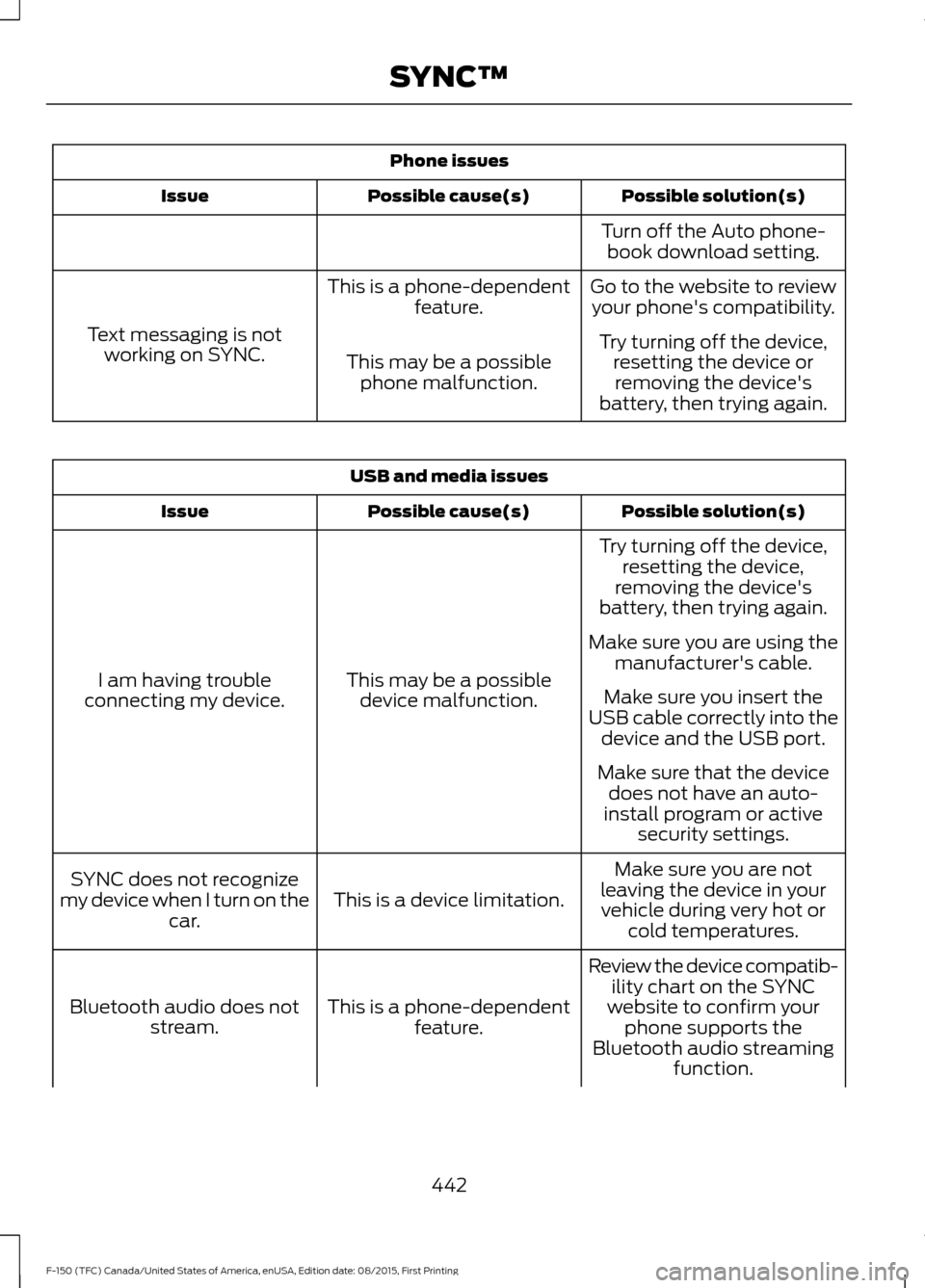
Phone issues
Possible solution(s)
Possible cause(s)
Issue
Turn off the Auto phone-book download setting.
Go to the website to review your phone's compatibility.
This is a phone-dependent
feature.
Text messaging is not working on SYNC. Try turning off the device,
resetting the device orremoving the device's
battery, then trying again.
This may be a possible
phone malfunction. USB and media issues
Possible solution(s)
Possible cause(s)
Issue
Try turning off the device,resetting the device,
removing the device's
battery, then trying again.
This may be a possible device malfunction.
I am having trouble
connecting my device. Make sure you are using the
manufacturer's cable.
Make sure you insert the
USB cable correctly into the device and the USB port.
Make sure that the device does not have an auto-
install program or active security settings.
Make sure you are not
leaving the device in your vehicle during very hot or cold temperatures.
This is a device limitation.
SYNC does not recognize
my device when I turn on the car.
Review the device compatib-ility chart on the SYNC
website to confirm your phone supports the
Bluetooth audio streaming function.
This is a phone-dependent
feature.
Bluetooth audio does not
stream.
442
F-150 (TFC) Canada/United States of America, enUSA, Edition date: 08/2015, First Printing SYNC™
Page 449 of 505

AppLink issues
Possible solution(s)
Possible cause(s)
Issue
login on the app on the
phone before using them with AppLink. Also, some may have a "Ford SYNC"
setting, so check the app's
settings menu on the phone.
Closing and restarting apps may help SYNC find the
application if you cannot
discover it inside the vehicle. On an Android device, if
apps have an "Exit' or 'Quit'
Sometime apps do not
properly close and re-open their connection to SYNC, over ignition cycles, for example.
My phone is connected, my
app(s) are running, but I still cannot find any apps. option, select that then
restart the app. If the app
does not have that option, you can also manually
"Force Close" the app by
going to the phone's settings
menu, selecting 'Apps.' then finding the particular app
and choosing 'Force stop.' Don't forget to restart the
app afterwards, then select "Find New Apps" on SYNC.
On an iPhone with iOS7+, to force close an app, doubletab the home button then
swipe up on the app to close it. Tab the home button
again, then select the app again to restart it. After a
few seconds, the app should then appear in SYNC'sMobile App's Menu.
Reset the Bluetooth on your phone by turning it off and
then turning Bluetooth back
on. If you are in your vehicle, SYNC should be able to
automatically re-connect to your phone if you press the "Phone" button.
There is a Bluetooth bug on
some order versions of theAndroid operating systemthat may cause apps that
were found on your previous
vehicle drive to not be found
again if you have not turned off Bluetooth.
My Android phone is
connected, my app(s) are running, I restarted them,but I still cannot find any apps.
446
F-150 (TFC) Canada/United States of America, enUSA, Edition date: 08/2015, First Printing SYNC™
Page 450 of 505
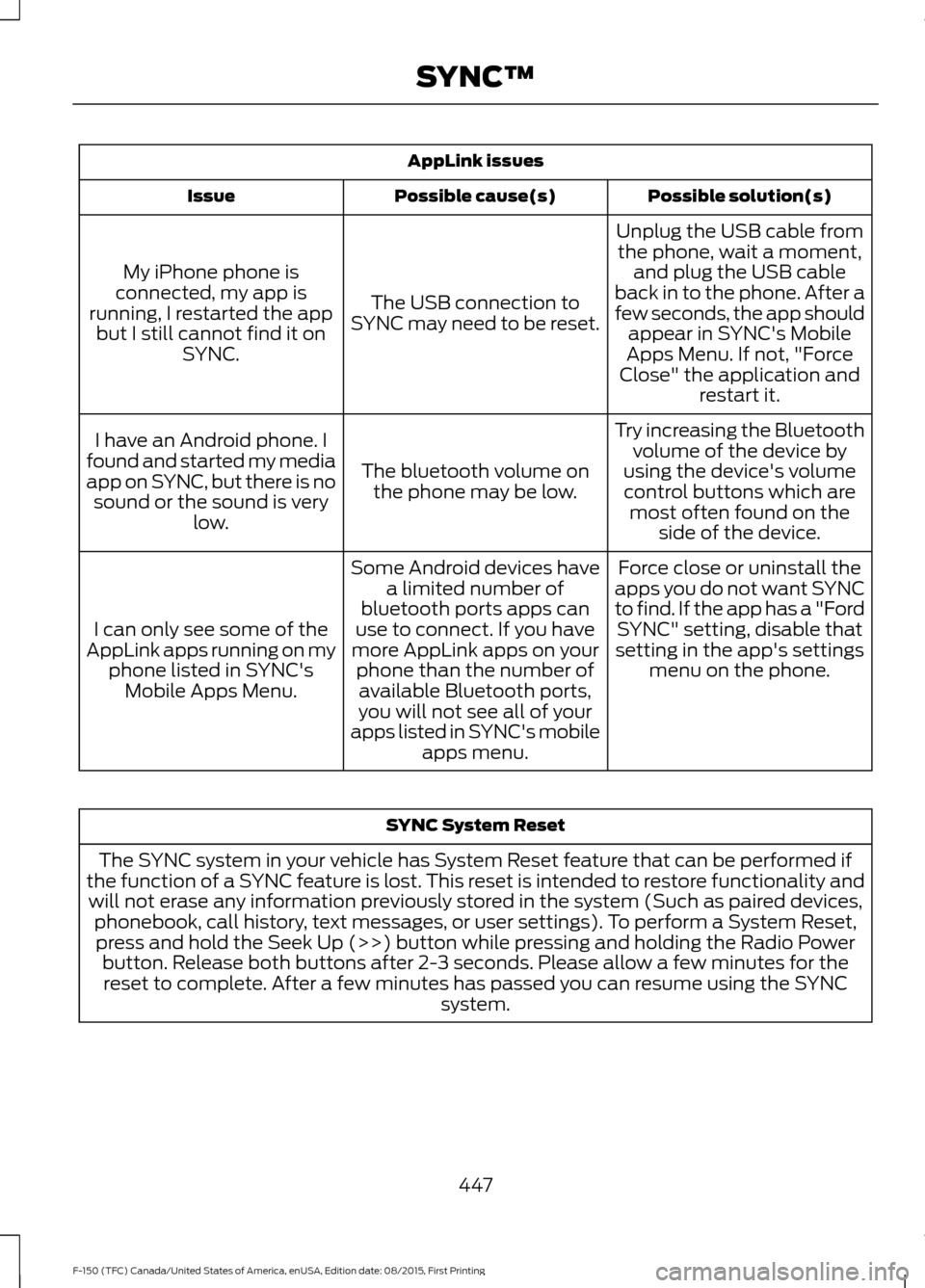
AppLink issues
Possible solution(s)
Possible cause(s)
Issue
Unplug the USB cable fromthe phone, wait a moment, and plug the USB cable
back in to the phone. After a
few seconds, the app should appear in SYNC's Mobile
Apps Menu. If not, "Force
Close" the application and restart it.
The USB connection to
SYNC may need to be reset.
My iPhone phone is
connected, my app is
running, I restarted the app but I still cannot find it on SYNC.
Try increasing the Bluetoothvolume of the device by
using the device's volume control buttons which are most often found on the side of the device.
The bluetooth volume on
the phone may be low.
I have an Android phone. I
found and started my media
app on SYNC, but there is no sound or the sound is very low.
Force close or uninstall the
apps you do not want SYNC
to find. If the app has a "Ford SYNC" setting, disable that
setting in the app's settings menu on the phone.
Some Android devices have
a limited number of
bluetooth ports apps can
use to connect. If you have
more AppLink apps on your phone than the number ofavailable Bluetooth ports,
you will not see all of your
apps listed in SYNC's mobile apps menu.
I can only see some of the
AppLink apps running on my phone listed in SYNC'sMobile Apps Menu. SYNC System Reset
The SYNC system in your vehicle has System Reset feature that can be performed if
the function of a SYNC feature is lost. This reset is intended to restore functionality and will not erase any information previously stored in the system (Such as paired devices, phonebook, call history, text messages, or user settings). To perform a System Reset,press and hold the Seek Up (>>) button while pressing and holding the Radio Power button. Release both buttons after 2-3 seconds. Please allow a few minutes for thereset to complete. After a few minutes has passed you can resume using the SYNC system.
447
F-150 (TFC) Canada/United States of America, enUSA, Edition date: 08/2015, First Printing SYNC™
Page 504 of 505

Using SYNC™ With Your Media
Player.............................................................431
Accessing Your USB Song Library...............435
Bluetooth Devices and System
Settings............................................................. 437
Connecting Your Digital Media Player to the USB Port............................................................ 431
Media Menu Features...................................... 435
Media Voice Commands................................. 432
USB 2...................................................................... 437
Voice Commands for Audio Sources.........438
Using SYNC™ With Your Phone.............414 Accessing Features through the Phone
Menu.................................................................. 419
Accessing Your Phone Settings.................... 422
Bluetooth Devices............................................. 423
Making Calls.......................................................... 417
Pairing a Phone for the First Time................414
Pairing Subsequent Phones........................... 415
Phone Options during an Active Call..........418
Phone Voice Commands................................. 416
Receiving Calls.................................................... 418
System Settings................................................. 424
Text Messaging.................................................. 420
Using Traction Control...............................203 Switching the System Off ............................. 203
System Indicator Lights and Messages......................................................... 203
Using Voice Recognition............................412 Initiating a Voice Session................................. 412
System Interaction and Feedback...............413
Utilizing the Mediation/Arbitration Program (Canada Only)
........................294
V
Vehicle Care
...................................................330
General Information......................................... 330
Vehicle Certification Label........................372
Vehicle Identification Number.................371 Vehicle Storage............................................336
Battery.................................................................... 337
Body........................................................................\
336
Brakes..................................................................... 337
Cooling system................................................... 336
Engine.................................................................... 336
Fuel system.......................................................... 336
General.................................................................. 336
Miscellaneous...................................................... 337
Removing Vehicle From Storage.................. 337
Tires........................................................................\
. 337
Ventilation See: Climate Control......................................... 139
VIN See: Vehicle Identification Number..............371
Voice Control...................................................80
501
F-150 (TFC) Canada/United States of America, enUSA, Edition date: 08/2015, First Printing Index