2016 FORD F150 USB port
[x] Cancel search: USB portPage 445 of 505
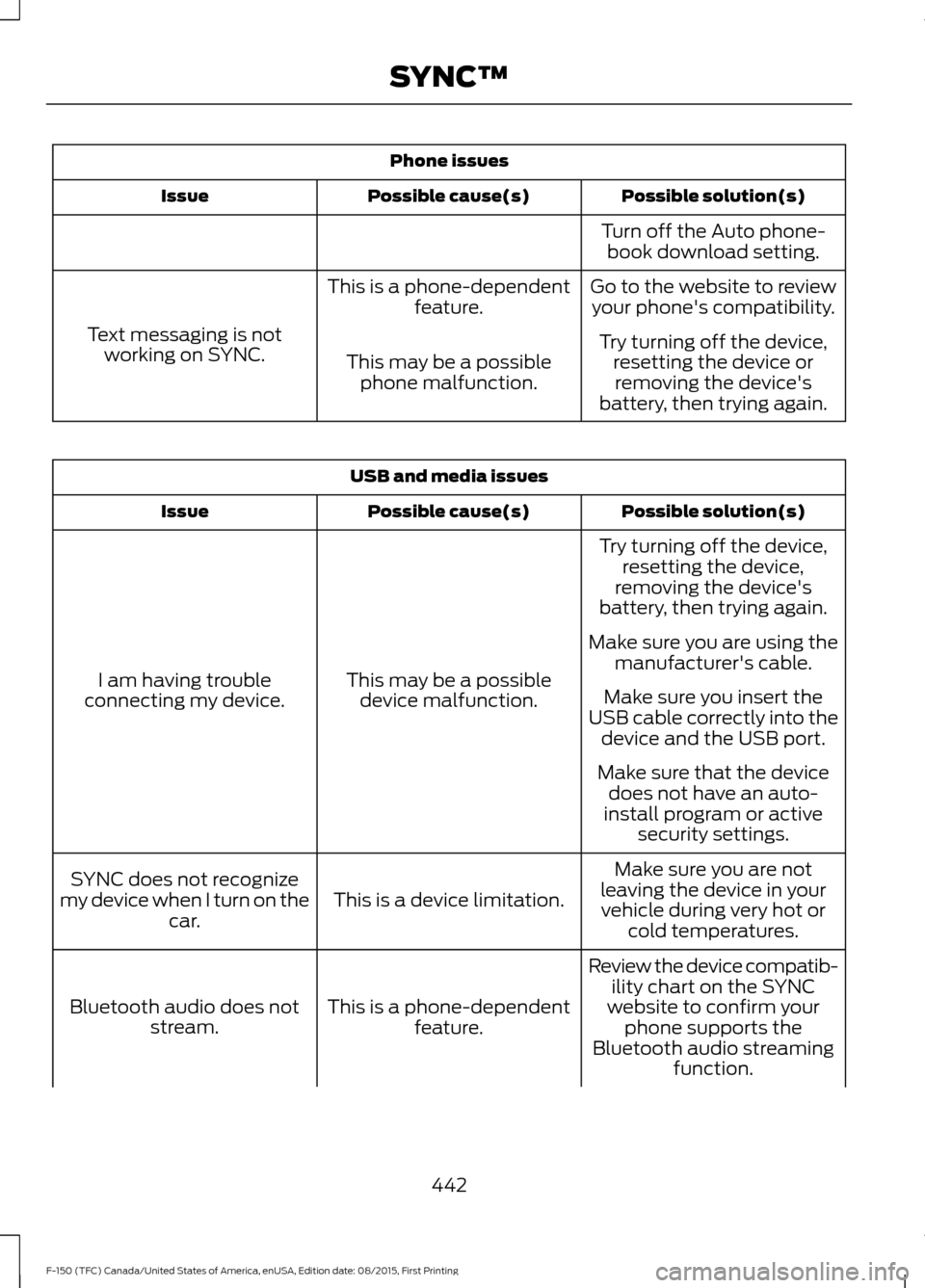
Phone issues
Possible solution(s)
Possible cause(s)
Issue
Turn off the Auto phone-book download setting.
Go to the website to review your phone's compatibility.
This is a phone-dependent
feature.
Text messaging is not working on SYNC. Try turning off the device,
resetting the device orremoving the device's
battery, then trying again.
This may be a possible
phone malfunction. USB and media issues
Possible solution(s)
Possible cause(s)
Issue
Try turning off the device,resetting the device,
removing the device's
battery, then trying again.
This may be a possible device malfunction.
I am having trouble
connecting my device. Make sure you are using the
manufacturer's cable.
Make sure you insert the
USB cable correctly into the device and the USB port.
Make sure that the device does not have an auto-
install program or active security settings.
Make sure you are not
leaving the device in your vehicle during very hot or cold temperatures.
This is a device limitation.
SYNC does not recognize
my device when I turn on the car.
Review the device compatib-ility chart on the SYNC
website to confirm your phone supports the
Bluetooth audio streaming function.
This is a phone-dependent
feature.
Bluetooth audio does not
stream.
442
F-150 (TFC) Canada/United States of America, enUSA, Edition date: 08/2015, First Printing SYNC™
Page 448 of 505
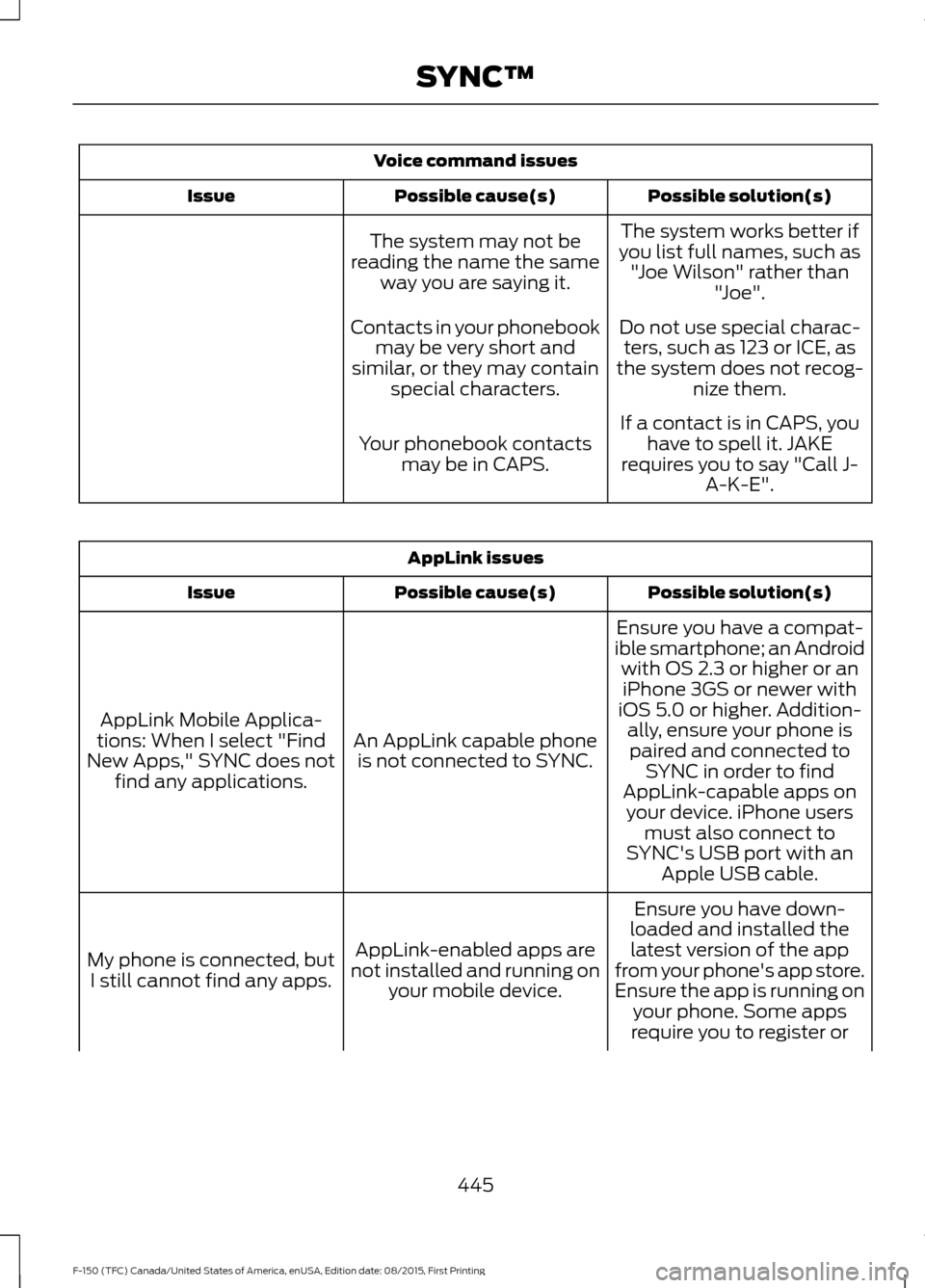
Voice command issues
Possible solution(s)
Possible cause(s)
Issue
The system works better if
you list full names, such as "Joe Wilson" rather than "Joe".
The system may not be
reading the name the same way you are saying it.
Do not use special charac-ters, such as 123 or ICE, as
the system does not recog- nize them.
Contacts in your phonebook
may be very short and
similar, or they may contain special characters.
If a contact is in CAPS, youhave to spell it. JAKE
requires you to say "Call J- A-K-E".
Your phonebook contacts
may be in CAPS. AppLink issues
Possible solution(s)
Possible cause(s)
Issue
Ensure you have a compat-
ible smartphone; an Android with OS 2.3 or higher or aniPhone 3GS or newer with
iOS 5.0 or higher. Addition- ally, ensure your phone is
An AppLink capable phone
is not connected to SYNC.
AppLink Mobile Applica-
tions: When I select "Find
New Apps," SYNC does not find any applications. paired and connected to
SYNC in order to find
AppLink-capable apps on your device. iPhone users must also connect to
SYNC's USB port with an Apple USB cable.
Ensure you have down-
loaded and installed the latest version of the app
from your phone's app store.
Ensure the app is running on your phone. Some apps
AppLink-enabled apps are
not installed and running on your mobile device.
My phone is connected, but
I still cannot find any apps.
require you to register or
445
F-150 (TFC) Canada/United States of America, enUSA, Edition date: 08/2015, First Printing SYNC™
Page 450 of 505
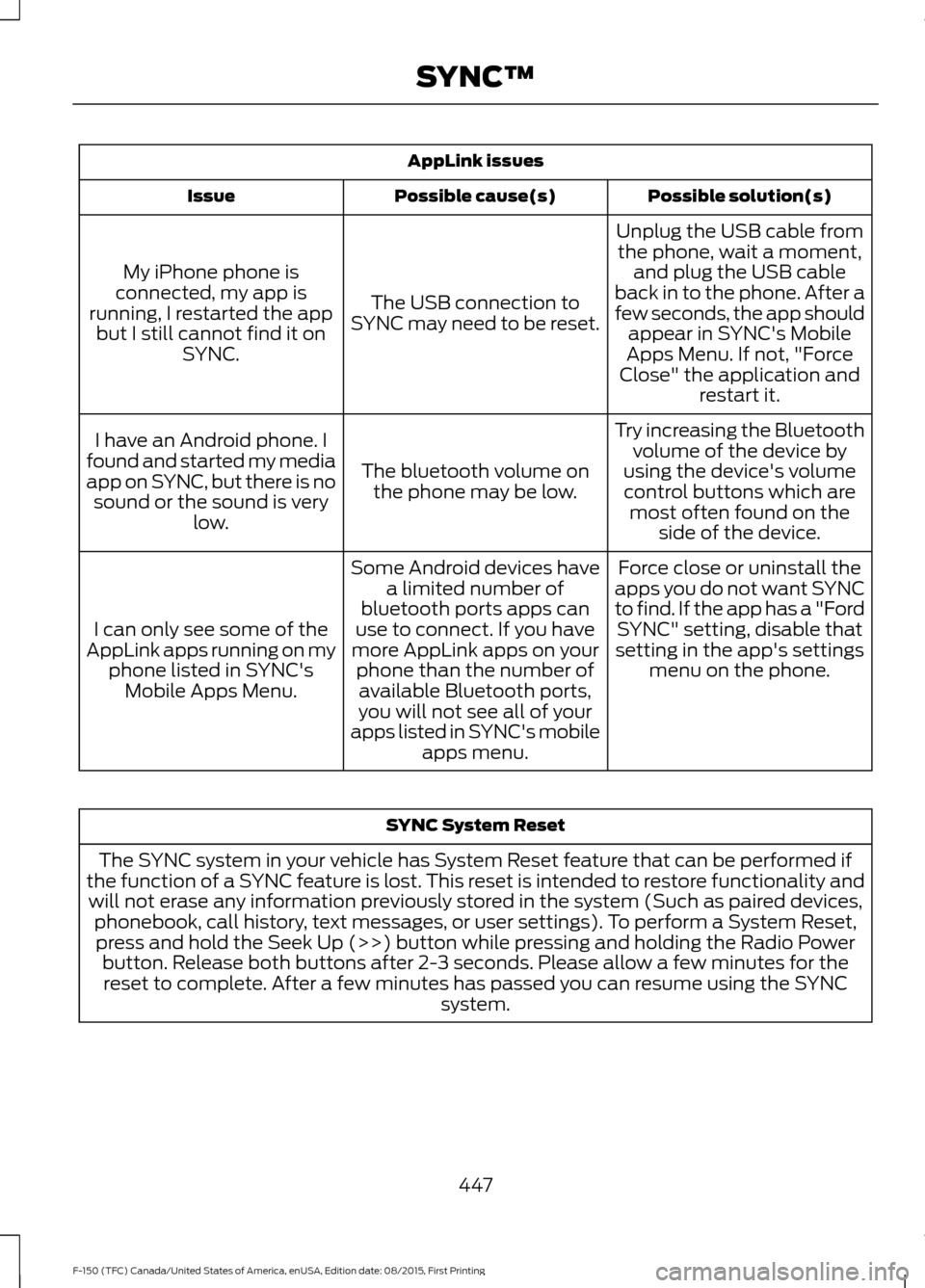
AppLink issues
Possible solution(s)
Possible cause(s)
Issue
Unplug the USB cable fromthe phone, wait a moment, and plug the USB cable
back in to the phone. After a
few seconds, the app should appear in SYNC's Mobile
Apps Menu. If not, "Force
Close" the application and restart it.
The USB connection to
SYNC may need to be reset.
My iPhone phone is
connected, my app is
running, I restarted the app but I still cannot find it on SYNC.
Try increasing the Bluetoothvolume of the device by
using the device's volume control buttons which are most often found on the side of the device.
The bluetooth volume on
the phone may be low.
I have an Android phone. I
found and started my media
app on SYNC, but there is no sound or the sound is very low.
Force close or uninstall the
apps you do not want SYNC
to find. If the app has a "Ford SYNC" setting, disable that
setting in the app's settings menu on the phone.
Some Android devices have
a limited number of
bluetooth ports apps can
use to connect. If you have
more AppLink apps on your phone than the number ofavailable Bluetooth ports,
you will not see all of your
apps listed in SYNC's mobile apps menu.
I can only see some of the
AppLink apps running on my phone listed in SYNC'sMobile Apps Menu. SYNC System Reset
The SYNC system in your vehicle has System Reset feature that can be performed if
the function of a SYNC feature is lost. This reset is intended to restore functionality and will not erase any information previously stored in the system (Such as paired devices, phonebook, call history, text messages, or user settings). To perform a System Reset,press and hold the Seek Up (>>) button while pressing and holding the Radio Power button. Release both buttons after 2-3 seconds. Please allow a few minutes for thereset to complete. After a few minutes has passed you can resume using the SYNC system.
447
F-150 (TFC) Canada/United States of America, enUSA, Edition date: 08/2015, First Printing SYNC™
Page 503 of 505

Tire Pressure Monitoring System..........356
Changing Tires With a Tire Pressure
Monitoring System........................................ 357
Understanding Your Tire Pressure Monitoring System ....................................... 357
Tires See: Wheels and Tires..................................... 338
Towing a Trailer.............................................252
Load Placement................................................. 252
Towing Points................................................276
Towing the Vehicle on Four Wheels..........................................................278
Emergency Towing............................................ 278
Recreational Towing......................................... 278
Towing..............................................................252
Traction Control...........................................203 Principle of Operation...................................... 203
Trailer Sway Control
...................................262
Transfer Case Fluid Check.........................317
Transmission Code Designation
.............373
Transmission..................................................182
Transmission See: Transmission.............................................. 182
Transporting the Vehicle............................277
Type Approvals
............................................488
RF Certification Logos for Tire Pressure
Monitoring Sensor(s)................................. 488
U
Under Hood Overview - 2.7L EcoBoost™................................................308
2.7L EcoBoost..................................................... 308
Under Hood Overview - 3.5L Ecoboost™.................................................309
Under Hood Overview - 3.5L....................310
Under Hood Overview - 5.0L.....................311
Unique Driving Characteristics.................172
Universal Garage Door Opener...............158 HomeLink Wireless Control System...........158
USB Port.........................................................409 Using Adaptive Cruise Control.................221
Blocked Sensor................................................... 226
Changing the Set Speed................................. 224
Detection Issues................................................. 225
Disengaging the System................................. 224
Following a Vehicle............................................ 222
Hilly Condition Usage....................................... 225
Low Speed Automatic Cancellation...........225
Overriding the System..................................... 224
Resuming the Set Speed................................ 224
Setting a Speed.................................................. 222
Setting the Gap Distance................................ 223
Switching the System Off............................... 225
Switching the System On............................... 222
Switching to Normal Cruise Control...........227
System Not Available....................................... 226
Using Cruise Control...................................220 Switching Cruise Control Off.......................... 221
Switching Cruise Control On and Off.........220
Using Four-Wheel Drive
............................188
4WD Indicator Lights........................................ 188
Driving Off-Road With Truck and Utility Vehicles.............................................................. 191
How Your Vehicle Differs From Other Vehicles.............................................................. 191
Using the 2-Speed Automatic 4WD System.............................................................. 189
Using the Electronic Shift on the Fly 4WD system............................................................... 188
Using Hill Descent Control.......................207 Hill descent modes........................................... 207
Using MyKey With Remote Start Systems..........................................................60
Using Power Running Boards....................76 Automatic Power Deploy.................................. 76
Automatic Power Stow...................................... 76
Bounce-back.......................................................... 77
Enabling and Disabling...................................... 76
Manual Power Deploy......................................... 76
Using Snow Chains
.....................................355
Using Stability Control..............................205 AdvanceTrac ™ with Roll Stability Control ™
(RSC™)............................................................ 205
500
F-150 (TFC) Canada/United States of America, enUSA, Edition date: 08/2015, First Printing Index
Page 504 of 505

Using SYNC™ With Your Media
Player.............................................................431
Accessing Your USB Song Library...............435
Bluetooth Devices and System
Settings............................................................. 437
Connecting Your Digital Media Player to the USB Port............................................................ 431
Media Menu Features...................................... 435
Media Voice Commands................................. 432
USB 2...................................................................... 437
Voice Commands for Audio Sources.........438
Using SYNC™ With Your Phone.............414 Accessing Features through the Phone
Menu.................................................................. 419
Accessing Your Phone Settings.................... 422
Bluetooth Devices............................................. 423
Making Calls.......................................................... 417
Pairing a Phone for the First Time................414
Pairing Subsequent Phones........................... 415
Phone Options during an Active Call..........418
Phone Voice Commands................................. 416
Receiving Calls.................................................... 418
System Settings................................................. 424
Text Messaging.................................................. 420
Using Traction Control...............................203 Switching the System Off ............................. 203
System Indicator Lights and Messages......................................................... 203
Using Voice Recognition............................412 Initiating a Voice Session................................. 412
System Interaction and Feedback...............413
Utilizing the Mediation/Arbitration Program (Canada Only)
........................294
V
Vehicle Care
...................................................330
General Information......................................... 330
Vehicle Certification Label........................372
Vehicle Identification Number.................371 Vehicle Storage............................................336
Battery.................................................................... 337
Body........................................................................\
336
Brakes..................................................................... 337
Cooling system................................................... 336
Engine.................................................................... 336
Fuel system.......................................................... 336
General.................................................................. 336
Miscellaneous...................................................... 337
Removing Vehicle From Storage.................. 337
Tires........................................................................\
. 337
Ventilation See: Climate Control......................................... 139
VIN See: Vehicle Identification Number..............371
Voice Control...................................................80
501
F-150 (TFC) Canada/United States of America, enUSA, Edition date: 08/2015, First Printing Index