2016 FORD EXPLORER climate settings
[x] Cancel search: climate settingsPage 8 of 541

Cleaning the Interior...................................302
Cleaning the Instrument Panel and
Instrument Cluster Lens.......................303
Cleaning Leather Seats.............................303
Repairing Minor Paint Damage..............304
Cleaning the Alloy Wheels.......................304
Vehicle Storage
............................................304
Wheels and Tires
General Information
...................................307
Tire Care
...........................................................310
Using Summer Tires
...................................323
Using Snow Chains.....................................324
Tire Pressure Monitoring System...........325
Changing a Road Wheel
...........................328
Technical Specifications
...........................332
Capacities and Specific- ations
Engine Specifications -
2.3L
EcoBoost™................................................334
Engine Specifications -
3.5L
Duratec........................................................335
Engine Specifications -
3.5L
Ecoboost™................................................335
Motorcraft Parts - 2.3L EcoBoost™......336
Motorcraft Parts - 3.5L Duratec..............337
Motorcraft Parts - 3.5L Ecoboost™......338
Vehicle Identification Number................339
Vehicle Certification Label.......................340
Transmission Code Designation............340
Capacities and Specifications -
2.3L
EcoBoost™.................................................341
Capacities and Specifications -
3.5L
Duratec........................................................344
Capacities and Specifications -
3.5L
Ecoboost™................................................348
Audio System
General Information
...................................353 Audio Unit - Vehicles With: AM/FM/CD/
SYNC............................................................354
Audio Unit - Vehicles With: Premium AM/ FM/CD..........................................................357
Audio Unit - Vehicles With: Sony AM/FM/ CD..................................................................358
Digital Radio
..................................................362
Satellite Radio..............................................364
USB Port
..........................................................367
Media Hub......................................................367
SYNC™
General Information...................................368
Using Voice Recognition...........................370
Using SYNC™ With Your Phone.............372
SYNC™ Applications and Services
......384
Using SYNC™ With Your Media Player...........................................................389
SYNC™ Troubleshooting
.........................398
MyFord Touch ™
General Information
..................................406
Settings............................................................416
Entertainment..............................................429
Phone..............................................................445
Information....................................................453
Climate............................................................462
Navigation ......................................................
466
MyFord Touch ™ Troubleshooting
.........475
Accessories
Accessories
....................................................482
Extended Service Plan (ESP)
Extended Service Plan (ESP).................484
Scheduled Maintenance
General Maintenance Information
.......486
Normal Scheduled Maintenance..........489
5
Explorer (TUB), enUSA, First Printing Table of Contents
Page 107 of 541

Settings
All Sensors
Alarm
Vehicle
Perimeter Sensing
Ask on Exit
Auto Engine Off - check enabled uncheck disabled Information - check enabled or uncheck disabled
Chimes
Normal or Towing
DTE Calcula-
tion
Easy Entry/Exit - check enabled or uncheck disabled
Auto Highbeam - check enabled or uncheck disabled
Lighting
Off or XX Seconds
Autolamp Delay
Daytime Lights - check enabled or uncheck disabled
Autolock - check enabled or uncheck disabled
Locks
Autounlock - check enabled or uncheck disabled
Relock - check enabled or uncheck disabled All Doors or Driver's Door
Remote unlock
Switches Inhibit - check enabled or uncheck disabled
Autofold - check enabled or uncheck disabled
Mirrors
Remaining Life XXX% - Hold OK to Reset
Oil Life
Reset
Enable Switch or Disable Switch
Power Lift-
gate
Auto or Last Settings
Climate Control
Remote
Start
Automatic or Off
Seats or Seats and
Wheel
5, 10 or 15 minutes
Duration
System - check enabled or uncheck disabled
Courtesy Wipe or Rain Sensing
Wipers
104
Explorer (TUB), enUSA, First Printing Information Displays
Page 113 of 541
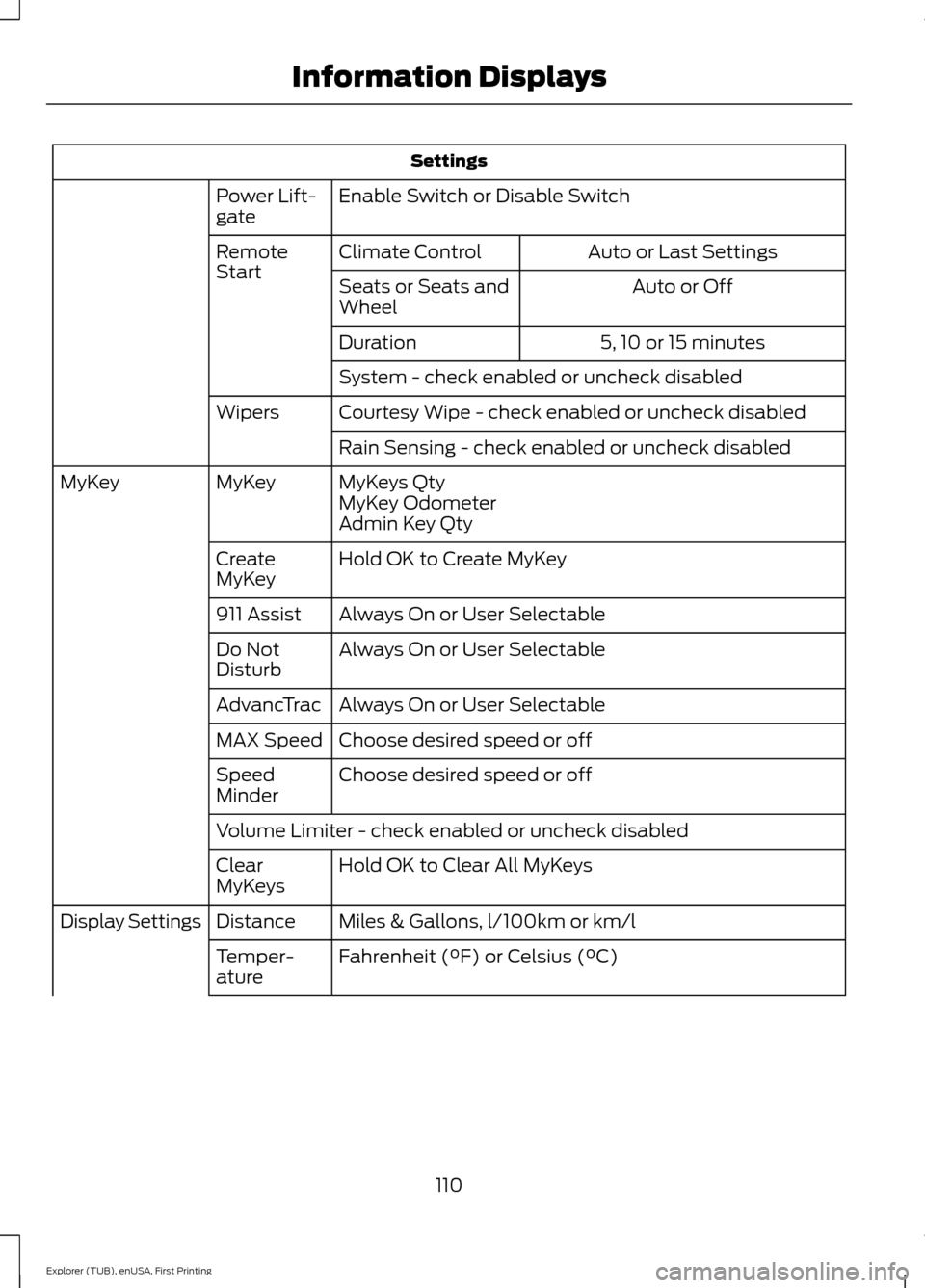
Settings
Enable Switch or Disable Switch
Power Lift-
gate
Auto or Last Settings
Climate Control
Remote
Start
Auto or Off
Seats or Seats and
Wheel
5, 10 or 15 minutes
Duration
System - check enabled or uncheck disabled
Courtesy Wipe - check enabled or uncheck disabled
Wipers
Rain Sensing - check enabled or uncheck disabled
MyKeys Qty
MyKey
MyKey
MyKey Odometer
Admin Key Qty
Hold OK to Create MyKey
Create
MyKey
Always On or User Selectable
911 Assist
Always On or User Selectable
Do Not
Disturb
Always On or User Selectable
AdvancTrac
Choose desired speed or off
MAX Speed
Choose desired speed or off
Speed
Minder
Volume Limiter - check enabled or uncheck disabled
Hold OK to Clear All MyKeys
Clear
MyKeys
Miles & Gallons, l/100km or km/l
Distance
Display Settings
Fahrenheit (°F) or Celsius (°C)
Temper-
ature
110
Explorer (TUB), enUSA, First Printing Information Displays
Page 117 of 541

Settings
Switch Inhibit - check enabled or uncheck disabled
Autofold - check enabled or uncheck disabled
Mirrors
XXX% - Hold OK to Reset
Oil Life
Reset
Enable Switch or Disable Switch
Power Lift-
gate
Auto or Last Settings
Climate Control
Remote
Start
Auto or Off
Seats or Seats and
Wheel
5, 10 or 15 minutes
Duration
System - check enabled or uncheck disabled
Courtesy Wipe - check enabled or uncheck disabled
Wipers
Rain Sensing - check enabled or uncheck disabled
MyKeys Qty
Mykey
Status
MyKey
MyKey Odometer
Admin Key Qty
Hold OK to Create MyKey
Create
MyKey
Always On or User Selectable
911 Assist
On or Off
Do Not
Disturb
Always On or User Selectable
Traction
Control
Choose desired speed or off
Max Speed
Choose desired speed or off
Speed
Minder
Volume Limiter - check enabled or uncheck disabled
Hold OK to Clear All MyKeys
Clear
MyKeys
Miles & Gallons, l/100km or km/l
Distance
Display Settings
114
Explorer (TUB), enUSA, First Printing Information Displays
Page 133 of 541
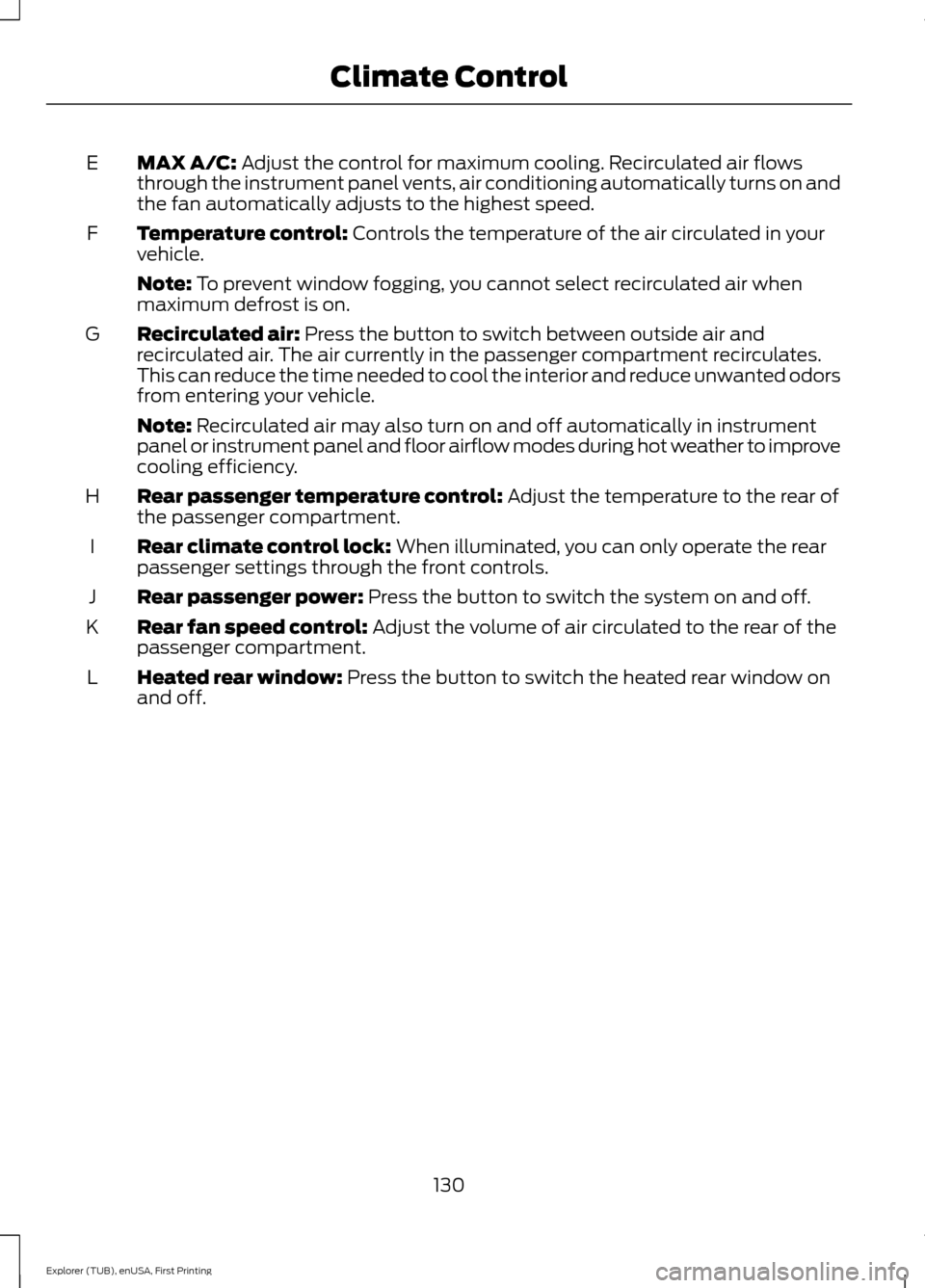
MAX A/C: Adjust the control for maximum cooling. Recirculated air flows
through the instrument panel vents, air conditioning automatically turns on and
the fan automatically adjusts to the highest speed.
E
Temperature control:
Controls the temperature of the air circulated in your
vehicle.
F
Note:
To prevent window fogging, you cannot select recirculated air when
maximum defrost is on.
Recirculated air:
Press the button to switch between outside air and
recirculated air. The air currently in the passenger compartment recirculates.
This can reduce the time needed to cool the interior and reduce unwanted odors
from entering your vehicle.
G
Note:
Recirculated air may also turn on and off automatically in instrument
panel or instrument panel and floor airflow modes during hot weather to improve
cooling efficiency.
Rear passenger temperature control:
Adjust the temperature to the rear of
the passenger compartment.
H
Rear climate control lock:
When illuminated, you can only operate the rear
passenger settings through the front controls.
I
Rear passenger power:
Press the button to switch the system on and off.
J
Rear fan speed control:
Adjust the volume of air circulated to the rear of the
passenger compartment.
K
Heated rear window:
Press the button to switch the heated rear window on
and off.
L
130
Explorer (TUB), enUSA, First Printing Climate Control
Page 138 of 541
Note:
Do not place objects under the front
seats as this may interfere with the airflow
to the rear seats.
Note: Remove any snow, ice or leaves from
the air intake area at the base of the
windshield.
Note: To improve the time to reach comfort
in hot weather, drive with the windows fully
open until you feel cold air through the air
vents.
Manual Climate Control
Note: To reduce fogging of the windshield
during humid weather, adjust the air
distribution control to the windshield air
vents position. Automatic Climate Control
Note:
Adjusting the settings when your
vehicle interior is extremely hot or cold is
not necessary. The system automatically
adjusts to heat or cool the cabin to your
selected temperature as quickly as possible.
For the system to function efficiently, the
instrument panel and side air vents should
be fully open.
Note: If you select AUTO during cold
outside temperatures, the system directs
airflow to the windshield and side window
vents. In addition, the fan may run at a
slower speed until the engine warms up.
Note: If you select AUTO during hot outside
temperatures, or when the inside of the
vehicle is hot, the system automatically uses
recirculated air to maximize interior cooling.
When the interior reaches the selected
temperature, the system automatically
switches to using outside air.
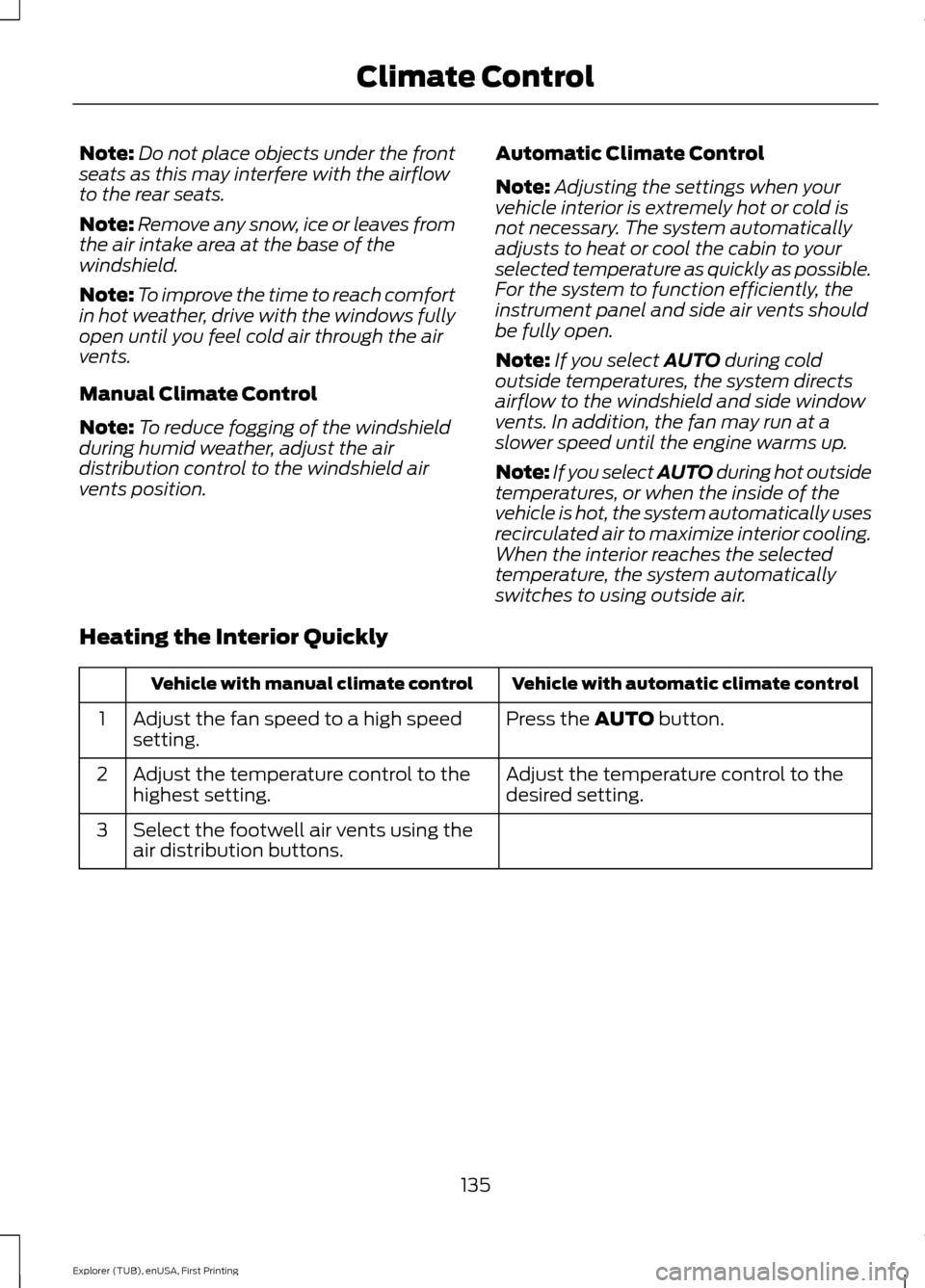
Heating the Interior Quickly Vehicle with automatic climate control
Vehicle with manual climate control
Press the
AUTO button.
Adjust the fan speed to a high speed
setting.
1
Adjust the temperature control to the
desired setting.
Adjust the temperature control to the
highest setting.
2
Select the footwell air vents using the
air distribution buttons.
3
135
Explorer (TUB), enUSA, First Printing Climate Control
Page 139 of 541
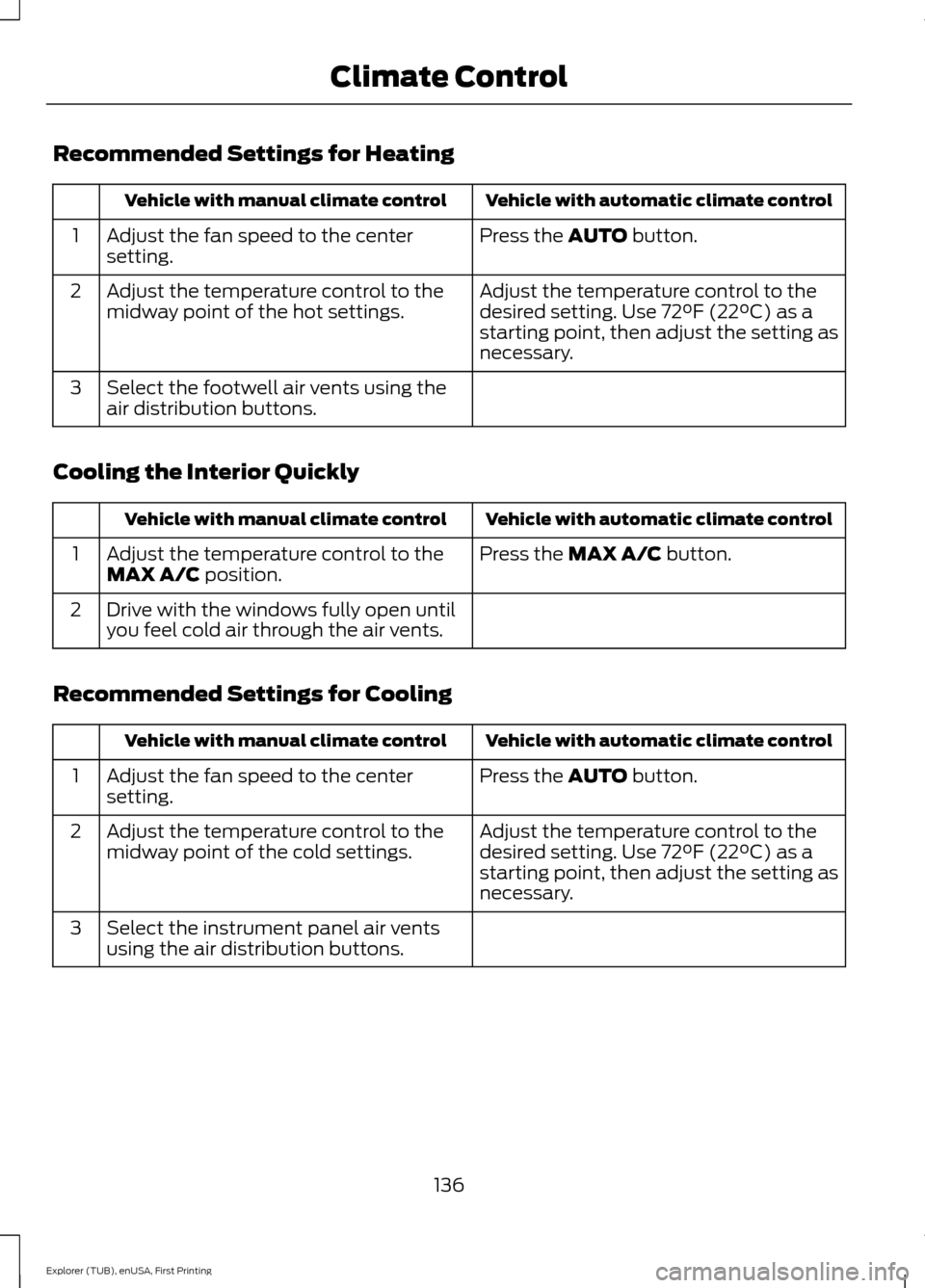
Recommended Settings for Heating
Vehicle with automatic climate control
Vehicle with manual climate control
Press the AUTO button.
Adjust the fan speed to the center
setting.
1
Adjust the temperature control to the
desired setting. Use 72°F (22°C) as a
starting point, then adjust the setting as
necessary.
Adjust the temperature control to the
midway point of the hot settings.
2
Select the footwell air vents using the
air distribution buttons.
3
Cooling the Interior Quickly Vehicle with automatic climate control
Vehicle with manual climate control
Press the
MAX A/C button.
Adjust the temperature control to the
MAX A/C position.
1
Drive with the windows fully open until
you feel cold air through the air vents.
2
Recommended Settings for Cooling Vehicle with automatic climate control
Vehicle with manual climate control
Press the
AUTO button.
Adjust the fan speed to the center
setting.
1
Adjust the temperature control to the
desired setting. Use 72°F (22°C) as a
starting point, then adjust the setting as
necessary.
Adjust the temperature control to the
midway point of the cold settings.
2
Select the instrument panel air vents
using the air distribution buttons.
3
136
Explorer (TUB), enUSA, First Printing Climate Control
Page 141 of 541
Fan speed control: Adjust the volume of air circulated in the vehicle.
A
Heated seats (if equipped):
Press the button to switch the heated seats on
and off. See Heated Seats (page 154).
B
Temperature control:
Control the temperature of the air circulated in your
vehicle.
C
Air distribution control:
Adjust the control to turn airflow from the instrument
panel or footwell vents on or off. You can distribute air through any combination
of these vents.
D
Fan speed control lock:
When illuminated, you can only operate the rear
passenger settings through the front controls.
E
HEATED WINDOWS AND
MIRRORS
(If Equipped)
Heated Rear Window
Note: Make sure the engine is running
before operating the heated windows. Press the button to clear the
heated rear window of thin ice
and fog. The heated rear window
will automatically turn off after a short
period of time. Start the engine before you
switch the heated rear window on.
Note: Do not use razor blades or other
sharp objects to clean or remove decals
from the inside of the heated rear window.
The vehicle warranty does not cover
damage caused to the heated rear window
grid lines.
Heated Exterior Mirror
When you switch the heated rear window
on, the heated exterior mirrors will
automatically turn on.
Note: Do not remove ice from the mirrors
with a scraper or adjust the mirror glass
when it is frozen in place.
Note: Do not clean the mirror housing or
glass with harsh abrasives, fuel or other
petroleum-based cleaning products. CABIN AIR FILTER
Your vehicle is equipped with a cabin air
filter, which gives you and your passengers
the following benefits:
•
It improves your driving comfort by
reducing particle concentration.
• It improves the interior compartment
cleanliness.
• It protects the climate control
components from particle deposits.
You can locate the cabin air filter behind
the glove box.
Note: Make sure you have a cabin air filter
installed at all times. This prevents foreign
objects from entering the system. Running
the system without a filter in place could
result in degradation or damage to the
system.
Replace the filter at regular intervals. See
Scheduled Maintenance
(page 486).
For additional cabin air filter information,
or to replace the filter, see an authorized
dealer.
138
Explorer (TUB), enUSA, First Printing Climate ControlE184884