2016 FORD EXPLORER audio
[x] Cancel search: audioPage 442 of 541
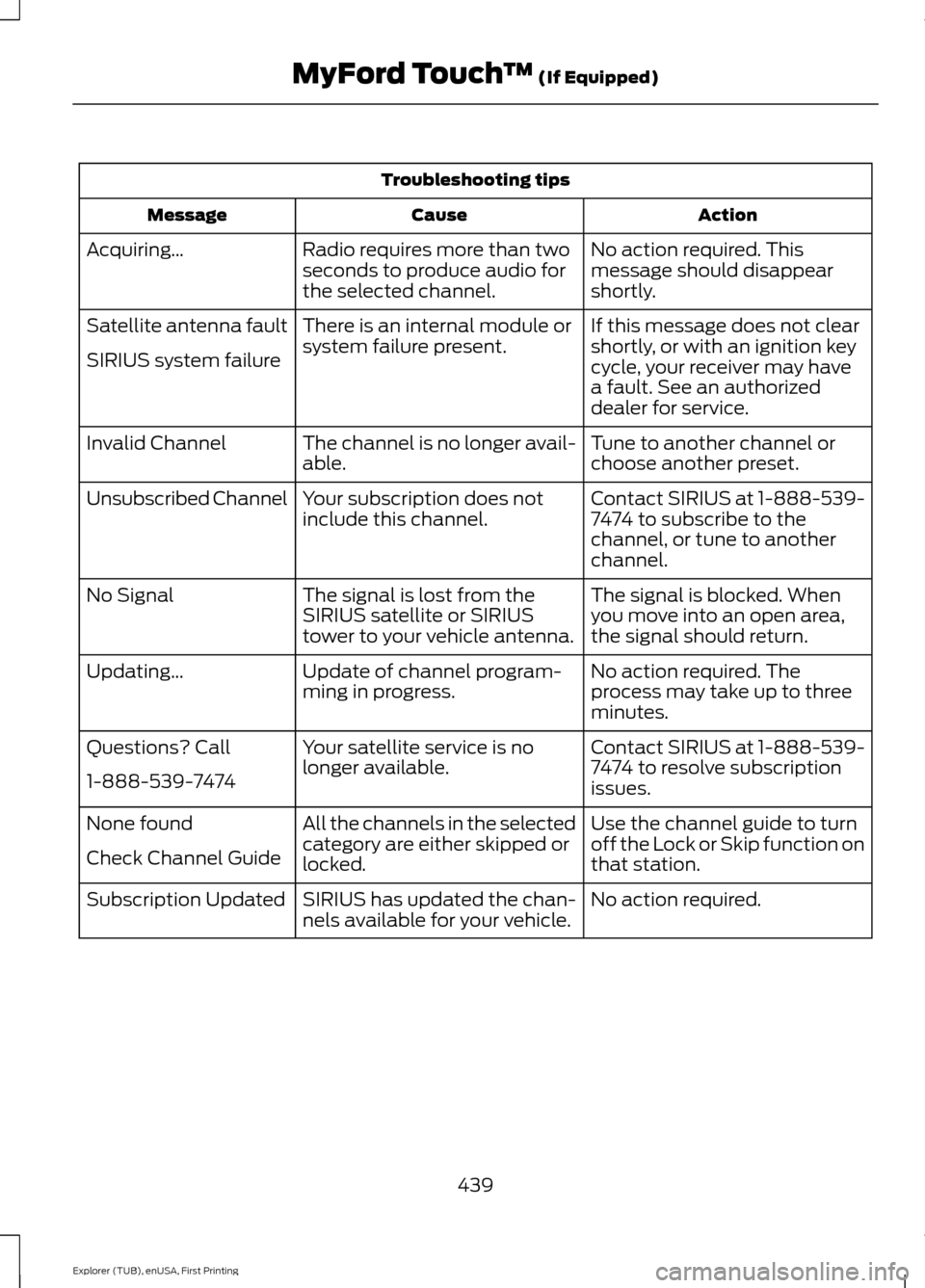
Troubleshooting tips
Action
Cause
Message
No action required. This
message should disappear
shortly.
Radio requires more than two
seconds to produce audio for
the selected channel.
Acquiring…
If this message does not clear
shortly, or with an ignition key
cycle, your receiver may have
a fault. See an authorized
dealer for service.
There is an internal module or
system failure present.
Satellite antenna fault
SIRIUS system failure
Tune to another channel or
choose another preset.
The channel is no longer avail-
able.
Invalid Channel
Contact SIRIUS at 1-888-539-
7474 to subscribe to the
channel, or tune to another
channel.
Your subscription does not
include this channel.
Unsubscribed Channel
The signal is blocked. When
you move into an open area,
the signal should return.
The signal is lost from the
SIRIUS satellite or SIRIUS
tower to your vehicle antenna.
No Signal
No action required. The
process may take up to three
minutes.
Update of channel program-
ming in progress.
Updating…
Contact SIRIUS at 1-888-539-
7474 to resolve subscription
issues.
Your satellite service is no
longer available.
Questions? Call
1-888-539-7474
Use the channel guide to turn
off the Lock or Skip function on
that station.
All the channels in the selected
category are either skipped or
locked.
None found
Check Channel Guide
No action required.
SIRIUS has updated the chan-
nels available for your vehicle.
Subscription Updated
439
Explorer (TUB), enUSA, First Printing MyFord Touch
™ (If Equipped)
Page 448 of 541
Supported Media Players, Formats
and Metadata Information
SYNC is capable of hosting nearly any
digital media player, including iPod,
Zune
™, plays from device players, and
most USB drives. Supported audio formats
include MP3, WMA, WAV and AAC.
It is also able to organize your indexed
media from your playing device by
metadata tags. Metadata tags, which are
descriptive software identifiers embedded
in the media files, provide information
about the file.
If your indexed media files contain no
information embedded in these metadata
tags, SYNC may classify the empty
metadata tags as unknown. Bluetooth Audio The system allows you to stream
audio over your vehicle's
speakers from your connected,
Bluetooth-enabled cell phone.
To access, press the lower left corner
on the touchscreen, then select: Message
BT Stereo
Bluetooth Audio Voice Commands The voice system allows you to
control your media with a simple
voice command. For example to
change songs, press the voice button and
follow the system prompts.
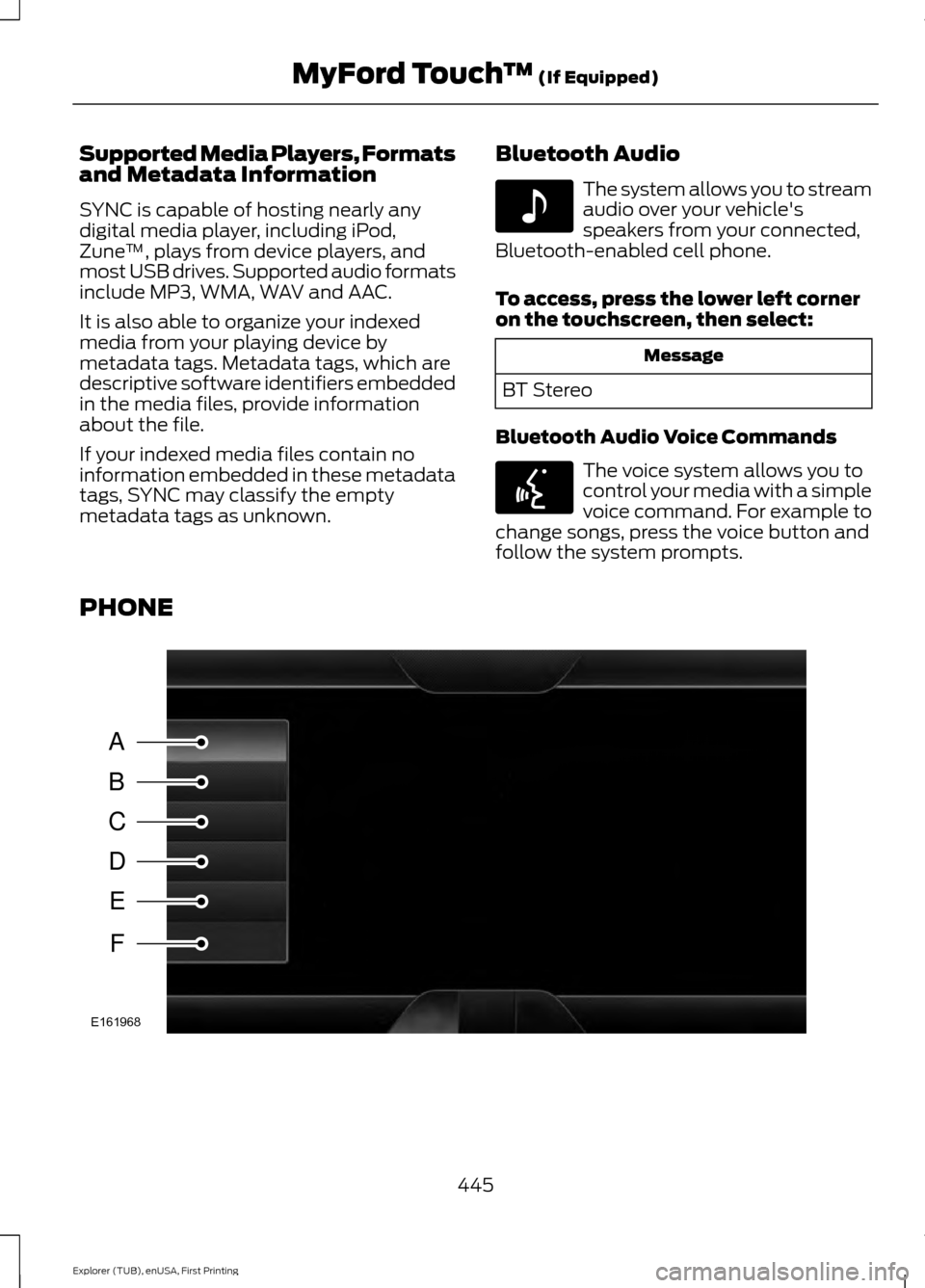
PHONE 445
Explorer (TUB), enUSA, First Printing MyFord Touch
™ (If Equipped)E142611 E142599 A
B
C
D
E
F
E161968
Page 459 of 541
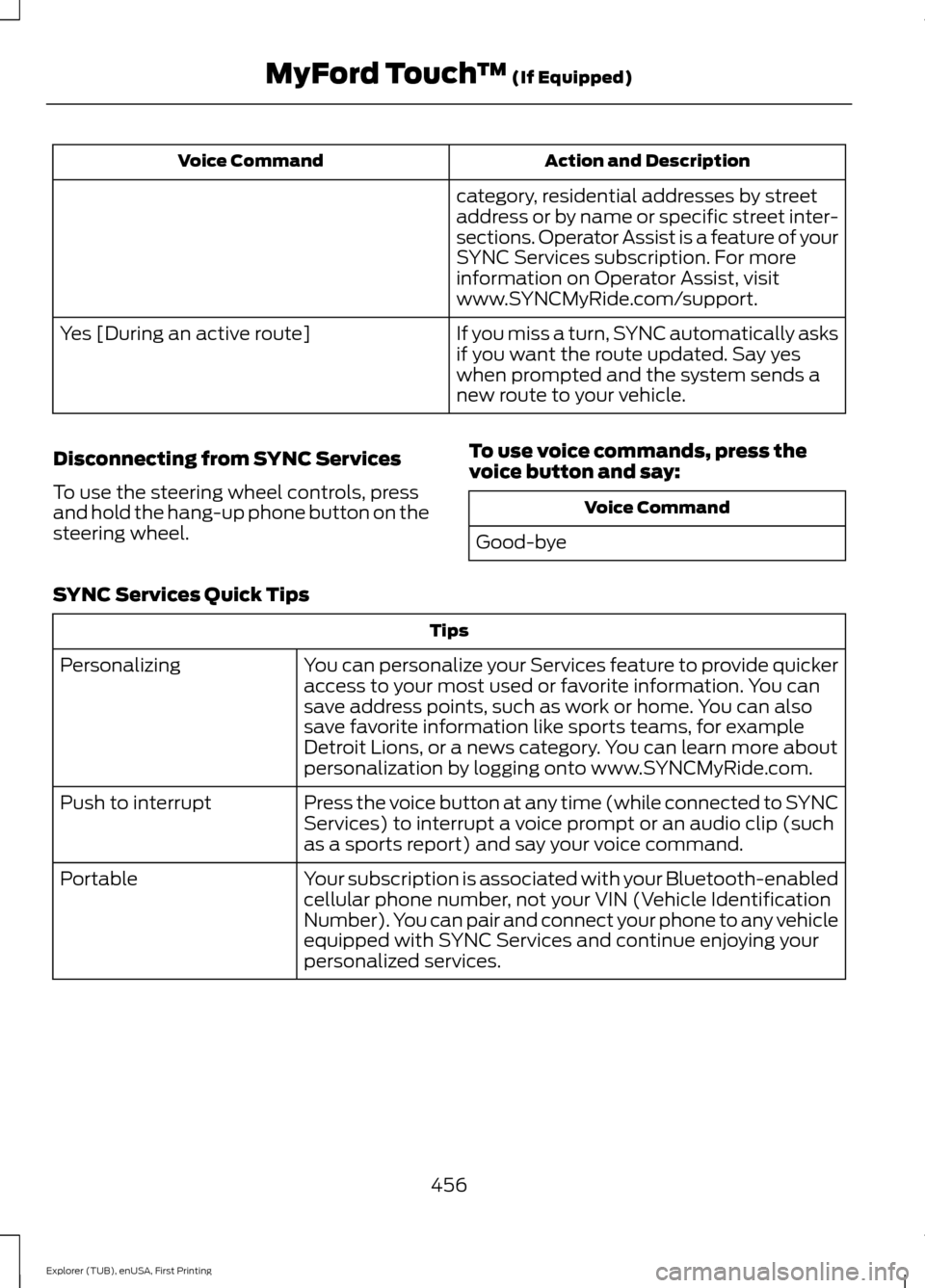
Action and Description
Voice Command
category, residential addresses by street
address or by name or specific street inter-
sections. Operator Assist is a feature of your
SYNC Services subscription. For more
information on Operator Assist, visit
www.SYNCMyRide.com/support.
If you miss a turn, SYNC automatically asks
if you want the route updated. Say yes
when prompted and the system sends a
new route to your vehicle.
Yes [During an active route]
Disconnecting from SYNC Services
To use the steering wheel controls, press
and hold the hang-up phone button on the
steering wheel. To use voice commands, press the
voice button and say: Voice Command
Good-bye
SYNC Services Quick Tips Tips
You can personalize your Services feature to provide quicker
access to your most used or favorite information. You can
save address points, such as work or home. You can also
save favorite information like sports teams, for example
Detroit Lions, or a news category. You can learn more about
personalization by logging onto www.SYNCMyRide.com.
Personalizing
Press the voice button at any time (while connected to SYNC
Services) to interrupt a voice prompt or an audio clip (such
as a sports report) and say your voice command.
Push to interrupt
Your subscription is associated with your Bluetooth-enabled
cellular phone number, not your VIN (Vehicle Identification
Number). You can pair and connect your phone to any vehicle
equipped with SYNC Services and continue enjoying your
personalized services.
Portable
456
Explorer (TUB), enUSA, First Printing MyFord Touch
™ (If Equipped)
Page 479 of 541
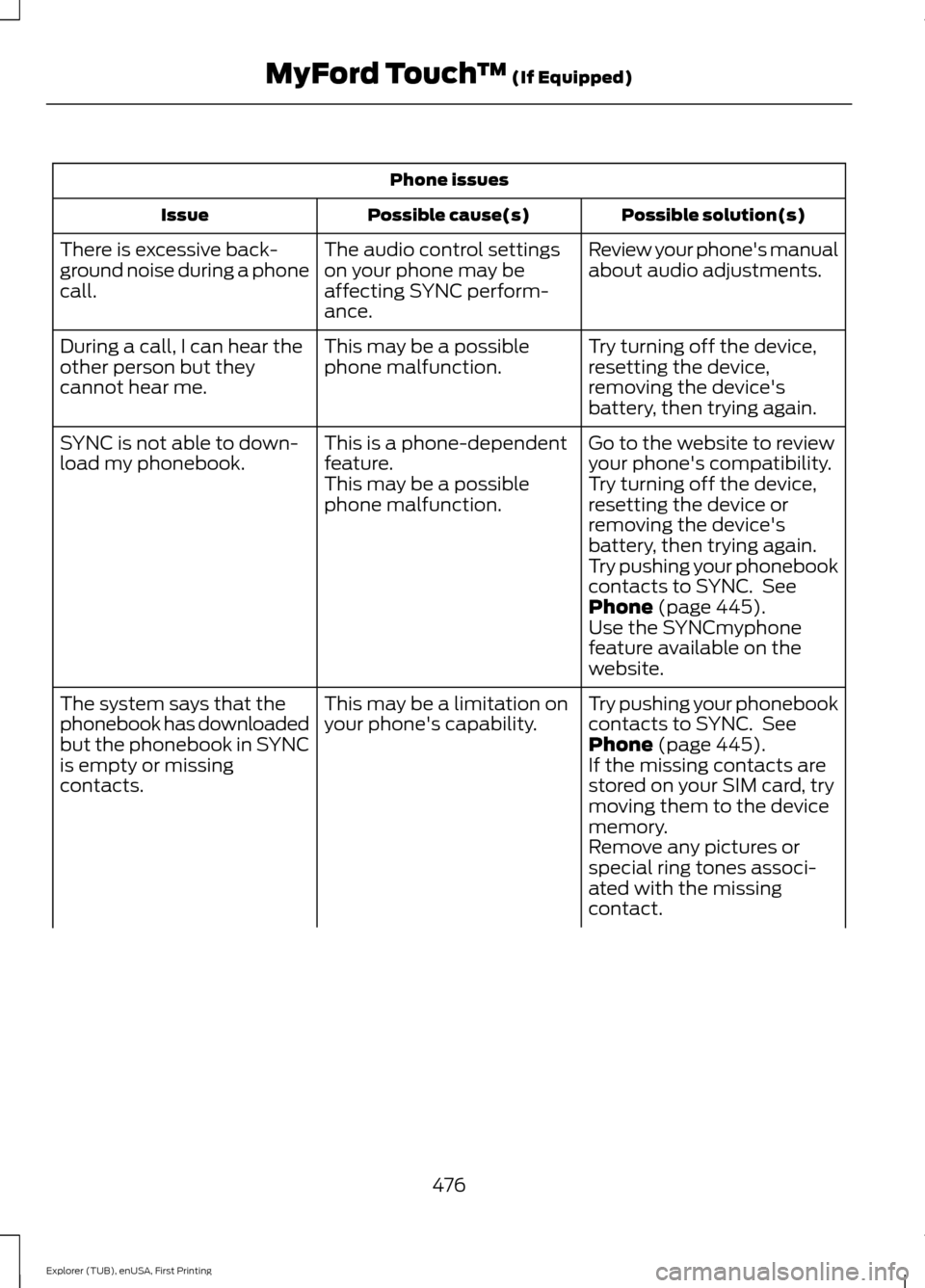
Phone issues
Possible solution(s)
Possible cause(s)
Issue
Review your phone's manual
about audio adjustments.
The audio control settings
on your phone may be
affecting SYNC perform-
ance.
There is excessive back-
ground noise during a phone
call.
Try turning off the device,
resetting the device,
removing the device's
battery, then trying again.
This may be a possible
phone malfunction.
During a call, I can hear the
other person but they
cannot hear me.
Go to the website to review
your phone's compatibility.
This is a phone-dependent
feature.
SYNC is not able to down-
load my phonebook.
Try turning off the device,
resetting the device or
removing the device's
battery, then trying again.
This may be a possible
phone malfunction.
Try pushing your phonebook
contacts to SYNC. See
Phone (page 445).
Use the SYNCmyphone
feature available on the
website.
Try pushing your phonebook
contacts to SYNC. See
Phone
(page 445).
This may be a limitation on
your phone's capability.
The system says that the
phonebook has downloaded
but the phonebook in SYNC
is empty or missing
contacts. If the missing contacts are
stored on your SIM card, try
moving them to the device
memory.
Remove any pictures or
special ring tones associ-
ated with the missing
contact.
476
Explorer (TUB), enUSA, First Printing MyFord Touch
™
(If Equipped)
Page 481 of 541
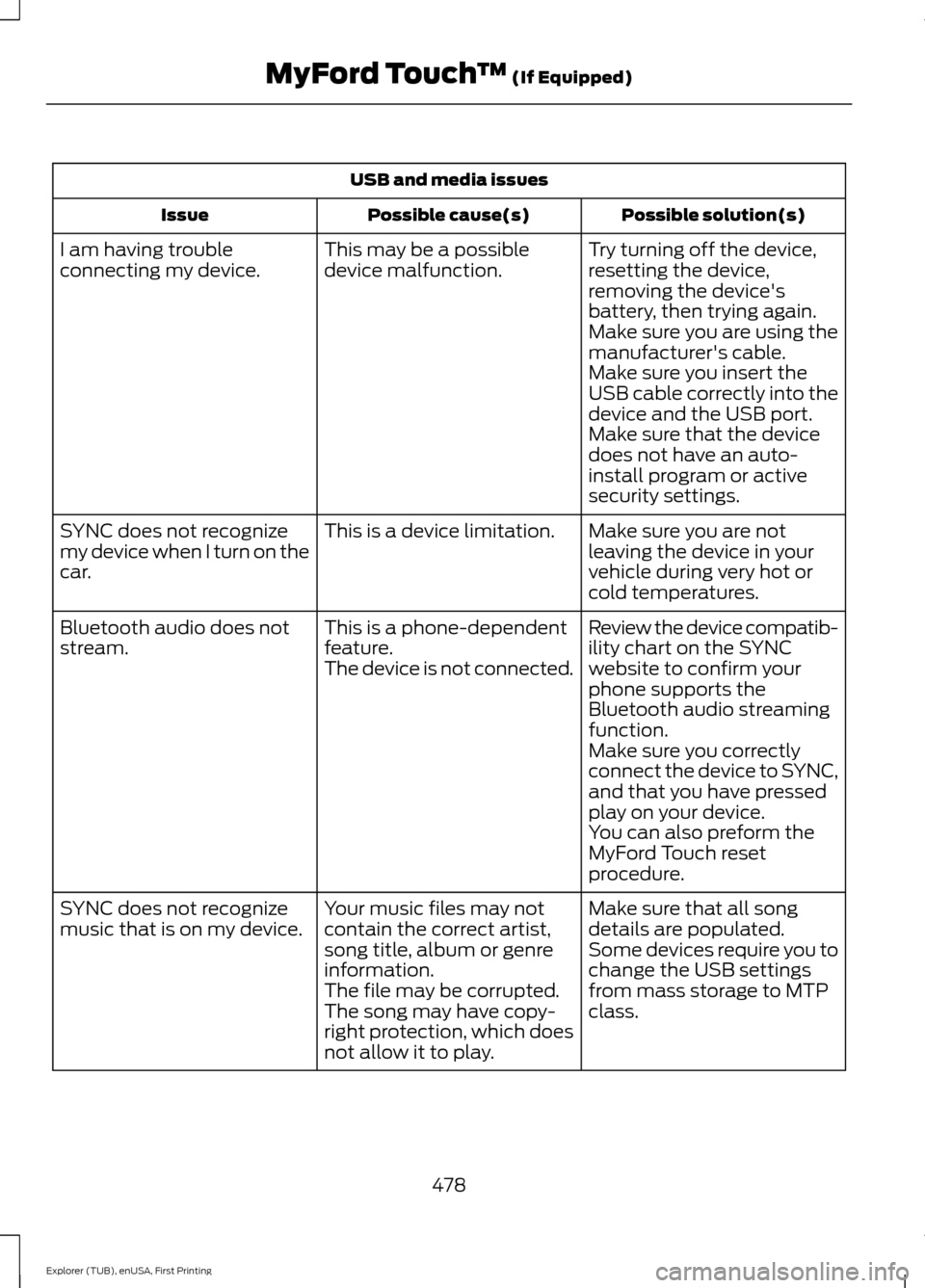
USB and media issues
Possible solution(s)
Possible cause(s)
Issue
Try turning off the device,
resetting the device,
removing the device's
battery, then trying again.
This may be a possible
device malfunction.
I am having trouble
connecting my device.
Make sure you are using the
manufacturer's cable.
Make sure you insert the
USB cable correctly into the
device and the USB port.
Make sure that the device
does not have an auto-
install program or active
security settings.
Make sure you are not
leaving the device in your
vehicle during very hot or
cold temperatures.
This is a device limitation.
SYNC does not recognize
my device when I turn on the
car.
Review the device compatib-
ility chart on the SYNC
website to confirm your
phone supports the
Bluetooth audio streaming
function.
This is a phone-dependent
feature.
The device is not connected.
Bluetooth audio does not
stream.
Make sure you correctly
connect the device to SYNC,
and that you have pressed
play on your device.
You can also preform the
MyFord Touch reset
procedure.
Make sure that all song
details are populated.
Your music files may not
contain the correct artist,
song title, album or genre
information.
SYNC does not recognize
music that is on my device.
Some devices require you to
change the USB settings
from mass storage to MTP
class.
The file may be corrupted.
The song may have copy-
right protection, which does
not allow it to play.
478
Explorer (TUB), enUSA, First Printing MyFord Touch
™ (If Equipped)
Page 511 of 541
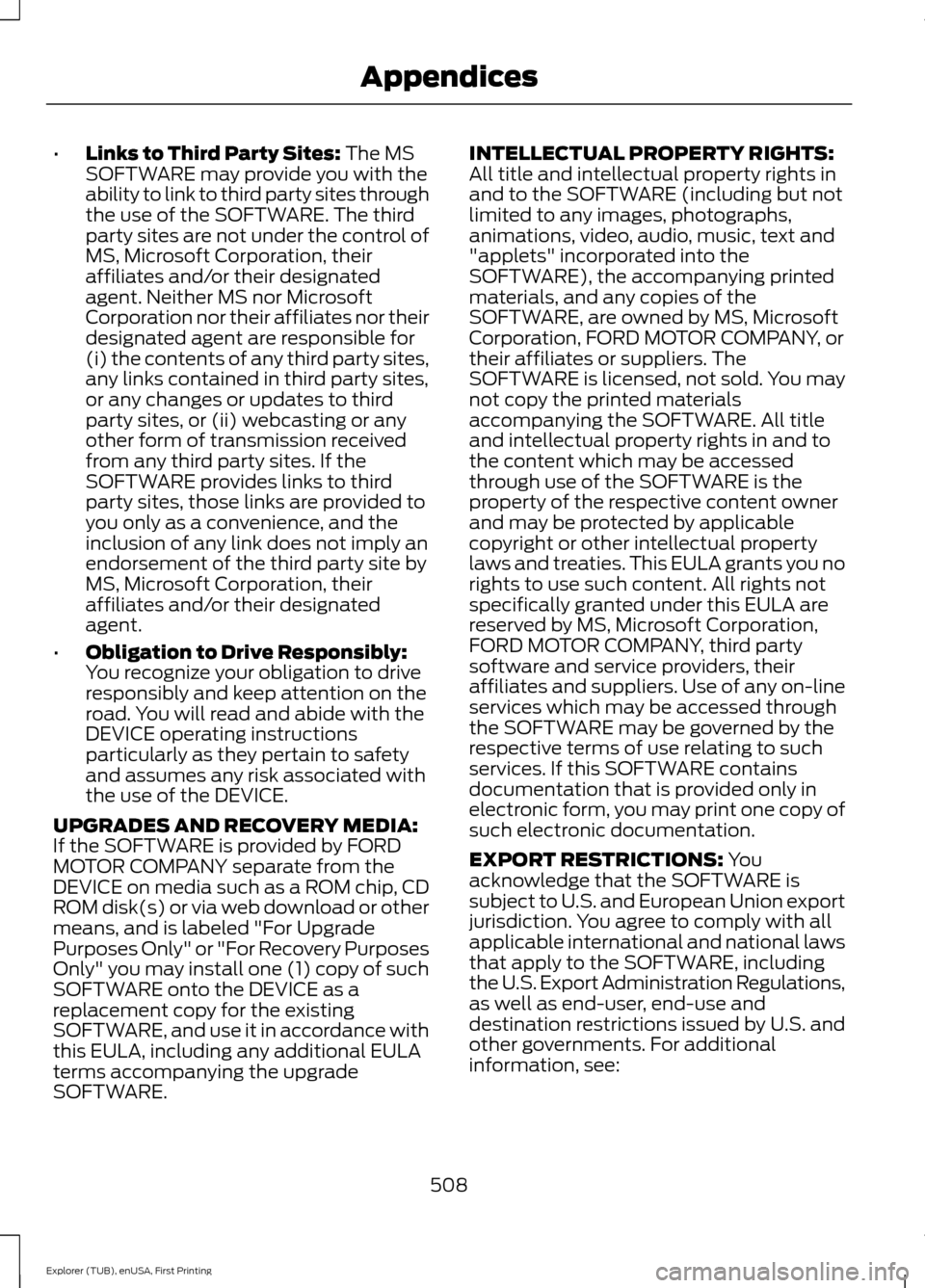
•
Links to Third Party Sites: The MS
SOFTWARE may provide you with the
ability to link to third party sites through
the use of the SOFTWARE. The third
party sites are not under the control of
MS, Microsoft Corporation, their
affiliates and/or their designated
agent. Neither MS nor Microsoft
Corporation nor their affiliates nor their
designated agent are responsible for
(i) the contents of any third party sites,
any links contained in third party sites,
or any changes or updates to third
party sites, or (ii) webcasting or any
other form of transmission received
from any third party sites. If the
SOFTWARE provides links to third
party sites, those links are provided to
you only as a convenience, and the
inclusion of any link does not imply an
endorsement of the third party site by
MS, Microsoft Corporation, their
affiliates and/or their designated
agent.
• Obligation to Drive Responsibly:
You recognize your obligation to drive
responsibly and keep attention on the
road. You will read and abide with the
DEVICE operating instructions
particularly as they pertain to safety
and assumes any risk associated with
the use of the DEVICE.
UPGRADES AND RECOVERY MEDIA:
If the SOFTWARE is provided by FORD
MOTOR COMPANY separate from the
DEVICE on media such as a ROM chip, CD
ROM disk(s) or via web download or other
means, and is labeled "For Upgrade
Purposes Only" or "For Recovery Purposes
Only" you may install one (1) copy of such
SOFTWARE onto the DEVICE as a
replacement copy for the existing
SOFTWARE, and use it in accordance with
this EULA, including any additional EULA
terms accompanying the upgrade
SOFTWARE. INTELLECTUAL PROPERTY RIGHTS:
All title and intellectual property rights in
and to the SOFTWARE (including but not
limited to any images, photographs,
animations, video, audio, music, text and
"applets" incorporated into the
SOFTWARE), the accompanying printed
materials, and any copies of the
SOFTWARE, are owned by MS, Microsoft
Corporation, FORD MOTOR COMPANY, or
their affiliates or suppliers. The
SOFTWARE is licensed, not sold. You may
not copy the printed materials
accompanying the SOFTWARE. All title
and intellectual property rights in and to
the content which may be accessed
through use of the SOFTWARE is the
property of the respective content owner
and may be protected by applicable
copyright or other intellectual property
laws and treaties. This EULA grants you no
rights to use such content. All rights not
specifically granted under this EULA are
reserved by MS, Microsoft Corporation,
FORD MOTOR COMPANY, third party
software and service providers, their
affiliates and suppliers. Use of any on-line
services which may be accessed through
the SOFTWARE may be governed by the
respective terms of use relating to such
services. If this SOFTWARE contains
documentation that is provided only in
electronic form, you may print one copy of
such electronic documentation.
EXPORT RESTRICTIONS:
You
acknowledge that the SOFTWARE is
subject to U.S. and European Union export
jurisdiction. You agree to comply with all
applicable international and national laws
that apply to the SOFTWARE, including
the U.S. Export Administration Regulations,
as well as end-user, end-use and
destination restrictions issued by U.S. and
other governments. For additional
information, see:
508
Explorer (TUB), enUSA, First Printing Appendices
Page 515 of 541
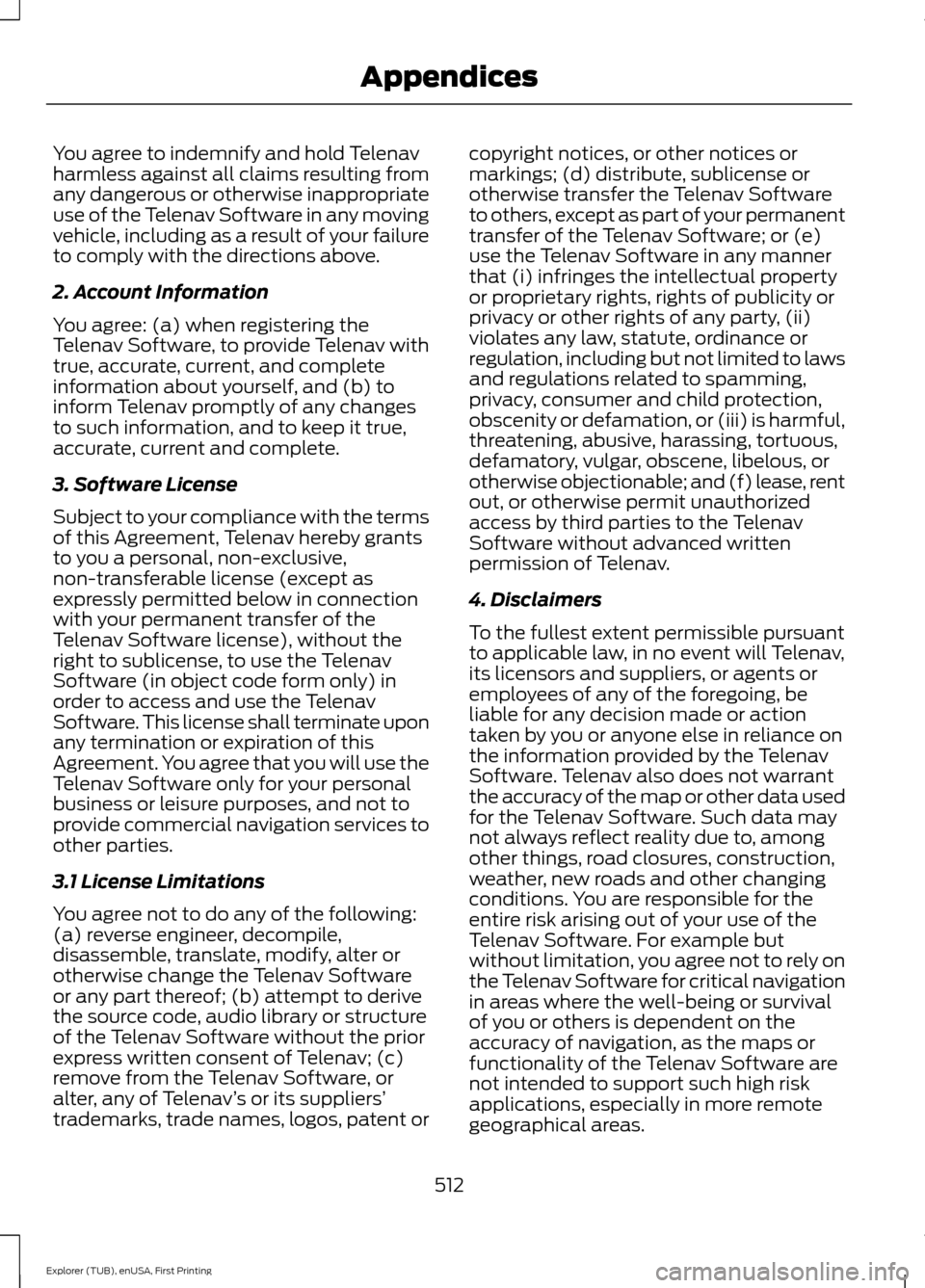
You agree to indemnify and hold Telenav
harmless against all claims resulting from
any dangerous or otherwise inappropriate
use of the Telenav Software in any moving
vehicle, including as a result of your failure
to comply with the directions above.
2. Account Information
You agree: (a) when registering the
Telenav Software, to provide Telenav with
true, accurate, current, and complete
information about yourself, and (b) to
inform Telenav promptly of any changes
to such information, and to keep it true,
accurate, current and complete.
3. Software License
Subject to your compliance with the terms
of this Agreement, Telenav hereby grants
to you a personal, non-exclusive,
non-transferable license (except as
expressly permitted below in connection
with your permanent transfer of the
Telenav Software license), without the
right to sublicense, to use the Telenav
Software (in object code form only) in
order to access and use the Telenav
Software. This license shall terminate upon
any termination or expiration of this
Agreement. You agree that you will use the
Telenav Software only for your personal
business or leisure purposes, and not to
provide commercial navigation services to
other parties.
3.1 License Limitations
You agree not to do any of the following:
(a) reverse engineer, decompile,
disassemble, translate, modify, alter or
otherwise change the Telenav Software
or any part thereof; (b) attempt to derive
the source code, audio library or structure
of the Telenav Software without the prior
express written consent of Telenav; (c)
remove from the Telenav Software, or
alter, any of Telenav
’s or its suppliers’
trademarks, trade names, logos, patent or copyright notices, or other notices or
markings; (d) distribute, sublicense or
otherwise transfer the Telenav Software
to others, except as part of your permanent
transfer of the Telenav Software; or (e)
use the Telenav Software in any manner
that (i) infringes the intellectual property
or proprietary rights, rights of publicity or
privacy or other rights of any party, (ii)
violates any law, statute, ordinance or
regulation, including but not limited to laws
and regulations related to spamming,
privacy, consumer and child protection,
obscenity or defamation, or (iii) is harmful,
threatening, abusive, harassing, tortuous,
defamatory, vulgar, obscene, libelous, or
otherwise objectionable; and (f) lease, rent
out, or otherwise permit unauthorized
access by third parties to the Telenav
Software without advanced written
permission of Telenav.
4. Disclaimers
To the fullest extent permissible pursuant
to applicable law, in no event will Telenav,
its licensors and suppliers, or agents or
employees of any of the foregoing, be
liable for any decision made or action
taken by you or anyone else in reliance on
the information provided by the Telenav
Software. Telenav also does not warrant
the accuracy of the map or other data used
for the Telenav Software. Such data may
not always reflect reality due to, among
other things, road closures, construction,
weather, new roads and other changing
conditions. You are responsible for the
entire risk arising out of your use of the
Telenav Software. For example but
without limitation, you agree not to rely on
the Telenav Software for critical navigation
in areas where the well-being or survival
of you or others is dependent on the
accuracy of navigation, as the maps or
functionality of the Telenav Software are
not intended to support such high risk
applications, especially in more remote
geographical areas.
512
Explorer (TUB), enUSA, First Printing Appendices
Page 530 of 541
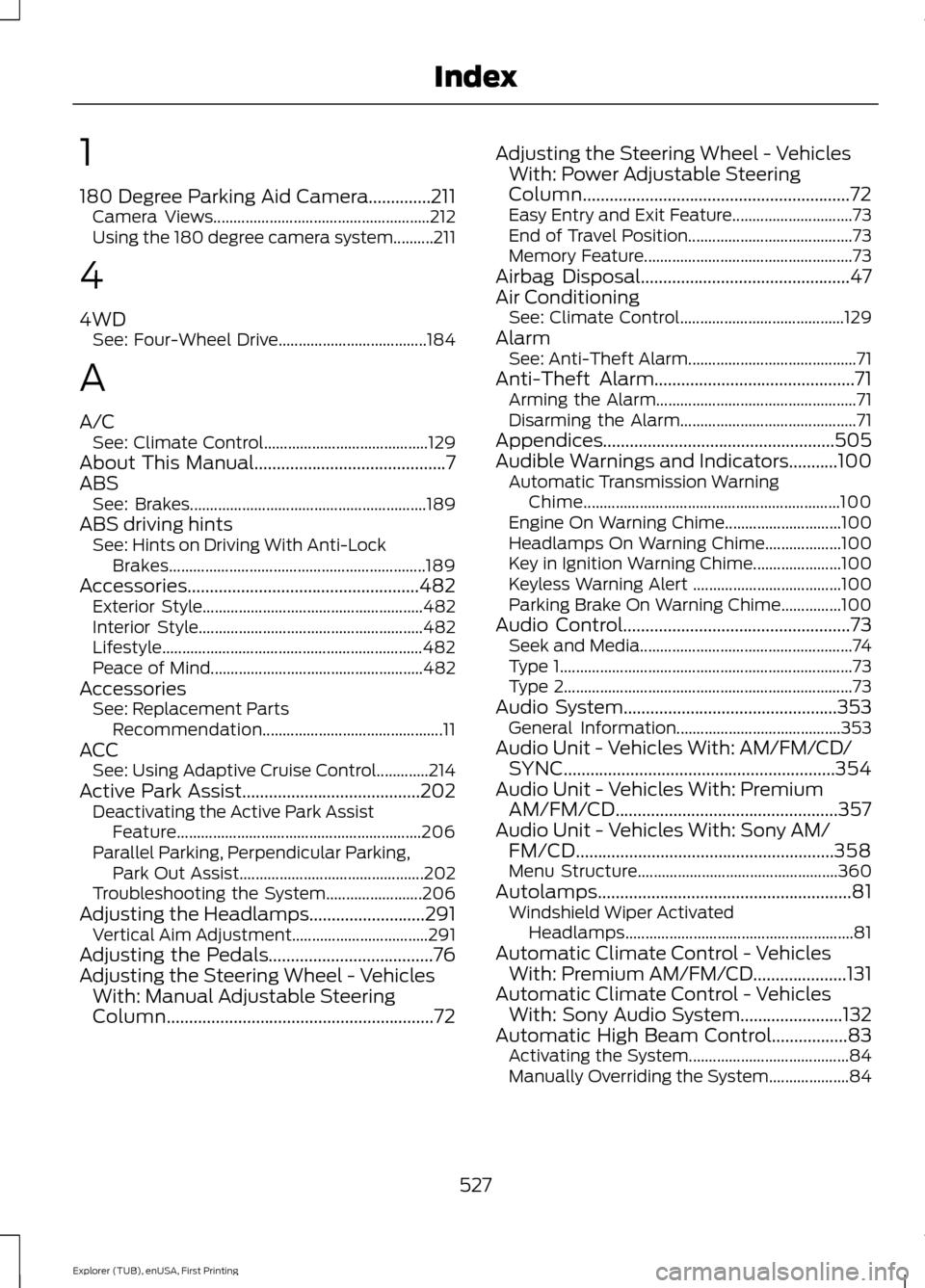
1
180 Degree Parking Aid Camera..............211
Camera Views...................................................... 212
Using the 180 degree camera system..........211
4
4WD See: Four-Wheel Drive..................................... 184
A
A/C See: Climate Control......................................... 129
About This Manual...........................................7
ABS See: Brakes........................................................... 189
ABS driving hints See: Hints on Driving With Anti-Lock
Brakes................................................................ 189
Accessories
....................................................482
Exterior Style....................................................... 482
Interior Style........................................................ 482
Lifestyle................................................................. 482
Peace of Mind..................................................... 482
Accessories See: Replacement Parts
Recommendation............................................. 11
ACC See: Using Adaptive Cruise Control.............214
Active Park Assist
........................................202
Deactivating the Active Park Assist
Feature............................................................. 206
Parallel Parking, Perpendicular Parking, Park Out Assist.............................................. 202
Troubleshooting the System........................ 206
Adjusting the Headlamps..........................291 Vertical Aim Adjustment.................................. 291
Adjusting the Pedals.....................................76
Adjusting the Steering Wheel - Vehicles With: Manual Adjustable Steering
Column
............................................................72 Adjusting the Steering Wheel - Vehicles
With: Power Adjustable Steering
Column
............................................................72
Easy Entry and Exit Feature.............................. 73
End of Travel Position......................................... 73
Memory Feature.................................................... 73
Airbag Disposal...............................................47
Air Conditioning See: Climate Control......................................... 129
Alarm See: Anti-Theft Alarm.......................................... 71
Anti-Theft Alarm.............................................71 Arming the Alarm.................................................. 71
Disarming the Alarm............................................ 71
Appendices....................................................505
Audible Warnings and Indicators
...........100
Automatic Transmission Warning
Chime................................................................ 100
Engine On Warning Chime............................. 100
Headlamps On Warning Chime................... 100
Key in Ignition Warning Chime...................... 100
Keyless Warning Alert ..................................... 100
Parking Brake On Warning Chime...............100
Audio Control
...................................................73
Seek and Media..................................................... 74
Type 1........................................................................\
. 73
Type 2........................................................................\
73
Audio System................................................353 General Information......................................... 353
Audio Unit - Vehicles With: AM/FM/CD/ SYNC
.............................................................354
Audio Unit - Vehicles With: Premium AM/FM/CD..................................................357
Audio Unit - Vehicles With: Sony AM/ FM/CD..........................................................358
Menu Structure.................................................. 360
Autolamps
.........................................................81
Windshield Wiper Activated
Headlamps......................................................... 81
Automatic Climate Control - Vehicles With: Premium AM/FM/CD.....................131
Automatic Climate Control - Vehicles With: Sony Audio System.......................132
Automatic High Beam Control.................83 Activating the System........................................ 84
Manually Overriding the System.................... 84
527
Explorer (TUB), enUSA, First Printing Index