2016 FORD EXPLORER service
[x] Cancel search: servicePage 123 of 541

Action
Message
The hood is not completely closed.
Hood Ajar
The system has disabled the door switches.
Switches Inhibited
Security Mode
The factory keypad code displays in the information display
after the system resets the keypad. See Passive Anti-Theft System (page 70).
Factory Keypad Code
XXXXX
Driver Alert Action
Message
Stop and rest as soon as it is safe to do so.
Driver Alert Warning Rest
Now
Take a rest soon.
Driver Alert Warning Rest
Suggested
Electronic Stability Control Action
Message
The system detects a malfunction due to a blocked sensor.
ESC Service required
Displays the traction control system status.
ESC Off
Displays the traction control system status.
ESC On
Engine Action
Message
Displays when the engine temperature is too high. Stop yourvehicle in a safe place and allow the engine to cool. If the
problem persists, contact an authorized dealer. See
Engine
Coolant Check (page 282).
High Engine Temper-
ature Stop Safely
Engine service is required. Contact an authorized dealer.
Engine Fault Service
Now
Check the engine oil level. See Engine Oil Check (page 281).
Engine Oil Level Low
Check Level
120
Explorer (TUB), enUSA, First Printing Information Displays
Page 125 of 541
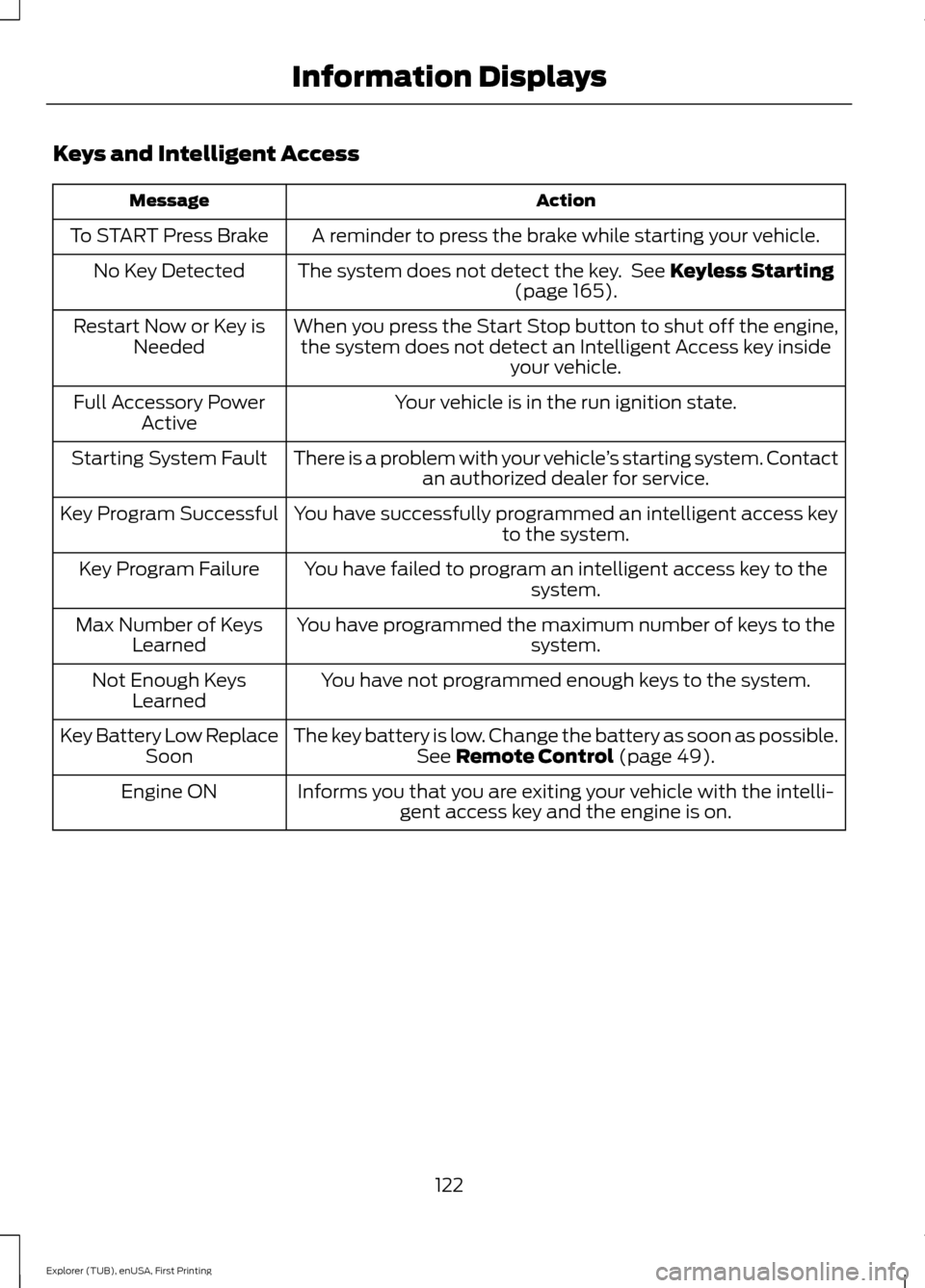
Keys and Intelligent Access
Action
Message
A reminder to press the brake while starting your vehicle.
To START Press Brake
The system does not detect the key. See Keyless Starting
(page 165).
No Key Detected
When you press the Start Stop button to shut off the engine,the system does not detect an Intelligent Access key inside your vehicle.
Restart Now or Key is
Needed
Your vehicle is in the run ignition state.
Full Accessory Power
Active
There is a problem with your vehicle ’s starting system. Contact
an authorized dealer for service.
Starting System Fault
You have successfully programmed an intelligent access keyto the system.
Key Program Successful
You have failed to program an intelligent access key to thesystem.
Key Program Failure
You have programmed the maximum number of keys to the system.
Max Number of Keys
Learned
You have not programmed enough keys to the system.
Not Enough Keys
Learned
The key battery is low. Change the battery as soon as possible.See
Remote Control (page 49).
Key Battery Low Replace
Soon
Informs you that you are exiting your vehicle with the intelli-gent access key and the engine is on.
Engine ON
122
Explorer (TUB), enUSA, First Printing Information Displays
Page 126 of 541
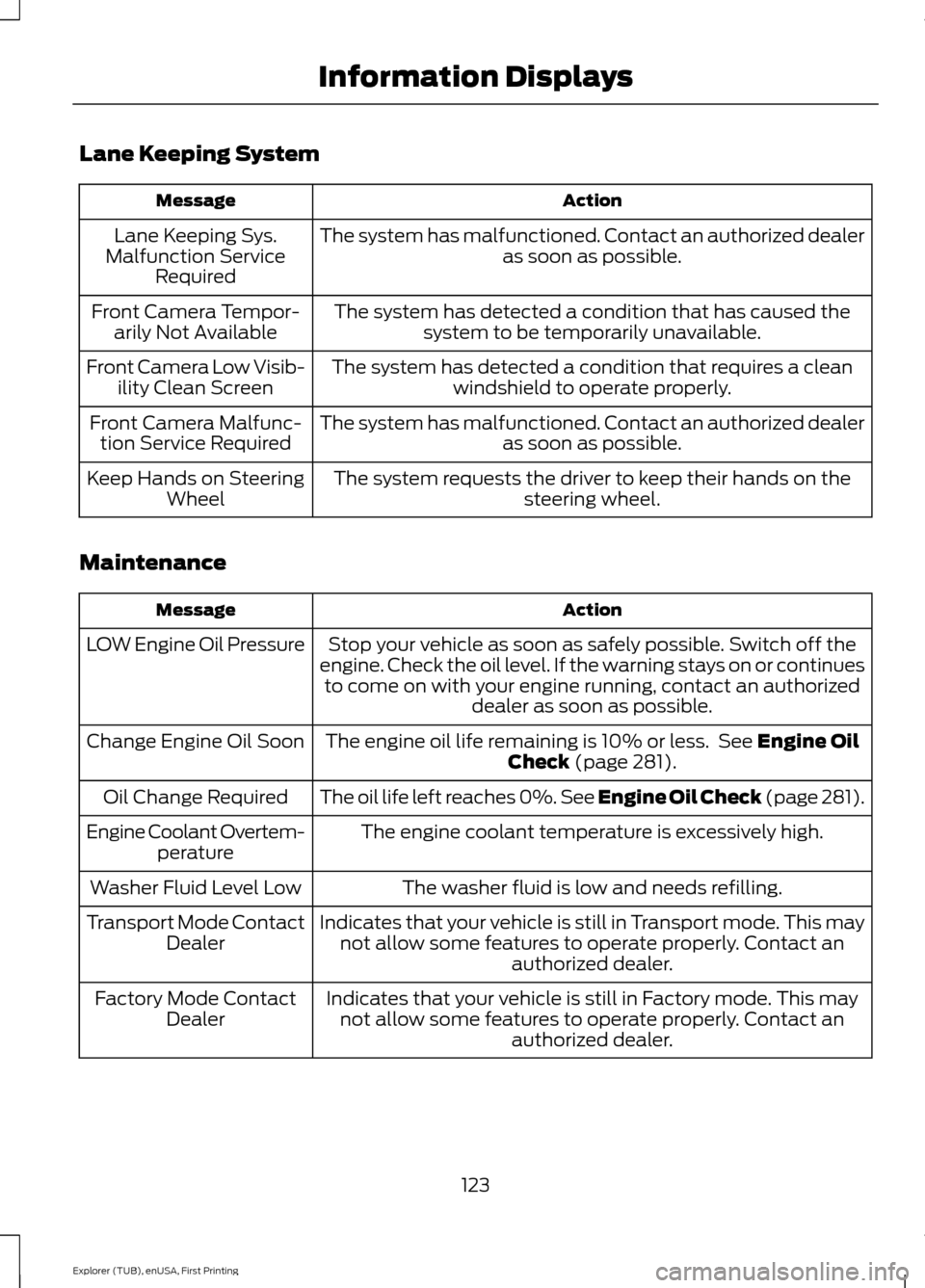
Lane Keeping System
Action
Message
The system has malfunctioned. Contact an authorized dealer as soon as possible.
Lane Keeping Sys.
Malfunction Service Required
The system has detected a condition that has caused thesystem to be temporarily unavailable.
Front Camera Tempor-
arily Not Available
The system has detected a condition that requires a cleanwindshield to operate properly.
Front Camera Low Visib-
ility Clean Screen
The system has malfunctioned. Contact an authorized dealeras soon as possible.
Front Camera Malfunc-
tion Service Required
The system requests the driver to keep their hands on thesteering wheel.
Keep Hands on Steering
Wheel
Maintenance Action
Message
Stop your vehicle as soon as safely possible. Switch off the
engine. Check the oil level. If the warning stays on or continues to come on with your engine running, contact an authorized dealer as soon as possible.
LOW Engine Oil Pressure
The engine oil life remaining is 10% or less. See Engine Oil
Check (page 281).
Change Engine Oil Soon
The oil life left reaches 0%. See
Engine Oil Check (page 281).
Oil Change Required
The engine coolant temperature is excessively high.
Engine Coolant Overtem-
perature
The washer fluid is low and needs refilling.
Washer Fluid Level Low
Indicates that your vehicle is still in Transport mode. This maynot allow some features to operate properly. Contact an authorized dealer.
Transport Mode Contact
Dealer
Indicates that your vehicle is still in Factory mode. This maynot allow some features to operate properly. Contact an authorized dealer.
Factory Mode Contact
Dealer
123
Explorer (TUB), enUSA, First Printing Information Displays
Page 127 of 541

MyKey
Action
Message
You cannot program a MyKey during key programming.
MyKey Not Created
MyKey is active.
MyKey Active Drive
Safely
When starting your vehicle, a MyKey is in use and the MyKey speed limit is on.
Speed Limited to XX
MPH/km/h
When a MyKey is in use, the MyKey speed limit is on and yourvehicle speed is approaching 80 mph (130 km/h).
Vehicle Near Top Speed
MyKey is active.
Check Speed Drive
Safely
A MyKey is in use and Belt-Minder is active.
Buckle Up to Unmute
Audio
You attempted to program a spare key using two existing MyKeys.
Could Not Program
Integrated Key
Park Aid Action
Message
The system has detected a condition that requires service.
Contact an authorized dealer. See Principle of Operation
(page 198).
Check Park Aid
The system has detected a condition that requires service.
Contact an authorized dealer.
See Principle of Operation
(page 198).
Check Rear Park Aid
Displays the park aid status.
Front Park Aid On Off
Displays the park aid status.
Rear Park Aid On Off
Park Brake Action
Message
You have set the parking brake and you have driven the vehiclemore than 3 mph (5 km/h). If the warning stays on after you
have released the parking brake, contact an authorized dealer.
Park Brake Engaged
124
Explorer (TUB), enUSA, First Printing Information Displays
Page 128 of 541
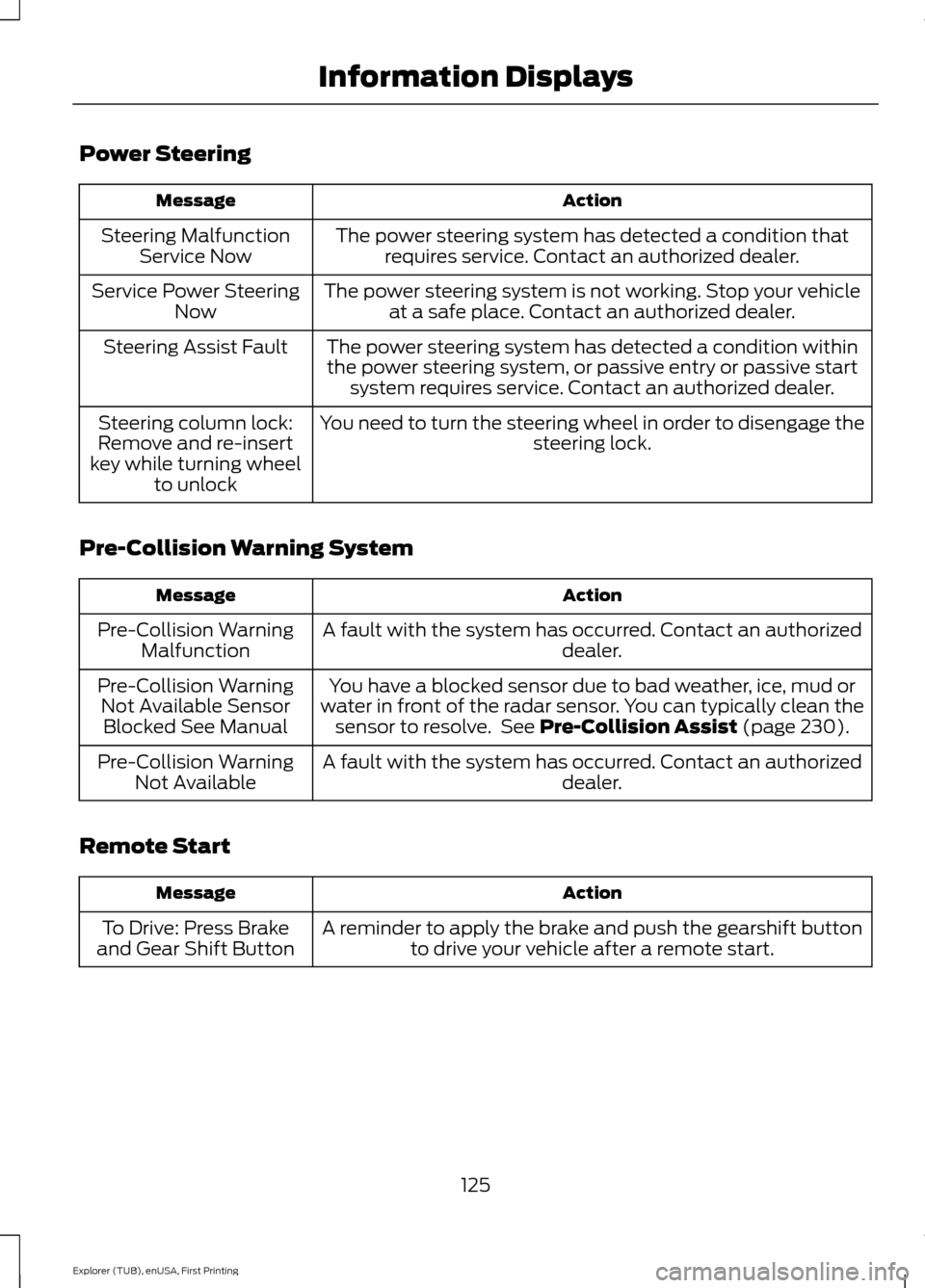
Power Steering
Action
Message
The power steering system has detected a condition thatrequires service. Contact an authorized dealer.
Steering Malfunction
Service Now
The power steering system is not working. Stop your vehicleat a safe place. Contact an authorized dealer.
Service Power Steering
Now
The power steering system has detected a condition withinthe power steering system, or passive entry or passive start system requires service. Contact an authorized dealer.
Steering Assist Fault
You need to turn the steering wheel in order to disengage thesteering lock.
Steering column lock:
Remove and re-insert
key while turning wheel to unlock
Pre-Collision Warning System Action
Message
A fault with the system has occurred. Contact an authorized dealer.
Pre-Collision Warning
Malfunction
You have a blocked sensor due to bad weather, ice, mud or
water in front of the radar sensor. You can typically clean the sensor to resolve. See Pre-Collision Assist (page 230).
Pre-Collision Warning
Not Available SensorBlocked See Manual
A fault with the system has occurred. Contact an authorized dealer.
Pre-Collision Warning
Not Available
Remote Start Action
Message
A reminder to apply the brake and push the gearshift buttonto drive your vehicle after a remote start.
To Drive: Press Brake
and Gear Shift Button
125
Explorer (TUB), enUSA, First Printing Information Displays
Page 131 of 541
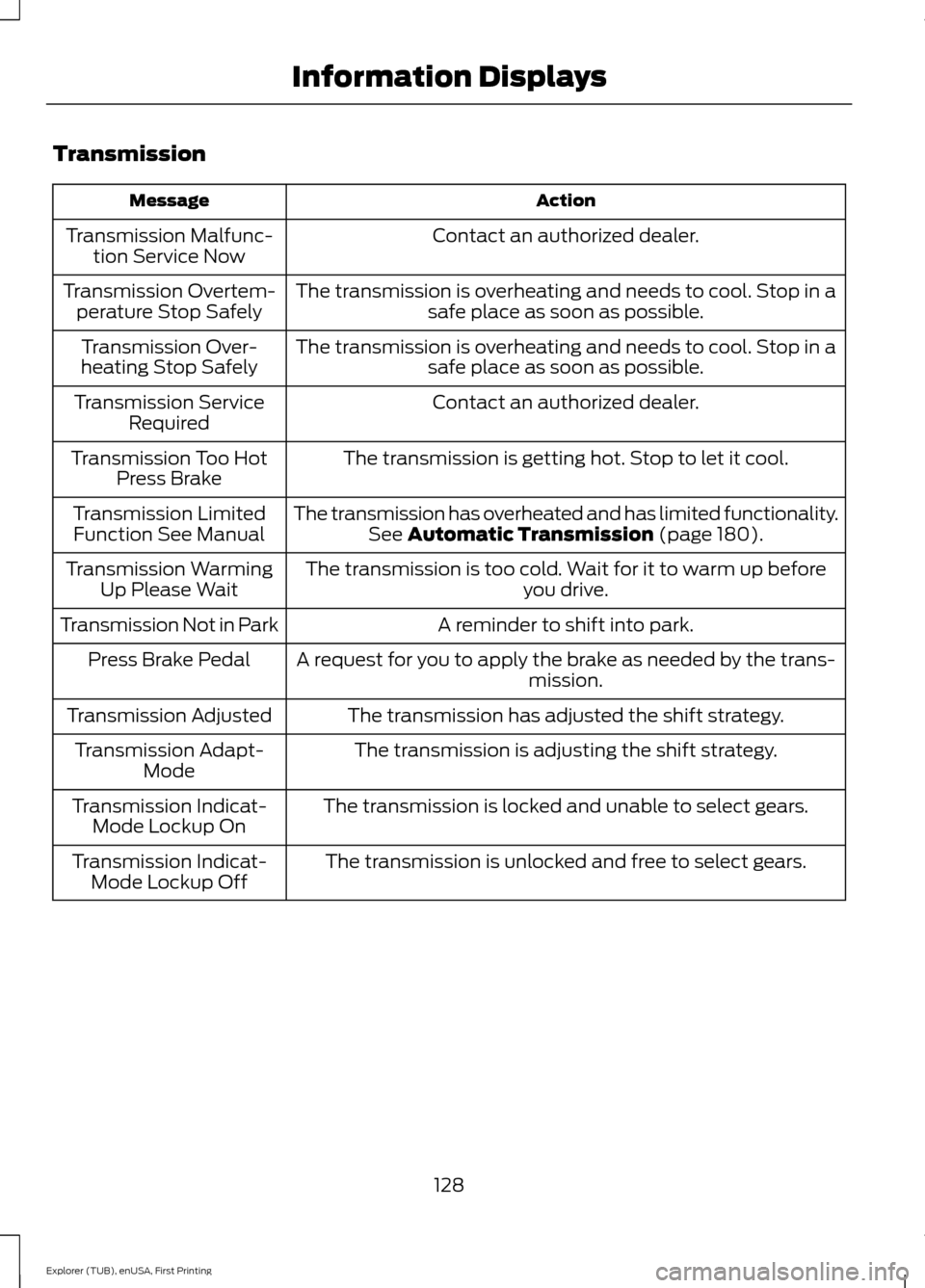
Transmission
Action
Message
Contact an authorized dealer.
Transmission Malfunc-
tion Service Now
The transmission is overheating and needs to cool. Stop in asafe place as soon as possible.
Transmission Overtem-
perature Stop Safely
The transmission is overheating and needs to cool. Stop in asafe place as soon as possible.
Transmission Over-
heating Stop Safely
Contact an authorized dealer.
Transmission Service
Required
The transmission is getting hot. Stop to let it cool.
Transmission Too Hot
Press Brake
The transmission has overheated and has limited functionality.See Automatic Transmission (page 180).
Transmission Limited
Function See Manual
The transmission is too cold. Wait for it to warm up beforeyou drive.
Transmission Warming
Up Please Wait
A reminder to shift into park.
Transmission Not in Park
A request for you to apply the brake as needed by the trans-mission.
Press Brake Pedal
The transmission has adjusted the shift strategy.
Transmission Adjusted
The transmission is adjusting the shift strategy.
Transmission Adapt-
Mode
The transmission is locked and unable to select gears.
Transmission Indicat-
Mode Lockup On
The transmission is unlocked and free to select gears.
Transmission Indicat-
Mode Lockup Off
128
Explorer (TUB), enUSA, First Printing Information Displays
Page 178 of 541
WARNINGS
Do not remove the fuel pump nozzle
from its fully inserted position when
refueling.
Use the following guidelines to avoid
electrostatic charge build-up, which can
produce a spark, when filling an
ungrounded fuel container:
•
Place approved fuel container on the
ground.
• Do not fill a fuel container while it is in
the vehicle (including the cargo area).
• Keep the fuel pump nozzle in contact
with the fuel container while filling.
• Do not use a device that would hold
the fuel pump handle in the fill position.
Easy Fuel ™ Capless Fuel System WARNING
The fuel system may be under
pressure. If you hear a hissing sound
near the fuel filler door, do not refuel
until the sound stops. Otherwise, fuel may
spray out, which could cause serious
personal injury. When fueling your vehicle:
1. When your vehicle has stopped, shift
into park (P) and switch the ignition
off.
2. Fully open the fuel tank filler door until
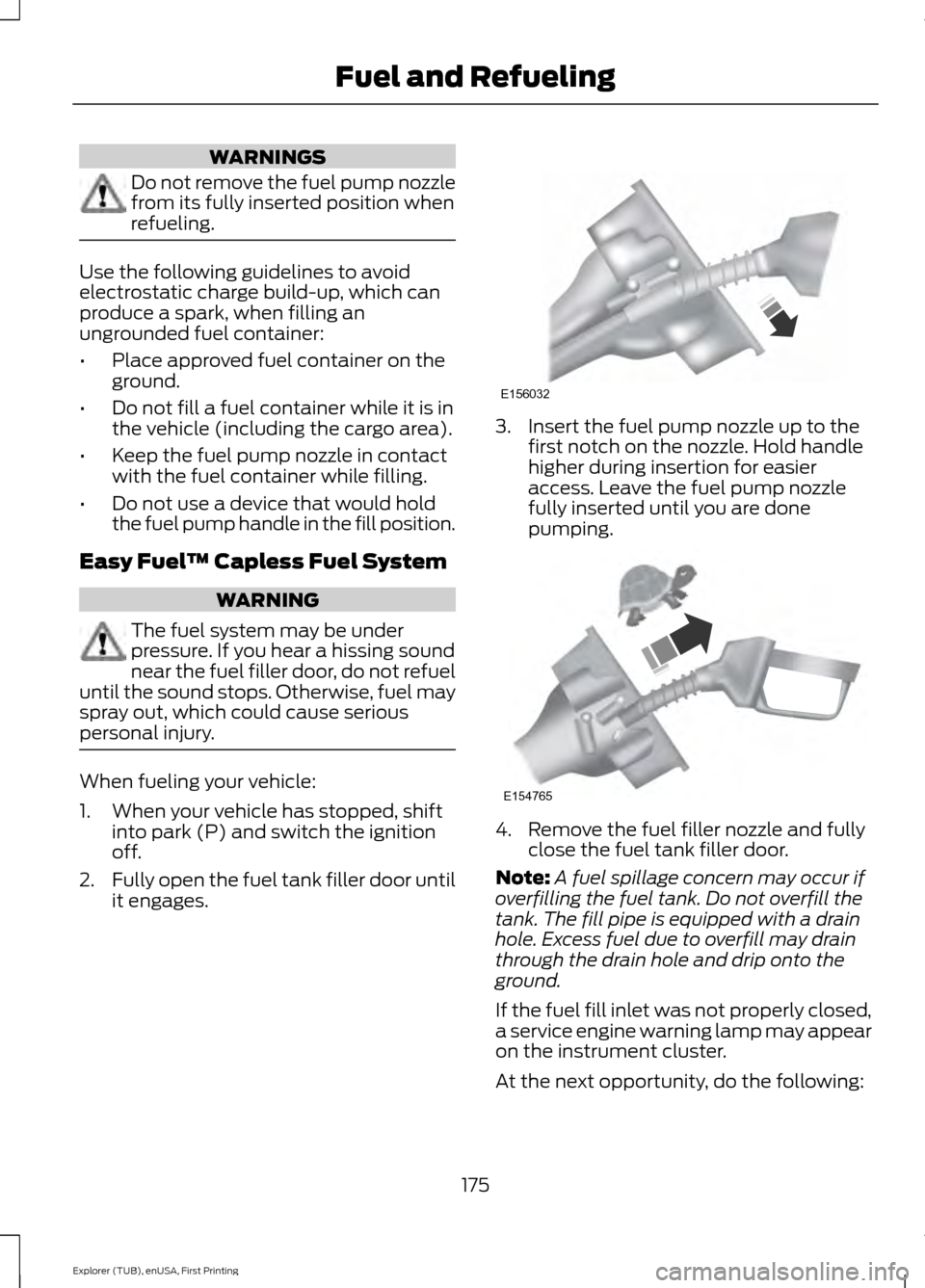
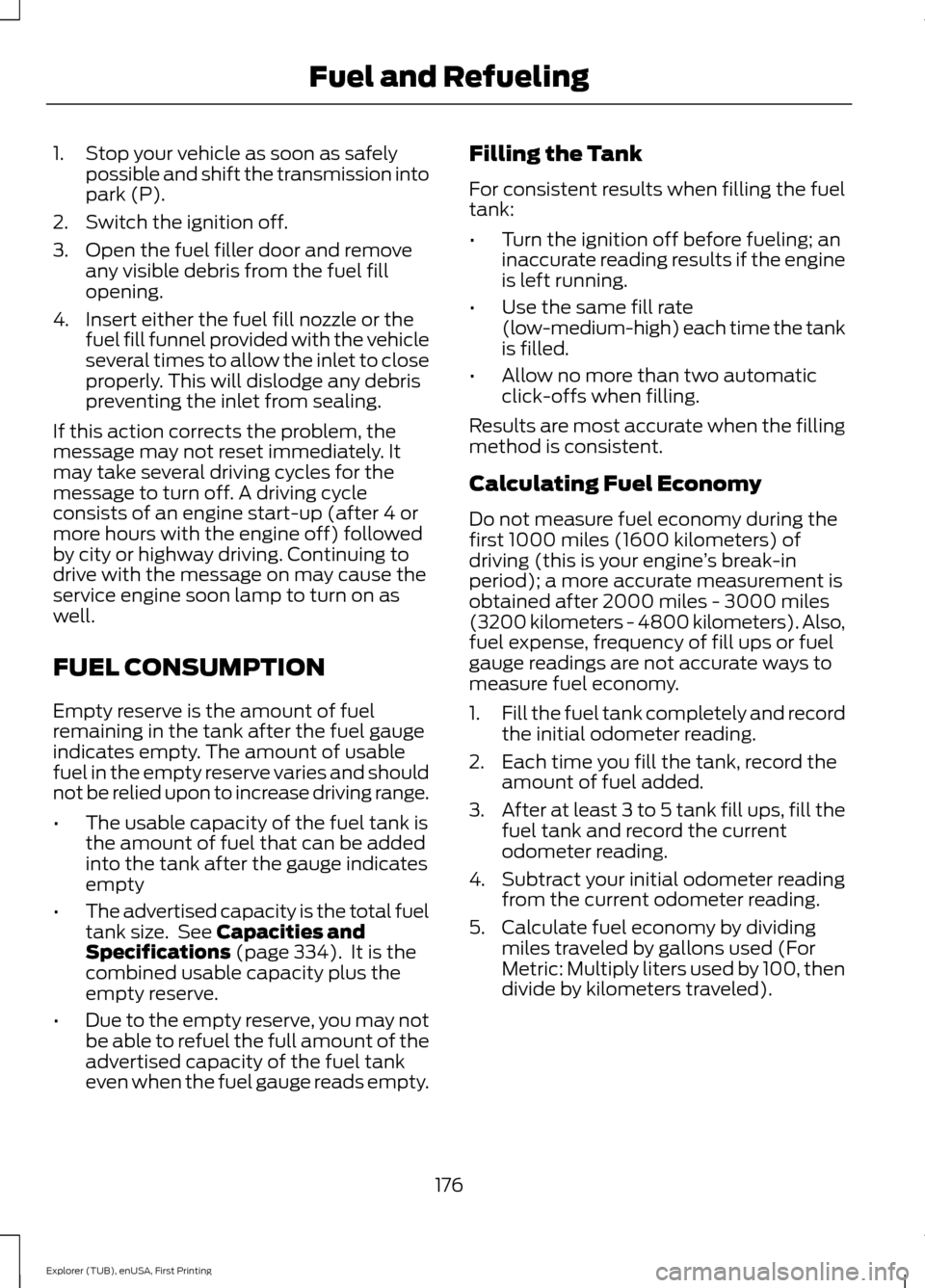
it engages. 3. Insert the fuel pump nozzle up to the
first notch on the nozzle. Hold handle
higher during insertion for easier
access. Leave the fuel pump nozzle
fully inserted until you are done
pumping. 4. Remove the fuel filler nozzle and fully
close the fuel tank filler door.
Note: A fuel spillage concern may occur if
overfilling the fuel tank. Do not overfill the
tank. The fill pipe is equipped with a drain
hole. Excess fuel due to overfill may drain
through the drain hole and drip onto the
ground.
If the fuel fill inlet was not properly closed,
a service engine warning lamp may appear
on the instrument cluster.
At the next opportunity, do the following:
175
Explorer (TUB), enUSA, First Printing Fuel and RefuelingE156032 E154765
Page 179 of 541
1. Stop your vehicle as soon as safely
possible and shift the transmission into
park (P).
2. Switch the ignition off.
3. Open the fuel filler door and remove any visible debris from the fuel fill
opening.
4. Insert either the fuel fill nozzle or the fuel fill funnel provided with the vehicle
several times to allow the inlet to close
properly. This will dislodge any debris
preventing the inlet from sealing.
If this action corrects the problem, the
message may not reset immediately. It
may take several driving cycles for the
message to turn off. A driving cycle
consists of an engine start-up (after 4 or
more hours with the engine off) followed
by city or highway driving. Continuing to
drive with the message on may cause the
service engine soon lamp to turn on as
well.
FUEL CONSUMPTION
Empty reserve is the amount of fuel
remaining in the tank after the fuel gauge
indicates empty. The amount of usable
fuel in the empty reserve varies and should
not be relied upon to increase driving range.
• The usable capacity of the fuel tank is
the amount of fuel that can be added
into the tank after the gauge indicates
empty
• The advertised capacity is the total fuel
tank size. See Capacities and
Specifications (page 334). It is the
combined usable capacity plus the
empty reserve.
• Due to the empty reserve, you may not
be able to refuel the full amount of the
advertised capacity of the fuel tank
even when the fuel gauge reads empty. Filling the Tank
For consistent results when filling the fuel
tank:
•
Turn the ignition off before fueling; an
inaccurate reading results if the engine
is left running.
• Use the same fill rate
(low-medium-high) each time the tank
is filled.
• Allow no more than two automatic
click-offs when filling.
Results are most accurate when the filling
method is consistent.
Calculating Fuel Economy
Do not measure fuel economy during the
first 1000 miles (1600 kilometers) of
driving (this is your engine ’s break-in
period); a more accurate measurement is
obtained after 2000 miles - 3000 miles
(3200 kilometers - 4800 kilometers). Also,
fuel expense, frequency of fill ups or fuel
gauge readings are not accurate ways to
measure fuel economy.
1. Fill the fuel tank completely and record
the initial odometer reading.
2. Each time you fill the tank, record the amount of fuel added.
3. After at least 3 to 5 tank fill ups, fill the
fuel tank and record the current
odometer reading.
4. Subtract your initial odometer reading from the current odometer reading.
5. Calculate fuel economy by dividing miles traveled by gallons used (For
Metric: Multiply liters used by 100, then
divide by kilometers traveled).
176
Explorer (TUB), enUSA, First Printing Fuel and Refueling