2016 FORD EXPLORER pairing phone
[x] Cancel search: pairing phonePage 450 of 541
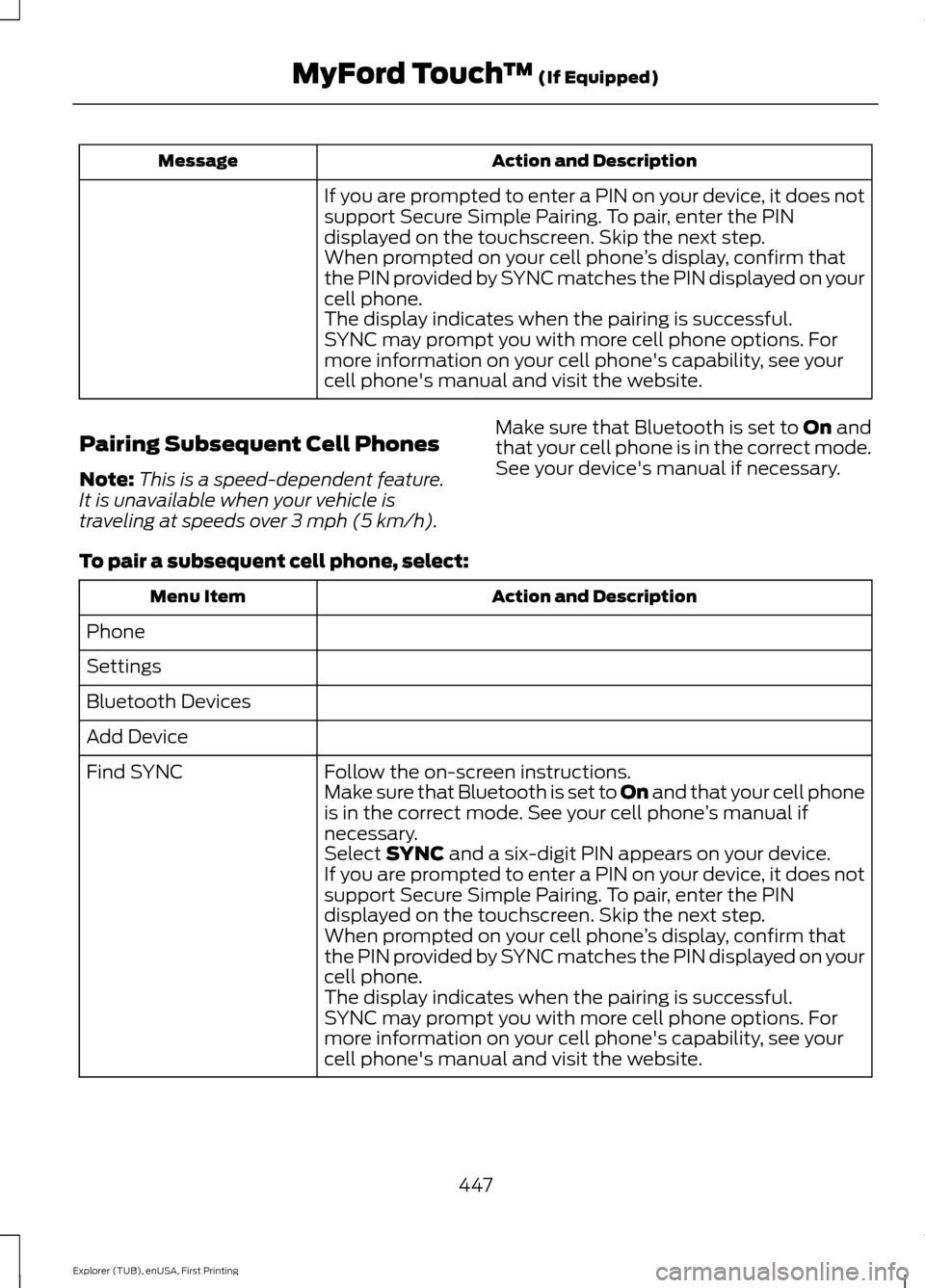
Action and Description
Message
If you are prompted to enter a PIN on your device, it does not
support Secure Simple Pairing. To pair, enter the PIN
displayed on the touchscreen. Skip the next step.
When prompted on your cell phone ’s display, confirm that
the PIN provided by SYNC matches the PIN displayed on your
cell phone.
The display indicates when the pairing is successful.
SYNC may prompt you with more cell phone options. For
more information on your cell phone's capability, see your
cell phone's manual and visit the website.
Pairing Subsequent Cell Phones
Note: This is a speed-dependent feature.
It is unavailable when your vehicle is
traveling at speeds over 3 mph (5 km/h). Make sure that Bluetooth is set to
On and
that your cell phone is in the correct mode.
See your device's manual if necessary.
To pair a subsequent cell phone, select: Action and Description
Menu Item
Phone
Settings
Bluetooth Devices
Add Device Follow the on-screen instructions.
Find SYNC
Make sure that Bluetooth is set to On
and that your cell phone
is in the correct mode. See your cell phone ’s manual if
necessary.
Select
SYNC and a six-digit PIN appears on your device.
If you are prompted to enter a PIN on your device, it does not
support Secure Simple Pairing. To pair, enter the PIN
displayed on the touchscreen. Skip the next step.
When prompted on your cell phone ’s display, confirm that
the PIN provided by SYNC matches the PIN displayed on your
cell phone.
The display indicates when the pairing is successful.
SYNC may prompt you with more cell phone options. For
more information on your cell phone's capability, see your
cell phone's manual and visit the website.
447
Explorer (TUB), enUSA, First Printing MyFord Touch
™
(If Equipped)
Page 482 of 541
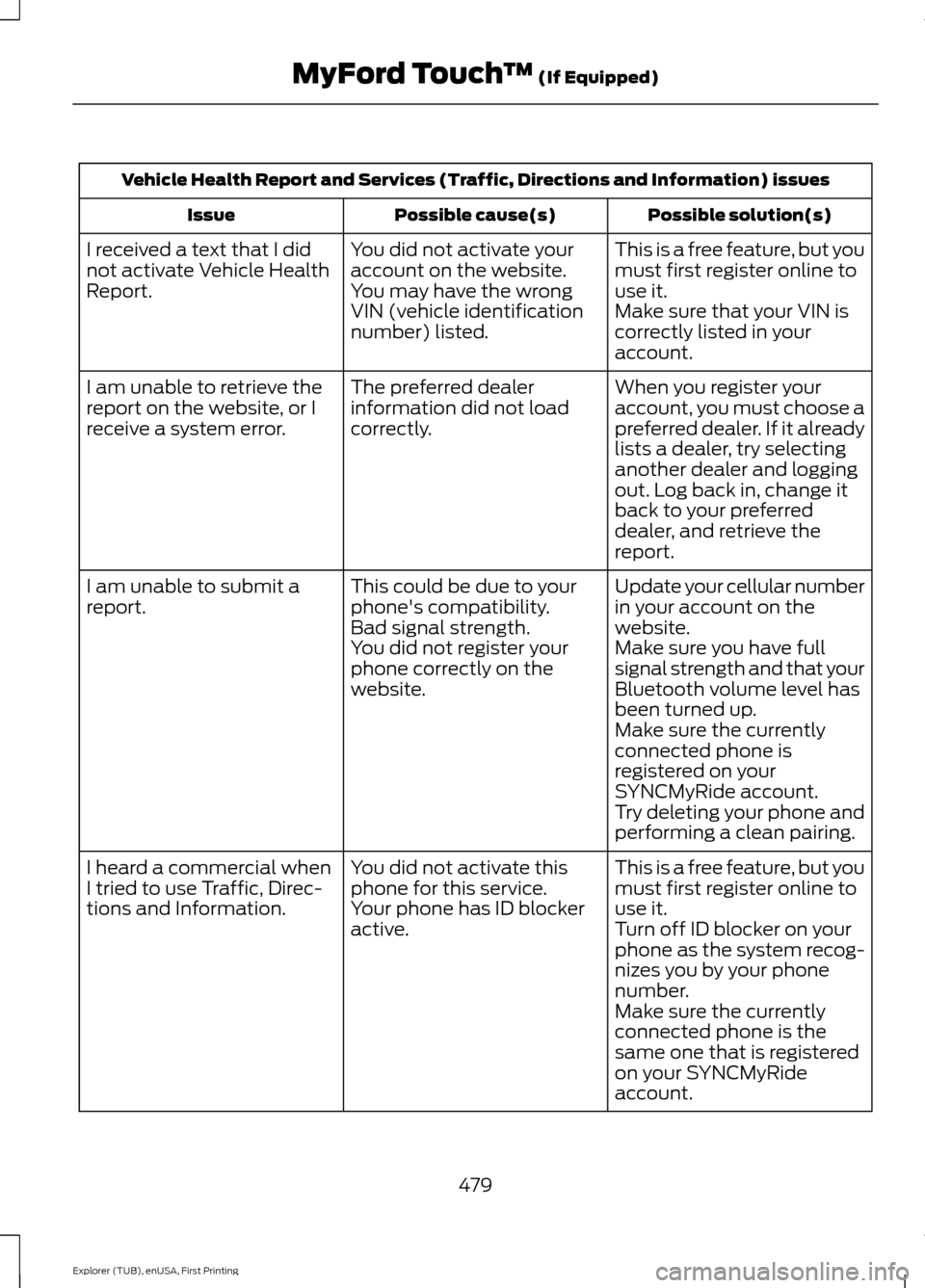
Vehicle Health Report and Services (Traffic, Directions and Information) issues
Possible solution(s)
Possible cause(s)
Issue
This is a free feature, but you
must first register online to
use it.
You did not activate your
account on the website.
You may have the wrong
VIN (vehicle identification
number) listed.
I received a text that I did
not activate Vehicle Health
Report.
Make sure that your VIN is
correctly listed in your
account.
When you register your
account, you must choose a
preferred dealer. If it already
lists a dealer, try selecting
another dealer and logging
out. Log back in, change it
back to your preferred
dealer, and retrieve the
report.
The preferred dealer
information did not load
correctly.
I am unable to retrieve the
report on the website, or I
receive a system error.
Update your cellular number
in your account on the
website.
This could be due to your
phone's compatibility.
Bad signal strength.
I am unable to submit a
report.
Make sure you have full
signal strength and that your
Bluetooth volume level has
been turned up.
You did not register your
phone correctly on the
website.
Make sure the currently
connected phone is
registered on your
SYNCMyRide account.
Try deleting your phone and
performing a clean pairing.
This is a free feature, but you
must first register online to
use it.
You did not activate this
phone for this service.
Your phone has ID blocker
active.
I heard a commercial when
I tried to use Traffic, Direc-
tions and Information.
Turn off ID blocker on your
phone as the system recog-
nizes you by your phone
number.
Make sure the currently
connected phone is the
same one that is registered
on your SYNCMyRide
account.
479
Explorer (TUB), enUSA, First Printing MyFord Touch
™ (If Equipped)
Page 536 of 541
Memory Function.........................................146
Easy Entry and Exit Feature............................ 147
Linking a PreSet Position to your Remote Control or Intelligent Access Key
Fob....................................................................... 147
Saving a PreSet Position................................. 146
Message Center See: Information Displays................................ 101
Mirrors See: Heated Windows and Mirrors..............138
See: Windows and Mirrors................................ 87
Mobile Communications Equipment.......13
Moonroof............................................................91 Bounce-Back......................................................... 92
Opening and Closing the Moonroof...............91
Opening and Closing the Sunscreen.............91
Venting the Moonroof........................................ 92
Motorcraft Parts - 2.3L EcoBoost™.................................................336
Motorcraft Parts - 3.5L Duratec
..............337
Motorcraft Parts - 3.5L Ecoboost™.................................................338
MyFord Touch ™
..........................................406
General Information........................................ 406
MyFord Touch ™ Troubleshooting.........475
MyKey Troubleshooting...............................58
MyKey ™
.............................................................54
Principle of Operation........................................ 54
N
Navigation ......................................................
466
cityseekr............................................................... 468
Destination Mode............................................. 466
Map Mode.............................................................. 471
Navigation Map Updates................................ 474
Navigation Voice Commands........................ 474
Point of Interest (POI) Categories...............467
Quick-touch Buttons........................................ 473
Setting Your Navigation Preferences.........469
Normal Scheduled Maintenance
..........489
Intelligent Oil-Life Monitor™........................ 489
Normal Maintenance Intervals.................... 490
O
Oil Change Indicator Reset......................282 Oil Check
See: Engine Oil Check....................................... 281
Opening and Closing the Hood..............276 Closing the Hood................................................ 277
Opening the Hood............................................. 276
Ordering Additional Owner's Literature.....................................................264
Obtaining a French Owner ’s Manual.........264
Overhead Console
.......................................164
P
Parking Aids
....................................................198
Principle of Operation...................................... 198
Parking Brake.................................................190
Passenger Knee Airbag................................45
Passive Anti-Theft System.........................70 SecuriLock®........................................................... 70
PATS See: Passive Anti-Theft System..................... 70
Pedals.................................................................76
Perchlorate.........................................................11
Personal Safety System ™
..........................39
How Does the Personal Safety System
Work?.................................................................. 39
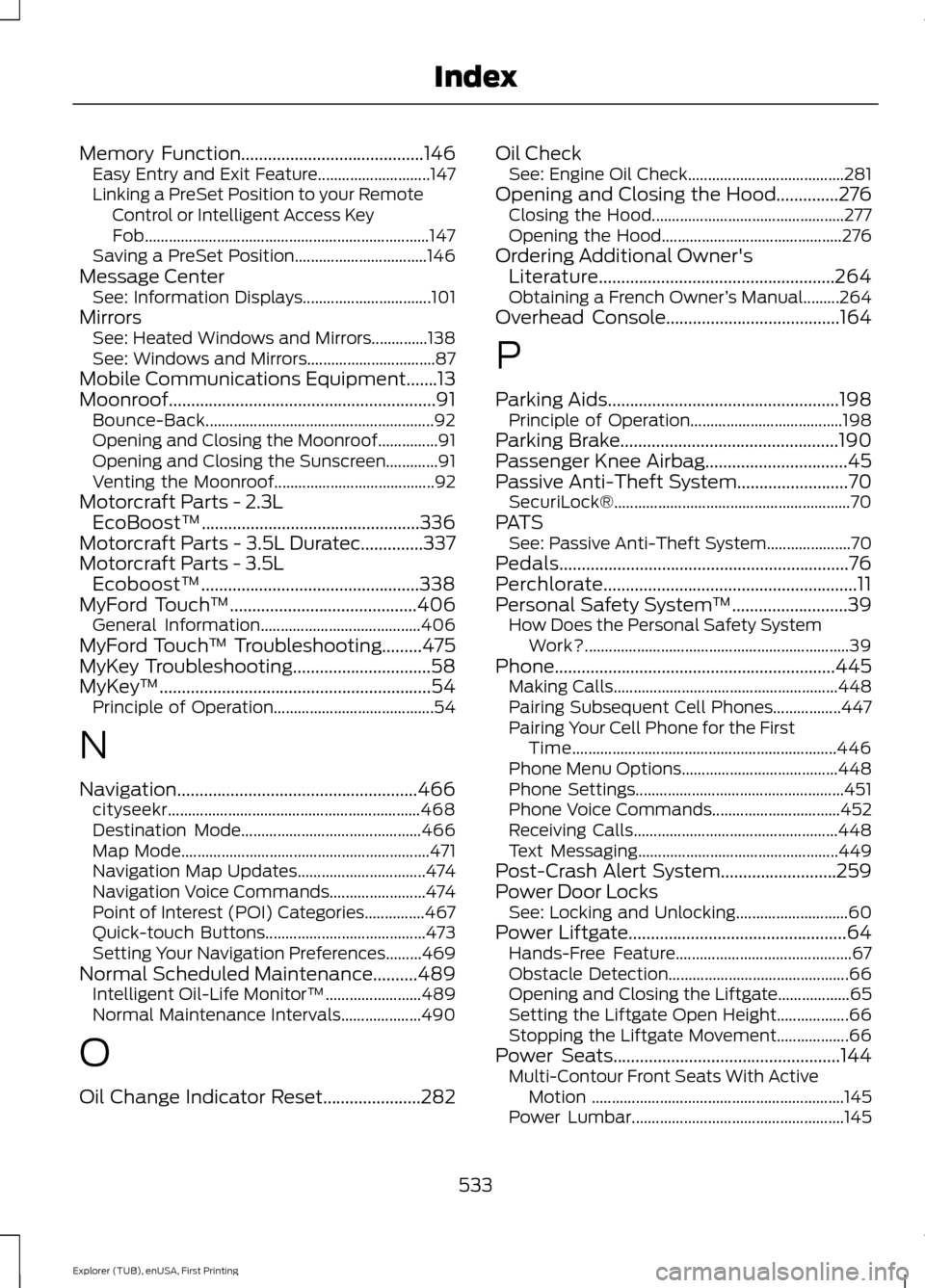
Phone...............................................................445 Making Calls........................................................ 448
Pairing Subsequent Cell Phones.................447
Pairing Your Cell Phone for the First Time.................................................................. 446
Phone Menu Options....................................... 448
Phone Settings.................................................... 451
Phone Voice Commands................................ 452
Receiving Calls................................................... 448
Text Messaging.................................................. 449
Post-Crash Alert System..........................259
Power Door Locks See: Locking and Unlocking............................ 60
Power Liftgate
.................................................64
Hands-Free Feature............................................ 67
Obstacle Detection............................................. 66
Opening and Closing the Liftgate.................. 65
Setting the Liftgate Open Height.................. 66
Stopping the Liftgate Movement.................. 66
Power Seats
...................................................144
Multi-Contour Front Seats With Active
Motion ............................................................... 145
Power Lumbar..................................................... 145
533
Explorer (TUB), enUSA, First Printing Index
Page 540 of 541

Using SYNC™ With Your Phone.............372
Accessing Features through the Phone
Menu................................................................... 377
Accessing Your Phone Settings................... 380
Bluetooth Devices.............................................. 381
Making Calls......................................................... 375
Pairing a Phone for the First Time...............372
Pairing Subsequent Phones........................... 373
Phone Options during an Active Call.........376
Phone Voice Commands................................ 374
Receiving Calls.................................................... 375
System Settings................................................. 382
Text Messaging................................................... 378
Using Terrain Response.............................195
Using Traction Control................................192
Switching the System Off............................... 192
System Indicator Lights and Messages.......................................................... 192
Using a Switch..................................................... 192
Using the Information Display Controls............................................................. 192
Using Voice Recognition...........................370 Initiating a Voice Session................................ 370
System Interaction and Feedback................371
Utilizing the Mediation/Arbitration Program (Canada Only)........................262
V
Vehicle Care
..................................................300
General Information........................................ 300
Vehicle Certification Label.......................340
Vehicle Identification Number
................339
Vehicle Storage............................................304
Battery................................................................... 305
Body....................................................................... 305
Brakes.................................................................... 305
Cooling system................................................... 305
Engine.................................................................... 305
Fuel system......................................................... 305
General.................................................................. 305
Miscellaneous.................................................... 306
Removing Vehicle From Storage.................306
Tires........................................................................\
305
Ventilation See: Climate Control......................................... 129
VIN See: Vehicle Identification Number............339 Voice Control
....................................................74
W
Warning Lamps and Indicators................96 Adaptive Cruise Control.................................... 96
Anti-Lock Braking System................................. 97
Automatic High Beam Control........................ 97
Battery...................................................................... 97
Blind Spot Monitor............................................... 97
Brake System......................................................... 97
Cruise Control........................................................ 97
Direction Indicator................................................ 97
Door Ajar.................................................................. 97
Engine Coolant Temperature........................... 97
Engine Oil................................................................ 98
Fasten Safety Belt............................................... 98
Front Airbag........................................................... 98
Front Fog Lamps.................................................. 98
Heads Up Display................................................ 98
High Beam.............................................................. 98
Hood Ajar................................................................ 98
Lane Keeping Aid................................................. 98
Liftgate Ajar............................................................ 98
Low Fuel Level...................................................... 98
Low Tire Pressure Warning.............................. 98
Low Washer Fluid................................................ 99
Parking Lamps...................................................... 99
Powertrain Fault................................................... 99
Service Engine Soon........................................... 99
Stability Control................................................... 99
Stability Control Off............................................ 99
Transmission Tow/Haul.................................... 99
Washer Fluid Check
....................................288
Washers See: Cleaning the Exterior............................. 300
See: Wipers and Washers.................................. 77
Waxing
..............................................................301
Wheel Nuts See: Changing a Road Wheel....................... 328
Wheels and Tires.........................................307 General Information......................................... 307
Technical Specifications................................. 332
Windows and Mirrors
....................................87
Windshield Washers.....................................78
Front Camera Washer........................................ 78
Windshield Wipers
.........................................77
Speed Dependent Wipers................................. 77
537
Explorer (TUB), enUSA, First Printing Index