2016 FORD EXPEDITION four wheel drive
[x] Cancel search: four wheel drivePage 292 of 421

Wheel misalignment in the front
or the rear can cause uneven and
rapid treadwear of your tires and
should be corrected by an
authorized dealer. Front-wheel
drive vehicles and those with an
independent rear suspension may
require alignment of all four
wheels.
The tires should also be balanced
periodically. An unbalanced tire
and wheel assembly may result in
irregular tire wear.
Tire Rotation
WARNING
If the tire label shows
different tire pressures for the
front and rear tires and the vehicle
is equipped with a tire pressure
monitoring system, then the
settings for the system sensors
need to be updated. Always
perform the system reset
procedure after tire rotation. If the
system is not reset, it may not
provide a low tire pressure
warning when necessary. See the
tire pressure monitoring system
reset procedure in this chapter. Note:
If your tires show uneven
wear ask an authorized dealer to
check for and correct any wheel
misalignment, tire imbalance or
mechanical problem involved
before tire rotation. Note:
Your vehicle may be
equipped with a dissimilar spare
wheel and tire assembly. A
dissimilar spare wheel and tire
assembly is defined as a spare
wheel and tire assembly that is
different in brand, size or
appearance from the road tires and
wheels. If you have a dissimilar
spare wheel and tire assembly it is
intended for temporary use only
and should not be used in a tire
rotation.
Note: After having your tires
rotated, inflation pressure must be
checked and adjusted to the
vehicle requirements.
Rotating your tires at the
recommended interval (as
indicated in the Scheduled
Maintenance chapter) will help
your tires wear more evenly,
providing better tire performance
and longer tire life.
Rear-wheel drive vehicles and
four-wheel drive vehicles (front
tires at left of diagram) 289
Expedition (TB7) Canada/United States of America, enUSA, First Printing Wheels and TiresE142548
Page 298 of 421

•
To reduce the chances of interference
from another vehicle, perform the
system reset procedure at least three
feet (one meter) away from another
Ford Motor Company vehicle
undergoing the system reset procedure
at the same time.
• Do not wait more than two minutes
between resetting each tire sensor or
the system will time-out and the entire
procedure will have to be repeated on
all four wheels.
• A double horn will sound indicating the
need to repeat the procedure.
Performing the System Reset Procedure
Read the entire procedure before
attempting.
1. Drive the vehicle above 20 mph (32 km/h) for at least two minutes, then
park in a safe location where you can
easily get to all four tires and have
access to an air pump.
2. Place the ignition in the off position and
keep the key in the ignition.
3. Cycle the ignition to the on position with the engine off.
4. Turn the hazard flashers on then off three times. You must accomplish this
within 10 seconds. If the reset mode
has been entered successfully, the horn
will sound once, the system indicator
will flash and a message is shown in
the information display. If this does not
occur, please try again starting at Step
2. If after repeated attempts to enter
the reset mode, the horn does not
sound, the system indicator does not
flash and no message is shown in the
information display, seek service from
your authorized dealer. 5. Train the tire pressure monitoring
system sensors in the tires using the
following system reset sequence
starting with the left front tire in the
following clockwise order: Left front
(driver's side front tire), Right front
(passenger's side front tire), Right rear
(passenger's side rear tire), Left rear
(driver's side rear tire).
6. Remove the valve cap from the valve stem on the left front tire. Decrease the
air pressure until the horn sounds.
Note: The single horn chirp confirms
that the sensor identification code has
been learned by the module for this
position. If a double horn is heard, the
reset procedure was unsuccessful, and
you must repeat it.
7. Remove the valve cap from the valve stem on the right front tire. Decrease
the air pressure until the horn sounds.
8. Remove the valve cap from the valve stem on the right rear tire. Decrease the
air pressure until the horn sounds.
9. Remove the valve cap from the valve stem on the left rear tire. Decrease the
air pressure until the horn sounds.
Training is complete after the horn
sounds for the last tire trained (driver's
side rear tire), the system indicator
stops flashing, and a message is shown
in the information display.
10. Turn the ignition off. If two short horn
beeps are heard, the reset procedure
was unsuccessful and you must
repeat it. If after repeating the
procedure and two short beeps are
heard when the ignition is turned to
off, seek assistance from your
authorized dealer.
295
Expedition (TB7) Canada/United States of America, enUSA, First Printing Wheels and Tires
Page 299 of 421

11.
Set all four tires to the recommended
air pressure as indicated on the
Safety Compliance Certification
Label (affixed to either the door hinge
pillar, door-latch post, or the door
edge that meets the door-latch post,
next to the driver's seating position)
or Tire Label located on the B-Pillar
or the edge of the driver's door.
CHANGING A ROAD WHEEL WARNINGS
The use of tire sealant may damage
your tire pressure monitoring system
and should only be used in roadside
emergencies. If you must use a sealant, the
Ford Tire Mobility Kit sealant should be
used. The tire pressure monitoring system
sensor and valve stem on the wheel must
be replaced by an authorized dealer after
use of the sealant. If the tire pressure monitor sensor
becomes damaged, it will no longer
function. See Tire Pressure
Monitoring System (page 290). Note:
The tire pressure monitoring system
indicator light will illuminate when the spare
tire is in use. To restore the full function of
the monitoring system, all road wheels
equipped with tire pressure monitoring
sensors must be mounted on this vehicle.
If you get a flat tire while driving, do not
apply the brake heavily. Instead, gradually
decrease your speed. Hold the steering
wheel firmly and slowly move to a safe
place on the side of the road. Have a flat serviced by an authorized
dealer in order to prevent damage to the
system sensors
See Tire Pressure
Monitoring System (page 290). Replace
the spare tire with a road tire as soon as
possible. During repairing or replacing of
the flat tire, have the authorized dealer
inspect the system sensor for damage.
Dissimilar Spare Wheel and Tire
Assembly Information WARNING
Failure to follow these guidelines
could result in an increased risk of
loss of vehicle control, injury or death.
If you have a dissimilar spare wheel and
tire, then it is intended for temporary use
only. This means that if you need to use it,
you should replace it as soon as possible
with a road wheel and tire assembly that
is the same size and type as the road tires
and wheels that were originally provided
by Ford. If the dissimilar spare tire or wheel
is damaged, it should be replaced rather
than repaired.
A dissimilar spare wheel and tire assembly
is defined as a spare wheel and tire
assembly that is different in brand, size or
appearance from the road tires and wheels
and can be one of three types:
1.
T-type mini-spare:
This spare tire
begins with the letter T for tire size and
may have Temporary Use Only molded in
the sidewall.
2. Full-size dissimilar spare with label
on wheel:
This spare tire has a label on
the wheel that states: THIS WHEEL AND
TIRE ASSEMBLY FOR TEMPORARY USE
ONLY
296
Expedition (TB7) Canada/United States of America, enUSA, First Printing Wheels and Tires
Page 380 of 421

At every oil change interval as indicated by the information display
*
Inspect the steering linkage, ball joints, suspension, tire-rod ends, driveshaft and U-
joints.
Inspect the wheels and related components for abnormal noise, wear, looseness or
drag.
* Do not exceed one year or 10000 miles (16000 kilometers) between service intervals.
** Reset the Intelligent Oil-Life Monitor after engine oil and filter changes. Other maintenance items
1
Replace engine air filter.
Every 30000 miles (48000
km)
Change engine coolant.2
At 100000 miles (160000
km)
Replace spark plugs.
Every 100000 miles
(160000 km) Inspect accessory drive belt(s). 3
Change automatic transmission fluid.
Every 150000 miles
(240000 km) Change front axle fluid (Four-wheel drive vehicles).
Change rear axle fluid.
Change transfer case fluid (Four-wheel drive vehicles).
Replace accessory drive belt(s).
1 Perform these maintenance items within 3000 miles (4800 kilometers) of the last
engine oil and filter change. Do not exceed the designated distance for the interval.
2 Initial replacement at six years or 100000 miles (160000 kilometers), then every three
years or 50000 miles (80000 kilometers).
3 After initial inspection, inspect every other oil change until replaced.
377
Expedition (TB7) Canada/United States of America, enUSA, First Printing Scheduled Maintenance
Page 381 of 421

SPECIAL OPERATING
CONDITIONS SCHEDULED
MAINTENANCE
If you operate your vehicle primarily in any
of the following conditions, you need to
perform extra maintenance, as indicated.
If you operate your vehicle
occasionally
under any of these conditions, it is not
necessary to perform the extra
maintenance. For specific
recommendations, see your dealership
service advisor or technician. Perform the services shown in the
following tables when specified or within
3,000 mi (4,800 km)
of the message
appearing in the information display
prompting you to change your oil.
• Example 1: The message comes on at
28,751 mi (46,270 km)
. Perform the
30,000 mi (48,000 km) automatic
transmission fluid replacement.
• Example 2
: The message has not
come on, but the odometer reads
30,000 mi (48,000 km) (for example,
the Intelligent Oil-Life Monitor was
reset at
25,000 mi (40,000 km)).
Perform the engine air filter
replacement. Towing a trailer or using a car-top carrier
Change engine oil and filter as indicated by the information
display and perform services listed in the Normal Sched-
uled Maintenance chart.
As required
Inspect and lubricate U-joints (if equipped with grease
fittings).
Inspect frequently, service
as required
See axle maintenance items under
Exceptions.
Change transfer case fluid (Four-wheel drive vehicles).
Every
60,000 mi
(96,000 km) Replace spark plugs.Extensive idling or low-speed driving for long distances, as in heavy commercial use
Change engine oil and filter as indicated by the information
display and perform services listed in the Normal Sched-
uled Maintenance chart.
As required
Replace engine air filter.
Inspect frequently, service
as required
Change transfer case fluid (Four-wheel drive vehicles).
Every
60,000 mi
(96,000 km) Replace spark plugs.
378
Expedition (TB7) Canada/United States of America, enUSA, First Printing Scheduled Maintenance
Page 382 of 421
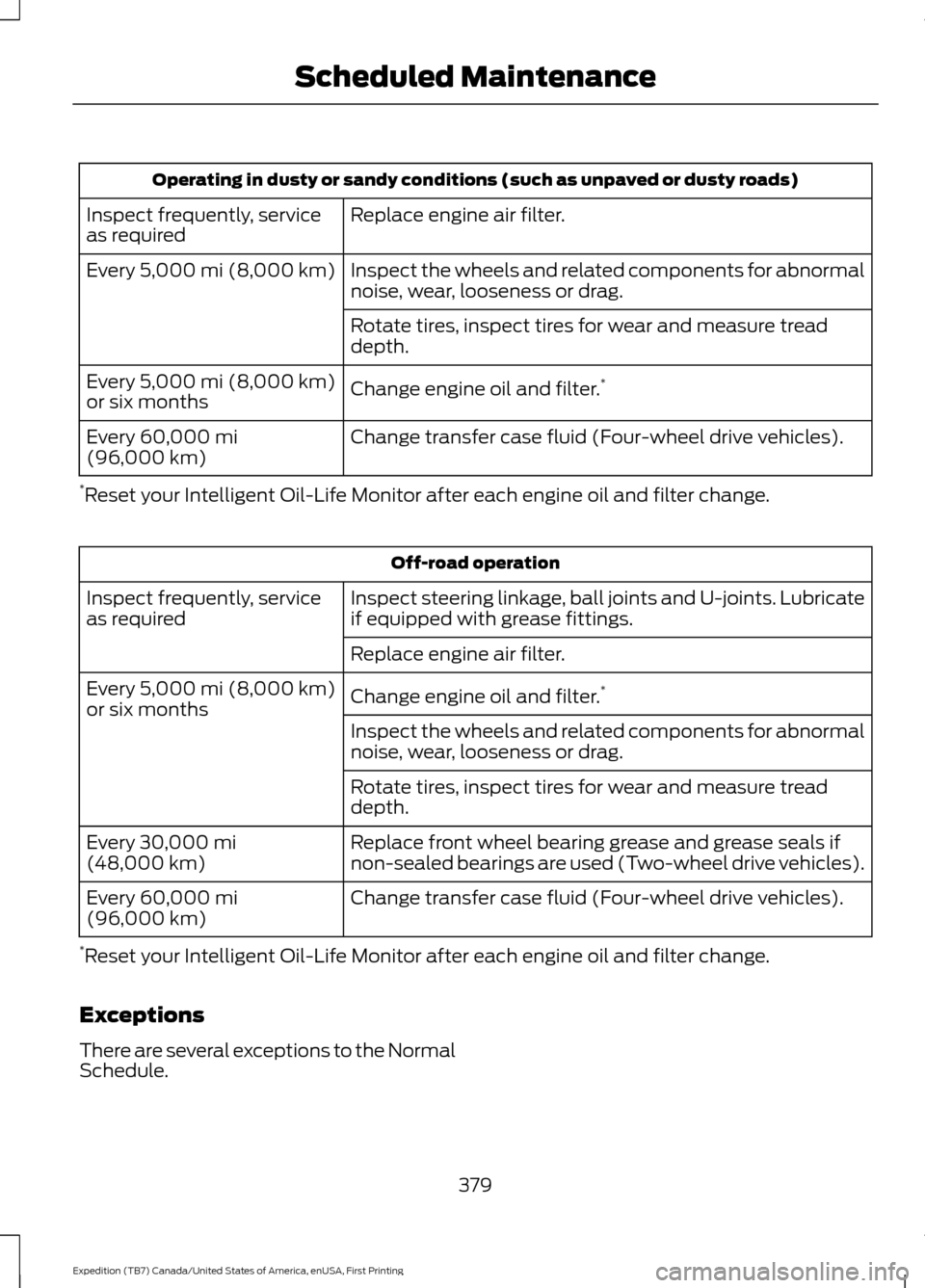
Operating in dusty or sandy conditions (such as unpaved or dusty roads)
Replace engine air filter.
Inspect frequently, service
as required
Inspect the wheels and related components for abnormal
noise, wear, looseness or drag.
Every 5,000 mi (8,000 km)
Rotate tires, inspect tires for wear and measure tread
depth.
Change engine oil and filter. *
Every
5,000 mi (8,000 km)
or six months
Change transfer case fluid (Four-wheel drive vehicles).
Every
60,000 mi
(96,000 km)
* Reset your Intelligent Oil-Life Monitor after each engine oil and filter change. Off-road operation
Inspect steering linkage, ball joints and U-joints. Lubricate
if equipped with grease fittings.
Inspect frequently, service
as required
Replace engine air filter.
Change engine oil and filter.*
Every
5,000 mi (8,000 km)
or six months
Inspect the wheels and related components for abnormal
noise, wear, looseness or drag.
Rotate tires, inspect tires for wear and measure tread
depth.
Replace front wheel bearing grease and grease seals if
non-sealed bearings are used (Two-wheel drive vehicles).
Every
30,000 mi
(48,000 km)
Change transfer case fluid (Four-wheel drive vehicles).
Every
60,000 mi
(96,000 km)
* Reset your Intelligent Oil-Life Monitor after each engine oil and filter change.
Exceptions
There are several exceptions to the Normal
Schedule.
379
Expedition (TB7) Canada/United States of America, enUSA, First Printing Scheduled Maintenance
Page 410 of 421

4
4WD
See: Four-Wheel Drive..................................... 164
A
A/C See: Climate Control.......................................... 113
About This Manual...........................................7
ABS See: Brakes............................................................ 172
ABS driving hints See: Hints on Driving With Anti-Lock
Brakes................................................................. 172
Accessories....................................................368 Exterior Style....................................................... 368
Interior Style........................................................ 368
Lifestyle................................................................. 368
Peace of Mind..................................................... 368
Accessories See: Replacement Parts
Recommendation............................................. 11
Adjusting the Headlamps.........................255 Horizontal Aim Adjustment........................... 256
Vertical Aim Adjustment................................. 255
Adjusting the Pedals......................................71
Adjusting the Steering Wheel - Vehicles With: Column Shift/Manual Adjustable
Steering Column
.........................................66
Adjusting the Steering Wheel - Vehicles With: Floor Shift/Manual Adjustable
Steering Column
.........................................66
Adjusting the Steering Wheel - Vehicles With: Power Adjustable Steering
Column............................................................67
Easy Entry and Exit Feature............................. 68
End of Travel Position........................................ 68
Memory Feature................................................... 68
Airbag Disposal..............................................40
Air Conditioning See: Climate Control.......................................... 113
Air Filter See: Changing the Engine Air Filter.............262
Alarm See: Anti-Theft Alarm........................................ 63
Ambient Lighting............................................79 Anti-Theft Alarm
............................................63
Arming the Alarm................................................. 63
Disarming the Alarm........................................... 63
Appendices.....................................................391
Audible Warnings and Indicators..............91 Direction Indicator Chime.................................. 91
Headlamps On Warning Chime....................... 91
Key in Ignition Warning Chime......................... 91
Parking Brake On Warning Chime................... 91
Audio Control..................................................68 Media........................................................................\
69
Seek, Next or Previous....................................... 69
Type One................................................................. 68
Type Two................................................................. 69
Audio System
.................................................312
General Information........................................... 312
Audio Unit - Vehicles With: AM/FM/CD/ SYNC/Satellite Radio...............................313
Audio Unit - Vehicles With: Sony AM/ FM/CD............................................................315
Rear Seat Audio Controls................................. 317
Autolamps.........................................................75 Windshield Wiper Activated
Headlamps......................................................... 75
Automatic Climate Control
.......................116
Automatic Transmission...........................159
Brake-Shift Interlock......................................... 162
If Your Vehicle Gets Stuck In Mud or Snow.................................................................. 163
Selector Lever Positions.................................. 159
Understanding your SelectShift Automatic ™ Transmission........................ 160
Automatic Transmission Fluid Check............................................................250
Autowipers
........................................................72
Auxiliary Power Points................................142
110 Volt AC Power Point................................... 142
12 Volt DC Power Point..................................... 142
Locations............................................................... 142
B
Battery See: Changing the 12V Battery...................... 252
Blind Spot Information System
..............188
Switching the System Off and On...............190
System Errors...................................................... 190
Using the System............................................... 188
407
Expedition (TB7) Canada/United States of America, enUSA, First Printing Index
Page 413 of 421
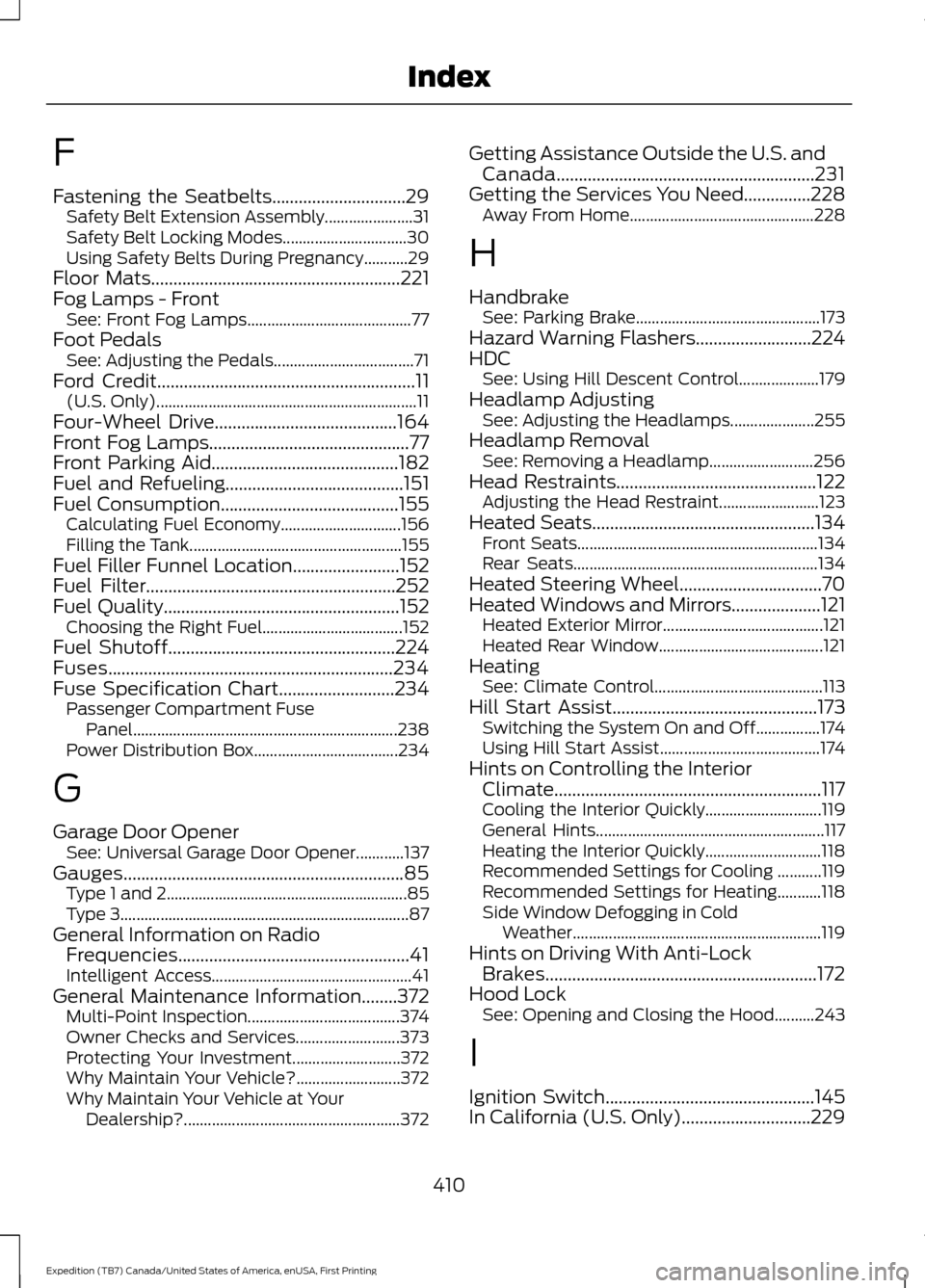
F
Fastening the Seatbelts..............................29
Safety Belt Extension Assembly...................... 31
Safety Belt Locking Modes............................... 30
Using Safety Belts During Pregnancy...........29
Floor Mats
........................................................221
Fog Lamps - Front See: Front Fog Lamps......................................... 77
Foot Pedals See: Adjusting the Pedals................................... 71
Ford Credit
..........................................................11
(U.S. Only)................................................................. 11
Four-Wheel Drive
.........................................164
Front Fog Lamps.............................................77
Front Parking Aid
..........................................182
Fuel and Refueling........................................151
Fuel Consumption
........................................155
Calculating Fuel Economy.............................. 156
Filling the Tank..................................................... 155
Fuel Filler Funnel Location
........................152
Fuel Filter........................................................252
Fuel Quality.....................................................152
Choosing the Right Fuel................................... 152
Fuel Shutoff
...................................................224
Fuses................................................................234
Fuse Specification Chart..........................234 Passenger Compartment Fuse
Panel.................................................................. 238
Power Distribution Box.................................... 234
G
Garage Door Opener See: Universal Garage Door Opener............137
Gauges...............................................................85 Type 1 and 2............................................................ 85
Type 3........................................................................\
87
General Information on Radio Frequencies....................................................41
Intelligent Access.................................................. 41
General Maintenance Information
........372
Multi-Point Inspection...................................... 374
Owner Checks and Services.......................... 373
Protecting Your Investment........................... 372
Why Maintain Your Vehicle?.......................... 372
Why Maintain Your Vehicle at Your Dealership?...................................................... 372Getting Assistance Outside the U.S. and
Canada..........................................................231
Getting the Services You Need...............228 Away From Home.............................................. 228
H
Handbrake See: Parking Brake.............................................. 173
Hazard Warning Flashers..........................224
HDC See: Using Hill Descent Control.................... 179
Headlamp Adjusting See: Adjusting the Headlamps..................... 255
Headlamp Removal See: Removing a Headlamp.......................... 256
Head Restraints.............................................122 Adjusting the Head Restraint......................... 123
Heated Seats
..................................................134
Front Seats............................................................ 134
Rear Seats............................................................. 134
Heated Steering Wheel................................70
Heated Windows and Mirrors
....................121
Heated Exterior Mirror........................................ 121
Heated Rear Window......................................... 121
Heating See: Climate Control.......................................... 113
Hill Start Assist
..............................................173
Switching the System On and Off................174
Using Hill Start Assist........................................ 174
Hints on Controlling the Interior Climate............................................................117
Cooling the Interior Quickly............................. 119
General Hints......................................................... 117
Heating the Interior Quickly............................. 118
Recommended Settings for Cooling ...........119
Recommended Settings for Heating...........118
Side Window Defogging in Cold Weather.............................................................. 119
Hints on Driving With Anti-Lock Brakes.............................................................172
Hood Lock See: Opening and Closing the Hood..........243
I
Ignition Switch
...............................................145
In California (U.S. Only).............................229
410
Expedition (TB7) Canada/United States of America, enUSA, First Printing Index