2016 FORD EXPEDITION EL lights
[x] Cancel search: lightsPage 191 of 421
BLIND SPOT INFORMATION
SYSTEM
WARNING
To help avoid injuries, NEVER use theBlind Spot Information System as areplacement for using the interiorand exterior mirrors or looking over yourshoulder before changing lanes. The BlindSpot Information System is not areplacement for careful driving.
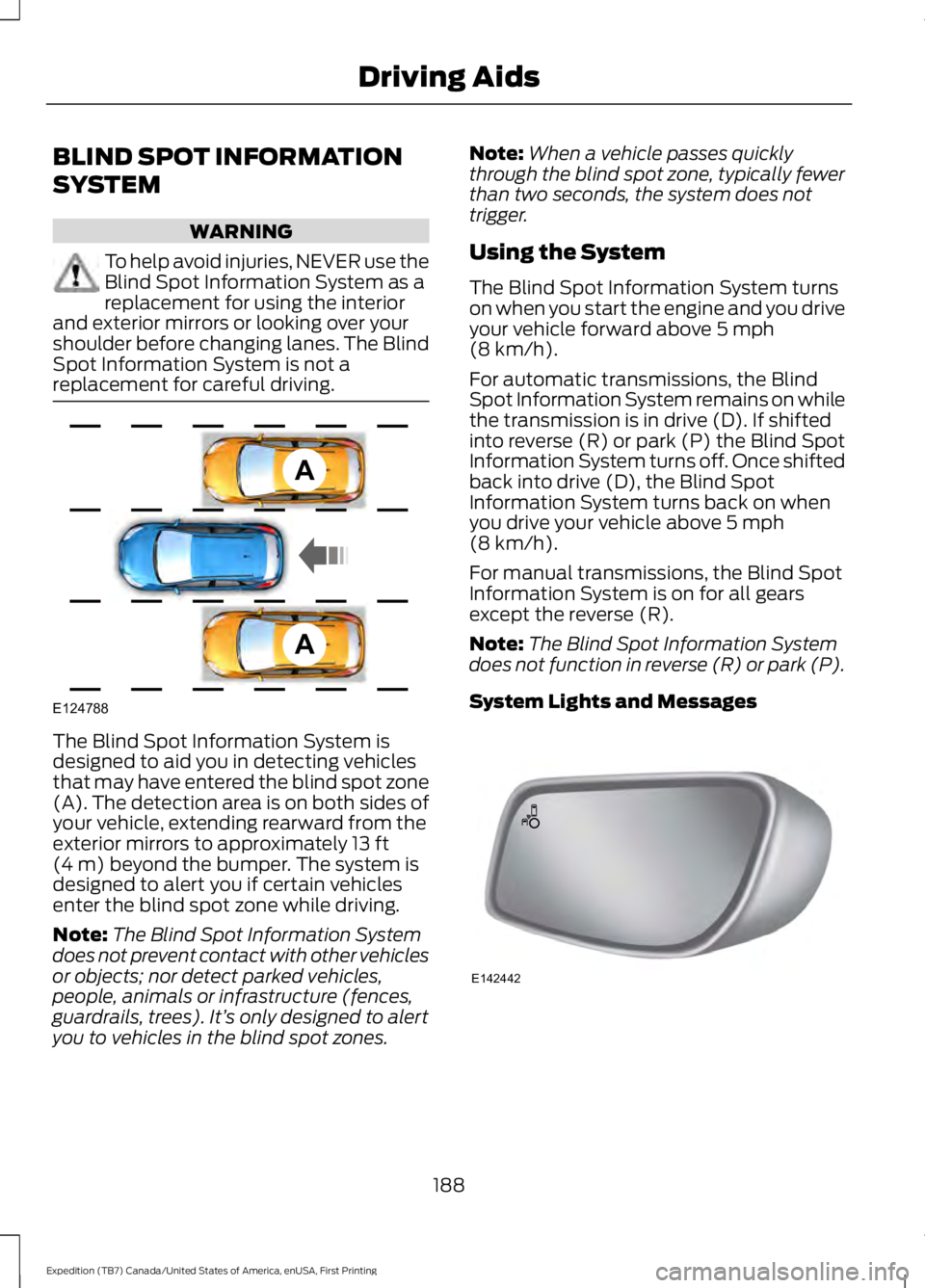
The Blind Spot Information System isdesigned to aid you in detecting vehiclesthat may have entered the blind spot zone(A). The detection area is on both sides ofyour vehicle, extending rearward from theexterior mirrors to approximately 13 ft(4 m) beyond the bumper. The system isdesigned to alert you if certain vehiclesenter the blind spot zone while driving.
Note:The Blind Spot Information Systemdoes not prevent contact with other vehiclesor objects; nor detect parked vehicles,people, animals or infrastructure (fences,guardrails, trees). It’s only designed to alertyou to vehicles in the blind spot zones.
Note:When a vehicle passes quicklythrough the blind spot zone, typically fewerthan two seconds, the system does nottrigger.
Using the System
The Blind Spot Information System turnson when you start the engine and you driveyour vehicle forward above 5 mph(8 km/h).
For automatic transmissions, the BlindSpot Information System remains on whilethe transmission is in drive (D). If shiftedinto reverse (R) or park (P) the Blind SpotInformation System turns off. Once shiftedback into drive (D), the Blind SpotInformation System turns back on whenyou drive your vehicle above 5 mph(8 km/h).
For manual transmissions, the Blind SpotInformation System is on for all gearsexcept the reverse (R).
Note:The Blind Spot Information Systemdoes not function in reverse (R) or park (P).
System Lights and Messages
188
Expedition (TB7) Canada/United States of America, enUSA, First Printing
Driving AidsA
A
E124788 E142442
Page 195 of 421

Zone coverage also decreases whenparking at shallow angles. Here, the leftsensor is mostly obstructed; zone coverageon that side is severely limited.
System Lights, Messages andAudible Alerts
The Cross Traffic Alert illuminates anamber alert indicator in the outside mirroron the side of your vehicle the approachingvehicle is coming from. Cross Traffic Alertalso sounds an audible alert and amessage appears in the informationdisplay indicating a vehicle is coming fromthe right or left. Cross Traffic Alert workswith the reverse sensing system thatsounds its own series of tones. See RearParking Aid (page 181).
The system uses radar sensors that arelocated behind the bumper fascia on eachside of your vehicle. Do not allow mud,snow or bumper stickers to obstruct theseareas, this can cause degraded systemperformance. See Blind SpotInformation System (page 188). If theBlind Spot Information System is blocked,Cross Traffic Alert is also blocked. Acorresponding message appears in theinformation display as soon as you shiftthe transmission into reverse (R).
System Limitations
Cross Traffic Alert has its limitations;situations such as severe weatherconditions or debris build-up on the sensorarea may limit vehicle detection.
192
Expedition (TB7) Canada/United States of America, enUSA, First Printing
Driving AidsE142442 E205199
Page 211 of 421

ESSENTIAL TOWING CHECKS
Follow these guidelines for safe towing:
•Do not tow a trailer until you drive yourvehicle at least 1000 miles (1600kilometers).
•Consult your local motor vehicle lawsfor towing a trailer.
•See the instructions included withtowing accessories for the properinstallation and adjustmentspecifications.
•Service your vehicle more frequently ifyou tow a trailer. See your scheduledmaintenance information.
•If you use a rental trailer, follow theinstructions the rental agency givesyou.
See Load limits in the Load Carryingchapter for load specification terms foundon the tire label and Safety Compliancelabel and instructions on calculating yourvehicle's load.
Remember to account for the trailertongue weight as part of your vehicle loadwhen calculating the total vehicle weight.
Trailer Towing Connector(Vehicles with a Trailer TowingPackage and 7–Pin Connector)
When attaching the trailer wiring connectorto your vehicle, only use a proper fittingconnector that works with the vehicle andtrailer functions. Some seven-positionconnectors may have the SAE J2863 logo,which confirms that it is the proper wiringconnector and works correctly with yourvehicle.
FunctionColor
Left turn signal and stop lampYellow
Ground (-)White
Electric brakesBlue
Right turn signal and stoplampGreen
Battery (+)Orange
Running lightsBrown
Reverse lightsGrey
Hitches
WARNING
The trailer hitch on this vehicle is partof the vehicle rear crash safetystructure. Do not remove the trailerhitch. Failure to follow this warning couldcompromise vehicle crash structure andincrease the risk of injury in a rear endcrash.
Do not use a hitch that either clamps ontothe bumper or attaches to the axle.
Distribute the trailer load so 10-15% of thetotal trailer weight is on the tongue.
208
Expedition (TB7) Canada/United States of America, enUSA, First Printing
TowingE163167
Page 217 of 421

•Your vehicle's brake system and thetrailer brake system workindependently of each other. Changingthe gain setting on the controller doesnot affect the operation of yourvehicle's brakes whether you attach atrailer or not.
•When you switch the engine off, thecontroller output is disabled and thedisplay and module shut down. Thecontroller module and display turn onwhen you switch the ignition on.
•The trailer brake controller is only afactory-installed or dealer-installeditem. Ford is not responsible forwarranty or performance of thecontroller due to misuse or customerinstallation.
Trailer Lamps
WARNING
Never connect any trailer lamp wiringto the vehicle's tail lamp wiring; thismay damage the electrical systemresulting in fire. Contact your authorizeddealer as soon as possible for assistancein proper trailer tow wiring installation.Additional electrical equipment may berequired.
Trailer lamps are required on most towedvehicles. Make sure all running lights, brakelights, turn signals and hazard lights areworking.
Before Towing a Trailer
Practice turning, stopping and backing upto get the feel of your vehicle-trailercombination before starting on a trip.When turning, make wider turns so thetrailer wheels clear curbs and otherobstacles.
When Towing a Trailer
•Do not drive faster than 70 mph (113km/h) during the first 500 miles (800kilometers).
•Do not make full-throttle starts.
•Check your hitch, electrical connectionsand trailer wheel lug nuts thoroughlyafter you have traveled 50 miles (80kilometers).
•When stopped in congested or heavytraffic during hot weather, place thegearshift in position P to aid engine andtransmission cooling and to help A/Cperformance.
•Turn off the speed control with heavyloads or in hilly terrain. The speedcontrol may turn off automaticallywhen you are towing on long, steepgrades.
•Shift to a lower gear when driving downa long or steep hill. Do not apply thebrakes continuously, as they mayoverheat and become less effective.
•If your transmission is equipped with aGrade Assist or Tow/Haul feature, usethis feature when towing. This providesengine braking and helps eliminateexcessive transmission shifting foroptimum fuel economy andtransmission cooling.
•If your vehicle is equipped withAdvanceTrac with RSC, this systemmay turn on during typical corneringmaneuvers with a heavily loaded trailer.This is normal. Turning the corner at aslower speed while towing may reducethis tendency.
•If you are towing a trailer frequently inhot weather, hilly conditions, at thegross combined weight rating (or anycombination of these factors), considerrefilling your rear axle with syntheticgear lubricant (if the axle is not alreadyfilled with it). See Capacities andSpecifications (page 303).
214
Expedition (TB7) Canada/United States of America, enUSA, First Printing
Towing
Page 224 of 421
•Avoid using speed control in hillyterrain.
•Do not rest your foot on the brakepedal while driving.
•Avoid carrying unnecessary weight.
•Avoid adding particular accessories toyour vehicle (e.g. bug deflectors,rollbars/light bars, running boards, skiracks).
•Avoid driving with the wheels out ofalignment.
DRIVING THROUGH WATER
WARNING
Do not drive through flowing or deepwater as you may lose control of yourvehicle.
Note:Driving through standing water cancause vehicle damage.
Note:Engine damage can occur if waterenters the air filter.
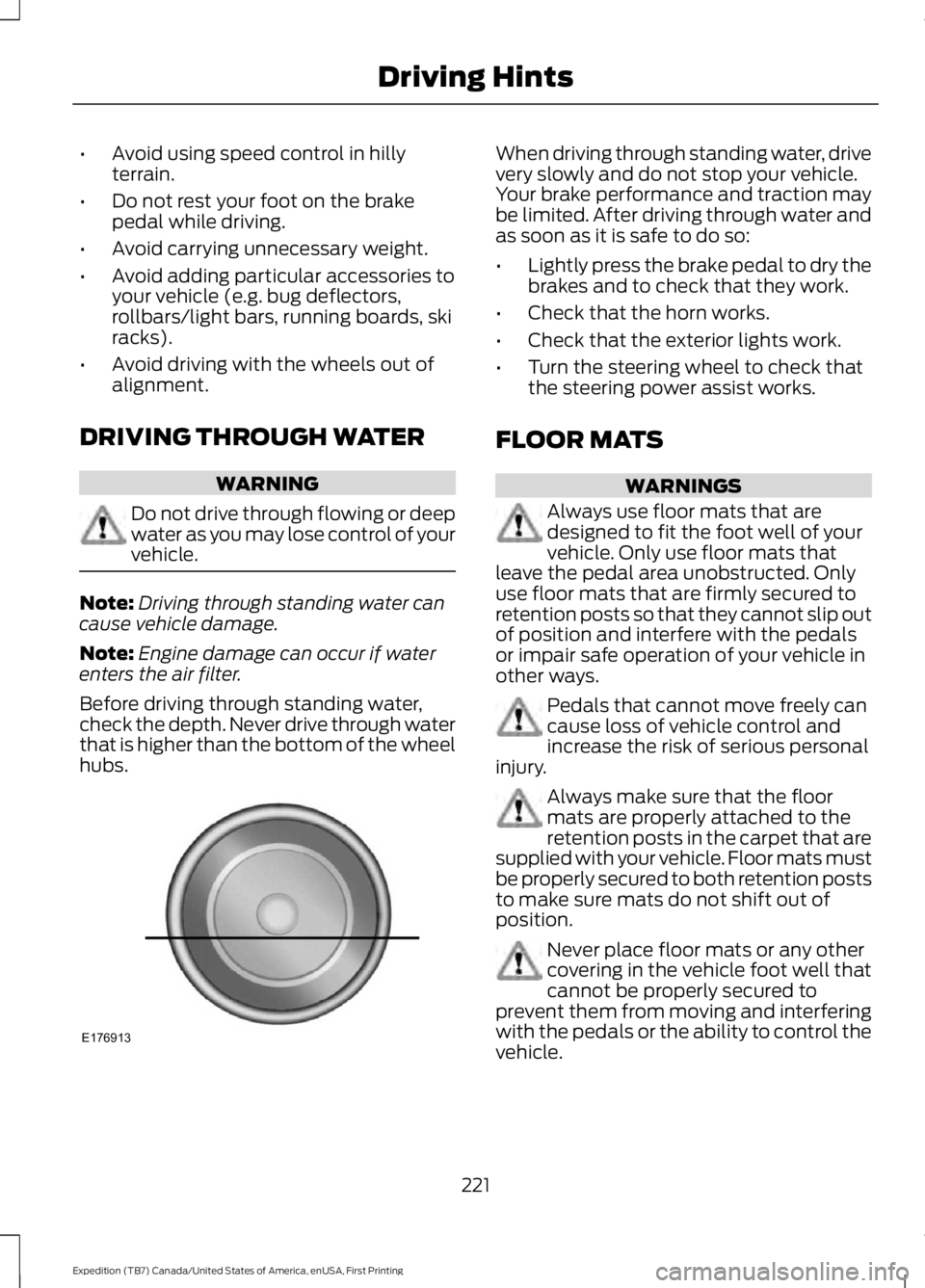
Before driving through standing water,check the depth. Never drive through waterthat is higher than the bottom of the wheelhubs.
When driving through standing water, drivevery slowly and do not stop your vehicle.Your brake performance and traction maybe limited. After driving through water andas soon as it is safe to do so:
•Lightly press the brake pedal to dry thebrakes and to check that they work.
•Check that the horn works.
•Check that the exterior lights work.
•Turn the steering wheel to check thatthe steering power assist works.
FLOOR MATS
WARNINGS
Always use floor mats that aredesigned to fit the foot well of yourvehicle. Only use floor mats thatleave the pedal area unobstructed. Onlyuse floor mats that are firmly secured toretention posts so that they cannot slip outof position and interfere with the pedalsor impair safe operation of your vehicle inother ways.
Pedals that cannot move freely cancause loss of vehicle control andincrease the risk of serious personalinjury.
Always make sure that the floormats are properly attached to theretention posts in the carpet that aresupplied with your vehicle. Floor mats mustbe properly secured to both retention poststo make sure mats do not shift out ofposition.
Never place floor mats or any othercovering in the vehicle foot well thatcannot be properly secured toprevent them from moving and interferingwith the pedals or the ability to control thevehicle.
221
Expedition (TB7) Canada/United States of America, enUSA, First Printing
Driving HintsE176913
Page 377 of 421
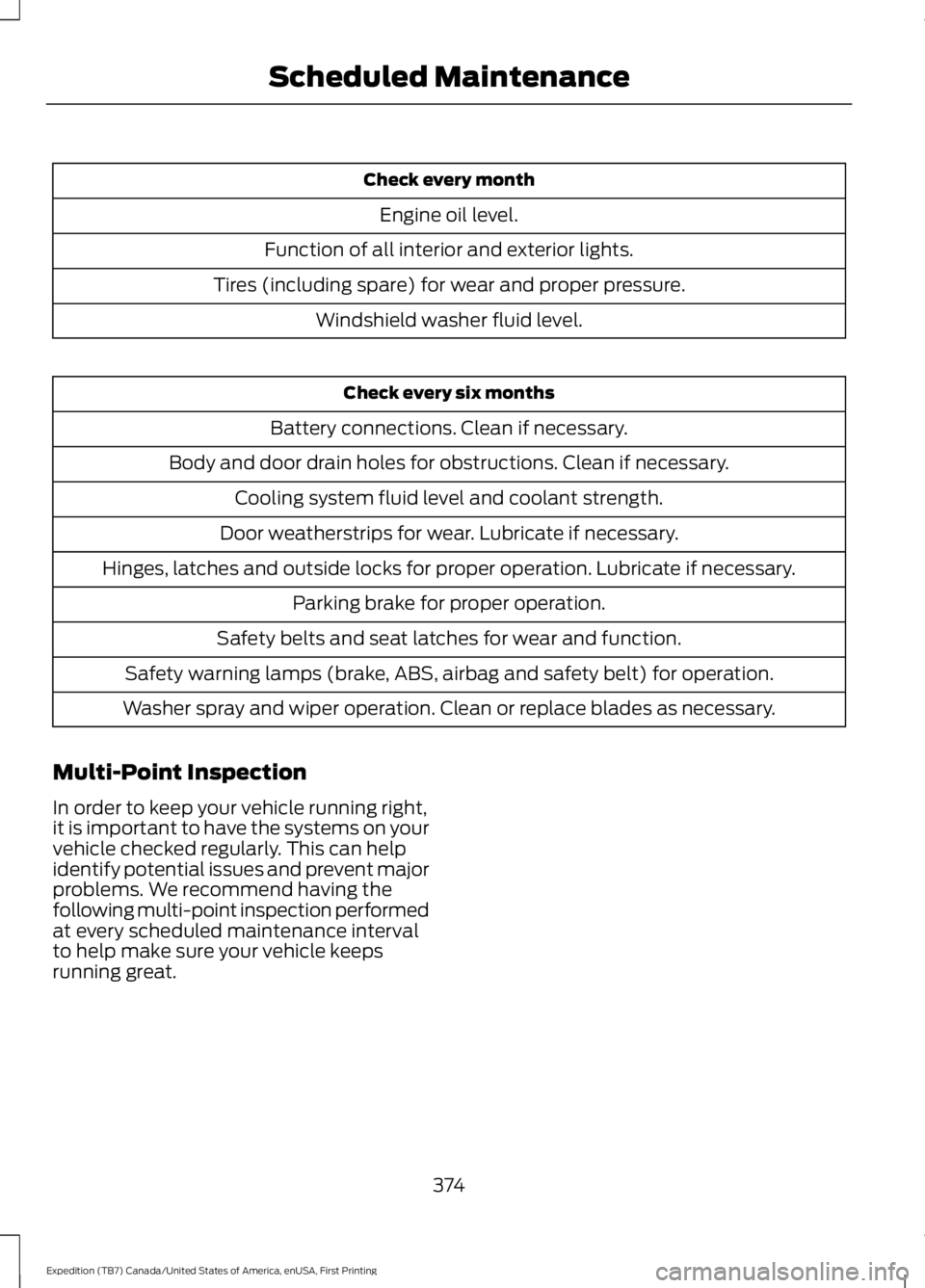
Check every month
Engine oil level.
Function of all interior and exterior lights.
Tires (including spare) for wear and proper pressure.
Windshield washer fluid level.
Check every six months
Battery connections. Clean if necessary.
Body and door drain holes for obstructions. Clean if necessary.
Cooling system fluid level and coolant strength.
Door weatherstrips for wear. Lubricate if necessary.
Hinges, latches and outside locks for proper operation. Lubricate if necessary.
Parking brake for proper operation.
Safety belts and seat latches for wear and function.
Safety warning lamps (brake, ABS, airbag and safety belt) for operation.
Washer spray and wiper operation. Clean or replace blades as necessary.
Multi-Point Inspection
In order to keep your vehicle running right,it is important to have the systems on yourvehicle checked regularly. This can helpidentify potential issues and prevent majorproblems. We recommend having thefollowing multi-point inspection performedat every scheduled maintenance intervalto help make sure your vehicle keepsrunning great.
374
Expedition (TB7) Canada/United States of America, enUSA, First Printing
Scheduled Maintenance
Page 411 of 421

Bonnet LockSee: Opening and Closing the Hood..........243Booster Seats..................................................23Types of Booster Seats......................................24Brake Fluid Check.........................................251Brakes................................................................172General Information...........................................172Breaking-In.....................................................220Bulb Specification Chart..........................260
C
California Proposition 65..............................11Capacities and Specifications - 3.5LEcoboost™.................................................307Specifications.....................................................308Capacities and Specifications................303Car WashSee: Cleaning the Exterior..............................264Center Console..............................................144Changing a Bulb...........................................257Central High-mounted Brake LampBulb....................................................................259Fog Lamp Bulb...................................................258Front Direction Indicator Bulb.......................258Headlamp Bulb...................................................257LED Central High-mounted Brake LampBulb....................................................................259LED Direction Indicator and Side MarkerBulbs..................................................................258LED Headlamp Bulb..........................................257LED Rear Lamp, Brake Lamp, Rear DirectionIndicator and Reverse LampBulbs..................................................................259License Plate Lamp Bulb...............................260Rear Lamp, Brake Lamp, Rear DirectionIndicator and Reverse LampBulbs..................................................................259Side Direction Indicator Bulb........................260Side Marker Bulb...............................................258Changing a Fuse...........................................242Fuses.......................................................................242Changing a Road Wheel...........................296Dissimilar Spare Wheel and Tire AssemblyInformation.....................................................296Location of the Spare Tire and Tools.........297Tire Change Procedure....................................298
Changing the 12V Battery.........................252Battery Management System.......................254Changing the Engine Air Filter.................262Changing the Wiper Blades.....................255Checking MyKey System Status..............49Checking the Wiper Blades.....................254Childminder Mirror.........................................82Child Restraint and SeatbeltMaintenance.................................................34Child Restraint Positioning.........................25Child Safety.......................................................15General Information.............................................15Child Safety Locks.........................................26Cleaning Leather Seats..............................267With King Ranch Edition.................................268Without King Ranch Edition...........................267Cleaning Products.......................................264Cleaning the Alloy Wheels.......................269Cleaning the Engine....................................265Cleaning the Exterior..................................264Exterior Chrome Parts.....................................264Exterior Plastic Parts........................................265Stripes or Graphics............................................265Underbody...........................................................265Cleaning the Instrument Panel andInstrument Cluster Lens.........................267Cleaning the Interior...................................266Cleaning the Windows and WiperBlades...........................................................266Clearing All MyKeys.......................................48Climate Control..............................................113Climate Controlled Seats..........................135Cooled Seats........................................................135Coolant CheckSee: Engine Coolant Check............................247Crash Sensors and Airbag Indicator........39Creating a MyKey............................................47Programming/Changing ConfigurableSettings...............................................................47Cross Traffic Alert........................................190False Alerts...........................................................193Switching the System Off and On...............193System Errors.......................................................193System Lights, Messages and AudibleAlerts..................................................................192System Limitations............................................192Using the System...............................................190
408
Expedition (TB7) Canada/United States of America, enUSA, First Printing
Index
Page 418 of 421
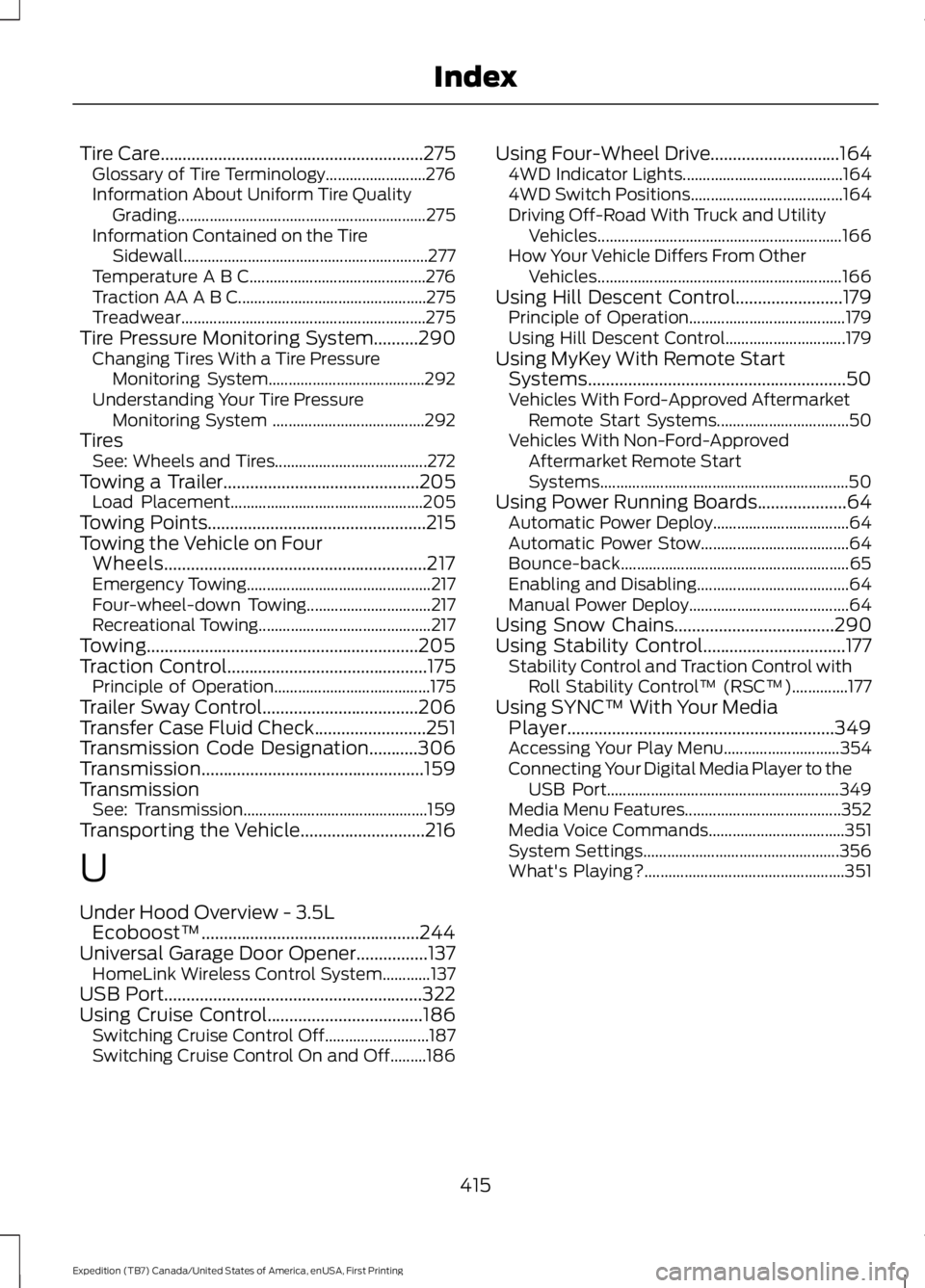
Tire Care...........................................................275Glossary of Tire Terminology.........................276Information About Uniform Tire QualityGrading..............................................................275Information Contained on the TireSidewall.............................................................277Temperature A B C............................................276Traction AA A B C...............................................275Treadwear.............................................................275Tire Pressure Monitoring System..........290Changing Tires With a Tire PressureMonitoring System.......................................292Understanding Your Tire PressureMonitoring System ......................................292TiresSee: Wheels and Tires......................................272Towing a Trailer............................................205Load Placement................................................205Towing Points.................................................215Towing the Vehicle on FourWheels...........................................................217Emergency Towing..............................................217Four-wheel-down Towing...............................217Recreational Towing...........................................217Towing.............................................................205Traction Control.............................................175Principle of Operation.......................................175Trailer Sway Control...................................206Transfer Case Fluid Check.........................251Transmission Code Designation...........306Transmission..................................................159TransmissionSee: Transmission..............................................159Transporting the Vehicle............................216
U
Under Hood Overview - 3.5LEcoboost™.................................................244Universal Garage Door Opener................137HomeLink Wireless Control System............137USB Port..........................................................322Using Cruise Control...................................186Switching Cruise Control Off..........................187Switching Cruise Control On and Off.........186
Using Four-Wheel Drive.............................1644WD Indicator Lights........................................1644WD Switch Positions......................................164Driving Off-Road With Truck and UtilityVehicles.............................................................166How Your Vehicle Differs From OtherVehicles.............................................................166Using Hill Descent Control........................179Principle of Operation.......................................179Using Hill Descent Control..............................179Using MyKey With Remote StartSystems..........................................................50Vehicles With Ford-Approved AftermarketRemote Start Systems.................................50Vehicles With Non-Ford-ApprovedAftermarket Remote StartSystems..............................................................50Using Power Running Boards....................64Automatic Power Deploy..................................64Automatic Power Stow.....................................64Bounce-back.........................................................65Enabling and Disabling......................................64Manual Power Deploy........................................64Using Snow Chains....................................290Using Stability Control................................177Stability Control and Traction Control withRoll Stability Control™ (RSC™)..............177Using SYNC™ With Your MediaPlayer............................................................349Accessing Your Play Menu.............................354Connecting Your Digital Media Player to theUSB Port..........................................................349Media Menu Features.......................................352Media Voice Commands..................................351System Settings.................................................356What's Playing?..................................................351
415
Expedition (TB7) Canada/United States of America, enUSA, First Printing
Index