2016 FORD EXPEDITION EL ECO mode
[x] Cancel search: ECO modePage 111 of 421
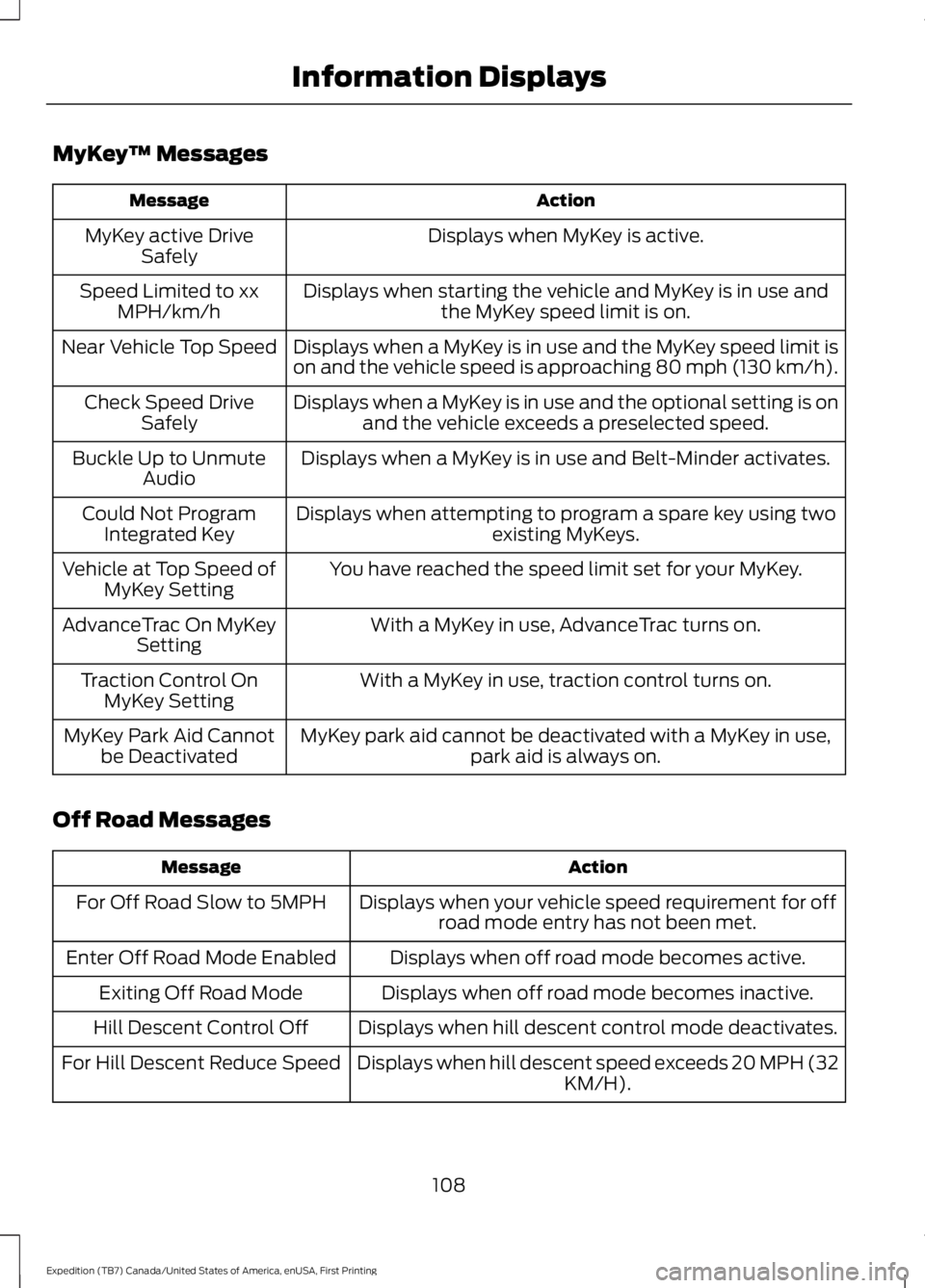
MyKey™ Messages
ActionMessage
Displays when MyKey is active.MyKey active DriveSafely
Displays when starting the vehicle and MyKey is in use andthe MyKey speed limit is on.Speed Limited to xxMPH/km/h
Displays when a MyKey is in use and the MyKey speed limit ison and the vehicle speed is approaching 80 mph (130 km/h).Near Vehicle Top Speed
Displays when a MyKey is in use and the optional setting is onand the vehicle exceeds a preselected speed.Check Speed DriveSafely
Displays when a MyKey is in use and Belt-Minder activates.Buckle Up to UnmuteAudio
Displays when attempting to program a spare key using twoexisting MyKeys.Could Not ProgramIntegrated Key
You have reached the speed limit set for your MyKey.Vehicle at Top Speed ofMyKey Setting
With a MyKey in use, AdvanceTrac turns on.AdvanceTrac On MyKeySetting
With a MyKey in use, traction control turns on.Traction Control OnMyKey Setting
MyKey park aid cannot be deactivated with a MyKey in use,park aid is always on.MyKey Park Aid Cannotbe Deactivated
Off Road Messages
ActionMessage
Displays when your vehicle speed requirement for offroad mode entry has not been met.For Off Road Slow to 5MPH
Displays when off road mode becomes active.Enter Off Road Mode Enabled
Displays when off road mode becomes inactive.Exiting Off Road Mode
Displays when hill descent control mode deactivates.Hill Descent Control Off
Displays when hill descent speed exceeds 20 MPH (32KM/H).For Hill Descent Reduce Speed
108
Expedition (TB7) Canada/United States of America, enUSA, First Printing
Information Displays
Page 112 of 421
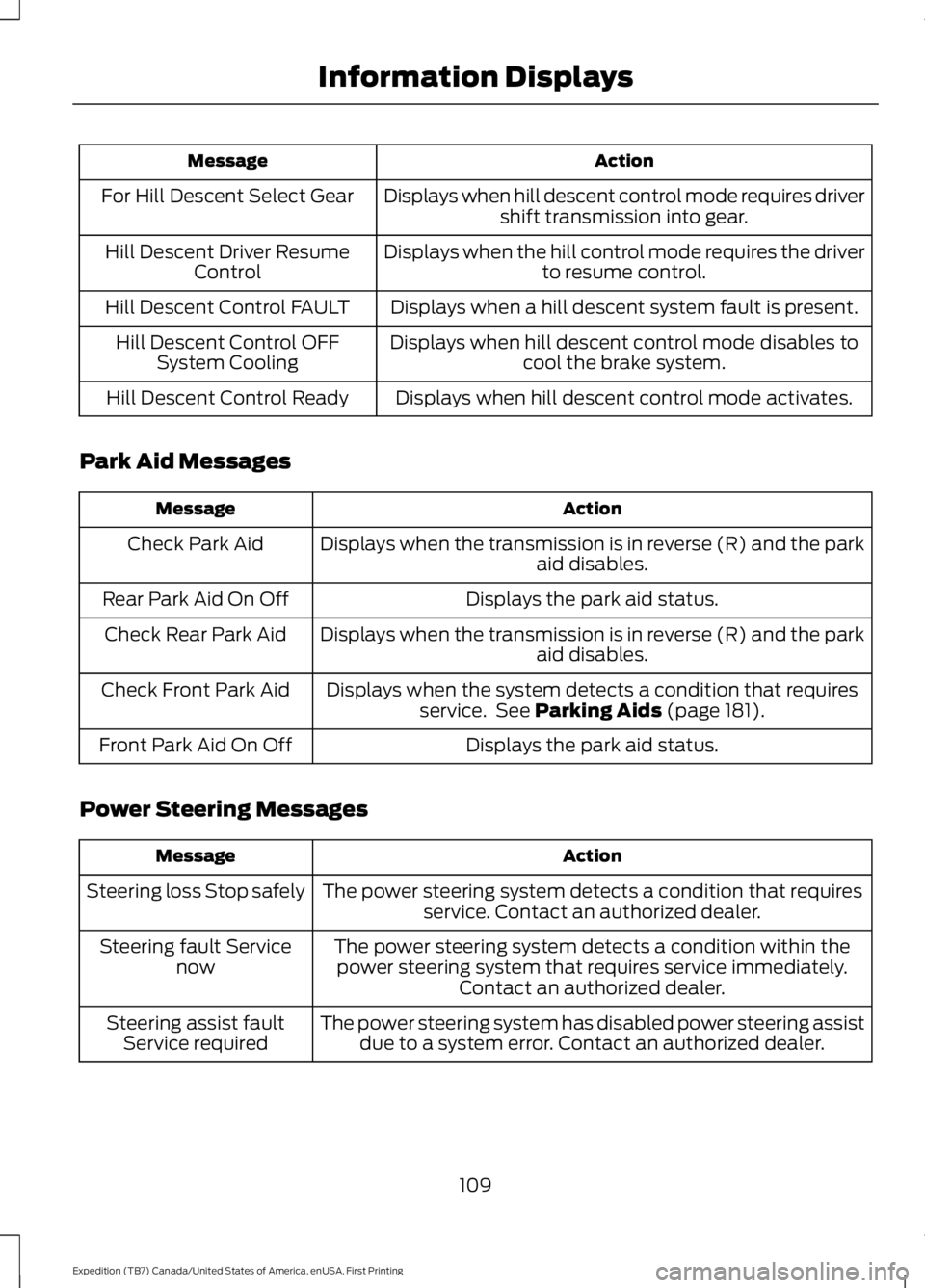
ActionMessage
Displays when hill descent control mode requires drivershift transmission into gear.For Hill Descent Select Gear
Displays when the hill control mode requires the driverto resume control.Hill Descent Driver ResumeControl
Displays when a hill descent system fault is present.Hill Descent Control FAULT
Displays when hill descent control mode disables tocool the brake system.Hill Descent Control OFFSystem Cooling
Displays when hill descent control mode activates.Hill Descent Control Ready
Park Aid Messages
ActionMessage
Displays when the transmission is in reverse (R) and the parkaid disables.Check Park Aid
Displays the park aid status.Rear Park Aid On Off
Displays when the transmission is in reverse (R) and the parkaid disables.Check Rear Park Aid
Displays when the system detects a condition that requiresservice. See Parking Aids (page 181).Check Front Park Aid
Displays the park aid status.Front Park Aid On Off
Power Steering Messages
ActionMessage
The power steering system detects a condition that requiresservice. Contact an authorized dealer.Steering loss Stop safely
The power steering system detects a condition within thepower steering system that requires service immediately.Contact an authorized dealer.
Steering fault Servicenow
The power steering system has disabled power steering assistdue to a system error. Contact an authorized dealer.Steering assist faultService required
109
Expedition (TB7) Canada/United States of America, enUSA, First Printing
Information Displays
Page 117 of 421
Note: Recirculated air may also turn on and off automatically in instrumentpanel or instrument panel and floor airflow modes during hot weather to improvecooling efficiency.
A/C: Press the button to switch the air conditioning on or off. Air conditioningcools your vehicle using outside air. To improve the time to reach a comfortabletemperature in hot weather, drive with the windows open until you feel cold airthrough the air vents.
I
MANUAL CLIMATE CONTROL - VEHICLES WITH: ELECTRONIC
MANUAL TEMPERATURE CONTROL (EMTC)
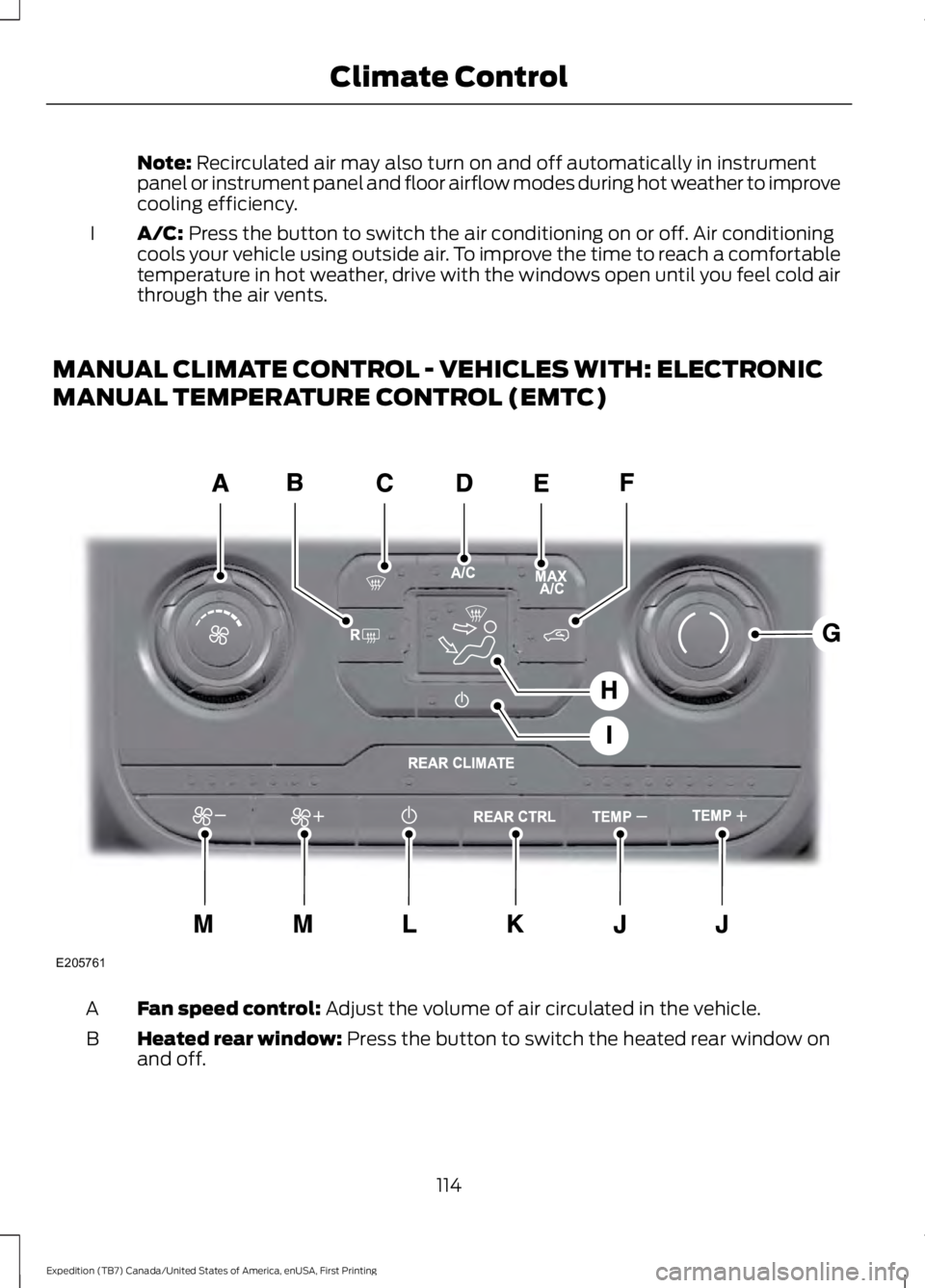
Fan speed control: Adjust the volume of air circulated in the vehicle.A
Heated rear window: Press the button to switch the heated rear window onand off.B
114
Expedition (TB7) Canada/United States of America, enUSA, First Printing
Climate ControlE205761
Page 118 of 421
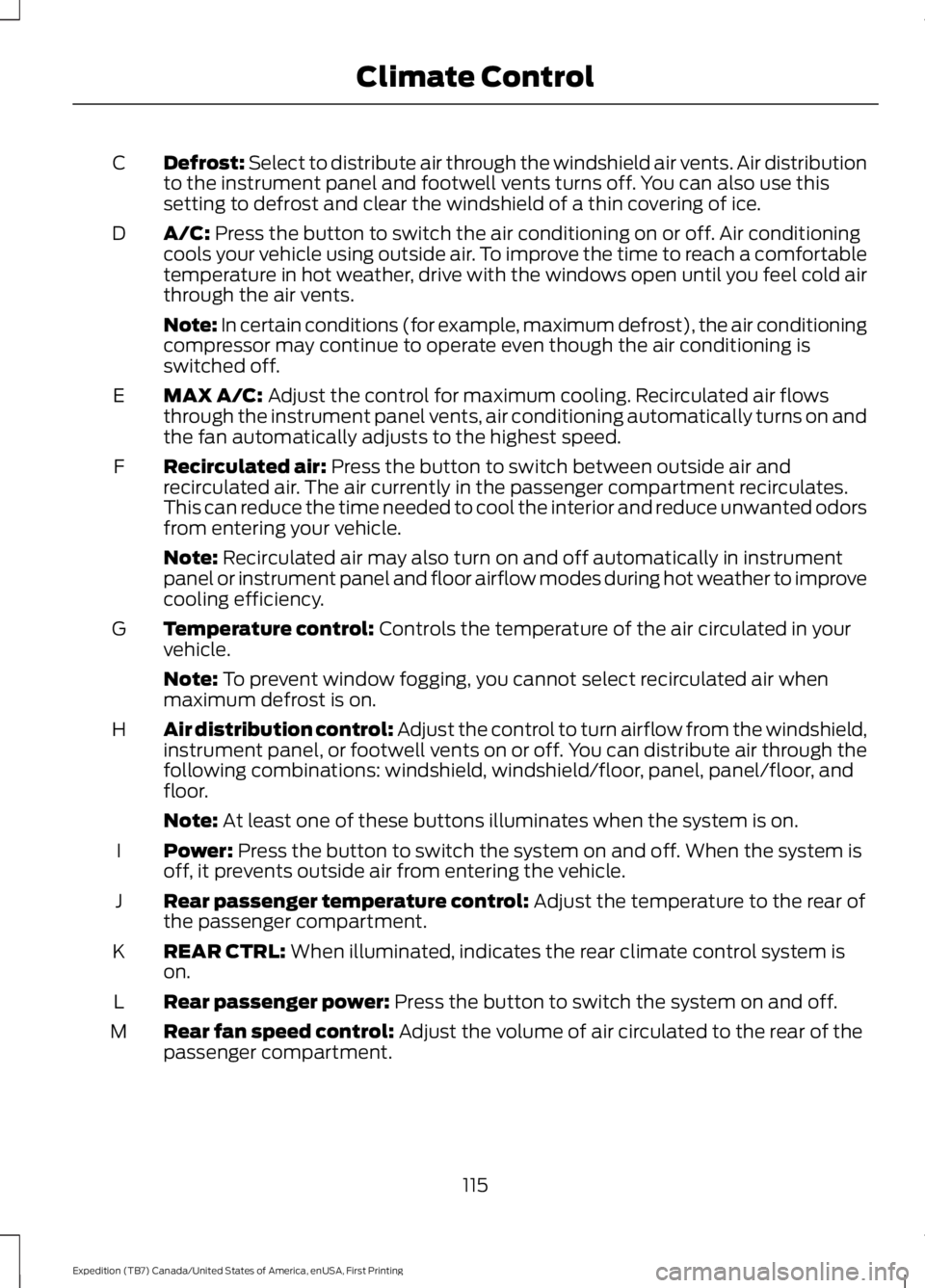
Defrost: Select to distribute air through the windshield air vents. Air distributionto the instrument panel and footwell vents turns off. You can also use thissetting to defrost and clear the windshield of a thin covering of ice.
C
A/C: Press the button to switch the air conditioning on or off. Air conditioningcools your vehicle using outside air. To improve the time to reach a comfortabletemperature in hot weather, drive with the windows open until you feel cold airthrough the air vents.
D
Note: In certain conditions (for example, maximum defrost), the air conditioningcompressor may continue to operate even though the air conditioning isswitched off.
MAX A/C: Adjust the control for maximum cooling. Recirculated air flowsthrough the instrument panel vents, air conditioning automatically turns on andthe fan automatically adjusts to the highest speed.
E
Recirculated air: Press the button to switch between outside air andrecirculated air. The air currently in the passenger compartment recirculates.This can reduce the time needed to cool the interior and reduce unwanted odorsfrom entering your vehicle.
F
Note: Recirculated air may also turn on and off automatically in instrumentpanel or instrument panel and floor airflow modes during hot weather to improvecooling efficiency.
Temperature control: Controls the temperature of the air circulated in yourvehicle.G
Note: To prevent window fogging, you cannot select recirculated air whenmaximum defrost is on.
Air distribution control: Adjust the control to turn airflow from the windshield,instrument panel, or footwell vents on or off. You can distribute air through thefollowing combinations: windshield, windshield/floor, panel, panel/floor, andfloor.
H
Note: At least one of these buttons illuminates when the system is on.
Power: Press the button to switch the system on and off. When the system isoff, it prevents outside air from entering the vehicle.I
Rear passenger temperature control: Adjust the temperature to the rear ofthe passenger compartment.J
REAR CTRL: When illuminated, indicates the rear climate control system ison.K
Rear passenger power: Press the button to switch the system on and off.L
Rear fan speed control: Adjust the volume of air circulated to the rear of thepassenger compartment.M
115
Expedition (TB7) Canada/United States of America, enUSA, First Printing
Climate Control
Page 120 of 421
MAX A/C: Press the button for maximum cooling. Recirculated air flows throughthe instrument panel vents, air conditioning automatically turns on and the fanautomatically adjusts to the highest speed.
G
Recirculated air: Press the button to switch between outside air andrecirculated air. The air currently in the passenger compartment recirculates.This can reduce the time needed to cool the interior and reduce unwanted odorsfrom entering your vehicle.
H
Note: Recirculated air may also turn on and off automatically in instrumentpanel or instrument panel and floor airflow modes during hot weather to improvecooling efficiency.
Passenger temperature control: Adjusts the temperature on the passengerside.I
Fan speed control: Adjusts the volume of air circulated in the vehicle.J
AUTO: Press the button to switch on automatic operation. Adjust to select thedesired temperature. Fan speed, air distribution, air conditioning operation, andoutside or recirculated air are automatically adjusted to heat or cool the vehicleto maintain the desired temperature. You can also switch off dual zone modeby pressing and holding the button for more than two seconds.
K
Air distribution control: Adjust the control to turn airflow from the windshield,instrument panel, or footwell vents on or off. You can distribute air through anycombination of these vents.
L
HINTS ON CONTROLLING THE
INTERIOR CLIMATE
General Hints
Note:Prolonged use of recirculated air maycause the windows to fog up.
Note:You may feel a small amount of airfrom the footwell air vents regardless of theair distribution setting.
Note:To reduce humidity build-up insideyour vehicle, do not drive with the systemswitched off or with recirculated air alwaysswitched on.
Note:Do not place objects under the frontseats as this may interfere with the airflowto the rear seats.
Note:Remove any snow, ice or leaves fromthe air intake area at the base of thewindshield.
Note:To improve the time to reach comfortin hot weather, drive with the windows fullyopen until you feel cold air through the airvents.
Manual Climate Control
Note:To reduce fogging of the windshieldduring humid weather, adjust the airdistribution control to the windshield airvents position.
117
Expedition (TB7) Canada/United States of America, enUSA, First Printing
Climate Control
Page 131 of 421
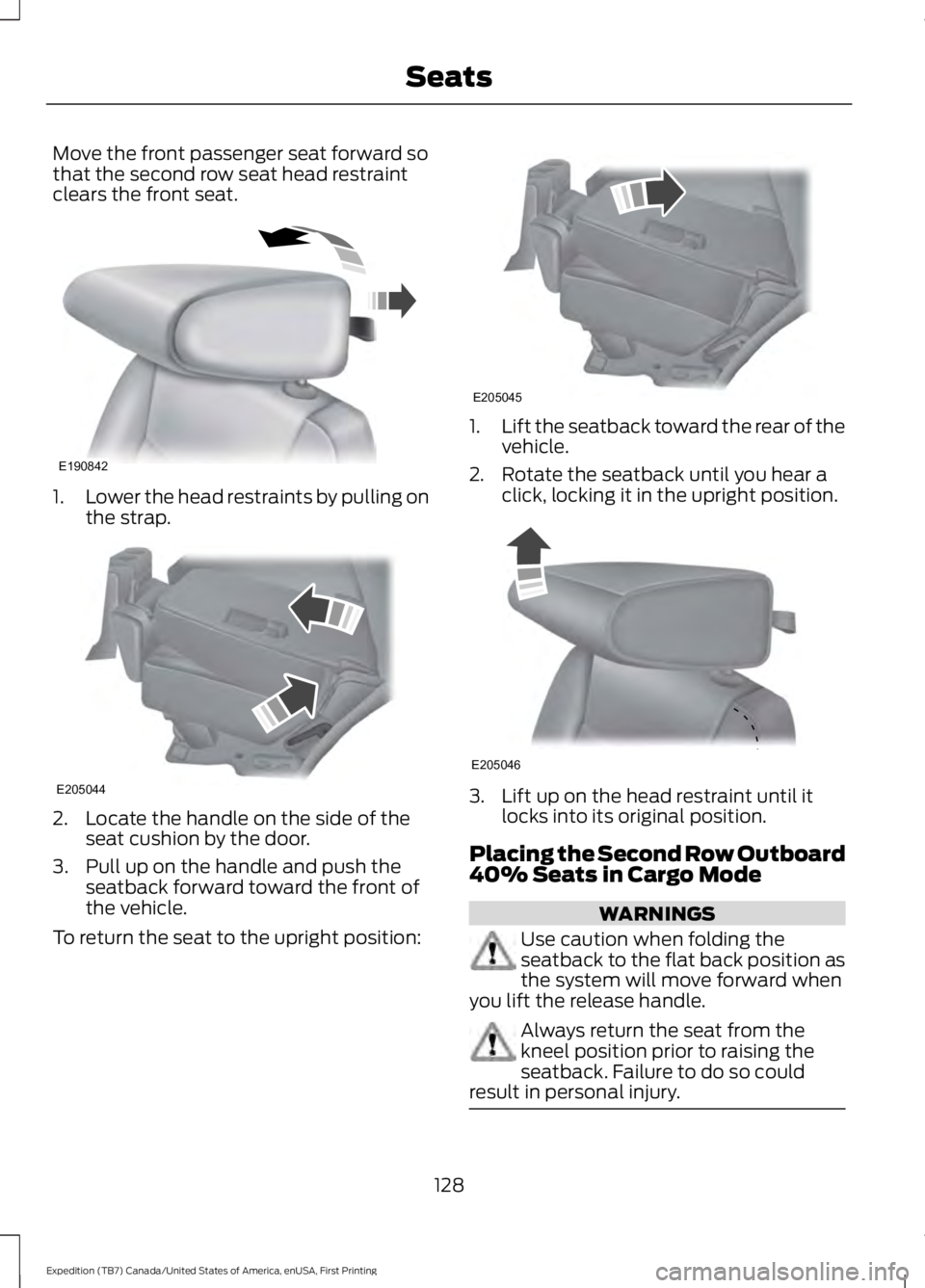
Move the front passenger seat forward sothat the second row seat head restraintclears the front seat.
1.Lower the head restraints by pulling onthe strap.
2. Locate the handle on the side of theseat cushion by the door.
3. Pull up on the handle and push theseatback forward toward the front ofthe vehicle.
To return the seat to the upright position:
1.Lift the seatback toward the rear of thevehicle.
2. Rotate the seatback until you hear aclick, locking it in the upright position.
3. Lift up on the head restraint until itlocks into its original position.
Placing the Second Row Outboard40% Seats in Cargo Mode
WARNINGS
Use caution when folding theseatback to the flat back position asthe system will move forward whenyou lift the release handle.
Always return the seat from thekneel position prior to raising theseatback. Failure to do so couldresult in personal injury.
128
Expedition (TB7) Canada/United States of America, enUSA, First Printing
SeatsE190842 E205044 E205045 E205046
Page 132 of 421
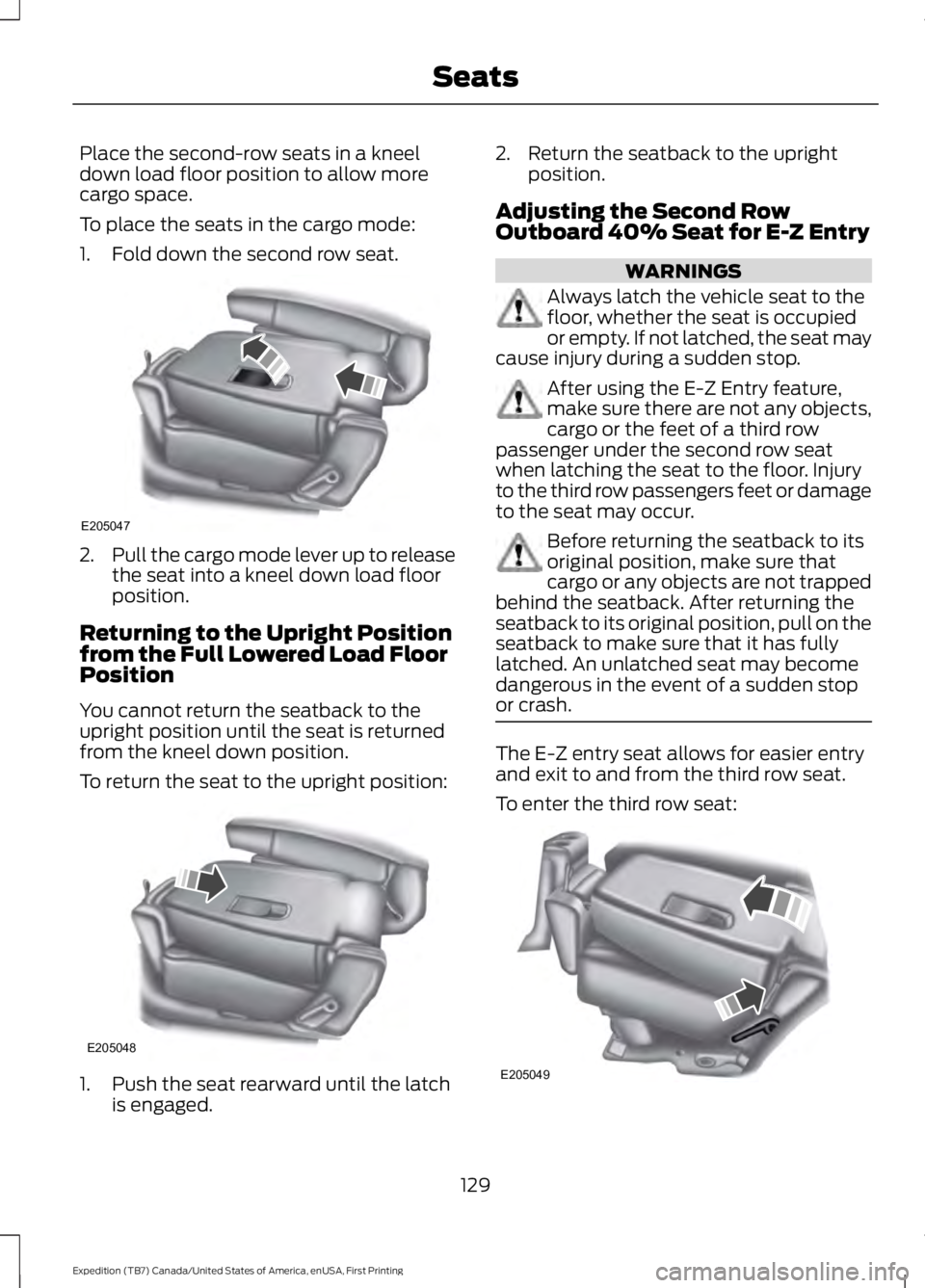
Place the second-row seats in a kneeldown load floor position to allow morecargo space.
To place the seats in the cargo mode:
1. Fold down the second row seat.
2.Pull the cargo mode lever up to releasethe seat into a kneel down load floorposition.
Returning to the Upright Positionfrom the Full Lowered Load FloorPosition
You cannot return the seatback to theupright position until the seat is returnedfrom the kneel down position.
To return the seat to the upright position:
1. Push the seat rearward until the latchis engaged.
2. Return the seatback to the uprightposition.
Adjusting the Second RowOutboard 40% Seat for E-Z Entry
WARNINGS
Always latch the vehicle seat to thefloor, whether the seat is occupiedor empty. If not latched, the seat maycause injury during a sudden stop.
After using the E-Z Entry feature,make sure there are not any objects,cargo or the feet of a third rowpassenger under the second row seatwhen latching the seat to the floor. Injuryto the third row passengers feet or damageto the seat may occur.
Before returning the seatback to itsoriginal position, make sure thatcargo or any objects are not trappedbehind the seatback. After returning theseatback to its original position, pull on theseatback to make sure that it has fullylatched. An unlatched seat may becomedangerous in the event of a sudden stopor crash.
The E-Z entry seat allows for easier entryand exit to and from the third row seat.
To enter the third row seat:
129
Expedition (TB7) Canada/United States of America, enUSA, First Printing
SeatsE205047 E205048 E205049
Page 142 of 421
Gate Operator / CanadianProgramming
Canadian radio-frequency laws requiretransmitter signals to “time-out” (or quit)after several seconds of transmission –which may not be long enough forHomeLink to pick up the signal duringprogramming. Similar to this Canadian law,some U.S. gate operators are designed to“time-out” in the same manner.
Note:If programming a garage door openeror gate operator, it is advised to unplug thedevice during the “cycling” process toprevent possible overheating.
1. Press and hold the HomeLink buttonwhile you press and release,every twoseconds, your hand-held transmitteruntil the HomeLink indicator lightchanges from a slow to a rapidlyblinking light.
2. Release both the HomeLink andhand-held transmitter buttons.
3. Continue programing HomeLink. SeeIn-Vehicle Programming.
Erasing the Function Button Codes
Note:You cannot erase individual buttons.
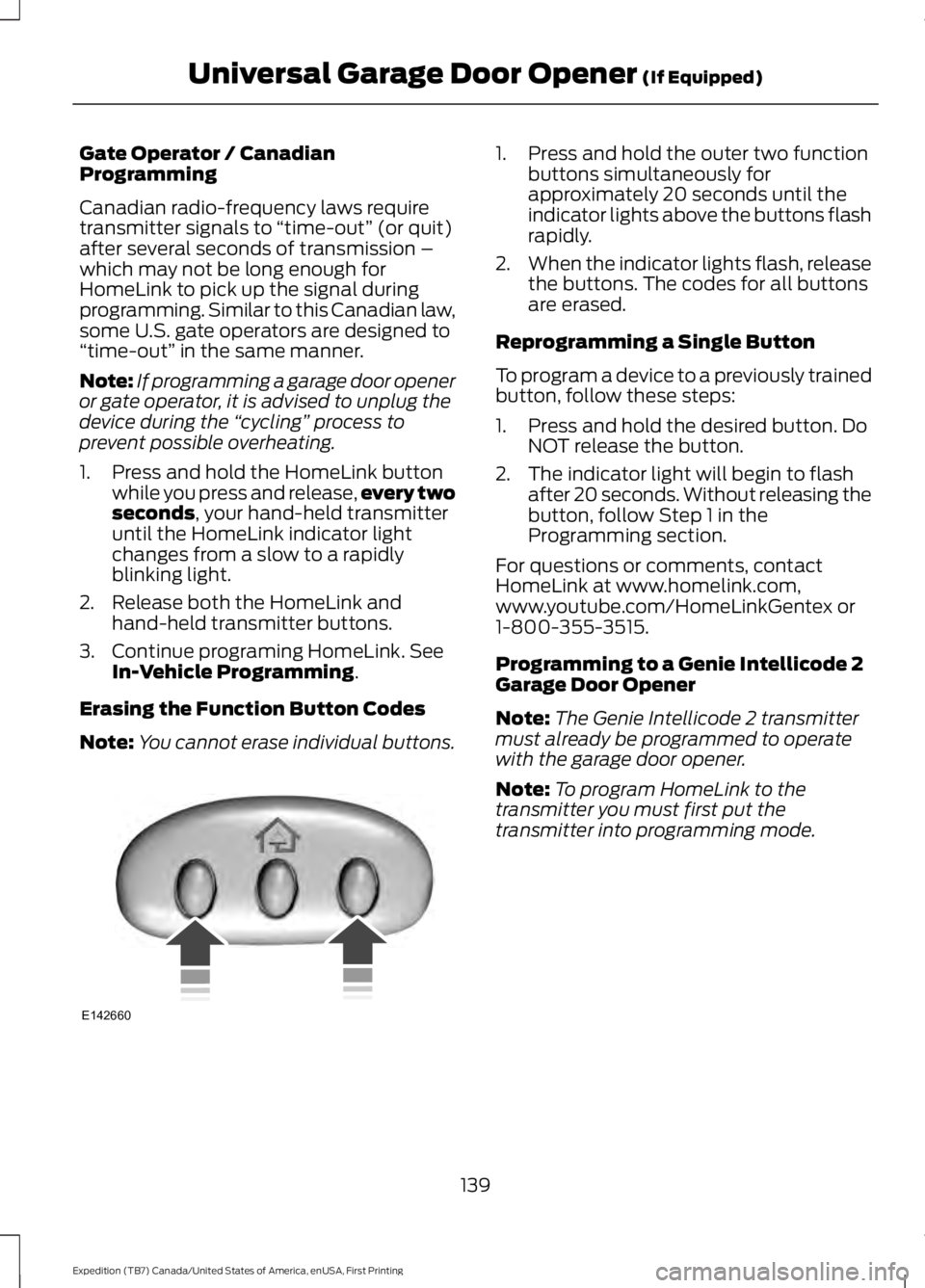
1. Press and hold the outer two functionbuttons simultaneously forapproximately 20 seconds until theindicator lights above the buttons flashrapidly.
2.When the indicator lights flash, releasethe buttons. The codes for all buttonsare erased.
Reprogramming a Single Button
To program a device to a previously trainedbutton, follow these steps:
1. Press and hold the desired button. DoNOT release the button.
2. The indicator light will begin to flashafter 20 seconds. Without releasing thebutton, follow Step 1 in theProgramming section.
For questions or comments, contactHomeLink at www.homelink.com,www.youtube.com/HomeLinkGentex or1-800-355-3515.
Programming to a Genie Intellicode 2Garage Door Opener
Note:The Genie Intellicode 2 transmittermust already be programmed to operatewith the garage door opener.
Note:To program HomeLink to thetransmitter you must first put thetransmitter into programming mode.
139
Expedition (TB7) Canada/United States of America, enUSA, First Printing
Universal Garage Door Opener (If Equipped)E142660