2016 FORD EXPEDITION EL remote start
[x] Cancel search: remote startPage 54 of 421
2. Start your vehicle using yournon-Ford-approved remote startsystem transmitter.
3. See Clearing All MyKeys (page 48).Follow Steps 1-3.
After clearing your MyKeys, you can createa new MyKey. See Creating a MyKey(page 47).
Note:With push-button start, you cannotprogram the remote start systemtransmitter as a MyKey. Always treat theremote start system transmitter as youwould any other admin key.
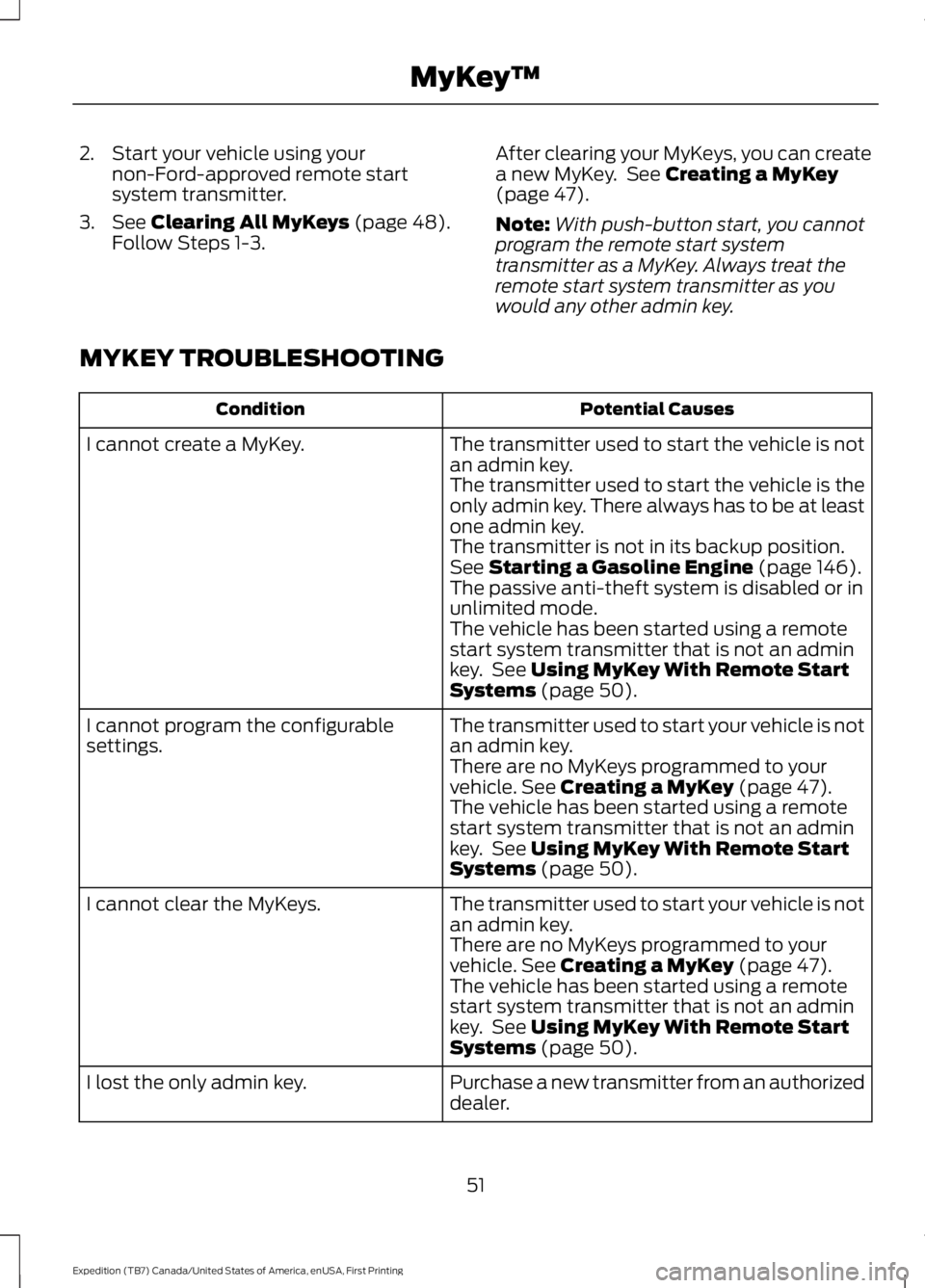
MYKEY TROUBLESHOOTING
Potential CausesCondition
The transmitter used to start the vehicle is notan admin key.I cannot create a MyKey.
The transmitter used to start the vehicle is theonly admin key. There always has to be at leastone admin key.The transmitter is not in its backup position.See Starting a Gasoline Engine (page 146).The passive anti-theft system is disabled or inunlimited mode.The vehicle has been started using a remotestart system transmitter that is not an adminkey. See Using MyKey With Remote StartSystems (page 50).
The transmitter used to start your vehicle is notan admin key.I cannot program the configurablesettings.There are no MyKeys programmed to yourvehicle. See Creating a MyKey (page 47).The vehicle has been started using a remotestart system transmitter that is not an adminkey. See Using MyKey With Remote StartSystems (page 50).
The transmitter used to start your vehicle is notan admin key.I cannot clear the MyKeys.
There are no MyKeys programmed to yourvehicle. See Creating a MyKey (page 47).The vehicle has been started using a remotestart system transmitter that is not an adminkey. See Using MyKey With Remote StartSystems (page 50).
Purchase a new transmitter from an authorizeddealer.I lost the only admin key.
51
Expedition (TB7) Canada/United States of America, enUSA, First Printing
MyKey™
Page 55 of 421
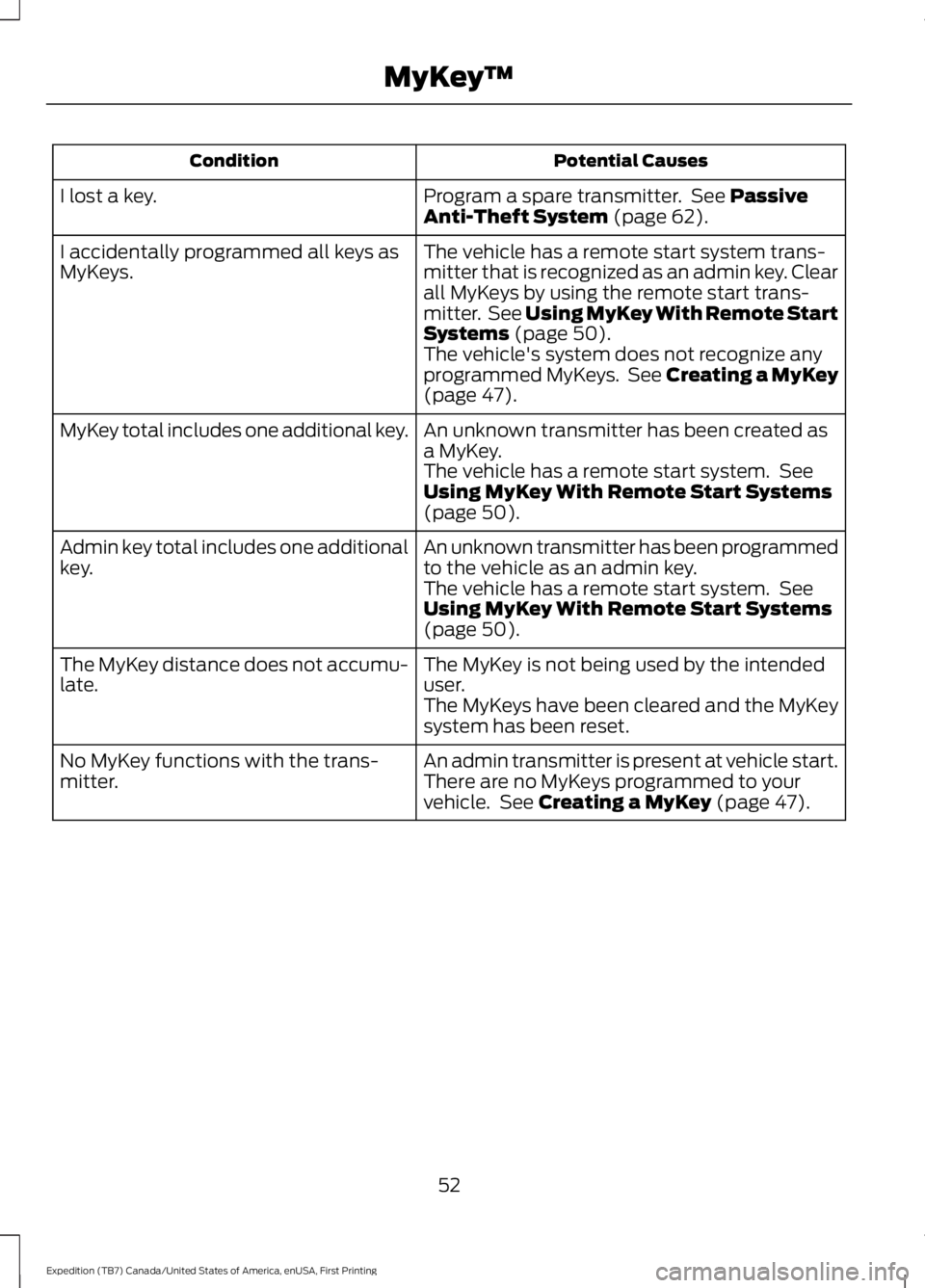
Potential CausesCondition
Program a spare transmitter. See PassiveAnti-Theft System (page 62).I lost a key.
The vehicle has a remote start system trans-mitter that is recognized as an admin key. Clearall MyKeys by using the remote start trans-mitter. See Using MyKey With Remote StartSystems (page 50).
I accidentally programmed all keys asMyKeys.
The vehicle's system does not recognize anyprogrammed MyKeys. See Creating a MyKey(page 47).
An unknown transmitter has been created asa MyKey.MyKey total includes one additional key.
The vehicle has a remote start system. SeeUsing MyKey With Remote Start Systems(page 50).
An unknown transmitter has been programmedto the vehicle as an admin key.Admin key total includes one additionalkey.The vehicle has a remote start system. SeeUsing MyKey With Remote Start Systems(page 50).
The MyKey is not being used by the intendeduser.The MyKey distance does not accumu-late.The MyKeys have been cleared and the MyKeysystem has been reset.
An admin transmitter is present at vehicle start.No MyKey functions with the trans-mitter.There are no MyKeys programmed to yourvehicle. See Creating a MyKey (page 47).
52
Expedition (TB7) Canada/United States of America, enUSA, First Printing
MyKey™
Page 56 of 421
LOCKING AND UNLOCKING
You can use the power door lock controlor the remote control to lock and unlockyour vehicle.
Power Door Locks
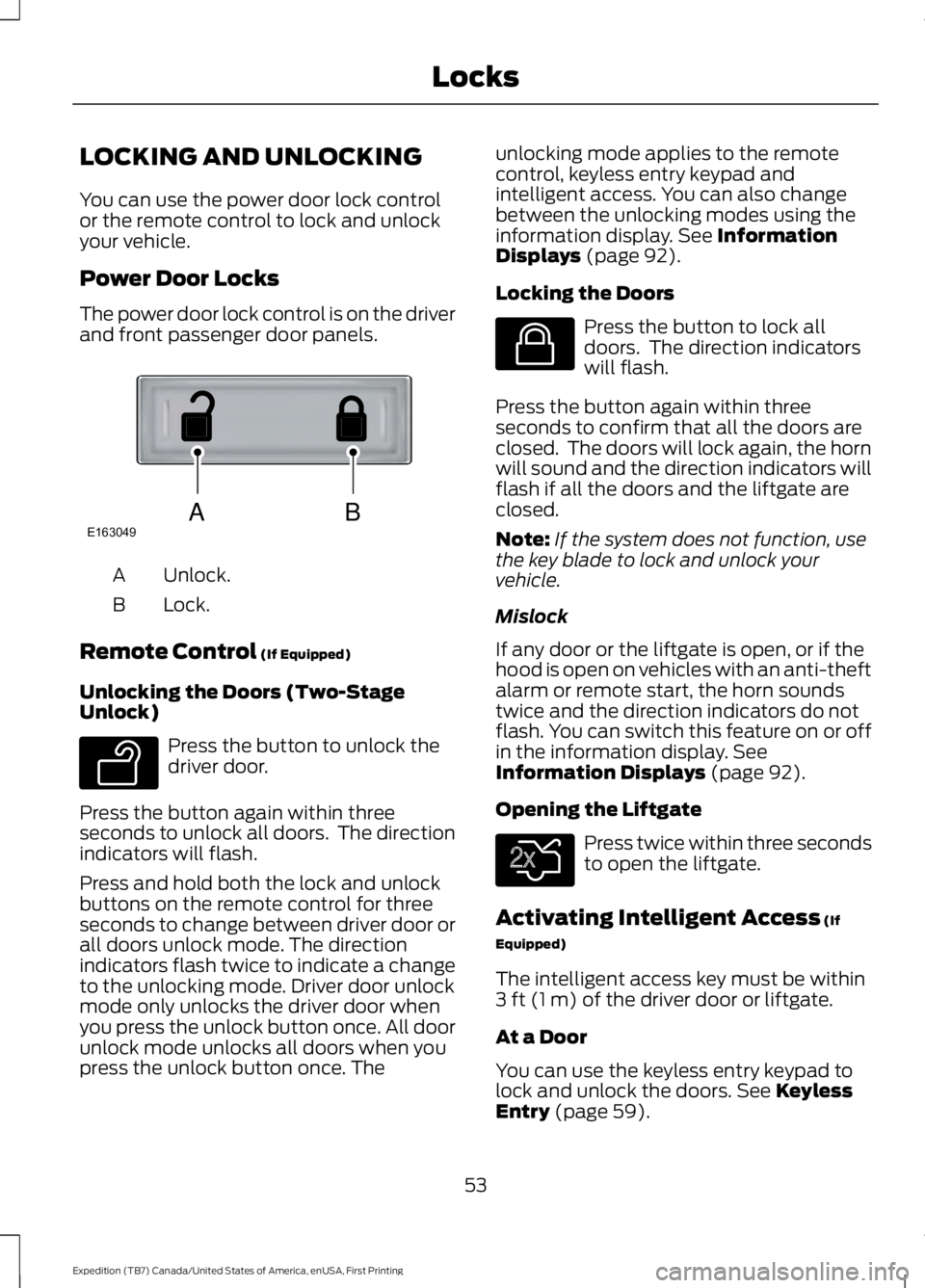
The power door lock control is on the driverand front passenger door panels.
Unlock.A
Lock.B
Remote Control (If Equipped)
Unlocking the Doors (Two-StageUnlock)
Press the button to unlock thedriver door.
Press the button again within threeseconds to unlock all doors. The directionindicators will flash.
Press and hold both the lock and unlockbuttons on the remote control for threeseconds to change between driver door orall doors unlock mode. The directionindicators flash twice to indicate a changeto the unlocking mode. Driver door unlockmode only unlocks the driver door whenyou press the unlock button once. All doorunlock mode unlocks all doors when youpress the unlock button once. The
unlocking mode applies to the remotecontrol, keyless entry keypad andintelligent access. You can also changebetween the unlocking modes using theinformation display. See InformationDisplays (page 92).
Locking the Doors
Press the button to lock alldoors. The direction indicatorswill flash.
Press the button again within threeseconds to confirm that all the doors areclosed. The doors will lock again, the hornwill sound and the direction indicators willflash if all the doors and the liftgate areclosed.
Note:If the system does not function, usethe key blade to lock and unlock yourvehicle.
Mislock
If any door or the liftgate is open, or if thehood is open on vehicles with an anti-theftalarm or remote start, the horn soundstwice and the direction indicators do notflash. You can switch this feature on or offin the information display. SeeInformation Displays (page 92).
Opening the Liftgate
Press twice within three secondsto open the liftgate.
Activating Intelligent Access (If
Equipped)
The intelligent access key must be within3 ft (1 m) of the driver door or liftgate.
At a Door
You can use the keyless entry keypad tolock and unlock the doors. See KeylessEntry (page 59).
53
Expedition (TB7) Canada/United States of America, enUSA, First Printing
LocksABE163049 E138629 E138623 E138630
Page 65 of 421
PASSIVE ANTI-THEFT
SYSTEM
Note:The system is not compatible withnon-Ford aftermarket remote start systems.Use of these systems may result in vehiclestarting problems and a loss of securityprotection.
Note:Metallic objects, electronic devicesor a second coded key on the same keychain may cause vehicle starting problemsif they are too close to the key when startingthe engine. Prevent these objects fromtouching the coded key while starting theengine. Switch the ignition off, move allobjects on the key chain away from thecoded key and restart the engine if aproblem occurs.
Note:Do not leave a duplicate coded keyin the vehicle. Always take your keys andlock all doors when leaving the vehicle.
SecuriLock®
The system is an engine immobilizationsystem. It is designed to help prevent theengine from being started unless a codedkey programmed to your vehicle is used.Using the wrong key may prevent theengine from starting. A message mayappear in the information display.
If you are unable to start the engine with acorrectly coded key, a malfunction hashappened and a message may appear inthe information display.
Automatic Arming
The vehicle arms immediately after youswitch the ignition off.
Automatic Disarming
Switching the ignition on with a coded keydisarms the vehicle.
Replacement Keys
Note:Your vehicle comes equipped withtwo integrated keyhead transmitters or twointelligent access keys.
The integrated keyhead transmitterfunctions as a programmed ignition keythat operates all the locks and starts thevehicle, as well as a remote control.
The intelligent access key functions as aprogrammed key that operates the driverdoor lock and activates the intelligentaccess with push button start system, aswell as a remote control.
If your programmed transmitters orstandard SecuriLock coded keys(integrated keyhead transmitters only) arelost or stolen and you do not have an extracoded key, you will need to have yourvehicle towed to an authorized dealer. Youneed to erase the key codes from yourvehicle and program new coded keys.
Store an extra programmed key away fromthe vehicle in a safe place to help preventany inconveniences. See your authorizeddealer to purchase additional spare orreplacement keys.
Programming a Spare IntegratedKeyhead Transmitter
Note:You can program a maximum of eightcoded keys to your vehicle. All eight can beintegrated keyhead transmitters.
You can program your own integratedkeyhead transmitter or standardSecuriLock coded keys to your vehicle. Thisprocedure will program both the engineimmobilizer keycode and the remote entryportion of the remote control to yourvehicle
Only use integrated keyhead transmittersor standard SecuriLock keys.
62
Expedition (TB7) Canada/United States of America, enUSA, First Printing
Security
Page 66 of 421
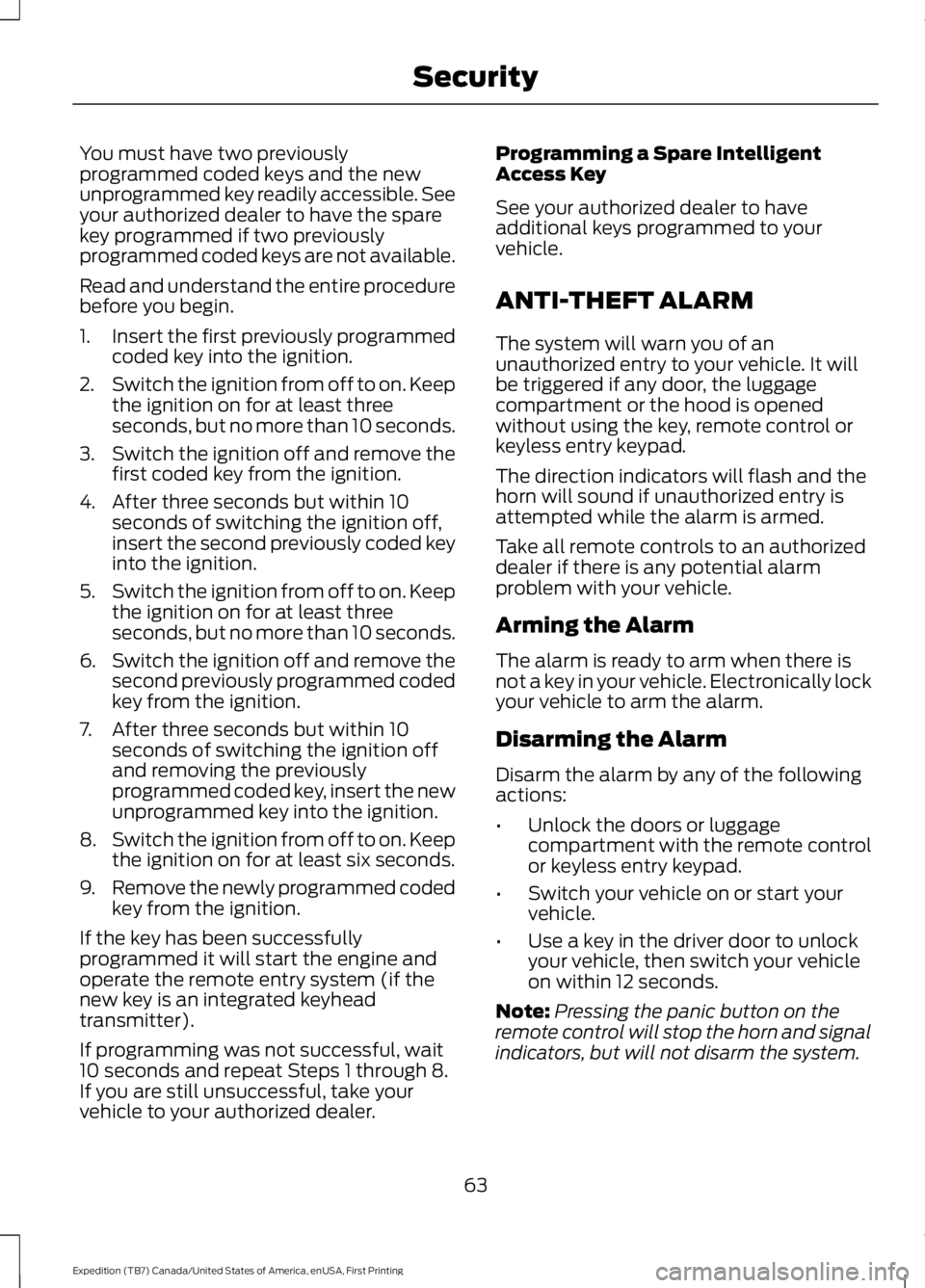
You must have two previouslyprogrammed coded keys and the newunprogrammed key readily accessible. Seeyour authorized dealer to have the sparekey programmed if two previouslyprogrammed coded keys are not available.
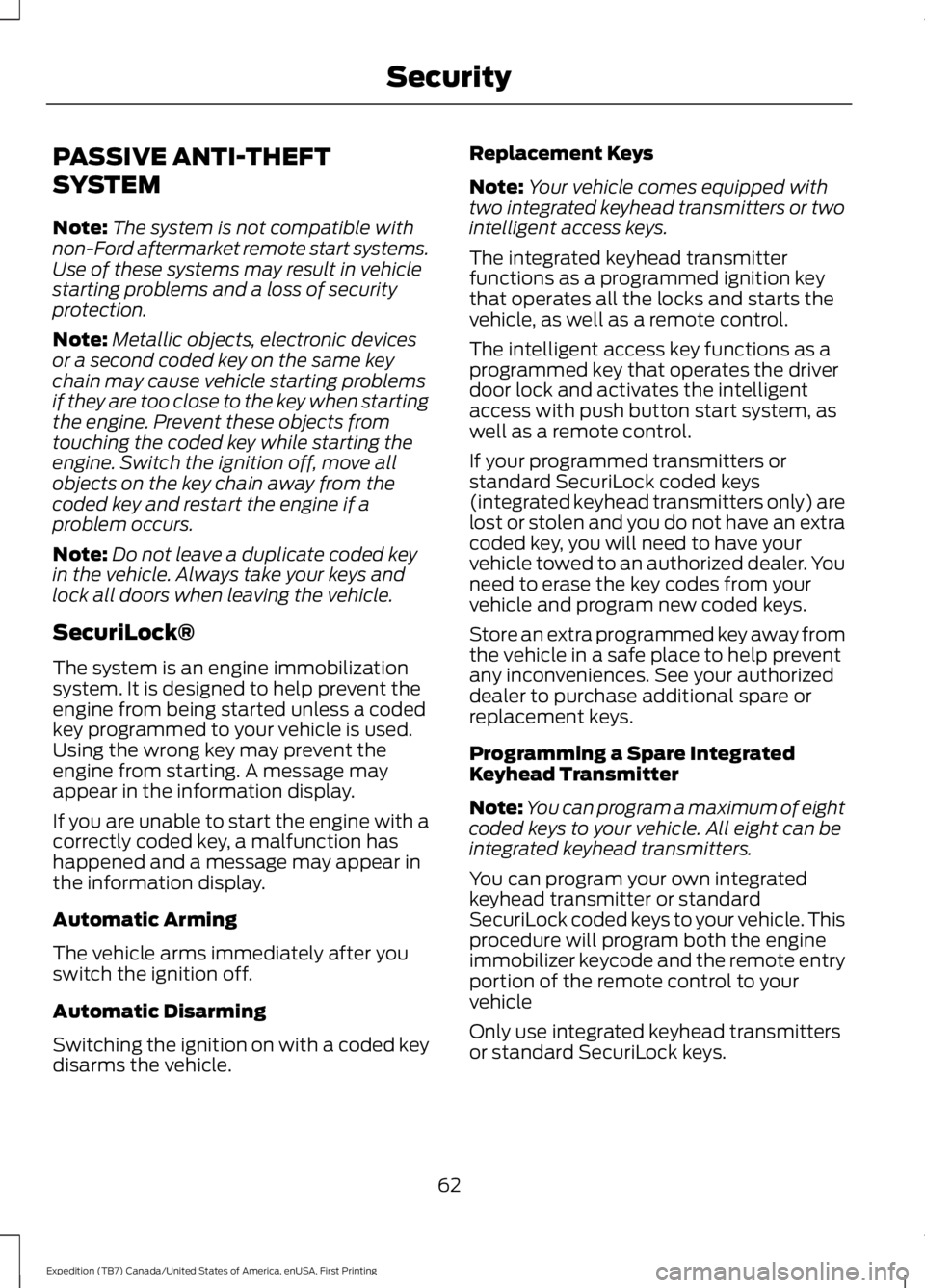
Read and understand the entire procedurebefore you begin.
1.Insert the first previously programmedcoded key into the ignition.
2.Switch the ignition from off to on. Keepthe ignition on for at least threeseconds, but no more than 10 seconds.
3.Switch the ignition off and remove thefirst coded key from the ignition.
4. After three seconds but within 10seconds of switching the ignition off,insert the second previously coded keyinto the ignition.
5.Switch the ignition from off to on. Keepthe ignition on for at least threeseconds, but no more than 10 seconds.
6.Switch the ignition off and remove thesecond previously programmed codedkey from the ignition.
7. After three seconds but within 10seconds of switching the ignition offand removing the previouslyprogrammed coded key, insert the newunprogrammed key into the ignition.
8.Switch the ignition from off to on. Keepthe ignition on for at least six seconds.
9.Remove the newly programmed codedkey from the ignition.
If the key has been successfullyprogrammed it will start the engine andoperate the remote entry system (if thenew key is an integrated keyheadtransmitter).
If programming was not successful, wait10 seconds and repeat Steps 1 through 8.If you are still unsuccessful, take yourvehicle to your authorized dealer.
Programming a Spare IntelligentAccess Key
See your authorized dealer to haveadditional keys programmed to yourvehicle.
ANTI-THEFT ALARM
The system will warn you of anunauthorized entry to your vehicle. It willbe triggered if any door, the luggagecompartment or the hood is openedwithout using the key, remote control orkeyless entry keypad.
The direction indicators will flash and thehorn will sound if unauthorized entry isattempted while the alarm is armed.
Take all remote controls to an authorizeddealer if there is any potential alarmproblem with your vehicle.
Arming the Alarm
The alarm is ready to arm when there isnot a key in your vehicle. Electronically lockyour vehicle to arm the alarm.
Disarming the Alarm
Disarm the alarm by any of the followingactions:
•Unlock the doors or luggagecompartment with the remote controlor keyless entry keypad.
•Switch your vehicle on or start yourvehicle.
•Use a key in the driver door to unlockyour vehicle, then switch your vehicleon within 12 seconds.
Note:Pressing the panic button on theremote control will stop the horn and signalindicators, but will not disarm the system.
63
Expedition (TB7) Canada/United States of America, enUSA, First Printing
Security
Page 105 of 421
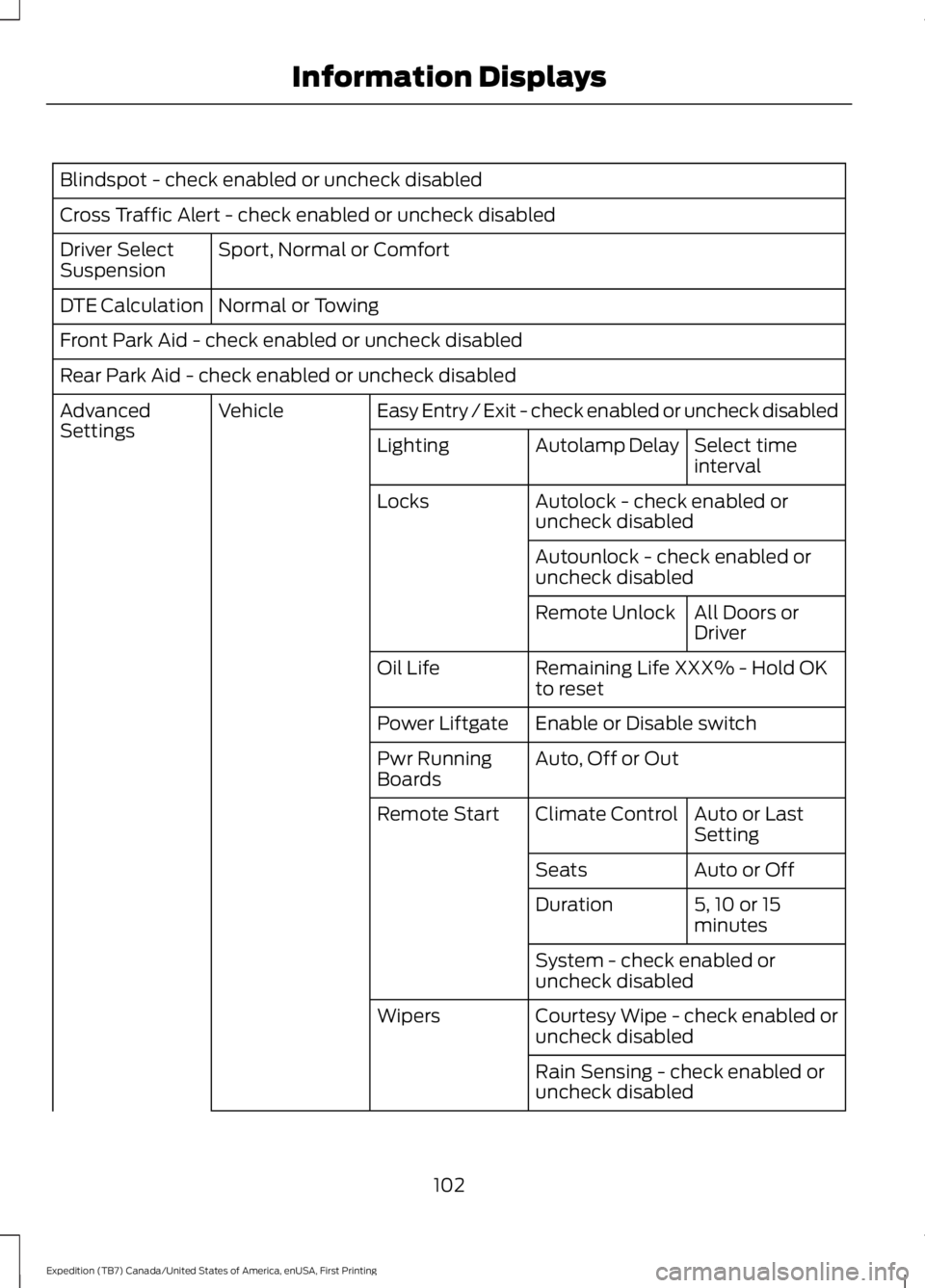
Blindspot - check enabled or uncheck disabled
Cross Traffic Alert - check enabled or uncheck disabled
Sport, Normal or ComfortDriver SelectSuspension
Normal or TowingDTE Calculation
Front Park Aid - check enabled or uncheck disabled
Rear Park Aid - check enabled or uncheck disabled
Easy Entry / Exit - check enabled or uncheck disabledVehicleAdvancedSettingsSelect timeintervalAutolamp DelayLighting
Autolock - check enabled oruncheck disabledLocks
Autounlock - check enabled oruncheck disabled
All Doors orDriverRemote Unlock
Remaining Life XXX% - Hold OKto resetOil Life
Enable or Disable switchPower Liftgate
Auto, Off or OutPwr RunningBoards
Auto or LastSettingClimate ControlRemote Start
Auto or OffSeats
5, 10 or 15minutesDuration
System - check enabled oruncheck disabled
Courtesy Wipe - check enabled oruncheck disabledWipers
Rain Sensing - check enabled oruncheck disabled
102
Expedition (TB7) Canada/United States of America, enUSA, First Printing
Information Displays
Page 113 of 421

Remote Start Messages
ActionMessage
Displays as a reminder to turn the key to on to drive the vehicleafter a remote start.To Drive: Turn Key to On
Displays as a reminder to apply the brake and the start buttonto drive the vehicle after a remote start.To Drive: Press Brakeand START Button
Suspension System Messages
ActionMessage
Displays when there is a problem with your vehicle’s suspen-sion system. Contact an authorized dealer for service.Driver Select Susp.malfunction Servicerequired
Tire Messages
ActionMessage
Displays when one or more tires on your vehicle have low tirepressure.Tire Pressure LOW
Displays when the tire pressure monitoring system ismalfunctioning. If the warning stays on or continues to comeon, contact an authorized dealer.
Tire Pressure MonitorFault
Displays when a tire pressure sensor is malfunctioning or yourspare tire is in use. See Wheels and Tires (page 272). If thewarning stays on or continues to come on, contact anauthorized dealer.
Tire Pressure SensorFault
Trailer Messages
ActionMessage
Displays the current gain setting for the trailer brakewhen a trailer is not connected.Trailer Brake Gain: XX.X NoTrailer
Displays and a chime sounds in response to faultssensed by the TBC.Trailer Brake Module Fault
Displays when a correct trailer connection is sensedduring a given ignition cycle.Trailer Connected
110
Expedition (TB7) Canada/United States of America, enUSA, First Printing
Information Displays
Page 124 of 421
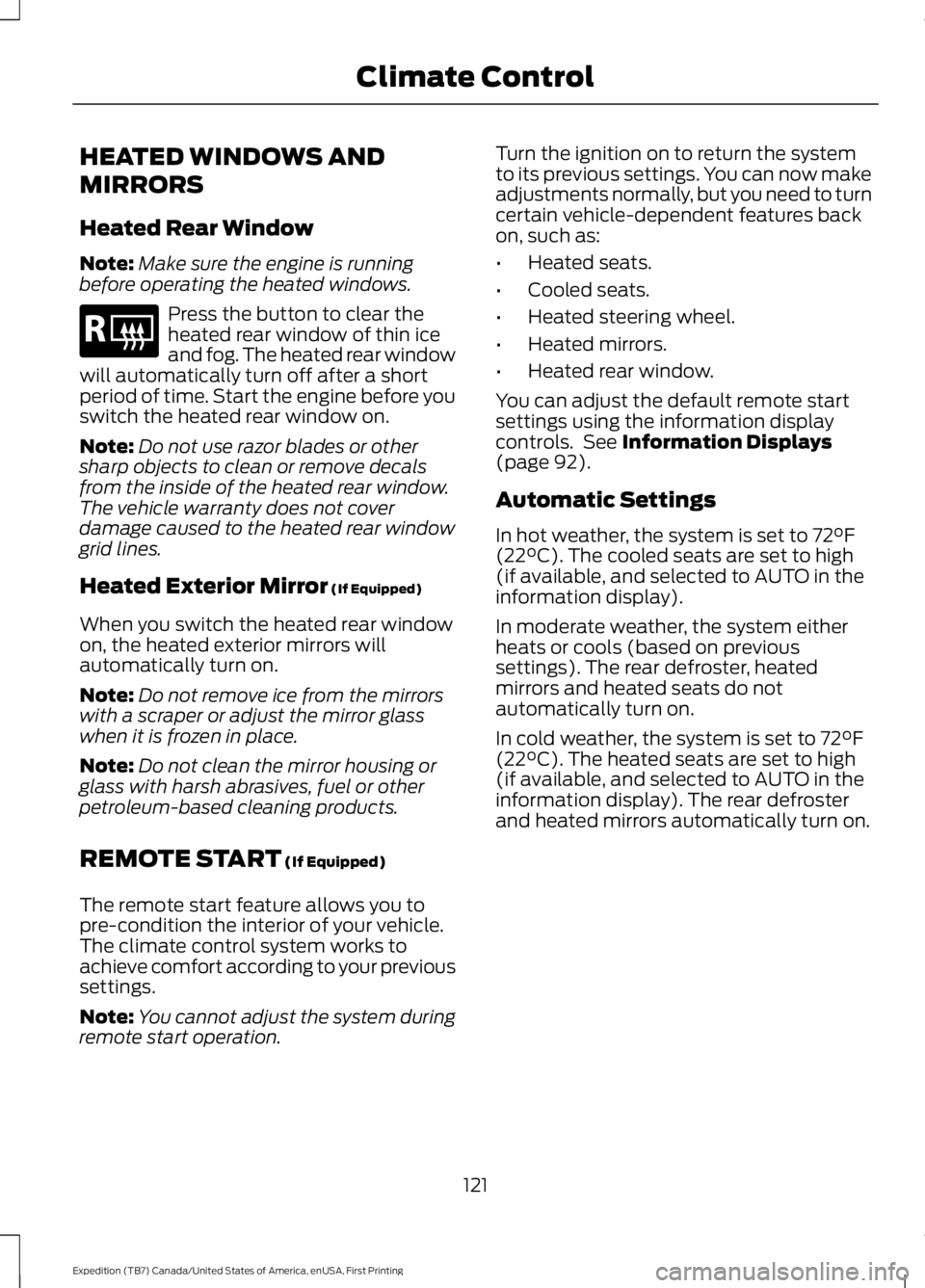
HEATED WINDOWS AND
MIRRORS
Heated Rear Window
Note:Make sure the engine is runningbefore operating the heated windows.
Press the button to clear theheated rear window of thin iceand fog. The heated rear windowwill automatically turn off after a shortperiod of time. Start the engine before youswitch the heated rear window on.
Note:Do not use razor blades or othersharp objects to clean or remove decalsfrom the inside of the heated rear window.The vehicle warranty does not coverdamage caused to the heated rear windowgrid lines.
Heated Exterior Mirror (If Equipped)
When you switch the heated rear windowon, the heated exterior mirrors willautomatically turn on.
Note:Do not remove ice from the mirrorswith a scraper or adjust the mirror glasswhen it is frozen in place.
Note:Do not clean the mirror housing orglass with harsh abrasives, fuel or otherpetroleum-based cleaning products.
REMOTE START (If Equipped)
The remote start feature allows you topre-condition the interior of your vehicle.The climate control system works toachieve comfort according to your previoussettings.
Note:You cannot adjust the system duringremote start operation.
Turn the ignition on to return the systemto its previous settings. You can now makeadjustments normally, but you need to turncertain vehicle-dependent features backon, such as:
•Heated seats.
•Cooled seats.
•Heated steering wheel.
•Heated mirrors.
•Heated rear window.
You can adjust the default remote startsettings using the information displaycontrols. See Information Displays(page 92).
Automatic Settings
In hot weather, the system is set to 72°F(22°C). The cooled seats are set to high(if available, and selected to AUTO in theinformation display).
In moderate weather, the system eitherheats or cools (based on previoussettings). The rear defroster, heatedmirrors and heated seats do notautomatically turn on.
In cold weather, the system is set to 72°F(22°C). The heated seats are set to high(if available, and selected to AUTO in theinformation display). The rear defrosterand heated mirrors automatically turn on.
121
Expedition (TB7) Canada/United States of America, enUSA, First Printing
Climate ControlE184884