2016 FORD EXPEDITION EL oil level
[x] Cancel search: oil levelPage 259 of 421
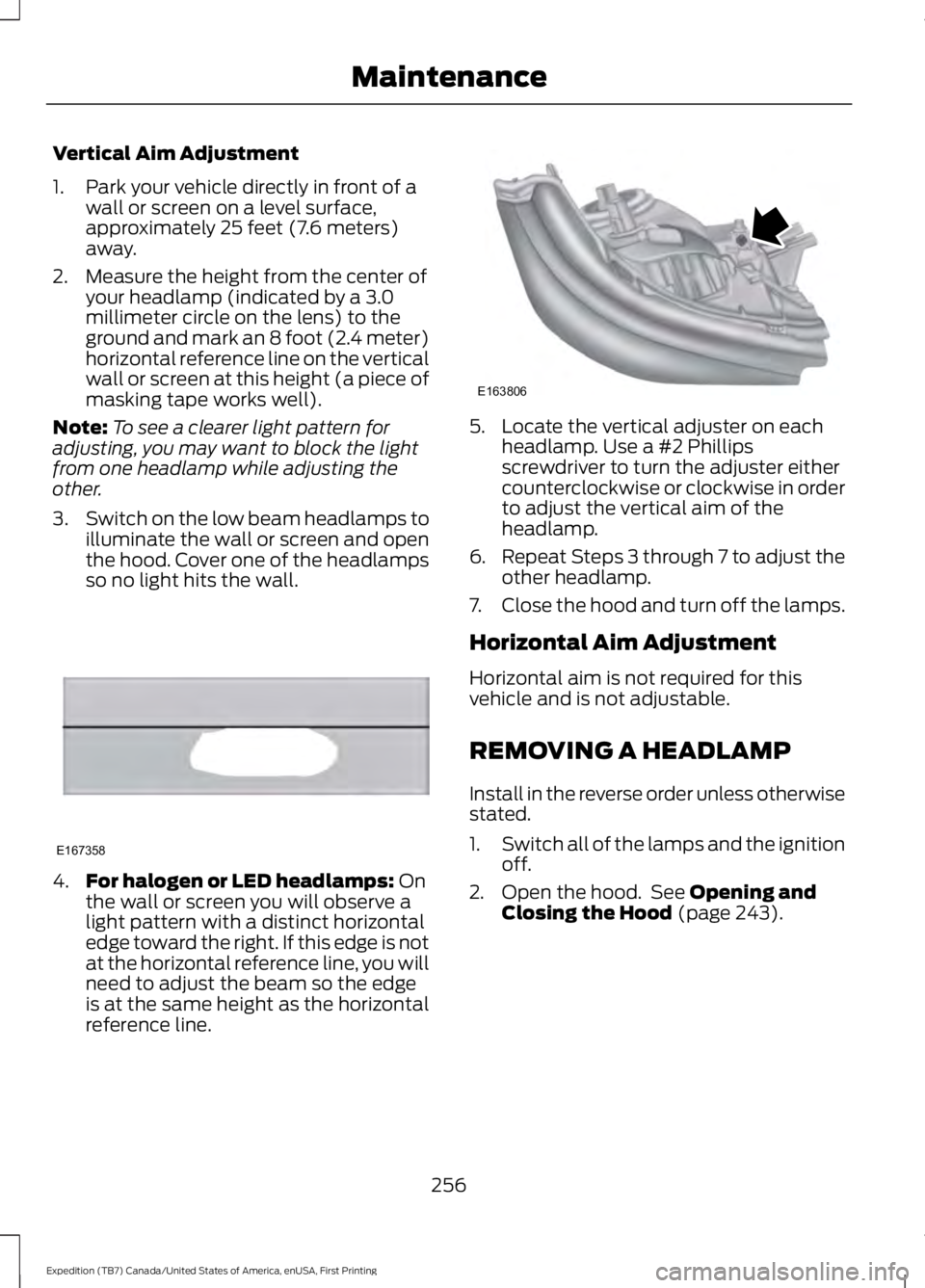
Vertical Aim Adjustment
1. Park your vehicle directly in front of awall or screen on a level surface,approximately 25 feet (7.6 meters)away.
2. Measure the height from the center ofyour headlamp (indicated by a 3.0millimeter circle on the lens) to theground and mark an 8 foot (2.4 meter)horizontal reference line on the verticalwall or screen at this height (a piece ofmasking tape works well).
Note:To see a clearer light pattern foradjusting, you may want to block the lightfrom one headlamp while adjusting theother.
3.Switch on the low beam headlamps toilluminate the wall or screen and openthe hood. Cover one of the headlampsso no light hits the wall.
4.For halogen or LED headlamps: Onthe wall or screen you will observe alight pattern with a distinct horizontaledge toward the right. If this edge is notat the horizontal reference line, you willneed to adjust the beam so the edgeis at the same height as the horizontalreference line.
5. Locate the vertical adjuster on eachheadlamp. Use a #2 Phillipsscrewdriver to turn the adjuster eithercounterclockwise or clockwise in orderto adjust the vertical aim of theheadlamp.
6.Repeat Steps 3 through 7 to adjust theother headlamp.
7.Close the hood and turn off the lamps.
Horizontal Aim Adjustment
Horizontal aim is not required for thisvehicle and is not adjustable.
REMOVING A HEADLAMP
Install in the reverse order unless otherwisestated.
1.Switch all of the lamps and the ignitionoff.
2. Open the hood. See Opening andClosing the Hood (page 243).
256
Expedition (TB7) Canada/United States of America, enUSA, First Printing
MaintenanceE167358 E163806
Page 273 of 421
•Touch-up exposed or primed metal toprevent rust.
•Cover chrome and stainless steel partswith a thick coat of auto wax to preventdiscoloration. Re-wax as necessarywhen you wash your vehicle.
•Lubricate all hood, door and luggagecompartment hinges and latches witha light grade oil.
•Cover interior trim to prevent fading.
•Keep all rubber parts free from oil andsolvents.
Engine
•Change the engine oil and filter prior tostorage because used engine oilcontains contaminates which maycause engine damage.
•Start the engine every 15 days for aminimum of 15 minutes. Run at fast idlewith the climate controls set to defrostuntil the engine reaches normaloperating temperature.
•With your foot on the brake, shiftthrough all the gears while the engineis running.
•We recommend that you change theengine oil before you use your vehicleagain.
Fuel system
•Fill the fuel tank with high-quality fueluntil the first automatic shutoff of thefuel pump nozzle.
Cooling system
•Protect against freezing temperatures.
•When removing your vehicle fromstorage, check coolant fluid level.Confirm that there are no coolingsystem leaks and that fluid is at therecommended level.
Battery
•Check and recharge as necessary. Keepconnections clean.
•If storing your vehicle for more than 30days without recharging the battery,we recommend that you disconnectthe battery cables to maintain batterycharge for quick starting.
Note:It is necessary to reset memoryfeatures if battery cables are disconnected.
Brakes
•Make sure the brakes and parking brakerelease fully.
Tires
•Maintain recommended air pressure.
Miscellaneous
•Make sure all linkages, cables, leversand pins under your vehicle are coveredwith grease to prevent rust.
•Move vehicles at least 25 ft (7.5 m)every 15 days to lubricate working partsand prevent corrosion.
Removing Vehicle From Storage
When your vehicle is ready to come out ofstorage, do the following:
•Wash your vehicle to remove any dirtor grease film build-up on windowsurfaces.
•Check windshield wipers for anydeterioration.
•Check under the hood for any foreignmaterial that may have collectedduring storage such as mice or squirrelnests.
•Check the exhaust for any foreignmaterial that may have collectedduring storage.
270
Expedition (TB7) Canada/United States of America, enUSA, First Printing
Vehicle Care
Page 274 of 421
•Check tire pressures and set tireinflation per the Tire Label.
•Check brake pedal operation. Driveyour vehicle 15 ft (4.5 m) back andforth to remove rust build-up.
•Check fluid levels (including coolant,oil and gas) to make sure there are noleaks, and fluids are at recommendedlevels.
•If you remove the battery, clean thebattery cable ends and check fordamage.
Contact an authorized dealer if you haveany concerns or issues.
271
Expedition (TB7) Canada/United States of America, enUSA, First Printing
Vehicle Care
Page 313 of 421
SpecificationName
WSH-M17B19-AA/C refrigerant (Canada):Motorcraft R-134a RefrigerantCYN-16-R
WSH-M17B19-AA/C refrigerant (Mexico):Motorcraft R-134a RefrigerantMYN-19
WSH-M1C231-BA/C refrigerant compressor oil:Motorcraft PAG Refrigerant Compressor OilYN-12-D
ESB-M1C93-BMulti-purpose grease:Motorcraft Multi-Purpose Grease SprayXL-5
--Lock cylinders (U.S.):Penetrating and Lock LubricantXL-1
--Lock cylinders (Canada):Penetrating FluidCXC-51-A
--Lock cylinders (Mexico):Penetrating and Lock LubricantMXL-1
If you use oil and fluids that do not meetthe defined specification and viscositygrade, this may lead to:
•Component damage which is notcovered by the vehicle warranty.
•Longer engine cranking periods.
•Increased emission levels.
•Reduced engine performance.
•Reduced fuel economy.
•Degraded brake performance.
We recommend Motorcraft motor oil foryour vehicle. If Motorcraft oil is notavailable, use motor oils of therecommended viscosity grade that meetAPI SN requirements and display the APICertification Mark for gasoline engines. Donot use oil labeled with API SN servicecategory unless the label also displays theAPI certification mark.
310
Expedition (TB7) Canada/United States of America, enUSA, First Printing
Capacities and Specifications
Page 377 of 421
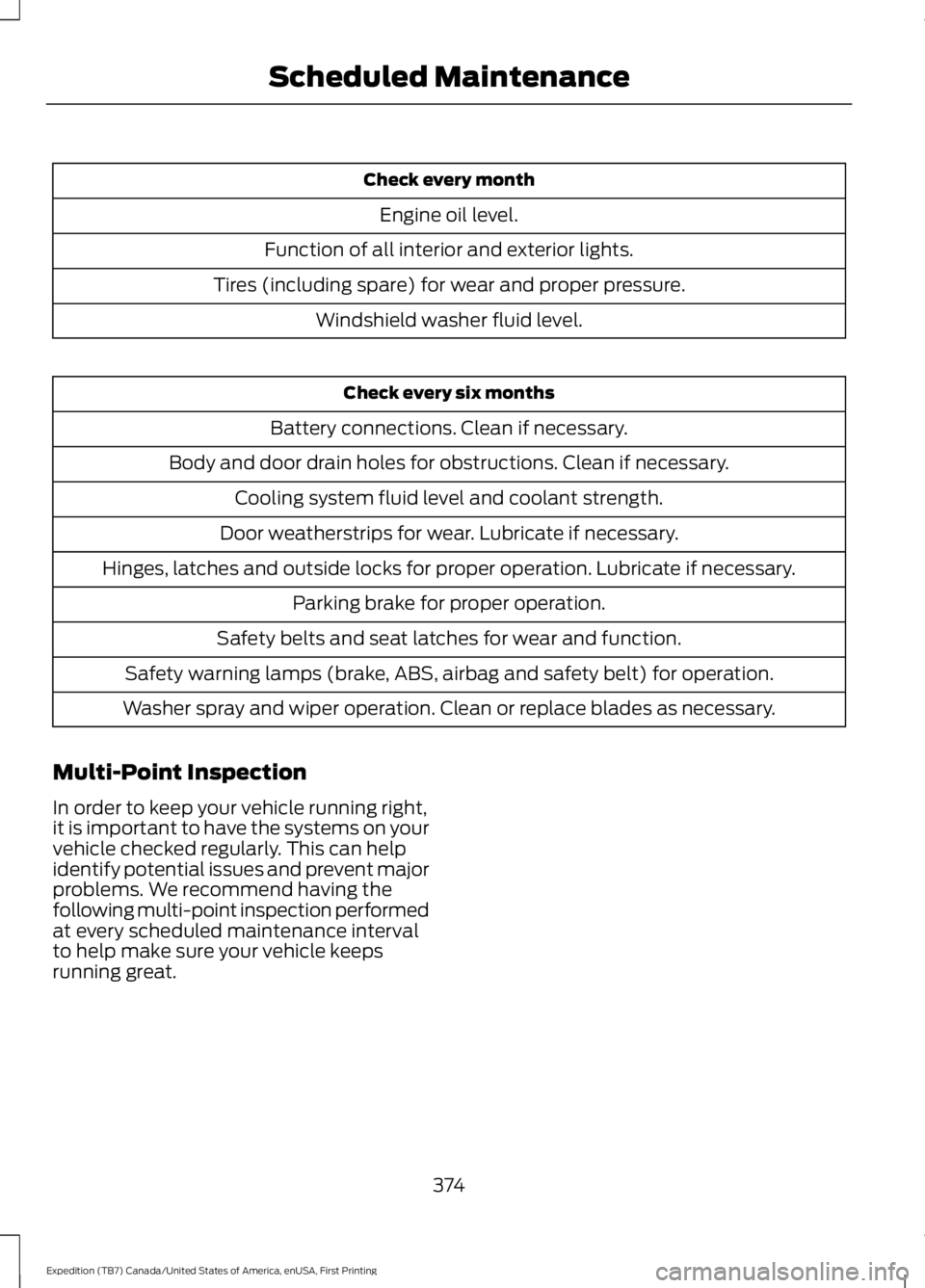
Check every month
Engine oil level.
Function of all interior and exterior lights.
Tires (including spare) for wear and proper pressure.
Windshield washer fluid level.
Check every six months
Battery connections. Clean if necessary.
Body and door drain holes for obstructions. Clean if necessary.
Cooling system fluid level and coolant strength.
Door weatherstrips for wear. Lubricate if necessary.
Hinges, latches and outside locks for proper operation. Lubricate if necessary.
Parking brake for proper operation.
Safety belts and seat latches for wear and function.
Safety warning lamps (brake, ABS, airbag and safety belt) for operation.
Washer spray and wiper operation. Clean or replace blades as necessary.
Multi-Point Inspection
In order to keep your vehicle running right,it is important to have the systems on yourvehicle checked regularly. This can helpidentify potential issues and prevent majorproblems. We recommend having thefollowing multi-point inspection performedat every scheduled maintenance intervalto help make sure your vehicle keepsrunning great.
374
Expedition (TB7) Canada/United States of America, enUSA, First Printing
Scheduled Maintenance
Page 378 of 421

Multi-Point inspection
Hazard warning system operationAccessory drive belt(s)
Horn operationBattery performance
Radiator, cooler, heater and air conditioninghosesEngine air filter
Suspension components for leaks ordamageExhaust system
Steering and linkageExterior lamps operation
Tires (including spare) for wear and proper
pressure**Fluid levels*; fill if necessary
Windshield for cracks, chips or pitsFor oil and fluid leaks
Washer spray and wiper operationHalf-shaft dust boots
* Brake, coolant recovery reservoir, automatic transmission and window washer**If your vehicle is equipped with a temporary mobility kit, check the tire sealant expirationUse By date on the canister. Replace as needed.
Be sure to ask your dealership serviceadvisor or technician about the multi-pointvehicle inspection. It is a comprehensiveway to perform a thorough inspection ofyour vehicle. Your checklist gives youimmediate feedback on the overallcondition of your vehicle.
NORMAL SCHEDULED
MAINTENANCE
Intelligent Oil-Life Monitor
Your vehicle is equipped with an IntelligentOil-Life Monitor that determines when youshould change the engine oil based on howyour vehicle is used. By using severalimportant factors in its calculations, themonitor helps reduce the cost of owningyour vehicle and reduces environmentalwaste at the same time.
This means you do not have to rememberto change the oil on a mileage-basedschedule. Your vehicle lets you know whenan oil change is due by displaying amessage in the information display.
The following table provides examples ofvehicle use and its impact on oil changeintervals. It is a guideline only. Actual oilchange intervals depend on several factorsand generally decrease with severity ofuse.
375
Expedition (TB7) Canada/United States of America, enUSA, First Printing
Scheduled Maintenance
Page 379 of 421
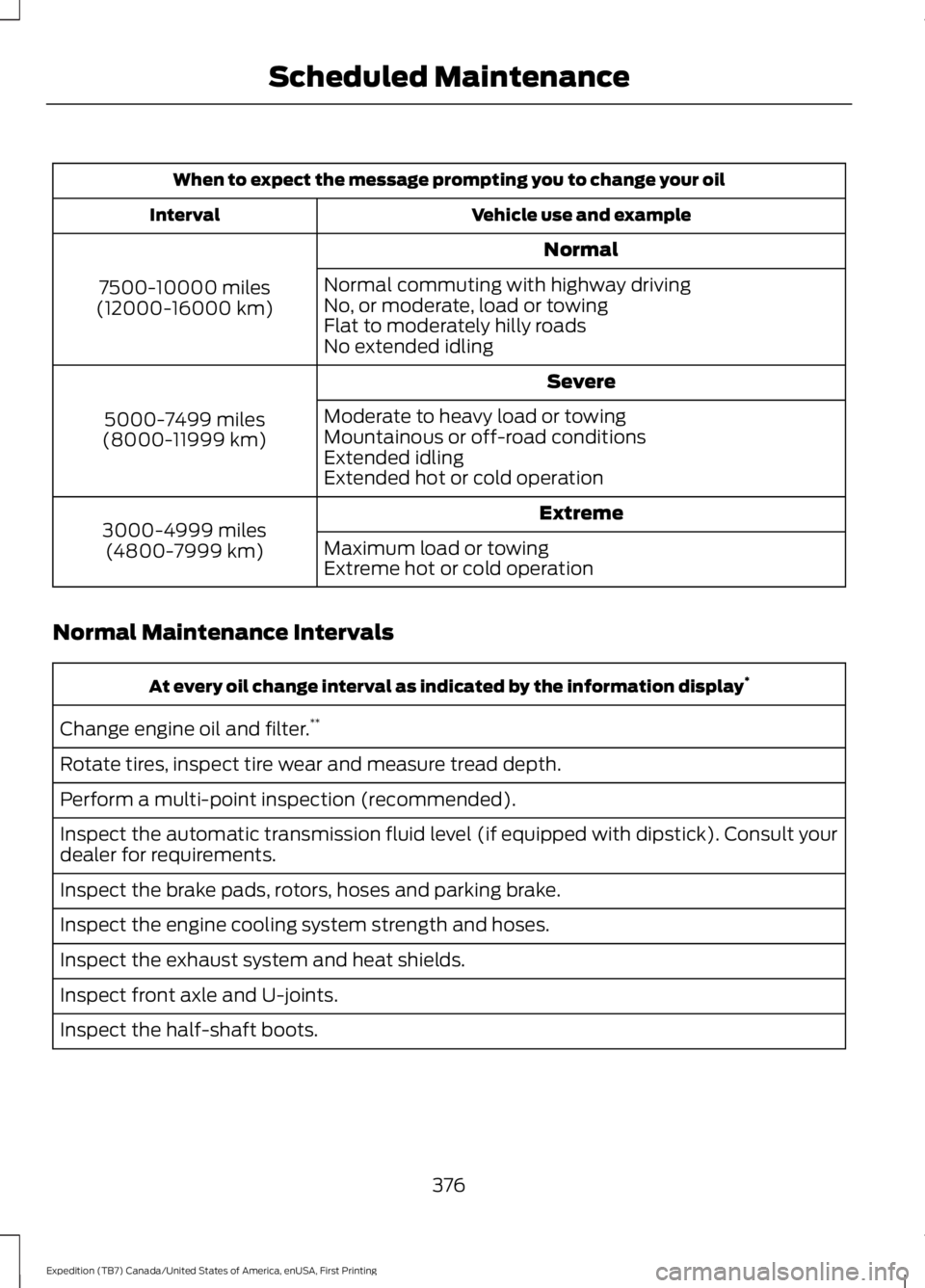
When to expect the message prompting you to change your oil
Vehicle use and exampleInterval
Normal
7500-10000 miles(12000-16000 km)
Normal commuting with highway drivingNo, or moderate, load or towingFlat to moderately hilly roadsNo extended idling
Severe
5000-7499 miles(8000-11999 km)
Moderate to heavy load or towingMountainous or off-road conditionsExtended idlingExtended hot or cold operation
Extreme3000-4999 miles(4800-7999 km)Maximum load or towingExtreme hot or cold operation
Normal Maintenance Intervals
At every oil change interval as indicated by the information display*
Change engine oil and filter.**
Rotate tires, inspect tire wear and measure tread depth.
Perform a multi-point inspection (recommended).
Inspect the automatic transmission fluid level (if equipped with dipstick). Consult yourdealer for requirements.
Inspect the brake pads, rotors, hoses and parking brake.
Inspect the engine cooling system strength and hoses.
Inspect the exhaust system and heat shields.
Inspect front axle and U-joints.
Inspect the half-shaft boots.
376
Expedition (TB7) Canada/United States of America, enUSA, First Printing
Scheduled Maintenance
Page 419 of 421
Using SYNC™ With Your Phone............328Accessing Features Through the PhoneMenu..................................................................332Accessing Your Phone Settings...................336Making a Call........................................................331Pairing a Cell Phone for the FirstTime...................................................................328Pairing Subsequent Cell Phones.................329Phone Options during an Active Call..........331Phone Voice Commands................................329Receiving Calls.....................................................331System Settings..................................................337Text Messaging...................................................334Using Traction Control................................175Switching the System Off ...............................175System Indicator Lights andMessages...........................................................175Using Voice Recognition...........................325Initiating a Voice Session................................325System Interaction and Feedback..............326Utilizing the Mediation/ArbitrationProgram (Canada Only)........................230
V
Vehicle Care...................................................264General Information.........................................264Vehicle Certification Label......................306Vehicle Identification Number...............305Vehicle Storage............................................269Battery...................................................................270Body.......................................................................269Brakes.....................................................................270Cooling system...................................................270Engine.....................................................................270Fuel system..........................................................270General..................................................................269Miscellaneous.....................................................270Removing Vehicle From Storage..................270Tires.........................................................................270VentilationSee: Climate Control..........................................113VINSee: Vehicle Identification Number............305Voice Control...................................................69Type One.................................................................69Type Two.................................................................70
W
Warning Lamps and Indicators................884X2............................................................................904X4 Auto.................................................................904X4 HIGH.................................................................914X4 LOW..................................................................91Anti-Lock Braking System................................88Battery.....................................................................88Brake System........................................................88Cruise Control.......................................................88Direction Indicator...............................................88Door Ajar.................................................................88Engine Coolant Temperature..........................88Engine Oil................................................................89Fasten Safety Belt...............................................89Front Airbag...........................................................89Front Fog Lamps..................................................89High Beam..............................................................89Hill Descent............................................................89Liftgate Ajar............................................................89Low Fuel Level......................................................89Low Tire Pressure Warning..............................89Low Washer Fluid................................................89Parking Lamps......................................................89Powertrain Fault...................................................89Service Engine Soon...........................................90Stability Control System...................................90Stability Control System Off...........................90Transmission Tow/Haul....................................90Washer Fluid Check....................................252WashersSee: Cleaning the Exterior..............................264See: Wipers and Washers..................................72Waxing.............................................................265Wheel NutsSee: Changing a Road Wheel.......................296Wheels and Tires..........................................272General Information..........................................272Technical Specifications..................................301Windows and Mirrors...................................80Windshield Washers......................................73Windshield Wipers.........................................72Speed Dependent Wipers.................................72Wiper BladesSee: Checking the Wiper Blades..................254Wipers and Washers......................................72
416
Expedition (TB7) Canada/United States of America, enUSA, First Printing
Index